Solved How to disable glow animation in progress bar

hansham

New member
I only want to disable the glow animation in progress bars.
How can I do that?

Unchecking "Animate controls and elements inside Windows" in "Performance options" does not turn off the glow animation.

I hope there is a much more simple tweak available then installing and using an application.
:party:
 

My Computer

OS
Windows 7 Professional x64
CPU
Intel i7-2600K
Motherboard
ASUS P8Z68 DELUXE/GEN3
Memory
8 gig
Graphics Card(s)
ASUS GTX570
Monitor(s) Displays
Samsung Syncmaster 206bw
Hard Drives
no harddisk: 2x SSD 128MB raid0
My Computer

Computer Manufacturer/Model Number
Dell and Custom
OS
Systems 1 and 2: Windows 7 Enterprise x64, Win 8 Developer
CPU
System 1: i7 [email protected], System 2: AMD FX-4100 Zambezi 3.6G
Motherboard
System 1:Dell 06NWYK System 2: ASUS M5A97 AM3+
Memory
System 1: 8GB System 2: 8GB
Graphics Card(s)
System 1: ATI FirePro V4800 System 2: Radeon HD 6850
Sound Card
System 1: onboard System 2: onboard
Monitor(s) Displays
System1: Viewsonic HDMI 24"
Screen Resolution
System 1: 1920x1080 System 2: 1920x1080
Hard Drives
System 1: Mirrored .5B drives System 2: Seagate Barracuda ST1000DM003 1TB 7200 RPM 64MB Cache SATA 6.0Gb/s
Case
System 1: Dell System 2: Cooler Master
Internet Speed
10 MBPS
wow! that looks impressive!

But where do I type that in??
:eek:
 

My Computer

OS
Windows 7 Professional x64
CPU
Intel i7-2600K
Motherboard
ASUS P8Z68 DELUXE/GEN3
Memory
8 gig
Graphics Card(s)
ASUS GTX570
Monitor(s) Displays
Samsung Syncmaster 206bw
Hard Drives
no harddisk: 2x SSD 128MB raid0
From same link, this might be easier for you...

You can also disable this effect in Win7 all together.

Right-click on My Computer icon on Desktop and select Properties (or press Windows Key + Pause/Break key), click on Advanced system settings link in left side pane (You can also open it by typing sysdm.cpl in RUN or start menu search box and press Enter). Now click on Settings button in Performance section:

Uncheck "Animate controls and elements inside windows", it should be the first selection.
 

My Computer

Computer Manufacturer/Model Number
Dell and Custom
OS
Systems 1 and 2: Windows 7 Enterprise x64, Win 8 Developer
CPU
System 1: i7 [email protected], System 2: AMD FX-4100 Zambezi 3.6G
Motherboard
System 1:Dell 06NWYK System 2: ASUS M5A97 AM3+
Memory
System 1: 8GB System 2: 8GB
Graphics Card(s)
System 1: ATI FirePro V4800 System 2: Radeon HD 6850
Sound Card
System 1: onboard System 2: onboard
Monitor(s) Displays
System1: Viewsonic HDMI 24"
Screen Resolution
System 1: 1920x1080 System 2: 1920x1080
Hard Drives
System 1: Mirrored .5B drives System 2: Seagate Barracuda ST1000DM003 1TB 7200 RPM 64MB Cache SATA 6.0Gb/s
Case
System 1: Dell System 2: Cooler Master
Internet Speed
10 MBPS
If you are using the default aero theme I can change that for you by editing an image using Windows Style Builder and posted here in a zip folder.
If you are using a custom theme you will need to ask the theme maker. It's not cool to change someone else work.
&
This makes a custom theme so you will need to do 1 of these 2 ways of Enabling custom themes for it to work.
http://www.sevenforums.com/tutorials/34579-enabling-custom-themes-windows-7-a.html
Or
http://www.sevenforums.com/tutorials/28377-theme-how-apply-custom-themes.html?filter
Let me know if you would like this done if so all I need is a name to call the theme.
Jerry
 

My Computer

Computer type
Laptop
Computer Manufacturer/Model Number
Sager NP9170
OS
Win 7 Pro x64 / Win 10 Pro
CPU
Intel(R) Core(TM) i7-3630QM CPU @ 2.40GHz
Motherboard
CLEVO P170EM
Memory
12 GB
Graphics Card(s)
(1) Intel(R) HD Graphics 4000 (2) NVIDIA GeForce GTX 675M
Sound Card
(1) Realtek High Definition Audio (2) Intel(R) Display Aud
Monitor(s) Displays
17.3
Screen Resolution
1920x1080
Hard Drives
(1) Samsung 860 EVO 500GB(OS) (1) Samsung 860 EVO 500GB(Data)
Keyboard
Backlite
Antivirus
MSE, Malwarebytes Pro
Browser
Firefox
Other Info
DESKTOP: Custom-built.
OS: Win 10 Pro x64.
CASE: Rosewill R5.
CPU: Intel I5 4670K CPU @ 3.40GHz.
CPU COOLER: Cool Master Hyper 212 EVO.
MOTHERBOARD: Asus Z87-A.
MEMORY: Kingston HyperX 2x4 GB.
GPU: Nvidia Geforce 650 TI.
PSU: Corsair TX750.
DRIVES: (1) Samsung 840 120 GB SSD (2) Western Digital blue 500 GB 7200 RPM.
with all respect, but...

From same link, this might be easier for you...

You can also disable this effect in Win7 all together.

Right-click on My Computer icon on Desktop and select Properties (or press Windows Key + Pause/Break key), click on Advanced system settings link in left side pane (You can also open it by typing sysdm.cpl in RUN or start menu search box and press Enter). Now click on Settings button in Performance section:

Uncheck "Animate controls and elements inside windows", it should be the first selection.

...I typed that in my question: unchecking that option does not stop the glow effect.
 

My Computer

OS
Windows 7 Professional x64
CPU
Intel i7-2600K
Motherboard
ASUS P8Z68 DELUXE/GEN3
Memory
8 gig
Graphics Card(s)
ASUS GTX570
Monitor(s) Displays
Samsung Syncmaster 206bw
Hard Drives
no harddisk: 2x SSD 128MB raid0
my bad ...
 

My Computer

Computer Manufacturer/Model Number
Dell and Custom
OS
Systems 1 and 2: Windows 7 Enterprise x64, Win 8 Developer
CPU
System 1: i7 [email protected], System 2: AMD FX-4100 Zambezi 3.6G
Motherboard
System 1:Dell 06NWYK System 2: ASUS M5A97 AM3+
Memory
System 1: 8GB System 2: 8GB
Graphics Card(s)
System 1: ATI FirePro V4800 System 2: Radeon HD 6850
Sound Card
System 1: onboard System 2: onboard
Monitor(s) Displays
System1: Viewsonic HDMI 24"
Screen Resolution
System 1: 1920x1080 System 2: 1920x1080
Hard Drives
System 1: Mirrored .5B drives System 2: Seagate Barracuda ST1000DM003 1TB 7200 RPM 64MB Cache SATA 6.0Gb/s
Case
System 1: Dell System 2: Cooler Master
Internet Speed
10 MBPS
@ Bongo,

thanks!

I am at work now, I use the default theme but I have 'freshened' it up a little by making the light blue a little more pale.
In a few hours I am at home, then I will mail you the details.

..or will I be able to do color ajustments with your tweaked file?

regards,

Hans
 

My Computer

OS
Windows 7 Professional x64
CPU
Intel i7-2600K
Motherboard
ASUS P8Z68 DELUXE/GEN3
Memory
8 gig
Graphics Card(s)
ASUS GTX570
Monitor(s) Displays
Samsung Syncmaster 206bw
Hard Drives
no harddisk: 2x SSD 128MB raid0
thanks!

I am at work now, I use the default theme but I have 'freshened' it up a little by making the light blue a little more pale.
In a few hours I am at home, then I will mail you the details.

..or will I be able to do color ajustments with your tweaked file?

regards,

Hans

What did you do to do this
but I have 'freshened' it up a little by making the light blue a little more pale.
Then I can tell you if you can do it to the theme I'm going to make afterwards.
Jerry
 

My Computer

Computer type
Laptop
Computer Manufacturer/Model Number
Sager NP9170
OS
Win 7 Pro x64 / Win 10 Pro
CPU
Intel(R) Core(TM) i7-3630QM CPU @ 2.40GHz
Motherboard
CLEVO P170EM
Memory
12 GB
Graphics Card(s)
(1) Intel(R) HD Graphics 4000 (2) NVIDIA GeForce GTX 675M
Sound Card
(1) Realtek High Definition Audio (2) Intel(R) Display Aud
Monitor(s) Displays
17.3
Screen Resolution
1920x1080
Hard Drives
(1) Samsung 860 EVO 500GB(OS) (1) Samsung 860 EVO 500GB(Data)
Keyboard
Backlite
Antivirus
MSE, Malwarebytes Pro
Browser
Firefox
Other Info
DESKTOP: Custom-built.
OS: Win 10 Pro x64.
CASE: Rosewill R5.
CPU: Intel I5 4670K CPU @ 3.40GHz.
CPU COOLER: Cool Master Hyper 212 EVO.
MOTHERBOARD: Asus Z87-A.
MEMORY: Kingston HyperX 2x4 GB.
GPU: Nvidia Geforce 650 TI.
PSU: Corsair TX750.
DRIVES: (1) Samsung 840 120 GB SSD (2) Western Digital blue 500 GB 7200 RPM.
by shifting the transparity bar a little.. but now I remember I returned to default again.
I use the windows 7 default theme with a custom wallpaper.
I guess that what you do does not affect the wallpaper.

regards,

Hans
 

My Computer

OS
Windows 7 Professional x64
CPU
Intel i7-2600K
Motherboard
ASUS P8Z68 DELUXE/GEN3
Memory
8 gig
Graphics Card(s)
ASUS GTX570
Monitor(s) Displays
Samsung Syncmaster 206bw
Hard Drives
no harddisk: 2x SSD 128MB raid0
Yes you will be able to do all that after I'm done.
I will work on that in a little while and post it here for you to try. Do you have anything special you would like to call the theme?
Jerry
 

My Computer

Computer type
Laptop
Computer Manufacturer/Model Number
Sager NP9170
OS
Win 7 Pro x64 / Win 10 Pro
CPU
Intel(R) Core(TM) i7-3630QM CPU @ 2.40GHz
Motherboard
CLEVO P170EM
Memory
12 GB
Graphics Card(s)
(1) Intel(R) HD Graphics 4000 (2) NVIDIA GeForce GTX 675M
Sound Card
(1) Realtek High Definition Audio (2) Intel(R) Display Aud
Monitor(s) Displays
17.3
Screen Resolution
1920x1080
Hard Drives
(1) Samsung 860 EVO 500GB(OS) (1) Samsung 860 EVO 500GB(Data)
Keyboard
Backlite
Antivirus
MSE, Malwarebytes Pro
Browser
Firefox
Other Info
DESKTOP: Custom-built.
OS: Win 10 Pro x64.
CASE: Rosewill R5.
CPU: Intel I5 4670K CPU @ 3.40GHz.
CPU COOLER: Cool Master Hyper 212 EVO.
MOTHERBOARD: Asus Z87-A.
MEMORY: Kingston HyperX 2x4 GB.
GPU: Nvidia Geforce 650 TI.
PSU: Corsair TX750.
DRIVES: (1) Samsung 840 120 GB SSD (2) Western Digital blue 500 GB 7200 RPM.
Last edited:

My Computer

Computer type
Laptop
Computer Manufacturer/Model Number
Sager NP9170
OS
Win 7 Pro x64 / Win 10 Pro
CPU
Intel(R) Core(TM) i7-3630QM CPU @ 2.40GHz
Motherboard
CLEVO P170EM
Memory
12 GB
Graphics Card(s)
(1) Intel(R) HD Graphics 4000 (2) NVIDIA GeForce GTX 675M
Sound Card
(1) Realtek High Definition Audio (2) Intel(R) Display Aud
Monitor(s) Displays
17.3
Screen Resolution
1920x1080
Hard Drives
(1) Samsung 860 EVO 500GB(OS) (1) Samsung 860 EVO 500GB(Data)
Keyboard
Backlite
Antivirus
MSE, Malwarebytes Pro
Browser
Firefox
Other Info
DESKTOP: Custom-built.
OS: Win 10 Pro x64.
CASE: Rosewill R5.
CPU: Intel I5 4670K CPU @ 3.40GHz.
CPU COOLER: Cool Master Hyper 212 EVO.
MOTHERBOARD: Asus Z87-A.
MEMORY: Kingston HyperX 2x4 GB.
GPU: Nvidia Geforce 650 TI.
PSU: Corsair TX750.
DRIVES: (1) Samsung 840 120 GB SSD (2) Western Digital blue 500 GB 7200 RPM.
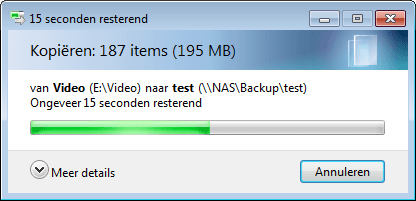
thank you but...

...it is still there!!!

stillthere.png

:(
 

My Computer

OS
Windows 7 Professional x64
CPU
Intel i7-2600K
Motherboard
ASUS P8Z68 DELUXE/GEN3
Memory
8 gig
Graphics Card(s)
ASUS GTX570
Monitor(s) Displays
Samsung Syncmaster 206bw
Hard Drives
no harddisk: 2x SSD 128MB raid0
Are you sure you're using the theme I made?
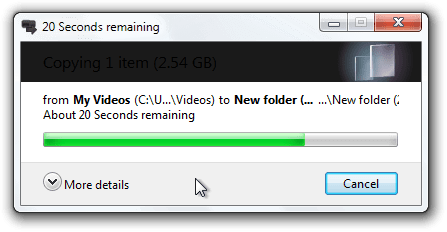
I just copy a video that is almost 3 GB to a new folder on my desktop and I didn't get any of that shine or are you talking about the white above the green?
20 Seconds remaining.png
Jerry
 

My Computer

Computer type
Laptop
Computer Manufacturer/Model Number
Sager NP9170
OS
Win 7 Pro x64 / Win 10 Pro
CPU
Intel(R) Core(TM) i7-3630QM CPU @ 2.40GHz
Motherboard
CLEVO P170EM
Memory
12 GB
Graphics Card(s)
(1) Intel(R) HD Graphics 4000 (2) NVIDIA GeForce GTX 675M
Sound Card
(1) Realtek High Definition Audio (2) Intel(R) Display Aud
Monitor(s) Displays
17.3
Screen Resolution
1920x1080
Hard Drives
(1) Samsung 860 EVO 500GB(OS) (1) Samsung 860 EVO 500GB(Data)
Keyboard
Backlite
Antivirus
MSE, Malwarebytes Pro
Browser
Firefox
Other Info
DESKTOP: Custom-built.
OS: Win 10 Pro x64.
CASE: Rosewill R5.
CPU: Intel I5 4670K CPU @ 3.40GHz.
CPU COOLER: Cool Master Hyper 212 EVO.
MOTHERBOARD: Asus Z87-A.
MEMORY: Kingston HyperX 2x4 GB.
GPU: Nvidia Geforce 650 TI.
PSU: Corsair TX750.
DRIVES: (1) Samsung 840 120 GB SSD (2) Western Digital blue 500 GB 7200 RPM.
yeah..

yes! wel.. i can not miss... it appears as an "installed theme".

I am going to delete it, uninstall Uxstyle and do all over again.
Another problem is that the borders are not transparent anymore.
 

My Computer

OS
Windows 7 Professional x64
CPU
Intel i7-2600K
Motherboard
ASUS P8Z68 DELUXE/GEN3
Memory
8 gig
Graphics Card(s)
ASUS GTX570
Monitor(s) Displays
Samsung Syncmaster 206bw
Hard Drives
no harddisk: 2x SSD 128MB raid0
Let us know how it turns out or if you need any more help.
Jerry
 

My Computer

Computer type
Laptop
Computer Manufacturer/Model Number
Sager NP9170
OS
Win 7 Pro x64 / Win 10 Pro
CPU
Intel(R) Core(TM) i7-3630QM CPU @ 2.40GHz
Motherboard
CLEVO P170EM
Memory
12 GB
Graphics Card(s)
(1) Intel(R) HD Graphics 4000 (2) NVIDIA GeForce GTX 675M
Sound Card
(1) Realtek High Definition Audio (2) Intel(R) Display Aud
Monitor(s) Displays
17.3
Screen Resolution
1920x1080
Hard Drives
(1) Samsung 860 EVO 500GB(OS) (1) Samsung 860 EVO 500GB(Data)
Keyboard
Backlite
Antivirus
MSE, Malwarebytes Pro
Browser
Firefox
Other Info
DESKTOP: Custom-built.
OS: Win 10 Pro x64.
CASE: Rosewill R5.
CPU: Intel I5 4670K CPU @ 3.40GHz.
CPU COOLER: Cool Master Hyper 212 EVO.
MOTHERBOARD: Asus Z87-A.
MEMORY: Kingston HyperX 2x4 GB.
GPU: Nvidia Geforce 650 TI.
PSU: Corsair TX750.
DRIVES: (1) Samsung 840 120 GB SSD (2) Western Digital blue 500 GB 7200 RPM.
If you have not started already tried this.
Switch to the default Aero theme.
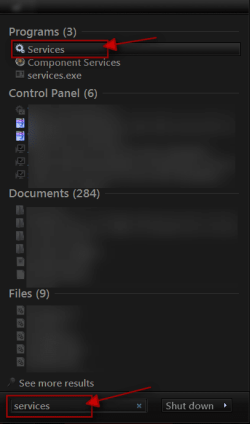
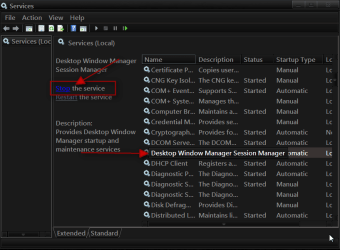
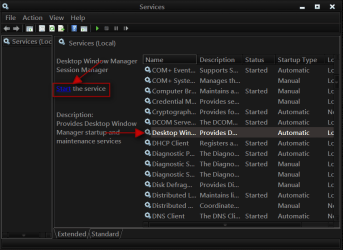
Click on the Start Button type in Services In the search box and then click on Services
1.png


Scroll down until you see Desktop Windows Manager Sessions Manager select it in click on the Stop text and let it stop after that click on Start text and see if that works. Your screen may blink when you do this.
2.pngstop.PNG3.png

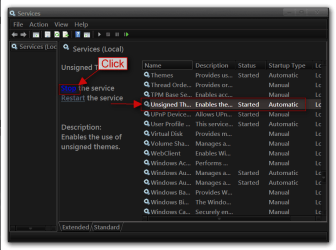
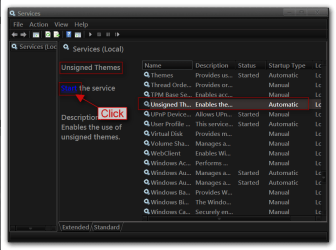
Do the same thing with unsigned themes
4.png5.png

Jerry
 

My Computer

Computer type
Laptop
Computer Manufacturer/Model Number
Sager NP9170
OS
Win 7 Pro x64 / Win 10 Pro
CPU
Intel(R) Core(TM) i7-3630QM CPU @ 2.40GHz
Motherboard
CLEVO P170EM
Memory
12 GB
Graphics Card(s)
(1) Intel(R) HD Graphics 4000 (2) NVIDIA GeForce GTX 675M
Sound Card
(1) Realtek High Definition Audio (2) Intel(R) Display Aud
Monitor(s) Displays
17.3
Screen Resolution
1920x1080
Hard Drives
(1) Samsung 860 EVO 500GB(OS) (1) Samsung 860 EVO 500GB(Data)
Keyboard
Backlite
Antivirus
MSE, Malwarebytes Pro
Browser
Firefox
Other Info
DESKTOP: Custom-built.
OS: Win 10 Pro x64.
CASE: Rosewill R5.
CPU: Intel I5 4670K CPU @ 3.40GHz.
CPU COOLER: Cool Master Hyper 212 EVO.
MOTHERBOARD: Asus Z87-A.
MEMORY: Kingston HyperX 2x4 GB.
GPU: Nvidia Geforce 650 TI.
PSU: Corsair TX750.
DRIVES: (1) Samsung 840 120 GB SSD (2) Western Digital blue 500 GB 7200 RPM.
I am administrator, disabeled UCS, I uninstalled uxstyle, reinstalled it, copied my theme and the directory, selected it, rebooted and still there is this (ugly) glow.

should i not overwrite the default folders in C:\Windows\Resources\Themes\Aero ??
 

My Computer

OS
Windows 7 Professional x64
CPU
Intel i7-2600K
Motherboard
ASUS P8Z68 DELUXE/GEN3
Memory
8 gig
Graphics Card(s)
ASUS GTX570
Monitor(s) Displays
Samsung Syncmaster 206bw
Hard Drives
no harddisk: 2x SSD 128MB raid0
i did it, and as expected, it blinked with Desktop Windows Manager Sessions Manager and showed a progress bar for a blink with unsigned themes. I guess that means that UxStyle works
 

My Computer

OS
Windows 7 Professional x64
CPU
Intel i7-2600K
Motherboard
ASUS P8Z68 DELUXE/GEN3
Memory
8 gig
Graphics Card(s)
ASUS GTX570
Monitor(s) Displays
Samsung Syncmaster 206bw
Hard Drives
no harddisk: 2x SSD 128MB raid0
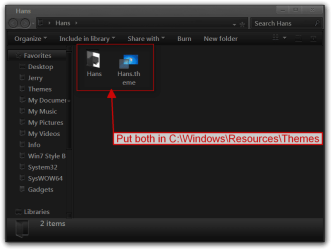
Does the theme folder and the theme file show up in C:\Windows\Resources\Themes like this Highlighted in red?
Themes.png

Did you try what I posted a couple posts back?
Jerry
 

My Computer

Computer type
Laptop
Computer Manufacturer/Model Number
Sager NP9170
OS
Win 7 Pro x64 / Win 10 Pro
CPU
Intel(R) Core(TM) i7-3630QM CPU @ 2.40GHz
Motherboard
CLEVO P170EM
Memory
12 GB
Graphics Card(s)
(1) Intel(R) HD Graphics 4000 (2) NVIDIA GeForce GTX 675M
Sound Card
(1) Realtek High Definition Audio (2) Intel(R) Display Aud
Monitor(s) Displays
17.3
Screen Resolution
1920x1080
Hard Drives
(1) Samsung 860 EVO 500GB(OS) (1) Samsung 860 EVO 500GB(Data)
Keyboard
Backlite
Antivirus
MSE, Malwarebytes Pro
Browser
Firefox
Other Info
DESKTOP: Custom-built.
OS: Win 10 Pro x64.
CASE: Rosewill R5.
CPU: Intel I5 4670K CPU @ 3.40GHz.
CPU COOLER: Cool Master Hyper 212 EVO.
MOTHERBOARD: Asus Z87-A.
MEMORY: Kingston HyperX 2x4 GB.
GPU: Nvidia Geforce 650 TI.
PSU: Corsair TX750.
DRIVES: (1) Samsung 840 120 GB SSD (2) Western Digital blue 500 GB 7200 RPM.
Back
Top