VLC media player disabling thumbnail previews on videos

tylar112

New member
I use VLC media player to play all my videos, (mp4, wma, avi, ect...)
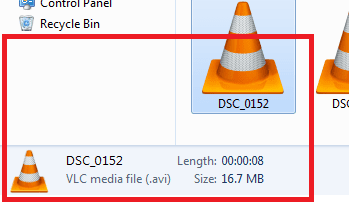
I have VLC set to play all video types, but when I did that, it replaced all the thumbnails that show a preview of the video, with the VLC orange cone

How can I fix this?
 

Attachments

  • thumbnail.png
    thumbnail.png
    19.6 KB · Views: 112

My Computer

Computer Manufacturer/Model Number
Asus UL50A/UL50Ag Series
OS
Windows 7 Home Premium x64
CPU
Genuine Intel(R) CPU U7300 @ 1.30GHz
Memory
4.00 Gigs
Graphics Card(s)
Mobile Intel(R) 4 Series Express Chipset Family
Sound Card
Realtek High Definition Audio
Monitor(s) Displays
Generic PnP Monitor
Screen Resolution
1366 x 768 - 60Hz
Hard Drives
500 Gigs
Internet Speed
Slow as hell.
I use VLC media player to play all my videos, (mp4, wma, avi, ect...)
I have VLC set to play all video types, but when I did that, it replaced all the thumbnails that show a preview of the video, with the VLC orange cone

How can I fix this?

Set it back.

VLC is not designed to create thumbnails of videos. Windows Media Player does that and if it is the default it creates thumbnails.

You can get Windows Media Player to play pretty much anything with the proper codecs [I recommend FFDShow-Tryouts http://ffdshow-tryout.sourceforge.net/]
 

My Computer

OS
Windows 7 Ultimate 64-bit
CPU
AMD Phenom II X6 1090T 3.2GHZ
Motherboard
MSI 890FXA-GD70
Memory
G.SKILL RipJaw 3x2GB DDR3-1066
Graphics Card(s)
2x HIS Radeon HD 6850 1 GB
Sound Card
VIA 8-channel
Monitor(s) Displays
2x 20 inch Acer LCDs, 1x 32" Sony LCD TV
Screen Resolution
4480x900
Hard Drives
1x Crucial 64GB SSD
3x 1TB HDDs (WD, Seagate, Hitatchi)
1x 500GB Seagate External
PSU
Kingwin 1000W Modular
Case
Coolermaster HAF 932
Cooling
1x 120mm, 3x 200mm, CoolerMaster Hyper 212+
Keyboard
Microsoft Wireless Keyboard 1000
Mouse
Microsoft Wiresless Mouse 5000
Internet Speed
20mbps
Other Info
Samsung BD-ROM/DVD-RW
I use VLC media player to play all my videos, (mp4, wma, avi, ect...)
I have VLC set to play all video types, but when I did that, it replaced all the thumbnails that show a preview of the video, with the VLC orange cone

How can I fix this?

Set it back.

VLC is not designed to create thumbnails of videos. Windows Media Player does that and if it is the default it creates thumbnails.

You can get Windows Media Player to play pretty much anything with the proper codecs [I recommend FFDShow-Tryouts http://ffdshow-tryout.sourceforge.net/]

I would, but I play a lot of HD videos and movies, and WMP is not powerful enough to do so. I experience a lot of skipping and delaying.

I dont have this problem when using VLC. Thats why I have it has my default video player.

But if theres no other way to fix the thumbnail issue, then Ill just have to live with it

Thanks! :)
 

My Computer

Computer Manufacturer/Model Number
Asus UL50A/UL50Ag Series
OS
Windows 7 Home Premium x64
CPU
Genuine Intel(R) CPU U7300 @ 1.30GHz
Memory
4.00 Gigs
Graphics Card(s)
Mobile Intel(R) 4 Series Express Chipset Family
Sound Card
Realtek High Definition Audio
Monitor(s) Displays
Generic PnP Monitor
Screen Resolution
1366 x 768 - 60Hz
Hard Drives
500 Gigs
Internet Speed
Slow as hell.
@JL:mad:

/sigh
/facepalm

If you don't know the answer then don't bother posting. The OP asked for advice on how to reestablish thumbnails explicitly for VLC files. For example, I understand programs exist to create or enable thumbnails in instances other programs, such as VLC, do not. This could very well be the remedy.

However, barring having to buy anything, the question remains. Anyone have an OS or VLC workaround for this yet pretty please?
 
Last edited:

My Computer

OS
Windows 7 Ultimate x64
From the web:

"It's a problem with x64 windows, the 64bit explorer cannot use the 32bit codecs.
The solution is to install the 64bit version of the ffdshow codecs"

That is all I can relay... (Yes, this is in regard to this exact problem)
 

My Computer

Computer Manufacturer/Model Number
Scratch built
OS
Windows 7 x64 Ultimate
CPU
i7 960
Motherboard
Asus P6X58D
Memory
12 Gig Corsair Dominator
Graphics Card(s)
Nvidia 480
Sound Card
Maudio Delta 44 + breakout box
Monitor(s) Displays
Dell UltraSharp U2410 24in and Samsung 21 dual monitors
Screen Resolution
1920x1200 and 1280x1024
Hard Drives
Primary: Intel X-25M G2 160G SSD
Secondary: Segate baracuda 1.0 TB
HDs in AHCI mode.
PSU
Corasair TX850
Case
Cooler Master HAF
Cooling
Corsair H50
Keyboard
Logitech G15 + N52 game pad
Mouse
Logitech MX518
Internet Speed
15kbs down 4.5kbps up
Other Info
WEI 7.6
CPU & RAM 7.6
Graphics 7.9
Hard disk 7.7
I've even tried contacting VLC but haven't heard anything at all.

This makes it so difficult when editing videos :mad:

Damn cones..
 

My Computer

Computer Manufacturer/Model Number
Asus UL50A/UL50Ag Series
OS
Windows 7 Home Premium x64
CPU
Genuine Intel(R) CPU U7300 @ 1.30GHz
Memory
4.00 Gigs
Graphics Card(s)
Mobile Intel(R) 4 Series Express Chipset Family
Sound Card
Realtek High Definition Audio
Monitor(s) Displays
Generic PnP Monitor
Screen Resolution
1366 x 768 - 60Hz
Hard Drives
500 Gigs
Internet Speed
Slow as hell.

My Computer

Computer Manufacturer/Model Number
Asus UL50A/UL50Ag Series
OS
Windows 7 Home Premium x64
CPU
Genuine Intel(R) CPU U7300 @ 1.30GHz
Memory
4.00 Gigs
Graphics Card(s)
Mobile Intel(R) 4 Series Express Chipset Family
Sound Card
Realtek High Definition Audio
Monitor(s) Displays
Generic PnP Monitor
Screen Resolution
1366 x 768 - 60Hz
Hard Drives
500 Gigs
Internet Speed
Slow as hell.
Sounds right :D though I dont know about that download site. Might try finding one hosted like on source forge or someplace that sounds more close to the source. Like here ffdshow - Browse /SVN builds by clsid/old builds at SourceForge.net

Also, I have not tried it myself, so I was just relaying some second hand information I remembered hearing about :( It's a somewhat common complaint, a general google search might bring up some more information besides what I posted (The details were no longer available "missing page".)
 
Last edited:

My Computer

Computer Manufacturer/Model Number
Scratch built
OS
Windows 7 x64 Ultimate
CPU
i7 960
Motherboard
Asus P6X58D
Memory
12 Gig Corsair Dominator
Graphics Card(s)
Nvidia 480
Sound Card
Maudio Delta 44 + breakout box
Monitor(s) Displays
Dell UltraSharp U2410 24in and Samsung 21 dual monitors
Screen Resolution
1920x1200 and 1280x1024
Hard Drives
Primary: Intel X-25M G2 160G SSD
Secondary: Segate baracuda 1.0 TB
HDs in AHCI mode.
PSU
Corasair TX850
Case
Cooler Master HAF
Cooling
Corsair H50
Keyboard
Logitech G15 + N52 game pad
Mouse
Logitech MX518
Internet Speed
15kbs down 4.5kbps up
Other Info
WEI 7.6
CPU & RAM 7.6
Graphics 7.9
Hard disk 7.7
:S VLC is making the thumbnails for me but yeah I don't use VLC anymore... now try using SMPlayer: SMPlayer - General Info :) hope this helps
 

My Computer

Computer Manufacturer/Model Number
Homebuilt
OS
Windows 7 Home Premium x64
CPU
Core i7 2600K
Motherboard
Asus P8Z77-V LX
Memory
4GB DDR3 Kingston HyperX
Graphics Card(s)
Gigabyte GTX 670
Sound Card
Realtek HD Audio
Monitor(s) Displays
Delium Monitor
Screen Resolution
1360 x 768
Hard Drives
C: (500GB)
PSU
Corsair 620W
Case
Antec
Cooling
Cooling Master
Keyboard
Logitech
Mouse
Logitech wireless mouse M 505
Internet Speed
60MBPS
Just noticed this post is #2 on Google when searching for "VLC windows thumbnails not working"

If anyone happens to stumble upon this post, try downloading Media Preview BabelSoft / ????

Confirmed and working on Windows 8 64bit as well.
 

My Computer

Computer Manufacturer/Model Number
Asus UL50A/UL50Ag Series
OS
Windows 7 Home Premium x64
CPU
Genuine Intel(R) CPU U7300 @ 1.30GHz
Memory
4.00 Gigs
Graphics Card(s)
Mobile Intel(R) 4 Series Express Chipset Family
Sound Card
Realtek High Definition Audio
Monitor(s) Displays
Generic PnP Monitor
Screen Resolution
1366 x 768 - 60Hz
Hard Drives
500 Gigs
Internet Speed
Slow as hell.
as above ,icaros will also display thumbnails for so many media filetypes

Icaros is a collection of lightweight, high quality, Windows Shell Extensions.

Icaros can provide Windows Explorer thumbnails, for essentially any video media format supported by FFmpeg,
this includes popular filetypes such as: Mkv, Flv, Avi, Mp4, Mov, Rmvb, M2ts, Ogm etc.

Besides the FFmpeg supported filetypes, Icaros also contains custom parsers,
which can produce Cover Art thumbnails for Mkv, Flac, Ape, and Mpc files.

Icaros also provides Windows Explorer properties for the following popular filetypes:
Mkv, Flv, Ogm, Ogv, Ogg, Flac, Ape, and Mpc.

|MG| Icaros 2.2.0 Download
 

My Computer

Computer Manufacturer/Model Number
Hewlett packard/p6512uk
OS
Microsoft Windows 7 Home Premium 64-bit 7600
CPU
IIx4 amd athelon 635 processor
Motherboard
FOXCONN 2AA9
Memory
2x2gb
Graphics Card(s)
ati radeon HD 5450
Sound Card
(1) Realtek High Definition Audio (2) AMD High Definition
Monitor(s) Displays
samsung lcd tv 32"
Screen Resolution
1360x 768
Hard Drives
(1) WDC WD10 01FAES-60Z2A0 SATA Disk Device (2) Maxtor OneTouch USB Device (3) ST310003 33AS USB Device (4) WD My Book 1111 USB Device
PSU
?
Cooling
air!
Keyboard
wireless hp
Mouse
wireless Hp,optical
Internet Speed
1.10mb/s
Antivirus
MSE
Browser
Firefox
Just make sure to use 64 bit version of VLC

If you have a 64 bit machine just make sure and use the 64 bit version of VLC and you will not have this problem. If you use the 32 bit version on a 64 bit machine that is when the problem arises.
 

My Computer

Computer type
PC/Desktop
OS
64 8
The cones will show for all filetypes that are associated with VLC. If you want thumbnails, change the filetype associations and run VLC via 'Open with'.
 

My Computer

Computer Manufacturer/Model Number
HP, Dell, Gateway, Toshiba - 4 laptops and 2 desktops
OS
Vista, Windows7, Mint Mate, Zorin, Windows 8
CPU
from 1.6GHz Duo to i7
Monitor(s) Displays
2x HP w2207
Hard Drives
5x HDD, 7x SSD, 12x Externals
Keyboard
with trackball - no mices
Mouse
Trackball mice
Internet Speed
DSL 6000
Just install 64 bit VLC

I just installed VLC 64 bit on my 64 bit system with no modifications or addons and set VLC player as the default for all these files, I now have thumbnails with the movie preview. WHS you are wrong, you do not need to use open with every time, as long as you install VLC 64 bit you are fine!
 

My Computer

Computer type
PC/Desktop
OS
64 8
Yes you are right. With 64bit you are fine.
 

My Computer

Computer Manufacturer/Model Number
HP, Dell, Gateway, Toshiba - 4 laptops and 2 desktops
OS
Vista, Windows7, Mint Mate, Zorin, Windows 8
CPU
from 1.6GHz Duo to i7
Monitor(s) Displays
2x HP w2207
Hard Drives
5x HDD, 7x SSD, 12x Externals
Keyboard
with trackball - no mices
Mouse
Trackball mice
Internet Speed
DSL 6000
64bit did not solve for me

I have the same issue 64bit laptop, I just uninstalled vlc2.2.4 32bit and installed vlc2.2.4 64bit and still have the problem. The kicker is I have a 64bit desktop running vlc2.2.2 32bit (no k-lite or icaros) and it has always displayed thumbnails fine.?!?!?! grrrrr. Just to be clear I don't want Icaros malware or K-lite codecs. The 'damn caution cones' comment made me laugh out loud because thats how I feel!
 

My Computer

Computer type
PC/Desktop
OS
win7 64 home prem
Back
Top