Solved Graphics Card to HDTV via HDMI Cable Even Possible?

BeKure

New member
I am trying to hook up my Radeon 5870 HD to my 1080p HDTV via HDMI cable and not only is the image onscreen slightly blurred, but there is also a black border that is approximately 1" around the entire display. Pardon me if I'm missing something but why even have a card with the option to hook up a HDTV via HDMI if it cannot properly display a picture?

Any help would be appreciated. Thanks.

Emitted from my Droid Bionic via Tapatalk
 

My Computer

OS
Windows 7 [64-Bit]
CPU
AMD Phenom II X6 1100T Black Edition Thuban 3.3GHz, 3.7GHz
Motherboard
GIGABYTE GA-990XA-UD3 AM3+ AMD
Memory
G.SKILL Ripjaws X Series 8GB 240-Pin DDR3 SDRAM DDR3 186
Graphics Card(s)
ATI Radeon HD 5870 1GB DDR5 PCI-Express Card
Sound Card
N/A (On-board Sound)
Monitor(s) Displays
HANNSpree 42" Class LCD 1080p 120Hz HDTV
Screen Resolution
1920 x 1080
Hard Drives
SSD: Crucial M4 CT064M4SSD2 2.5" 64GB SATA

HDD 1: Western Digital Caviar Blue WD5000AAKS 2TB 7200 RPM 16MB Cache

HDD 2: Western Digital Caviar Blue WD5000AAKS 1TB 7200 RPM 16MB Cache

HDD 3: Western Digital Caviar Blue WD5000AAKS 500GB 7200 R
PSU
Antec High Current Gamer Series HCG-900 900W
Case
NZXT Phantom PHAN-001WT Red Steel / Plastic Enthusiast ATX
Cooling
FANS: 140MM (x1), 120MM (x3), 200MM (x2)
Keyboard
Logitech G13 & Steelseries Merc Stealth
Mouse
Cyborg M.M.O. 7 Gaming Mouse, Logitech G700 & Steelseries Wo
Internet Speed
25 Mbps Download / 2 Mbps Upload
Hi.

First ensure that you have installed the most recent software\driver for your Radeon 5870 HD.

http://support.amd.com/us/gpudownload/Pages/index.aspx

Then,

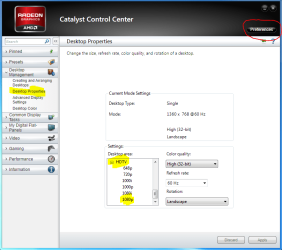
Right click on desktop,click\run Catalyst Control Center,on the right side click preferences and select Advanced view.

Now in the left side list select Desktop Management\Desktop Properties,on the Desktop area list click HDTV\1080p Aplly.

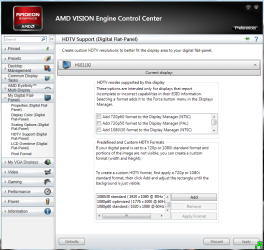
Now click on My Digital Flat Panels\Scaling options (Digital-Flat-Panel) and adjust the screen to eliminate the black border.
 

Attachments

  • panais 1.PNG
    panais 1.PNG
    118.2 KB · Views: 247
  • panais 2.PNG
    panais 2.PNG
    143.8 KB · Views: 267

My Computer

Computer Manufacturer/Model Number
Custom Built by me.
OS
Windows 7 Ultimate 64bit SP1
CPU
Intel Core 2 Quad Q6600
Motherboard
Gigabyte GA-X38-DS4
Memory
2X2GB DDR2 PC6400 800MHZ DUAL CHANNEL
Graphics Card(s)
XFX RADEON HD 6850 1GB GDDR5
Sound Card
2/4/5.1/7.1-channel Realtek High Definition
Monitor(s) Displays
Samsung LE40A656F1 1080p 100Hz LCD HD TV 50,000:1
Screen Resolution
1366x768 in Desktop,1920x1080p in gaming and video
Hard Drives
C:\WD VelociRaptor 150 GB,10,000 RPM
E:\WESTERN DIGITAL WD15EADS 1.5TB CAVIAR GREEN SATA2 F:\WESTERN DIGITAL WD15EADS 1.5TB CAVIAR GREEN SATA2
PSU
THERMALTAKE W0229 TOUGHPOWER XT 750W
Case
A-Case Twin Engine BB
Cooling
3 x thermaltake smart case fan II + 1 arctic cooling fan
Keyboard
Wireless Logitech LX710
Mouse
Logitech Wireless Gaming Mouse G700
Internet Speed
ADSL 12000 plus
Other Info
Mouse Logitech G700,with 13 buttons who needs keyboard in RPG?

D:\Sony high speed sata Dvd Rewriter
Logitech Cordless Rumblepad 2
Have you set the output resolution to your HDTVs native resolution? It should be in your AMD Catalyst controls IIRC. My Nvidia card did this also. I had to set it to my HDTV's native resolution. This is most likely causing your issues.

My resolution is 1360*768 on my LG 720p 37". It doesn't default to it automatically.
 

My Computer

Computer type
PC/Desktop
Computer Manufacturer/Model Number
Home Built
OS
Windows 7 Home Premium 64bit SP2
CPU
Intel Core i5-2500k
Motherboard
ASRock Z68 Extreme3 Gen3
Memory
G.Skill Sniper 16GB (4x4GB) DDR3-1600
Graphics Card(s)
EVGA Nvidia GTX 560Ti
Sound Card
OnBoard HD Audio
Monitor(s) Displays
LG 37" 720p HDTV
Hard Drives
Corsair Force Series 3 120GB SSD
Western Digital Caviar Blue 500GB
Western Digital Caviar Black 1TB
PSU
OCZ ModXStream Pro 700w Modular
Case
Thermaltake Commander MS-I ID ATX Mid Tower
Cooling
Corsair Hydro H60
Internet Speed
Cox HSI Preferred 25Mbt
Antivirus
Kaspersky Internet Security 2013
Browser
Waterfox 64Bit 18.1
Hi.

First ensure that you have installed the most recent software\driver for your Radeon 5870 HD.

AMD Graphics Drivers & Software

Then,

Right click on desktop,click\run Catalyst Control Center,on the right side click preferences and select Advanced view.

Now in the left side list select Desktop Management\Desktop Properties,on the Desktop area list click HDTV\1080p Aplly.

Now click on My Digital Flat Panels\Scaling options (Digital-Flat-Panel) and adjust the screen to eliminate the black border.

Thank you anyhow but this didn't work very well. I was able to manually adjust the scale but the scale still didn't line up with the corners of my HDTV the way that it should, plus the picture is still blurry and looks horrible in my opinion.
 

My Computer

OS
Windows 7 [64-Bit]
CPU
AMD Phenom II X6 1100T Black Edition Thuban 3.3GHz, 3.7GHz
Motherboard
GIGABYTE GA-990XA-UD3 AM3+ AMD
Memory
G.SKILL Ripjaws X Series 8GB 240-Pin DDR3 SDRAM DDR3 186
Graphics Card(s)
ATI Radeon HD 5870 1GB DDR5 PCI-Express Card
Sound Card
N/A (On-board Sound)
Monitor(s) Displays
HANNSpree 42" Class LCD 1080p 120Hz HDTV
Screen Resolution
1920 x 1080
Hard Drives
SSD: Crucial M4 CT064M4SSD2 2.5" 64GB SATA

HDD 1: Western Digital Caviar Blue WD5000AAKS 2TB 7200 RPM 16MB Cache

HDD 2: Western Digital Caviar Blue WD5000AAKS 1TB 7200 RPM 16MB Cache

HDD 3: Western Digital Caviar Blue WD5000AAKS 500GB 7200 R
PSU
Antec High Current Gamer Series HCG-900 900W
Case
NZXT Phantom PHAN-001WT Red Steel / Plastic Enthusiast ATX
Cooling
FANS: 140MM (x1), 120MM (x3), 200MM (x2)
Keyboard
Logitech G13 & Steelseries Merc Stealth
Mouse
Cyborg M.M.O. 7 Gaming Mouse, Logitech G700 & Steelseries Wo
Internet Speed
25 Mbps Download / 2 Mbps Upload
Have you set the output resolution to your HDTVs native resolution? It should be in your AMD Catalyst controls IIRC. My Nvidia card did this also. I had to set it to my HDTV's native resolution. This is most likely causing your issues.

My resolution is 1360*768 on my LG 720p 37". It doesn't default to it automatically.

Thank you for your suggestion and I would love to try this but I have no idea how to go about doing so.
 

My Computer

OS
Windows 7 [64-Bit]
CPU
AMD Phenom II X6 1100T Black Edition Thuban 3.3GHz, 3.7GHz
Motherboard
GIGABYTE GA-990XA-UD3 AM3+ AMD
Memory
G.SKILL Ripjaws X Series 8GB 240-Pin DDR3 SDRAM DDR3 186
Graphics Card(s)
ATI Radeon HD 5870 1GB DDR5 PCI-Express Card
Sound Card
N/A (On-board Sound)
Monitor(s) Displays
HANNSpree 42" Class LCD 1080p 120Hz HDTV
Screen Resolution
1920 x 1080
Hard Drives
SSD: Crucial M4 CT064M4SSD2 2.5" 64GB SATA

HDD 1: Western Digital Caviar Blue WD5000AAKS 2TB 7200 RPM 16MB Cache

HDD 2: Western Digital Caviar Blue WD5000AAKS 1TB 7200 RPM 16MB Cache

HDD 3: Western Digital Caviar Blue WD5000AAKS 500GB 7200 R
PSU
Antec High Current Gamer Series HCG-900 900W
Case
NZXT Phantom PHAN-001WT Red Steel / Plastic Enthusiast ATX
Cooling
FANS: 140MM (x1), 120MM (x3), 200MM (x2)
Keyboard
Logitech G13 & Steelseries Merc Stealth
Mouse
Cyborg M.M.O. 7 Gaming Mouse, Logitech G700 & Steelseries Wo
Internet Speed
25 Mbps Download / 2 Mbps Upload
hi i no panais covered this in his post but this is from ccc help hope it helps

Adjusting Image Size and Position for Digital Flat-Panels (Digital TVs)

To adjust black borders surrounding your display area, use the Underscan/Overscan slider to adjust your image so that the borders are no longer visible.

Navigate to one of the following pages:
Standard View—Desktops and Displays > My Digital Flat-Panels > Scaling Options (Digital Flat-Panel).
Advanced View—My Digital Flat-Panels > Scaling Options (Digital Flat-Panel).
If more than one digital flat-panel is available for your computer, use the display selection menu at the top of the page to select the display that you want to configure.
Click and drag the Underscan/Overscan slider to adjust the overall size of the image on the display.
Note: The slider is not available for display configured to use a custom or the default optimized timing mode.
To ensure that forcing a custom HDTV mode does not create conflicting resolutions, select Use the scaling values instead of the customized settings when the desktop resolution does not match your DTV resolution. For more information on creating and applying custom HDTV modes, see HDTV Support.
 

My Computer

Computer Manufacturer/Model Number
packard bell IXTREME M5722
OS
Operating System : Windows 7 Home Premium Edition 6.01.7600 SP1 (x64)
CPU
Processor : Intel Core 2 Quad Q8300 @ 2500 MHz
Motherboard
Mainboard : Packard Bell (Acer EG43M )
Memory
Physical Memory :8GB Corsair4x 2GB 800MHz C5 DDR2
Graphics Card(s)
Video Card : XFX 6700 AMD
Monitor(s) Displays
Maestro 234DL - BenQ V2220 - BenQ VW2420H
Screen Resolution
Current Display :1920x1080p pixels at 60 Hz in HD LED
Hard Drives
Hard Disks : WDC (1000 GB)
Drive C: (Hard Disk) : 428 GB available on 491 GB
Drive D: (Hard Disk) : 426 GB available on 492 GB
SAMSUNG spinpoint HD103SJ 1000.2 GB
(X 2) KINGSTON SSD NOW V 30GB
PSU
XFX ProSeries 550W PSU
Case
PACKARD BELL IXTREME
Cooling
System Blower Current: 150mA Air Flow16CFM ;Akasa 90mm rear
Keyboard
Gigabyte Aivia K8100
Mouse
TRUST-Wireless Laser Mouse - Carbon edition MI-7770C
Internet Speed
TP-LINK > TL-WN951N / AV500 Gigabit Powerline Adapters
Browser
chrome dev
Other Info
EXTRA COOLING>(FAN CONTROLLER) PC Bay Cooler 3 x 40mm fans; Akasa AK-HD-BL Blue hard drive cooler 2 x 40 mm fan 4500 rpm 29.7 dBA
Bios> American Megatrends Inc.
Version : P01-A1
Date : 08/31/2009
I had the exact same problem with my new ASUS monitor. Connecting it via HDMI to my 6950, would never go full screen unless i did what Pansis suggested, but patches were still blurred and looked funny, while others were fine.

i then connected it via DVI and it was fine. I later did some research and found out theres some know issues with AMD cards and HDMI, with lots of unsolved issues.

Try a DVI to HDMI cable, may give better results.
 

My Computer

Computer type
PC/Desktop
Computer Manufacturer/Model Number
Built by badgers!!!
OS
Windows 7 Ultimate x64, & Mac OS X 10.9.2
CPU
Intel Core i5 2500k
Motherboard
Asus P8z68 LE
Memory
Corsair Vengence 8gb 1866mhz
Graphics Card(s)
Nvidia GTX 770 OC
Monitor(s) Displays
2x ASUS LED 22" IPS
Screen Resolution
3840x1080
Hard Drives
240GB Crucial M500 SSD
120gb Corsair Force 3 SSD
1TB Western Digital
PSU
Corsair HX650w Modular
Case
Corsair Air 540
Cooling
Corsair H60 Push/Pull
Keyboard
Corsair K70/ Logitech G27 wheel
Mouse
Saitek R.A.T 9
Internet Speed
Too slow!
Other Info
AMD fusion E350N Home server-Windows Home Server 2011 (also made by badgers!)
2011 Macbook 2.4ghz Core2Duo, 4gb ddr3, 120gb Ocz Vertex SSD
I had the exact same problem with my new ASUS monitor. Connecting it via HDMI to my 6950, would never go full screen unless i did what Pansis suggested, but patches were still blurred and looked funny, while others were fine.

i then connected it via DVI and it was fine. I later did some research and found out theres some know issues with AMD cards and HDMI, with lots of unsolved issues.

Try a DVI to HDMI cable, may give better results.

Wow, thanks for that bit of info. The fact that this has been a problem with AMD for quite some time really makes me want to lean toward Nvidia when I upgrade again. I will just try to hook it up a different way. Thanks again.
 

My Computer

OS
Windows 7 [64-Bit]
CPU
AMD Phenom II X6 1100T Black Edition Thuban 3.3GHz, 3.7GHz
Motherboard
GIGABYTE GA-990XA-UD3 AM3+ AMD
Memory
G.SKILL Ripjaws X Series 8GB 240-Pin DDR3 SDRAM DDR3 186
Graphics Card(s)
ATI Radeon HD 5870 1GB DDR5 PCI-Express Card
Sound Card
N/A (On-board Sound)
Monitor(s) Displays
HANNSpree 42" Class LCD 1080p 120Hz HDTV
Screen Resolution
1920 x 1080
Hard Drives
SSD: Crucial M4 CT064M4SSD2 2.5" 64GB SATA

HDD 1: Western Digital Caviar Blue WD5000AAKS 2TB 7200 RPM 16MB Cache

HDD 2: Western Digital Caviar Blue WD5000AAKS 1TB 7200 RPM 16MB Cache

HDD 3: Western Digital Caviar Blue WD5000AAKS 500GB 7200 R
PSU
Antec High Current Gamer Series HCG-900 900W
Case
NZXT Phantom PHAN-001WT Red Steel / Plastic Enthusiast ATX
Cooling
FANS: 140MM (x1), 120MM (x3), 200MM (x2)
Keyboard
Logitech G13 & Steelseries Merc Stealth
Mouse
Cyborg M.M.O. 7 Gaming Mouse, Logitech G700 & Steelseries Wo
Internet Speed
25 Mbps Download / 2 Mbps Upload
Have you set the output resolution to your HDTVs native resolution? It should be in your AMD Catalyst controls IIRC. My Nvidia card did this also. I had to set it to my HDTV's native resolution. This is most likely causing your issues.

My resolution is 1360*768 on my LG 720p 37". It doesn't default to it automatically.

Thank you for your suggestion and I would love to try this but I have no idea how to go about doing so.
Don't manually adjust. If its an HDTV, on HDMI, it will tell the AMD control center what its native resolution is.

On the desktop, right click, then select "AMD Catalyst control center.

Find the resolution/display tab, one of the outputs should say Native next to one of the resolutions.
 

My Computer

Computer type
PC/Desktop
Computer Manufacturer/Model Number
Home Built
OS
Windows 7 Home Premium 64bit SP2
CPU
Intel Core i5-2500k
Motherboard
ASRock Z68 Extreme3 Gen3
Memory
G.Skill Sniper 16GB (4x4GB) DDR3-1600
Graphics Card(s)
EVGA Nvidia GTX 560Ti
Sound Card
OnBoard HD Audio
Monitor(s) Displays
LG 37" 720p HDTV
Hard Drives
Corsair Force Series 3 120GB SSD
Western Digital Caviar Blue 500GB
Western Digital Caviar Black 1TB
PSU
OCZ ModXStream Pro 700w Modular
Case
Thermaltake Commander MS-I ID ATX Mid Tower
Cooling
Corsair Hydro H60
Internet Speed
Cox HSI Preferred 25Mbt
Antivirus
Kaspersky Internet Security 2013
Browser
Waterfox 64Bit 18.1
Tried DVI to VGA and the display looks great. I'm still bummed that the HDMI cable didn't display the way that it should. I like the fact that HDMI supports both video and audio and it sucks that it isn't working correctly with AMD cards.


Emitted from my Droid Bionic via Tapatalk
 

My Computer

OS
Windows 7 [64-Bit]
CPU
AMD Phenom II X6 1100T Black Edition Thuban 3.3GHz, 3.7GHz
Motherboard
GIGABYTE GA-990XA-UD3 AM3+ AMD
Memory
G.SKILL Ripjaws X Series 8GB 240-Pin DDR3 SDRAM DDR3 186
Graphics Card(s)
ATI Radeon HD 5870 1GB DDR5 PCI-Express Card
Sound Card
N/A (On-board Sound)
Monitor(s) Displays
HANNSpree 42" Class LCD 1080p 120Hz HDTV
Screen Resolution
1920 x 1080
Hard Drives
SSD: Crucial M4 CT064M4SSD2 2.5" 64GB SATA

HDD 1: Western Digital Caviar Blue WD5000AAKS 2TB 7200 RPM 16MB Cache

HDD 2: Western Digital Caviar Blue WD5000AAKS 1TB 7200 RPM 16MB Cache

HDD 3: Western Digital Caviar Blue WD5000AAKS 500GB 7200 R
PSU
Antec High Current Gamer Series HCG-900 900W
Case
NZXT Phantom PHAN-001WT Red Steel / Plastic Enthusiast ATX
Cooling
FANS: 140MM (x1), 120MM (x3), 200MM (x2)
Keyboard
Logitech G13 & Steelseries Merc Stealth
Mouse
Cyborg M.M.O. 7 Gaming Mouse, Logitech G700 & Steelseries Wo
Internet Speed
25 Mbps Download / 2 Mbps Upload
Tried DVI to VGA and the display looks great. I'm still bummed that the HDMI cable didn't display the way that it should. I like the fact that HDMI supports both video and audio and it sucks that it isn't working correctly with AMD cards.


Emitted from my Droid Bionic via Tapatalk

You must have a setting wrong somewhere. Can you post a screen shot of your resolution in the Catalyst control center? I'm still thinking you have an incorrect display resolution selected. Many times selecting 1080P will not display right.
 

My Computer

Computer type
PC/Desktop
Computer Manufacturer/Model Number
Home Built
OS
Windows 7 Home Premium 64bit SP2
CPU
Intel Core i5-2500k
Motherboard
ASRock Z68 Extreme3 Gen3
Memory
G.Skill Sniper 16GB (4x4GB) DDR3-1600
Graphics Card(s)
EVGA Nvidia GTX 560Ti
Sound Card
OnBoard HD Audio
Monitor(s) Displays
LG 37" 720p HDTV
Hard Drives
Corsair Force Series 3 120GB SSD
Western Digital Caviar Blue 500GB
Western Digital Caviar Black 1TB
PSU
OCZ ModXStream Pro 700w Modular
Case
Thermaltake Commander MS-I ID ATX Mid Tower
Cooling
Corsair Hydro H60
Internet Speed
Cox HSI Preferred 25Mbt
Antivirus
Kaspersky Internet Security 2013
Browser
Waterfox 64Bit 18.1
Tried DVI to VGA and the display looks great. I'm still bummed that the HDMI cable didn't display the way that it should. I like the fact that HDMI supports both video and audio and it sucks that it isn't working correctly with AMD cards.


Emitted from my Droid Bionic via Tapatalk

You must have a setting wrong somewhere. Can you post a screen shot of your resolution in the Catalyst control center? I'm still thinking you have an incorrect display resolution selected. Many times selecting 1080P will not display right.

I hooked up my TV via DVI to VGA because for some reason now I can't even get my cursor, taskbar or anything to appear besides the desktop wallpaper
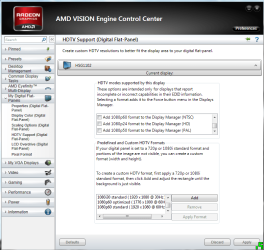
via HDMI. Here are the screen shots you asked for.
 

Attachments

  • Capture1.PNG
    Capture1.PNG
    157.6 KB · Views: 82
  • Capture2.PNG
    Capture2.PNG
    151.9 KB · Views: 70

My Computer

OS
Windows 7 [64-Bit]
CPU
AMD Phenom II X6 1100T Black Edition Thuban 3.3GHz, 3.7GHz
Motherboard
GIGABYTE GA-990XA-UD3 AM3+ AMD
Memory
G.SKILL Ripjaws X Series 8GB 240-Pin DDR3 SDRAM DDR3 186
Graphics Card(s)
ATI Radeon HD 5870 1GB DDR5 PCI-Express Card
Sound Card
N/A (On-board Sound)
Monitor(s) Displays
HANNSpree 42" Class LCD 1080p 120Hz HDTV
Screen Resolution
1920 x 1080
Hard Drives
SSD: Crucial M4 CT064M4SSD2 2.5" 64GB SATA

HDD 1: Western Digital Caviar Blue WD5000AAKS 2TB 7200 RPM 16MB Cache

HDD 2: Western Digital Caviar Blue WD5000AAKS 1TB 7200 RPM 16MB Cache

HDD 3: Western Digital Caviar Blue WD5000AAKS 500GB 7200 R
PSU
Antec High Current Gamer Series HCG-900 900W
Case
NZXT Phantom PHAN-001WT Red Steel / Plastic Enthusiast ATX
Cooling
FANS: 140MM (x1), 120MM (x3), 200MM (x2)
Keyboard
Logitech G13 & Steelseries Merc Stealth
Mouse
Cyborg M.M.O. 7 Gaming Mouse, Logitech G700 & Steelseries Wo
Internet Speed
25 Mbps Download / 2 Mbps Upload
Hum...you should be a 1080P 60Hz. Surprised that doesn't work. My buddies setup is this way. I just checked with him. What resolution is it trying to set to on default?
 

My Computer

Computer type
PC/Desktop
Computer Manufacturer/Model Number
Home Built
OS
Windows 7 Home Premium 64bit SP2
CPU
Intel Core i5-2500k
Motherboard
ASRock Z68 Extreme3 Gen3
Memory
G.Skill Sniper 16GB (4x4GB) DDR3-1600
Graphics Card(s)
EVGA Nvidia GTX 560Ti
Sound Card
OnBoard HD Audio
Monitor(s) Displays
LG 37" 720p HDTV
Hard Drives
Corsair Force Series 3 120GB SSD
Western Digital Caviar Blue 500GB
Western Digital Caviar Black 1TB
PSU
OCZ ModXStream Pro 700w Modular
Case
Thermaltake Commander MS-I ID ATX Mid Tower
Cooling
Corsair Hydro H60
Internet Speed
Cox HSI Preferred 25Mbt
Antivirus
Kaspersky Internet Security 2013
Browser
Waterfox 64Bit 18.1
Hum...you should be a 1080P 60Hz. Surprised that doesn't work. My buddies setup is this way. I just checked with him. What resolution is it trying to set to on default?

I can't tell because when I switch my HDTV input to HDMI for some reason now I can't even get my cursor, taskbar or anything to appear besides the desktop wallpaper. That's all I see when I switch to HDMI is the wallpaper/background. No keys work nor does the cursor work. It's almost as if the HDMI function is completely broken now.
 

My Computer

OS
Windows 7 [64-Bit]
CPU
AMD Phenom II X6 1100T Black Edition Thuban 3.3GHz, 3.7GHz
Motherboard
GIGABYTE GA-990XA-UD3 AM3+ AMD
Memory
G.SKILL Ripjaws X Series 8GB 240-Pin DDR3 SDRAM DDR3 186
Graphics Card(s)
ATI Radeon HD 5870 1GB DDR5 PCI-Express Card
Sound Card
N/A (On-board Sound)
Monitor(s) Displays
HANNSpree 42" Class LCD 1080p 120Hz HDTV
Screen Resolution
1920 x 1080
Hard Drives
SSD: Crucial M4 CT064M4SSD2 2.5" 64GB SATA

HDD 1: Western Digital Caviar Blue WD5000AAKS 2TB 7200 RPM 16MB Cache

HDD 2: Western Digital Caviar Blue WD5000AAKS 1TB 7200 RPM 16MB Cache

HDD 3: Western Digital Caviar Blue WD5000AAKS 500GB 7200 R
PSU
Antec High Current Gamer Series HCG-900 900W
Case
NZXT Phantom PHAN-001WT Red Steel / Plastic Enthusiast ATX
Cooling
FANS: 140MM (x1), 120MM (x3), 200MM (x2)
Keyboard
Logitech G13 & Steelseries Merc Stealth
Mouse
Cyborg M.M.O. 7 Gaming Mouse, Logitech G700 & Steelseries Wo
Internet Speed
25 Mbps Download / 2 Mbps Upload
Have you tried reinstalling your drivers for the card. If your having all these issues, its more than just the output. I would try the drivers first.
 

My Computer

Computer type
PC/Desktop
Computer Manufacturer/Model Number
Home Built
OS
Windows 7 Home Premium 64bit SP2
CPU
Intel Core i5-2500k
Motherboard
ASRock Z68 Extreme3 Gen3
Memory
G.Skill Sniper 16GB (4x4GB) DDR3-1600
Graphics Card(s)
EVGA Nvidia GTX 560Ti
Sound Card
OnBoard HD Audio
Monitor(s) Displays
LG 37" 720p HDTV
Hard Drives
Corsair Force Series 3 120GB SSD
Western Digital Caviar Blue 500GB
Western Digital Caviar Black 1TB
PSU
OCZ ModXStream Pro 700w Modular
Case
Thermaltake Commander MS-I ID ATX Mid Tower
Cooling
Corsair Hydro H60
Internet Speed
Cox HSI Preferred 25Mbt
Antivirus
Kaspersky Internet Security 2013
Browser
Waterfox 64Bit 18.1
i have the ( ATI Radeon HD6800 Series ) and had the older cards and never had no trouble with it.
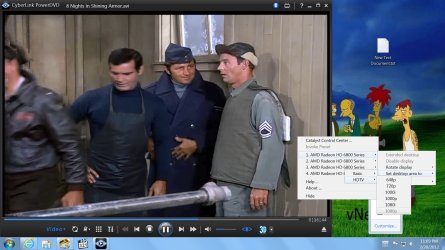
take a look at this screen shot and see if that helps.

Untitled.jpg


scrooge
 

My Computer

Computer Manufacturer/Model Number
home build
OS
win 7 ( 64 bit)
CPU
Intel Core i7-870 Lynnfield 2.93GHz 8MB L3 Cache LGA 1156 95
Motherboard
ASUS P7P55 LX LGA 1156
Memory
G.SKILL Sniper Series 16GB (4 x 4GB) 240-Pin DDR3 SDRAM
Graphics Card(s)
ATI Radeon HD6800 Series
Sound Card
hdmi
Monitor(s) Displays
42" lg 3d tv
Screen Resolution
1920 x 1080
Hard Drives
1 ssd pci-e revodrive
4 seagate 1.5 tb
PSU
Rosewill BRONZE Series RBR1000-M 1000W Continuous@40°C, 80Pl
Case
CoolMaster 922
Cooling
CORSAIR CWCH60 Hydro Series H60 High Performance Liquid CPU
Keyboard
logtech
Mouse
logitect
Internet Speed
5 mbit
Have you tried reinstalling your drivers for the card. If your having all these issues, its more than just the output. I would try the drivers first.

I have tried re-installing the drivers multiple times. I am thinking that I just may have a faulty card.
 

My Computer

OS
Windows 7 [64-Bit]
CPU
AMD Phenom II X6 1100T Black Edition Thuban 3.3GHz, 3.7GHz
Motherboard
GIGABYTE GA-990XA-UD3 AM3+ AMD
Memory
G.SKILL Ripjaws X Series 8GB 240-Pin DDR3 SDRAM DDR3 186
Graphics Card(s)
ATI Radeon HD 5870 1GB DDR5 PCI-Express Card
Sound Card
N/A (On-board Sound)
Monitor(s) Displays
HANNSpree 42" Class LCD 1080p 120Hz HDTV
Screen Resolution
1920 x 1080
Hard Drives
SSD: Crucial M4 CT064M4SSD2 2.5" 64GB SATA

HDD 1: Western Digital Caviar Blue WD5000AAKS 2TB 7200 RPM 16MB Cache

HDD 2: Western Digital Caviar Blue WD5000AAKS 1TB 7200 RPM 16MB Cache

HDD 3: Western Digital Caviar Blue WD5000AAKS 500GB 7200 R
PSU
Antec High Current Gamer Series HCG-900 900W
Case
NZXT Phantom PHAN-001WT Red Steel / Plastic Enthusiast ATX
Cooling
FANS: 140MM (x1), 120MM (x3), 200MM (x2)
Keyboard
Logitech G13 & Steelseries Merc Stealth
Mouse
Cyborg M.M.O. 7 Gaming Mouse, Logitech G700 & Steelseries Wo
Internet Speed
25 Mbps Download / 2 Mbps Upload
have you tryed the hdmi cable on another device ?
maybe the cable is bad.


scrooge
 

My Computer

Computer Manufacturer/Model Number
home build
OS
win 7 ( 64 bit)
CPU
Intel Core i7-870 Lynnfield 2.93GHz 8MB L3 Cache LGA 1156 95
Motherboard
ASUS P7P55 LX LGA 1156
Memory
G.SKILL Sniper Series 16GB (4 x 4GB) 240-Pin DDR3 SDRAM
Graphics Card(s)
ATI Radeon HD6800 Series
Sound Card
hdmi
Monitor(s) Displays
42" lg 3d tv
Screen Resolution
1920 x 1080
Hard Drives
1 ssd pci-e revodrive
4 seagate 1.5 tb
PSU
Rosewill BRONZE Series RBR1000-M 1000W Continuous@40°C, 80Pl
Case
CoolMaster 922
Cooling
CORSAIR CWCH60 Hydro Series H60 High Performance Liquid CPU
Keyboard
logtech
Mouse
logitect
Internet Speed
5 mbit
have you tryed the hdmi cable on another device ?
maybe the cable is bad.


scrooge

Yes I have and the cable is working as intended.

Emitted from my Droid Bionic via Tapatalk
 

My Computer

OS
Windows 7 [64-Bit]
CPU
AMD Phenom II X6 1100T Black Edition Thuban 3.3GHz, 3.7GHz
Motherboard
GIGABYTE GA-990XA-UD3 AM3+ AMD
Memory
G.SKILL Ripjaws X Series 8GB 240-Pin DDR3 SDRAM DDR3 186
Graphics Card(s)
ATI Radeon HD 5870 1GB DDR5 PCI-Express Card
Sound Card
N/A (On-board Sound)
Monitor(s) Displays
HANNSpree 42" Class LCD 1080p 120Hz HDTV
Screen Resolution
1920 x 1080
Hard Drives
SSD: Crucial M4 CT064M4SSD2 2.5" 64GB SATA

HDD 1: Western Digital Caviar Blue WD5000AAKS 2TB 7200 RPM 16MB Cache

HDD 2: Western Digital Caviar Blue WD5000AAKS 1TB 7200 RPM 16MB Cache

HDD 3: Western Digital Caviar Blue WD5000AAKS 500GB 7200 R
PSU
Antec High Current Gamer Series HCG-900 900W
Case
NZXT Phantom PHAN-001WT Red Steel / Plastic Enthusiast ATX
Cooling
FANS: 140MM (x1), 120MM (x3), 200MM (x2)
Keyboard
Logitech G13 & Steelseries Merc Stealth
Mouse
Cyborg M.M.O. 7 Gaming Mouse, Logitech G700 & Steelseries Wo
Internet Speed
25 Mbps Download / 2 Mbps Upload
The Radeon 5870 HD has HDMI port so "normally" the best connection is HDMI-HDMI.


Connect the HDMI cable in the HDMI 2 of your T.V.


In some hd television models the correct computer connection is the HDMI 2.


Try this and post back.
 

My Computer

Computer Manufacturer/Model Number
Custom Built by me.
OS
Windows 7 Ultimate 64bit SP1
CPU
Intel Core 2 Quad Q6600
Motherboard
Gigabyte GA-X38-DS4
Memory
2X2GB DDR2 PC6400 800MHZ DUAL CHANNEL
Graphics Card(s)
XFX RADEON HD 6850 1GB GDDR5
Sound Card
2/4/5.1/7.1-channel Realtek High Definition
Monitor(s) Displays
Samsung LE40A656F1 1080p 100Hz LCD HD TV 50,000:1
Screen Resolution
1366x768 in Desktop,1920x1080p in gaming and video
Hard Drives
C:\WD VelociRaptor 150 GB,10,000 RPM
E:\WESTERN DIGITAL WD15EADS 1.5TB CAVIAR GREEN SATA2 F:\WESTERN DIGITAL WD15EADS 1.5TB CAVIAR GREEN SATA2
PSU
THERMALTAKE W0229 TOUGHPOWER XT 750W
Case
A-Case Twin Engine BB
Cooling
3 x thermaltake smart case fan II + 1 arctic cooling fan
Keyboard
Wireless Logitech LX710
Mouse
Logitech Wireless Gaming Mouse G700
Internet Speed
ADSL 12000 plus
Other Info
Mouse Logitech G700,with 13 buttons who needs keyboard in RPG?

D:\Sony high speed sata Dvd Rewriter
Logitech Cordless Rumblepad 2
Back
Top