Solved How do I disable the Windows "DING" sound when copy/paste or cutting?

that 2nd sounds reminds me of an XP sound...
 

My Computer My Computer

At a glance

Multi-Boot W7_Pro_x64 W8.1_Pro_x64 W10_Pro_x6...AMD Athlon II x4 6206GB GSkill DDR2 800AMD 4670 GPU + AMD 4200 IGP
Computer type
PC/Desktop
Computer Manufacturer/Model Number
home built
OS
Multi-Boot W7_Pro_x64 W8.1_Pro_x64 W10_Pro_x64 +Linux_VMs +Chromium_VM
CPU
AMD Athlon II x4 620
Motherboard
Gigabyte GA-MA785G-UD3H
Memory
6GB GSkill DDR2 800
Graphics Card(s)
AMD 4670 GPU + AMD 4200 IGP
Sound Card
on board Realtek ALC889A
Monitor(s) Displays
RCA 40" LCD TV, Insignia 32" LCD TV, HP 15" LCD monitor
Screen Resolution
1680 x 1050
Hard Drives
OCZ Vertex 3 120GB,
Samsung F3 1TB (3),
Several others - WD, Seagate, Hitachi, ...
PSU
Corsair 500 W
Case
Rosewill mid tower
Cooling
CM 90mm rifle
Keyboard
Gyration wireless, Logitech wireless, Dell USB wired
Mouse
Gyration wireless, Logitech wireless, V7 USB wired
Internet Speed
Spectrum - 100Mbps D / 10Mbps U
Antivirus
Avast, MBAM3, EMET, WinPatrol
Browser
Pale Moon, Firefox, IE
Other Info
2 multi-boot PC's
Mainly HTPC/Office/Gen purpose (no gaming).
Trendnet USB KVM.
LG DVD burner/Blue Ray Player.
Tray system for removable SATA backup drives.

Not currently OCd, under-volted.
I use Hybrid sleep, rarely re-boot or shutdown.

Hauppauge HD-PVR, Avermedia PCIe TV Tuner, Hauppauge PCI TV Tuner.
For now I have only two more suggestions, when you were here:
Already tried:
Control panel > Sound > Sounds Tab > highlight "default beep" > select "none" for sound from drop-down list > click "Apply"
Did you also set the Sound Scheme to No Sounds?
View attachment 202331

You will still get sounds like music or playback from a CD or DVD. This setting just takes care of System Sounds.

The only other setting I would know of would be your on-board sound, but that would effectively kill all sound.

It would be in your BIOS, see page 55 here: http://www.evga.com/support/manuals/files/141-BL-E759.pdf
On the Integrated Peripherals Menu >Onboard Device, disable the High Definition Audio setting. Shown on page 57.

Anak,

I missed this one earlier. Yes, I did set BOTH the "Sound Scheme" at the upper drop-down list to "No Sounds", and the drop-down list at the bottom under "Sounds:" is set to "(None)"

I have to copy & paste a large number of car part numbers (one by one) from an Excel spreadsheet, it's a mind-numbing experience that will take a couple of work days, but I don't know any easier way to do it. I could turn the speakers off, or I could maybe figure out how to disable ALL sound at the motherboard, but I would sure like to be able to listen to music over the speakers while I'm working, minus the constant DINGING, of course! :D
 

My Computer My Computer

At a glance

Windows 7 Professional x64Intel i7-920Mushkin Redline 6GBSapphire Radeon HD 6670
Computer Manufacturer/Model Number
custom
OS
Windows 7 Professional x64
CPU
Intel i7-920
Motherboard
EVGA Classified E760
Memory
Mushkin Redline 6GB
Graphics Card(s)
Sapphire Radeon HD 6670
Sound Card
whatever came on motherboard
Monitor(s) Displays
NEC 20WMGX2 and NEC 2490WUXI2
Hard Drives
Intel x25-M G2 160GB Solid State
Samsung Spinpoint F3 (1TB)
PSU
Seasonic X-750
that 2nd sounds reminds me of an XP sound...

David,

I kind of thought so too, but I only have WinXP installed on the Virtual setting, so I could run some of my old WinXP programs that wouldn't work on Win7 64-bit, but I haven't used it since the first few months after I put this PC together, about two years ago (my first experience building a PC, I was amazed when it worked it all!)

I don't even remember how to get into "virtual WinXP" mode anymore...

The main operating system on this machine has always been Win7 64-bit, installed with all brand-new components.
 

My Computer My Computer

At a glance

Windows 7 Professional x64Intel i7-920Mushkin Redline 6GBSapphire Radeon HD 6670
Computer Manufacturer/Model Number
custom
OS
Windows 7 Professional x64
CPU
Intel i7-920
Motherboard
EVGA Classified E760
Memory
Mushkin Redline 6GB
Graphics Card(s)
Sapphire Radeon HD 6670
Sound Card
whatever came on motherboard
Monitor(s) Displays
NEC 20WMGX2 and NEC 2490WUXI2
Hard Drives
Intel x25-M G2 160GB Solid State
Samsung Spinpoint F3 (1TB)
PSU
Seasonic X-750
Until we find the source of your angst, your best bet would be to turn the speakers off, and get a radio or MP3, iPod player to give you some background sound.
 

My Computer My Computer

At a glance

Originally Win 7 Hm Prem x64 Ver 6.1.7600 Bui...Intel i3 530 2.93GHz, 2933MHz 2 Cores 4 Logic...6GB of 1,333MHz DDR3 SDRAM32MB Intel Graphics Media Accelerator HD IGChip
Computer type
PC/Desktop
Computer Manufacturer/Model Number
Gateway DX4831-01e (Mid-Tower Desktop)
OS
Originally Win 7 Hm Prem x64 Ver 6.1.7600 Build 7601-SP1 | Upgraded to Windows 10 December 14, 2019
CPU
Intel i3 530 2.93GHz, 2933MHz 2 Cores 4 Logical Processors
Motherboard
Gateway H57M01 133 megahertz
Memory
6GB of 1,333MHz DDR3 SDRAM
Graphics Card(s)
32MB Intel Graphics Media Accelerator HD IGChip
Sound Card
Realtek High Definition Audio
Monitor(s) Displays
Gateway HX2000 20inch TFT active matrix TN
Screen Resolution
1600 x 900 x 59 hertz
Hard Drives
WDC WD10EADS-00M2B0 [HDD] (1000.20 GB) -- drive 0,
HL-DT-ST DVDRAM GH41N [CD-ROM dr]
Four card readers, and Four USB 2.0
PSU
300watts.
Case
Mid-Tower Desktop
Cooling
Stock from Gateway
Keyboard
Natural Ergonomic Keyboard 4000, see Other Info
Mouse
Orig. Gateway wore out now using Insignia USB wired optical
Internet Speed
Vz FIOS 10ms png 57.64Mbps down 65.53Mbps up Speedtest.org
Antivirus
Zamana Anti-logger with Anti-malware, MSE, Windows Firewall,
Browser
IE11.0.9600.19399-Upd ver11.0.135, Firefox 68.0.1 x64
Other Info
System Specs by Belarc.

BIOS: American Megatrends Inc. P01-A0 11/17/2009

Replaced the MS 'Natural' Standard PS/2 Enhanced 101-102 Keyboard with a new Natural Ergonomic Keyboard 4000 on August 1st 2014.

Canon Pixma MG3222 Printer.

Updated to IE11 on 12102015 | Fios Quantum Router g1100

Additional AV: SpywareBlaster, manual Mbam, SAS

My Computer My Computer

At a glance

Originally Win 7 Hm Prem x64 Ver 6.1.7600 Bui...Intel i3 530 2.93GHz, 2933MHz 2 Cores 4 Logic...6GB of 1,333MHz DDR3 SDRAM32MB Intel Graphics Media Accelerator HD IGChip
Computer type
PC/Desktop
Computer Manufacturer/Model Number
Gateway DX4831-01e (Mid-Tower Desktop)
OS
Originally Win 7 Hm Prem x64 Ver 6.1.7600 Build 7601-SP1 | Upgraded to Windows 10 December 14, 2019
CPU
Intel i3 530 2.93GHz, 2933MHz 2 Cores 4 Logical Processors
Motherboard
Gateway H57M01 133 megahertz
Memory
6GB of 1,333MHz DDR3 SDRAM
Graphics Card(s)
32MB Intel Graphics Media Accelerator HD IGChip
Sound Card
Realtek High Definition Audio
Monitor(s) Displays
Gateway HX2000 20inch TFT active matrix TN
Screen Resolution
1600 x 900 x 59 hertz
Hard Drives
WDC WD10EADS-00M2B0 [HDD] (1000.20 GB) -- drive 0,
HL-DT-ST DVDRAM GH41N [CD-ROM dr]
Four card readers, and Four USB 2.0
PSU
300watts.
Case
Mid-Tower Desktop
Cooling
Stock from Gateway
Keyboard
Natural Ergonomic Keyboard 4000, see Other Info
Mouse
Orig. Gateway wore out now using Insignia USB wired optical
Internet Speed
Vz FIOS 10ms png 57.64Mbps down 65.53Mbps up Speedtest.org
Antivirus
Zamana Anti-logger with Anti-malware, MSE, Windows Firewall,
Browser
IE11.0.9600.19399-Upd ver11.0.135, Firefox 68.0.1 x64
Other Info
System Specs by Belarc.

BIOS: American Megatrends Inc. P01-A0 11/17/2009

Replaced the MS 'Natural' Standard PS/2 Enhanced 101-102 Keyboard with a new Natural Ergonomic Keyboard 4000 on August 1st 2014.

Canon Pixma MG3222 Printer.

Updated to IE11 on 12102015 | Fios Quantum Router g1100

Additional AV: SpywareBlaster, manual Mbam, SAS

My Computer My Computer

At a glance

Windows 7 Professional x64Intel i7-920Mushkin Redline 6GBSapphire Radeon HD 6670
Computer Manufacturer/Model Number
custom
OS
Windows 7 Professional x64
CPU
Intel i7-920
Motherboard
EVGA Classified E760
Memory
Mushkin Redline 6GB
Graphics Card(s)
Sapphire Radeon HD 6670
Sound Card
whatever came on motherboard
Monitor(s) Displays
NEC 20WMGX2 and NEC 2490WUXI2
Hard Drives
Intel x25-M G2 160GB Solid State
Samsung Spinpoint F3 (1TB)
PSU
Seasonic X-750
Check to see if you can shut the sounds off in virtual mode.
 

My Computer My Computer

At a glance

Originally Win 7 Hm Prem x64 Ver 6.1.7600 Bui...Intel i3 530 2.93GHz, 2933MHz 2 Cores 4 Logic...6GB of 1,333MHz DDR3 SDRAM32MB Intel Graphics Media Accelerator HD IGChip
Computer type
PC/Desktop
Computer Manufacturer/Model Number
Gateway DX4831-01e (Mid-Tower Desktop)
OS
Originally Win 7 Hm Prem x64 Ver 6.1.7600 Build 7601-SP1 | Upgraded to Windows 10 December 14, 2019
CPU
Intel i3 530 2.93GHz, 2933MHz 2 Cores 4 Logical Processors
Motherboard
Gateway H57M01 133 megahertz
Memory
6GB of 1,333MHz DDR3 SDRAM
Graphics Card(s)
32MB Intel Graphics Media Accelerator HD IGChip
Sound Card
Realtek High Definition Audio
Monitor(s) Displays
Gateway HX2000 20inch TFT active matrix TN
Screen Resolution
1600 x 900 x 59 hertz
Hard Drives
WDC WD10EADS-00M2B0 [HDD] (1000.20 GB) -- drive 0,
HL-DT-ST DVDRAM GH41N [CD-ROM dr]
Four card readers, and Four USB 2.0
PSU
300watts.
Case
Mid-Tower Desktop
Cooling
Stock from Gateway
Keyboard
Natural Ergonomic Keyboard 4000, see Other Info
Mouse
Orig. Gateway wore out now using Insignia USB wired optical
Internet Speed
Vz FIOS 10ms png 57.64Mbps down 65.53Mbps up Speedtest.org
Antivirus
Zamana Anti-logger with Anti-malware, MSE, Windows Firewall,
Browser
IE11.0.9600.19399-Upd ver11.0.135, Firefox 68.0.1 x64
Other Info
System Specs by Belarc.

BIOS: American Megatrends Inc. P01-A0 11/17/2009

Replaced the MS 'Natural' Standard PS/2 Enhanced 101-102 Keyboard with a new Natural Ergonomic Keyboard 4000 on August 1st 2014.

Canon Pixma MG3222 Printer.

Updated to IE11 on 12102015 | Fios Quantum Router g1100

Additional AV: SpywareBlaster, manual Mbam, SAS
Until we find the source of your angst, your best bet would be to turn the speakers off, and get a radio or MP3, iPod player to give you some background sound.

I can certainly do that for now, this is just one of those things that must have an easy solution (an off switch somewhere), and it's frustrating not to be able to figure it out. I spent an hour or more on Google searching for a resolution, and it seems many others have had this same problem, but I didn't find any workable solutions.

One person claimed to solve it by changing the Registry, but messing around in the Registry is not something I person with my limited computer knowledge ought to be doing...
 

My Computer My Computer

At a glance

Windows 7 Professional x64Intel i7-920Mushkin Redline 6GBSapphire Radeon HD 6670
Computer Manufacturer/Model Number
custom
OS
Windows 7 Professional x64
CPU
Intel i7-920
Motherboard
EVGA Classified E760
Memory
Mushkin Redline 6GB
Graphics Card(s)
Sapphire Radeon HD 6670
Sound Card
whatever came on motherboard
Monitor(s) Displays
NEC 20WMGX2 and NEC 2490WUXI2
Hard Drives
Intel x25-M G2 160GB Solid State
Samsung Spinpoint F3 (1TB)
PSU
Seasonic X-750

My Computer My Computer

At a glance

Windows 7 Professional x64Intel i7-920Mushkin Redline 6GBSapphire Radeon HD 6670
Computer Manufacturer/Model Number
custom
OS
Windows 7 Professional x64
CPU
Intel i7-920
Motherboard
EVGA Classified E760
Memory
Mushkin Redline 6GB
Graphics Card(s)
Sapphire Radeon HD 6670
Sound Card
whatever came on motherboard
Monitor(s) Displays
NEC 20WMGX2 and NEC 2490WUXI2
Hard Drives
Intel x25-M G2 160GB Solid State
Samsung Spinpoint F3 (1TB)
PSU
Seasonic X-750
You might want to install the latest audio drivers. Although I've not encountered this in W7, in XP if the drivers are messed up (or totally missing) the "action=sound" settings do not work as expected.

This seems to be a PDF with some info on your motherboard:
http://www.evga.com/support/manuals/files/141-BL-E759.pdf

That points to the MB using a RealTek audio chipset. If the information in your device manager confirms the chipset, then you might want to get the drivers that were updated in Dec 2011: Realtek

Just a thought...
 

My Computer My Computer

At a glance

W7 Pro SP1 64biti78GBIntel HD Graphics
Computer type
Laptop
Computer Manufacturer/Model Number
Employer provided Dell Latitude
OS
W7 Pro SP1 64bit
CPU
i7
Memory
8GB
Graphics Card(s)
Intel HD Graphics
Hard Drives
crappy SSD
Antivirus
Employer mandated Symantec Endpoint Protection
Browser
Pale Moon 64bit, IE11 64bit & Chrome 64bit
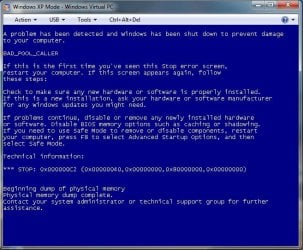
I couldn't get virtual WinXP to work, it says something about not being able to activate Integration features, but says I can do it at a later time, so I click "OK" to continue and it pops up the box saying it must shut down.

I did a "print-screen" (with "ding"), pasted into Paint, cropped it and saved as a Jpeg attached below. I think this is why I stopped using WinXp, I couldn't get it to work anymore, and I only needed it for one program.

Micrografx Windows Draw 6.0 was a great desktop publishing program, I think originally released for Windows 95, but still worked fine on WinXP. I would like to be able to use it again, but I suspect the problems I'm having would require reformatting the hard drives, reinstalling the O/S and all my software, and data, etc., etc.
 

Attachments

  • WinXP error pop-up window.jpg
    WinXP error pop-up window.jpg
    65.6 KB · Views: 22

My Computer My Computer

At a glance

Windows 7 Professional x64Intel i7-920Mushkin Redline 6GBSapphire Radeon HD 6670
Computer Manufacturer/Model Number
custom
OS
Windows 7 Professional x64
CPU
Intel i7-920
Motherboard
EVGA Classified E760
Memory
Mushkin Redline 6GB
Graphics Card(s)
Sapphire Radeon HD 6670
Sound Card
whatever came on motherboard
Monitor(s) Displays
NEC 20WMGX2 and NEC 2490WUXI2
Hard Drives
Intel x25-M G2 160GB Solid State
Samsung Spinpoint F3 (1TB)
PSU
Seasonic X-750
Let's not get too far off topic, and put the XPmode on the back burner for now. Did you see UsernameIssues's post?

Your copy/paste problem sounds interesting, and I am looking into the problem your having with handling large sets of values, but again off topic.
Try posting about it here: Microsoft Office - Windows 7 Forums, and let me know.
 

My Computer My Computer

At a glance

Originally Win 7 Hm Prem x64 Ver 6.1.7600 Bui...Intel i3 530 2.93GHz, 2933MHz 2 Cores 4 Logic...6GB of 1,333MHz DDR3 SDRAM32MB Intel Graphics Media Accelerator HD IGChip
Computer type
PC/Desktop
Computer Manufacturer/Model Number
Gateway DX4831-01e (Mid-Tower Desktop)
OS
Originally Win 7 Hm Prem x64 Ver 6.1.7600 Build 7601-SP1 | Upgraded to Windows 10 December 14, 2019
CPU
Intel i3 530 2.93GHz, 2933MHz 2 Cores 4 Logical Processors
Motherboard
Gateway H57M01 133 megahertz
Memory
6GB of 1,333MHz DDR3 SDRAM
Graphics Card(s)
32MB Intel Graphics Media Accelerator HD IGChip
Sound Card
Realtek High Definition Audio
Monitor(s) Displays
Gateway HX2000 20inch TFT active matrix TN
Screen Resolution
1600 x 900 x 59 hertz
Hard Drives
WDC WD10EADS-00M2B0 [HDD] (1000.20 GB) -- drive 0,
HL-DT-ST DVDRAM GH41N [CD-ROM dr]
Four card readers, and Four USB 2.0
PSU
300watts.
Case
Mid-Tower Desktop
Cooling
Stock from Gateway
Keyboard
Natural Ergonomic Keyboard 4000, see Other Info
Mouse
Orig. Gateway wore out now using Insignia USB wired optical
Internet Speed
Vz FIOS 10ms png 57.64Mbps down 65.53Mbps up Speedtest.org
Antivirus
Zamana Anti-logger with Anti-malware, MSE, Windows Firewall,
Browser
IE11.0.9600.19399-Upd ver11.0.135, Firefox 68.0.1 x64
Other Info
System Specs by Belarc.

BIOS: American Megatrends Inc. P01-A0 11/17/2009

Replaced the MS 'Natural' Standard PS/2 Enhanced 101-102 Keyboard with a new Natural Ergonomic Keyboard 4000 on August 1st 2014.

Canon Pixma MG3222 Printer.

Updated to IE11 on 12102015 | Fios Quantum Router g1100

Additional AV: SpywareBlaster, manual Mbam, SAS
based on this from post #6 i don't see it as an Office issue

So, it appears that I do not have "feedback with sound" enabled. I think this is something systemic to Windows, because it makes the "DING!" sound on ANYTHING that I attempt to right-click and copy (internet, Adobe Acrobat Standard, Notepad, etc., etc.).
I'd try starting in Safe Mode and see if there is the Ding issue with Notepad, Browser, etc.
 

My Computer My Computer

At a glance

Multi-Boot W7_Pro_x64 W8.1_Pro_x64 W10_Pro_x6...AMD Athlon II x4 6206GB GSkill DDR2 800AMD 4670 GPU + AMD 4200 IGP
Computer type
PC/Desktop
Computer Manufacturer/Model Number
home built
OS
Multi-Boot W7_Pro_x64 W8.1_Pro_x64 W10_Pro_x64 +Linux_VMs +Chromium_VM
CPU
AMD Athlon II x4 620
Motherboard
Gigabyte GA-MA785G-UD3H
Memory
6GB GSkill DDR2 800
Graphics Card(s)
AMD 4670 GPU + AMD 4200 IGP
Sound Card
on board Realtek ALC889A
Monitor(s) Displays
RCA 40" LCD TV, Insignia 32" LCD TV, HP 15" LCD monitor
Screen Resolution
1680 x 1050
Hard Drives
OCZ Vertex 3 120GB,
Samsung F3 1TB (3),
Several others - WD, Seagate, Hitachi, ...
PSU
Corsair 500 W
Case
Rosewill mid tower
Cooling
CM 90mm rifle
Keyboard
Gyration wireless, Logitech wireless, Dell USB wired
Mouse
Gyration wireless, Logitech wireless, V7 USB wired
Internet Speed
Spectrum - 100Mbps D / 10Mbps U
Antivirus
Avast, MBAM3, EMET, WinPatrol
Browser
Pale Moon, Firefox, IE
Other Info
2 multi-boot PC's
Mainly HTPC/Office/Gen purpose (no gaming).
Trendnet USB KVM.
LG DVD burner/Blue Ray Player.
Tray system for removable SATA backup drives.

Not currently OCd, under-volted.
I use Hybrid sleep, rarely re-boot or shutdown.

Hauppauge HD-PVR, Avermedia PCIe TV Tuner, Hauppauge PCI TV Tuner.
You might want to install the latest audio drivers. Although I've not encountered this in W7, in XP if the drivers are messed up (or totally missing) the "action=sound" settings do not work as expected.

This seems to be a PDF with some info on your motherboard:
http://www.evga.com/support/manuals/files/141-BL-E759.pdf

That points to the MB using a RealTek audio chipset. If the information in your device manager confirms the chipset, then you might want to get the drivers that were updated in Dec 2011: Realtek

Just a thought...

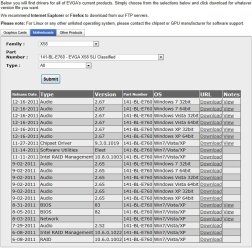
Thanks for the reply and checking on this. My motherboard is an E760 but (from memory) I think it uses the same Realtek audio chipset. I went to the Realtek website link you posted, and it said better to go to the EVGA website for downloads.

I found the EVGA download page here: EVGA Download Center

There is a list of 21 different driver updates available for download. I don't do anything with RAID (3 drivers) and I'm not on a Network (1 driver), so I can probably skip those, unless it's good practice to update all drivers as a matter of habit.

That leaves 1 chipset driver, 2 BIOS drivers, 1 software utilities driver and 13 Audio drivers. Do I need to install each one in order, from oldest to newest, or will the newest BIOS or Audio drivers include all previous updates?
 

Attachments

  • EVGA Driver Update Page.jpg
    EVGA Driver Update Page.jpg
    123.6 KB · Views: 10

My Computer My Computer

At a glance

Windows 7 Professional x64Intel i7-920Mushkin Redline 6GBSapphire Radeon HD 6670
Computer Manufacturer/Model Number
custom
OS
Windows 7 Professional x64
CPU
Intel i7-920
Motherboard
EVGA Classified E760
Memory
Mushkin Redline 6GB
Graphics Card(s)
Sapphire Radeon HD 6670
Sound Card
whatever came on motherboard
Monitor(s) Displays
NEC 20WMGX2 and NEC 2490WUXI2
Hard Drives
Intel x25-M G2 160GB Solid State
Samsung Spinpoint F3 (1TB)
PSU
Seasonic X-750
based on this from post #6 i don't see it as an Office issue

So, it appears that I do not have "feedback with sound" enabled. I think this is something systemic to Windows, because it makes the "DING!" sound on ANYTHING that I attempt to right-click and copy (internet, Adobe Acrobat Standard, Notepad, etc., etc.).
I'd try starting in Safe Mode and see if there is the Ding issue with Notepad, Browser, etc.

David,

I just rebooted into Safe Mode to try it. It would allow me to launch Microsoft Word, but then would say it was unable to verify the license, and shut the program down before I could try anything.

It did the same thing with Adobe Acrobate Standard 9.

I opened Notepad, typed some characters and tried copying and cutting them, there was NO "ding" sound. I also tried copying desktop icons, there was NO "ding" sound associated with that action either.

Both actions do cause the "ding" sound when I rebooted and started Win7 normally. So, the problem does not present itself in Safe Mode, but does in a regular Win7 reboot.
 

My Computer My Computer

At a glance

Windows 7 Professional x64Intel i7-920Mushkin Redline 6GBSapphire Radeon HD 6670
Computer Manufacturer/Model Number
custom
OS
Windows 7 Professional x64
CPU
Intel i7-920
Motherboard
EVGA Classified E760
Memory
Mushkin Redline 6GB
Graphics Card(s)
Sapphire Radeon HD 6670
Sound Card
whatever came on motherboard
Monitor(s) Displays
NEC 20WMGX2 and NEC 2490WUXI2
Hard Drives
Intel x25-M G2 160GB Solid State
Samsung Spinpoint F3 (1TB)
PSU
Seasonic X-750
Let's not get too far off topic, and put the XPmode on the back burner for now. Did you see UsernameIssues's post?

Your copy/paste problem sounds interesting, and I am looking into the problem your having with handling large sets of values, but again off topic.
Try posting about it here: Microsoft Office - Windows 7 Forums, and let me know.

Anak,

Thanks, I missed it earlier, I addressed UsernameIssue's post just a few minutes ago (see above). I won't worry about the virtual WinXP mode for now, and will try to stay focused on this issue.
 

My Computer My Computer

At a glance

Windows 7 Professional x64Intel i7-920Mushkin Redline 6GBSapphire Radeon HD 6670
Computer Manufacturer/Model Number
custom
OS
Windows 7 Professional x64
CPU
Intel i7-920
Motherboard
EVGA Classified E760
Memory
Mushkin Redline 6GB
Graphics Card(s)
Sapphire Radeon HD 6670
Sound Card
whatever came on motherboard
Monitor(s) Displays
NEC 20WMGX2 and NEC 2490WUXI2
Hard Drives
Intel x25-M G2 160GB Solid State
Samsung Spinpoint F3 (1TB)
PSU
Seasonic X-750
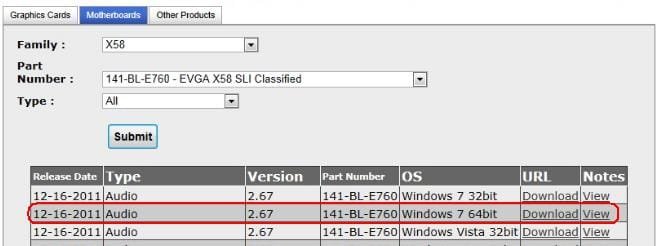
This is the only file that you should download for now:

evga.JPG

You can do BIOS later if you want.

While it is best to get drivers from the manufacturer's website - in this case, the files are the same. I downloaded the file from each site and did a file compare.

Given the results of your safe mode testing, I'm not as hopeful that drivers are the issue.

Edit: Can you please post a screenshot of your start up programs as shown by msconfig?
 

My Computer My Computer

At a glance

W7 Pro SP1 64biti78GBIntel HD Graphics
Computer type
Laptop
Computer Manufacturer/Model Number
Employer provided Dell Latitude
OS
W7 Pro SP1 64bit
CPU
i7
Memory
8GB
Graphics Card(s)
Intel HD Graphics
Hard Drives
crappy SSD
Antivirus
Employer mandated Symantec Endpoint Protection
Browser
Pale Moon 64bit, IE11 64bit & Chrome 64bit
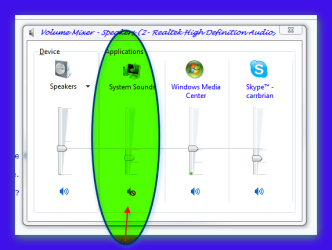
can you not just temporarily disable system sounds (as in the pic) right click on the speaker icon in the taskbar and click on open volume mixer
 

Attachments

  • Brys Snap 02  ?12 ?March ?2012 .png
    Brys Snap 02 ?12 ?March ?2012 .png
    18.9 KB · Views: 16

My Computer My Computer

At a glance

Operating System : Windows 7 Home Premium Edi...Processor : Intel Core 2 Quad Q8300 @ 2500 MHzPhysical Memory :8GB Corsair4x 2GB 800MHz C5 ...Video Card : XFX 6700 AMD
Computer Manufacturer/Model Number
packard bell IXTREME M5722
OS
Operating System : Windows 7 Home Premium Edition 6.01.7600 SP1 (x64)
CPU
Processor : Intel Core 2 Quad Q8300 @ 2500 MHz
Motherboard
Mainboard : Packard Bell (Acer EG43M )
Memory
Physical Memory :8GB Corsair4x 2GB 800MHz C5 DDR2
Graphics Card(s)
Video Card : XFX 6700 AMD
Monitor(s) Displays
Maestro 234DL - BenQ V2220 - BenQ VW2420H
Screen Resolution
Current Display :1920x1080p pixels at 60 Hz in HD LED
Hard Drives
Hard Disks : WDC (1000 GB)
Drive C: (Hard Disk) : 428 GB available on 491 GB
Drive D: (Hard Disk) : 426 GB available on 492 GB
SAMSUNG spinpoint HD103SJ 1000.2 GB
(X 2) KINGSTON SSD NOW V 30GB
PSU
XFX ProSeries 550W PSU
Case
PACKARD BELL IXTREME
Cooling
System Blower Current: 150mA Air Flow16CFM ;Akasa 90mm rear
Keyboard
Gigabyte Aivia K8100
Mouse
TRUST-Wireless Laser Mouse - Carbon edition MI-7770C
Internet Speed
TP-LINK > TL-WN951N / AV500 Gigabit Powerline Adapters
Browser
chrome dev
Other Info
EXTRA COOLING>(FAN CONTROLLER) PC Bay Cooler 3 x 40mm fans; Akasa AK-HD-BL Blue hard drive cooler 2 x 40 mm fan 4500 rpm 29.7 dBA
Bios> American Megatrends Inc.
Version : P01-A1
Date : 08/31/2009
UPDATE:

I have a small Clipboard program called "M8 Free Clipboard" that I rarely use, but this is where the "ding" sound was coming from. I disabled it in the M8 Free Clipboard program and the problem is solved!

Thanks everyone for all the replies,

Scott
 

My Computer My Computer

At a glance

Windows 7 Professional x64Intel i7-920Mushkin Redline 6GBSapphire Radeon HD 6670
Computer Manufacturer/Model Number
custom
OS
Windows 7 Professional x64
CPU
Intel i7-920
Motherboard
EVGA Classified E760
Memory
Mushkin Redline 6GB
Graphics Card(s)
Sapphire Radeon HD 6670
Sound Card
whatever came on motherboard
Monitor(s) Displays
NEC 20WMGX2 and NEC 2490WUXI2
Hard Drives
Intel x25-M G2 160GB Solid State
Samsung Spinpoint F3 (1TB)
PSU
Seasonic X-750
Thank you for the update Scott, glad to hear you found it!

"Sometimes the littlest things......." :p
 

My Computer My Computer

At a glance

Originally Win 7 Hm Prem x64 Ver 6.1.7600 Bui...Intel i3 530 2.93GHz, 2933MHz 2 Cores 4 Logic...6GB of 1,333MHz DDR3 SDRAM32MB Intel Graphics Media Accelerator HD IGChip
Computer type
PC/Desktop
Computer Manufacturer/Model Number
Gateway DX4831-01e (Mid-Tower Desktop)
OS
Originally Win 7 Hm Prem x64 Ver 6.1.7600 Build 7601-SP1 | Upgraded to Windows 10 December 14, 2019
CPU
Intel i3 530 2.93GHz, 2933MHz 2 Cores 4 Logical Processors
Motherboard
Gateway H57M01 133 megahertz
Memory
6GB of 1,333MHz DDR3 SDRAM
Graphics Card(s)
32MB Intel Graphics Media Accelerator HD IGChip
Sound Card
Realtek High Definition Audio
Monitor(s) Displays
Gateway HX2000 20inch TFT active matrix TN
Screen Resolution
1600 x 900 x 59 hertz
Hard Drives
WDC WD10EADS-00M2B0 [HDD] (1000.20 GB) -- drive 0,
HL-DT-ST DVDRAM GH41N [CD-ROM dr]
Four card readers, and Four USB 2.0
PSU
300watts.
Case
Mid-Tower Desktop
Cooling
Stock from Gateway
Keyboard
Natural Ergonomic Keyboard 4000, see Other Info
Mouse
Orig. Gateway wore out now using Insignia USB wired optical
Internet Speed
Vz FIOS 10ms png 57.64Mbps down 65.53Mbps up Speedtest.org
Antivirus
Zamana Anti-logger with Anti-malware, MSE, Windows Firewall,
Browser
IE11.0.9600.19399-Upd ver11.0.135, Firefox 68.0.1 x64
Other Info
System Specs by Belarc.

BIOS: American Megatrends Inc. P01-A0 11/17/2009

Replaced the MS 'Natural' Standard PS/2 Enhanced 101-102 Keyboard with a new Natural Ergonomic Keyboard 4000 on August 1st 2014.

Canon Pixma MG3222 Printer.

Updated to IE11 on 12102015 | Fios Quantum Router g1100

Additional AV: SpywareBlaster, manual Mbam, SAS
Back
Top