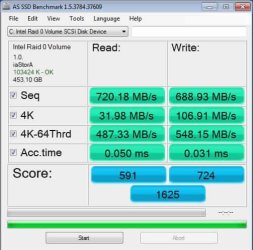
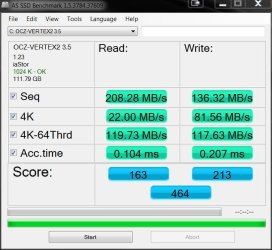
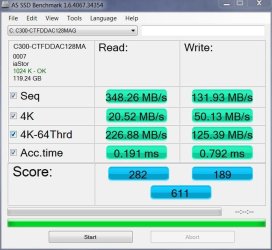
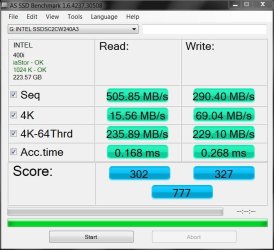
Show us your SSD performance 2

The one good thing besides the confusing nums is that in real life it probably makes very little difference. A little more or a little less in R/W times is hardly measurable during daily operations.

I totally agree.

There is some questions I have about the alignment though. Is there an alignment number that is better than the rest?

If so, how would I change the alignment number?

I plan on imaging the Vertex4 tonight and start from scratch with both the Vertex4 array and the Vertex3 array. I need to be consistant with the tests.
That is why I am asking about the alignment.

As you can see on AS SSD yours is 1024 and that is perfect. :D
 

My Computer

Computer Manufacturer/Model Number
Hopalong/ Godzilla
OS
Windows7 Pro 64bit SP-1; Windows XP Pro 32bit
CPU
Intel Core i7-870 Lynnfield 2.93GHz LGA 1156 95W Quad-Core
Motherboard
ASUS P7P55D-E PRO
Memory
8GB@1400MHz Crucial Ballistix DDR3-1600 4x2GB
Graphics Card(s)
ASUS ENGTX460 DirectCU/2DI/1GD5 1GB 256-bit GDDR5
Sound Card
VIA Onboard
Monitor(s) Displays
Asus VS248H-P 24"; Samsung SyncMaster 941BW 19"ws
Screen Resolution
1920x1080; 1440x900
Hard Drives
Samsung 830 120GB SSD
Intel 320 120GB SSD
Western Digital Caviar Black WD7501AALS 750GB 7200 RPM SATA 3.0Gb/s
Western Digital Caviar Black WD6401AALS 640GB 7200 RPM SATA 3.0Gb/s
PSU
COOLER MASTER Silent Pro RS850-AMBAJ3-US 850W Modular
Case
COOLER MASTER HAF 932 RC-932-KKN5-GP Black
Cooling
Scythe "Mugen-2 Rev.B" (2 ScytheKaze-Jyuni PWM fans)
Keyboard
Logitech K-320
Mouse
Kensington
Antivirus
Avast Inernet Suite
Browser
IE 9 ; Chrome
The one good thing besides the confusing nums is that in real life it probably makes very little difference. A little more or a little less in R/W times is hardly measurable during daily operations.

I totally agree.

There are some questions I have about the alignment though. Is there an alignment number that is better than the rest?

If so, how would I change the alignment number?

I plan on imaging the Vertex4 tonight and start from scratch with both the Vertex4 array and the Vertex3 array. I need to be consistant with the tests.
That is why I am asking about the alignment.
I understand that 1024 is a good alignment. But I am not sure whether that really performs better than any other valid number.

If you want to change it, there are several ways. I have described one method here: http://www.sevenforums.com/tutorials/205905-ssd-fix-misalignment.html
 

My Computer

Computer Manufacturer/Model Number
HP, Dell, Gateway, Toshiba - 4 laptops and 2 desktops
OS
Vista, Windows7, Mint Mate, Zorin, Windows 8
CPU
from 1.6GHz Duo to i7
Monitor(s) Displays
2x HP w2207
Hard Drives
5x HDD, 7x SSD, 12x Externals
Keyboard
with trackball - no mices
Mouse
Trackball mice
Internet Speed
DSL 6000
Hopalong X,

Yes, those are but I have a couple with 103424 as well. Not sure what happened there. I think that is when the Vertex4 was with firmware 1.3 and I did a clean install instead of imaging.
 

Attachments

  • 2012-05-12_Vertex4 Raid0 V1.3.jpg
    2012-05-12_Vertex4 Raid0 V1.3.jpg
    33.2 KB · Views: 5

My Computer

Computer type
PC/Desktop
Computer Manufacturer/Model Number
My New Build
OS
Microsoft Windows 7 Professional & Ultimate 64-bit 7601 Multiprocessor Free Service Pack 1
CPU
Intel(R) Core(TM) i7-3930K-C2 CPU @ 3.20GHz O.C. 4.50GHz
Motherboard
ASUSTeK COMPUTER INC. SABERTOOTH X79
Memory
32.00 GB - GSkill 32Gig Kit
Graphics Card(s)
(1) NVIDIA GeForce GTX 680 (2) NVIDIA GeForce GTX 680
Sound Card
(1) Realtek High Definition Audio (2) NVIDIA High Definiti
Monitor(s) Displays
Viewsonic 28", Samsung 40", Viewsonic 28"
Screen Resolution
(1) 1600 x 1024 x 32 bits (4294967296 colors) @ 60 Hz (2)
Hard Drives
(1) 2-Vertex 4 256G in Raid0 (2) Crusial C300-CTFDDAC256M SCSI Disk Device (3) WDC WD1002FAEX-007BA0 ATA Device (4) WDC WD1002FAEX-007BA0 ATA Device (5) 2 Vertex 3 240G
PSU
Seasonic 80+ Platinum 860W
Case
Thermaltake Level 10 GT Snow Edition
Cooling
Phantek PH-TC14PE_RD
Internet Speed
25M
If they have System Reserve they often end up at 103424.

1024 is often the offset when there is no System Reserve partition.
As WHS stated above it does not really matter.
The only important thing is the number showing divisible by four (4)?
In both case yours are so both are perfectly fine.

Mike


This is one you previously posted below 32K. It is divisible by 4 so you are good to go.


My Computer

Computer Manufacturer/Model Number
Hopalong/ Godzilla
OS
Windows7 Pro 64bit SP-1; Windows XP Pro 32bit
CPU
Intel Core i7-870 Lynnfield 2.93GHz LGA 1156 95W Quad-Core
Motherboard
ASUS P7P55D-E PRO
Memory
8GB@1400MHz Crucial Ballistix DDR3-1600 4x2GB
Graphics Card(s)
ASUS ENGTX460 DirectCU/2DI/1GD5 1GB 256-bit GDDR5
Sound Card
VIA Onboard
Monitor(s) Displays
Asus VS248H-P 24"; Samsung SyncMaster 941BW 19"ws
Screen Resolution
1920x1080; 1440x900
Hard Drives
Samsung 830 120GB SSD
Intel 320 120GB SSD
Western Digital Caviar Black WD7501AALS 750GB 7200 RPM SATA 3.0Gb/s
Western Digital Caviar Black WD6401AALS 640GB 7200 RPM SATA 3.0Gb/s
PSU
COOLER MASTER Silent Pro RS850-AMBAJ3-US 850W Modular
Case
COOLER MASTER HAF 932 RC-932-KKN5-GP Black
Cooling
Scythe "Mugen-2 Rev.B" (2 ScytheKaze-Jyuni PWM fans)
Keyboard
Logitech K-320
Mouse
Kensington
Antivirus
Avast Inernet Suite
Browser
IE 9 ; Chrome
The one good thing besides the confusing nums is that in real life it probably makes very little difference. A little more or a little less in R/W times is hardly measurable during daily operations.

I totally agree.

There are some questions I have about the alignment though. Is there an alignment number that is better than the rest?

If so, how would I change the alignment number?

I plan on imaging the Vertex4 tonight and start from scratch with both the Vertex4 array and the Vertex3 array. I need to be consistant with the tests.
That is why I am asking about the alignment.
I understand that 1024 is a good alignment. But I am not sure whether that really performs better than any other valid number.

If you want to change it, there are several ways. I have described one method here: http://www.sevenforums.com/tutorials/205905-ssd-fix-misalignment.html

Now I remember! I used Diskpart when I first got my Crucial in 2010 and used that method. Thanks for the tip.


If they have System Reserve they often end up at 103424.

1024 is often the offset when there is no System Reserve partition.
As WHS stated above it does not really matter.
The only important thing is the number showing divisible by four (4)?
In both case yours are so both are perfectly fine.

Mike


This is one you previously posted below 32K. It is divisible by 4 so you are good to go.


Ah yes. That was the single Vertex3 but not sure how it got to 32K.

You are right about the 103424, I remember I did a fresh install with the DVD and of course Win decided to add the 100MB partition. I can't tell you how much I hate that. I remember now that when I saw that, I started over and partitioned the drive from another OS just to keep Windows from making another one.

As far as the alignment goes, someone on another site told me that to do a proper comparison of the single, Vertex3 Raid, and Vertex4 raid, they all need to have the same alignment.

I never thought that mattered, only that they were aligned.

Am I wrong or are they wrong?
As it pertains to benchmarks that is.
 

My Computer

Computer type
PC/Desktop
Computer Manufacturer/Model Number
My New Build
OS
Microsoft Windows 7 Professional & Ultimate 64-bit 7601 Multiprocessor Free Service Pack 1
CPU
Intel(R) Core(TM) i7-3930K-C2 CPU @ 3.20GHz O.C. 4.50GHz
Motherboard
ASUSTeK COMPUTER INC. SABERTOOTH X79
Memory
32.00 GB - GSkill 32Gig Kit
Graphics Card(s)
(1) NVIDIA GeForce GTX 680 (2) NVIDIA GeForce GTX 680
Sound Card
(1) Realtek High Definition Audio (2) NVIDIA High Definiti
Monitor(s) Displays
Viewsonic 28", Samsung 40", Viewsonic 28"
Screen Resolution
(1) 1600 x 1024 x 32 bits (4294967296 colors) @ 60 Hz (2)
Hard Drives
(1) 2-Vertex 4 256G in Raid0 (2) Crusial C300-CTFDDAC256M SCSI Disk Device (3) WDC WD1002FAEX-007BA0 ATA Device (4) WDC WD1002FAEX-007BA0 ATA Device (5) 2 Vertex 3 240G
PSU
Seasonic 80+ Platinum 860W
Case
Thermaltake Level 10 GT Snow Edition
Cooling
Phantek PH-TC14PE_RD
Internet Speed
25M
They are wrong.

Benchmarks can vary as much as 2-5% from run to run from what I have seen.
TRIM, and garbage collection (GC). How close to needing TRIM run? Did it just run GC or is it almost due? No way of knowing after you run the Bench the first time when the SSD is new.
Antivirus running, indexing by Windows all can have an effect on the benchmark. These shut down if running in the background but did they have time to shut down before the benchmark started running or slightly after? That can effect the results.

Benches can be good to make sure everything is good when they are new. After they are used a while if it seems to be slow and you run the bench again and it is slow then???
Say your 4K drops from 24mb/s to 10Mb/s. Now you know something is off.

Sequential drop from 500Mb/s to 490Mb/s is not a big deal on the other hand.

Otherwise enjoy. :D ;)
Mike

Your question. As far as I know alignment has no effect on benchmarks unless alignment is wrong- not divisible by four.
 

My Computer

Computer Manufacturer/Model Number
Hopalong/ Godzilla
OS
Windows7 Pro 64bit SP-1; Windows XP Pro 32bit
CPU
Intel Core i7-870 Lynnfield 2.93GHz LGA 1156 95W Quad-Core
Motherboard
ASUS P7P55D-E PRO
Memory
8GB@1400MHz Crucial Ballistix DDR3-1600 4x2GB
Graphics Card(s)
ASUS ENGTX460 DirectCU/2DI/1GD5 1GB 256-bit GDDR5
Sound Card
VIA Onboard
Monitor(s) Displays
Asus VS248H-P 24"; Samsung SyncMaster 941BW 19"ws
Screen Resolution
1920x1080; 1440x900
Hard Drives
Samsung 830 120GB SSD
Intel 320 120GB SSD
Western Digital Caviar Black WD7501AALS 750GB 7200 RPM SATA 3.0Gb/s
Western Digital Caviar Black WD6401AALS 640GB 7200 RPM SATA 3.0Gb/s
PSU
COOLER MASTER Silent Pro RS850-AMBAJ3-US 850W Modular
Case
COOLER MASTER HAF 932 RC-932-KKN5-GP Black
Cooling
Scythe "Mugen-2 Rev.B" (2 ScytheKaze-Jyuni PWM fans)
Keyboard
Logitech K-320
Mouse
Kensington
Antivirus
Avast Inernet Suite
Browser
IE 9 ; Chrome
They are wrong.

Benchmarks can vary as much as 2-5% from run to run from what I have seen.
TRIM, and garbage collection (GC). How close to needing TRIM run? Did it just run GC or is it almost due? No way of knowing after you run the Bench the first time when the SSD is new.
Antivirus running, indexing by Windows all can have an effect on the benchmark. These shut down if running in the background but did they have time to shut down before the benchmark started running or slightly after? That can effect the results.

Benches can be good to make sure everything is good when they are new. After they are used a while if it seems to be slow and you run the bench again and it is slow then???
Say your 4K drops from 24mb/s to 10Mb/s. Now you know something is off.

Sequential drop from 500Mb/s to 490Mb/s is not a big deal on the other hand.

Otherwise enjoy. :D ;)
Mike

Your question. As far as I know alignment has no effect on benchmarks unless alignment is wrong- not divisible by four.


Thank you Mike for the very clear description.
 

My Computer

Computer type
PC/Desktop
Computer Manufacturer/Model Number
My New Build
OS
Microsoft Windows 7 Professional & Ultimate 64-bit 7601 Multiprocessor Free Service Pack 1
CPU
Intel(R) Core(TM) i7-3930K-C2 CPU @ 3.20GHz O.C. 4.50GHz
Motherboard
ASUSTeK COMPUTER INC. SABERTOOTH X79
Memory
32.00 GB - GSkill 32Gig Kit
Graphics Card(s)
(1) NVIDIA GeForce GTX 680 (2) NVIDIA GeForce GTX 680
Sound Card
(1) Realtek High Definition Audio (2) NVIDIA High Definiti
Monitor(s) Displays
Viewsonic 28", Samsung 40", Viewsonic 28"
Screen Resolution
(1) 1600 x 1024 x 32 bits (4294967296 colors) @ 60 Hz (2)
Hard Drives
(1) 2-Vertex 4 256G in Raid0 (2) Crusial C300-CTFDDAC256M SCSI Disk Device (3) WDC WD1002FAEX-007BA0 ATA Device (4) WDC WD1002FAEX-007BA0 ATA Device (5) 2 Vertex 3 240G
PSU
Seasonic 80+ Platinum 860W
Case
Thermaltake Level 10 GT Snow Edition
Cooling
Phantek PH-TC14PE_RD
Internet Speed
25M

My Computer

Computer Manufacturer/Model Number
Hopalong/ Godzilla
OS
Windows7 Pro 64bit SP-1; Windows XP Pro 32bit
CPU
Intel Core i7-870 Lynnfield 2.93GHz LGA 1156 95W Quad-Core
Motherboard
ASUS P7P55D-E PRO
Memory
8GB@1400MHz Crucial Ballistix DDR3-1600 4x2GB
Graphics Card(s)
ASUS ENGTX460 DirectCU/2DI/1GD5 1GB 256-bit GDDR5
Sound Card
VIA Onboard
Monitor(s) Displays
Asus VS248H-P 24"; Samsung SyncMaster 941BW 19"ws
Screen Resolution
1920x1080; 1440x900
Hard Drives
Samsung 830 120GB SSD
Intel 320 120GB SSD
Western Digital Caviar Black WD7501AALS 750GB 7200 RPM SATA 3.0Gb/s
Western Digital Caviar Black WD6401AALS 640GB 7200 RPM SATA 3.0Gb/s
PSU
COOLER MASTER Silent Pro RS850-AMBAJ3-US 850W Modular
Case
COOLER MASTER HAF 932 RC-932-KKN5-GP Black
Cooling
Scythe "Mugen-2 Rev.B" (2 ScytheKaze-Jyuni PWM fans)
Keyboard
Logitech K-320
Mouse
Kensington
Antivirus
Avast Inernet Suite
Browser
IE 9 ; Chrome
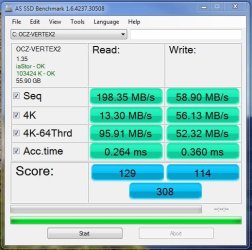
128GB Vertex 2
Vertex 2 AS SSD MBs.JPG

128GB Crucial C300
HD AS SSD C300 FW 007.JPG

128 Crucial M4
hd AS C4.JPG

240GB Intel 520
As SSD intel 520.JPG


I was going to Raid the intel drives, but figured they're fast enough without doing so.
 

My Computer

Computer type
PC/Desktop
Computer Manufacturer/Model Number
Systems by SmartEyeball
OS
8 Pro x64
CPU
i7 3770K 4.6GHz
Motherboard
ASUS P8Z77 WS
Memory
16GB G.Skill Trident X 2666mhz
Graphics Card(s)
x2 EVGA 780 Ti Superclocked SLI
Sound Card
SB X-FI Surround 5.1 PRO USB / ATH-AD900 Headphones
Monitor(s) Displays
x3 Dell U2410 / 58" Samsung
Screen Resolution
5760*1200/ 1920*1200
Hard Drives
2x Intel 520 240GB (RAID 0) * 2x WD Caviar Blacks 2TB (RAID 0) * 2TB WD Caviar Black * Sony Optirac DVD
PSU
Silverstone Strider Evolution 1200W
Case
Thermaltake Level 10 GT Snow Edition
Cooling
Noctua NH-D14
Keyboard
Topre Realforce // Ducky Shine MX Black // Filco Ninja TKL
Mouse
Thermaltake Theron (Highly Recommended) + Razer Imperator
Antivirus
MSE
Browser
IE, FF, WaterFox
Other Info
GT Extreme V2 Sim Racing Cockpit + 40" LCD and K/B Mouse stand ▼
Fanatec CSR Elite Wheel + Clubsport V1 Pedals + CSR shifter/7G-H ▼Saitek X52 Pro ▼ TrackIR 5 Pro
Buttkicker v2 Seat Rumbler with Dedicated 5.1 and Sub Woofer attached to frame ▼
=
Bloody Big Grin
Nice upgrade.

Any noticeable difference between the 128GB M4 and the 520?
The 4k read and access times are slightly better on the M4 but, my guess is it's not a noticeable difference.
 

My Computer

Computer type
PC/Desktop
Computer Manufacturer/Model Number
76~2.0
OS
Windows 7 Ult x64 - SP1/ Windows 8 Pro x64
CPU
Intel Core i5-3570K 4.6GHz
Motherboard
Gigabyte GA-Z77X UD3H, f18
Memory
8GB (2X4GB) DDR3 1600 Corsair Vengeance CL8 1.5v
Graphics Card(s)
Sapphire HD 7770 Vapor-X OC 1GB DDR5
Sound Card
Onboard VIA VT2021
Monitor(s) Displays
22" LCD Dell
Screen Resolution
1680x1050
Hard Drives
Samsung 840Pro 128GB SSD,
Seagate Barracuda 500GB SATA2 7200rpm 32MB cache, Seagate Barracuda 1TB SATA2 7200rpm 32MB cache,
PSU
Corsair HX650W
Case
Cooler Master Storm Scout
Cooling
Corsair H80 2x12cm Noctua NF P12 , 2x14cm case fans
Keyboard
Logitech Wave
Mouse
CM Sentinel
Internet Speed
Dismal
Antivirus
Avast
Browser
Opera Next
Other Info
Haswell laptop: HP Envy 17t-j, i7-4700MQ, GeForce 740M 2GB DDR3, 17.3" Full HD 1920x1080, 16GB RAM, Samsung 840 Pro 128GB, 1TB Hitachi 7200 HDD,
Desktop: eSATA ports,
External eSATA Seagate 500GB SATA2 7200rpm,
External WD USB 500GB
Yeah, nothing noticeable.
 

My Computer

Computer type
PC/Desktop
Computer Manufacturer/Model Number
Systems by SmartEyeball
OS
8 Pro x64
CPU
i7 3770K 4.6GHz
Motherboard
ASUS P8Z77 WS
Memory
16GB G.Skill Trident X 2666mhz
Graphics Card(s)
x2 EVGA 780 Ti Superclocked SLI
Sound Card
SB X-FI Surround 5.1 PRO USB / ATH-AD900 Headphones
Monitor(s) Displays
x3 Dell U2410 / 58" Samsung
Screen Resolution
5760*1200/ 1920*1200
Hard Drives
2x Intel 520 240GB (RAID 0) * 2x WD Caviar Blacks 2TB (RAID 0) * 2TB WD Caviar Black * Sony Optirac DVD
PSU
Silverstone Strider Evolution 1200W
Case
Thermaltake Level 10 GT Snow Edition
Cooling
Noctua NH-D14
Keyboard
Topre Realforce // Ducky Shine MX Black // Filco Ninja TKL
Mouse
Thermaltake Theron (Highly Recommended) + Razer Imperator
Antivirus
MSE
Browser
IE, FF, WaterFox
Other Info
GT Extreme V2 Sim Racing Cockpit + 40" LCD and K/B Mouse stand ▼
Fanatec CSR Elite Wheel + Clubsport V1 Pedals + CSR shifter/7G-H ▼Saitek X52 Pro ▼ TrackIR 5 Pro
Buttkicker v2 Seat Rumbler with Dedicated 5.1 and Sub Woofer attached to frame ▼
=
Bloody Big Grin
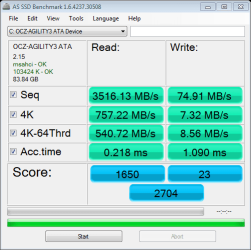
My Agility 3 is running numbers far below what's advertised, and while it's not a big issue at all (things still load incredibly fast!) I'm wondering if I'm doing something wrong.

I can post results from CDMark, if necessary.
 

My Computer

Computer type
PC/Desktop
Computer Manufacturer/Model Number
Custom
OS
Windows 10 Technical Preview - x64
CPU
Core i5-3570K - 4.5GHz
Motherboard
ASUS Sabertooth Z77 [B. 2003]
Memory
G.Skill Sniper 12GB DDR3-1600
Graphics Card(s)
ASUS GeForce GTX 970 STRIX
Monitor(s) Displays
Acer K272HUL
Screen Resolution
2560x1440
Hard Drives
Samsung 840 Evo 250GB (OS), Samsung Spinpoint F3 HD103SJ 1TB (Games), Seagate Expansion 1TB (Additional storage, Backup)
PSU
Cooler Master Real Power Pro 750W, Corsair HX1000W
Case
HAF-X
Cooling
XSPC Rasa RS360
Keyboard
Gigabyte Osmium, Noppoo Choc Mid 87, Corsair K70 RGB
Mouse
Roccat Kova
Internet Speed
50 Mbps up, 50 Mbps down
Antivirus
BitDefender TS 2013, Malwarebytes AM, SUPERAntiSpyware
Browser
Google Chrome
Other Info
Razer Vespula Gaming Pad, Razer eXactMat, Blackmagic Intensity Pro, Corsair Vengeance 1500 USB Headset, Google/ASUS Nexus 7

My Computer

Computer type
PC/Desktop
OS
Windows 10 Home x64
CPU
INTEL Core i5-750 Quad-Core 3.37GHz
Motherboard
ASUS P7P55D
Memory
HyperX Fury Black Series 8GB (2 x 4GB) 1866Mhz
Graphics Card(s)
EVGA GeForce GTX 750 Superclocked 1GB 128-Bit GDDR5
Monitor(s) Displays
LG 32MA68HY 32" IPS
Screen Resolution
1920 x 1080
Hard Drives
Samsung 840 Evo 120GB, SEAGATE 500GB Barracuda® 7200.12, SATA 3 Gb/s, 7200 RPM, 16MB cache
PSU
ANTEC TruePower New TP-550, 80 PLUS, 550W
Case
ANTEC Three Hundred Illusion
Cooling
COOLER MASTER Hyper 212 Plus, 4 x 120mm 1 x 140mm Noctua's
Internet Speed
85 + Mbps
Antivirus
Avast
Browser
Vivaldi
I've no idea where these scores came from - first time I've seen numbers that high.


Attachments

  • as-ssd-bench OCZ-AGILITY3 ATA 5.26.2012 6-13-01 AM.png
    as-ssd-bench OCZ-AGILITY3 ATA 5.26.2012 6-13-01 AM.png
    38.2 KB · Views: 11

My Computer

Computer type
PC/Desktop
Computer Manufacturer/Model Number
Custom
OS
Windows 10 Technical Preview - x64
CPU
Core i5-3570K - 4.5GHz
Motherboard
ASUS Sabertooth Z77 [B. 2003]
Memory
G.Skill Sniper 12GB DDR3-1600
Graphics Card(s)
ASUS GeForce GTX 970 STRIX
Monitor(s) Displays
Acer K272HUL
Screen Resolution
2560x1440
Hard Drives
Samsung 840 Evo 250GB (OS), Samsung Spinpoint F3 HD103SJ 1TB (Games), Seagate Expansion 1TB (Additional storage, Backup)
PSU
Cooler Master Real Power Pro 750W, Corsair HX1000W
Case
HAF-X
Cooling
XSPC Rasa RS360
Keyboard
Gigabyte Osmium, Noppoo Choc Mid 87, Corsair K70 RGB
Mouse
Roccat Kova
Internet Speed
50 Mbps up, 50 Mbps down
Antivirus
BitDefender TS 2013, Malwarebytes AM, SUPERAntiSpyware
Browser
Google Chrome
Other Info
Razer Vespula Gaming Pad, Razer eXactMat, Blackmagic Intensity Pro, Corsair Vengeance 1500 USB Headset, Google/ASUS Nexus 7
I think you have a world record there, that SSD is a keeper ;)

Your alignment and driver looks good.
 

My Computer

Computer type
PC/Desktop
Computer Manufacturer/Model Number
76~2.0
OS
Windows 7 Ult x64 - SP1/ Windows 8 Pro x64
CPU
Intel Core i5-3570K 4.6GHz
Motherboard
Gigabyte GA-Z77X UD3H, f18
Memory
8GB (2X4GB) DDR3 1600 Corsair Vengeance CL8 1.5v
Graphics Card(s)
Sapphire HD 7770 Vapor-X OC 1GB DDR5
Sound Card
Onboard VIA VT2021
Monitor(s) Displays
22" LCD Dell
Screen Resolution
1680x1050
Hard Drives
Samsung 840Pro 128GB SSD,
Seagate Barracuda 500GB SATA2 7200rpm 32MB cache, Seagate Barracuda 1TB SATA2 7200rpm 32MB cache,
PSU
Corsair HX650W
Case
Cooler Master Storm Scout
Cooling
Corsair H80 2x12cm Noctua NF P12 , 2x14cm case fans
Keyboard
Logitech Wave
Mouse
CM Sentinel
Internet Speed
Dismal
Antivirus
Avast
Browser
Opera Next
Other Info
Haswell laptop: HP Envy 17t-j, i7-4700MQ, GeForce 740M 2GB DDR3, 17.3" Full HD 1920x1080, 16GB RAM, Samsung 840 Pro 128GB, 1TB Hitachi 7200 HDD,
Desktop: eSATA ports,
External eSATA Seagate 500GB SATA2 7200rpm,
External WD USB 500GB
My 2 year old Vertex2 60GB still chugging away reliably. Upgrade in Decemeber....thinking Samsung.
 

Attachments

  • Capture.JPG
    Capture.JPG
    66.5 KB · Views: 5

My Computer

Computer type
PC/Desktop
Computer Manufacturer/Model Number
Golden Mk. I.4
OS
Windows 10 Pro x64 ; Xubuntu x64
CPU
Intel i7 860 @ 2.80 GHz O/C'ed to 4.0GHz
Motherboard
Gigabyte P55A-UD3R Rev.1. Award BIOS F13
Memory
16GB Corsair Vengance DDR3 @ 661 MHz Dual Channel (9-9-9-24)
Graphics Card(s)
EVGA NVidia GTX 560 1024MB
Sound Card
Realtek Integrated
Monitor(s) Displays
Dual Samsung SyncMaster 2494HS
Screen Resolution
1920*1080 and 1920*1080
Hard Drives
1*Samsung 840 EVO 120GB SSD;
1*OCZ Vertex 2 60GB SSD;
2*Samsung F3 SpinPoint 1TB in RAID0;
1*Samsung F1 SpinPoint 1TB;
2*Western Digital 1TB External USB 3.0
1*Western Digital 500GB External USB 3.0
1*Seagate 500GB External USB 2.0
PSU
Thermaltake ToughPower QFan 750W
Case
Thermaltake Element S VK60001W2Z
Cooling
Corsair H60 Water Cooling, 2*230mm and 2*80mm case fans
Keyboard
Logitech G110
Mouse
Logitech MX518
Golden

Good thinking. ;)
I like my Samsung 830 128GB I got last week.

Intelligent minds think alike. :geek:
 

My Computer

Computer Manufacturer/Model Number
Hopalong/ Godzilla
OS
Windows7 Pro 64bit SP-1; Windows XP Pro 32bit
CPU
Intel Core i7-870 Lynnfield 2.93GHz LGA 1156 95W Quad-Core
Motherboard
ASUS P7P55D-E PRO
Memory
8GB@1400MHz Crucial Ballistix DDR3-1600 4x2GB
Graphics Card(s)
ASUS ENGTX460 DirectCU/2DI/1GD5 1GB 256-bit GDDR5
Sound Card
VIA Onboard
Monitor(s) Displays
Asus VS248H-P 24"; Samsung SyncMaster 941BW 19"ws
Screen Resolution
1920x1080; 1440x900
Hard Drives
Samsung 830 120GB SSD
Intel 320 120GB SSD
Western Digital Caviar Black WD7501AALS 750GB 7200 RPM SATA 3.0Gb/s
Western Digital Caviar Black WD6401AALS 640GB 7200 RPM SATA 3.0Gb/s
PSU
COOLER MASTER Silent Pro RS850-AMBAJ3-US 850W Modular
Case
COOLER MASTER HAF 932 RC-932-KKN5-GP Black
Cooling
Scythe "Mugen-2 Rev.B" (2 ScytheKaze-Jyuni PWM fans)
Keyboard
Logitech K-320
Mouse
Kensington
Antivirus
Avast Inernet Suite
Browser
IE 9 ; Chrome
The Samsung 830 128GB is exactly the model I was thinking of.
 

My Computer

Computer type
PC/Desktop
Computer Manufacturer/Model Number
Golden Mk. I.4
OS
Windows 10 Pro x64 ; Xubuntu x64
CPU
Intel i7 860 @ 2.80 GHz O/C'ed to 4.0GHz
Motherboard
Gigabyte P55A-UD3R Rev.1. Award BIOS F13
Memory
16GB Corsair Vengance DDR3 @ 661 MHz Dual Channel (9-9-9-24)
Graphics Card(s)
EVGA NVidia GTX 560 1024MB
Sound Card
Realtek Integrated
Monitor(s) Displays
Dual Samsung SyncMaster 2494HS
Screen Resolution
1920*1080 and 1920*1080
Hard Drives
1*Samsung 840 EVO 120GB SSD;
1*OCZ Vertex 2 60GB SSD;
2*Samsung F3 SpinPoint 1TB in RAID0;
1*Samsung F1 SpinPoint 1TB;
2*Western Digital 1TB External USB 3.0
1*Western Digital 500GB External USB 3.0
1*Seagate 500GB External USB 2.0
PSU
Thermaltake ToughPower QFan 750W
Case
Thermaltake Element S VK60001W2Z
Cooling
Corsair H60 Water Cooling, 2*230mm and 2*80mm case fans
Keyboard
Logitech G110
Mouse
Logitech MX518

My Computer

Computer Manufacturer/Model Number
Hopalong/ Godzilla
OS
Windows7 Pro 64bit SP-1; Windows XP Pro 32bit
CPU
Intel Core i7-870 Lynnfield 2.93GHz LGA 1156 95W Quad-Core
Motherboard
ASUS P7P55D-E PRO
Memory
8GB@1400MHz Crucial Ballistix DDR3-1600 4x2GB
Graphics Card(s)
ASUS ENGTX460 DirectCU/2DI/1GD5 1GB 256-bit GDDR5
Sound Card
VIA Onboard
Monitor(s) Displays
Asus VS248H-P 24"; Samsung SyncMaster 941BW 19"ws
Screen Resolution
1920x1080; 1440x900
Hard Drives
Samsung 830 120GB SSD
Intel 320 120GB SSD
Western Digital Caviar Black WD7501AALS 750GB 7200 RPM SATA 3.0Gb/s
Western Digital Caviar Black WD6401AALS 640GB 7200 RPM SATA 3.0Gb/s
PSU
COOLER MASTER Silent Pro RS850-AMBAJ3-US 850W Modular
Case
COOLER MASTER HAF 932 RC-932-KKN5-GP Black
Cooling
Scythe "Mugen-2 Rev.B" (2 ScytheKaze-Jyuni PWM fans)
Keyboard
Logitech K-320
Mouse
Kensington
Antivirus
Avast Inernet Suite
Browser
IE 9 ; Chrome
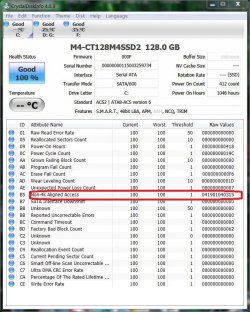
I didn't realize this before
CDI-M4-128G.jpg
"Basically, even though you have Windows and your drive nicely aligned - there's nothing stopping developers from reading and writing whatever they want. Which is a perfectly valid thing for software to do but will show as a non 4k access."
SSD SMART "Non-4k Aligned Access" - Crucial Community
So I wonder if software developers don't have SSDs in mind then real world software may not reflect blistering benchmarks?
 

My Computer

Computer type
PC/Desktop
Computer Manufacturer/Model Number
Own build
OS
Windows 7x64 Home Premium SP1
CPU
Intel i7 2600k
Motherboard
ASUS P8Z68 Deluxe
Memory
G.Skill Ripjaws (DDR3-1600) 2x4GB
Graphics Card(s)
Nvidia GeForce GTS 450; Intel HD Graphics 3000(GT2+)
Monitor(s) Displays
Dell Ultrasharp IPS panel U2311H, Samsung SyncMaster P2350
Screen Resolution
1920x1080
Hard Drives
Samsung 850 Pro SSD 256GB, Samsung SSD 840 120GB, Seagates 1TB Barracuda ST31000528AS x2
PSU
Seasonic M12II 520W
Case
Lian Li Lancool PC-K60
Cooling
Case: 1x120mm, 3x140mm CPU: Hyper 212+
Keyboard
Logitech MK520 (wireless)
Mouse
Logitech MK520
Internet Speed
6-7 Mbps
Antivirus
Norton Security Premium, Malwarebytes on 2 (MSE on 3rd PC)
Browser
FireFox
Other Info
Audio: Logitech Z523 2.1
Back
Top