Solved Possible virus/malware on a Windows 7 PC - need advice

Greyish99

New member
Hi,

I have a desktop computer running Windows Home Premium 64 bit, with 12 gb memory and plenty of disk, 2 x Nvidia Geforce 560 Gtx TI. Its been running just fine since it was new like 8 months ago. This weekend i moved, and upon using the PC for the first time in my new flat, it started to act up, with these symptoms:

- Cannot start Spotify - cursor hangs, and then i get the "not responding"
- Cannot set the computer to an earlier point, just hangs "not responding"
- I can use Internet Explorer to surf the net, but its sluggish
- Copy/paste often hangs
- Some options in controlpanel dont work, just get "not responding"
- i have tried to scan with Avast, which is the Av i use, stops at the same spot early in the scan. I have tried Avira Control Center, the scan hangs after a while. I have tried Malwarebytes antimalware, soon as i click it, it just tries to start it seems, cursors spins a little, then goes calm. If i look under processes, i can see the mbam.exe *32 run, but nothing happens. Last i tried the Microsoft Security Scanner, it starts up, scans up to 98%, then just sits there.

I am no computerexpert, but it seems to be some sort of virus, because all the normal actions you would take to fix a computer, has been blocked.

Now, is there a way out of this other than scratching the harddrive, and i also have 2 external drives attached to this PC, do they all need to be scratched/formatted?

Avast has not warned me about any viruses far as i can remember.

Any help would be appreciated :)

Oyvind,
Norway
 

My Computer

Computer Manufacturer/Model Number
Komplett
OS
Windows 7 Home Premium 64 bit
CPU
Intel i7 3,20 ghz
Memory
12 GB
Graphics Card(s)
Nvidia Geforce Gtx 560 TI x 2
Monitor(s) Displays
Samsung 24 inch
Hard Drives
2 x Ata
Welcome to the forum
Try to download WDO on a clean machine from this site and read about it:

What is Windows Defender Offline?
Then in safe mode run MBAM and see what happens if you are sure that your computer is infected.
 

My Computer

Computer type
Laptop
Computer Manufacturer/Model Number
HP pavilion DV6
OS
win7 home premium-64bit-SP1-IE10
CPU
T6600 2.2Ghz
Motherboard
HP Model 3628
Memory
4 Gb
Graphics Card(s)
ATI Mobility Radeon HD 4530
Sound Card
IDT High Definition
Screen Resolution
1366x768 @ 60Hz
Hard Drives
500Gb Western Digital
Antivirus
MSE
Other Info
Malwarebytes Antimalware + Spybot-Search&Destroy
Welcome Oyvind,

This may not be malware, but rather a system files issue brought on th by the move (perhaps a bump etc.). Please try the following:

1. Click the Start Orb
2. In the Search box, type cmd
3. Right-click on cmd.exe when it appears in the list, and choose 'Run as administrator'
4. In the console window that opens, type sfc /scannow and hit enter.

Copy & paste the results here in your next reply.

Regards,
Golden
 

My Computer

Computer type
PC/Desktop
Computer Manufacturer/Model Number
Golden Mk. I.4
OS
Windows 10 Pro x64 ; Xubuntu x64
CPU
Intel i7 860 @ 2.80 GHz O/C'ed to 4.0GHz
Motherboard
Gigabyte P55A-UD3R Rev.1. Award BIOS F13
Memory
16GB Corsair Vengance DDR3 @ 661 MHz Dual Channel (9-9-9-24)
Graphics Card(s)
EVGA NVidia GTX 560 1024MB
Sound Card
Realtek Integrated
Monitor(s) Displays
Dual Samsung SyncMaster 2494HS
Screen Resolution
1920*1080 and 1920*1080
Hard Drives
1*Samsung 840 EVO 120GB SSD;
1*OCZ Vertex 2 60GB SSD;
2*Samsung F3 SpinPoint 1TB in RAID0;
1*Samsung F1 SpinPoint 1TB;
2*Western Digital 1TB External USB 3.0
1*Western Digital 500GB External USB 3.0
1*Seagate 500GB External USB 2.0
PSU
Thermaltake ToughPower QFan 750W
Case
Thermaltake Element S VK60001W2Z
Cooling
Corsair H60 Water Cooling, 2*230mm and 2*80mm case fans
Keyboard
Logitech G110
Mouse
Logitech MX518
Hi,

Golden: My computer runs Norwegian, so i just try and translate what the screens say. It looks like nothing bad was found, it says something like this:

Control 100% completed
Windows resourceprotection did not find any integrity violations.

I have downloaded WDO on another clean Windows 7 PC. I have read the instructions, that tells me to goto the dir where the file is, its called mssstool64.exe. When i doubleclick it, it starts, but doesnt seem to do anything. Instructions tell me to insert a recordable CD or DVD, then doubleclick the MSSS_Media.iso file, but mine isnt called that. Then it says that it will automatically open a burner program. (I have Nero) None of that happens. To make a bootable CD i guess i need that iso file to burn, but when i click to download the WDO, i only get the .exe file, which doesnt seem to do anything.

Need some more assistance i guess :o

Update: I used my portable PC, and managed to create a CD, also created a second one. I then put it one into the infected PC, and one into another PC i have. Both booted from the CD after hitting a key when prompted. The infected PC now shows a grey screen with a blue window saying "Windows defender Offline", but have been doing that for 1,5 hours now, not showing me the screen where i can choose the type of scan i want. On the other PC, after like 20 minutes with the "Windows defener Offline screen", it showed me the screen where i chose full scan, and has now gone through more than a million files.

So, i see no heavy disk activity on the possibly infected PC, why doesnt it show me the screen where i can actually start the scan? Hmm, im kinda lost here, since the PC booted from the CD, can a virus really preventing the WDo from running properly?

Oyvind
Norway
 
Last edited:

My Computer

Computer Manufacturer/Model Number
Komplett
OS
Windows 7 Home Premium 64 bit
CPU
Intel i7 3,20 ghz
Memory
12 GB
Graphics Card(s)
Nvidia Geforce Gtx 560 TI x 2
Monitor(s) Displays
Samsung 24 inch
Hard Drives
2 x Ata
Control 100% completed
Windows resourceprotection did not find any integrity violations

Hi,

Thats OK, it means there aren't any system file corruptions, so we can rule that out.

I still doubt that there is a malware problem, but I think its good to persist with a scan none-the-less. If you still have issues with WDO, I recommend running the ESET online scanner from this link:

ESET :: Get a FREE Online Virus Scan

Regards,
Golden
 

My Computer

Computer type
PC/Desktop
Computer Manufacturer/Model Number
Golden Mk. I.4
OS
Windows 10 Pro x64 ; Xubuntu x64
CPU
Intel i7 860 @ 2.80 GHz O/C'ed to 4.0GHz
Motherboard
Gigabyte P55A-UD3R Rev.1. Award BIOS F13
Memory
16GB Corsair Vengance DDR3 @ 661 MHz Dual Channel (9-9-9-24)
Graphics Card(s)
EVGA NVidia GTX 560 1024MB
Sound Card
Realtek Integrated
Monitor(s) Displays
Dual Samsung SyncMaster 2494HS
Screen Resolution
1920*1080 and 1920*1080
Hard Drives
1*Samsung 840 EVO 120GB SSD;
1*OCZ Vertex 2 60GB SSD;
2*Samsung F3 SpinPoint 1TB in RAID0;
1*Samsung F1 SpinPoint 1TB;
2*Western Digital 1TB External USB 3.0
1*Western Digital 500GB External USB 3.0
1*Seagate 500GB External USB 2.0
PSU
Thermaltake ToughPower QFan 750W
Case
Thermaltake Element S VK60001W2Z
Cooling
Corsair H60 Water Cooling, 2*230mm and 2*80mm case fans
Keyboard
Logitech G110
Mouse
Logitech MX518
Hi,

I just tried the ESET online scanner, but the scan never really starts, the popup window just sits there at 0%, doing nothing.

The WDO i have gotten to start once, but it said it needed updates, so it started downloading but just before the end, it halted and never continued. I tried a USB, it boots from it, but never pops the scanwindow, im at my wits end here atm.
 

My Computer

Computer Manufacturer/Model Number
Komplett
OS
Windows 7 Home Premium 64 bit
CPU
Intel i7 3,20 ghz
Memory
12 GB
Graphics Card(s)
Nvidia Geforce Gtx 560 TI x 2
Monitor(s) Displays
Samsung 24 inch
Hard Drives
2 x Ata
Hi,

OK, whew. Lets try the BitDefender scanner.

Download this USB installer tool, and then run it:

Universal USB Installer – Easy as 1 2 3 | USB Pen Drive Linux

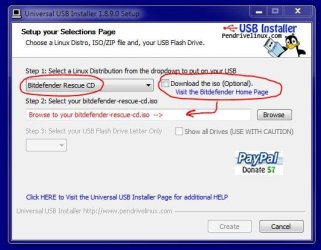
From the pull-down list select 'Bitdefender Rescue CD' and then download the ISO from the link. Select the ISO once it is downloaded, and then select the USB drive you want to install it to (note the USB drive will be formatted). See image below.

Capture.JPG

1. Boot directly from the USB drive.

2. Bitdefender will load (note the splash screen stays on the screen for quite a few minutes and it looks like nothing is happening, but just leave it).

3. After a few minutes, BitDefender will update its definitions from the web (make sure the internet cable is plugged into the computer) and then scan your system. This will take several hours.

4. A summary of the scan will be displayed once it is finished.

Regards,
Golden
 

My Computer

Computer type
PC/Desktop
Computer Manufacturer/Model Number
Golden Mk. I.4
OS
Windows 10 Pro x64 ; Xubuntu x64
CPU
Intel i7 860 @ 2.80 GHz O/C'ed to 4.0GHz
Motherboard
Gigabyte P55A-UD3R Rev.1. Award BIOS F13
Memory
16GB Corsair Vengance DDR3 @ 661 MHz Dual Channel (9-9-9-24)
Graphics Card(s)
EVGA NVidia GTX 560 1024MB
Sound Card
Realtek Integrated
Monitor(s) Displays
Dual Samsung SyncMaster 2494HS
Screen Resolution
1920*1080 and 1920*1080
Hard Drives
1*Samsung 840 EVO 120GB SSD;
1*OCZ Vertex 2 60GB SSD;
2*Samsung F3 SpinPoint 1TB in RAID0;
1*Samsung F1 SpinPoint 1TB;
2*Western Digital 1TB External USB 3.0
1*Western Digital 500GB External USB 3.0
1*Seagate 500GB External USB 2.0
PSU
Thermaltake ToughPower QFan 750W
Case
Thermaltake Element S VK60001W2Z
Cooling
Corsair H60 Water Cooling, 2*230mm and 2*80mm case fans
Keyboard
Logitech G110
Mouse
Logitech MX518
Hi,

i was a bit confused when i saw the Linux images ;) Well, so far it downloaded the virus definitions, and now just started scanning. Its 1 am here so i am going to bed, but hopefully in a few hours it will have found something. I take it that it has some sort of clean/quarantine function?

Thanks for all the help so far, its appreciated.

Oyvind
Norway
 

My Computer

Computer Manufacturer/Model Number
Komplett
OS
Windows 7 Home Premium 64 bit
CPU
Intel i7 3,20 ghz
Memory
12 GB
Graphics Card(s)
Nvidia Geforce Gtx 560 TI x 2
Monitor(s) Displays
Samsung 24 inch
Hard Drives
2 x Ata
Hi,

It will clean anything it finds automatically, and show that in the summary results.

Regards,
Golden
 

My Computer

Computer type
PC/Desktop
Computer Manufacturer/Model Number
Golden Mk. I.4
OS
Windows 10 Pro x64 ; Xubuntu x64
CPU
Intel i7 860 @ 2.80 GHz O/C'ed to 4.0GHz
Motherboard
Gigabyte P55A-UD3R Rev.1. Award BIOS F13
Memory
16GB Corsair Vengance DDR3 @ 661 MHz Dual Channel (9-9-9-24)
Graphics Card(s)
EVGA NVidia GTX 560 1024MB
Sound Card
Realtek Integrated
Monitor(s) Displays
Dual Samsung SyncMaster 2494HS
Screen Resolution
1920*1080 and 1920*1080
Hard Drives
1*Samsung 840 EVO 120GB SSD;
1*OCZ Vertex 2 60GB SSD;
2*Samsung F3 SpinPoint 1TB in RAID0;
1*Samsung F1 SpinPoint 1TB;
2*Western Digital 1TB External USB 3.0
1*Western Digital 500GB External USB 3.0
1*Seagate 500GB External USB 2.0
PSU
Thermaltake ToughPower QFan 750W
Case
Thermaltake Element S VK60001W2Z
Cooling
Corsair H60 Water Cooling, 2*230mm and 2*80mm case fans
Keyboard
Logitech G110
Mouse
Logitech MX518
Hi,

The scan came back clean, it said no threaths found. I was actually hoping it would find something, so i could be done with this. One thing that started to happen at the same time as this, is that the computer wont shut down or restart properly. It just hangs on the "shutting down" screen, and never actually shuts down or restarts, i have to push the power button. Yesterday, there was a Windows update that was trying to install, it said installing 1 our of 1, do not turn off the computer... But, in the end i had to, because it never shuts down.

Im not sure how accurate the bitdefender is, since it didnt find anything, can i assume that i dont have a malware/trojan/virus, or is it more complex than that? I can format the hardrive and reinstall Win 7, but thats the last solution, but getting close to it i guess.

Oyvind
Norway


My Computer

Computer Manufacturer/Model Number
Komplett
OS
Windows 7 Home Premium 64 bit
CPU
Intel i7 3,20 ghz
Memory
12 GB
Graphics Card(s)
Nvidia Geforce Gtx 560 TI x 2
Monitor(s) Displays
Samsung 24 inch
Hard Drives
2 x Ata
Hi,

BitDefender is pretty robust, so I'd say its unlikely you have any malware. I could be wrong, but to me this problem sounds like a corrupt system, especially the hanging during updates and other programs.

Before you go down the clean install route, I'd suggest a Repair Install:

http://www.sevenforums.com/tutorials/3413-repair-install.html

Regards,
Golden
 

My Computer

Computer type
PC/Desktop
Computer Manufacturer/Model Number
Golden Mk. I.4
OS
Windows 10 Pro x64 ; Xubuntu x64
CPU
Intel i7 860 @ 2.80 GHz O/C'ed to 4.0GHz
Motherboard
Gigabyte P55A-UD3R Rev.1. Award BIOS F13
Memory
16GB Corsair Vengance DDR3 @ 661 MHz Dual Channel (9-9-9-24)
Graphics Card(s)
EVGA NVidia GTX 560 1024MB
Sound Card
Realtek Integrated
Monitor(s) Displays
Dual Samsung SyncMaster 2494HS
Screen Resolution
1920*1080 and 1920*1080
Hard Drives
1*Samsung 840 EVO 120GB SSD;
1*OCZ Vertex 2 60GB SSD;
2*Samsung F3 SpinPoint 1TB in RAID0;
1*Samsung F1 SpinPoint 1TB;
2*Western Digital 1TB External USB 3.0
1*Western Digital 500GB External USB 3.0
1*Seagate 500GB External USB 2.0
PSU
Thermaltake ToughPower QFan 750W
Case
Thermaltake Element S VK60001W2Z
Cooling
Corsair H60 Water Cooling, 2*230mm and 2*80mm case fans
Keyboard
Logitech G110
Mouse
Logitech MX518
Hiyya Oyvind and welcome sorry to butt in Golden but is that sfc the same as the chkdsk that one runs from setting it in the C: drive properties and then it runs in that old DOS type when the machine reboots as I have had that cure a couple of instances like Oyvind is experiencing?
 

My Computer

Computer type
PC/Desktop
Computer Manufacturer/Model Number
Own build (new) Desk1 / Asus ROG Win 7 / Desk2 1st build
OS
Desk1 7 Home Prem / Desk2 10 Pro / Main lap Asus ROG 10 Pro 2 laptop Toshiba 7 Pro Asus P2520 7 & 10
CPU
Desk1 i5 3750K / Laptop i7 GTX 860M / Desk2 i5 2500
Motherboard
Desk1 Asus P877-V / Desk2 Gigabyte H67 UD3H / Laptop ?
Memory
Desk1 8GB (1866) / Desk2 16GB (1333) / Laptop 8Gb DDR3
Graphics Card(s)
Desk 1& 2NVidia GTX 650 & Laptops on board Intel
Sound Card
Desk 1 & 2 -XONAR DG Realtek High Def audio Laptop
Monitor(s) Displays
Desk 1 Benq HD 2450 / Desk2 Philips 24" / Laptop 17.5"
Screen Resolution
1920x1080 D1 & D2 & Laptop 1
Hard Drives
Desk1 Samsung 120GB 830 SSD
Asus ROG 256GB 850 Pro SSD
Desk2 Samsung 840 256 SSD
Toshiba 120GB EVO
PSU
Desk 1 Corsair HX 1050/ Laptop ? / Desk 2 Corsair HX 650
Case
Desk 1 Cooler HAF XM ? Toshiba laptop / Desk2 Coolermaster
Cooling
Fans on all Desk1 -2 Desk2 - all Coolermasters 5 Laptop ?
Keyboard
Desk 1 MS Sidewinder X6 Desk 2 MS Sidewinder X 4
Mouse
Desk 1&2 - Gigabyte MS 900 gamer - laptop - Logitec wireless
Internet Speed
ADSL2+
Other Info
One other Desktop (tester) and spare Toshba laptop both with SSD's
Running Kaspersky 2016 ISS on all machines config'd identically
Logitec audio stereo systems on each machine (x3)
Canon MG5250MFC
Router/modem TP-Link running WPA2SK
Hi,

sfc = system file checker. It can be run anytime from a command prompt, not neccesarily at bootup. We tried the sfc and it didn't report any integrity violations.

Regards,
Golden
 

My Computer

Computer type
PC/Desktop
Computer Manufacturer/Model Number
Golden Mk. I.4
OS
Windows 10 Pro x64 ; Xubuntu x64
CPU
Intel i7 860 @ 2.80 GHz O/C'ed to 4.0GHz
Motherboard
Gigabyte P55A-UD3R Rev.1. Award BIOS F13
Memory
16GB Corsair Vengance DDR3 @ 661 MHz Dual Channel (9-9-9-24)
Graphics Card(s)
EVGA NVidia GTX 560 1024MB
Sound Card
Realtek Integrated
Monitor(s) Displays
Dual Samsung SyncMaster 2494HS
Screen Resolution
1920*1080 and 1920*1080
Hard Drives
1*Samsung 840 EVO 120GB SSD;
1*OCZ Vertex 2 60GB SSD;
2*Samsung F3 SpinPoint 1TB in RAID0;
1*Samsung F1 SpinPoint 1TB;
2*Western Digital 1TB External USB 3.0
1*Western Digital 500GB External USB 3.0
1*Seagate 500GB External USB 2.0
PSU
Thermaltake ToughPower QFan 750W
Case
Thermaltake Element S VK60001W2Z
Cooling
Corsair H60 Water Cooling, 2*230mm and 2*80mm case fans
Keyboard
Logitech G110
Mouse
Logitech MX518
Hi again,

I decided to try the repair option as suggested. However, before i was going to do that, i disconnected all the USB cables from the computer, part from the mouse and keyboard. Voila, the PC runs normally once again. I then reconnected the USB devices, one by one. And, after i hooked up a WD external harddrive, the PC turned sluggish again. Then i remembered, at the old house (I just moved), i had a defective external WD lying in the cablemess at my desk, and in the rush of the move, i moved it with me, forgetting that it was broken. :o

I guess Explorer got messed up somehow when that HD was connected to the PC, not sure how that works, but now everything runs fine as it did before the move. I have learnt quite a bit thanks to you guys, for that i am grateful, its nice to have people willing to give out advices and sharing knowledge. Im a sorry that i took you guys on a wild goose chase, but one gets paranoid these days with all the malware and viruses floating around. As you said, Golden, you ddint think it was malware, and you were right. Is it "normal" that a PC can behaves like that, just because one external harddrive is broken?

Have a nice weekend, and again, thanks for all help here on the 7forums, i will certainly be visiting here frequently to eduacate myself, and help if possible.

Oyvind
Norway
 

My Computer

Computer Manufacturer/Model Number
Komplett
OS
Windows 7 Home Premium 64 bit
CPU
Intel i7 3,20 ghz
Memory
12 GB
Graphics Card(s)
Nvidia Geforce Gtx 560 TI x 2
Monitor(s) Displays
Samsung 24 inch
Hard Drives
2 x Ata
Hi,

sfc = system file checker. It can be run anytime from a command prompt, not neccesarily at bootup. We tried the sfc and it didn't report any integrity violations.

Regards,
Golden
Thanks Golden for the heads up I tried that sfc on my lappy and see it is different and quite a bit quicker than the other method I mentioned:)
 

My Computer

Computer type
PC/Desktop
Computer Manufacturer/Model Number
Own build (new) Desk1 / Asus ROG Win 7 / Desk2 1st build
OS
Desk1 7 Home Prem / Desk2 10 Pro / Main lap Asus ROG 10 Pro 2 laptop Toshiba 7 Pro Asus P2520 7 & 10
CPU
Desk1 i5 3750K / Laptop i7 GTX 860M / Desk2 i5 2500
Motherboard
Desk1 Asus P877-V / Desk2 Gigabyte H67 UD3H / Laptop ?
Memory
Desk1 8GB (1866) / Desk2 16GB (1333) / Laptop 8Gb DDR3
Graphics Card(s)
Desk 1& 2NVidia GTX 650 & Laptops on board Intel
Sound Card
Desk 1 & 2 -XONAR DG Realtek High Def audio Laptop
Monitor(s) Displays
Desk 1 Benq HD 2450 / Desk2 Philips 24" / Laptop 17.5"
Screen Resolution
1920x1080 D1 & D2 & Laptop 1
Hard Drives
Desk1 Samsung 120GB 830 SSD
Asus ROG 256GB 850 Pro SSD
Desk2 Samsung 840 256 SSD
Toshiba 120GB EVO
PSU
Desk 1 Corsair HX 1050/ Laptop ? / Desk 2 Corsair HX 650
Case
Desk 1 Cooler HAF XM ? Toshiba laptop / Desk2 Coolermaster
Cooling
Fans on all Desk1 -2 Desk2 - all Coolermasters 5 Laptop ?
Keyboard
Desk 1 MS Sidewinder X6 Desk 2 MS Sidewinder X 4
Mouse
Desk 1&2 - Gigabyte MS 900 gamer - laptop - Logitec wireless
Internet Speed
ADSL2+
Other Info
One other Desktop (tester) and spare Toshba laptop both with SSD's
Running Kaspersky 2016 ISS on all machines config'd identically
Logitec audio stereo systems on each machine (x3)
Canon MG5250MFC
Router/modem TP-Link running WPA2SK
Ha! Thats great news Oyvind. Defective hardware certainly can play havoc with the system. I'm glad its sorted.

Come back and visit us again.

Regards,
Golden
 

My Computer

Computer type
PC/Desktop
Computer Manufacturer/Model Number
Golden Mk. I.4
OS
Windows 10 Pro x64 ; Xubuntu x64
CPU
Intel i7 860 @ 2.80 GHz O/C'ed to 4.0GHz
Motherboard
Gigabyte P55A-UD3R Rev.1. Award BIOS F13
Memory
16GB Corsair Vengance DDR3 @ 661 MHz Dual Channel (9-9-9-24)
Graphics Card(s)
EVGA NVidia GTX 560 1024MB
Sound Card
Realtek Integrated
Monitor(s) Displays
Dual Samsung SyncMaster 2494HS
Screen Resolution
1920*1080 and 1920*1080
Hard Drives
1*Samsung 840 EVO 120GB SSD;
1*OCZ Vertex 2 60GB SSD;
2*Samsung F3 SpinPoint 1TB in RAID0;
1*Samsung F1 SpinPoint 1TB;
2*Western Digital 1TB External USB 3.0
1*Western Digital 500GB External USB 3.0
1*Seagate 500GB External USB 2.0
PSU
Thermaltake ToughPower QFan 750W
Case
Thermaltake Element S VK60001W2Z
Cooling
Corsair H60 Water Cooling, 2*230mm and 2*80mm case fans
Keyboard
Logitech G110
Mouse
Logitech MX518
Back
Top