Latest AMD Catalyst Video Driver for Windows 7

Status
Not open for further replies.
Note for X1xxx "legacy" ATI users...

Hi all,

Just a note for other older ATI hardware users/enthusiasts who want the latest version of the ATI driver suite for use under W7... (er, that was meant to mean users of older ATI hardware, not old users of ATI hardware :o)

ATI support sent me to the 9.1.3 build of their 64-bit Catalyst drivers for W7 x64 a bit over 2 weeks ago, and unfortunately, that driver set hasn't been updated since then.

And since the PCIe X1600XT (and similar X-series and 9xxx series cards) are now in "legacy support" mode, ATI won't be providing support (or, presumably, driver updates) until after their "build 7600 compatible" drivers are finalised. If they do provide updates sooner, it will only be on a "best effort" basis. That could work either way, I suppose...

I guess that's the way the cookie crumbles (drivers compile?) these days. But hopefully, this might help to minimise disappointment for others like me with perfectly acceptable but superseded hardware...

If anyone does get info about the W7 drivers for the older cards, please let us know! I'll do the same.
 

My Computer My Computer

Computer Manufacturer/Model Number
Peterbuilt
OS
Windows 7 x64 RC Build 7100
CPU
Dual dual-core AMD Opteron 2.6GHz
Motherboard
Tyan H2000 Thunder
Memory
4G ECC DRAM
Graphics Card(s)
Radeon X1600XT
Sound Card
Lynx L22; Audigy 2ZS
Monitor(s) Displays
HP L1927 (1280x1k); Viewpoint VP2030b (1600x1200)
Hard Drives
C: 250G Barracuda EIDE;
D: 1.2Tb RAID5 (My Documents)
E: 2.0Tb RAID5 (Data and sandpit)
G: 80G EIDE (swap)
T: 120G EIDE (user/system temp)
PSU
Thermaltake Zeus 750 x2; APC 3.3kW UPS
Case
LianLi PC2100B
Cooling
Zalman CPU x2, under-floor pump & radiator
Are you looking in the device manager? Once the ATI drivers are removed Windows will use it's own generic standard vga drivers and that will be indicated in the display adapter section in the device manager there.
 

My Computers My Computers

System One System Two

  • Computer type
    PC/Desktop
    Computer Manufacturer/Model Number
    Custom builds = 2
    OS
    W7 Ultimate x64/W10 Pro x64/W11 Pro Triple Boot - Main PC W7 Remote PC Micro ATX W7 Pro x64/W11 Pro
    CPU
    AMD Phenom II X4 975 Deneb 3.6ghz - 965 2nd remote pc
    Motherboard
    Gigabyte GA-790XTA-UD4-Gigabyte GA-880GM-D2H remote pc
    Memory
    Kingston Hyper X DDR3 1600 1.5v 16gb - Hyper X Fury 8gb 2nd
    Graphics Card(s)
    MSI HD Radeon 5750 1gb - MSI HD Radeon 6450 on mini tower
    Sound Card
    Creative Labs X-Fi Xtreme Audio P - Realtek onooard 2nd case
    Monitor(s) Displays
    ASUS VW199T-P 19" HP 2082a Main-HP 2082a 20" remote pc
    Screen Resolution
    Asus 1440x900 - HP 1600x900
    Hard Drives
    WD Black 1TB HD per OS W7, W10, and pending W11 presently on 500gb OS Drive - Pending Triple 1TB HDs for Spanned Storage/backup volume
    Single 2TB external USB enclosure, single 1TB System 7 Host/Boot drive, Pending 8TB external HD for system image b
    PSU
    Corsair 750TX - primary / Corsair CX600 - second
    Case
    Antec 900-2 - SSD compatible / NZXT Vulcan mini tower
    Cooling
    Zalman CNPS9900A
    Keyboard
    AZIO L70 Backlit Letters Gaming - ONN Cordless/USB
    Mouse
    MSI DS200 Programmable, Logitech Cordless
    Internet Speed
    30mbps upgrade - primary hard wired - mini tower usb WiFi
    Antivirus
    GFI VIPRE Internet Security 2014 on W7 2016 beta on W10,
    Browser
    Cyberfox, WaterFox 64bit FF variants, FireFox x64, Pale Moon
    Other Info
    Accomdata fan cooled usb 2.0 PIDE/Sata II, III external enclosure.
    Sambient usb/eSata PATA/Sata II, III external enclosure.
  • Computer type
    PC/Desktop
    System Manufacturer/Model Number
    CUSTOM ASSEMBLY
    OS
    W7 Pro x64/W11 Pro
    CPU
    AMD Deneb 3.6ghz - 965
    Motherboard
    Gigabyte GA-880GM-D2H remote pc
    Memory
    Kingston Hyper X Fury 8gb
    Graphics Card(s)
    MSI HD Radeon 6450 DVI Output
    Sound Card
    Realtek onooard Creative or Other separate PENDING
    Monitor(s) Displays
    VIZIO 32" LCD TV Separate LCD Pending
    Screen Resolution
    1600x1080
    Hard Drives
    WD 500GB OS Host/Boot WD Green 1TB Storage/Backup
    PSU
    Corsair 600W - THERMALTAKE 600W spare case
    Case
    NZXT Vulcan mini tower
    Cooling
    Twin 120mm Top Fans - 240mm Side Cover
    Keyboard
    ONN Cordless/USB Logitech Cordless
    Mouse
    ONN USB/Cordless - Logitech Cordless
    Internet Speed
    DSL 5G
    Browser
    MS Edge, FireFox, WaterFox x64, FireFox Nightly
    Other Info
    OS Testing-Remote Access to Main TeamViewer

My Computer My Computer

OS
Windows 7 Home Premium 64-bit
CPU
AMD Phenom II X2 555 Black Edition
Motherboard
GIGABYTE GA-MA785GMT-UD2H
Memory
G.SKILL Ripjaws 4GB
Graphics Card(s)
PowerColor Radeon HD 5770 1GB GDDR5
Sound Card
Realtek ALC889 HD Audio
Monitor(s) Displays
Samsung P2370HD
Screen Resolution
1920 x 1080P
Hard Drives
Seagate Barracuda 7200.12 500GB
PSU
BFG GS-550 550W
Case
Cooler Master Elite 341
Cooling
Scythe Katana 3
Keyboard
Microsoft Comfort Curve 2000
Mouse
Logitech MX-518
Other Info
Microsoft Mouse Pad
LOL, the infamous 9.4 fiasco fix. Glad it worked for you, because it was the last thing I could suggest. :)
 

My Computer My Computer

Computer type
PC/Desktop
Computer Manufacturer/Model Number
Airbot 2.0
OS
Windows 7 Ultimate x64 SP1
CPU
Core i7 920 (D0) @ 4Ghz, *26c idle *65c full load on air
Motherboard
Asus P6X58D Premium - Sata 6Gb/s - USB 3.0
Memory
12GB DDR3 Corsair Dominator -CMD12GX3M6A1600C8 at 1600MHz
Graphics Card(s)
Zotac Geforce GTX 770
Sound Card
ASUS Xonar D2X
Monitor(s) Displays
1 LG 24" Flatron W2453V-PF 1 Samsung 24" P2450H both 2ms RT
Screen Resolution
1920x1080@60hz
Hard Drives
1 Samsung 250GB 840 Evo SSD
1 OCZ Vertex2 180GB SSD
1 TB Samsung Spinpoint F1 7200RPM 32MB cache
2 500GB WD Caviar Blacks 7200RPM 32MB cache (WD5001AALS)

Pioneer DVD Burner DVR-S18M
PSU
Corsair HX1000W
Case
Cooler Master HAF 932
Cooling
Case Fans *3 230mm, *1 140mm/CPU - *Tuniq Tower 120 Extreme
Keyboard
Logitech Wireless MK700
Mouse
Logitech Wireless MK700
Internet Speed
DL 15 Mbps UL 0.98 Mbps
Antivirus
None
Browser
Firefox Nightly
Other Info
Processor-7.7 *RAM- 7.9 *Graphics-7.9 *Gaming Graphics- 7.9 *SSD- 7.8 W.E.I final score= 7.7
*Phone- LG Nexus 5
cant start up catalyst control center

hey could any1 giv me some help..i am using hpdv5-1106ax with 3400 ati graphics card..i was previously using vista 32bit and now recently i installed win 7..downloaded all the drivers and is workin superb..my only prob is i insatlled 9.7 catalyst suite and drivers but in my device manager it is showin ati 3400 installed. but i am not able to open my catalyst center... wen i click right button in desktop its showin ATI CATALYST CENTER but not able to open it..when i clik nothing happens..
wen i checked in my task manager i found that it is running..

any 1 had such kind of prob...
it would be gr8 help if some could tell how 2 correct this...:huh:
 

My Computer My Computer

Computer Manufacturer/Model Number
hp dv5-1106ax
OS
windows 7
CPU
AMD X2 DUAL CORE 2.ghz
Memory
3GB
Graphics Card(s)
ATI MOBILITY RADEON 3400
LOL, the infamous 9.4 fiasco fix. Glad it worked for you, because it was the last thing I could suggest. :)

It only took a trip into the device manager! :D

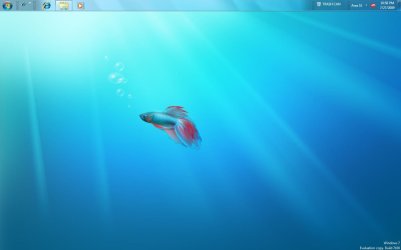
Meanwhile the 9.7 finally went on here without fuss. It simply took a new "beta fish" wallpaper to solve that little problem! :roflmao:
I also seeing a problem where one program refused to work on the host RC64 while it works perfectly on the second? Time for another clean install again!

hey could any1 giv me some help..i am using hpdv5-1106ax with 3400 ati graphics card..i was previously using vista 32bit and now recently i installed win 7..downloaded all the drivers and is workin superb..my only prob is i insatlled 9.7 catalyst suite and drivers but in my device manager it is showin ati 3400 installed. but i am not able to open my catalyst center... wen i click right button in desktop its showin ATI CATALYST CENTER but not able to open it..when i clik nothing happens..
wen i checked in my task manager i found that it is running..

any 1 had such kind of prob...
it would be gr8 help if some could tell how 2 correct this...:huh:

You have to be a little patient and a welcome anyways to the Se7enforums here! mail2parun

Did you restart the system inbetween all updated and the 9.7? Often you have to left everything finish installing in order to get one thing hanging to work when the rest are finished.
 

Attachments

  • Latest Beta Fish.jpg
    Latest Beta Fish.jpg
    46.7 KB · Views: 316

My Computers My Computers

System One System Two

  • Computer type
    PC/Desktop
    Computer Manufacturer/Model Number
    Custom builds = 2
    OS
    W7 Ultimate x64/W10 Pro x64/W11 Pro Triple Boot - Main PC W7 Remote PC Micro ATX W7 Pro x64/W11 Pro
    CPU
    AMD Phenom II X4 975 Deneb 3.6ghz - 965 2nd remote pc
    Motherboard
    Gigabyte GA-790XTA-UD4-Gigabyte GA-880GM-D2H remote pc
    Memory
    Kingston Hyper X DDR3 1600 1.5v 16gb - Hyper X Fury 8gb 2nd
    Graphics Card(s)
    MSI HD Radeon 5750 1gb - MSI HD Radeon 6450 on mini tower
    Sound Card
    Creative Labs X-Fi Xtreme Audio P - Realtek onooard 2nd case
    Monitor(s) Displays
    ASUS VW199T-P 19" HP 2082a Main-HP 2082a 20" remote pc
    Screen Resolution
    Asus 1440x900 - HP 1600x900
    Hard Drives
    WD Black 1TB HD per OS W7, W10, and pending W11 presently on 500gb OS Drive - Pending Triple 1TB HDs for Spanned Storage/backup volume
    Single 2TB external USB enclosure, single 1TB System 7 Host/Boot drive, Pending 8TB external HD for system image b
    PSU
    Corsair 750TX - primary / Corsair CX600 - second
    Case
    Antec 900-2 - SSD compatible / NZXT Vulcan mini tower
    Cooling
    Zalman CNPS9900A
    Keyboard
    AZIO L70 Backlit Letters Gaming - ONN Cordless/USB
    Mouse
    MSI DS200 Programmable, Logitech Cordless
    Internet Speed
    30mbps upgrade - primary hard wired - mini tower usb WiFi
    Antivirus
    GFI VIPRE Internet Security 2014 on W7 2016 beta on W10,
    Browser
    Cyberfox, WaterFox 64bit FF variants, FireFox x64, Pale Moon
    Other Info
    Accomdata fan cooled usb 2.0 PIDE/Sata II, III external enclosure.
    Sambient usb/eSata PATA/Sata II, III external enclosure.
  • Computer type
    PC/Desktop
    System Manufacturer/Model Number
    CUSTOM ASSEMBLY
    OS
    W7 Pro x64/W11 Pro
    CPU
    AMD Deneb 3.6ghz - 965
    Motherboard
    Gigabyte GA-880GM-D2H remote pc
    Memory
    Kingston Hyper X Fury 8gb
    Graphics Card(s)
    MSI HD Radeon 6450 DVI Output
    Sound Card
    Realtek onooard Creative or Other separate PENDING
    Monitor(s) Displays
    VIZIO 32" LCD TV Separate LCD Pending
    Screen Resolution
    1600x1080
    Hard Drives
    WD 500GB OS Host/Boot WD Green 1TB Storage/Backup
    PSU
    Corsair 600W - THERMALTAKE 600W spare case
    Case
    NZXT Vulcan mini tower
    Cooling
    Twin 120mm Top Fans - 240mm Side Cover
    Keyboard
    ONN Cordless/USB Logitech Cordless
    Mouse
    ONN USB/Cordless - Logitech Cordless
    Internet Speed
    DSL 5G
    Browser
    MS Edge, FireFox, WaterFox x64, FireFox Nightly
    Other Info
    OS Testing-Remote Access to Main TeamViewer
hi everybody
I have a little problem, I'm running windows 7 rtm 7600 (64bit) on my hp pavilion with an ati hd4500.
The driver is installed but I can't seem to get the catalyst center to work. I've installed the 9.7 driver and everything seems to go well with the installation, it even says, installation completed, but the catalyst center isn't enywhere to be found. When I go to the folder ..programfiles/ati technologies the folder is just empty. my laptop says the ati install manager is installed but the catalyst control center not. I had the same problem when I was running the windows 7 rc.
I've tried to install the ccc from the extraction folder on c:/ati but still same problem.
Can anybody tell me what's wrong?
Thx
Dani
 

My Computer My Computer

Computer Manufacturer/Model Number
hp dv7-2040eb
OS
windows 7
CPU
intel core 2 duo t6400 2gh
Memory
4gb
Graphics Card(s)
ati hd 4500
Hey guys, I'm back.

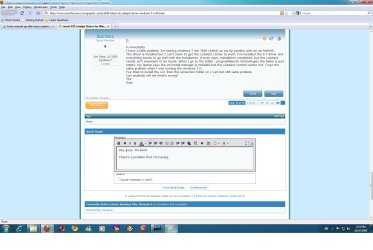
There's a problem that I'm having. Ever since I was able to install the driver for my radeon 3850 properly, the fonts tend to get messed up. When I maximize/minmize, that's when it happens. I have attached a picture of it in this post and tell me what you guys think. Thank you.

EDIT: Also, it's only happening in the Aero theme.

EDIT 2: Another thing I notice. When I play games, its very laggy. Should I go back to the old drivers?

EDIT 3: Okay, I don't think I gave you every information about my card. I forgot to say, it's an AGP and not a PCIE! Maybe this is why its not working properly.
 

Attachments

  • fongmessedup.jpg
    fongmessedup.jpg
    143.1 KB · Views: 37
Last edited:

My Computer My Computer

OS
Windows 7 Home Premium 64-bit
CPU
AMD Phenom II X2 555 Black Edition
Motherboard
GIGABYTE GA-MA785GMT-UD2H
Memory
G.SKILL Ripjaws 4GB
Graphics Card(s)
PowerColor Radeon HD 5770 1GB GDDR5
Sound Card
Realtek ALC889 HD Audio
Monitor(s) Displays
Samsung P2370HD
Screen Resolution
1920 x 1080P
Hard Drives
Seagate Barracuda 7200.12 500GB
PSU
BFG GS-550 550W
Case
Cooler Master Elite 341
Cooling
Scythe Katana 3
Keyboard
Microsoft Comfort Curve 2000
Mouse
Logitech MX-518
Other Info
Microsoft Mouse Pad
Hey guys, I'm back.

There's a problem that I'm having. Ever since I was able to install the driver for my radeon 3850 properly, the fonts tend to get messed up. When I maximize/minmize, that's when it happens. I have attached a picture of it in this post and tell me what you guys think. Thank you.

EDIT: Also, it's only happening in the Aero theme.

EDIT 2: Another thing I notice. When I play games, its very laggy. Should I go back to the old drivers?

EDIT 3: Okay, I think I don't think I gave you every information about my card. I forgot to say, it's an AGP and not a PCIE! Maybe this is why its not working properly.

hmm tricky problem,
i suggest fisrt reinstalling the drivers, if that dosent work try installing an older version of the drivers,
if that dosent work download the vista drviers and run in compatibilty mode
 

My Computer My Computer

OS
Windows 7 Ultimate x64
CPU
Intel Core 2 Duo E8400
Motherboard
GIGABYTE GA-EX38-DS4
Memory
Mushkin DDR2 4096MB (2048MBx2) 800Mhz CL 5-5-5-18 SP
Graphics Card(s)
Club3D ATI Radeon HD4850 512MB PCIe
Monitor(s) Displays
Asus 22" VK222U 2ms LCD
Screen Resolution
1680x1050
Hard Drives
Seagate ST3500320AS 500GB SATA2 32MB
PSU
Enermax Pro82+ 525W
Case
NZXT Trinity
Cooling
Arctic Cooling Case Fan AF12025 120mm
Keyboard
Logitech Media Keyboard
Mouse
Logitech RX700 Cordless
You have to be a little patient and a welcome anyways to the Se7enforums here! mail2parun

Did you restart the system inbetween all updated and the 9.7? Often you have to left everything finish installing in order to get one thing hanging to work when the rest are finished.

danks nighthawk:D yup i had restarted system after install but still its not comin...:huh:
 

My Computer My Computer

Computer Manufacturer/Model Number
hp dv5-1106ax
OS
windows 7
CPU
AMD X2 DUAL CORE 2.ghz
Memory
3GB
Graphics Card(s)
ATI MOBILITY RADEON 3400
hi everybody
I have a little problem, I'm running windows 7 rtm 7600 (64bit) on my hp pavilion with an ati hd4500.
The driver is installed but I can't seem to get the catalyst center to work. I've installed the 9.7 driver and everything seems to go well with the installation, it even says, installation completed, but the catalyst center isn't enywhere to be found. When I go to the folder ..programfiles/ati technologies the folder is just empty. my laptop says the ati install manager is installed but the catalyst control center not. I had the same problem when I was running the windows 7 rc.
I've tried to install the ccc from the extraction folder on c:/ati but still same problem.
Can anybody tell me what's wrong?
Thx
Dani

this is same problem i am also havin...any1 can shed some light on how 2 rectify it..
 

My Computer My Computer

Computer Manufacturer/Model Number
hp dv5-1106ax
OS
windows 7
CPU
AMD X2 DUAL CORE 2.ghz
Memory
3GB
Graphics Card(s)
ATI MOBILITY RADEON 3400
hi everybody
I have a little problem, I'm running windows 7 rtm 7600 (64bit) on my hp pavilion with an ati hd4500.
The driver is installed but I can't seem to get the catalyst center to work. I've installed the 9.7 driver and everything seems to go well with the installation, it even says, installation completed, but the catalyst center isn't enywhere to be found. When I go to the folder ..programfiles/ati technologies the folder is just empty. my laptop says the ati install manager is installed but the catalyst control center not. I had the same problem when I was running the windows 7 rc.
I've tried to install the ccc from the extraction folder on c:/ati but still same problem.
Can anybody tell me what's wrong?
Thx
Dani

this is same problem i am also havin...any1 can shed some light on how 2 rectify it..

Use Mobility Modder to modify your ATI drivers. I had the same problem, but it worked for me:D. You can get Mobility Modder by pressing link bellow;):
Mobility Modder - DriverHeaven.net
 

My Computer My Computer

Computer Manufacturer/Model Number
Asus X53Kseries
OS
Windows 7 Ultimate 86x
CPU
AMD Athlon(tm) 64 X2 Dual-Core Processor TK-57
Memory
2GB
Graphics Card(s)
ATI Mobility Radeon HD 2600
Screen Resolution
1280x800

My Computer My Computer

Computer Manufacturer/Model Number
hp dv7-2040eb
OS
windows 7
CPU
intel core 2 duo t6400 2gh
Memory
4gb
Graphics Card(s)
ati hd 4500
But now I'm desperate about Narrow screen (black sides) in any game. Anyone knows how can it be fixed ? I'm using ati radeon hd 2600 and 15.4" WXGA laptop Display
 

My Computer My Computer

Computer Manufacturer/Model Number
Asus X53Kseries
OS
Windows 7 Ultimate 86x
CPU
AMD Athlon(tm) 64 X2 Dual-Core Processor TK-57
Memory
2GB
Graphics Card(s)
ATI Mobility Radeon HD 2600
Screen Resolution
1280x800
Unfortunately the HD 2600XT used here is on a desktop. One thing I do know is that the catalyst does have to match the driver set on. If the catalyst is newer or older then the version of the driver set since those can be downloaded as a separate item even by way of updates the catalyst won't recognise them.

One possible while not guarantedd solution would be nuking both drivers and any catalyst you have on now and then going direct to the support for the catalyst and drivers not the separate driver set. Even the Windows updates will only see the drivers by themselves.

You don't want to take the steps I did here of nuking one Windows installation to toss on a fresh one when the 9.7 refused to go on as well as another program simply not working! Gee? The 9.7 is on now on the clean install of 7 just like any previous catalyst without problems suggesting a Windows related issue as the cause.
 

My Computers My Computers

System One System Two

  • Computer type
    PC/Desktop
    Computer Manufacturer/Model Number
    Custom builds = 2
    OS
    W7 Ultimate x64/W10 Pro x64/W11 Pro Triple Boot - Main PC W7 Remote PC Micro ATX W7 Pro x64/W11 Pro
    CPU
    AMD Phenom II X4 975 Deneb 3.6ghz - 965 2nd remote pc
    Motherboard
    Gigabyte GA-790XTA-UD4-Gigabyte GA-880GM-D2H remote pc
    Memory
    Kingston Hyper X DDR3 1600 1.5v 16gb - Hyper X Fury 8gb 2nd
    Graphics Card(s)
    MSI HD Radeon 5750 1gb - MSI HD Radeon 6450 on mini tower
    Sound Card
    Creative Labs X-Fi Xtreme Audio P - Realtek onooard 2nd case
    Monitor(s) Displays
    ASUS VW199T-P 19" HP 2082a Main-HP 2082a 20" remote pc
    Screen Resolution
    Asus 1440x900 - HP 1600x900
    Hard Drives
    WD Black 1TB HD per OS W7, W10, and pending W11 presently on 500gb OS Drive - Pending Triple 1TB HDs for Spanned Storage/backup volume
    Single 2TB external USB enclosure, single 1TB System 7 Host/Boot drive, Pending 8TB external HD for system image b
    PSU
    Corsair 750TX - primary / Corsair CX600 - second
    Case
    Antec 900-2 - SSD compatible / NZXT Vulcan mini tower
    Cooling
    Zalman CNPS9900A
    Keyboard
    AZIO L70 Backlit Letters Gaming - ONN Cordless/USB
    Mouse
    MSI DS200 Programmable, Logitech Cordless
    Internet Speed
    30mbps upgrade - primary hard wired - mini tower usb WiFi
    Antivirus
    GFI VIPRE Internet Security 2014 on W7 2016 beta on W10,
    Browser
    Cyberfox, WaterFox 64bit FF variants, FireFox x64, Pale Moon
    Other Info
    Accomdata fan cooled usb 2.0 PIDE/Sata II, III external enclosure.
    Sambient usb/eSata PATA/Sata II, III external enclosure.
  • Computer type
    PC/Desktop
    System Manufacturer/Model Number
    CUSTOM ASSEMBLY
    OS
    W7 Pro x64/W11 Pro
    CPU
    AMD Deneb 3.6ghz - 965
    Motherboard
    Gigabyte GA-880GM-D2H remote pc
    Memory
    Kingston Hyper X Fury 8gb
    Graphics Card(s)
    MSI HD Radeon 6450 DVI Output
    Sound Card
    Realtek onooard Creative or Other separate PENDING
    Monitor(s) Displays
    VIZIO 32" LCD TV Separate LCD Pending
    Screen Resolution
    1600x1080
    Hard Drives
    WD 500GB OS Host/Boot WD Green 1TB Storage/Backup
    PSU
    Corsair 600W - THERMALTAKE 600W spare case
    Case
    NZXT Vulcan mini tower
    Cooling
    Twin 120mm Top Fans - 240mm Side Cover
    Keyboard
    ONN Cordless/USB Logitech Cordless
    Mouse
    ONN USB/Cordless - Logitech Cordless
    Internet Speed
    DSL 5G
    Browser
    MS Edge, FireFox, WaterFox x64, FireFox Nightly
    Other Info
    OS Testing-Remote Access to Main TeamViewer
Can someone help me with my question from the previous page?
 

My Computer My Computer

OS
Windows 7 Home Premium 64-bit
CPU
AMD Phenom II X2 555 Black Edition
Motherboard
GIGABYTE GA-MA785GMT-UD2H
Memory
G.SKILL Ripjaws 4GB
Graphics Card(s)
PowerColor Radeon HD 5770 1GB GDDR5
Sound Card
Realtek ALC889 HD Audio
Monitor(s) Displays
Samsung P2370HD
Screen Resolution
1920 x 1080P
Hard Drives
Seagate Barracuda 7200.12 500GB
PSU
BFG GS-550 550W
Case
Cooler Master Elite 341
Cooling
Scythe Katana 3
Keyboard
Microsoft Comfort Curve 2000
Mouse
Logitech MX-518
Other Info
Microsoft Mouse Pad
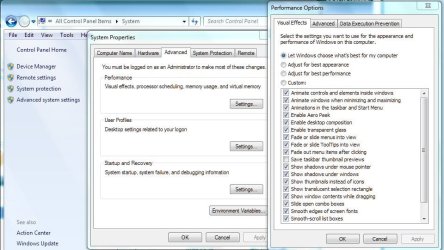
Besides the previous suggestion made you should also look at other advanced system performance settings to maybe set those to let Windows manage or use the custom option to disable a few things. A look at the effects in the advanced>effects can also help with fonts.
 

My Computers My Computers

System One System Two

  • Computer type
    PC/Desktop
    Computer Manufacturer/Model Number
    Custom builds = 2
    OS
    W7 Ultimate x64/W10 Pro x64/W11 Pro Triple Boot - Main PC W7 Remote PC Micro ATX W7 Pro x64/W11 Pro
    CPU
    AMD Phenom II X4 975 Deneb 3.6ghz - 965 2nd remote pc
    Motherboard
    Gigabyte GA-790XTA-UD4-Gigabyte GA-880GM-D2H remote pc
    Memory
    Kingston Hyper X DDR3 1600 1.5v 16gb - Hyper X Fury 8gb 2nd
    Graphics Card(s)
    MSI HD Radeon 5750 1gb - MSI HD Radeon 6450 on mini tower
    Sound Card
    Creative Labs X-Fi Xtreme Audio P - Realtek onooard 2nd case
    Monitor(s) Displays
    ASUS VW199T-P 19" HP 2082a Main-HP 2082a 20" remote pc
    Screen Resolution
    Asus 1440x900 - HP 1600x900
    Hard Drives
    WD Black 1TB HD per OS W7, W10, and pending W11 presently on 500gb OS Drive - Pending Triple 1TB HDs for Spanned Storage/backup volume
    Single 2TB external USB enclosure, single 1TB System 7 Host/Boot drive, Pending 8TB external HD for system image b
    PSU
    Corsair 750TX - primary / Corsair CX600 - second
    Case
    Antec 900-2 - SSD compatible / NZXT Vulcan mini tower
    Cooling
    Zalman CNPS9900A
    Keyboard
    AZIO L70 Backlit Letters Gaming - ONN Cordless/USB
    Mouse
    MSI DS200 Programmable, Logitech Cordless
    Internet Speed
    30mbps upgrade - primary hard wired - mini tower usb WiFi
    Antivirus
    GFI VIPRE Internet Security 2014 on W7 2016 beta on W10,
    Browser
    Cyberfox, WaterFox 64bit FF variants, FireFox x64, Pale Moon
    Other Info
    Accomdata fan cooled usb 2.0 PIDE/Sata II, III external enclosure.
    Sambient usb/eSata PATA/Sata II, III external enclosure.
  • Computer type
    PC/Desktop
    System Manufacturer/Model Number
    CUSTOM ASSEMBLY
    OS
    W7 Pro x64/W11 Pro
    CPU
    AMD Deneb 3.6ghz - 965
    Motherboard
    Gigabyte GA-880GM-D2H remote pc
    Memory
    Kingston Hyper X Fury 8gb
    Graphics Card(s)
    MSI HD Radeon 6450 DVI Output
    Sound Card
    Realtek onooard Creative or Other separate PENDING
    Monitor(s) Displays
    VIZIO 32" LCD TV Separate LCD Pending
    Screen Resolution
    1600x1080
    Hard Drives
    WD 500GB OS Host/Boot WD Green 1TB Storage/Backup
    PSU
    Corsair 600W - THERMALTAKE 600W spare case
    Case
    NZXT Vulcan mini tower
    Cooling
    Twin 120mm Top Fans - 240mm Side Cover
    Keyboard
    ONN Cordless/USB Logitech Cordless
    Mouse
    ONN USB/Cordless - Logitech Cordless
    Internet Speed
    DSL 5G
    Browser
    MS Edge, FireFox, WaterFox x64, FireFox Nightly
    Other Info
    OS Testing-Remote Access to Main TeamViewer
Besides the previous suggestion made you should also look at other advanced system performance settings to maybe set those to let Windows manage or use the custom option to disable a few things. A look at the effects in the advanced>effects can also help with fonts.
I just turned off the aero theme altogether because I couldn't find a fix for the font issue.

Thanks though.
 

My Computer My Computer

OS
Windows 7 Home Premium 64-bit
CPU
AMD Phenom II X2 555 Black Edition
Motherboard
GIGABYTE GA-MA785GMT-UD2H
Memory
G.SKILL Ripjaws 4GB
Graphics Card(s)
PowerColor Radeon HD 5770 1GB GDDR5
Sound Card
Realtek ALC889 HD Audio
Monitor(s) Displays
Samsung P2370HD
Screen Resolution
1920 x 1080P
Hard Drives
Seagate Barracuda 7200.12 500GB
PSU
BFG GS-550 550W
Case
Cooler Master Elite 341
Cooling
Scythe Katana 3
Keyboard
Microsoft Comfort Curve 2000
Mouse
Logitech MX-518
Other Info
Microsoft Mouse Pad
Sometimes tweaking a few items can be a help when you run into display issues of one form or another. Sometimes with everything checked off there simply browsing through a folder will be a lengthy process due to the wait for each icon to animate.
 

Attachments

  • Visual Performance Tweaks.jpg
    Visual Performance Tweaks.jpg
    91.3 KB · Views: 67

My Computers My Computers

System One System Two

  • Computer type
    PC/Desktop
    Computer Manufacturer/Model Number
    Custom builds = 2
    OS
    W7 Ultimate x64/W10 Pro x64/W11 Pro Triple Boot - Main PC W7 Remote PC Micro ATX W7 Pro x64/W11 Pro
    CPU
    AMD Phenom II X4 975 Deneb 3.6ghz - 965 2nd remote pc
    Motherboard
    Gigabyte GA-790XTA-UD4-Gigabyte GA-880GM-D2H remote pc
    Memory
    Kingston Hyper X DDR3 1600 1.5v 16gb - Hyper X Fury 8gb 2nd
    Graphics Card(s)
    MSI HD Radeon 5750 1gb - MSI HD Radeon 6450 on mini tower
    Sound Card
    Creative Labs X-Fi Xtreme Audio P - Realtek onooard 2nd case
    Monitor(s) Displays
    ASUS VW199T-P 19" HP 2082a Main-HP 2082a 20" remote pc
    Screen Resolution
    Asus 1440x900 - HP 1600x900
    Hard Drives
    WD Black 1TB HD per OS W7, W10, and pending W11 presently on 500gb OS Drive - Pending Triple 1TB HDs for Spanned Storage/backup volume
    Single 2TB external USB enclosure, single 1TB System 7 Host/Boot drive, Pending 8TB external HD for system image b
    PSU
    Corsair 750TX - primary / Corsair CX600 - second
    Case
    Antec 900-2 - SSD compatible / NZXT Vulcan mini tower
    Cooling
    Zalman CNPS9900A
    Keyboard
    AZIO L70 Backlit Letters Gaming - ONN Cordless/USB
    Mouse
    MSI DS200 Programmable, Logitech Cordless
    Internet Speed
    30mbps upgrade - primary hard wired - mini tower usb WiFi
    Antivirus
    GFI VIPRE Internet Security 2014 on W7 2016 beta on W10,
    Browser
    Cyberfox, WaterFox 64bit FF variants, FireFox x64, Pale Moon
    Other Info
    Accomdata fan cooled usb 2.0 PIDE/Sata II, III external enclosure.
    Sambient usb/eSata PATA/Sata II, III external enclosure.
  • Computer type
    PC/Desktop
    System Manufacturer/Model Number
    CUSTOM ASSEMBLY
    OS
    W7 Pro x64/W11 Pro
    CPU
    AMD Deneb 3.6ghz - 965
    Motherboard
    Gigabyte GA-880GM-D2H remote pc
    Memory
    Kingston Hyper X Fury 8gb
    Graphics Card(s)
    MSI HD Radeon 6450 DVI Output
    Sound Card
    Realtek onooard Creative or Other separate PENDING
    Monitor(s) Displays
    VIZIO 32" LCD TV Separate LCD Pending
    Screen Resolution
    1600x1080
    Hard Drives
    WD 500GB OS Host/Boot WD Green 1TB Storage/Backup
    PSU
    Corsair 600W - THERMALTAKE 600W spare case
    Case
    NZXT Vulcan mini tower
    Cooling
    Twin 120mm Top Fans - 240mm Side Cover
    Keyboard
    ONN Cordless/USB Logitech Cordless
    Mouse
    ONN USB/Cordless - Logitech Cordless
    Internet Speed
    DSL 5G
    Browser
    MS Edge, FireFox, WaterFox x64, FireFox Nightly
    Other Info
    OS Testing-Remote Access to Main TeamViewer
Yeah, I'll play around with it.

Another thing I noticed... Whenever I play any games(including flash games), it does some weird lag. For example, if I play Mario and walk him across the screen, theres like this little lag every time the frame switches from one to another. I think this has to do with the driver.

EDIT: Even when I scroll up and down on the scroll bar, its not "smooth". The frames seems to skip sometimes.
 

My Computer My Computer

OS
Windows 7 Home Premium 64-bit
CPU
AMD Phenom II X2 555 Black Edition
Motherboard
GIGABYTE GA-MA785GMT-UD2H
Memory
G.SKILL Ripjaws 4GB
Graphics Card(s)
PowerColor Radeon HD 5770 1GB GDDR5
Sound Card
Realtek ALC889 HD Audio
Monitor(s) Displays
Samsung P2370HD
Screen Resolution
1920 x 1080P
Hard Drives
Seagate Barracuda 7200.12 500GB
PSU
BFG GS-550 550W
Case
Cooler Master Elite 341
Cooling
Scythe Katana 3
Keyboard
Microsoft Comfort Curve 2000
Mouse
Logitech MX-518
Other Info
Microsoft Mouse Pad
Status
Not open for further replies.
Back
Top