
Windows Update Error 80246008 in Windows 7 - Fix

Windows Update Error 80246008 in Windows 7 - Fix

   Information

Reasons

This error is caused by issues with Background Inteligence Transfer Service or with COM+ Event System


Troubleshooting

1.Go to Start>>Search>>Services.msc

and check below services exist, have correct settings and are working

COM+ Event System :Automatic (started)

Background Intelligent Transfer Service (BITS):Manual or Automatic(Delayed Start)

If you have another settings you have to correct it.If COM+ Event System is not started then please run it manually,next run manually BITS service.

   Note

Please save order with running services.BITS service dependce from COM+ Event System -if this service is not working BITS service will not work too.


If you have only issue with running BITS service

STEP I

Reset Windows Update backgrounds components

how,see Windows Update - Reset

STEP II

Make sure that following folder exist

C:\ProgramData\Microsoft\Network\Downloader

   Note

Folder C:\ProgramData is hidden.To see this folder you have to in Control panel>>Folder Options enable option "Show hidden files and folders" or use any good 3p file manager which can see everything independly from system settings


if you don't have this folders,create it manually.Check also permissions for this folder

Administrators group and System have full access (all checked) to this folder, no one else has permission to that.

//how to check & change permissions see this tutorial CLICK //

see also

STEP III

Empty folder C:\ProgramData\Microsoft\Network\Downloader.

STEP IV

Reset fully Windows Updates

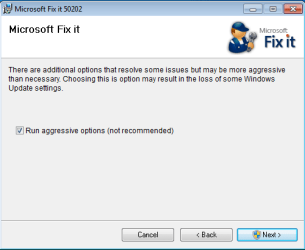
Please run this MS Fix 50202 in AGGRESSIVE MODE (image)
KB971058.png

STEP V

Uninstall all 3p security software,download accelerators and any program for managing and monitoring network connections.

If you have issue with COM+ Event System too...

As I said before if this service not working, BITS service will not work too. If unable to run this service or service doesn't exist please import this EventSystemWin7.reg fix to registry.


Download


and next restart computer

If you don't have BITS service or cannot to run it,none of previous method help...

Import BITSWin7.reg below fix for BITS service to registry.


Download


Because for some subkeys Administrators defaultly don't have full control to workaround this problem,import this fix from SYSTEM account

1.Download PsTools,extract from this psexec.exe file and put it in C:\Windows\System32
2.Download my fix for BITS service and unpack it anywhere e.g on your desktop
3..Run cmd.exe with administrative previlliges (right click on cmd.exe and choose "run as admin") and type:

psexec -s -i -d regedit


//This command run regedit from System account.//

4.Go to File>>Import choose location where you stored BITSWIN7.reg file,choose it and apply.

5.Restart Computer


Attachments

Last edited by a moderator:
Another Thank you very much!

I just found out last night that Windows Update wasn't working with the Error 80246008.
The Windows/MS solution for this wouldn't work as BITS was not listed in my Services.

I had had an instance of the zeroaccess trojan that my AV saw and stopped but obviously not before it had done some damage.

I ran the Microsoft `FIXIT' - several of them and they partially fixed the problems but BITS - Background Intelligent Transfer Service was still missing.

System File Checker (SFC/scannow) may have helped with the initial problem but BITS was still not in my Services.

I ran through your solution and BITSWin7.reg fixed the problem. BITS was back in my Services!

I ran Windows Update and it successfully downloaded and installed the 17 listed Updates.

Once again, thank you. Your solution sure beats having to back up data (already done) and then reinstall Windows 7!
 

My Computer

OS
Windows 7 64 bit Home Premium
Drea WWWringer. I'm happy this worked for you. I can't take credit for the fix as it was just extracted from the Flavius post earlier, however it was burried in there and many people would have given up before getting to the BITSWin7.reg fix.

In my situation a client had a laptop that had failed to do windows updates for several months and his virus protection had lapsed. My initial quick scan with Microsoft Security Essentials (MSE) (free) found the Win32/Siref.AL and .AQ Trojans.

A second full scan overnight was clean, however after I applied the BITSWin7.reg fix and got the BITS services running (and updates working), I ran another quick scan using Malwarebytes (free version) and it detected and removed two Trojan.Zacess viruses in the registry! A final full scan with Malware bytes found no further infections.

It is often my experience when doing side jobs on infected computers that windows updates were not current and virus protection was not current. The other common case is someone gets a pop-up window warning that your computer may be infected (and not from their antivius program) and click a button ....DONE!

Lessons learned - update windows, keep virus protectin up to date, don't click on suspicious windows (use CTRL+ALT+DEL for task manager and stop the associated process and or browser, or hit the off button!), do full scans overnight from time-to-time, and scan with another program like Malwarebaytes when your PC is doing odd things. I often find malware using a second scanner that the resident scanner didn't find.

Sorry for the dissertation! Good luck!
 

My Computer

OS
Vista 32, Win 7-32 &64, XP ( 8-PC's)

My Computer

Computer type
PC/Desktop
Computer Manufacturer/Model Number
Self built custom
OS
64-bit Windows 11 Pro for Workstations
CPU
Intel i7-8700K OC'd to 5 GHz
Motherboard
ASUS ROG Maximus XI Formula Z390
Memory
64 GB (4x16GB) G.SKILL TridentZ RGB DDR4 3600 MHz
Graphics Card(s)
ASUS ROG-STRIX-GTX1080TI-O11G-GAMING
Sound Card
Integrated
Monitor(s) Displays
2 x Samsung Odyssey G7 27"
Screen Resolution
2560x1440
Hard Drives
1TB Samsung 990 PRO M.2,
4TB Samsung 990 PRO PRO M.2,
TerraMaster F8 SSD Plus NAS
PSU
Seasonic Prime Titanium 850W
Case
Thermaltake Core P3
Cooling
Corsair Hydro H115i
Keyboard
Logitech wireless K800
Mouse
Logitech MX Master 4
Internet Speed
2 Gb/s Download and 100 Mb/s Upload
Antivirus
Malwarebyte Anti-Malware Premium
Browser
Google Chrome
Other Info
Logitech Z625 speaker system,
Logitech BRIO 4K Pro webcam,
HP Color LaserJet Pro MFP M477fdn,
APC SMART-UPS RT 1000 XL - SURT1000XLI,
Galaxy S23 Plus phone
...wife opened a e-mail from "Pay-Pal"...yep...virus city...1-2 days later, finally cleaned it all up BUT no BITS services...so no updates...looked and looked..almost getting ready to wipe clean and start over AND came across this... minutes later..ALL is well...thanks so much !
biggrin.gif


...just a quick addition..the virus(s) that attacked were the pretend anti-virus software..DANGER DANGER YOUR HARD DRIVE IS FAILING"..kinda flashing messages with a phony disc scan report and buy this software to fix the problem etc etc...well besides taking over IE,Firefox and Google Chrome, and disable MSE..it apparently deleted or renamed the BITS services...in going thru all the various MS fixes,none worked btw, I could never locate the BITS file..anywhere...your BITS reg fix was the ONLY fix that worked.. Malware,AVG, Trend Micro and a few others..TDS Killer...they removed the virus(s),not sure they would have damaged the BITS file...maybe?...just a thought...
 
Last edited by a moderator:

My Computer

Computer Manufacturer/Model Number
lenovo ideacenter all in one
OS
win 7 64 home prem
CPU
dual core
Memory
4g
Hard Drives
500 gig
Nice work Jim254! I try to tell everyone to avoid hitting any "buttons" on these popups and use Ctrl+Alt+Del to invoke Task Manager, then stop the browser applicatin or kill the associated process (right click on application, Go To Process, End Process). All else failing, hit the main reset button or the power switch. Normally not a good idea but better than an infection.

Cheers!
 

My Computer

OS
Vista 32, Win 7-32 &64, XP ( 8-PC's)
Great!!!!

Thank you so much for this tutorial! After a virus attack, BITS didnt start and wasnt present anymore in the services. I tried already so much tips, but the all didn't work. I used the BitsWin7 registry import and that was the one and only solution. Thank you very much and keep on writing such good tutorials.
Joop H, Best, The netherlands.
 

My Computer

OS
Windows 7 ultimate 32bit
The most effective tutorial on this kind of problem that I found ( just follow the instructions to the letter). I was able to fix a computer I was working on for weeks until I solve using this methods, not even the blogs or answer from microsoft came close to the resolution of this kind of problem. Thank you for posting this.
 

My Computer

OS
Windows 7 Ultimate 64 Bit
Wow -- where is the "tip jar"? I've been pulling my hair out on a customer's HP Mini trying to get all the CRAP the user put on it, which obviously hosed up the registry, removed, and cleaned up (e.g., two anti-virus tools (no-no), registry optimizers (three of them!!!, and etc). Of course, the customer didn't have any recovery / repair disks. Long story of all the tasks I tried to resolve the Windows Update not working issue is too gory to put here. Amazing how many tech notes are out there online that are nothing short of simply "tosses of the coin" on resolving this issue. Short story: this tutorial/BITS fix procedure worked great - updates successfully installed. I THANK YOU again for the "right" expertise / procedure.
 

My Computer

OS
Windows 7 Pro 64 bit
Just wanted to post and say thanks for your detailed fix. I too, had the pleasure of mindlessly searching high and low for a fix. To say the least, it was a very frustrating experience, but perseverance paid off, and I am back in the game again.

Kindest regards,
John
 

My Computer

OS
Windows 7 Ultimate x64
I tried everything stated on here, and even imported the bitswin7.reg and I'm still have an issue with the missing bits service and windows update service
Yeah same here broski, I do NOT see BITS in the services Or the windows update service, i even Imported the BITSWin7.reg from my desktop into the registry and it was successfully added, but where is it?
 

My Computer

OS
Windows home premium 64bit
Wow -- where is the "tip jar"? I've been pulling my hair out on a customer's HP Mini trying to get all the CRAP the user put on it, which obviously hosed up the registry, removed, and cleaned up (e.g., two anti-virus tools (no-no), registry optimizers (three of them!!!, and etc). Of course, the customer didn't have any recovery / repair disks. Long story of all the tasks I tried to resolve the Windows Update not working issue is too gory to put here. Amazing how many tech notes are out there online that are nothing short of simply "tosses of the coin" on resolving this issue. Short story: this tutorial/BITS fix procedure worked great - updates successfully installed. I THANK YOU again for the "right" expertise / procedure.
Can You please Explain to me how you got this to work? I don't see the BITS in the services Nor The Windows update service, I even restarted my computer when done.
 

My Computer

OS
Windows home premium 64bit
How I got BITS working (from this tutorial thread)

From the tuturial (in this thread - above where it shows "click here for entire tutorial"), I actually started with Step IV (MS Fix it -- no luck). I immediately tried the "If you don't have BITS service or cannot run it, none of the previous method help..." option in Step V.

I followed the steps exactly - downloaded the BITSWIN7.reg file "and" the PSTools in order to extract the psexec.exe file in a temp folder, then ran the listed command in a DOS window (i.e., cmd.exe) as shown: psexec -s -i -d regedit. Imported the file from my temp and restarted the computer.

After restart, I opened Windows logo (i.e., Start button) --> Control Panel --> Administrative Tools (Myself, I LIKE THE VIEW of "Small icons" in Control Panel!!!) and then double-clicked on Services.

Partway down the list I finally saw: "Background Intelligent Transfer Service". I double-clicked on it to ensure it was set to Automatic and ensured the service was in fact started.


SO -- understand that you do not see BITS in "windows update", but it is an ESSENTIAL service you must have running in order for Windows update your computer with all those OS updates (along with Windows Installer ).

BTW: you can also see if it is there by opening up Task Manager and under the "Services" tab you will see "BITS".


FINAL NOTE TO ADD HERE. The above worked for me. HOWEVER - something didn't feel right and I ended up rebuilding the OS (from the recovery partition) back to factory specs -- OH what an improvement in performance!!! Yeah, I had a lot of patches to 'bring back up-to-date', but the PC I was repairing was nearly 10 times faster than if I had not rebuilt. IMO -- if a registry loses something as key as BITS, my gut tells me something else is probably wrong too - even if you recover it. Again, just my opinion and I haven't failed 'me' yet. :)

I hope this helps some.
 

My Computer

OS
Windows 7 Pro 64 bit
thank you so much, I just had to register and post my thanks. Fighting a laptop that has had a few viri on it and had to re-register the windows update component, that still wouldn't run because bits was missing, tried another forums registry key solution but that didn't work. Following this did. The mr fixit fails though as it can't load and doesn't give any options apart from cancel.

downloads are now 57% complete! going to get the friends files off to another drive when I have time and do a clean install, this is just too bent now. Had zeroaccess and a host of others to contend with!!

ty again.:D
 

My Computer

OS
Windows 7 Premium Home 64bit
Bits was completely missing on one of my systems. This was due to seveal viruses and trojans I removed first. The BITSWin7.reg worked like a champ.

Thank you so very much for allievating my stress. :D
 

My Computer

OS
Windows 7 Enterprise 64 bit with sp1
If you don't have BITS service or cannot to run it,none of previous method help...

Import BITSWin7.reg below fix for BITS service to registry.


Because for some subkeys Administrators defaultly don't have full control to workaround this problem,import this fix from SYSTEM account

Hi!
First of I thank You for help.
I run a Windows 7 64BIT OS on my computer. I am not able to run Windows Update currently. It says error code error code 80246008. I looked in various forums and one of them mentioned to reun 'services.msc and turn on background intelligent transfer service (BITS). However my BITS itself seems missing in the services list. i tried following the steps you have mentioned which is
1.Download PsTools,extract from this psexec.exe file and put it in C:\Windows\System32
2.Download my fix for BITS service and unpack it anywhere e.g on your desktop
3..Run cmd.exe with administrative previlliges (right click on cmd.exe and choose "run as admin") and type:
psexec -s -i -d regedit
//This command run regedit from System account.//
4.Go to File>>Import choose location where you stored BITSWIN7.reg file,choose it and apply.
5.Restart Computer

However I am not able to understand the step 2 ( My FIX for BITS) and step 4.

are there other alternatives for the problem that I am facing?
It would be really kind of you if you would suggest me steps to Fix the problem with my OS

With Kind regards

Atul
 

My Computer

OS
Windows 7 64bit
want to thank you very much not been able to install updates for months due to BITS missing, followed your advice you gave to somebody on here and it worked , the only problem I had was next day my pc couldnt start up windows but I did an automatic repair and its now all working fine so thanks again, I had tried so many other options before this.
 

My Computer

Computer Manufacturer/Model Number
Dell
OS
Vista 32 bit
Here is some information for those requesting more information about the service

BITS stands for "Background Intelligent Transfer Service"

The service is located here in the Registry
HKEY_LOCAL_MACHINE\SYSTEM\CurrentControlSet\services\BITS

Querying the service with SC from an elevated command console
SC is a command line program used for communicating with the Service Control Manager and services.

RequiredPrivileges

  • SeCreateGlobalPrivilege
  • SeImpersonatePrivilege
  • SeTcbPrivilege
  • SeAssignPrimaryTokenPrivilege
  • SeIncreaseQuotaPrivilege


Note: The listed DEPENDENCIES must also be working in order for the service to function properly

Code:
C:\>sc qc bits
[SC] QueryServiceConfig SUCCESS

SERVICE_NAME: bits
        TYPE               : 20  WIN32_SHARE_PROCESS
        START_TYPE         : 3   DEMAND_START
        ERROR_CONTROL      : 1   NORMAL
        BINARY_PATH_NAME   : C:\Windows\System32\svchost.exe -k netsvcs
        LOAD_ORDER_GROUP   :
        TAG                : 0
        DISPLAY_NAME       : Background Intelligent Transfer Service
        DEPENDENCIES       : RpcSs
                           : EventSystem
        SERVICE_START_NAME : LocalSystem

C:\>sc queryex bits

SERVICE_NAME: bits
        TYPE               : 20  WIN32_SHARE_PROCESS
        STATE              : 4  RUNNING
                                (STOPPABLE, NOT_PAUSABLE, IGNORES_SHUTDOWN)
        WIN32_EXIT_CODE    : 0  (0x0)
        SERVICE_EXIT_CODE  : 0  (0x0)
        CHECKPOINT         : 0x0
        WAIT_HINT          : 0x0
        PID                : 292
        FLAGS              :

services_bits_registry_view.png


services_bits.png


services_bits_general.png


services_bits_dependencies.png


DCOM View from running DCOMCNFG from an elevated console prompt

bits_dcomcnfg.png
 

My Computer

OS
Windows 7 Pro x64
CPU
i7 2600K 4.7Ghz
Memory
16GB
Hard Drives
OCZ Vertex 3
RAID 0 SSD
Internet Speed
100Mbps
Back
Top