Dropping wifi connection

John30072

New member
I got a new pavilion dm4 with windows 7in April, and I had no problems with connecting to the Internet untill a month or so ago. When I start the computer and it connects to my wifi, the connection will work for anywhere from 10 to 30 minutes. After that my computer seems to have dropped the Internet cOnnection, but it says that I still have a connection in the network panel. When I try to load a web page, it freezes up or something, because nothing happens and it eventually tells me I'm not connected to the Internet, even though it says I still have a signal. I have to restart my computer, then I will get maybe another 10 minutes and it happens again. I'm pretty sure it's not the router because my Mac has no problem with the connection. Any ideas on what's wrong would be appreciated.
 
Last edited:

My Computer

OS
64bit
If you can download the Xirrus WiFi inspector and post the screen shot of the results here it would be helpful. :)

Wi-Fi Inspector | Xirrus
 

My Computer

Computer type
PC/Desktop
Computer Manufacturer/Model Number
Home built
OS
Windows 7 Ult, Windows 8.1 Pro,
CPU
Q9650-4.275GHz, E8600 4.5GHz, E6750-3.8GHz
Motherboard
Evga 780i FTW
Memory
G.Skill PC2 9600 1200Mhz 5 5 5 15 2T
Graphics Card(s)
GTX480
Sound Card
Asus Xonar D2
Monitor(s) Displays
HannsG
Screen Resolution
1680X1050
Hard Drives
GSkill Phoenix Pro 120GB SSD
PSU
ThermalTake Toughpower 1000Watt modular
Case
ThermalTake XaserV
Cooling
Xigmatek S1283
Keyboard
Logitech G15
Mouse
Logitech G9
Internet Speed
T1
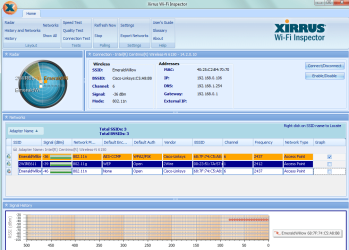
my network is the top emerald willow connection

This is when it works normally...
 

Attachments

  • working connection.PNG
    working connection.PNG
    156.6 KB · Views: 20

My Computer

OS
64bit
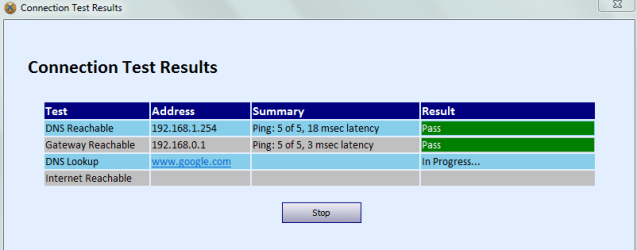
and when its not working nothing changes but when i run the connection test, it freezes like this
 

Attachments

  • connection test.PNG
    connection test.PNG
    26.6 KB · Views: 13

My Computer

OS
64bit
Are you assigning your DNS manually or is it automatic?
 

My Computer

Computer type
PC/Desktop
Computer Manufacturer/Model Number
UNDER CONSTRUCTION
OS
Windows 7 Ultimate SP1 (32-bit)
CPU
Intel Core i3-2120 @ 3.30GHz (Stock)
Motherboard
ASUS P8H61-M LX (Rev 3.0)
Memory
1x Kingston DDR3 SDRAM @ 1333MHz 4GB (Stock)
Graphics Card(s)
PALIT NVIDIA GeForce 210 @ 1GB DDR3 (Stock)
Sound Card
Realtek ALC887 (On-Board)
Monitor(s) Displays
LG Flatron L227WTG-PF 22" LCD Monitor
Screen Resolution
1680x1050 (Monitor) & 1176x664 (TV)
Hard Drives
Western Digital Caviar Blue @ 500GB (Internal) & Western Digital Elements @ 500GB (External)
PSU
Seasonic M12II Bronze Evo Edition @ 520W
Case
Cooler Master HAF X
Cooling
DEEPCOOL Gamma Archer CPU Cooler & 1x 120mm Side Intake Fan
Keyboard
Compaq KB-0133 PS/2 Keyboard
Mouse
Elephant Blade Runner GR WEM-1019 USB Laser Gaming Mouse
Internet Speed
PLDT Home DSL @ 3 Mbps ↓ & 0.75 Mbps ↑
Antivirus
Microsoft SE & Malwarebytes Anti-Malware (Premium)
Browser
Google Chrome
Other Info
Edifier 2.1 Speaker System + Bose SoundLink Mini | Samsung LN540520X/XAA LCD TV via HDMI | Epson L120

My Computer

Computer type
PC/Desktop
Computer Manufacturer/Model Number
UNDER CONSTRUCTION
OS
Windows 7 Ultimate SP1 (32-bit)
CPU
Intel Core i3-2120 @ 3.30GHz (Stock)
Motherboard
ASUS P8H61-M LX (Rev 3.0)
Memory
1x Kingston DDR3 SDRAM @ 1333MHz 4GB (Stock)
Graphics Card(s)
PALIT NVIDIA GeForce 210 @ 1GB DDR3 (Stock)
Sound Card
Realtek ALC887 (On-Board)
Monitor(s) Displays
LG Flatron L227WTG-PF 22" LCD Monitor
Screen Resolution
1680x1050 (Monitor) & 1176x664 (TV)
Hard Drives
Western Digital Caviar Blue @ 500GB (Internal) & Western Digital Elements @ 500GB (External)
PSU
Seasonic M12II Bronze Evo Edition @ 520W
Case
Cooler Master HAF X
Cooling
DEEPCOOL Gamma Archer CPU Cooler & 1x 120mm Side Intake Fan
Keyboard
Compaq KB-0133 PS/2 Keyboard
Mouse
Elephant Blade Runner GR WEM-1019 USB Laser Gaming Mouse
Internet Speed
PLDT Home DSL @ 3 Mbps ↓ & 0.75 Mbps ↑
Antivirus
Microsoft SE & Malwarebytes Anti-Malware (Premium)
Browser
Google Chrome
Other Info
Edifier 2.1 Speaker System + Bose SoundLink Mini | Samsung LN540520X/XAA LCD TV via HDMI | Epson L120
I've been checking my connection and I think the problem is my DNS lookup, but it is set to automatic already so how should I reconfigure it to work?
 

My Computer

OS
64bit
Start>Control Panel>Network and Internet>Network and Sharing center on left hand side change adapter settings right click Local Area Connection select properties double click IPV 4 Use the following DNS server Addresses
 

My Computer

Computer Manufacturer/Model Number
Unforgiven!!
OS
Windows 7 Ultimate x64
CPU
AMD X6 1090T
Motherboard
ASUS m4a79xtd evo
Memory
16 Gig Kingston HyperX
Graphics Card(s)
Saphire Radeon 6700
Sound Card
O/B
Monitor(s) Displays
23" Acer 19"Acer
Screen Resolution
1920x1080 Native
Hard Drives
M4 64 Gig SSD
W/D Cav Black 1 T/B
W/D Scorpio Blue 500 Gig X2
PSU
OCZ 650 watt 80+ Modular
Case
Cooler Master 690 Basic
Cooling
Cooler Master Hyper 212+ Push/Pull
Keyboard
Razer Black Widow Ultimate
Mouse
Razer D/A 3500dpi
Internet Speed
Meh...it's okay
The most likely reason for the dropped connection is that you are using the same channel as your neighbor.

John, you will want to go into your routers settings and change the channel to 11. You can change the DNS server to Google while you are there, try using 8.8.8.8 and 8.8.4.4 , it's just as easy to type the DNS servers into your routers setting for DNS.

After that give it some time and see if the connection is any better. :)
 

My Computer

Computer type
PC/Desktop
Computer Manufacturer/Model Number
Home built
OS
Windows 7 Ult, Windows 8.1 Pro,
CPU
Q9650-4.275GHz, E8600 4.5GHz, E6750-3.8GHz
Motherboard
Evga 780i FTW
Memory
G.Skill PC2 9600 1200Mhz 5 5 5 15 2T
Graphics Card(s)
GTX480
Sound Card
Asus Xonar D2
Monitor(s) Displays
HannsG
Screen Resolution
1680X1050
Hard Drives
GSkill Phoenix Pro 120GB SSD
PSU
ThermalTake Toughpower 1000Watt modular
Case
ThermalTake XaserV
Cooling
Xigmatek S1283
Keyboard
Logitech G15
Mouse
Logitech G9
Internet Speed
T1
How would I change the routers settings

You just need the default gateway from the router and type it into the URL on your browser.

You can get all that info by typing ipconfig/all into an elevated command prompt. :)
 

My Computer

Computer type
PC/Desktop
Computer Manufacturer/Model Number
Home built
OS
Windows 7 Ult, Windows 8.1 Pro,
CPU
Q9650-4.275GHz, E8600 4.5GHz, E6750-3.8GHz
Motherboard
Evga 780i FTW
Memory
G.Skill PC2 9600 1200Mhz 5 5 5 15 2T
Graphics Card(s)
GTX480
Sound Card
Asus Xonar D2
Monitor(s) Displays
HannsG
Screen Resolution
1680X1050
Hard Drives
GSkill Phoenix Pro 120GB SSD
PSU
ThermalTake Toughpower 1000Watt modular
Case
ThermalTake XaserV
Cooling
Xigmatek S1283
Keyboard
Logitech G15
Mouse
Logitech G9
Internet Speed
T1
I changed the DNS settings, restarted my computer, but that didn't help, I still lost the connection after a few minutes, an I couldn't find any setting for changing the channel for the router.
 

My Computer

OS
64bit
I changed the DNS settings, restarted my computer, but that didn't help, I still lost the connection after a few minutes, an I couldn't find any setting for changing the channel for the router.

The settings for changing the channel are there somewhere but the interface is different for every router.

It should be on the wireless set up page, channel overlap is the most likely cause of this problem.

In fact your connection looks very solid other than the obvious channel overlap problem.
 

My Computer

Computer type
PC/Desktop
Computer Manufacturer/Model Number
Home built
OS
Windows 7 Ult, Windows 8.1 Pro,
CPU
Q9650-4.275GHz, E8600 4.5GHz, E6750-3.8GHz
Motherboard
Evga 780i FTW
Memory
G.Skill PC2 9600 1200Mhz 5 5 5 15 2T
Graphics Card(s)
GTX480
Sound Card
Asus Xonar D2
Monitor(s) Displays
HannsG
Screen Resolution
1680X1050
Hard Drives
GSkill Phoenix Pro 120GB SSD
PSU
ThermalTake Toughpower 1000Watt modular
Case
ThermalTake XaserV
Cooling
Xigmatek S1283
Keyboard
Logitech G15
Mouse
Logitech G9
Internet Speed
T1
I tried going through all the channels, none of them made a difference. I also noticed when I wa at a hotel over the weekend and using the Internet I was having the same problem.
 

My Computer

OS
64bit
I tried going through all the channels, none of them made a difference. I also noticed when I wa at a hotel over the weekend and using the Internet I was having the same problem.

The other more obvious problem that I see in your Xirrus read out is that you have two connections showing and one of them is open and not secured properly for some reason?

It looks like the same network with the same SSID, same channel but it's open instead of secured.

This open network invites hackers right into your network which is most likely part of the problem.
 

My Computer

Computer type
PC/Desktop
Computer Manufacturer/Model Number
Home built
OS
Windows 7 Ult, Windows 8.1 Pro,
CPU
Q9650-4.275GHz, E8600 4.5GHz, E6750-3.8GHz
Motherboard
Evga 780i FTW
Memory
G.Skill PC2 9600 1200Mhz 5 5 5 15 2T
Graphics Card(s)
GTX480
Sound Card
Asus Xonar D2
Monitor(s) Displays
HannsG
Screen Resolution
1680X1050
Hard Drives
GSkill Phoenix Pro 120GB SSD
PSU
ThermalTake Toughpower 1000Watt modular
Case
ThermalTake XaserV
Cooling
Xigmatek S1283
Keyboard
Logitech G15
Mouse
Logitech G9
Internet Speed
T1
That's the guest account for my system, when i first set up the router it automatically created it and i couldn't figure out how to get rid of it untill a couple of days ago when I went into the router setup page to change the channels. I disabled it, and it shouldn't cause a security problem anymore. Whether or not that fixes the problem I'm having with my connection I'll have to wait a while and monitor it to see what happens.
 

My Computer

OS
64bit
That's the guest account for my system, when i first set up the router it automatically created it and i couldn't figure out how to get rid of it untill a couple of days ago when I went into the router setup page to change the channels. I disabled it, and it shouldn't cause a security problem anymore. Whether or not that fixes the problem I'm having with my connection I'll have to wait a while and monitor it to see what happens.

If that isn't the problem you might try starting in safe mode with networking in order to determine if the problem is caused by an installed program.

http://www.sevenforums.com/tutorials/69585-safe-mode.html
 

My Computer

Computer type
PC/Desktop
Computer Manufacturer/Model Number
Home built
OS
Windows 7 Ult, Windows 8.1 Pro,
CPU
Q9650-4.275GHz, E8600 4.5GHz, E6750-3.8GHz
Motherboard
Evga 780i FTW
Memory
G.Skill PC2 9600 1200Mhz 5 5 5 15 2T
Graphics Card(s)
GTX480
Sound Card
Asus Xonar D2
Monitor(s) Displays
HannsG
Screen Resolution
1680X1050
Hard Drives
GSkill Phoenix Pro 120GB SSD
PSU
ThermalTake Toughpower 1000Watt modular
Case
ThermalTake XaserV
Cooling
Xigmatek S1283
Keyboard
Logitech G15
Mouse
Logitech G9
Internet Speed
T1
Back
Top