Is a 64-bit Windows 7 quicker than 32-bit in itself, as an OS?

tufffta

New member
Local time
6:23 PM
Messages
8
1) Would Windows 7 64-bit work faster, slower or exactly the same compared to 32-bit version on a computer with AMD Quad-Core A6-3420 64-bit CPU and 4 GB RAM (1333 MHz DDR3). I am mostly interested in its performance as an operating system, like opening My Computer, opening folders, staring the Windows, and using just "light" software like internet browsers, audio players? I mean, not playing any games, not using any Photoshops.

I ask this because with only 4 GBs of RAM there is theoretically no need for a 64-bit OS (if not using any 64-bit software), and, in addition, a 64-bit OS uses a little more computer resourses, so less resourses left for other software -- but does that mean that those used up resource are in this case "wasted" (used only to make Windows work), or is it that the resourses 64-bit OS uses are used more efficiently, so that the OS functions more quickly?

In other words, I'll use this analogy: 64-bit Windows 7 is a more powerful engine, which uses up more fuel than 32-bit - but do I get any benefit of that when not having more than 4 GB RAM and not using any specific "heavy" 64-bit software --- like does it load an internet browser faster, does it open My Computer faster?
Why I ask this is because I noticed that as good as WinXP might be, it just never was as quick as Win98 in just using the computer back in the days. I have always been disappointed by WinXP not holding up to my expectations in performance - but that's understandable, because WinXP is much more complicated OS than Win98. And I noticed WinXP is quicker before you install all the drivers. So regarding Windows 7, I wish to know which version with given hardware limitations would be quicker.


2) Also, a little "off-topic" question: is there a difference in efficiency between Win7 Home Premium and Ultimate? I mean, which one would be quicker? In regards to Windows XP, I noticed XP Professional was faster than Home, but of course that could have just been my wrong impression or I could have missed some important factors (like software installed).
 

My Computer My Computer

At a glance

Windows 7 Ultimate 32bit
OS
Windows 7 Ultimate 32bit
Windows 7 32 bit, has a maximum address space of 4 gigs. What do you have for a Video card? You didn't fill in your system specs. If you have a dedicated Video card with its own onboard RAM, that RAM will still need to be addressed in that 4 gig space. Whats left after that will be used to map your 4 gigs of RAM. The video RAM will effectively subtract from your available RAM. If you run 64 bit there is no 4 gig limit and you'll get full use of your 4 gigs of RAM.
 

My Computer My Computer

At a glance

Windows 10 Education 64 bitAMD Phenom II X4 980 Black Edition Deneb 3.7GHz8GB 4GBx2 Kingston PC10600 DDR3 1333 MemoryZotac NVIDIA Geforce GT640 2 Gig DDR3 PCIe
Computer type
PC/Desktop
Computer Manufacturer/Model Number
Home Built
OS
Windows 10 Education 64 bit
CPU
AMD Phenom II X4 980 Black Edition Deneb 3.7GHz
Motherboard
Asus M4N68T-M V2 µATX Motherboard
Memory
8GB 4GBx2 Kingston PC10600 DDR3 1333 Memory
Graphics Card(s)
Zotac NVIDIA Geforce GT640 2 Gig DDR3 PCIe
Sound Card
VIA VT1708s High Definition Audio 8-channel Onboard
Monitor(s) Displays
22" LG E2242 1080p and 2 19" I-INC AG191D
Screen Resolution
1280x1024 - 1920x1080 - 1280x1024
Hard Drives
Crucial M100 256 GB SSD and 500 GB WD Blue SATA
PSU
Thermaltake TR 620
Case
Power Up Black ATX Mid-Tower Case
Cooling
Stock heatsink and fan
Keyboard
Logitech Wireless K350 Wave
Mouse
Logitech Wireless M570 Trackman Wheel
Internet Speed
80 Mbps Down 30 Mbps Up
Antivirus
Windows Defender
Browser
Internet Explorer 11
Other Info
HP DVD1040e Lightscribe - External USB2
What most people want to know is does 64bit give you a more responsive experience compared to 32bit for everyday use.

From my experience for basic/common usage (Browsing, Email, Office doc's, audio & movies non-editing)
Its not noticable, unless your the kind of person that sits with a stopwatch.

But i totally agree with others, software that requires that extra RAM above the 2GB limit of 32bit then you will see its true benefits.
 

My Computer My Computer

At a glance

Windows 7 Ultimate 64bit SP1 with Media Centeri7 3610QM 2.3MHz (Turbo 3.3MHZ)8GB DDR3 PC3-12800NVIDIA GeForce GTX660M 2GB
Computer type
Laptop
Computer Manufacturer/Model Number
Lenovo Y580
OS
Windows 7 Ultimate 64bit SP1 with Media Center
CPU
i7 3610QM 2.3MHz (Turbo 3.3MHZ)
Motherboard
HM76
Memory
8GB DDR3 PC3-12800
Graphics Card(s)
NVIDIA GeForce GTX660M 2GB
Sound Card
RealteK/JBL branded speakers
Monitor(s) Displays
15.4in LCD Laptop & (2x 27in AOC LED Monitors)
Screen Resolution
1366x768 & (1920x1080)
Hard Drives
Internal:
120GB Samsung 850 Pro System SSD,
256GB Plaxtor M5M msata Internal SSD,
1TB Samsung swappable HDD,
External:
2x 8TB USB3 WD Drive,
1x 6TB USB3 WD Drive.
1x 4TB USB3 WD Drive.
Keyboard
Logitech K360 Wireless Keyboard
Mouse
Logitech M525 Wireless mouse
Internet Speed
Virgin media 220Mbps download, 12Mbps upload
Browser
Pale Moon x64 & Opera
Other Info
Swappable Blu-ray Burner, Bluetooth, WiFi bgn, Internal Digital TV Tuner.
So regarding Windows 7, I wish to know which version with given hardware limitations would be quicker.


Also, a little "off-topic" question: is there a difference in efficiency between Win7 Home Premium and Ultimate? I mean, which one would be quicker?

I have 4 GB of RAM.

I moved from 32-bit to 64-bit Windows 7. I never noticed any difference in speed, responsiveness or general performance.

Home Premium differs from Ultimate in features. Not speed, not efficiency.

But millions of people buy Ultimate for reasons unrelated to features, speed, or efficiency. Let's just say those reasons are "personal" and leave it at that.
 

My Computer My Computer

At a glance

Windows 7 Home Premium SP1, 64-bitIntel Skylake i5-6600K, not overclocked8 GB HyperX DDR4-2666 (2 x 4 GB)none; graphics are integrated on CPU
Computer type
PC/Desktop
Computer Manufacturer/Model Number
Ignatz Special; 4 speed manual gearbox; factory air conditioning; one of one
OS
Windows 7 Home Premium SP1, 64-bit
CPU
Intel Skylake i5-6600K, not overclocked
Motherboard
AsRock Z170M Extreme 4, micro ATX
Memory
8 GB HyperX DDR4-2666 (2 x 4 GB)
Graphics Card(s)
none; graphics are integrated on CPU
Sound Card
onboard: Realtek ALC1150; external: USB Behringer UF0-202
Monitor(s) Displays
Dell S2340M 23 inch IPS
Screen Resolution
1600 x 900
Hard Drives
System: Crucial MX100 series SSD, 128 GB;
Data: Samsung Spinpoint 103SJ, 1 TB;
Backup: WD Caviar Green WD30EZRX-00D8PB0, 3 TB
PSU
Rosewill SilentNight 500 watt fanless, semi-modular
Case
Antec Solo II
Cooling
Noctua NH-U12S; Noctua F12 intake, Noctua S12A exhaust
Keyboard
Microsoft 200 6JH-00001 USB
Mouse
Dell or Microsoft optical wired; USB
Antivirus
Microsoft Security Essentials and Malwarebytes Premium
Browser
Pale Moon
Other Info
All fans PWM; speeds at idle: CPU circa 500 rpm; intake circa 600 rpm; exhaust circa 600 rpm; CPU temps 27 idle and 47 C load in a warm room (27 C/81 F) when running Intel Extreme Tuning Utility stress test.
To put it another non tech way. System and programs went from 8,16,32,64 bi and in the future 128 bit is not being R&D and produced just for the hell of it. It is being done so we can do more things with computer at the same time and quicker. Along with that one must keep their/there equipment and programs up to date to take advantage of the new things. 64 bit operating system will use more resources than a 32 bit operating system. Because of that you give it more resources to use. You can go on line and read for days how it works if you care to have a more techie answer.
If your in the process of choosing a operating system choose 64 bit; you will thank yourself later.
 

My Computer My Computer

At a glance

Windows 10 Pro. 64/ version 1709 Windows 7 Pr...Intel i7-6800K @ 4.3Corsair Platinum 16 gig @2400EVGA GTX 1070 OC
Computer type
PC/Desktop
Computer Manufacturer/Model Number
Home made Desktop
OS
Windows 10 Pro. 64/ version 1709 Windows 7 Pro/64
CPU
Intel i7-6800K @ 4.3
Motherboard
ASUS X-99 Deluxe II
Memory
Corsair Platinum 16 gig @2400
Graphics Card(s)
EVGA GTX 1070 OC
Monitor(s) Displays
Asus 27" LED LCD/VE278Q
Screen Resolution
1920-1080 or 1280-720 HDMI
Hard Drives
INTEL SSD 730-240 Gb Sata 3.0/
PSU
EVGA Platium 1200W
Case
Phanteks Luxe Tempered Glass 8 fans/ one radiator
Cooling
XSPC/ Water Cooled CPU
Keyboard
Das 4 Professional
Mouse
Logitech M705/MX Anywhere 2-S
Internet Speed
100 mbits
Antivirus
Microsoft Security Essentials/ Malwarebytes Premium 3.0/ SAS
Browser
I.E. 11 default/Firefox/ ISP Time Warner Cable/Spectrum
Other Info
LG BluRay Burner/
Sound system-KLipsch-THX/
Icy Dock ssd Hot Swap bays.
Why does 64 bit Windows 7 require more RAM than 32 bit?
 

My Computer My Computer

At a glance

Windows 7 Ultimate 32bit
OS
Windows 7 Ultimate 32bit
Why does 64 bit Windows 7 require more RAM than 32 bit?

I'm not sure it does.

It can recognize and use more RAM, but I don't know that it requires more. If so, I never noticed it.
 

My Computer My Computer

At a glance

Windows 7 Home Premium SP1, 64-bitIntel Skylake i5-6600K, not overclocked8 GB HyperX DDR4-2666 (2 x 4 GB)none; graphics are integrated on CPU
Computer type
PC/Desktop
Computer Manufacturer/Model Number
Ignatz Special; 4 speed manual gearbox; factory air conditioning; one of one
OS
Windows 7 Home Premium SP1, 64-bit
CPU
Intel Skylake i5-6600K, not overclocked
Motherboard
AsRock Z170M Extreme 4, micro ATX
Memory
8 GB HyperX DDR4-2666 (2 x 4 GB)
Graphics Card(s)
none; graphics are integrated on CPU
Sound Card
onboard: Realtek ALC1150; external: USB Behringer UF0-202
Monitor(s) Displays
Dell S2340M 23 inch IPS
Screen Resolution
1600 x 900
Hard Drives
System: Crucial MX100 series SSD, 128 GB;
Data: Samsung Spinpoint 103SJ, 1 TB;
Backup: WD Caviar Green WD30EZRX-00D8PB0, 3 TB
PSU
Rosewill SilentNight 500 watt fanless, semi-modular
Case
Antec Solo II
Cooling
Noctua NH-U12S; Noctua F12 intake, Noctua S12A exhaust
Keyboard
Microsoft 200 6JH-00001 USB
Mouse
Dell or Microsoft optical wired; USB
Antivirus
Microsoft Security Essentials and Malwarebytes Premium
Browser
Pale Moon
Other Info
All fans PWM; speeds at idle: CPU circa 500 rpm; intake circa 600 rpm; exhaust circa 600 rpm; CPU temps 27 idle and 47 C load in a warm room (27 C/81 F) when running Intel Extreme Tuning Utility stress test.
Why does 64 bit Windows 7 require more RAM than 32 bit?
64 bit needs from 50 to 200 MB more RAM than 32 bit depending on hardware. None ever cried over that little loss though. It theoretically uses RAM in a less efficient way than 32 bit, so a program that in 32 bit needs X ram in 64 could need more (not a lot, but noticeably). The fact it can use up to ridiculous amounts of RAM makes this a technical detail in most builds, though.

And no, for your needs having a 32 or a 64 Win7 makes no difference at all.

But millions of people buy Ultimate for reasons unrelated to features, speed, or efficiency.
Must be the easily-changed system language. It is a so must-have feature, lol. :D
 

My Computer My Computer

At a glance

Win 7 Pro 64-bit 7601AMD Phenom 9650 QuadCore, revision DR-B35 GB yes I run 2x 2GB and 1x 1GB, different b...NVIDIA GeForce 9800 GT 512 Mb, unknown manufa...
Computer type
PC/Desktop
Computer Manufacturer/Model Number
custom built
OS
Win 7 Pro 64-bit 7601
CPU
AMD Phenom 9650 QuadCore, revision DR-B3
Motherboard
ASUS M4A78
Memory
5 GB yes I run 2x 2GB and 1x 1GB, different brand, spank me.
Graphics Card(s)
NVIDIA GeForce 9800 GT 512 Mb, unknown manufacturer.
Sound Card
Crappy Realtek Integrated Audio
Monitor(s) Displays
Fujitsu Siemens P19-3P
Screen Resolution
1280 x 1024 x 32 bits @ 60 Hz Oh yeah, 4:3 rocks!
Hard Drives
(1) MAXTOR S TM3320613AS SATA Disk Device (2) STM35004 18AS SATA Disk Device (3) TOSHIBA USB 2.5"-HDD
PSU
whatever, around 450w
Case
Scavenged from old company PC, 10+ years old
Cooling
CPU fan, GPU fan, case fan, nothing fancy
Keyboard
Microsoft, PS/2, white.
Mouse
Optical, logitec.
Internet Speed
effective max speeds: 70-ish kB/s down 30-ish kB/s up
Antivirus
Avira, free edition.
Browser
Firefox with FXChrome to make it look like Google Chrome :P
Other Info
Was discarded by previous owner due to "horrible performance".
Was running Win Xp from a IDE drive. Yeah. Was a pain.
SATA II drive and Win7 and it zips away! Yay!

My Computer My Computer

At a glance

Windows 10 Pro. 64/ version 1709 Windows 7 Pr...Intel i7-6800K @ 4.3Corsair Platinum 16 gig @2400EVGA GTX 1070 OC
Computer type
PC/Desktop
Computer Manufacturer/Model Number
Home made Desktop
OS
Windows 10 Pro. 64/ version 1709 Windows 7 Pro/64
CPU
Intel i7-6800K @ 4.3
Motherboard
ASUS X-99 Deluxe II
Memory
Corsair Platinum 16 gig @2400
Graphics Card(s)
EVGA GTX 1070 OC
Monitor(s) Displays
Asus 27" LED LCD/VE278Q
Screen Resolution
1920-1080 or 1280-720 HDMI
Hard Drives
INTEL SSD 730-240 Gb Sata 3.0/
PSU
EVGA Platium 1200W
Case
Phanteks Luxe Tempered Glass 8 fans/ one radiator
Cooling
XSPC/ Water Cooled CPU
Keyboard
Das 4 Professional
Mouse
Logitech M705/MX Anywhere 2-S
Internet Speed
100 mbits
Antivirus
Microsoft Security Essentials/ Malwarebytes Premium 3.0/ SAS
Browser
I.E. 11 default/Firefox/ ISP Time Warner Cable/Spectrum
Other Info
LG BluRay Burner/
Sound system-KLipsch-THX/
Icy Dock ssd Hot Swap bays.
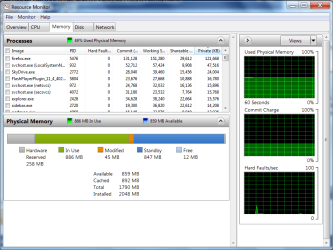
I lean toward 32-bit with 4gb RAM because it seems faster and almost always does use all of the RAM since some RAM is apportioned to hardware.

This can be determined by typing Resource Monitor into Start button Search Box, click on Memory tab.
 
Last edited:
I have 3Gb of RAM and nVidia Graphic card of 256 MB and Intel(R) Core(TM)2 Duo CPU P7350 @ 2.00Ghz 2.00GHz. I am still using Windows 7 Ultimate 32bit.

Do I upgrade to 64bit or not? If not plz tell why?
 

My Computer My Computer

At a glance

Windows 7 Ultimate 32bitIntel(R) Core(TM)2 Duo CPU P7350 @ 2.00GHz (2...3072 MB RAMNVIDIA GeForce 9200M GS
Computer Manufacturer/Model Number
Compaq Presario CQ45-137TX
OS
Windows 7 Ultimate 32bit
CPU
Intel(R) Core(TM)2 Duo CPU P7350 @ 2.00GHz (2 CPUs), ~2.0GHz
Memory
3072 MB RAM
Graphics Card(s)
NVIDIA GeForce 9200M GS
Sound Card
Speakers and Headphones (IDT High Definition)
Monitor(s) Displays
Generic PnP Monitor (32 bit) (60Hz)
Screen Resolution
1280 * 800
Hard Drives
Hitachi HTS542525K9A300 ATA Device
250 Gb
PSU
240V
Mouse
Logitech Mouse M100
Internet Speed
512 kbps
I have 3Gb of RAM and nVidia Graphic card of 256 MB and Intel(R) Core(TM)2 Duo CPU P7350 @ 2.00Ghz 2.00GHz. I am still using Windows 7 Ultimate 32bit.

Do I upgrade to 64bit or not? If not plz tell why?
 

My Computer My Computer

At a glance

Windows 7 Ultimate 32bitIntel(R) Core(TM)2 Duo CPU P7350 @ 2.00GHz (2...3072 MB RAMNVIDIA GeForce 9200M GS
Computer Manufacturer/Model Number
Compaq Presario CQ45-137TX
OS
Windows 7 Ultimate 32bit
CPU
Intel(R) Core(TM)2 Duo CPU P7350 @ 2.00GHz (2 CPUs), ~2.0GHz
Memory
3072 MB RAM
Graphics Card(s)
NVIDIA GeForce 9200M GS
Sound Card
Speakers and Headphones (IDT High Definition)
Monitor(s) Displays
Generic PnP Monitor (32 bit) (60Hz)
Screen Resolution
1280 * 800
Hard Drives
Hitachi HTS542525K9A300 ATA Device
250 Gb
PSU
240V
Mouse
Logitech Mouse M100
Internet Speed
512 kbps
I have 3Gb of RAM and nVidia Graphic card of 256 MB and Intel(R) Core(TM)2 Duo CPU P7350 @ 2.00Ghz 2.00GHz. I am still using Windows 7 Ultimate 32bit.

Do I upgrade to 64bit or not? If not plz tell why?
 

My Computer My Computer

At a glance

Windows 7 Ultimate 32bitIntel(R) Core(TM)2 Duo CPU P7350 @ 2.00GHz (2...3072 MB RAMNVIDIA GeForce 9200M GS
Computer Manufacturer/Model Number
Compaq Presario CQ45-137TX
OS
Windows 7 Ultimate 32bit
CPU
Intel(R) Core(TM)2 Duo CPU P7350 @ 2.00GHz (2 CPUs), ~2.0GHz
Memory
3072 MB RAM
Graphics Card(s)
NVIDIA GeForce 9200M GS
Sound Card
Speakers and Headphones (IDT High Definition)
Monitor(s) Displays
Generic PnP Monitor (32 bit) (60Hz)
Screen Resolution
1280 * 800
Hard Drives
Hitachi HTS542525K9A300 ATA Device
250 Gb
PSU
240V
Mouse
Logitech Mouse M100
Internet Speed
512 kbps
I have 3Gb of RAM and nVidia Graphic card of 256 MB and Intel(R) Core(TM)2 Duo CPU P7350 @ 2.00Ghz 2.00GHz. I am still using Windows 7 Ultimate 32bit.

Do I upgrade to 64bit or not? If not plz tell why?

I wouldn't. Why would you consider it?

Why do you refer to it as an "upgrade"? It would be a change, not necessarily an upgrade.

If you found that some of your applications no longer worked, you might consider it a downgrade.

Most applications will work with 64-bit, but there's no obvious advantage in day to day usage.

I changed---only because one of my applications would not even install on a 32-bit system.

If you ever add more RAM and in fact actually use more RAM, then consider moving to 64-bit.

Sooner or later, you will be forced to change. Worry about that then.
 

My Computer My Computer

At a glance

Windows 7 Home Premium SP1, 64-bitIntel Skylake i5-6600K, not overclocked8 GB HyperX DDR4-2666 (2 x 4 GB)none; graphics are integrated on CPU
Computer type
PC/Desktop
Computer Manufacturer/Model Number
Ignatz Special; 4 speed manual gearbox; factory air conditioning; one of one
OS
Windows 7 Home Premium SP1, 64-bit
CPU
Intel Skylake i5-6600K, not overclocked
Motherboard
AsRock Z170M Extreme 4, micro ATX
Memory
8 GB HyperX DDR4-2666 (2 x 4 GB)
Graphics Card(s)
none; graphics are integrated on CPU
Sound Card
onboard: Realtek ALC1150; external: USB Behringer UF0-202
Monitor(s) Displays
Dell S2340M 23 inch IPS
Screen Resolution
1600 x 900
Hard Drives
System: Crucial MX100 series SSD, 128 GB;
Data: Samsung Spinpoint 103SJ, 1 TB;
Backup: WD Caviar Green WD30EZRX-00D8PB0, 3 TB
PSU
Rosewill SilentNight 500 watt fanless, semi-modular
Case
Antec Solo II
Cooling
Noctua NH-U12S; Noctua F12 intake, Noctua S12A exhaust
Keyboard
Microsoft 200 6JH-00001 USB
Mouse
Dell or Microsoft optical wired; USB
Antivirus
Microsoft Security Essentials and Malwarebytes Premium
Browser
Pale Moon
Other Info
All fans PWM; speeds at idle: CPU circa 500 rpm; intake circa 600 rpm; exhaust circa 600 rpm; CPU temps 27 idle and 47 C load in a warm room (27 C/81 F) when running Intel Extreme Tuning Utility stress test.
Thanks and Tell me Enterprise Edition has more features than the ultimate edition.
Plz
 

My Computer My Computer

At a glance

Windows 7 Ultimate 32bitIntel(R) Core(TM)2 Duo CPU P7350 @ 2.00GHz (2...3072 MB RAMNVIDIA GeForce 9200M GS
Computer Manufacturer/Model Number
Compaq Presario CQ45-137TX
OS
Windows 7 Ultimate 32bit
CPU
Intel(R) Core(TM)2 Duo CPU P7350 @ 2.00GHz (2 CPUs), ~2.0GHz
Memory
3072 MB RAM
Graphics Card(s)
NVIDIA GeForce 9200M GS
Sound Card
Speakers and Headphones (IDT High Definition)
Monitor(s) Displays
Generic PnP Monitor (32 bit) (60Hz)
Screen Resolution
1280 * 800
Hard Drives
Hitachi HTS542525K9A300 ATA Device
250 Gb
PSU
240V
Mouse
Logitech Mouse M100
Internet Speed
512 kbps
Thanks and Tell me Enterprise Edition has more features than the ultimate edition.
Plz

Enterprise does not have more features. It activates differently.


Ultimate is a single user license. Enterprise is for volume licenses.
 

My Computer My Computer

At a glance

Windows 7 Home Premium SP1, 64-bitIntel Skylake i5-6600K, not overclocked8 GB HyperX DDR4-2666 (2 x 4 GB)none; graphics are integrated on CPU
Computer type
PC/Desktop
Computer Manufacturer/Model Number
Ignatz Special; 4 speed manual gearbox; factory air conditioning; one of one
OS
Windows 7 Home Premium SP1, 64-bit
CPU
Intel Skylake i5-6600K, not overclocked
Motherboard
AsRock Z170M Extreme 4, micro ATX
Memory
8 GB HyperX DDR4-2666 (2 x 4 GB)
Graphics Card(s)
none; graphics are integrated on CPU
Sound Card
onboard: Realtek ALC1150; external: USB Behringer UF0-202
Monitor(s) Displays
Dell S2340M 23 inch IPS
Screen Resolution
1600 x 900
Hard Drives
System: Crucial MX100 series SSD, 128 GB;
Data: Samsung Spinpoint 103SJ, 1 TB;
Backup: WD Caviar Green WD30EZRX-00D8PB0, 3 TB
PSU
Rosewill SilentNight 500 watt fanless, semi-modular
Case
Antec Solo II
Cooling
Noctua NH-U12S; Noctua F12 intake, Noctua S12A exhaust
Keyboard
Microsoft 200 6JH-00001 USB
Mouse
Dell or Microsoft optical wired; USB
Antivirus
Microsoft Security Essentials and Malwarebytes Premium
Browser
Pale Moon
Other Info
All fans PWM; speeds at idle: CPU circa 500 rpm; intake circa 600 rpm; exhaust circa 600 rpm; CPU temps 27 idle and 47 C load in a warm room (27 C/81 F) when running Intel Extreme Tuning Utility stress test.
thnkx
 

My Computer My Computer

At a glance

Windows 7 Ultimate 32bitIntel(R) Core(TM)2 Duo CPU P7350 @ 2.00GHz (2...3072 MB RAMNVIDIA GeForce 9200M GS
Computer Manufacturer/Model Number
Compaq Presario CQ45-137TX
OS
Windows 7 Ultimate 32bit
CPU
Intel(R) Core(TM)2 Duo CPU P7350 @ 2.00GHz (2 CPUs), ~2.0GHz
Memory
3072 MB RAM
Graphics Card(s)
NVIDIA GeForce 9200M GS
Sound Card
Speakers and Headphones (IDT High Definition)
Monitor(s) Displays
Generic PnP Monitor (32 bit) (60Hz)
Screen Resolution
1280 * 800
Hard Drives
Hitachi HTS542525K9A300 ATA Device
250 Gb
PSU
240V
Mouse
Logitech Mouse M100
Internet Speed
512 kbps
I lean toward 32-bit with 4gb RAM because it seems faster and almost always does use all of the RAM since some RAM is apportioned to hardware.

This can be determined by typing Resource Monitor into Start button Search Box, click on Memory tab.

RAM isn't apportioned to hardware with 32 bit windows, virtual address space is. RAM is actually wasted. The RAM addresses that the PCI hardware memory is mapped to can't be used by the system with 32 bit OS, so it is lost. With 64 bit OS, the hardware can be mapped to addresses beyond the physical RAM, so all RAM can be used.
 

My Computer My Computer

At a glance

Windows 10 Pro. EFI boot partition, full EFI ...i7 4770k 4.4GHz (44-44-43-43 turbo) @ 1.248V16GB (8GBx2) @2200 MHz G.skill Sniper 10-11-1...MSI GTX 970 Gaming 4G
Computer type
PC/Desktop
Computer Manufacturer/Model Number
Home built (GeneO industries)/Model 4
OS
Windows 10 Pro. EFI boot partition, full EFI boot
CPU
i7 4770k 4.4GHz (44-44-43-43 turbo) @ 1.248V
Motherboard
ASUS Maximus VI Hero
Memory
16GB (8GBx2) @2200 MHz G.skill Sniper 10-11-10-30-1, 1.6V
Graphics Card(s)
MSI GTX 970 Gaming 4G
Sound Card
Onboard SupremeFX Audio
Monitor(s) Displays
NEC Spectraview 2490WUXi-SV
Screen Resolution
1920 x 1200
Hard Drives
Samsung 850 Pro 256GB (OS), Samsung 2x 128GB 840 Pro SSD in RAID0, 3x WD Blue 6Gb/s 1TB RAID0, WD 2TB Black external USB 3.0, 2TB WD20EARS Green external USB 3.0, 2x 500GB Seagate and 1 750 GB external USB, 1x 350GB external USB3
PSU
Seasonic X-850 (2012 KM3 model)
Case
Fractal Design Define R4
Cooling
NH-D14, NF-F12, NF-A15; NF-P14, NF-P12,NF-A14, S12A PWM
Keyboard
Cooler Master Storm Quickfire Rapid - Brown
Mouse
Logitech G602
Internet Speed
126.4 Mb/s down, 24.3 Mb/s up
Other Info
USB 3.0 x8 , SATA III x8, eSATA, USB 2.0 x6. Samsung DVD R/W drive.

WEI: CPU 7.8, Memory 7.9, Graphics 7.9, Disk 7.9
Interesting GeneO.

What about the Hardware shown below on this older laptop which it says is reserved for Physical Memory?
 

Attachments

  • Capture.PNG
    Capture.PNG
    40.3 KB · Views: 16
Interesting GeneO.

What about the Hardware shown below on this older laptop which it says is reserved for Physical Memory?


But it isn't physical memory no matter what windows says, it is the virtual address space that is being used by the device. If you had 64 bit windows and memory/hole remapping in the BIOS, you would get that memory back.

It basically works like this. Windows uses virtual addresses that are mapped to physical devices like RAM or the PCI bus. The PCI i/o region has been mapped to the top of this 4GB virtual addresses space and when those virtual addresses are accessed, the memory management hardware translates them to PCI addresses. So you writing to those upper addresses writes over PCI. Drivers expect this. Since 32 bit windows has only 4GB of virtual address space available, this PCI address range cannot be mapped to physical memory. So in a sense it is hardware reserved.

With 64 bit OS this 4GB limitation for virtual addresses is not there. The PCI addresses are still mapped to the top 4GB of the virtual addresses range, so there is a hole in the physical RAM mapping. However, physical RAM does not have to be mapped contiguously to virtual addresses, so the remapping hardware maps that hole in the RAM to virtual addresses beyond the 4GB., so all of your RAM is available.

Now in your case, I believe that physical memory is really being used by a device since you only have 2GB installed. So all physical RAM plus device mapped memory fit in 4GB range. However if you have 4GB or more of RAM, in general you will not be able to access all of your RAM due to the PCI hole.
 
Last edited:

My Computer My Computer

At a glance

Windows 10 Pro. EFI boot partition, full EFI ...i7 4770k 4.4GHz (44-44-43-43 turbo) @ 1.248V16GB (8GBx2) @2200 MHz G.skill Sniper 10-11-1...MSI GTX 970 Gaming 4G
Computer type
PC/Desktop
Computer Manufacturer/Model Number
Home built (GeneO industries)/Model 4
OS
Windows 10 Pro. EFI boot partition, full EFI boot
CPU
i7 4770k 4.4GHz (44-44-43-43 turbo) @ 1.248V
Motherboard
ASUS Maximus VI Hero
Memory
16GB (8GBx2) @2200 MHz G.skill Sniper 10-11-10-30-1, 1.6V
Graphics Card(s)
MSI GTX 970 Gaming 4G
Sound Card
Onboard SupremeFX Audio
Monitor(s) Displays
NEC Spectraview 2490WUXi-SV
Screen Resolution
1920 x 1200
Hard Drives
Samsung 850 Pro 256GB (OS), Samsung 2x 128GB 840 Pro SSD in RAID0, 3x WD Blue 6Gb/s 1TB RAID0, WD 2TB Black external USB 3.0, 2TB WD20EARS Green external USB 3.0, 2x 500GB Seagate and 1 750 GB external USB, 1x 350GB external USB3
PSU
Seasonic X-850 (2012 KM3 model)
Case
Fractal Design Define R4
Cooling
NH-D14, NF-F12, NF-A15; NF-P14, NF-P12,NF-A14, S12A PWM
Keyboard
Cooler Master Storm Quickfire Rapid - Brown
Mouse
Logitech G602
Internet Speed
126.4 Mb/s down, 24.3 Mb/s up
Other Info
USB 3.0 x8 , SATA III x8, eSATA, USB 2.0 x6. Samsung DVD R/W drive.

WEI: CPU 7.8, Memory 7.9, Graphics 7.9, Disk 7.9
Back
Top