
Solved problem burning DVDs?

bajamaniac12

New member
Member
Local time
6:40 PM
Messages
31
if you people would be so kind i could do with some help?

my laptop has a DVD super-multi drive but im having problems burning DVD's

i have tried using nero, windows DVD maker and burnaware.

it goes through the whole process and takes around 40 minutes, but then the disk wont play/open in any devices, sometimes i get a message saying there was an unkown error and other times it says it was a succesful burn

my laptop was brand new around 2 months ago

the disks are pretty old though, they are called: LOGIK DVD-R
but i dont want to go and buy new disks if its going to happen again

if any1 can help me i would be very grateful.
 

My Computer

Computer Manufacturer/Model Number
toshiba satallite C870-157
OS
windows 7 home premium x64
Memory
4GB
Hard Drives
320GB internal & 500GB seagate external
Hello and welcome baja so nothing is working? if so try ImgBurn I found it really took a bit of getting used to but it's good.

The Official ImgBurn Website

Maybe an idea to run a cleaner through the opto drive mate first I know the machine is new but....

Oh and check in Device Manager for the driver for it > Control Panel > Device Manager > DVD /CD-ROM drives > right click on the device > window comes up with "update driver software" - do the online one.

Meant to add my PVR does have the finalise option too so check.
 
Last edited:

My Computer

Computer type
PC/Desktop
Computer Manufacturer/Model Number
Own build (new) Desk1 / Asus ROG Win 7 / Desk2 1st build
OS
Desk1 7 Home Prem / Desk2 10 Pro / Main lap Asus ROG 10 Pro 2 laptop Toshiba 7 Pro Asus P2520 7 & 10
CPU
Desk1 i5 3750K / Laptop i7 GTX 860M / Desk2 i5 2500
Motherboard
Desk1 Asus P877-V / Desk2 Gigabyte H67 UD3H / Laptop ?
Memory
Desk1 8GB (1866) / Desk2 16GB (1333) / Laptop 8Gb DDR3
Graphics Card(s)
Desk 1& 2NVidia GTX 650 & Laptops on board Intel
Sound Card
Desk 1 & 2 -XONAR DG Realtek High Def audio Laptop
Monitor(s) Displays
Desk 1 Benq HD 2450 / Desk2 Philips 24" / Laptop 17.5"
Screen Resolution
1920x1080 D1 & D2 & Laptop 1
Hard Drives
Desk1 Samsung 120GB 830 SSD
Asus ROG 256GB 850 Pro SSD
Desk2 Samsung 840 256 SSD
Toshiba 120GB EVO
PSU
Desk 1 Corsair HX 1050/ Laptop ? / Desk 2 Corsair HX 650
Case
Desk 1 Cooler HAF XM ? Toshiba laptop / Desk2 Coolermaster
Cooling
Fans on all Desk1 -2 Desk2 - all Coolermasters 5 Laptop ?
Keyboard
Desk 1 MS Sidewinder X6 Desk 2 MS Sidewinder X 4
Mouse
Desk 1&2 - Gigabyte MS 900 gamer - laptop - Logitec wireless
Internet Speed
ADSL2+
Other Info
One other Desktop (tester) and spare Toshba laptop both with SSD's
Running Kaspersky 2016 ISS on all machines config'd identically
Logitec audio stereo systems on each machine (x3)
Canon MG5250MFC
Router/modem TP-Link running WPA2SK
1. Are you able to read data disks?

2. Are you able to play commercial DVD movies?

3. Are you able to burn data disks successfully and read those?

4. What are you trying to burn?

5. What make is your burner? (check in Device Manager)

If you provide more details, perhaps it will be easier to diagnose and help.

Buy some good brand DVD-RWs ( Verbatim/JVC/Taiyo Yuden) and do your trials until the problem is sorted out. You can always erase those and reuse if the burn fails.
 

My Computer

OS
Windows 7 Home Premium 32 bit
Hello and welcome baja so nothing is working? if so try ImgBurn I found it really took a bit of getting used to but it's good.

The Official ImgBurn Website

Maybe an idea to run a cleaner through the opto drive mate first I know the machine is new but....

Oh and check in Device Manager for the driver for it > Control Panel > Device Manager > DVD /CD-ROM drives > right click on the device > window comes up with "update driver software" - do the online one.

Meant to add my PVR does have the finalise option too so check.

thanks for the advice, did run a cleaner through the drive before first use, also all drivers are upto date just tried what you suggested.
1. Are you able to read data disks?

2. Are you able to play commercial DVD movies?

3. Are you able to burn data disks successfully and read those?

4. What are you trying to burn?

5. What make is your burner? (check in Device Manager)

If you provide more details, perhaps it will be easier to diagnose and help.

Buy some good brand DVD-RWs ( Verbatim/JVC/Taiyo Yuden) and do your trials until the problem is sorted out. You can always erase those and reuse if the burn fails.

1. yes :)
2. yes :)
3. not tried, i will soon and update accoringly
4. im trying to burn a copy of a DVD
5. not sure, will check in a moment and update

:)
 

My Computer

Computer Manufacturer/Model Number
toshiba satallite C870-157
OS
windows 7 home premium x64
Memory
4GB
Hard Drives
320GB internal & 500GB seagate external
okay so

my drive is a :TSSTcorp CDDVDW SN-208AB

as for burning data disks i can succesfully do this

i have downloaded Imgburn and will try again with this
 

My Computer

Computer Manufacturer/Model Number
toshiba satallite C870-157
OS
windows 7 home premium x64
Memory
4GB
Hard Drives
320GB internal & 500GB seagate external
okay guys it now works! i used imgburn and i can now burn dvds and data easily!, i did also change from -R disks to maxell DVD+RW disks, i will stck with these as they work :) cheers everyone
 

My Computer

Computer Manufacturer/Model Number
toshiba satallite C870-157
OS
windows 7 home premium x64
Memory
4GB
Hard Drives
320GB internal & 500GB seagate external
It only points to the fact that your Samsung optical drive does not like Logik DVD-Rs. ( Logik, I presume is only a UK brand)

It is not necessary that you should only use DVD-RWs which are costlier than DVD-Rs. You only have to find the DVD-Rs that go well with your optical drive. Check the Samsung optical Media website for a list of compatible optical Media for your model and stick to those listed therein.
 

My Computer

OS
Windows 7 Home Premium 32 bit
It only points to the fact that your Samsung optical drive does not like Logik DVD-Rs. ( Logik, I presume is only a UK brand)

It is not necessary that you should only use DVD-RWs which are costlier than DVD-Rs. You only have to find the DVD-Rs that go well with your optical drive. Check the Samsung optical Media website for a list of compatible optical Media for your model and stick to those listed therein.

i thaught my drive was a toshiba lol
 

My Computer

Computer Manufacturer/Model Number
toshiba satallite C870-157
OS
windows 7 home premium x64
Memory
4GB
Hard Drives
320GB internal & 500GB seagate external
It only points to the fact that your Samsung optical drive does not like Logik DVD-Rs. ( Logik, I presume is only a UK brand)

It is not necessary that you should only use DVD-RWs which are costlier than DVD-Rs. You only have to find the DVD-Rs that go well with your optical drive. Check the Samsung optical Media website for a list of compatible optical Media for your model and stick to those listed therein.

i thaught my drive was a toshiba lol
Hum well I have pulled out Hitachi's Samsungs and Toshibas out of Toshiba machines I think Toshiba now are getting near the bottom of the heap when it comes to laptops in any case.

I have had my last one thats for sure and I never recommend them to anyone who ass what to buy. I suppose like everything else they are churned out like there is no tomorrow so what can you expect really?
 

My Computer

Computer type
PC/Desktop
Computer Manufacturer/Model Number
Own build (new) Desk1 / Asus ROG Win 7 / Desk2 1st build
OS
Desk1 7 Home Prem / Desk2 10 Pro / Main lap Asus ROG 10 Pro 2 laptop Toshiba 7 Pro Asus P2520 7 & 10
CPU
Desk1 i5 3750K / Laptop i7 GTX 860M / Desk2 i5 2500
Motherboard
Desk1 Asus P877-V / Desk2 Gigabyte H67 UD3H / Laptop ?
Memory
Desk1 8GB (1866) / Desk2 16GB (1333) / Laptop 8Gb DDR3
Graphics Card(s)
Desk 1& 2NVidia GTX 650 & Laptops on board Intel
Sound Card
Desk 1 & 2 -XONAR DG Realtek High Def audio Laptop
Monitor(s) Displays
Desk 1 Benq HD 2450 / Desk2 Philips 24" / Laptop 17.5"
Screen Resolution
1920x1080 D1 & D2 & Laptop 1
Hard Drives
Desk1 Samsung 120GB 830 SSD
Asus ROG 256GB 850 Pro SSD
Desk2 Samsung 840 256 SSD
Toshiba 120GB EVO
PSU
Desk 1 Corsair HX 1050/ Laptop ? / Desk 2 Corsair HX 650
Case
Desk 1 Cooler HAF XM ? Toshiba laptop / Desk2 Coolermaster
Cooling
Fans on all Desk1 -2 Desk2 - all Coolermasters 5 Laptop ?
Keyboard
Desk 1 MS Sidewinder X6 Desk 2 MS Sidewinder X 4
Mouse
Desk 1&2 - Gigabyte MS 900 gamer - laptop - Logitec wireless
Internet Speed
ADSL2+
Other Info
One other Desktop (tester) and spare Toshba laptop both with SSD's
Running Kaspersky 2016 ISS on all machines config'd identically
Logitec audio stereo systems on each machine (x3)
Canon MG5250MFC
Router/modem TP-Link running WPA2SK
It only points to the fact that your Samsung optical drive does not like Logik DVD-Rs. ( Logik, I presume is only a UK brand)

It is not necessary that you should only use DVD-RWs which are costlier than DVD-Rs. You only have to find the DVD-Rs that go well with your optical drive. Check the Samsung optical Media website for a list of compatible optical Media for your model and stick to those listed therein.

i thaught my drive was a toshiba lol
Hum well I have pulled out Hitachi's Samsungs and Toshibas out of Toshiba machines I think Toshiba now are getting near the bottom of the heap when it comes to laptops in any case.

I have had my last one thats for sure and I never recommend them to anyone who ass what to buy. I suppose like everything else they are churned out like there is no tomorrow so what can you expect really?

thanks for the help dude (Y)
 

My Computer

Computer Manufacturer/Model Number
toshiba satallite C870-157
OS
windows 7 home premium x64
Memory
4GB
Hard Drives
320GB internal & 500GB seagate external
My Computer

Computer Manufacturer/Model Number
toshiba satallite C870-157
OS
windows 7 home premium x64
Memory
4GB
Hard Drives
320GB internal & 500GB seagate external
says my model is not supported?
 

My Computer

Computer Manufacturer/Model Number
toshiba satallite C870-157
OS
windows 7 home premium x64
Memory
4GB
Hard Drives
320GB internal & 500GB seagate external
says my model is not supported?

says my model is not supported?
Hiyya Baja Well mate I am assuming yours is a new or newish Toshiba but if ever you want to slip in another new optical drive a lot of the Toshiba's use the same method - see Step 3 in this reference (it's for my last Toshiba) .
http://www.irisvista.com/tech/laptops/Toshiba-Satellite-L555-L555D/disassemble-toshiba-laptop-1.htm and this is the real thing

Toshiba Satellite C870 / C870D / L870 / L870D / L875 / L875D Series: ODD Replacement - YouTube

New drives are very cheap and quite frankly doing this makes falling of a log look really difficult LOL!! I also put 8GB RAM in this one and replaced the HDD with a SSD and slipped in an OEM because of the new bits.

Now the difference in speed with the SSD and RAM plus NO Toshiba bloatware plus Brinks tutorial on optimising Windows 7 is truly mind boggling. I put in a Samsung 830 120GB SSD for the OS / boot a fair bit of data and have an external for lots of data - don't use it that much anyway but the way to go.
If you want to see this done watch this

Toshiba Satellite C870 / C870D / L870 / L870D / L875 / L875D Series: HDD Replacement - YouTube (RAM is done via this cover too)

So when your warranty runs out (if it is new) this might be an option for you:cool:
 

My Computer

Computer type
PC/Desktop
Computer Manufacturer/Model Number
Own build (new) Desk1 / Asus ROG Win 7 / Desk2 1st build
OS
Desk1 7 Home Prem / Desk2 10 Pro / Main lap Asus ROG 10 Pro 2 laptop Toshiba 7 Pro Asus P2520 7 & 10
CPU
Desk1 i5 3750K / Laptop i7 GTX 860M / Desk2 i5 2500
Motherboard
Desk1 Asus P877-V / Desk2 Gigabyte H67 UD3H / Laptop ?
Memory
Desk1 8GB (1866) / Desk2 16GB (1333) / Laptop 8Gb DDR3
Graphics Card(s)
Desk 1& 2NVidia GTX 650 & Laptops on board Intel
Sound Card
Desk 1 & 2 -XONAR DG Realtek High Def audio Laptop
Monitor(s) Displays
Desk 1 Benq HD 2450 / Desk2 Philips 24" / Laptop 17.5"
Screen Resolution
1920x1080 D1 & D2 & Laptop 1
Hard Drives
Desk1 Samsung 120GB 830 SSD
Asus ROG 256GB 850 Pro SSD
Desk2 Samsung 840 256 SSD
Toshiba 120GB EVO
PSU
Desk 1 Corsair HX 1050/ Laptop ? / Desk 2 Corsair HX 650
Case
Desk 1 Cooler HAF XM ? Toshiba laptop / Desk2 Coolermaster
Cooling
Fans on all Desk1 -2 Desk2 - all Coolermasters 5 Laptop ?
Keyboard
Desk 1 MS Sidewinder X6 Desk 2 MS Sidewinder X 4
Mouse
Desk 1&2 - Gigabyte MS 900 gamer - laptop - Logitec wireless
Internet Speed
ADSL2+
Other Info
One other Desktop (tester) and spare Toshba laptop both with SSD's
Running Kaspersky 2016 ISS on all machines config'd identically
Logitec audio stereo systems on each machine (x3)
Canon MG5250MFC
Router/modem TP-Link running WPA2SK
says my model is not supported?

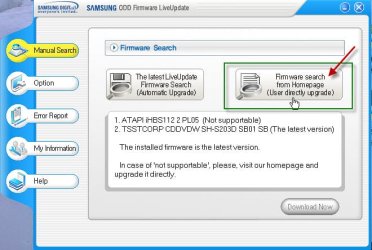
I just checked my updater.

In case it says not supported, you try to manually update the firmware, (if you want to) by clicking on "Firmware Search from Home Page".

Liveupdate.jpg

If it still does not find any new firmware, you may have to contact Toshiba Technical Support and find out.

Normally a firmware update adds to the list of compatible media.

( As ICit2lol has opined a quick google search reveals that many users have problems with this particular ODD not recognising blank discs. Should you continue to face any problems, do not hesitate to contact Toshiba Tech. Support who may know better about this issue and hopefully help you better.)
 

My Computer

OS
Windows 7 Home Premium 32 bit
says my model is not supported?

I just checked my updater.

In case it says not supported, you try to manually update the firmware, (if you want to) by clicking on "Firmware Search from Home Page".

View attachment 235635

If it still does not find any new firmware, you may have to contact Toshiba Technical Support and find out.

Normally a firmware update adds to the list of compatible media.

( As ICit2lol has opined a quick google search reveals that many users have problems with this particular ODD not recognising blank discs. Should you continue to face any problems, do not hesitate to contact Toshiba Tech. Support who may know better about this issue and hopefully help you better.)

great thanks for all the help
 

My Computer

Computer Manufacturer/Model Number
toshiba satallite C870-157
OS
windows 7 home premium x64
Memory
4GB
Hard Drives
320GB internal & 500GB seagate external
says my model is not supported?

says my model is not supported?
Hiyya Baja Well mate I am assuming yours is a new or newish Toshiba but if ever you want to slip in another new optical drive a lot of the Toshiba's use the same method - see Step 3 in this reference (it's for my last Toshiba) .
http://www.irisvista.com/tech/laptops/Toshiba-Satellite-L555-L555D/disassemble-toshiba-laptop-1.htm and this is the real thing

Toshiba Satellite C870 / C870D / L870 / L870D / L875 / L875D Series: ODD Replacement - YouTube

New drives are very cheap and quite frankly doing this makes falling of a log look really difficult LOL!! I also put 8GB RAM in this one and replaced the HDD with a SSD and slipped in an OEM because of the new bits.

Now the difference in speed with the SSD and RAM plus NO Toshiba bloatware plus Brinks tutorial on optimising Windows 7 is truly mind boggling. I put in a Samsung 830 120GB SSD for the OS / boot a fair bit of data and have an external for lots of data - don't use it that much anyway but the way to go.
If you want to see this done watch this

Toshiba Satellite C870 / C870D / L870 / L870D / L875 / L875D Series: HDD Replacement - YouTube (RAM is done via this cover too)

So when your warranty runs out (if it is new) this might be an option for you:cool:

yes mate baught it last month new, i have ordered another 4GB RAM to make 8GB,

i might try another ODD, will contact toshiba first, maybe buy a external DVD writer, do you suggest any?
 

My Computer

Computer Manufacturer/Model Number
toshiba satallite C870-157
OS
windows 7 home premium x64
Memory
4GB
Hard Drives
320GB internal & 500GB seagate external
No Baja I stuck in a TSST (Toshiba Samsung Storage Technology) corp CDDVDW TS-L633L ATA and just slipped it in and away it went.

I suppose if you have any probs you could always update the driver for whatever opto you get via the Device Mnagein Contorl Pane.

BUT FIRST! check as jumanji says mate with Toshiba before you do any updating with the opto or RAM as you may void the warranty. They will probably ask you to send it in or take it to a Toshiba tech and well if my experience is anything to go by that is an arm and a leg:(

As for an external if you are handy at fixing stuff up you ca make one fairly cheaply yourself all you need is an enclosure a drive and power supply.
But prices here are very reasonable $29 for this and it is USB powered too.
Samsung SE-208AB - DVD±RW (±R DL) / DVD-RAM drive - Hi-Speed USB - 24x (CD) / 8x (DVD) 24x (CD) / 8x (DVD±R) / 6x (DVD±R DL) 24x (CD) / 6x (DVD-RW) / 8x (DVD+RW) / 5x (DVD-RAM) - External - Black

Don't know what theprices are like over there as it has beena long time since I have been back.
 

My Computer

Computer type
PC/Desktop
Computer Manufacturer/Model Number
Own build (new) Desk1 / Asus ROG Win 7 / Desk2 1st build
OS
Desk1 7 Home Prem / Desk2 10 Pro / Main lap Asus ROG 10 Pro 2 laptop Toshiba 7 Pro Asus P2520 7 & 10
CPU
Desk1 i5 3750K / Laptop i7 GTX 860M / Desk2 i5 2500
Motherboard
Desk1 Asus P877-V / Desk2 Gigabyte H67 UD3H / Laptop ?
Memory
Desk1 8GB (1866) / Desk2 16GB (1333) / Laptop 8Gb DDR3
Graphics Card(s)
Desk 1& 2NVidia GTX 650 & Laptops on board Intel
Sound Card
Desk 1 & 2 -XONAR DG Realtek High Def audio Laptop
Monitor(s) Displays
Desk 1 Benq HD 2450 / Desk2 Philips 24" / Laptop 17.5"
Screen Resolution
1920x1080 D1 & D2 & Laptop 1
Hard Drives
Desk1 Samsung 120GB 830 SSD
Asus ROG 256GB 850 Pro SSD
Desk2 Samsung 840 256 SSD
Toshiba 120GB EVO
PSU
Desk 1 Corsair HX 1050/ Laptop ? / Desk 2 Corsair HX 650
Case
Desk 1 Cooler HAF XM ? Toshiba laptop / Desk2 Coolermaster
Cooling
Fans on all Desk1 -2 Desk2 - all Coolermasters 5 Laptop ?
Keyboard
Desk 1 MS Sidewinder X6 Desk 2 MS Sidewinder X 4
Mouse
Desk 1&2 - Gigabyte MS 900 gamer - laptop - Logitec wireless
Internet Speed
ADSL2+
Other Info
One other Desktop (tester) and spare Toshba laptop both with SSD's
Running Kaspersky 2016 ISS on all machines config'd identically
Logitec audio stereo systems on each machine (x3)
Canon MG5250MFC
Router/modem TP-Link running WPA2SK
No Baja I stuck in a TSST (Toshiba Samsung Storage Technology) corp CDDVDW TS-L633L ATA and just slipped it in and away it went.

I suppose if you have any probs you could always update the driver for whatever opto you get via the Device Mnagein Contorl Pane.

BUT FIRST! check as jumanji says mate with Toshiba before you do any updating with the opto or RAM as you may void the warranty. They will probably ask you to send it in or take it to a Toshiba tech and well if my experience is anything to go by that is an arm and a leg:(

As for an external if you are handy at fixing stuff up you ca make one fairly cheaply yourself all you need is an enclosure a drive and power supply.
But prices here are very reasonable $29 for this and it is USB powered too.
Samsung SE-208AB - DVD±RW (±R DL) / DVD-RAM drive - Hi-Speed USB - 24x (CD) / 8x (DVD) 24x (CD) / 8x (DVD±R) / 6x (DVD±R DL) 24x (CD) / 6x (DVD-RW) / 8x (DVD+RW) / 5x (DVD-RAM) - External - Black

Don't know what theprices are like over there as it has beena long time since I have been back.

they gave me a years free collect and return repair service which included labour and parts etc,

i have just baught an LG DVD re-writer, it is capable of writing every kind of disk including blu-ray not a bad price i dont think at £10

thanks for all your help, im sure i will be back on this thread soon enough lol
 

My Computer

Computer Manufacturer/Model Number
toshiba satallite C870-157
OS
windows 7 home premium x64
Memory
4GB
Hard Drives
320GB internal & 500GB seagate external
Yeah mate be sure of the warranty before you do anything and also you might find the finish bezel (the plastic clip on moulding) on the outer casing that finishes the machine's edges may not fit over the new drive:(

I've had a couple that the bezel does not fit and have had to leave as is . It will not affect the performance only look a bit ordinary.
 

My Computer

Computer type
PC/Desktop
Computer Manufacturer/Model Number
Own build (new) Desk1 / Asus ROG Win 7 / Desk2 1st build
OS
Desk1 7 Home Prem / Desk2 10 Pro / Main lap Asus ROG 10 Pro 2 laptop Toshiba 7 Pro Asus P2520 7 & 10
CPU
Desk1 i5 3750K / Laptop i7 GTX 860M / Desk2 i5 2500
Motherboard
Desk1 Asus P877-V / Desk2 Gigabyte H67 UD3H / Laptop ?
Memory
Desk1 8GB (1866) / Desk2 16GB (1333) / Laptop 8Gb DDR3
Graphics Card(s)
Desk 1& 2NVidia GTX 650 & Laptops on board Intel
Sound Card
Desk 1 & 2 -XONAR DG Realtek High Def audio Laptop
Monitor(s) Displays
Desk 1 Benq HD 2450 / Desk2 Philips 24" / Laptop 17.5"
Screen Resolution
1920x1080 D1 & D2 & Laptop 1
Hard Drives
Desk1 Samsung 120GB 830 SSD
Asus ROG 256GB 850 Pro SSD
Desk2 Samsung 840 256 SSD
Toshiba 120GB EVO
PSU
Desk 1 Corsair HX 1050/ Laptop ? / Desk 2 Corsair HX 650
Case
Desk 1 Cooler HAF XM ? Toshiba laptop / Desk2 Coolermaster
Cooling
Fans on all Desk1 -2 Desk2 - all Coolermasters 5 Laptop ?
Keyboard
Desk 1 MS Sidewinder X6 Desk 2 MS Sidewinder X 4
Mouse
Desk 1&2 - Gigabyte MS 900 gamer - laptop - Logitec wireless
Internet Speed
ADSL2+
Other Info
One other Desktop (tester) and spare Toshba laptop both with SSD's
Running Kaspersky 2016 ISS on all machines config'd identically
Logitec audio stereo systems on each machine (x3)
Canon MG5250MFC
Router/modem TP-Link running WPA2SK
Back
Top