it s been a while since i have been having this problem with usb external drives .
As written in the title my pc does detect them but they re not shown in computer.
I have to point out i dont get any problems when i plug my phone in the pc , it recognizes the smartphone and i can browse the folders , upload and download pics , etc etc.
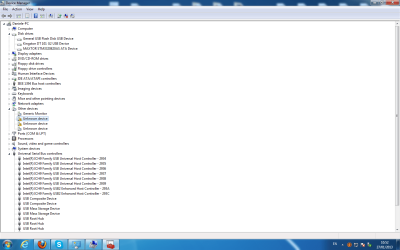
All the usb sticks are shown in the device manager
I tried to remove and install all the drivers , still having the same problem.
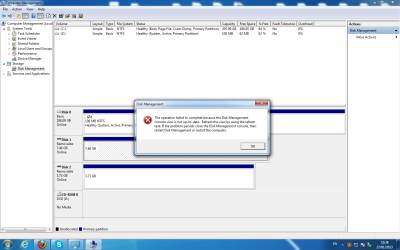
I thought i had to assign them a driver letter but when i try to do it, disk management comes up with this error :
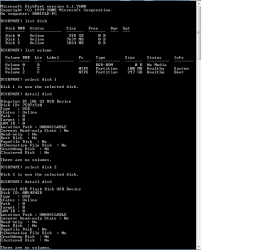
Dunno if might be useful to you but here their details through diskpart:
I searched for that exact error about the disk console and found a microsoft fixit - just yesterday. It seems that Microsoft updates its driver recognition list and if somehow you haven't done so (perhaps a minor update you chose not to install), Microsoft will eventually refuse to recognize. Google the entire error message. Checking my download logs it might be fixit 50688 - but check that.
In my case I also ended up having to check the security on the console and had to reset it so that the admin owned it rather than the system. When it still wasn't happy, Everyone owned it and since then it's been working fine.
Hope this helps.
Madeline
My Computer
Computer Manufacturer/Model Number
Desktop made to order - Asus P6x58D Premium
OS
Win 7 64 Prof
CPU
i7 930
Motherboard
Asus P6x58D Premium
Memory
24 gig 1333
Graphics Card(s)
HIS ATI Radeon HD 6850
Sound Card
Creative
Monitor(s) Displays
NEC Multisync P241W
Screen Resolution
1920 x 1200
Hard Drives
2 WD 1tb each black caviar
1 WD black caviar 2tb
1 Plextor SSD SATA 6 256 gig
1 Intel generation 2 SSD 160 gig
PSU
i7 930
Case
Antec 183 (?)
Cooling
Zalman fan and heat pipe
Keyboard
Goldtouch
Mouse
Logitech G 700 used wirelessly
Internet Speed
19.6 Mbps up and 2.00 Mbps down
Other Info
5 usb 3 hard drives used for backup. Until recently also backed up with Crashplan but discovered it was the cause of endless VSS errors and open programs stopping responding. HP Laserjet and large Epson inkjet for photography. Very old Epson Scanner. Cyberpower UPS.
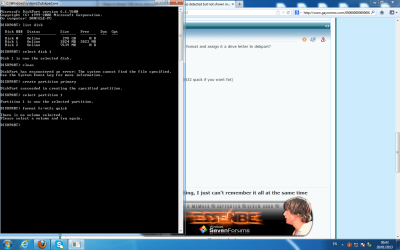
Have you tried to create a partition, format and assign it a drive letter In diskpart?
diskpart
list disk
select disk 1
clean
create partition primary
select partition 1
format fs=ntfs quick (or format fs=fat32 quick if you want fat)
assign
exit
exit
One other Desktop (tester) and spare Toshba laptop both with SSD's
Running Kaspersky 2016 ISS on all machines config'd identically
Logitec audio stereo systems on each machine (x3)
Canon MG5250MFC
Router/modem TP-Link running WPA2SK
One other Desktop (tester) and spare Toshba laptop both with SSD's
Running Kaspersky 2016 ISS on all machines config'd identically
Logitec audio stereo systems on each machine (x3)
Canon MG5250MFC
Router/modem TP-Link running WPA2SK
Has anyone ever heard of the Disk Management tool? When going into Control Panel>Administrative tools>Computer Management>Storage>Disk Management you should see the factory volume(Fat 32) once the flash drive or other external device is properly detected. If you added an SD card into a cell phone or to a digital camera that will be seen as a storage medium as well.
Once you have located the volume you simply right click on that to select the change drive letter option. This will generally initialize the drive or device on the spot. If you should see the "offline" showing in the square area on the left side clicking on that to set it to online or going to the menu bar>Actions to select the rescan all disks option can also help.
Once the drive or device is assigned a drive letter you will then see that in use when opening up a new explorer window and looking down the list of drives. In most cases as soon as you use the Change drive letter option a new popup will flash indicating the item was initialized and is now available for use.
W7 Ultimate x64/W10 Pro x64/W11 Pro Triple Boot - Main PC W7 Remote PC Micro ATX W7 Pro x64/W11 Pro
CPU
AMD Phenom II X4 975 Deneb 3.6ghz - 965 2nd remote pc
Motherboard
Gigabyte GA-790XTA-UD4-Gigabyte GA-880GM-D2H remote pc
Memory
Kingston Hyper X DDR3 1600 1.5v 16gb - Hyper X Fury 8gb 2nd
Graphics Card(s)
MSI HD Radeon 5750 1gb - MSI HD Radeon 6450 on mini tower
Sound Card
Creative Labs X-Fi Xtreme Audio P - Realtek onooard 2nd case
Monitor(s) Displays
ASUS VW199T-P 19" HP 2082a Main-HP 2082a 20" remote pc
Screen Resolution
Asus 1440x900 - HP 1600x900
Hard Drives
WD Black 1TB HD per OS W7, W10, and pending W11 presently on 500gb OS Drive - Pending Triple 1TB HDs for Spanned Storage/backup volume
Single 2TB external USB enclosure, single 1TB System 7 Host/Boot drive, Pending 8TB external HD for system image b
PSU
Corsair 750TX - primary / Corsair CX600 - second
Case
Antec 900-2 - SSD compatible / NZXT Vulcan mini tower
All that was needed there was to use the rescan drives option or flip back and forth to Storage and then back to the DM to refresh things. The error popup notice states a refresh was required. Once that is taken care of it's right back to normal again in two seconds time.
W7 Ultimate x64/W10 Pro x64/W11 Pro Triple Boot - Main PC W7 Remote PC Micro ATX W7 Pro x64/W11 Pro
CPU
AMD Phenom II X4 975 Deneb 3.6ghz - 965 2nd remote pc
Motherboard
Gigabyte GA-790XTA-UD4-Gigabyte GA-880GM-D2H remote pc
Memory
Kingston Hyper X DDR3 1600 1.5v 16gb - Hyper X Fury 8gb 2nd
Graphics Card(s)
MSI HD Radeon 5750 1gb - MSI HD Radeon 6450 on mini tower
Sound Card
Creative Labs X-Fi Xtreme Audio P - Realtek onooard 2nd case
Monitor(s) Displays
ASUS VW199T-P 19" HP 2082a Main-HP 2082a 20" remote pc
Screen Resolution
Asus 1440x900 - HP 1600x900
Hard Drives
WD Black 1TB HD per OS W7, W10, and pending W11 presently on 500gb OS Drive - Pending Triple 1TB HDs for Spanned Storage/backup volume
Single 2TB external USB enclosure, single 1TB System 7 Host/Boot drive, Pending 8TB external HD for system image b
PSU
Corsair 750TX - primary / Corsair CX600 - second
Case
Antec 900-2 - SSD compatible / NZXT Vulcan mini tower
Yes Night Hawk I had thought of that when I first answered this members post but as essenbe says I saw they were not being picked up by that Computer feature.
My Computer
Computer type
PC/Desktop
Computer Manufacturer/Model Number
Own build (new) Desk1 / Asus ROG Win 7 / Desk2 1st build
OS
Desk1 7 Home Prem / Desk2 10 Pro / Main lap Asus ROG 10 Pro 2 laptop Toshiba 7 Pro Asus P2520 7 & 10
One other Desktop (tester) and spare Toshba laptop both with SSD's
Running Kaspersky 2016 ISS on all machines config'd identically
Logitec audio stereo systems on each machine (x3)
Canon MG5250MFC
Router/modem TP-Link running WPA2SK
Why not search the disk console error that prevents the OP from getting to the drive - as per my earlier post. It took me 5 minutes to find the microsoft fixit and 2 minutes to execute it. And maybe it would be necessary to check ownership security settings but I think that was a problem with my particular machine.
I rest my case.....
Madeline
My Computer
Computer Manufacturer/Model Number
Desktop made to order - Asus P6x58D Premium
OS
Win 7 64 Prof
CPU
i7 930
Motherboard
Asus P6x58D Premium
Memory
24 gig 1333
Graphics Card(s)
HIS ATI Radeon HD 6850
Sound Card
Creative
Monitor(s) Displays
NEC Multisync P241W
Screen Resolution
1920 x 1200
Hard Drives
2 WD 1tb each black caviar
1 WD black caviar 2tb
1 Plextor SSD SATA 6 256 gig
1 Intel generation 2 SSD 160 gig
PSU
i7 930
Case
Antec 183 (?)
Cooling
Zalman fan and heat pipe
Keyboard
Goldtouch
Mouse
Logitech G 700 used wirelessly
Internet Speed
19.6 Mbps up and 2.00 Mbps down
Other Info
5 usb 3 hard drives used for backup. Until recently also backed up with Crashplan but discovered it was the cause of endless VSS errors and open programs stopping responding. HP Laserjet and large Epson inkjet for photography. Very old Epson Scanner. Cyberpower UPS.
The image #2 shows both flash drives plugged in at the same time. I have to wonder if only having one plugged in will allow it to be properly detected as well as how good the factory Fat volume is or the drives themselves.
With certain brands I have found that some are more trouble then they are worth! That's mainly due to a poor quality to start with. HP and PNY flash drives are touchy to get to work even on self powered hubs as well as plugged directly into ports at times.
I have that often enough when plugging them into older builds as well as a few laptops here and they simply are not to be counted on while other brands are plug and play and be happy! While in the DM there one idea would be to see what will work as far as dumping the factory volume on each and then creating the new GUID for a fresh partition on each flash drive. The new volume can then be formatted to Fat or NTFS which is often the preferred when strictly used on Windows only.
W7 Ultimate x64/W10 Pro x64/W11 Pro Triple Boot - Main PC W7 Remote PC Micro ATX W7 Pro x64/W11 Pro
CPU
AMD Phenom II X4 975 Deneb 3.6ghz - 965 2nd remote pc
Motherboard
Gigabyte GA-790XTA-UD4-Gigabyte GA-880GM-D2H remote pc
Memory
Kingston Hyper X DDR3 1600 1.5v 16gb - Hyper X Fury 8gb 2nd
Graphics Card(s)
MSI HD Radeon 5750 1gb - MSI HD Radeon 6450 on mini tower
Sound Card
Creative Labs X-Fi Xtreme Audio P - Realtek onooard 2nd case
Monitor(s) Displays
ASUS VW199T-P 19" HP 2082a Main-HP 2082a 20" remote pc
Screen Resolution
Asus 1440x900 - HP 1600x900
Hard Drives
WD Black 1TB HD per OS W7, W10, and pending W11 presently on 500gb OS Drive - Pending Triple 1TB HDs for Spanned Storage/backup volume
Single 2TB external USB enclosure, single 1TB System 7 Host/Boot drive, Pending 8TB external HD for system image b
PSU
Corsair 750TX - primary / Corsair CX600 - second
Case
Antec 900-2 - SSD compatible / NZXT Vulcan mini tower