Error 619 internet modem E1553

tasha24filli

New member
I keep getting error 619 and 628 when trying to connect my modem E1553. It may be windows firewall?
 

My Computer

Computer type
Laptop
Computer Manufacturer/Model Number
Toshiba
OS
Windows 7 Home Premium 32 bit
Memory
4 GB
Hi tasha24filli, welcome to 7F! :)

Is this your modem or are you with any type of Internet Service Provider (ISP)?

You may be trying to connect too soon before your machine is ready.

Try in this order:

  • Restart your computer and wait until all applications have completely loaded before trying to reconnect.
  • Check your modem and phone cables are connected securely.
  • If your problem has still not been resolved you may have to reinstall the drivers for your modem.
 

My Computer

Computer type
PC/Desktop
Computer Manufacturer/Model Number
Gateway DX4831-01e (Mid-Tower Desktop)
OS
Originally Win 7 Hm Prem x64 Ver 6.1.7600 Build 7601-SP1 | Upgraded to Windows 10 December 14, 2019
CPU
Intel i3 530 2.93GHz, 2933MHz 2 Cores 4 Logical Processors
Motherboard
Gateway H57M01 133 megahertz
Memory
6GB of 1,333MHz DDR3 SDRAM
Graphics Card(s)
32MB Intel Graphics Media Accelerator HD IGChip
Sound Card
Realtek High Definition Audio
Monitor(s) Displays
Gateway HX2000 20inch TFT active matrix TN
Screen Resolution
1600 x 900 x 59 hertz
Hard Drives
WDC WD10EADS-00M2B0 [HDD] (1000.20 GB) -- drive 0,
HL-DT-ST DVDRAM GH41N [CD-ROM dr]
Four card readers, and Four USB 2.0
PSU
300watts.
Case
Mid-Tower Desktop
Cooling
Stock from Gateway
Keyboard
Natural Ergonomic Keyboard 4000, see Other Info
Mouse
Orig. Gateway wore out now using Insignia USB wired optical
Internet Speed
Vz FIOS 10ms png 57.64Mbps down 65.53Mbps up Speedtest.org
Antivirus
Zamana Anti-logger with Anti-malware, MSE, Windows Firewall,
Browser
IE11.0.9600.19399-Upd ver11.0.135, Firefox 68.0.1 x64
Other Info
System Specs by Belarc.

BIOS: American Megatrends Inc. P01-A0 11/17/2009

Replaced the MS 'Natural' Standard PS/2 Enhanced 101-102 Keyboard with a new Natural Ergonomic Keyboard 4000 on August 1st 2014.

Canon Pixma MG3222 Printer.

Updated to IE11 on 12102015 | Fios Quantum Router g1100

Additional AV: SpywareBlaster, manual Mbam, SAS
Yes it is my modem, it's prepaid with vodafone. I have just got a laptop from a friend and I have tried lots of things but I read that firewall could be blocking it? I don't have any idea, but I know the modem works and all the settings are correct according to vodafone.
 

My Computer

Computer type
Laptop
Computer Manufacturer/Model Number
Toshiba
OS
Windows 7 Home Premium 32 bit
Memory
4 GB
That is possible, what are you using for a firewall?

You could try using the Network troubleshooter. Go to: Control Panel\All Control Panel Items\Troubleshooting\Network and Internet and try the Internet connections, then Network Adapter troubleshooters.

For both:

  • Click on Advanced.
  • Click on "Run As Administrator".
  • Click on Next.
  • Let it run and see if they can find and correct any problems.
  • Post back any results.
 

My Computer

Computer type
PC/Desktop
Computer Manufacturer/Model Number
Gateway DX4831-01e (Mid-Tower Desktop)
OS
Originally Win 7 Hm Prem x64 Ver 6.1.7600 Build 7601-SP1 | Upgraded to Windows 10 December 14, 2019
CPU
Intel i3 530 2.93GHz, 2933MHz 2 Cores 4 Logical Processors
Motherboard
Gateway H57M01 133 megahertz
Memory
6GB of 1,333MHz DDR3 SDRAM
Graphics Card(s)
32MB Intel Graphics Media Accelerator HD IGChip
Sound Card
Realtek High Definition Audio
Monitor(s) Displays
Gateway HX2000 20inch TFT active matrix TN
Screen Resolution
1600 x 900 x 59 hertz
Hard Drives
WDC WD10EADS-00M2B0 [HDD] (1000.20 GB) -- drive 0,
HL-DT-ST DVDRAM GH41N [CD-ROM dr]
Four card readers, and Four USB 2.0
PSU
300watts.
Case
Mid-Tower Desktop
Cooling
Stock from Gateway
Keyboard
Natural Ergonomic Keyboard 4000, see Other Info
Mouse
Orig. Gateway wore out now using Insignia USB wired optical
Internet Speed
Vz FIOS 10ms png 57.64Mbps down 65.53Mbps up Speedtest.org
Antivirus
Zamana Anti-logger with Anti-malware, MSE, Windows Firewall,
Browser
IE11.0.9600.19399-Upd ver11.0.135, Firefox 68.0.1 x64
Other Info
System Specs by Belarc.

BIOS: American Megatrends Inc. P01-A0 11/17/2009

Replaced the MS 'Natural' Standard PS/2 Enhanced 101-102 Keyboard with a new Natural Ergonomic Keyboard 4000 on August 1st 2014.

Canon Pixma MG3222 Printer.

Updated to IE11 on 12102015 | Fios Quantum Router g1100

Additional AV: SpywareBlaster, manual Mbam, SAS
It says what are you trying to do?
The troubleshooter will check whether Windows Firewall is preventing connections to this computer. Click the task you're trying to compete:
Share files or folders.Find this computers on the network. Something else.
If I select one of these and go next it says: Connect to an available wireless network.
Show me list of available networks. My status bar shows 3 mobile broadband prepaid not connected.
 

My Computer

Computer type
Laptop
Computer Manufacturer/Model Number
Toshiba
OS
Windows 7 Home Premium 32 bit
Memory
4 GB
Do any of the prepaid's look familiar? Click on one that does.
 

My Computer

Computer type
PC/Desktop
Computer Manufacturer/Model Number
Gateway DX4831-01e (Mid-Tower Desktop)
OS
Originally Win 7 Hm Prem x64 Ver 6.1.7600 Build 7601-SP1 | Upgraded to Windows 10 December 14, 2019
CPU
Intel i3 530 2.93GHz, 2933MHz 2 Cores 4 Logical Processors
Motherboard
Gateway H57M01 133 megahertz
Memory
6GB of 1,333MHz DDR3 SDRAM
Graphics Card(s)
32MB Intel Graphics Media Accelerator HD IGChip
Sound Card
Realtek High Definition Audio
Monitor(s) Displays
Gateway HX2000 20inch TFT active matrix TN
Screen Resolution
1600 x 900 x 59 hertz
Hard Drives
WDC WD10EADS-00M2B0 [HDD] (1000.20 GB) -- drive 0,
HL-DT-ST DVDRAM GH41N [CD-ROM dr]
Four card readers, and Four USB 2.0
PSU
300watts.
Case
Mid-Tower Desktop
Cooling
Stock from Gateway
Keyboard
Natural Ergonomic Keyboard 4000, see Other Info
Mouse
Orig. Gateway wore out now using Insignia USB wired optical
Internet Speed
Vz FIOS 10ms png 57.64Mbps down 65.53Mbps up Speedtest.org
Antivirus
Zamana Anti-logger with Anti-malware, MSE, Windows Firewall,
Browser
IE11.0.9600.19399-Upd ver11.0.135, Firefox 68.0.1 x64
Other Info
System Specs by Belarc.

BIOS: American Megatrends Inc. P01-A0 11/17/2009

Replaced the MS 'Natural' Standard PS/2 Enhanced 101-102 Keyboard with a new Natural Ergonomic Keyboard 4000 on August 1st 2014.

Canon Pixma MG3222 Printer.

Updated to IE11 on 12102015 | Fios Quantum Router g1100

Additional AV: SpywareBlaster, manual Mbam, SAS
Yes but it takes me to a screen with dial *99# which I believe is correct but then when I press dial is says disconnected error 619 A connection to the remote computer could not be established, so the port used for this connection was closed.
 

My Computer

Computer type
Laptop
Computer Manufacturer/Model Number
Toshiba
OS
Windows 7 Home Premium 32 bit
Memory
4 GB
That dial *99# doesn't feel right, like you're going to end up adding extra charges to your account.

The only idea I have left is you could try this: TroubleshootingPage - Mobile broadband -Vodafone-Help

It is a drill down type troubleshooter where you answer questions until it arrives at your solution. I tried it, up to a point, but couldn't go any further because it asked for information that I don't know about your machine.
The main troubleshooting page is here: Troubleshooting -Vodafone-Help

I would like to stay with you, but it is getting late here on the East coast of the US and even though your name is the same as my niece's (Tasha) I have to get up early tomorrow, but, I will leave a request for more help with our other members and hopefully they can help you.

I will check back tomorrow.
 

My Computer

Computer type
PC/Desktop
Computer Manufacturer/Model Number
Gateway DX4831-01e (Mid-Tower Desktop)
OS
Originally Win 7 Hm Prem x64 Ver 6.1.7600 Build 7601-SP1 | Upgraded to Windows 10 December 14, 2019
CPU
Intel i3 530 2.93GHz, 2933MHz 2 Cores 4 Logical Processors
Motherboard
Gateway H57M01 133 megahertz
Memory
6GB of 1,333MHz DDR3 SDRAM
Graphics Card(s)
32MB Intel Graphics Media Accelerator HD IGChip
Sound Card
Realtek High Definition Audio
Monitor(s) Displays
Gateway HX2000 20inch TFT active matrix TN
Screen Resolution
1600 x 900 x 59 hertz
Hard Drives
WDC WD10EADS-00M2B0 [HDD] (1000.20 GB) -- drive 0,
HL-DT-ST DVDRAM GH41N [CD-ROM dr]
Four card readers, and Four USB 2.0
PSU
300watts.
Case
Mid-Tower Desktop
Cooling
Stock from Gateway
Keyboard
Natural Ergonomic Keyboard 4000, see Other Info
Mouse
Orig. Gateway wore out now using Insignia USB wired optical
Internet Speed
Vz FIOS 10ms png 57.64Mbps down 65.53Mbps up Speedtest.org
Antivirus
Zamana Anti-logger with Anti-malware, MSE, Windows Firewall,
Browser
IE11.0.9600.19399-Upd ver11.0.135, Firefox 68.0.1 x64
Other Info
System Specs by Belarc.

BIOS: American Megatrends Inc. P01-A0 11/17/2009

Replaced the MS 'Natural' Standard PS/2 Enhanced 101-102 Keyboard with a new Natural Ergonomic Keyboard 4000 on August 1st 2014.

Canon Pixma MG3222 Printer.

Updated to IE11 on 12102015 | Fios Quantum Router g1100

Additional AV: SpywareBlaster, manual Mbam, SAS
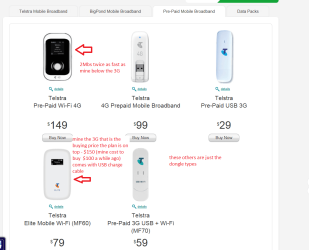
Just my two cents worth tasha either contact the provider by phone or go Telstra Elite wireless adaptor. Thats is what I have for my laptops and the $150 prepaid lasts for a year and you will get far better coverage:)
 

My Computer

Computer type
PC/Desktop
Computer Manufacturer/Model Number
Own build (new) Desk1 / Asus ROG Win 7 / Desk2 1st build
OS
Desk1 7 Home Prem / Desk2 10 Pro / Main lap Asus ROG 10 Pro 2 laptop Toshiba 7 Pro Asus P2520 7 & 10
CPU
Desk1 i5 3750K / Laptop i7 GTX 860M / Desk2 i5 2500
Motherboard
Desk1 Asus P877-V / Desk2 Gigabyte H67 UD3H / Laptop ?
Memory
Desk1 8GB (1866) / Desk2 16GB (1333) / Laptop 8Gb DDR3
Graphics Card(s)
Desk 1& 2NVidia GTX 650 & Laptops on board Intel
Sound Card
Desk 1 & 2 -XONAR DG Realtek High Def audio Laptop
Monitor(s) Displays
Desk 1 Benq HD 2450 / Desk2 Philips 24" / Laptop 17.5"
Screen Resolution
1920x1080 D1 & D2 & Laptop 1
Hard Drives
Desk1 Samsung 120GB 830 SSD
Asus ROG 256GB 850 Pro SSD
Desk2 Samsung 840 256 SSD
Toshiba 120GB EVO
PSU
Desk 1 Corsair HX 1050/ Laptop ? / Desk 2 Corsair HX 650
Case
Desk 1 Cooler HAF XM ? Toshiba laptop / Desk2 Coolermaster
Cooling
Fans on all Desk1 -2 Desk2 - all Coolermasters 5 Laptop ?
Keyboard
Desk 1 MS Sidewinder X6 Desk 2 MS Sidewinder X 4
Mouse
Desk 1&2 - Gigabyte MS 900 gamer - laptop - Logitec wireless
Internet Speed
ADSL2+
Other Info
One other Desktop (tester) and spare Toshba laptop both with SSD's
Running Kaspersky 2016 ISS on all machines config'd identically
Logitec audio stereo systems on each machine (x3)
Canon MG5250MFC
Router/modem TP-Link running WPA2SK
After doing some research I have come up with something we can try, but before we get into that I need to know a few things.

Please answer my questions in the order I am asking, and wait until I see your response, and reply back to you.
I only added the information below these eleven questions to help if we need to go there. I don't mind if you read on, but please do not go any further than question 11 until you hear back from me about your responses.
Thank you.

  1. I need to know the full model number of your Toshiba machine so I can understand the various connections it has.
  2. Are you using wi-fi for the E1553, and wired for the modem, if different how?
  3. Are you using vodafone's equipment, i.e. modem, and would that be a Huawai E1553 USB dongle?
  4. Please go to Control Panel\All Control Panel Items\Device Manager and check to see if you have any warnings or errors. Especially, open and look under Network Adapters, and Portable Devices.
  5. If you don't have any warning or errors, have you tried to use the modem in a different phone connection on your machine, and have you tried to use the E1553 in a different USB slot? I ask this because I don't know the connections your machine has.
  6. Are you sure you have the latest drivers for each?
  7. When was the last time you ran a CHKDSK?
  8. When was the last time you ran a SFC /scannow?
  9. What are you using as an antivirus/malware/firewall product?
  10. When was the last time you checked for any virus's or malware, are you sure your machine is clean?
  11. Have you tried anything since our last contact, such as running that Vodafone troubleshooter?
If you have any difficulty in understanding these questions please reply back and I will help you get the answers.


~ ~ ~ Please stop here until you reply, and hear back from me. ~ ~ ~


I may want you to switch to Microsoft's Security Essentials (MSE) only to test. If I do, I need to know what antivirus/malware/firewall product you have because it has to be completely uninstalled first before installing MSE.

Do not install until I know what you are using, we may be able to adjust or disable your present product.

Procedure to install MSE:

  • Click on the link and select your version (Windows Vista / Windows 7 32bit).
  • Click on Download, then Save File.
  • Save File to your Desktop,
  • Save any previous work, then close all other programs.
  • Go to desktop, click on MSE to start the wizard and finish install.
  • Reboot your machine.

Depending on your answers we will proceed to flushing your Domain Name System (DNS), then:

  • Registering your DNS
  • Reset/Renew TCP/IP connection
  • Repair & Reset Winsock Catalog
I will guide you how to do these three commands, but will wait to show you until we need to.
It would be helpful if you know how to open an Elevated Command Prompt.

 

My Computer

Computer type
PC/Desktop
Computer Manufacturer/Model Number
Gateway DX4831-01e (Mid-Tower Desktop)
OS
Originally Win 7 Hm Prem x64 Ver 6.1.7600 Build 7601-SP1 | Upgraded to Windows 10 December 14, 2019
CPU
Intel i3 530 2.93GHz, 2933MHz 2 Cores 4 Logical Processors
Motherboard
Gateway H57M01 133 megahertz
Memory
6GB of 1,333MHz DDR3 SDRAM
Graphics Card(s)
32MB Intel Graphics Media Accelerator HD IGChip
Sound Card
Realtek High Definition Audio
Monitor(s) Displays
Gateway HX2000 20inch TFT active matrix TN
Screen Resolution
1600 x 900 x 59 hertz
Hard Drives
WDC WD10EADS-00M2B0 [HDD] (1000.20 GB) -- drive 0,
HL-DT-ST DVDRAM GH41N [CD-ROM dr]
Four card readers, and Four USB 2.0
PSU
300watts.
Case
Mid-Tower Desktop
Cooling
Stock from Gateway
Keyboard
Natural Ergonomic Keyboard 4000, see Other Info
Mouse
Orig. Gateway wore out now using Insignia USB wired optical
Internet Speed
Vz FIOS 10ms png 57.64Mbps down 65.53Mbps up Speedtest.org
Antivirus
Zamana Anti-logger with Anti-malware, MSE, Windows Firewall,
Browser
IE11.0.9600.19399-Upd ver11.0.135, Firefox 68.0.1 x64
Other Info
System Specs by Belarc.

BIOS: American Megatrends Inc. P01-A0 11/17/2009

Replaced the MS 'Natural' Standard PS/2 Enhanced 101-102 Keyboard with a new Natural Ergonomic Keyboard 4000 on August 1st 2014.

Canon Pixma MG3222 Printer.

Updated to IE11 on 12102015 | Fios Quantum Router g1100

Additional AV: SpywareBlaster, manual Mbam, SAS
After doing some research I have come up with something we can try, but before we get into that I need to know a few things.

Please answer my questions in the order I am asking, and wait until I see your response, and reply back to you.
I only added the information below these eleven questions to help if we need to go there. I don't mind if you read on, but please do not go any further than question 11 until you hear back from me about your responses.
Thank you.

  1. I need to know the full model number of your Toshiba machine so I can understand the various connections it has.
  2. Are you using wi-fi for the E1553, and wired for the modem, if different how?
  3. Are you using vodafone's equipment, i.e. modem, and would that be a Huawai E1553 USB dongle?
  4. Please go to Control Panel\All Control Panel Items\Device Manager and check to see if you have any warnings or errors. Especially, open and look under Network Adapters, and Portable Devices.
  5. If you don't have any warning or errors, have you tried to use the modem in a different phone connection on your machine, and have you tried to use the E1553 in a different USB slot? I ask this because I don't know the connections your machine has.
  6. Are you sure you have the latest drivers for each?
  7. When was the last time you ran a CHKDSK?
  8. When was the last time you ran a SFC /scannow?
  9. What are you using as an antivirus/malware/firewall product?
  10. When was the last time you checked for any virus's or malware, are you sure your machine is clean?
  11. Have you tried anything since our last contact, such as running that Vodafone troubleshooter?
If you have any difficulty in understanding these questions please reply back and I will help you get the answers.


~ ~ ~ Please stop here until you reply, and hear back from me. ~ ~ ~


I may want you to switch to Microsoft's Security Essentials (MSE) only to test. If I do, I need to know what antivirus/malware/firewall product you have because it has to be completely uninstalled first before installing MSE.

Do not install until I know what you are using, we may be able to adjust or disable your present product.

Procedure to install MSE:


  • Click on the link and select your version (Windows Vista / Windows 7 32bit).
  • Click on Download, then Save File.
  • Save File to your Desktop,
  • Save any previous work, then close all other programs.
  • Go to desktop, click on MSE to start the wizard and finish install.
  • Reboot your machine.
Depending on your answers we will proceed to flushing your Domain Name System (DNS), then:

  • Registering your DNS
  • Reset/Renew TCP/IP connection
  • Repair & Reset Winsock Catalog
I will guide you how to do these three commands, but will wait to show you until we need to.
It would be helpful if you know how to open an Elevated Command Prompt.
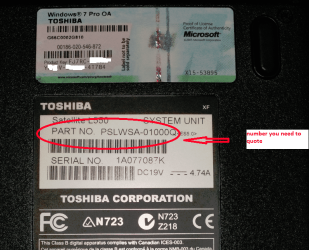
Anak you will also need the PART NO on the Toshiba sticker underneath the machine as it will denote where the machine was made or made for as you will get far more precise info using that as well and any communication with Toshiba they will ask for that number:) see pic
 

Attachments

  • TOSHX.PNG
    TOSHX.PNG
    947.6 KB · Views: 3

My Computer

Computer type
PC/Desktop
Computer Manufacturer/Model Number
Own build (new) Desk1 / Asus ROG Win 7 / Desk2 1st build
OS
Desk1 7 Home Prem / Desk2 10 Pro / Main lap Asus ROG 10 Pro 2 laptop Toshiba 7 Pro Asus P2520 7 & 10
CPU
Desk1 i5 3750K / Laptop i7 GTX 860M / Desk2 i5 2500
Motherboard
Desk1 Asus P877-V / Desk2 Gigabyte H67 UD3H / Laptop ?
Memory
Desk1 8GB (1866) / Desk2 16GB (1333) / Laptop 8Gb DDR3
Graphics Card(s)
Desk 1& 2NVidia GTX 650 & Laptops on board Intel
Sound Card
Desk 1 & 2 -XONAR DG Realtek High Def audio Laptop
Monitor(s) Displays
Desk 1 Benq HD 2450 / Desk2 Philips 24" / Laptop 17.5"
Screen Resolution
1920x1080 D1 & D2 & Laptop 1
Hard Drives
Desk1 Samsung 120GB 830 SSD
Asus ROG 256GB 850 Pro SSD
Desk2 Samsung 840 256 SSD
Toshiba 120GB EVO
PSU
Desk 1 Corsair HX 1050/ Laptop ? / Desk 2 Corsair HX 650
Case
Desk 1 Cooler HAF XM ? Toshiba laptop / Desk2 Coolermaster
Cooling
Fans on all Desk1 -2 Desk2 - all Coolermasters 5 Laptop ?
Keyboard
Desk 1 MS Sidewinder X6 Desk 2 MS Sidewinder X 4
Mouse
Desk 1&2 - Gigabyte MS 900 gamer - laptop - Logitec wireless
Internet Speed
ADSL2+
Other Info
One other Desktop (tester) and spare Toshba laptop both with SSD's
Running Kaspersky 2016 ISS on all machines config'd identically
Logitec audio stereo systems on each machine (x3)
Canon MG5250MFC
Router/modem TP-Link running WPA2SK
Thank you ICit2lol, location specifics is a good point.

I noticed when I was researching the E1553 that I was coming up with references to Australia and the E1553's use in conjunction with modems, and when you made your post#9 it started to sink in, and I wondered if that is normal for Australians to have dial-up to get on the internet.

I would think that Australia does have cable, satellite, and maybe even something similar to fiber optics service, but the norm seems to be dial-up. Could you clarify that for me?

Your $150 is a good deal, what speeds to you get for that price, and is it just for the internet?
We're on verizon fios triple play; phone, TV, and internet (24.57Mbps Down - 5.68Mbps up) all digital for $90 a month. If we wanted to go up to 50/25 as the link suggests it would cost $10 more, but we're happy with what we have.

tasha may have taken your suggestion in post9 and checked with her provider, and maybe even changed over to Telstra, but we'll have to wait for her reply.
 

My Computer

Computer type
PC/Desktop
Computer Manufacturer/Model Number
Gateway DX4831-01e (Mid-Tower Desktop)
OS
Originally Win 7 Hm Prem x64 Ver 6.1.7600 Build 7601-SP1 | Upgraded to Windows 10 December 14, 2019
CPU
Intel i3 530 2.93GHz, 2933MHz 2 Cores 4 Logical Processors
Motherboard
Gateway H57M01 133 megahertz
Memory
6GB of 1,333MHz DDR3 SDRAM
Graphics Card(s)
32MB Intel Graphics Media Accelerator HD IGChip
Sound Card
Realtek High Definition Audio
Monitor(s) Displays
Gateway HX2000 20inch TFT active matrix TN
Screen Resolution
1600 x 900 x 59 hertz
Hard Drives
WDC WD10EADS-00M2B0 [HDD] (1000.20 GB) -- drive 0,
HL-DT-ST DVDRAM GH41N [CD-ROM dr]
Four card readers, and Four USB 2.0
PSU
300watts.
Case
Mid-Tower Desktop
Cooling
Stock from Gateway
Keyboard
Natural Ergonomic Keyboard 4000, see Other Info
Mouse
Orig. Gateway wore out now using Insignia USB wired optical
Internet Speed
Vz FIOS 10ms png 57.64Mbps down 65.53Mbps up Speedtest.org
Antivirus
Zamana Anti-logger with Anti-malware, MSE, Windows Firewall,
Browser
IE11.0.9600.19399-Upd ver11.0.135, Firefox 68.0.1 x64
Other Info
System Specs by Belarc.

BIOS: American Megatrends Inc. P01-A0 11/17/2009

Replaced the MS 'Natural' Standard PS/2 Enhanced 101-102 Keyboard with a new Natural Ergonomic Keyboard 4000 on August 1st 2014.

Canon Pixma MG3222 Printer.

Updated to IE11 on 12102015 | Fios Quantum Router g1100

Additional AV: SpywareBlaster, manual Mbam, SAS
Hiyya Anak no mate dial up is getting quite rare now it is mostly the other forms like I am on copper right now but they are rolling out optical in a lot of places unfortunately cos I am out in the country can't see it happening here any time real soon.
My ex and several friends in remote or bad coverage areas have satellite which is very good and also subsidised the last I heard.

The device I posted is a wireless adaptor and yep is just for the net it isn't real fast but enough for my casual away from home stuff, and oh emergencies of course :geek:

The $150 is for I think 12GB of download but as I say I only use it for casual stuff and it only needs checking up on from time to time. Best apart as I said is that that price is for a years prepaid any period less than that the price rockets horrendously.

Some run the net through their phones but not having experience I think they can run up quite bill.
 

Attachments

  • ELITE.PNG
    ELITE.PNG
    136.8 KB · Views: 2

My Computer

Computer type
PC/Desktop
Computer Manufacturer/Model Number
Own build (new) Desk1 / Asus ROG Win 7 / Desk2 1st build
OS
Desk1 7 Home Prem / Desk2 10 Pro / Main lap Asus ROG 10 Pro 2 laptop Toshiba 7 Pro Asus P2520 7 & 10
CPU
Desk1 i5 3750K / Laptop i7 GTX 860M / Desk2 i5 2500
Motherboard
Desk1 Asus P877-V / Desk2 Gigabyte H67 UD3H / Laptop ?
Memory
Desk1 8GB (1866) / Desk2 16GB (1333) / Laptop 8Gb DDR3
Graphics Card(s)
Desk 1& 2NVidia GTX 650 & Laptops on board Intel
Sound Card
Desk 1 & 2 -XONAR DG Realtek High Def audio Laptop
Monitor(s) Displays
Desk 1 Benq HD 2450 / Desk2 Philips 24" / Laptop 17.5"
Screen Resolution
1920x1080 D1 & D2 & Laptop 1
Hard Drives
Desk1 Samsung 120GB 830 SSD
Asus ROG 256GB 850 Pro SSD
Desk2 Samsung 840 256 SSD
Toshiba 120GB EVO
PSU
Desk 1 Corsair HX 1050/ Laptop ? / Desk 2 Corsair HX 650
Case
Desk 1 Cooler HAF XM ? Toshiba laptop / Desk2 Coolermaster
Cooling
Fans on all Desk1 -2 Desk2 - all Coolermasters 5 Laptop ?
Keyboard
Desk 1 MS Sidewinder X6 Desk 2 MS Sidewinder X 4
Mouse
Desk 1&2 - Gigabyte MS 900 gamer - laptop - Logitec wireless
Internet Speed
ADSL2+
Other Info
One other Desktop (tester) and spare Toshba laptop both with SSD's
Running Kaspersky 2016 ISS on all machines config'd identically
Logitec audio stereo systems on each machine (x3)
Canon MG5250MFC
Router/modem TP-Link running WPA2SK
Thanks for clearing that up for me.
 

My Computer

Computer type
PC/Desktop
Computer Manufacturer/Model Number
Gateway DX4831-01e (Mid-Tower Desktop)
OS
Originally Win 7 Hm Prem x64 Ver 6.1.7600 Build 7601-SP1 | Upgraded to Windows 10 December 14, 2019
CPU
Intel i3 530 2.93GHz, 2933MHz 2 Cores 4 Logical Processors
Motherboard
Gateway H57M01 133 megahertz
Memory
6GB of 1,333MHz DDR3 SDRAM
Graphics Card(s)
32MB Intel Graphics Media Accelerator HD IGChip
Sound Card
Realtek High Definition Audio
Monitor(s) Displays
Gateway HX2000 20inch TFT active matrix TN
Screen Resolution
1600 x 900 x 59 hertz
Hard Drives
WDC WD10EADS-00M2B0 [HDD] (1000.20 GB) -- drive 0,
HL-DT-ST DVDRAM GH41N [CD-ROM dr]
Four card readers, and Four USB 2.0
PSU
300watts.
Case
Mid-Tower Desktop
Cooling
Stock from Gateway
Keyboard
Natural Ergonomic Keyboard 4000, see Other Info
Mouse
Orig. Gateway wore out now using Insignia USB wired optical
Internet Speed
Vz FIOS 10ms png 57.64Mbps down 65.53Mbps up Speedtest.org
Antivirus
Zamana Anti-logger with Anti-malware, MSE, Windows Firewall,
Browser
IE11.0.9600.19399-Upd ver11.0.135, Firefox 68.0.1 x64
Other Info
System Specs by Belarc.

BIOS: American Megatrends Inc. P01-A0 11/17/2009

Replaced the MS 'Natural' Standard PS/2 Enhanced 101-102 Keyboard with a new Natural Ergonomic Keyboard 4000 on August 1st 2014.

Canon Pixma MG3222 Printer.

Updated to IE11 on 12102015 | Fios Quantum Router g1100

Additional AV: SpywareBlaster, manual Mbam, SAS
Back
Top