new installation not connecting to internet

mk1tt16v

New member
Member
Local time
1:41 AM
Messages
34
ok so following on from this thread here:
http://www.sevenforums.com/general-...-welcome-screen-only-cursor-visible-enla.html

I was not getting anywhere while trying to get ti working. I couldn't waste any more time trying too get it booting correctly so I decided to just do a fresh installation. So when i was asked where to install windows 7 , I clicked on the partition with windows 7 on it and deleted it . This left me with an un allocated partition. I then chose to this partition to install windows & on and let it do its thing. So after it finished installing, it loaded the desktop for the first time , however it still has the large cursor and the desktop is as if it is in safe mode. Maybe it still is in safe mode so I thought I would restart with f8 and select boot normally , however it just loads exactly the same.
The second problem is that i can not get internet access as it says the drivers are not installed.
Thanks in advance for any help.
 

My Computer My Computer

At a glance

windows 7 64 bit6gb
Computer type
Laptop
Computer Manufacturer/Model Number
toshiba satellite c660
OS
windows 7 64 bit
Memory
6gb
Browser
chrome
Why dont' you interact with us on the help you're seeking here instead of just skipping around blindly?

Follow the steps given here to Clean Reinstall - Factory OEM Windows 7 to get a perfect install. Pay attention to how drivers are handled in Win7 which you'd already know if you'd consulted us first.

Delete all partitions this time and create new as you wish, format before install. Have your wireless driver in your backup so you can get online and run all rounds of Updates to get the rest of your drivers.
 
I have been interacting with you. And I tried everything you had suggested on my other thread. And again I have done the install as seen here: http://www.sevenforums.com/tutorials/1649-clean-install-windows-7-a.html

So I followed all the steps and am now at the stage in my initial post. Regardless of how you see me "skipping around blindly" the simple fact is that I am now at this stage.

As i have already deleted the initial partition does this now mean that my lan driver is gone for good? or if I do as you suggest will it start working. Its ok replying to everything with "follow this guide" but in my case the guides miss out certain parts which are relative to me.
 

My Computer My Computer

At a glance

windows 7 64 bit6gb
Computer type
Laptop
Computer Manufacturer/Model Number
toshiba satellite c660
OS
windows 7 64 bit
Memory
6gb
Browser
chrome
I have read it but it does not say where to get the drivers! all it says is enable auto update settings. These need internet access. could you just please tell me what i need to do instead of talking in riddles.
 

My Computer My Computer

At a glance

windows 7 64 bit6gb
Computer type
Laptop
Computer Manufacturer/Model Number
toshiba satellite c660
OS
windows 7 64 bit
Memory
6gb
Browser
chrome
Ok i apologise as i had read all that but as there are so many links in there and I was reading loads of information I forgot to get them from the toshiba website. would I be better to reinstall again and delete all 3 partitions or should I get the 6 drivers I need from the toshiba website? would these drivers be one of the reasons that the desktop has the enlarged appearance?
 

My Computer My Computer

At a glance

windows 7 64 bit6gb
Computer type
Laptop
Computer Manufacturer/Model Number
toshiba satellite c660
OS
windows 7 64 bit
Memory
6gb
Browser
chrome
Ok the drivers available after I put my serial number in are a little different to the ones I think I need.
please bear with me as I am not clued up on terminology.
When I trouble shoot my laptop the list of drivers missing are:
1.Unknown device doesn't have a driver
2.Ethernet controller does not have a driver
3.Network controller does not have a driver
4.Sm bus controller does not have a driver
5.PCI simple communications controller doesn't have a driver

the drivers available that to me sound like the right ones are,
For 1. not a clue what to put here.
For 2.LAN driver? there is no ethernet driver listed.
For 3.wireless LAN driveror Network device ID registry setting tool
For 4. Nothing in the list that sounds like this
For 5. Nothing on the list sounds like this
 

My Computer My Computer

At a glance

windows 7 64 bit6gb
Computer type
Laptop
Computer Manufacturer/Model Number
toshiba satellite c660
OS
windows 7 64 bit
Memory
6gb
Browser
chrome
Have you done all rounds of Important and Optional Updates with necessary restarts? Only then should you import any missing drivers besides LAN driver to get online.

This is quite explicit in the tutorial so I don't understand why you have no interest in studying and applying the practices which assure you will get and keep a perfect install for as long as you do. Is it some other kind of install that you want instead?

Ethernet driver will most times be supplied and start up connected if you have it plugged in during install. Otherwise install it and the Display drivers from the website.
 
Last edited:
Excuse me for butting in Greg but as mk1 has a Toshiba and having a bit of experience with this err... brand the Toshiba utilities / driver updates are pretty ruddy useless a bit like the rotten bloat they always put on.

What I would do personally is to try and get the manufacturer's drivers for the machine's component parts.
mk1 you can if you want find these from this Satellite C660-108 - Toshiba just highlight the ones you want Google for the manufacturer or the download site and get it from there.
For example the LAN Ethernet driver is this Intel® 82551IT Integrated 10BASE-T/100BASE-TX Ethernet Controller - Overview


But this is only what I would do because at the moment looks like you are in no mans land.
 

My Computer My Computer

At a glance

Desk1 7 Home Prem / Desk2 10 Pro / Main lap A...Desk1 i5 3750K / Laptop i7 GTX 860M / Desk2 i...Desk1 8GB (1866) / Desk2 16GB (1333) / Laptop...Desk 1& 2NVidia GTX 650 & Laptops on board Intel
Computer type
PC/Desktop
Computer Manufacturer/Model Number
Own build (new) Desk1 / Asus ROG Win 7 / Desk2 1st build
OS
Desk1 7 Home Prem / Desk2 10 Pro / Main lap Asus ROG 10 Pro 2 laptop Toshiba 7 Pro Asus P2520 7 & 10
CPU
Desk1 i5 3750K / Laptop i7 GTX 860M / Desk2 i5 2500
Motherboard
Desk1 Asus P877-V / Desk2 Gigabyte H67 UD3H / Laptop ?
Memory
Desk1 8GB (1866) / Desk2 16GB (1333) / Laptop 8Gb DDR3
Graphics Card(s)
Desk 1& 2NVidia GTX 650 & Laptops on board Intel
Sound Card
Desk 1 & 2 -XONAR DG Realtek High Def audio Laptop
Monitor(s) Displays
Desk 1 Benq HD 2450 / Desk2 Philips 24" / Laptop 17.5"
Screen Resolution
1920x1080 D1 & D2 & Laptop 1
Hard Drives
Desk1 Samsung 120GB 830 SSD
Asus ROG 256GB 850 Pro SSD
Desk2 Samsung 840 256 SSD
Toshiba 120GB EVO
PSU
Desk 1 Corsair HX 1050/ Laptop ? / Desk 2 Corsair HX 650
Case
Desk 1 Cooler HAF XM ? Toshiba laptop / Desk2 Coolermaster
Cooling
Fans on all Desk1 -2 Desk2 - all Coolermasters 5 Laptop ?
Keyboard
Desk 1 MS Sidewinder X6 Desk 2 MS Sidewinder X 4
Mouse
Desk 1&2 - Gigabyte MS 900 gamer - laptop - Logitec wireless
Internet Speed
ADSL2+
Other Info
One other Desktop (tester) and spare Toshba laptop both with SSD's
Running Kaspersky 2016 ISS on all machines config'd identically
Logitec audio stereo systems on each machine (x3)
Canon MG5250MFC
Router/modem TP-Link running WPA2SK
That`s what Greg menat by the "website" but good job for getting them for thr op. :D
 

My Computer My Computer

At a glance

Windows 10 Pro x64Intel Core i7 6700KGSkill TridentZ RGB 16GB 3600 16-16-16-36EVGA GTX 980 Ti SC x2
Computer type
PC/Desktop
Computer Manufacturer/Model Number
Skylake Special #666
OS
Windows 10 Pro x64
CPU
Intel Core i7 6700K
Motherboard
Asus Sabertooth Z170 Mark 1
Memory
GSkill TridentZ RGB 16GB 3600 16-16-16-36
Graphics Card(s)
EVGA GTX 980 Ti SC x2
Sound Card
Realtek High Definition
Monitor(s) Displays
AOC G2460PG
Screen Resolution
1920 x 1080 144Hz
Hard Drives
Samsung 860 Pro 256GB, Seagate Barracuda 4TB x2
PSU
EVGA 1000 P2, EVGA White Custom Braided Cables
Case
Corsair Vengeance C70 Gunmetal Black
Cooling
Corsair H100i v2, Corsair ML120 x2, Thermal Grizzly Kryonaut
Keyboard
Logitech G910 Orion Spectrum
Mouse
Logitech G700s
Internet Speed
Verizon Fios Quantum Gateway 75/75
Antivirus
Windows Defender, Malwarebytes Free 3.8.3
Browser
Chrome
Other Info
Corsair SP120 x4, LG Blu-ray Drive, Durabrand HT-395 100 Watt Dolby Digital Amp, Corsair H2100 Wireless 7.1 Headset

My Computer My Computer

At a glance

Desk1 7 Home Prem / Desk2 10 Pro / Main lap A...Desk1 i5 3750K / Laptop i7 GTX 860M / Desk2 i...Desk1 8GB (1866) / Desk2 16GB (1333) / Laptop...Desk 1& 2NVidia GTX 650 & Laptops on board Intel
Computer type
PC/Desktop
Computer Manufacturer/Model Number
Own build (new) Desk1 / Asus ROG Win 7 / Desk2 1st build
OS
Desk1 7 Home Prem / Desk2 10 Pro / Main lap Asus ROG 10 Pro 2 laptop Toshiba 7 Pro Asus P2520 7 & 10
CPU
Desk1 i5 3750K / Laptop i7 GTX 860M / Desk2 i5 2500
Motherboard
Desk1 Asus P877-V / Desk2 Gigabyte H67 UD3H / Laptop ?
Memory
Desk1 8GB (1866) / Desk2 16GB (1333) / Laptop 8Gb DDR3
Graphics Card(s)
Desk 1& 2NVidia GTX 650 & Laptops on board Intel
Sound Card
Desk 1 & 2 -XONAR DG Realtek High Def audio Laptop
Monitor(s) Displays
Desk 1 Benq HD 2450 / Desk2 Philips 24" / Laptop 17.5"
Screen Resolution
1920x1080 D1 & D2 & Laptop 1
Hard Drives
Desk1 Samsung 120GB 830 SSD
Asus ROG 256GB 850 Pro SSD
Desk2 Samsung 840 256 SSD
Toshiba 120GB EVO
PSU
Desk 1 Corsair HX 1050/ Laptop ? / Desk 2 Corsair HX 650
Case
Desk 1 Cooler HAF XM ? Toshiba laptop / Desk2 Coolermaster
Cooling
Fans on all Desk1 -2 Desk2 - all Coolermasters 5 Laptop ?
Keyboard
Desk 1 MS Sidewinder X6 Desk 2 MS Sidewinder X 4
Mouse
Desk 1&2 - Gigabyte MS 900 gamer - laptop - Logitec wireless
Internet Speed
ADSL2+
Other Info
One other Desktop (tester) and spare Toshba laptop both with SSD's
Running Kaspersky 2016 ISS on all machines config'd identically
Logitec audio stereo systems on each machine (x3)
Canon MG5250MFC
Router/modem TP-Link running WPA2SK
Thank you for your response icit2lol. I was up late last night getting it working, once I got the ethernet driver, all of the other drivers were solved when I did another trouble shoot. I then had to wait up for it to finish 138 updates. The only issue I now have is that the computer can not get the sm bus controller driver. Is this called something else in the toshiba list of drivers? as it is not listed on their downloads page.
Thanks in advance
 

My Computer My Computer

At a glance

windows 7 64 bit6gb
Computer type
Laptop
Computer Manufacturer/Model Number
toshiba satellite c660
OS
windows 7 64 bit
Memory
6gb
Browser
chrome

My Computer My Computer

At a glance

Desk1 7 Home Prem / Desk2 10 Pro / Main lap A...Desk1 i5 3750K / Laptop i7 GTX 860M / Desk2 i...Desk1 8GB (1866) / Desk2 16GB (1333) / Laptop...Desk 1& 2NVidia GTX 650 & Laptops on board Intel
Computer type
PC/Desktop
Computer Manufacturer/Model Number
Own build (new) Desk1 / Asus ROG Win 7 / Desk2 1st build
OS
Desk1 7 Home Prem / Desk2 10 Pro / Main lap Asus ROG 10 Pro 2 laptop Toshiba 7 Pro Asus P2520 7 & 10
CPU
Desk1 i5 3750K / Laptop i7 GTX 860M / Desk2 i5 2500
Motherboard
Desk1 Asus P877-V / Desk2 Gigabyte H67 UD3H / Laptop ?
Memory
Desk1 8GB (1866) / Desk2 16GB (1333) / Laptop 8Gb DDR3
Graphics Card(s)
Desk 1& 2NVidia GTX 650 & Laptops on board Intel
Sound Card
Desk 1 & 2 -XONAR DG Realtek High Def audio Laptop
Monitor(s) Displays
Desk 1 Benq HD 2450 / Desk2 Philips 24" / Laptop 17.5"
Screen Resolution
1920x1080 D1 & D2 & Laptop 1
Hard Drives
Desk1 Samsung 120GB 830 SSD
Asus ROG 256GB 850 Pro SSD
Desk2 Samsung 840 256 SSD
Toshiba 120GB EVO
PSU
Desk 1 Corsair HX 1050/ Laptop ? / Desk 2 Corsair HX 650
Case
Desk 1 Cooler HAF XM ? Toshiba laptop / Desk2 Coolermaster
Cooling
Fans on all Desk1 -2 Desk2 - all Coolermasters 5 Laptop ?
Keyboard
Desk 1 MS Sidewinder X6 Desk 2 MS Sidewinder X 4
Mouse
Desk 1&2 - Gigabyte MS 900 gamer - laptop - Logitec wireless
Internet Speed
ADSL2+
Other Info
One other Desktop (tester) and spare Toshba laptop both with SSD's
Running Kaspersky 2016 ISS on all machines config'd identically
Logitec audio stereo systems on each machine (x3)
Canon MG5250MFC
Router/modem TP-Link running WPA2SK
ah ok thanks ill give that a try. Almost there now.
 

My Computer My Computer

At a glance

windows 7 64 bit6gb
Computer type
Laptop
Computer Manufacturer/Model Number
toshiba satellite c660
OS
windows 7 64 bit
Memory
6gb
Browser
chrome
If the Chipset driver doesn't fix your SM BUS CONTROLLER issue try this download

:ar: ♦ Card Reader Controller


Download


My Computer My Computer

At a glance

Windows 7 Ultimate 32-Bit & Windows 7 Ultimat...Intel Core i7 CPU 950 @ 3.07GHzOCZ 6GB (3 x 2GB) 240-Pin DDR3 SDRAM DDR3 160...ATI Radeon HD 5700 Series
Computer Manufacturer/Model Number
Custom Built
OS
Windows 7 Ultimate 32-Bit & Windows 7 Ultimate 64-Bit
CPU
Intel Core i7 CPU 950 @ 3.07GHz
Motherboard
ASUS P6T DELUXE V2
Memory
OCZ 6GB (3 x 2GB) 240-Pin DDR3 SDRAM DDR3 1600 OCZ3X1600R2
Graphics Card(s)
ATI Radeon HD 5700 Series
Sound Card
OnBoard
Hard Drives
WD6400AACS-00M3B0 (640GB SATA )
PSU
CORSAIR 850w
Case
NZXT LEXA
Cooling
Intel Stock Heatsink Fan
Keyboard
Microsoft Wireless Laser Keyboard 7000
Mouse
Microsoft Wireless Laser Mouse 7000
ok so very nearly there now. The driver for the sm bus controller was the chipset utility one. I have 2 other issues,
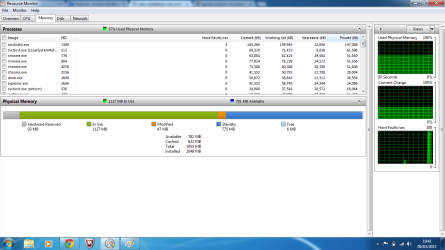
1.My laptop has 6 gb of ram however when I look under system properties ,it says installed memory 2gb.
2. The touchpad used to have a function whereby I can swipe on the edge to scroll down the page, this no longer works.

Are these both driver related issues?

Thanks again
 

My Computer My Computer

At a glance

windows 7 64 bit6gb
Computer type
Laptop
Computer Manufacturer/Model Number
toshiba satellite c660
OS
windows 7 64 bit
Memory
6gb
Browser
chrome
Yes, for scrolling on touchpad edge you need to enable the touchpad software in msconfig>Startup. If you don't have it installed in Device manager and you've completed all rounds of Important and Optional Updates after enabling Automatically deliver drivers via Windows Update (Step 3) then import it from the Toshiba Downloads webpage.

Next type Resource Monitor in Start Search box, on Memory tab post back a screenshot of the RAM apportionment showing the full picture.
 
Try updating your bios or check the settings in the bios .
 

My Computer My Computer

At a glance

Windows 7 Ultimate 32-Bit & Windows 7 Ultimat...Intel Core i7 CPU 950 @ 3.07GHzOCZ 6GB (3 x 2GB) 240-Pin DDR3 SDRAM DDR3 160...ATI Radeon HD 5700 Series
Computer Manufacturer/Model Number
Custom Built
OS
Windows 7 Ultimate 32-Bit & Windows 7 Ultimate 64-Bit
CPU
Intel Core i7 CPU 950 @ 3.07GHz
Motherboard
ASUS P6T DELUXE V2
Memory
OCZ 6GB (3 x 2GB) 240-Pin DDR3 SDRAM DDR3 1600 OCZ3X1600R2
Graphics Card(s)
ATI Radeon HD 5700 Series
Sound Card
OnBoard
Hard Drives
WD6400AACS-00M3B0 (640GB SATA )
PSU
CORSAIR 850w
Case
NZXT LEXA
Cooling
Intel Stock Heatsink Fan
Keyboard
Microsoft Wireless Laser Keyboard 7000
Mouse
Microsoft Wireless Laser Mouse 7000
When I look in msconfig-startup every thing is already enabled.So I will need the driver,however the drivers that are available are not clear to me which one I need. Any idea which i need to look for?

Here is the screen shot from the resource monitor,
Untitled.png

I will try the bios update driver now.
 

My Computer My Computer

At a glance

windows 7 64 bit6gb
Computer type
Laptop
Computer Manufacturer/Model Number
toshiba satellite c660
OS
windows 7 64 bit
Memory
6gb
Browser
chrome
Back
Top