Display Adapter - Can't Download

maranatha4u

New member
Member
VIP
Local time
6:17 PM
Messages
157
Location
Lakeland, Florida USA
I was told by a tech several weeks ago on SevenForums to remove the Display Adapter under the Device Manager from the Control Panel so as to download an all new graphics driver. He had even given me the site for Dell with the page link for various downloads as well as giving me the nVidia site.

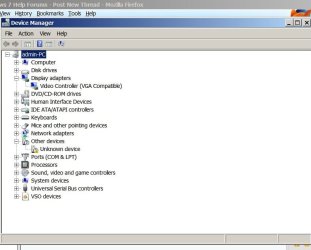
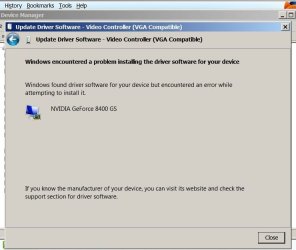
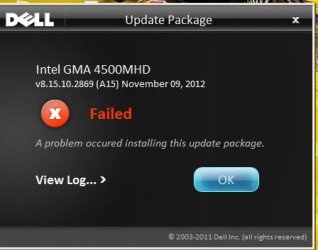
HOWEVER, no matter what I do (since I had already uninstalled the adapter), all attempts to download a new graphics adapter have been futile with my getting error messages every time I try - from the Dell site - from the nVidia site and any other site (?????). Can't for the life of me figure this one out! :confused:

If anyone could lend some helpful expertise, I would greatly appreciate it. Thanks so very much. I'm using a Dell Optiplex 760 with Windows 7 Pro OS. And, I certainly wouldn't mind a tech to navigate my PC remotely to troubleshoot the problem. My e-mail is techyboy7 at gmail dot com. Please see error msg screenshots (3) attached here.
 

Attachments
  • ERROR IN DOWNLOADING FROM DELL PAGE.jpg
    ERROR IN DOWNLOADING FROM DELL PAGE.jpg
    86.4 KB · Views: 12
  • Device Mgr - Display Adapters.jpg
    Device Mgr - Display Adapters.jpg
    42 KB · Views: 10
  • ERROR IN DOWNLOADING NVIDIA.jpg
    ERROR IN DOWNLOADING NVIDIA.jpg
    37.2 KB · Views: 8

My Computer My Computer

At a glance

Windows 7 Pro, 64-bit
Computer Manufacturer/Model Number
Dell Optiplex 760
OS
Windows 7 Pro, 64-bit
What error message are you receiving? you can also do this: http://www.sevenforums.com/tutorials/96442-device-manager-finding-unknown-devices.html

Heres the Dell driver site. Download, if possible, and SAVE it to your desktop. Install it from there.

Drivers for OptiPlex 760

Have you tried a system restore to a point before you uninstalled the driver? If so and everything else didn't work you could do a repair install to get the basic drivers and then update the one. Thats a little drastic for now, so try the others first.

http://www.sevenforums.com/tutorials/3413-repair-install.html
 

My Computer My Computer

At a glance

Windows 10x64 Build 1709Intel i7 7700HQ Kaby Lake16 GB DDR4 @2400Nvidia Geforce GTX 1060
Computer type
Laptop
Computer Manufacturer/Model Number
MSI GE72VR Apache Pro-416
OS
Windows 10x64 Build 1709
CPU
Intel i7 7700HQ Kaby Lake
Motherboard
Micro-Star Intl. MS-179B (U3C1)
Memory
16 GB DDR4 @2400
Graphics Card(s)
Nvidia Geforce GTX 1060
Screen Resolution
1920x1080 120Hz
Hard Drives
256 GB Nvme M.2 SSD

1TB HDD@7200
Cooling
Cooler Blast 4
Keyboard
Steel Series
Antivirus
Bit Defender Free
Browser
Edge
Hi maranatha4u

If you give us the Service Tag number we will provide the right drivers for your machine .

You might have this Intel GMA 4500HD/4500MHD


Download


Download

1.Click Download Button to download the file.
2.When the File Download window appears, click Save The Save In window appears.
3.From the Save In: field, click the down arrow then click to
select Desktop and click Save. The file will download to your desktop.
4.If the Download Complete window appears, click Close. The file
icon appears on your desktop.

Install

1.Double-click the new icon on the desktop labelled Win7-64_15.17.19_2869_Dell_setup.exe
2.The Self-Extracting window appears and prompts you to extract or
unzip to C:\DELL\DRIVERS\1M8J9. Write down this path so the executable (I.e.
Setup.exe) file can be found later.
3.The Self-Extractor window appears.
4.Click OK.
5.After completing the file extraction, if the Self-Extractor
window is still open, close it.
6.Click the Start button and then click Run.
7.Type C:\DELL\DRIVERS\1M8J9 in the Open textbox and then click OK.
8.Follow the on-screen installation instructions.
 
Last edited:

My Computer My Computer

At a glance

Windows 7 Ultimate 32-Bit & Windows 7 Ultimat...Intel Core i7 CPU 950 @ 3.07GHzOCZ 6GB (3 x 2GB) 240-Pin DDR3 SDRAM DDR3 160...ATI Radeon HD 5700 Series
Computer Manufacturer/Model Number
Custom Built
OS
Windows 7 Ultimate 32-Bit & Windows 7 Ultimate 64-Bit
CPU
Intel Core i7 CPU 950 @ 3.07GHz
Motherboard
ASUS P6T DELUXE V2
Memory
OCZ 6GB (3 x 2GB) 240-Pin DDR3 SDRAM DDR3 1600 OCZ3X1600R2
Graphics Card(s)
ATI Radeon HD 5700 Series
Sound Card
OnBoard
Hard Drives
WD6400AACS-00M3B0 (640GB SATA )
PSU
CORSAIR 850w
Case
NZXT LEXA
Cooling
Intel Stock Heatsink Fan
Keyboard
Microsoft Wireless Laser Keyboard 7000
Mouse
Microsoft Wireless Laser Mouse 7000
What error message are you receiving? you can also do this: http://www.sevenforums.com/tutorials/96442-device-manager-finding-unknown-devices.html

Heres the Dell driver site. Download, if possible, and SAVE it to your desktop. Install it from there.

Drivers for OptiPlex 760

Have you tried a system restore to a point before you uninstalled the driver? If so and everything else didn't work you could do a repair install to get the basic drivers and then update the one. Thats a little drastic for now, so try the others first.

http://www.sevenforums.com/tutorials/3413-repair-install.html
______________________________________________________________________________

Thank you, Indianacarnie; but this too failed with an error message when I tried the appropriate drive from the Dell site. See screenshot of error msg attached. I did try a system restore the other evening, but unfortunately that failed too, as the restore would only go back to an early period that same day. (And, I didn't think a system restore could restore hardware that had been removed; perhaps I'm wrong). I'll try the last approach you suggested in doing a repair install and let you know the results. Thanks so much.
 

Attachments

  • FAILED.jpg
    FAILED.jpg
    16 KB · Views: 5

My Computer My Computer

At a glance

Windows 7 Pro, 64-bit
Computer Manufacturer/Model Number
Dell Optiplex 760
OS
Windows 7 Pro, 64-bit
Hi maranatha4u

If you give us the Service Tag number we will provide the right drivers for your machine .

You might have this Intel GMA 4500HD/4500MHD


Download


Download

1.Click Download Button to download the file.
2.When the File Download window appears, click Save The Save In window appears.
3.From the Save In: field, click the down arrow then click to
select Desktop and click Save. The file will download to your desktop.
4.If the Download Complete window appears, click Close. The file
icon appears on your desktop.

Install

1.Double-click the new icon on the desktop labelled Win7-64_15.17.19_2869_Dell_setup.exe
2.The Self-Extracting window appears and prompts you to extract or
unzip to C:\DELL\DRIVERS\1M8J9. Write down this path so the executable (I.e.
Setup.exe) file can be found later.
3.The Self-Extractor window appears.
4.Click OK.
5.After completing the file extraction, if the Self-Extractor
window is still open, close it.
6.Click the Start button and then click Run.
7.Type C:\DELL\DRIVERS\1M8J9 in the Open textbox and then click OK.
8.Follow the on-screen installation instructions.

_____________________________________________________________________

Thanks so much . . . here's the Service Tag #: HM47QL1
 

My Computer My Computer

At a glance

Windows 7 Pro, 64-bit
Computer Manufacturer/Model Number
Dell Optiplex 760
OS
Windows 7 Pro, 64-bit
Hi maranatha4u

If you give us the Service Tag number we will provide the right drivers for your machine .

You might have this Intel GMA 4500HD/4500MHD


Download


Download

1.Click Download Button to download the file.
2.When the File Download window appears, click Save The Save In window appears.
3.From the Save In: field, click the down arrow then click to
select Desktop and click Save. The file will download to your desktop.
4.If the Download Complete window appears, click Close. The file
icon appears on your desktop.

Install

1.Double-click the new icon on the desktop labelled Win7-64_15.17.19_2869_Dell_setup.exe
2.The Self-Extracting window appears and prompts you to extract or
unzip to C:\DELL\DRIVERS\1M8J9. Write down this path so the executable (I.e.
Setup.exe) file can be found later.
3.The Self-Extractor window appears.
4.Click OK.
5.After completing the file extraction, if the Self-Extractor
window is still open, close it.
6.Click the Start button and then click Run.
7.Type C:\DELL\DRIVERS\1M8J9 in the Open textbox and then click OK.
8.Follow the on-screen installation instructions.

___________________________________________________________________________


I'll do this right now (before the other measure of repair install). Thank you.
 

My Computer My Computer

At a glance

Windows 7 Pro, 64-bit
Computer Manufacturer/Model Number
Dell Optiplex 760
OS
Windows 7 Pro, 64-bit
Hi maranatha4u

If you give us the Service Tag number we will provide the right drivers for your machine .

You might have this Intel GMA 4500HD/4500MHD


Download


Download

1.Click Download Button to download the file.
2.When the File Download window appears, click Save The Save In window appears.
3.From the Save In: field, click the down arrow then click to
select Desktop and click Save. The file will download to your desktop.
4.If the Download Complete window appears, click Close. The file
icon appears on your desktop.

Install

1.Double-click the new icon on the desktop labelled Win7-64_15.17.19_2869_Dell_setup.exe
2.The Self-Extracting window appears and prompts you to extract or
unzip to C:\DELL\DRIVERS\1M8J9. Write down this path so the executable (I.e.
Setup.exe) file can be found later.
3.The Self-Extractor window appears.
4.Click OK.
5.After completing the file extraction, if the Self-Extractor
window is still open, close it.
6.Click the Start button and then click Run.
7.Type C:\DELL\DRIVERS\1M8J9 in the Open textbox and then click OK.
8.Follow the on-screen installation instructions.

___________________________________________________________________________


I'll do this right now (before the other measure of repair install). Thank you.

___________________________________________________________________________


Hello Again,

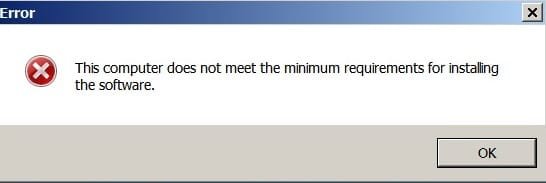
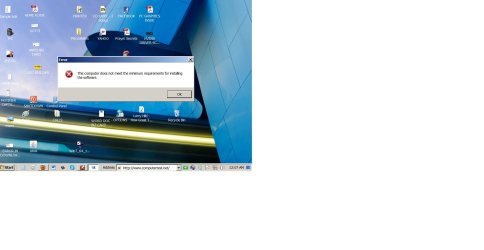
I just followed your method here precisely, but before I could even use the Run feature, I received (another) error popuup (see screenshot attached) . . . the same one I had gotten before.
 

Attachments

  • ANOTHER ERROR.jpg
    ANOTHER ERROR.jpg
    9.4 KB · Views: 5

My Computer My Computer

At a glance

Windows 7 Pro, 64-bit
Computer Manufacturer/Model Number
Dell Optiplex 760
OS
Windows 7 Pro, 64-bit
With this Service Tag : HM47QL1 it has 3 video drivers . If the one I sent you earlier doesn't work let me know and I will send you the other ones .

What is your bios version ? To check run the command below inside command prompt .

Click on :orb: button then type in CMD and press enter .

Code:
wmic csproduct get vendor,name,identifyingnumber

If the command doesn't help try this command below

Code:
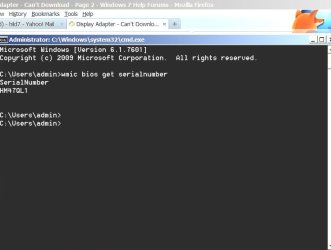
wmic bios get serialnumber

Do you have 64-bit or 32-bit OS ? To check click on :orb: right-click on COMPUTER and choose Properties .
   Note
you could do the same step without clicking on :orb: if you have the COMPUTER icon on the desktop
 
Last edited:

My Computer My Computer

At a glance

Windows 7 Ultimate 32-Bit & Windows 7 Ultimat...Intel Core i7 CPU 950 @ 3.07GHzOCZ 6GB (3 x 2GB) 240-Pin DDR3 SDRAM DDR3 160...ATI Radeon HD 5700 Series
Computer Manufacturer/Model Number
Custom Built
OS
Windows 7 Ultimate 32-Bit & Windows 7 Ultimate 64-Bit
CPU
Intel Core i7 CPU 950 @ 3.07GHz
Motherboard
ASUS P6T DELUXE V2
Memory
OCZ 6GB (3 x 2GB) 240-Pin DDR3 SDRAM DDR3 1600 OCZ3X1600R2
Graphics Card(s)
ATI Radeon HD 5700 Series
Sound Card
OnBoard
Hard Drives
WD6400AACS-00M3B0 (640GB SATA )
PSU
CORSAIR 850w
Case
NZXT LEXA
Cooling
Intel Stock Heatsink Fan
Keyboard
Microsoft Wireless Laser Keyboard 7000
Mouse
Microsoft Wireless Laser Mouse 7000
With this Service Tag : HM47QL1 it has 3 video drivers . If the one I sent you earlier doesn't work let me know and I will send you the other ones .

What is your bios version ? To check run the command below inside command prompt .

Click on :orb: button then type in CMD and press enter .
Code:
wmic csproduct get vendor,name,identifyingnumber
If the command doesn't help try this command below

Code:
wmic bios get serialnumber

___________________________________________________________________


Is this what you were looking for? (not sure I did this correctly, as the emoticon was blocking out some of your text.) See attached screenshot.
 

Attachments

  • Bios Version.jpg
    Bios Version.jpg
    24.2 KB · Views: 6

My Computer My Computer

At a glance

Windows 7 Pro, 64-bit
Computer Manufacturer/Model Number
Dell Optiplex 760
OS
Windows 7 Pro, 64-bit
In that command prompt window type in what is inside the code box .

Example: C:\Users\Admin>wmic bios get serialnumber

   Tip
Type in what is in BOLD
 

My Computer My Computer

At a glance

Windows 7 Ultimate 32-Bit & Windows 7 Ultimat...Intel Core i7 CPU 950 @ 3.07GHzOCZ 6GB (3 x 2GB) 240-Pin DDR3 SDRAM DDR3 160...ATI Radeon HD 5700 Series
Computer Manufacturer/Model Number
Custom Built
OS
Windows 7 Ultimate 32-Bit & Windows 7 Ultimate 64-Bit
CPU
Intel Core i7 CPU 950 @ 3.07GHz
Motherboard
ASUS P6T DELUXE V2
Memory
OCZ 6GB (3 x 2GB) 240-Pin DDR3 SDRAM DDR3 1600 OCZ3X1600R2
Graphics Card(s)
ATI Radeon HD 5700 Series
Sound Card
OnBoard
Hard Drives
WD6400AACS-00M3B0 (640GB SATA )
PSU
CORSAIR 850w
Case
NZXT LEXA
Cooling
Intel Stock Heatsink Fan
Keyboard
Microsoft Wireless Laser Keyboard 7000
Mouse
Microsoft Wireless Laser Mouse 7000
In that command prompt window type in what is inside the code box .

Example: C:\Users\Admin>wmic bios get serialnumber

   Tip
Type in what is in BOLD
_______________________________________________

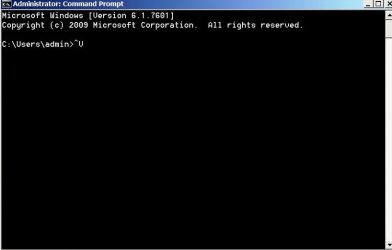
Oh, Sorry . . . I was just going to Start > Accessores > CP . . . but, same destination. Anyways, no matter which of the two codes you had given me . . . when I input them at the command prompt, both yield this (see screenshot attached).
 

Attachments

  • Either Code Yields This.jpg
    Either Code Yields This.jpg
    16.8 KB · Views: 5

My Computer My Computer

At a glance

Windows 7 Pro, 64-bit
Computer Manufacturer/Model Number
Dell Optiplex 760
OS
Windows 7 Pro, 64-bit
The screen above is cause you used CTRL+V to paste. In command prompt you can't use the paste keyboard shortcut . You would have to right click with the mouse and choose Paste then press enter .
 

My Computer My Computer

At a glance

Windows 7 Ultimate 32-Bit & Windows 7 Ultimat...Intel Core i7 CPU 950 @ 3.07GHzOCZ 6GB (3 x 2GB) 240-Pin DDR3 SDRAM DDR3 160...ATI Radeon HD 5700 Series
Computer Manufacturer/Model Number
Custom Built
OS
Windows 7 Ultimate 32-Bit & Windows 7 Ultimate 64-Bit
CPU
Intel Core i7 CPU 950 @ 3.07GHz
Motherboard
ASUS P6T DELUXE V2
Memory
OCZ 6GB (3 x 2GB) 240-Pin DDR3 SDRAM DDR3 1600 OCZ3X1600R2
Graphics Card(s)
ATI Radeon HD 5700 Series
Sound Card
OnBoard
Hard Drives
WD6400AACS-00M3B0 (640GB SATA )
PSU
CORSAIR 850w
Case
NZXT LEXA
Cooling
Intel Stock Heatsink Fan
Keyboard
Microsoft Wireless Laser Keyboard 7000
Mouse
Microsoft Wireless Laser Mouse 7000
The screen above is cause you used CTRL+V to paste. In command prompt you can't use the paste keyboard shortcut . You would have to right click with the mouse and choose Paste then press enter .

___________________________________________________________________________________

I see. Thanks for telling me this. Here is the command prompts results (attached).
 

Attachments

  • New CMD Screenshot.jpg
    New CMD Screenshot.jpg
    30.5 KB · Views: 7

My Computer My Computer

At a glance

Windows 7 Pro, 64-bit
Computer Manufacturer/Model Number
Dell Optiplex 760
OS
Windows 7 Pro, 64-bit
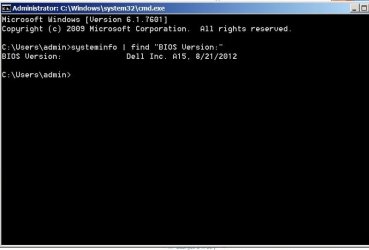
Shoot ! I gave you the wrong command to input . I'm sorry . Put in this command inside command prompt

Code:
[b]systeminfo | find "BIOS Version:"[/b]

   Note
Include the quotes . The | pipe symbol can be found using SHIFT+\ (just above the Enter key).
 

My Computer My Computer

At a glance

Windows 7 Ultimate 32-Bit & Windows 7 Ultimat...Intel Core i7 CPU 950 @ 3.07GHzOCZ 6GB (3 x 2GB) 240-Pin DDR3 SDRAM DDR3 160...ATI Radeon HD 5700 Series
Computer Manufacturer/Model Number
Custom Built
OS
Windows 7 Ultimate 32-Bit & Windows 7 Ultimate 64-Bit
CPU
Intel Core i7 CPU 950 @ 3.07GHz
Motherboard
ASUS P6T DELUXE V2
Memory
OCZ 6GB (3 x 2GB) 240-Pin DDR3 SDRAM DDR3 1600 OCZ3X1600R2
Graphics Card(s)
ATI Radeon HD 5700 Series
Sound Card
OnBoard
Hard Drives
WD6400AACS-00M3B0 (640GB SATA )
PSU
CORSAIR 850w
Case
NZXT LEXA
Cooling
Intel Stock Heatsink Fan
Keyboard
Microsoft Wireless Laser Keyboard 7000
Mouse
Microsoft Wireless Laser Mouse 7000
Shoot ! I gave you the wrong command to input . I'm sorry . Put in this command inside command prompt

Code:
[B]systeminfo | find "BIOS Version:"[/B]
   Note
Include the quotes . The | pipe symbol can be found using SHIFT+\ (just above the Enter key).

______________________________________________________________________________

No prob. I just greatly appreciate your help. Here's the screenshot (attached). I think I'm going to "hit the sack" right now and continue tomorrow, if that's alright. :sleepy:
 

Attachments

  • BIOS VERSION.jpg
    BIOS VERSION.jpg
    22.2 KB · Views: 8

My Computer My Computer

At a glance

Windows 7 Pro, 64-bit
Computer Manufacturer/Model Number
Dell Optiplex 760
OS
Windows 7 Pro, 64-bit
You have the most recent BIOS version and that driver needs A015 for it to run.

Are you running Windows 7 32-bit or 64-bit ? To check right click on COMPUTER and choose Properties . In the System section you’ll see “System type”, which will say 32-bit Operating System or 64-bit Operating System
 

My Computer My Computer

At a glance

Windows 7 Ultimate 32-Bit & Windows 7 Ultimat...Intel Core i7 CPU 950 @ 3.07GHzOCZ 6GB (3 x 2GB) 240-Pin DDR3 SDRAM DDR3 160...ATI Radeon HD 5700 Series
Computer Manufacturer/Model Number
Custom Built
OS
Windows 7 Ultimate 32-Bit & Windows 7 Ultimate 64-Bit
CPU
Intel Core i7 CPU 950 @ 3.07GHz
Motherboard
ASUS P6T DELUXE V2
Memory
OCZ 6GB (3 x 2GB) 240-Pin DDR3 SDRAM DDR3 1600 OCZ3X1600R2
Graphics Card(s)
ATI Radeon HD 5700 Series
Sound Card
OnBoard
Hard Drives
WD6400AACS-00M3B0 (640GB SATA )
PSU
CORSAIR 850w
Case
NZXT LEXA
Cooling
Intel Stock Heatsink Fan
Keyboard
Microsoft Wireless Laser Keyboard 7000
Mouse
Microsoft Wireless Laser Mouse 7000
Thanks, Vistaking. This is a 64-bit system.
 

My Computer My Computer

At a glance

Windows 7 Pro, 64-bit
Computer Manufacturer/Model Number
Dell Optiplex 760
OS
Windows 7 Pro, 64-bit

My Computer My Computer

At a glance

Windows 10x64 Build 1709Intel i7 7700HQ Kaby Lake16 GB DDR4 @2400Nvidia Geforce GTX 1060
Computer type
Laptop
Computer Manufacturer/Model Number
MSI GE72VR Apache Pro-416
OS
Windows 10x64 Build 1709
CPU
Intel i7 7700HQ Kaby Lake
Motherboard
Micro-Star Intl. MS-179B (U3C1)
Memory
16 GB DDR4 @2400
Graphics Card(s)
Nvidia Geforce GTX 1060
Screen Resolution
1920x1080 120Hz
Hard Drives
256 GB Nvme M.2 SSD

1TB HDD@7200
Cooling
Cooler Blast 4
Keyboard
Steel Series
Antivirus
Bit Defender Free
Browser
Edge
So, Indianacarnie, do you suggest I download this (bios from link you had given here) anyways?
 

My Computer My Computer

At a glance

Windows 7 Pro, 64-bit
Computer Manufacturer/Model Number
Dell Optiplex 760
OS
Windows 7 Pro, 64-bit
Last edited:

My Computer My Computer

At a glance

Windows 10x64 Build 1709Intel i7 7700HQ Kaby Lake16 GB DDR4 @2400Nvidia Geforce GTX 1060
Computer type
Laptop
Computer Manufacturer/Model Number
MSI GE72VR Apache Pro-416
OS
Windows 10x64 Build 1709
CPU
Intel i7 7700HQ Kaby Lake
Motherboard
Micro-Star Intl. MS-179B (U3C1)
Memory
16 GB DDR4 @2400
Graphics Card(s)
Nvidia Geforce GTX 1060
Screen Resolution
1920x1080 120Hz
Hard Drives
256 GB Nvme M.2 SSD

1TB HDD@7200
Cooling
Cooler Blast 4
Keyboard
Steel Series
Antivirus
Bit Defender Free
Browser
Edge
Back
Top