Realtek, Windows 7 64RTM Crackle/static/popping

Try this fix

I tried several fixes recommended but what finally worked for me was to disable the wireless card. I have mine hard wired in so this was not a problem. Not sure if they are sharing the same IRQ but I was very frustrated. I bought a new usb external sound card, bought a new fiber optic cable, installed various drivers but nothing worked. The wireless card disable did the trick for me. Hope it works for you!
 

My Computer My Computer

At a glance

Windows 7 Home Premium x64
OS
Windows 7 Home Premium x64
Try this, may fix

I started having these crackling sounds 3 days ago and it was frustrating because it was impossible for me to listen to my my music with tons of distortion or watching stuff. I searched endlessly on the net but found no fix, tried dcpchecker, latencymon, and driver updates, reinstall, ethernet, realtek blah blah blah but nothing worked, then I thought it could be a ground problem within my pc. so what I did was clean up my pc.

I opened my pc and it was full of dust. dust everywhere. spiders even mosquitoes living in my pc. freaking insects. first thing I did was disassemble my whole pc, cleaned out the dust from the motherboard, powersupply,videocard,ram and case anything were the PCB is physically EXPOSED. reassemble the pc then turn it on. second I opened my music player [media monkey] played some music at the same time doing the browser srcolling, window change anything that could throttle my cpu but no crackling had been encountered, now everything works fine. Im guessing there was some electrical dust ground looping something.
 

My Computer My Computer

At a glance

windows 7 Ultimate x64Intel Pentium G620 2.6GHZ8 (2 x 4GB) Corsair XMS3 1333MHZ DDR3Sapphire Radeon 7750 1GB
OS
windows 7 Ultimate x64
CPU
Intel Pentium G620 2.6GHZ
Motherboard
Asrock H61m-GE
Memory
8 (2 x 4GB) Corsair XMS3 1333MHZ DDR3
Graphics Card(s)
Sapphire Radeon 7750 1GB
Sound Card
Realtek
Monitor(s) Displays
1 x Samsung p2250 21", 1x Asus v228h 21"
Screen Resolution
3840x1080
Hard Drives
Western Digital Green 2TB
Seagate 750GB
PSU
Logisys 550w
Case
CDR-KING
Cooling
Rocket Fish lga 1155 Cooler
Keyboard
Logitech Wireless
Mouse
Logitech Wireless
Internet Speed
2mb
..changed the default format till the popping went away..24bit 48000 was ok for me
 

My Computer My Computer

At a glance

Windows 7 Ultimate x64AMD Phenom II X6 1090T16gigs
Computer Manufacturer/Model Number
homebrew
OS
Windows 7 Ultimate x64
CPU
AMD Phenom II X6 1090T
Motherboard
amd crosshair iv extreme
Memory
16gigs
Sound Card
onboard
Monitor(s) Displays
samsung syncmaster
Hard Drives
ssd 250mb~2tb raid westerdigital 1000,500
PSU
kingwin 1000
Cooling
corsair hyro
For me disabling the CPU throttling from BIOS did the thing. I've tried all drivers from realtek with no success.
The CPU throttling feature can be found under different names. On my Gigabyte board it's called CPU EIST Function.
 

My Computer My Computer

At a glance

Windows 7 X64
OS
Windows 7 X64
I had the same crackling sound issue, and none of the offered solutions worked for me (although I tried to avoid trying the more "hacky" ideas). So I decided to forget the integrated sound card, and bought an external USB 7.1 sound card for 10 quid. And it works like a charm.

Seriously, if none of the previously mentioned tips work for you, buying a usb sound card is the easiest way to solve the problem, because the combination of the realtek integrated sound card and win7 64bit is something that went really wrong, and none of the new drivers seem to make any difference.

(Btw I have a Gigabyte GA-X58A-UD5 with win7 x64 ultimate)
 

My Computer My Computer

At a glance

Windows 7 Ultimate x64i7 [email protected]12gb corsairGigabyte Nvidia GT430
Computer type
PC/Desktop
OS
Windows 7 Ultimate x64
CPU
i7 [email protected]
Motherboard
Gigabyte GA-X58A-UD5
Memory
12gb corsair
Graphics Card(s)
Gigabyte Nvidia GT430
Sound Card
External USB 7.1
PSU
Some noname 500W
SOLVED FOR FUJITSU SIEMENS V5515 x86 Windows 7

Hi,
I read on another forum that this problem might be solved. Realtek have made available a limited BETA driver which solves this problem.
The file name is:-
5898_pg281_win7_turnoff_pullmode_upd
You can google it and download it from various free file networks. I got mine from '4 share'.
It works perfectly on my laptop and maybe your desktop? I am running a SiS Motherboard, T2130 CPU, Realtek sound and Synaptic touchpad with SiS graphics.
I had stayed with Vista X86 Business prior to this but now 7 Home Premium (x86) works perfectly. Sound was absolutely terrible before and now works perfectly with no crackle at all!
Windows 7 x86 SP1 Home Premium

Perhaps someone can check the driver on x64 for full compatibility?
 

My Computer My Computer

At a glance

Winodws Home Premium x86 and x64
OS
Winodws Home Premium x86 and x64
Hey "POPPING Noise" I'm thinking it *COULD* be to do with windows update since if you do a fresh install without the updates it is mostly quiet but after it starts doing the annoying noise.

I'm thinking if we all come together and remove 1 update stating which update it is such as (KB2342 etc) then we might be able to pinpoint the Popping noise.

*Static Noise*/Popping noise-I think if you Change settings on Wireless Card via device manager then maybe you could reduce it but if anyone tries it and does work please tell us what steps you have done.
 

My Computer My Computer

At a glance

Windows 7 Home Premium 64 bit8GBGT555
Computer type
Laptop
OS
Windows 7 Home Premium 64 bit
Memory
8GB
Graphics Card(s)
GT555
Screen Resolution
1920x1080
I'm getting the popping/glitchy audio from time to time in my onboard audio in Windows 8. I have a Gigabyte mobo. Model EP45-UD3R
 

My Computer My Computer

At a glance

Windows 7 Ultimate 64
OS
Windows 7 Ultimate 64
I have had the popping and cracking off and on for the past 2 weeks, tried all sorts of things. I have a brand new Dell XPS 8500 with realtek soundcard. Disabled onboard wireless and seems to working just fine so far. Will update later
 

My Computer My Computer

At a glance

Windows 7 Home Premium 64bit12 GBNVidia GeForce GT 640
Computer type
PC/Desktop
Computer Manufacturer/Model Number
Dell XPS 8500
OS
Windows 7 Home Premium 64bit
Memory
12 GB
Graphics Card(s)
NVidia GeForce GT 640
Internet Speed
Cable
Antivirus
Microsoft Security Essentials
Browser
Chrome
I have had the popping and cracking off and on for the past 2 weeks, tried all sorts of things. I have a brand new Dell XPS 8500 with realtek soundcard. Disabled onboard wireless and seems to working just fine so far. Will update later

I also have the XPS 8500 and I'm having the same issue. Has it been ok for you ever since your fix? I'm upstairs so kinda need the wireless feature :(
 

My Computer My Computer

At a glance

Windows 8 64 bitIntel Core i7 37708GB 1600mhznVidia GT 640
Computer type
PC/Desktop
Computer Manufacturer/Model Number
Dell XPS 8500
OS
Windows 8 64 bit
CPU
Intel Core i7 3770
Memory
8GB 1600mhz
Graphics Card(s)
nVidia GT 640
Hard Drives
Seagate 2TB 7200RPM

Samsung PM830 32GB SSD Cache
Antivirus
Norton
Browser
Firefox
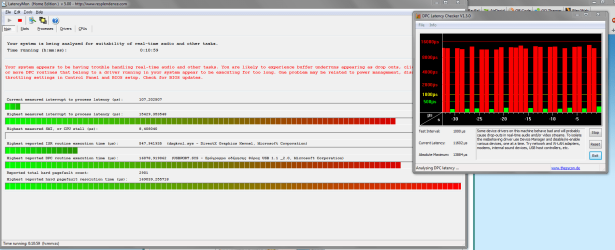
I posted about switching to an external USB soundcard earlier. I thought it solved my popping/crackling sound problem, but no, it didn't... It worked for a while, it was much better than with the integrated sound card, but I still had these extreme (19000+ microsecond) latency spikes that could last for minutes. I also tried disabling almost everything (sound card, graphics card, usb, etc) in the device manager while looking at the DPC latency checker, and nothing...

Few months later it started to become really annoying, as the popping/crackling didn't stop. Basically, I turned the PC on, and within 3-4 minutes the crackling started and didn't stop until I shut the PC down.

Then I looked around on forums again, and I read that others had the same problem with similar Gigabyte motherboards (I have a Gigabyte GA-X58A-UD5). Somebody suggested that it might be a conflict between the Gigabyte Marvel SATA drivers and the optical drive (DVD-rom). Basically, you shouldn't plug your DVD-rom into any of the Marvel (blue) SATA slots.

So I plugged it into a non-Marvel slot, and suddenly no spikes. WTF!!! I'm constanly running the DPC latency checker now, and when I look at it after hours of gaming, it usually tells me that there was a spike, but I didn't notice it at all. So it's weird, but seems to be working. Hope it helps.

 

My Computer My Computer

At a glance

Windows 7 Ultimate x64i7 [email protected]12gb corsairGigabyte Nvidia GT430
Computer type
PC/Desktop
OS
Windows 7 Ultimate x64
CPU
i7 [email protected]
Motherboard
Gigabyte GA-X58A-UD5
Memory
12gb corsair
Graphics Card(s)
Gigabyte Nvidia GT430
Sound Card
External USB 7.1
PSU
Some noname 500W
Actually, there's an easier solution. Simply uninstall the Gigabyte RAID drivers (GB36XX something in the device manager) and you don't have to plug the optical drive anywhere else.
 

My Computer My Computer

At a glance

Windows 7 Ultimate x64i7 [email protected]12gb corsairGigabyte Nvidia GT430
Computer type
PC/Desktop
OS
Windows 7 Ultimate x64
CPU
i7 [email protected]
Motherboard
Gigabyte GA-X58A-UD5
Memory
12gb corsair
Graphics Card(s)
Gigabyte Nvidia GT430
Sound Card
External USB 7.1
PSU
Some noname 500W
press start key, type "msconfig" hit enter, go to "services", select hide all microsoft services, untill only 3rd party apps and add ons show, then click disable all hit enter, "restart" your computer, twice if you have to, then run your audio program and see if it still stutters. if it doesnt, then your problem is in your add ons and 3rd party apps, your welcome!11
 

My Computer My Computer

At a glance

windows 7 64 bitpentium(R) dual core cpu
Computer type
PC/Desktop
Computer Manufacturer/Model Number
dell windows home premium 2009
OS
windows 7 64 bit
CPU
pentium(R) dual core cpu
I managed to find the solution on my XPS 8500 but I'm gonna have to contact dell about this as I'm not happy. My system has a 2TB HDD but also paired with a 32GB mSata SSD for caching purposes.

I had set the mode in the Intel RST app to 'maximized' from the default 'enhanced' mode. After trying every solution I could (updating drivers, rolling back drivers, disabling network adapters etc.) I then decided to set the mode back to 'enhanced' and what do you know? No more audio stutters for about 2 months now. Tonight I changed the setting back to 'maximized' and there it is, the audio stutters are back again and thus, confirming to me that this is the issue (for me at least).

So yeah, I'm gonna have to contact dell about this as I would rather use the cache device in 'maximized' mode rather than 'enhanced'.
 

My Computer My Computer

At a glance

Windows 8 64 bitIntel Core i7 37708GB 1600mhznVidia GT 640
Computer type
PC/Desktop
Computer Manufacturer/Model Number
Dell XPS 8500
OS
Windows 8 64 bit
CPU
Intel Core i7 3770
Memory
8GB 1600mhz
Graphics Card(s)
nVidia GT 640
Hard Drives
Seagate 2TB 7200RPM

Samsung PM830 32GB SSD Cache
Antivirus
Norton
Browser
Firefox
i have the same problem sound cracking until i restart my pc its fine for 1-2 days but after crackling returns and i hear it more often as the days pass any help i attached also latecy mon and latency checker the second one is after i restart my computer
 

Attachments

  • wi3ArVt.png
    wi3ArVt.png
    60.8 KB · Views: 10
  • lQZARD5.png
    lQZARD5.png
    41.3 KB · Views: 6

My Computer My Computer

At a glance

win 7 x64
OS
win 7 x64
come on noone who can help?
 

My Computer My Computer

At a glance

win 7 x64
OS
win 7 x64
You seemed to have what we call hijacked some other member's thread. Maybe if you start your own someone will help yo.
 

My Computer My Computer

At a glance

Win 10 Pro 64Intel Core i7 960 @3.20 GHz24.0 GB DDR3EVGA GTX 750Ti
Computer type
PC/Desktop
Computer Manufacturer/Model Number
Custom Build
OS
Win 10 Pro 64
CPU
Intel Core i7 960 @3.20 GHz
Motherboard
MSI MS7522
Memory
24.0 GB DDR3
Graphics Card(s)
EVGA GTX 750Ti
Monitor(s) Displays
LG E2341 23 Inch
Screen Resolution
1920x1080
Hard Drives
1TB Western Dgital 1002FAEX-00Y9A0
1TB Hitachi HDS721010CLA322
PSU
700 Watt
Case
Haf 912
Cooling
Fans
Keyboard
Logitech MK710
Mouse
Logitech M705
Internet Speed
Cable
Antivirus
AIS 2015 .10.0.2225
Browser
Firefox 49
Other Info
MalwareBytes Anti-Rootkit utility
Let me share my experience with you guys...I had the same problem too with my new Sony Duo Vaio 13 laptop running windows 8.1 and realtek hd audio.....The problem was intermittent....there were days when you'd hear it then there are days that the computer is ok...Upon logging in, you'd hear the loud static/crackling sound already...I thought at first it was a hardware problem. I even called up Sony and asked for an exchange or a refund but they wouldn't allow it on a custom unit. I first tried reformatting it and it worked no problem for a few days and when I did updates and installed programs on it, the problem would manifest again....same crackling static very loud irritating sound even when the speakers are set to a very low volume. I began to think it must be caused by a software conflict somewhere so I tried installing the softwares one by one to see if the problem would come out again...After several days of formatting and reformatting, I think I found the problem already....I think the culprit is the Nero Platinum 12 I installed...That program worked fine on my older computer running Windows 8 so it was the last program I suspected would cause any problems with windows 8.1.....My computer seems to be running fine now.....with windows and sony vaio update all fine......I'm still keeping my computers crossed that the problem won't arise again....It's been a day and a half already of trouble free computing.......So far so good
 

My Computer My Computer

At a glance

windows 8.1 64 biti7-46508 gigIntel HD Graphics 5000
Computer type
Laptop
Computer Manufacturer/Model Number
Custom Build
OS
windows 8.1 64 bit
CPU
i7-4650
Memory
8 gig
Graphics Card(s)
Intel HD Graphics 5000
Hard Drives
512g SSD
Antivirus
Avast
Back
Top