Folder Size for Win 7

Remember "Folder Size" for XP where you could add to explorer?
well i am back again looking after 2 years of use... is it really true??? NOT YET??
WHY...

anyone have a solution other than WinDirStat type proggys?

thanks in advance.
 

My Computer

Computer type
PC/Desktop
Computer Manufacturer/Model Number
Homemade Heap
OS
Windows 7 x64 Ultimate
CPU
AMD Phenom II X4 965 Black Edition 3.4Ghz (OC @ 3.7Ghz)
Motherboard
ASUS M5A97 LE R2.0
Memory
G-Skill (2x4GB) DDR3 1333 1.5v (OV to 1.65v @ 1432)
Graphics Card(s)
EVGA GeForce GTS 450 SC Edition
Sound Card
Onboard
Monitor(s) Displays
42 inch HP Television/Monitor
Screen Resolution
1920x1080
Hard Drives
SSD OS:OCZ RevoDrive X2 220GB PCIe SSD >>>
HDD Storage: 1x Western Digital Black 750GB, 32MB, 6.0,
2x Western Digital Blue 1TB, 32MB, 6.0,
1x Seagate Baracuda 3TB, 64MB, 6.0
PSU
Antec EarthWatts EA750 750W
Case
IN WIN Dragon Rider Black Steel Full Tower
Cooling
ALL AIR. Case:1x 220mm, 4x 120mm / CPU:Stock 4 pipe AMD PIB
Keyboard
Steelseries MERC Stealth
Mouse
Tek Republic TM Black 7 Button + 1 Wheel
Internet Speed
10Mb/s
Antivirus
ESET Security Suite v6
Browser
Firefox
Other Info
Optical Drive: Sony Optiarc 24x DVD Double Layer Lightscribe,
Fan Controller: NZXT Sentry-2 Touch Screen (5 fans + temps),
Audio: Kenwood 500w Home System
I'm confused. I can see the size of any folder I want without any special programs.
 

My Computer

Computer type
PC/Desktop

My Computer

Computer type
PC/Desktop
OS
Windows 10 Home x64
CPU
INTEL Core i5-750 Quad-Core 3.37GHz
Motherboard
ASUS P7P55D
Memory
HyperX Fury Black Series 8GB (2 x 4GB) 1866Mhz
Graphics Card(s)
EVGA GeForce GTX 750 Superclocked 1GB 128-Bit GDDR5
Monitor(s) Displays
LG 32MA68HY 32" IPS
Screen Resolution
1920 x 1080
Hard Drives
Samsung 840 Evo 120GB, SEAGATE 500GB Barracuda® 7200.12, SATA 3 Gb/s, 7200 RPM, 16MB cache
PSU
ANTEC TruePower New TP-550, 80 PLUS, 550W
Case
ANTEC Three Hundred Illusion
Cooling
COOLER MASTER Hyper 212 Plus, 4 x 120mm 1 x 140mm Noctua's
Internet Speed
85 + Mbps
Antivirus
Avast
Browser
Vivaldi
I'm also confused.
In Windows Explored search Folder; there will be a bunch.
Right click on any one of them and select properties. The information will include size of that folder.

I'm I misunderstanding something?
 

My Computer

Computer type
PC/Desktop
Computer Manufacturer/Model Number
Home made Desktop
OS
Windows 10 Pro. 64/ version 1709 Windows 7 Pro/64
CPU
Intel i7-6800K @ 4.3
Motherboard
ASUS X-99 Deluxe II
Memory
Corsair Platinum 16 gig @2400
Graphics Card(s)
EVGA GTX 1070 OC
Monitor(s) Displays
Asus 27" LED LCD/VE278Q
Screen Resolution
1920-1080 or 1280-720 HDMI
Hard Drives
INTEL SSD 730-240 Gb Sata 3.0/
PSU
EVGA Platium 1200W
Case
Phanteks Luxe Tempered Glass 8 fans/ one radiator
Cooling
XSPC/ Water Cooled CPU
Keyboard
Das 4 Professional
Mouse
Logitech M705/MX Anywhere 2-S
Internet Speed
100 mbits
Antivirus
Microsoft Security Essentials/ Malwarebytes Premium 3.0/ SAS
Browser
I.E. 11 default/Firefox/ ISP Time Warner Cable/Spectrum
Other Info
LG BluRay Burner/
Sound system-KLipsch-THX/
Icy Dock ssd Hot Swap bays.
In detail view, there is a size column, but in Windows 7 there is no size for folders listed, only for individual files. Apparently the shell was completely removed. You don't have to click anything in XP, it is just listed. A Guy
 

My Computer

Computer type
PC/Desktop
OS
Windows 10 Home x64
CPU
INTEL Core i5-750 Quad-Core 3.37GHz
Motherboard
ASUS P7P55D
Memory
HyperX Fury Black Series 8GB (2 x 4GB) 1866Mhz
Graphics Card(s)
EVGA GeForce GTX 750 Superclocked 1GB 128-Bit GDDR5
Monitor(s) Displays
LG 32MA68HY 32" IPS
Screen Resolution
1920 x 1080
Hard Drives
Samsung 840 Evo 120GB, SEAGATE 500GB Barracuda® 7200.12, SATA 3 Gb/s, 7200 RPM, 16MB cache
PSU
ANTEC TruePower New TP-550, 80 PLUS, 550W
Case
ANTEC Three Hundred Illusion
Cooling
COOLER MASTER Hyper 212 Plus, 4 x 120mm 1 x 140mm Noctua's
Internet Speed
85 + Mbps
Antivirus
Avast
Browser
Vivaldi
If you hover over the folder, it shows you the size. I find that to be most practical because it works with any view.
 

My Computer

Computer Manufacturer/Model Number
HP, Dell, Gateway, Toshiba - 4 laptops and 2 desktops
OS
Vista, Windows7, Mint Mate, Zorin, Windows 8
CPU
from 1.6GHz Duo to i7
Monitor(s) Displays
2x HP w2207
Hard Drives
5x HDD, 7x SSD, 12x Externals
Keyboard
with trackball - no mices
Mouse
Trackball mice
Internet Speed
DSL 6000
I agree, but was just trying to do what the OP wanted ;)

A Guy
 

My Computer

Computer type
PC/Desktop
OS
Windows 10 Home x64
CPU
INTEL Core i5-750 Quad-Core 3.37GHz
Motherboard
ASUS P7P55D
Memory
HyperX Fury Black Series 8GB (2 x 4GB) 1866Mhz
Graphics Card(s)
EVGA GeForce GTX 750 Superclocked 1GB 128-Bit GDDR5
Monitor(s) Displays
LG 32MA68HY 32" IPS
Screen Resolution
1920 x 1080
Hard Drives
Samsung 840 Evo 120GB, SEAGATE 500GB Barracuda® 7200.12, SATA 3 Gb/s, 7200 RPM, 16MB cache
PSU
ANTEC TruePower New TP-550, 80 PLUS, 550W
Case
ANTEC Three Hundred Illusion
Cooling
COOLER MASTER Hyper 212 Plus, 4 x 120mm 1 x 140mm Noctua's
Internet Speed
85 + Mbps
Antivirus
Avast
Browser
Vivaldi
Thank you A Guy. Now I understand.
Hovering also works for me.
 

My Computer

Computer type
PC/Desktop
Computer Manufacturer/Model Number
Home made Desktop
OS
Windows 10 Pro. 64/ version 1709 Windows 7 Pro/64
CPU
Intel i7-6800K @ 4.3
Motherboard
ASUS X-99 Deluxe II
Memory
Corsair Platinum 16 gig @2400
Graphics Card(s)
EVGA GTX 1070 OC
Monitor(s) Displays
Asus 27" LED LCD/VE278Q
Screen Resolution
1920-1080 or 1280-720 HDMI
Hard Drives
INTEL SSD 730-240 Gb Sata 3.0/
PSU
EVGA Platium 1200W
Case
Phanteks Luxe Tempered Glass 8 fans/ one radiator
Cooling
XSPC/ Water Cooled CPU
Keyboard
Das 4 Professional
Mouse
Logitech M705/MX Anywhere 2-S
Internet Speed
100 mbits
Antivirus
Microsoft Security Essentials/ Malwarebytes Premium 3.0/ SAS
Browser
I.E. 11 default/Firefox/ ISP Time Warner Cable/Spectrum
Other Info
LG BluRay Burner/
Sound system-KLipsch-THX/
Icy Dock ssd Hot Swap bays.
I agree, but was just trying to do what the OP wanted ;)

A Guy
Bill, I was not trying to criticize your post. It was just a further clarification.
 

My Computer

Computer Manufacturer/Model Number
HP, Dell, Gateway, Toshiba - 4 laptops and 2 desktops
OS
Vista, Windows7, Mint Mate, Zorin, Windows 8
CPU
from 1.6GHz Duo to i7
Monitor(s) Displays
2x HP w2207
Hard Drives
5x HDD, 7x SSD, 12x Externals
Keyboard
with trackball - no mices
Mouse
Trackball mice
Internet Speed
DSL 6000
I think we would have done the same if we understood as well. I mean, now that I know exactly what's wanted here, I probably wouldn't have replied because I didn't know of a solution (until now).
 

My Computer

Computer type
PC/Desktop
I agree, but was just trying to do what the OP wanted ;)

A Guy
Bill, I was not trying to criticize your post. It was just a further clarification.

No worries Wolfgang, I understood that, I just assumed the OP knew this, but wanted it to list like XP did ;)

A Guy
 

My Computer

Computer type
PC/Desktop
OS
Windows 10 Home x64
CPU
INTEL Core i5-750 Quad-Core 3.37GHz
Motherboard
ASUS P7P55D
Memory
HyperX Fury Black Series 8GB (2 x 4GB) 1866Mhz
Graphics Card(s)
EVGA GeForce GTX 750 Superclocked 1GB 128-Bit GDDR5
Monitor(s) Displays
LG 32MA68HY 32" IPS
Screen Resolution
1920 x 1080
Hard Drives
Samsung 840 Evo 120GB, SEAGATE 500GB Barracuda® 7200.12, SATA 3 Gb/s, 7200 RPM, 16MB cache
PSU
ANTEC TruePower New TP-550, 80 PLUS, 550W
Case
ANTEC Three Hundred Illusion
Cooling
COOLER MASTER Hyper 212 Plus, 4 x 120mm 1 x 140mm Noctua's
Internet Speed
85 + Mbps
Antivirus
Avast
Browser
Vivaldi
@ Layback Bear: yeah... you missed the WHOLE point. You OBVIOUSLY know NOTHING of "Folder Size". So why you commenting?

@ whs. you also know NOTHING of what i am talkling about. So why are you responding?

@ TwoCables - so WHAT is your solution?

I mean c'mon fellas, don't try for "kudos"... i am looking for a solution.

None of you have hit the mark considering a "solution" to my question.

You all are obviously unfamiliar with Folder Size.
 

My Computer

Computer type
PC/Desktop
Computer Manufacturer/Model Number
Homemade Heap
OS
Windows 7 x64 Ultimate
CPU
AMD Phenom II X4 965 Black Edition 3.4Ghz (OC @ 3.7Ghz)
Motherboard
ASUS M5A97 LE R2.0
Memory
G-Skill (2x4GB) DDR3 1333 1.5v (OV to 1.65v @ 1432)
Graphics Card(s)
EVGA GeForce GTS 450 SC Edition
Sound Card
Onboard
Monitor(s) Displays
42 inch HP Television/Monitor
Screen Resolution
1920x1080
Hard Drives
SSD OS:OCZ RevoDrive X2 220GB PCIe SSD >>>
HDD Storage: 1x Western Digital Black 750GB, 32MB, 6.0,
2x Western Digital Blue 1TB, 32MB, 6.0,
1x Seagate Baracuda 3TB, 64MB, 6.0
PSU
Antec EarthWatts EA750 750W
Case
IN WIN Dragon Rider Black Steel Full Tower
Cooling
ALL AIR. Case:1x 220mm, 4x 120mm / CPU:Stock 4 pipe AMD PIB
Keyboard
Steelseries MERC Stealth
Mouse
Tek Republic TM Black 7 Button + 1 Wheel
Internet Speed
10Mb/s
Antivirus
ESET Security Suite v6
Browser
Firefox
Other Info
Optical Drive: Sony Optiarc 24x DVD Double Layer Lightscribe,
Fan Controller: NZXT Sentry-2 Touch Screen (5 fans + temps),
Audio: Kenwood 500w Home System
You all are obviously unfamiliar with Folder Size.

If you don't calm yourself down, you might find yourself "unfamiliar with this forum". Find some manners - people volunteer their own time to help others, like you, here. Show some respect.
 

My Computer

Computer type
PC/Desktop
Computer Manufacturer/Model Number
Golden Mk. I.4
OS
Windows 10 Pro x64 ; Xubuntu x64
CPU
Intel i7 860 @ 2.80 GHz O/C'ed to 4.0GHz
Motherboard
Gigabyte P55A-UD3R Rev.1. Award BIOS F13
Memory
16GB Corsair Vengance DDR3 @ 661 MHz Dual Channel (9-9-9-24)
Graphics Card(s)
EVGA NVidia GTX 560 1024MB
Sound Card
Realtek Integrated
Monitor(s) Displays
Dual Samsung SyncMaster 2494HS
Screen Resolution
1920*1080 and 1920*1080
Hard Drives
1*Samsung 840 EVO 120GB SSD;
1*OCZ Vertex 2 60GB SSD;
2*Samsung F3 SpinPoint 1TB in RAID0;
1*Samsung F1 SpinPoint 1TB;
2*Western Digital 1TB External USB 3.0
1*Western Digital 500GB External USB 3.0
1*Seagate 500GB External USB 2.0
PSU
Thermaltake ToughPower QFan 750W
Case
Thermaltake Element S VK60001W2Z
Cooling
Corsair H60 Water Cooling, 2*230mm and 2*80mm case fans
Keyboard
Logitech G110
Mouse
Logitech MX518
You will get no more help here. Rude SOB, suggest you go elsewhere with your attitude. A Guy
 

My Computer

Computer type
PC/Desktop
OS
Windows 10 Home x64
CPU
INTEL Core i5-750 Quad-Core 3.37GHz
Motherboard
ASUS P7P55D
Memory
HyperX Fury Black Series 8GB (2 x 4GB) 1866Mhz
Graphics Card(s)
EVGA GeForce GTX 750 Superclocked 1GB 128-Bit GDDR5
Monitor(s) Displays
LG 32MA68HY 32" IPS
Screen Resolution
1920 x 1080
Hard Drives
Samsung 840 Evo 120GB, SEAGATE 500GB Barracuda® 7200.12, SATA 3 Gb/s, 7200 RPM, 16MB cache
PSU
ANTEC TruePower New TP-550, 80 PLUS, 550W
Case
ANTEC Three Hundred Illusion
Cooling
COOLER MASTER Hyper 212 Plus, 4 x 120mm 1 x 140mm Noctua's
Internet Speed
85 + Mbps
Antivirus
Avast
Browser
Vivaldi
If you hover over the folder, it shows you the size. I find that to be most practical because it works with any view.

Hi Wolfgang,

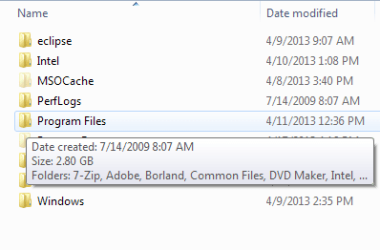
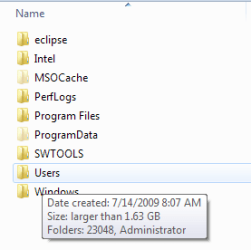
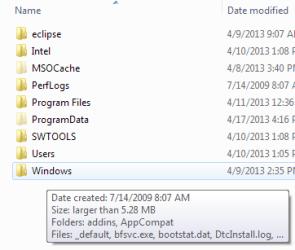
Just tried out hovering over folders to check the size, and this is what I got.

PFiles.png Users.png Windows.png

The first one (Program Files) is fine and I can live with the second one (Users -> larger than 1.63 GB),
but the third one (Windows -> larger than 5.28 MB :confused:)

Is there anyway to show the correct size of folders ?
 

My Computer

Computer type
Laptop
Computer Manufacturer/Model Number
HP EliteBook 8530w Mobile Workstation
OS
Windows 7 Ultimate x64 (XP, 98SE, 95, 3.11, DOS 7.10 on VM) + Ubuntu 10.04 LTS Lucid Lynx
CPU
Intel Core 2 Duo Processor P8600 (2.40 GHz, 3 MB L2 cache)
Motherboard
Mobile Intel PM45 Express Chipset ICH9M-Enhanced
Memory
4GB 800 MHz DDR2 SDRAM
Graphics Card(s)
ATI Mobility FireGL V5700 with 256 MB
Sound Card
SoundMAX Integrated Digital HD Audio
Monitor(s) Displays
15.4-inch WXGA anti-glare (1280 x 800 resolution)
Screen Resolution
1280 x 800
Hard Drives
500GB + 1TB
Mouse
Synaptics PS/2 Port Touchpad, USB Mouse
Internet Speed
4 Mbps
Antivirus
MSE
Browser
Firefox, Chrome, IE
Other Info
Authentec AES2810 Fingerprint Reader
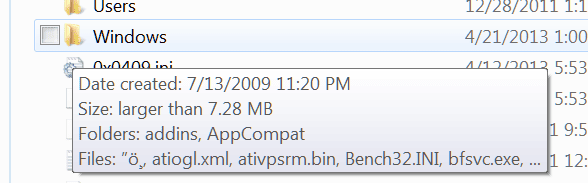
The Windows folder is very large. That's probably why it gives this funny answer. Just right click on it and go to Properties. There you'll see the correct size. Mine is 22.5GB. This is what I get when I hover.
 

Attachments

  • 2013-04-21_2337.png
    2013-04-21_2337.png
    22.3 KB · Views: 2

My Computer

Computer Manufacturer/Model Number
HP, Dell, Gateway, Toshiba - 4 laptops and 2 desktops
OS
Vista, Windows7, Mint Mate, Zorin, Windows 8
CPU
from 1.6GHz Duo to i7
Monitor(s) Displays
2x HP w2207
Hard Drives
5x HDD, 7x SSD, 12x Externals
Keyboard
with trackball - no mices
Mouse
Trackball mice
Internet Speed
DSL 6000
The Windows folder is very large. That's probably why it gives this funny answer. Just right click on it and go to Properties. There you'll see the correct size. Mine is 22.5GB. This is what I get when I hover.

Thanks. Just wanted to know on what basis Windows defines a folder as "Large", 'cause the Users folder is 2.33 GB and Windows is 8.26 GB and I get "larger than 1.63 GB" and "larger than 5.28 MB" for them. Must be one of those unanswered questions on Windows :)
 

My Computer

Computer type
Laptop
Computer Manufacturer/Model Number
HP EliteBook 8530w Mobile Workstation
OS
Windows 7 Ultimate x64 (XP, 98SE, 95, 3.11, DOS 7.10 on VM) + Ubuntu 10.04 LTS Lucid Lynx
CPU
Intel Core 2 Duo Processor P8600 (2.40 GHz, 3 MB L2 cache)
Motherboard
Mobile Intel PM45 Express Chipset ICH9M-Enhanced
Memory
4GB 800 MHz DDR2 SDRAM
Graphics Card(s)
ATI Mobility FireGL V5700 with 256 MB
Sound Card
SoundMAX Integrated Digital HD Audio
Monitor(s) Displays
15.4-inch WXGA anti-glare (1280 x 800 resolution)
Screen Resolution
1280 x 800
Hard Drives
500GB + 1TB
Mouse
Synaptics PS/2 Port Touchpad, USB Mouse
Internet Speed
4 Mbps
Antivirus
MSE
Browser
Firefox, Chrome, IE
Other Info
Authentec AES2810 Fingerprint Reader
My Users folder shows as 5.71GB. Only my Windows folder gives me that "larger than" response. I use Large Icons, maybe different views show different? A Guy
 
Last edited:

My Computer

Computer type
PC/Desktop
OS
Windows 10 Home x64
CPU
INTEL Core i5-750 Quad-Core 3.37GHz
Motherboard
ASUS P7P55D
Memory
HyperX Fury Black Series 8GB (2 x 4GB) 1866Mhz
Graphics Card(s)
EVGA GeForce GTX 750 Superclocked 1GB 128-Bit GDDR5
Monitor(s) Displays
LG 32MA68HY 32" IPS
Screen Resolution
1920 x 1080
Hard Drives
Samsung 840 Evo 120GB, SEAGATE 500GB Barracuda® 7200.12, SATA 3 Gb/s, 7200 RPM, 16MB cache
PSU
ANTEC TruePower New TP-550, 80 PLUS, 550W
Case
ANTEC Three Hundred Illusion
Cooling
COOLER MASTER Hyper 212 Plus, 4 x 120mm 1 x 140mm Noctua's
Internet Speed
85 + Mbps
Antivirus
Avast
Browser
Vivaldi
I don't know why, but mine always tells me the size when I mouseover any folder. For example, I have a folder that's 53.0 GB and when I mouseover it, it says that it's 53.0 GB.

I never see "larger than...".
 

My Computer

Computer type
PC/Desktop
Back
Top