This is very frustrating.
I have a Radeon HD6450 on my desktop pc, and a monitor which is plugged into its VGA output. I installed windows 7, and it installed and ran fine, but it didnt have the ati drivers, so the resolution was low. I installed the windows updates, including the ati drivers. When I restarted, the windows loading screen displayed, but when it finished the screen went black. After a bit of research, I think the problem is that the radeon card is switching output to DVI:
Computer doesn't start up after Catalyst install... what's wrong? [Archive] - AnandTech Forums
Unfortunately, I dont have a DVI cable to test this, and I dont want to buy one if I dont need to.
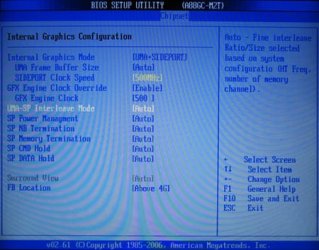
To get into windows I need to go into the bios and set the onboard graphics to be the default graphics, and connect my monitor to the motherboards VGA output.
I can then connect a second monitor to the Radeon's VGA output, and windows detects it and all is dandy, except I have to use onboard graphics.
Does anyone know why my Radeon card is switching to DVI on startup? Catalyst control panel didnt seem to have any relevant settings..
Thanks!
Ethan
I have a Radeon HD6450 on my desktop pc, and a monitor which is plugged into its VGA output. I installed windows 7, and it installed and ran fine, but it didnt have the ati drivers, so the resolution was low. I installed the windows updates, including the ati drivers. When I restarted, the windows loading screen displayed, but when it finished the screen went black. After a bit of research, I think the problem is that the radeon card is switching output to DVI:
Computer doesn't start up after Catalyst install... what's wrong? [Archive] - AnandTech Forums
Unfortunately, I dont have a DVI cable to test this, and I dont want to buy one if I dont need to.
To get into windows I need to go into the bios and set the onboard graphics to be the default graphics, and connect my monitor to the motherboards VGA output.
I can then connect a second monitor to the Radeon's VGA output, and windows detects it and all is dandy, except I have to use onboard graphics.
Does anyone know why my Radeon card is switching to DVI on startup? Catalyst control panel didnt seem to have any relevant settings..
Thanks!
Ethan
My Computer
- Computer type
- PC/Desktop
- Computer Manufacturer/Model Number
- custom build
- OS
- Windows 7 Professional x64
- CPU
- Intel Pentium D
- Motherboard
- ASRock G31M-S
- Memory
- 3 GB
- Graphics Card(s)
- AMD Radeon HD6450
- Hard Drives
- 1.5 TB Western Digital HDD
- Antivirus
- Avast Free Antivirus
- Browser
- Firefox