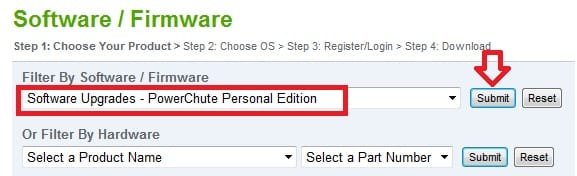
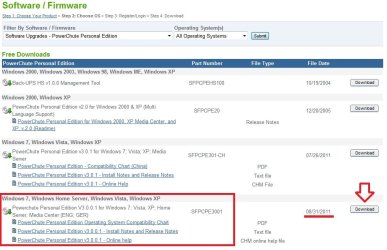
This is for my desktop system (the one listed in my System Specs). And the panel I posted is what is shown when the UPS is connected to this system via USB.
That's why I specifically said use version 3.0.0.1 The UAC issue during startup is supposed to be fixed with that version - APC Discussion Forums : PCPE 3.0 ... I know it is for me.
You can download 3.0.0.1 here - Software / Firmware. Note that you need to register and log in to download from there.
Anyway it continues and you want to use the program without the UAC prompts see this tutorial and my issue with Powerchute 3.0....
At any rate 3.0.0.1 did get rid of the startup UAC prompts for me. However it should be noted that I still get a prompt if I click to open the control panel.
I'm also not using the above fix since moving to 3.0.0.1.
You could download the APC PowerChute Personal Edition 3.0.0.1 at the APC link below without having to register or login. You would just need to select it, download it, and install it.
It uses the same wording for the link, but it's not the same URL address for the link.
There should be a Download button to the right of that to actually download the PowerChute. I just had that part boxed in red to help point out which one to use the Download button for.
My Computer
At a glance
64-bit Windows 11 Pro for WorkstationsIntel i7-8700K OC'd to 5 GHz64 GB (4x16GB) G.SKILL TridentZ RGB DDR4 3600...ASUS ROG-STRIX-GTX1080TI-O11G-GAMING
Computer type
PC/Desktop
Computer Manufacturer/Model Number
Self built custom
OS
64-bit Windows 11 Pro for Workstations
CPU
Intel i7-8700K OC'd to 5 GHz
Motherboard
ASUS ROG Maximus XI Formula Z390
Memory
64 GB (4x16GB) G.SKILL TridentZ RGB DDR4 3600 MHz
Graphics Card(s)
ASUS ROG-STRIX-GTX1080TI-O11G-GAMING
Sound Card
Integrated
Monitor(s) Displays
2 x Samsung Odyssey G7 27"
Screen Resolution
2560x1440
Hard Drives
1TB Samsung 990 PRO M.2,
4TB Samsung 990 PRO PRO M.2,
TerraMaster F8 SSD Plus NAS
PSU
Seasonic Prime Titanium 850W
Case
Thermaltake Core P3
Cooling
Corsair Hydro H115i
Keyboard
Logitech wireless K800
Mouse
Logitech MX Master 4
Internet Speed
2 Gb/s Download and 100 Mb/s Upload
Antivirus
Malwarebyte Anti-Malware Premium
Browser
Google Chrome
Other Info
Logitech Z625 speaker system,
Logitech BRIO 4K Pro webcam,
HP Color LaserJet Pro MFP M477fdn,
APC SMART-UPS RT 1000 XL - SURT1000XLI,
Galaxy S23 Plus phone
Yeah it is a bit confusing. I just know when I went to get the software it had me register through the link I provided. Don't understand why they make you register through one link but not the other
You could download the APC PowerChute Personal Edition 3.0.0.1 at the APC link below without having to register or login. You would just need to select it, download it, and install it.
I suppose that you could install the APC Business Edition to see or not. If not, you could always uninstall it, then install the APC Personal Edition instead.
My Computer
At a glance
64-bit Windows 11 Pro for WorkstationsIntel i7-8700K OC'd to 5 GHz64 GB (4x16GB) G.SKILL TridentZ RGB DDR4 3600...ASUS ROG-STRIX-GTX1080TI-O11G-GAMING
Computer type
PC/Desktop
Computer Manufacturer/Model Number
Self built custom
OS
64-bit Windows 11 Pro for Workstations
CPU
Intel i7-8700K OC'd to 5 GHz
Motherboard
ASUS ROG Maximus XI Formula Z390
Memory
64 GB (4x16GB) G.SKILL TridentZ RGB DDR4 3600 MHz
Graphics Card(s)
ASUS ROG-STRIX-GTX1080TI-O11G-GAMING
Sound Card
Integrated
Monitor(s) Displays
2 x Samsung Odyssey G7 27"
Screen Resolution
2560x1440
Hard Drives
1TB Samsung 990 PRO M.2,
4TB Samsung 990 PRO PRO M.2,
TerraMaster F8 SSD Plus NAS
PSU
Seasonic Prime Titanium 850W
Case
Thermaltake Core P3
Cooling
Corsair Hydro H115i
Keyboard
Logitech wireless K800
Mouse
Logitech MX Master 4
Internet Speed
2 Gb/s Download and 100 Mb/s Upload
Antivirus
Malwarebyte Anti-Malware Premium
Browser
Google Chrome
Other Info
Logitech Z625 speaker system,
Logitech BRIO 4K Pro webcam,
HP Color LaserJet Pro MFP M477fdn,
APC SMART-UPS RT 1000 XL - SURT1000XLI,
Galaxy S23 Plus phone
Did the business edition have the UAC issue too? I was thinking it was only the Personal edition. It could be only one edition or the other will install, sometimes Powerchute is particular about which UPS you have.
Try each one, if you like it keep it.
My Computer
At a glance
Windows 7 Ultimate X64 SP1Intel i5-2550K, Differing ~4.4-4.8GHz No buil...16GB G.Skill Sniper 1866MHz @ 2133MHz 2x8GBASUS GTX650TIB-DC2OC-2GD5, (650TI Boost)
Computer type
PC/Desktop
Computer Manufacturer/Model Number
Home Built Desktop By DataTech
OS
Windows 7 Ultimate X64 SP1
CPU
Intel i5-2550K, Differing ~4.4-4.8GHz No built in GPU
Motherboard
ASUS P8Z68-V PRO/GEN3
Memory
16GB G.Skill Sniper 1866MHz @ 2133MHz 2x8GB
Graphics Card(s)
ASUS GTX650TIB-DC2OC-2GD5, (650TI Boost)
Sound Card
Onboard Realtek 5-1
Monitor(s) Displays
Samsung P2570HD
Screen Resolution
1920x1080
Hard Drives
Samsung 840 Pro 256GB SSD for OS, 500GB Seagate Constellation (Enterprise drive) for Data
PSU
Corsair HX650W
Case
Inwin Dragon Rider
Cooling
Hyper 212 EVO w/two Noctua fans, push-pull, @1300 RPM
Keyboard
E-Z Eyes, bright yellow keys with large characters
Mouse
steelseries SENSEI Laser Pro Gaming
Internet Speed
48-51Mbs Mbs down, 11 Mbs up Xfinity Cable
Antivirus
Norton Internet Security 2013
Browser
IE 10, Opera, Pale Moon if needed
Other Info
4 case fans, LG BluRay-RE, ASUS DVD-RW, Mr. Fusion power supply, 1.21 gigawatts.
I'm thinking I'll try the Business Edition. It has a great feature where it will send out an email or text message when the UPS goes into battery mode. Not sure what I'd do with that info if I'm not at home, but it seems like a neat feature.
I'm needing some of your expertise folks......I have 60+ APC BR1300G Pro Backups units in my office and all are connected to Dell PCs running Windows 7 Pro 64-bit. I have some machines that seem to ALWAYS stay up when the electricity goes out and some that ALWAYS go into PowerSave/Sleep mode. I cannot find the setting that is different between the two. Anyone have any ideas where to look? Thanks in advance.......
Whenever I used PowerChute in the past, it was to silence that infuriating beeping whenever the power went out. Uninstalling the software was impossible, so I ended up using Macrium Reflect drive images.