Creating own theme pack windows 7

My Computer

Computer type
Laptop
Computer Manufacturer/Model Number
Sager NP9170
OS
Win 7 Pro x64 / Win 10 Pro
CPU
Intel(R) Core(TM) i7-3630QM CPU @ 2.40GHz
Motherboard
CLEVO P170EM
Memory
12 GB
Graphics Card(s)
(1) Intel(R) HD Graphics 4000 (2) NVIDIA GeForce GTX 675M
Sound Card
(1) Realtek High Definition Audio (2) Intel(R) Display Aud
Monitor(s) Displays
17.3
Screen Resolution
1920x1080
Hard Drives
(1) Samsung 860 EVO 500GB(OS) (1) Samsung 860 EVO 500GB(Data)
Keyboard
Backlite
Antivirus
MSE, Malwarebytes Pro
Browser
Firefox
Other Info
DESKTOP: Custom-built.
OS: Win 10 Pro x64.
CASE: Rosewill R5.
CPU: Intel I5 4670K CPU @ 3.40GHz.
CPU COOLER: Cool Master Hyper 212 EVO.
MOTHERBOARD: Asus Z87-A.
MEMORY: Kingston HyperX 2x4 GB.
GPU: Nvidia Geforce 650 TI.
PSU: Corsair TX750.
DRIVES: (1) Samsung 840 120 GB SSD (2) Western Digital blue 500 GB 7200 RPM.


My Computer

Computer type
PC/Desktop
OS
Microsoft Windows 7 Ultimate 32-bit 7601 Multiprocessor Free Service Pack 1
CPU
Intel(R) Pentium(R) Dual CPU E2160 @ 1.80GHz
Motherboard
Intel DL-G41MX3-LT
Memory
2.00 GB
Graphics Card(s)
Intel(R) G41 Express Chipset
Sound Card
Realtek High Definition Audio
Screen Resolution
1024 x 768 x 32 bits (4294967296 colors) @ 75 Hz
Hard Drives
ST500DM002-1BD142 ATA Device
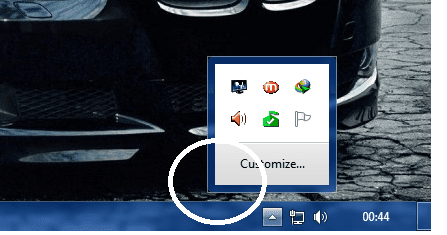
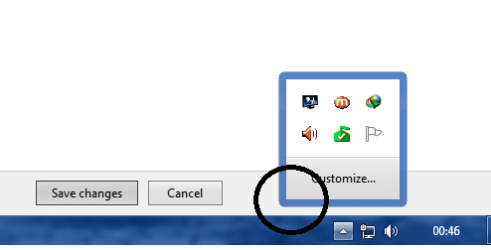
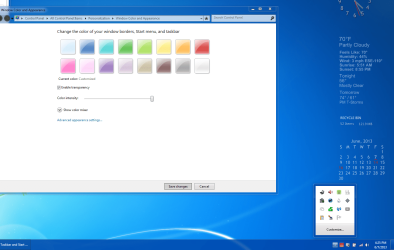
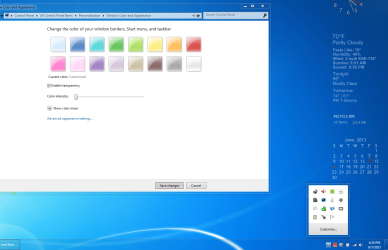
You'll never get rid of the blur or the faint line where the taskbar is supposed to be.

Look at these two screenshots sometimes it depends on what background you use it may look better, I also slid the transparency slider to make it as transparent as possible.

Jerry
22.PNG

33.PNG
 

My Computer

Computer type
Laptop
Computer Manufacturer/Model Number
Sager NP9170
OS
Win 7 Pro x64 / Win 10 Pro
CPU
Intel(R) Core(TM) i7-3630QM CPU @ 2.40GHz
Motherboard
CLEVO P170EM
Memory
12 GB
Graphics Card(s)
(1) Intel(R) HD Graphics 4000 (2) NVIDIA GeForce GTX 675M
Sound Card
(1) Realtek High Definition Audio (2) Intel(R) Display Aud
Monitor(s) Displays
17.3
Screen Resolution
1920x1080
Hard Drives
(1) Samsung 860 EVO 500GB(OS) (1) Samsung 860 EVO 500GB(Data)
Keyboard
Backlite
Antivirus
MSE, Malwarebytes Pro
Browser
Firefox
Other Info
DESKTOP: Custom-built.
OS: Win 10 Pro x64.
CASE: Rosewill R5.
CPU: Intel I5 4670K CPU @ 3.40GHz.
CPU COOLER: Cool Master Hyper 212 EVO.
MOTHERBOARD: Asus Z87-A.
MEMORY: Kingston HyperX 2x4 GB.
GPU: Nvidia Geforce 650 TI.
PSU: Corsair TX750.
DRIVES: (1) Samsung 840 120 GB SSD (2) Western Digital blue 500 GB 7200 RPM.

You'll never get rid of the blur or the faint line where the taskbar is supposed to be.

I am confused because once I applied a custom theme from somewhere which didn't have faint task bar. It was clearly 3d shaped task bar. So, there must be one more image that remains to change in Vista style builder. Except/with

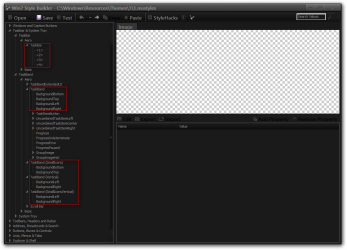
TaskBand > BackgroundBottom

And

TaskBand (SmallIcons) > BackgroundBottom
 

My Computer

Computer type
PC/Desktop
OS
Microsoft Windows 7 Ultimate 32-bit 7601 Multiprocessor Free Service Pack 1
CPU
Intel(R) Pentium(R) Dual CPU E2160 @ 1.80GHz
Motherboard
Intel DL-G41MX3-LT
Memory
2.00 GB
Graphics Card(s)
Intel(R) G41 Express Chipset
Sound Card
Realtek High Definition Audio
Screen Resolution
1024 x 768 x 32 bits (4294967296 colors) @ 75 Hz
Hard Drives
ST500DM002-1BD142 ATA Device
Post a link to one of those themes and I will look at it.
Look at the screenshot below these are the only locations for the taskbar.

Jerry
Win7 Style Builder - CWindowsResourcesThemes11.msstyles.png
 

My Computer

Computer type
Laptop
Computer Manufacturer/Model Number
Sager NP9170
OS
Win 7 Pro x64 / Win 10 Pro
CPU
Intel(R) Core(TM) i7-3630QM CPU @ 2.40GHz
Motherboard
CLEVO P170EM
Memory
12 GB
Graphics Card(s)
(1) Intel(R) HD Graphics 4000 (2) NVIDIA GeForce GTX 675M
Sound Card
(1) Realtek High Definition Audio (2) Intel(R) Display Aud
Monitor(s) Displays
17.3
Screen Resolution
1920x1080
Hard Drives
(1) Samsung 860 EVO 500GB(OS) (1) Samsung 860 EVO 500GB(Data)
Keyboard
Backlite
Antivirus
MSE, Malwarebytes Pro
Browser
Firefox
Other Info
DESKTOP: Custom-built.
OS: Win 10 Pro x64.
CASE: Rosewill R5.
CPU: Intel I5 4670K CPU @ 3.40GHz.
CPU COOLER: Cool Master Hyper 212 EVO.
MOTHERBOARD: Asus Z87-A.
MEMORY: Kingston HyperX 2x4 GB.
GPU: Nvidia Geforce 650 TI.
PSU: Corsair TX750.
DRIVES: (1) Samsung 840 120 GB SSD (2) Western Digital blue 500 GB 7200 RPM.
2yuglrt.jpg


How to make sharp corners of user picture border?

Location of image in vista style builder ?

That image cannot be edited with Windows style builder.

That user picture frame is bitmap image # 7013 in explorer.exe in C:\Windows you'll need a resource hacker of some kind and extract that image and then edit it with a image editor and then imported back in. Be sure to work on a copy so you do not corrupt the original.

To properly change a system file you need to take ownership give yourself permission and rename the old file and then copy in the new one look at Post #6 of this thread will tell you how to do it http://www.sevenforums.com/customization/179502-basic-networking-information.html#post1525656

Jerry

It can be with the attached simple program. It can at least change it.
 

Attachments

My Computer

Computer type
PC/Desktop
Computer Manufacturer/Model Number
Custom Build
OS
Win 10 Pro 64
CPU
Intel Core i7 960 @3.20 GHz
Motherboard
MSI MS7522
Memory
24.0 GB DDR3
Graphics Card(s)
EVGA GTX 750Ti
Monitor(s) Displays
LG E2341 23 Inch
Screen Resolution
1920x1080
Hard Drives
1TB Western Dgital 1002FAEX-00Y9A0
1TB Hitachi HDS721010CLA322
PSU
700 Watt
Case
Haf 912
Cooling
Fans
Keyboard
Logitech MK710
Mouse
Logitech M705
Internet Speed
Cable
Antivirus
AIS 2015 .10.0.2225
Browser
Firefox 49
Other Info
MalwareBytes Anti-Rootkit utility
Post a link to one of those themes and I will look at it.
Look at the screenshot below these are the only locations for the taskbar.

Jerry
View attachment 271331

I used it many days before so unfortunately I don't remember the name of the theme and from where it was taken. But my another problem is I am unable to make window corners sharp even I made sharp images in VSB.

I send u my modified theme. You please check which image is remained to make sharp.

View attachment theme.zip
_____________________________________

Next problem is when I extend start menu. The border of start menu is totally transparent. Means, icon behind menu can be selected from between the border image of Extended start menu.

_____________________________________

Next is, I applied windows 8 loading spin animation .ani and .cur to my windows 7. They are working perfect. But when I start pc and turn off, the old windows 7 spin animation displayed.
 

My Computer

Computer type
PC/Desktop
OS
Microsoft Windows 7 Ultimate 32-bit 7601 Multiprocessor Free Service Pack 1
CPU
Intel(R) Pentium(R) Dual CPU E2160 @ 1.80GHz
Motherboard
Intel DL-G41MX3-LT
Memory
2.00 GB
Graphics Card(s)
Intel(R) G41 Express Chipset
Sound Card
Realtek High Definition Audio
Screen Resolution
1024 x 768 x 32 bits (4294967296 colors) @ 75 Hz
Hard Drives
ST500DM002-1BD142 ATA Device
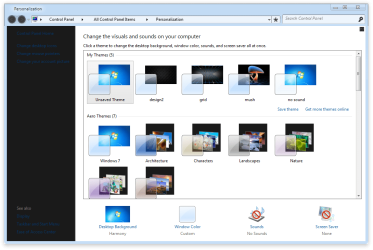
To make the corners more square you need to have at least a two pixel border to make a square corner come out better I did it real quick just to show you, look at the screenshot below.
DWMWindow_FrameTopImage.png-1.0 (RGB, 4 layers) 21x54 – GIMP.pngPersonalization.pngDWMWindow_FrameTopImage.png

For the spinning animation at the start up look in the imageres.dll there will be a png and a bitmap folders in there are the images that control that spinning image I don't recall which one it is for sure the bitmap or the png.

Post some screenshots of what you are talking about with the start menu.

Jerry
 

My Computer

Computer type
Laptop
Computer Manufacturer/Model Number
Sager NP9170
OS
Win 7 Pro x64 / Win 10 Pro
CPU
Intel(R) Core(TM) i7-3630QM CPU @ 2.40GHz
Motherboard
CLEVO P170EM
Memory
12 GB
Graphics Card(s)
(1) Intel(R) HD Graphics 4000 (2) NVIDIA GeForce GTX 675M
Sound Card
(1) Realtek High Definition Audio (2) Intel(R) Display Aud
Monitor(s) Displays
17.3
Screen Resolution
1920x1080
Hard Drives
(1) Samsung 860 EVO 500GB(OS) (1) Samsung 860 EVO 500GB(Data)
Keyboard
Backlite
Antivirus
MSE, Malwarebytes Pro
Browser
Firefox
Other Info
DESKTOP: Custom-built.
OS: Win 10 Pro x64.
CASE: Rosewill R5.
CPU: Intel I5 4670K CPU @ 3.40GHz.
CPU COOLER: Cool Master Hyper 212 EVO.
MOTHERBOARD: Asus Z87-A.
MEMORY: Kingston HyperX 2x4 GB.
GPU: Nvidia Geforce 650 TI.
PSU: Corsair TX750.
DRIVES: (1) Samsung 840 120 GB SSD (2) Western Digital blue 500 GB 7200 RPM.
Post some screenshots of what you are talking about with the start menu.

Jerry

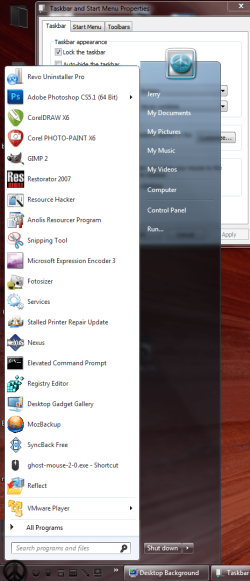
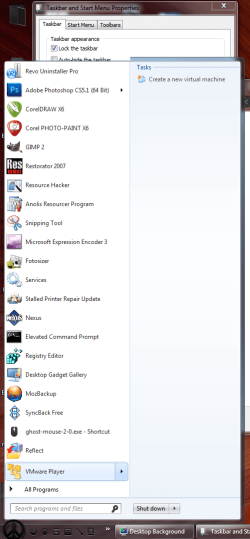
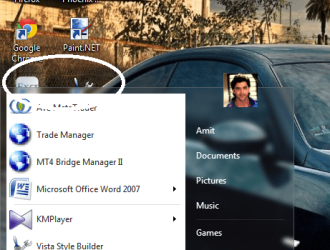
In image below, icons behind menu border are looking blur. So they can not be selected when mouse pointer is on menu border which is blur. This is normal menu.

Untitled.png


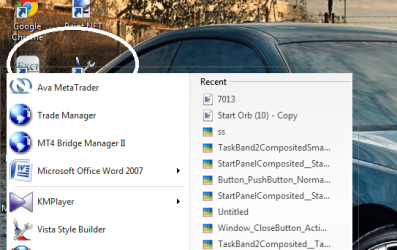
But in following image, icons behind menu border are not looking blur. So they can be selected even mouse pointer is on menu border. This is extended menu. When we just move pointer on quick program list in normal menu (program list on above "All programs").


Untitledd.png


The address of the border image of 2nd image of above is Start menu>panels>aero>top>searchview & may be Start menu>panels>aero>top>NSChost too.

But even I made both image transparent as other menu borders, both images are giving the problem shown in 2nd image of above. Check both problem with applying my theme on your pc
 

My Computer

Computer type
PC/Desktop
OS
Microsoft Windows 7 Ultimate 32-bit 7601 Multiprocessor Free Service Pack 1
CPU
Intel(R) Pentium(R) Dual CPU E2160 @ 1.80GHz
Motherboard
Intel DL-G41MX3-LT
Memory
2.00 GB
Graphics Card(s)
Intel(R) G41 Express Chipset
Sound Card
Realtek High Definition Audio
Screen Resolution
1024 x 768 x 32 bits (4294967296 colors) @ 75 Hz
Hard Drives
ST500DM002-1BD142 ATA Device
One more problem is :

In following image when I open system tray on desktop, corners does look sharp.

Untitled.png

But in following image when I open system tray in (personalize>window color) window, corners doesn't look sharp.

Untitledd.png


Please apply this following corner updated theme and check it.

View attachment updated.zip
 

My Computer

Computer type
PC/Desktop
OS
Microsoft Windows 7 Ultimate 32-bit 7601 Multiprocessor Free Service Pack 1
CPU
Intel(R) Pentium(R) Dual CPU E2160 @ 1.80GHz
Motherboard
Intel DL-G41MX3-LT
Memory
2.00 GB
Graphics Card(s)
Intel(R) G41 Express Chipset
Sound Card
Realtek High Definition Audio
Screen Resolution
1024 x 768 x 32 bits (4294967296 colors) @ 75 Hz
Hard Drives
ST500DM002-1BD142 ATA Device
I tested and on the start menu I made Start Menu > Panels > Aero > Top > ProgramsList and
Start Menu > Panels > Aero > Top > ProgramsListExtended all transparent but the white part and it removed the blur so you need to work on them 2 images.
untitled3.PNGuntitled4.PNG


The system tray looks OK to me.
untitled.PNGuntitled2.PNG
Jerry
 

My Computer

Computer type
Laptop
Computer Manufacturer/Model Number
Sager NP9170
OS
Win 7 Pro x64 / Win 10 Pro
CPU
Intel(R) Core(TM) i7-3630QM CPU @ 2.40GHz
Motherboard
CLEVO P170EM
Memory
12 GB
Graphics Card(s)
(1) Intel(R) HD Graphics 4000 (2) NVIDIA GeForce GTX 675M
Sound Card
(1) Realtek High Definition Audio (2) Intel(R) Display Aud
Monitor(s) Displays
17.3
Screen Resolution
1920x1080
Hard Drives
(1) Samsung 860 EVO 500GB(OS) (1) Samsung 860 EVO 500GB(Data)
Keyboard
Backlite
Antivirus
MSE, Malwarebytes Pro
Browser
Firefox
Other Info
DESKTOP: Custom-built.
OS: Win 10 Pro x64.
CASE: Rosewill R5.
CPU: Intel I5 4670K CPU @ 3.40GHz.
CPU COOLER: Cool Master Hyper 212 EVO.
MOTHERBOARD: Asus Z87-A.
MEMORY: Kingston HyperX 2x4 GB.
GPU: Nvidia Geforce 650 TI.
PSU: Corsair TX750.
DRIVES: (1) Samsung 840 120 GB SSD (2) Western Digital blue 500 GB 7200 RPM.

My Computer

Computer type
PC/Desktop
OS
Microsoft Windows 7 Ultimate 32-bit 7601 Multiprocessor Free Service Pack 1
CPU
Intel(R) Pentium(R) Dual CPU E2160 @ 1.80GHz
Motherboard
Intel DL-G41MX3-LT
Memory
2.00 GB
Graphics Card(s)
Intel(R) G41 Express Chipset
Sound Card
Realtek High Definition Audio
Screen Resolution
1024 x 768 x 32 bits (4294967296 colors) @ 75 Hz
Hard Drives
ST500DM002-1BD142 ATA Device

My Computer

Computer type
PC/Desktop
OS
Microsoft Windows 7 Ultimate 32-bit 7601 Multiprocessor Free Service Pack 1
CPU
Intel(R) Pentium(R) Dual CPU E2160 @ 1.80GHz
Motherboard
Intel DL-G41MX3-LT
Memory
2.00 GB
Graphics Card(s)
Intel(R) G41 Express Chipset
Sound Card
Realtek High Definition Audio
Screen Resolution
1024 x 768 x 32 bits (4294967296 colors) @ 75 Hz
Hard Drives
ST500DM002-1BD142 ATA Device
To add text glow go to Start Menu > Menus > Aero > PlaceList:ListView and change TEXTGLOWSIZE:INT to 2 or 3 and test. To change glow color add GLOWCOLOR:COLOR propertie and select color you want.

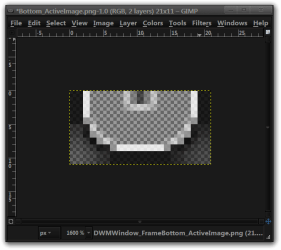
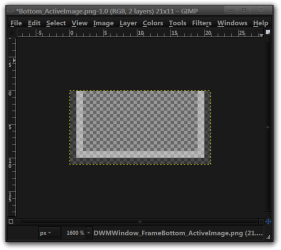
You are going to have to work on those images at Windows and Caption Buttons > Aero > Dwm Window > Frames > Normal top, bottom, left, right, as you can see from my screenshots there still a little bit too much transparency in the corners.
Capture5.PNG

Original image for the bottom.
3.png

Your image for the bottom.
2.png

Here is an overlay of your image on top of the original.
1.png

The clock and the calendar and the weather is Rainmeter, desktop customization tool

Put the skin folders in C:User\YOUR USER NAME\My Documents\Rainmeter\Skins folder

I am using VClouds Weather 2 - 1Days skin for the weather, change out the .ini file, there is a background folder that I edited some images so it is inclosed

I cannot find a link to the clock so it is inclosed also.


LuaCalendar 4.1 by ~smurfier on deviantART change out the .ini file.

VClouds Weather 2 by ~VClouds on deviantART change out the .ini file.

Jerry
 

Attachments

My Computer

Computer type
Laptop
Computer Manufacturer/Model Number
Sager NP9170
OS
Win 7 Pro x64 / Win 10 Pro
CPU
Intel(R) Core(TM) i7-3630QM CPU @ 2.40GHz
Motherboard
CLEVO P170EM
Memory
12 GB
Graphics Card(s)
(1) Intel(R) HD Graphics 4000 (2) NVIDIA GeForce GTX 675M
Sound Card
(1) Realtek High Definition Audio (2) Intel(R) Display Aud
Monitor(s) Displays
17.3
Screen Resolution
1920x1080
Hard Drives
(1) Samsung 860 EVO 500GB(OS) (1) Samsung 860 EVO 500GB(Data)
Keyboard
Backlite
Antivirus
MSE, Malwarebytes Pro
Browser
Firefox
Other Info
DESKTOP: Custom-built.
OS: Win 10 Pro x64.
CASE: Rosewill R5.
CPU: Intel I5 4670K CPU @ 3.40GHz.
CPU COOLER: Cool Master Hyper 212 EVO.
MOTHERBOARD: Asus Z87-A.
MEMORY: Kingston HyperX 2x4 GB.
GPU: Nvidia Geforce 650 TI.
PSU: Corsair TX750.
DRIVES: (1) Samsung 840 120 GB SSD (2) Western Digital blue 500 GB 7200 RPM.
You are going to have to work on those images at Windows and Caption Buttons > Aero > Dwm Window > Frames > Normal top, bottom, left, right, as you can see from my screenshots there still a little bit too much transparency in the corners.

Jerry

I already did make corner sharp in Windows and Caption Buttons > Aero > Dwm Window > Frames > Normal top, bottom, left, right. But, it didn't work. You can check sharp corners image in my last attached theme.
 

My Computer

Computer type
PC/Desktop
OS
Microsoft Windows 7 Ultimate 32-bit 7601 Multiprocessor Free Service Pack 1
CPU
Intel(R) Pentium(R) Dual CPU E2160 @ 1.80GHz
Motherboard
Intel DL-G41MX3-LT
Memory
2.00 GB
Graphics Card(s)
Intel(R) G41 Express Chipset
Sound Card
Realtek High Definition Audio
Screen Resolution
1024 x 768 x 32 bits (4294967296 colors) @ 75 Hz
Hard Drives
ST500DM002-1BD142 ATA Device
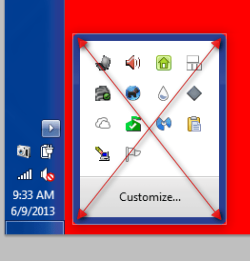
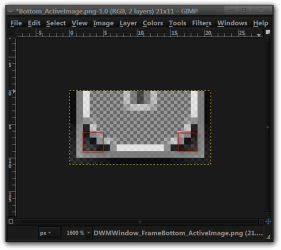
I did see that you have sharp corners but there is still too much transparency(there is no color there at all) in those corners they need to have some kind of color there even if it's just a black color that you have the transparency turned down to 10% just as a guess on the percentage.
Look at the image I have below and where the red squares are you need some color their to eliminate that bleed through on the corners.

Jerry
1.png
 

My Computer

Computer type
Laptop
Computer Manufacturer/Model Number
Sager NP9170
OS
Win 7 Pro x64 / Win 10 Pro
CPU
Intel(R) Core(TM) i7-3630QM CPU @ 2.40GHz
Motherboard
CLEVO P170EM
Memory
12 GB
Graphics Card(s)
(1) Intel(R) HD Graphics 4000 (2) NVIDIA GeForce GTX 675M
Sound Card
(1) Realtek High Definition Audio (2) Intel(R) Display Aud
Monitor(s) Displays
17.3
Screen Resolution
1920x1080
Hard Drives
(1) Samsung 860 EVO 500GB(OS) (1) Samsung 860 EVO 500GB(Data)
Keyboard
Backlite
Antivirus
MSE, Malwarebytes Pro
Browser
Firefox
Other Info
DESKTOP: Custom-built.
OS: Win 10 Pro x64.
CASE: Rosewill R5.
CPU: Intel I5 4670K CPU @ 3.40GHz.
CPU COOLER: Cool Master Hyper 212 EVO.
MOTHERBOARD: Asus Z87-A.
MEMORY: Kingston HyperX 2x4 GB.
GPU: Nvidia Geforce 650 TI.
PSU: Corsair TX750.
DRIVES: (1) Samsung 840 120 GB SSD (2) Western Digital blue 500 GB 7200 RPM.
Hi bongo,

Can I edit Original Aero from resource/theme folder ?
If yes then after editing it, if i do sfc scan then will the modified Aero will go back to it's original look ?
Thanks
 

My Computer

Computer type
PC/Desktop
OS
Microsoft Windows 7 Ultimate 32-bit 7601 Multiprocessor Free Service Pack 1
CPU
Intel(R) Pentium(R) Dual CPU E2160 @ 1.80GHz
Motherboard
Intel DL-G41MX3-LT
Memory
2.00 GB
Graphics Card(s)
Intel(R) G41 Express Chipset
Sound Card
Realtek High Definition Audio
Screen Resolution
1024 x 768 x 32 bits (4294967296 colors) @ 75 Hz
Hard Drives
ST500DM002-1BD142 ATA Device
Hi bongo,

Can I edit Original Aero from resource/theme folder ?
If yes then after editing it, if i do sfc scan then will the modified Aero will go back to it's original look ?
Thanks
You can if you want to but I would not recommend it, the sfc scan may go back to the default but I'm not sure.
Why do you want to edit the original and not create a new theme based off the original?

Jerry
 

My Computer

Computer type
Laptop
Computer Manufacturer/Model Number
Sager NP9170
OS
Win 7 Pro x64 / Win 10 Pro
CPU
Intel(R) Core(TM) i7-3630QM CPU @ 2.40GHz
Motherboard
CLEVO P170EM
Memory
12 GB
Graphics Card(s)
(1) Intel(R) HD Graphics 4000 (2) NVIDIA GeForce GTX 675M
Sound Card
(1) Realtek High Definition Audio (2) Intel(R) Display Aud
Monitor(s) Displays
17.3
Screen Resolution
1920x1080
Hard Drives
(1) Samsung 860 EVO 500GB(OS) (1) Samsung 860 EVO 500GB(Data)
Keyboard
Backlite
Antivirus
MSE, Malwarebytes Pro
Browser
Firefox
Other Info
DESKTOP: Custom-built.
OS: Win 10 Pro x64.
CASE: Rosewill R5.
CPU: Intel I5 4670K CPU @ 3.40GHz.
CPU COOLER: Cool Master Hyper 212 EVO.
MOTHERBOARD: Asus Z87-A.
MEMORY: Kingston HyperX 2x4 GB.
GPU: Nvidia Geforce 650 TI.
PSU: Corsair TX750.
DRIVES: (1) Samsung 840 120 GB SSD (2) Western Digital blue 500 GB 7200 RPM.
Hi bongo,

Can I edit Original Aero from resource/theme folder ?
If yes then after editing it, if i do sfc scan then will the modified Aero will go back to it's original look ?
Thanks
You can if you want to but I would not recommend it, the sfc scan may go back to the default but I'm not sure.
Why do you want to edit the original and not create a new theme based off the original?

Jerry

Because universal theme patcher affecets (modifies) system files and if i do sfc scan, patch goes back.

so if i edit the original aero, and if sfc scan doesn't affect it, then I can do sfc scan anytime and theme and system files will not need to face universal theme patcher's patches and sfc scan's repairing everytime.
 

My Computer

Computer type
PC/Desktop
OS
Microsoft Windows 7 Ultimate 32-bit 7601 Multiprocessor Free Service Pack 1
CPU
Intel(R) Pentium(R) Dual CPU E2160 @ 1.80GHz
Motherboard
Intel DL-G41MX3-LT
Memory
2.00 GB
Graphics Card(s)
Intel(R) G41 Express Chipset
Sound Card
Realtek High Definition Audio
Screen Resolution
1024 x 768 x 32 bits (4294967296 colors) @ 75 Hz
Hard Drives
ST500DM002-1BD142 ATA Device
Hi bongo,

Can I edit Original Aero from resource/theme folder ?
If yes then after editing it, if i do sfc scan then will the modified Aero will go back to it's original look ?
Thanks
You can if you want to but I would not recommend it, the sfc scan may go back to the default but I'm not sure.
Why do you want to edit the original and not create a new theme based off the original?

Jerry

Because universal theme patcher affecets (modifies) system files and if i do sfc scan, patch goes back.

so if i edit the original aero, and if sfc scan doesn't affect it, then I can do sfc scan anytime and theme and system files will not need to face universal theme patcher's patches and sfc scan's repairing everytime.
If you edit the original aero you will still need to use universal theme patcher or UxStyle Core, UxStyle Core is a service and is not effected when you use SFC scan.
Here is a tutorial on how to use UxStyle Core make sure that you are not using universal theme patcher at the same time, run the SFC scan first and then follow the tutorial.
http://www.sevenforums.com/tutorials/34579-enabling-custom-themes-windows-7-a.html

Jerry
 

My Computer

Computer type
Laptop
Computer Manufacturer/Model Number
Sager NP9170
OS
Win 7 Pro x64 / Win 10 Pro
CPU
Intel(R) Core(TM) i7-3630QM CPU @ 2.40GHz
Motherboard
CLEVO P170EM
Memory
12 GB
Graphics Card(s)
(1) Intel(R) HD Graphics 4000 (2) NVIDIA GeForce GTX 675M
Sound Card
(1) Realtek High Definition Audio (2) Intel(R) Display Aud
Monitor(s) Displays
17.3
Screen Resolution
1920x1080
Hard Drives
(1) Samsung 860 EVO 500GB(OS) (1) Samsung 860 EVO 500GB(Data)
Keyboard
Backlite
Antivirus
MSE, Malwarebytes Pro
Browser
Firefox
Other Info
DESKTOP: Custom-built.
OS: Win 10 Pro x64.
CASE: Rosewill R5.
CPU: Intel I5 4670K CPU @ 3.40GHz.
CPU COOLER: Cool Master Hyper 212 EVO.
MOTHERBOARD: Asus Z87-A.
MEMORY: Kingston HyperX 2x4 GB.
GPU: Nvidia Geforce 650 TI.
PSU: Corsair TX750.
DRIVES: (1) Samsung 840 120 GB SSD (2) Western Digital blue 500 GB 7200 RPM.
Back
Top