how to change shellstyle?

rightspin

Banned
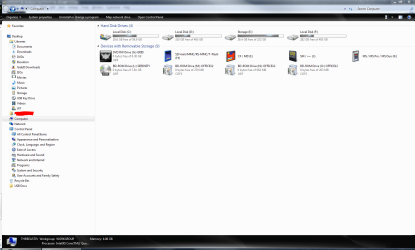
Ok i was looking around for some themes and found one i really like. All it needs is a black shellstyle. So now to my question:

How do i change the windows shellstyle?
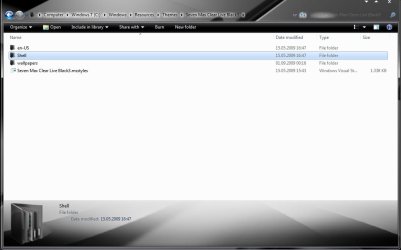
What files need to be replaced? I mean i got some themes that have a black shellstyle, but how do i insert them into my theme? Im looking for something like this:
 

Attachments
  • blackshellstylethatswutiwant.jpg
    blackshellstylethatswutiwant.jpg
    99 KB · Views: 652

My Computer

OS
Windows 7 Ultimate x64
CPU
AMD Athlon 64 X2 4200+ @2,2 GHz
Motherboard
Asus A8V-E SE
Memory
2x1 GB
Graphics Card(s)
Ati x1950 xt 512MB
Sound Card
Soundblaster Live! 5.1
Monitor(s) Displays
LG Flatron W2252TQ
Screen Resolution
1680x1050
Hard Drives
WD 360 GB extern
WD 360 GB
WD 80 GB
Keyboard
Cherry
Mouse
ROCCAT Kone USB Mouse (awesome>expensive)
Internet Speed
12mpbt down / 1mbp up
Ok i was looking around for some themes and found one i really like. All it needs is a black shellstyle. So now to my question:

How do i change the windows shellstyle?
What files need to be replaced? I mean i got some themes that have a black shellstyle, but how do i insert them into my theme? Im looking for something like this:

Hi Rightspin,

It's a very nice skin indeed.
I can't help you with your question, but I'm sure a few in here can.

You might take a look at our customization section.

One advise I want to give you.
Please make a full backup of your system.
Customizing can be risky.

Good luck,

Greetz
 

My Computer

OS
Win7 Build 7600 x86
CPU
Pentium II 300MHz
Motherboard
Asus
Memory
32mb EDO RAM
Graphics Card(s)
Diamond Viper
Sound Card
Soundblaster 16
Monitor(s) Displays
14" AOC CRT 16K color
Screen Resolution
800x600
Hard Drives
300mb Quantum fireball
PSU
110 Watts
Cooling
Passive
Keyboard
Trust Ergonomic
Mouse
Generic
Internet Speed
256K u 128K d
Hi Rightspin,

It's a very nice skin indeed.
I can't help you with your question, but I'm sure a few in here can.

You might take a look at our customization section.

One advise I want to give you.
Please make a full backup of your system.
Customizing can be risky.

Good luck,

Greetz


Hey squonksc,

thanks for your advice. I made a system backup allready.
I browse the customization section here every day, since i customize alot. Unfortunatly i havent found anything about changing the shellstyle yet.
 

My Computer

OS
Windows 7 Ultimate x64
CPU
AMD Athlon 64 X2 4200+ @2,2 GHz
Motherboard
Asus A8V-E SE
Memory
2x1 GB
Graphics Card(s)
Ati x1950 xt 512MB
Sound Card
Soundblaster Live! 5.1
Monitor(s) Displays
LG Flatron W2252TQ
Screen Resolution
1680x1050
Hard Drives
WD 360 GB extern
WD 360 GB
WD 80 GB
Keyboard
Cherry
Mouse
ROCCAT Kone USB Mouse (awesome>expensive)
Internet Speed
12mpbt down / 1mbp up
Hey squonksc,

thanks for your advice. I made a system backup allready.
I browse the customization section here every day, since i customize alot. Unfortunatly i havent found anything about changing the shellstyle yet.

I've done quite a lot of shell customizing myself in the past, but I guess I got kind of bored with it.
That, and I found that keeping the system stable after hacking windows files is more a question of luck rather than wisdom.

I think you can find answers quicker by googling for "Windows 7 UI hacking" or something similar.

There's not much response to your question yet. I guess the customizers are all at the pub.

Good luck
 

My Computer

OS
Win7 Build 7600 x86
CPU
Pentium II 300MHz
Motherboard
Asus
Memory
32mb EDO RAM
Graphics Card(s)
Diamond Viper
Sound Card
Soundblaster 16
Monitor(s) Displays
14" AOC CRT 16K color
Screen Resolution
800x600
Hard Drives
300mb Quantum fireball
PSU
110 Watts
Cooling
Passive
Keyboard
Trust Ergonomic
Mouse
Generic
Internet Speed
256K u 128K d

My Computer

OS
Win7 Build 7600 x86
CPU
Pentium II 300MHz
Motherboard
Asus
Memory
32mb EDO RAM
Graphics Card(s)
Diamond Viper
Sound Card
Soundblaster 16
Monitor(s) Displays
14" AOC CRT 16K color
Screen Resolution
800x600
Hard Drives
300mb Quantum fireball
PSU
110 Watts
Cooling
Passive
Keyboard
Trust Ergonomic
Mouse
Generic
Internet Speed
256K u 128K d
I've done quite a lot of shell customizing myself in the past, but I guess I got kind of bored with it.
That, and I found that keeping the system stable after hacking windows files is more a question of luck rather than wisdom.

I think you can find answers quicker by googling for "Windows 7 UI hacking" or something similar.

There's not much response to your question yet. I guess the customizers are all at the pub.

Good luck


Of course i googled before making this post, but i didnt find anything for windows 7, i think thats to early for such a specific customization.


Thanks alot, i allready tried restorator, but unfortunatly a one-time-trail version and it was way too much information for the first use. Would you mind giving me some advice? (since i assume your german like me that would be fine either)

Good post Moinmoin!

I have to add, to look out for getting restorator from torrent sites.
Most of them are infected with trojans.

Be careful.

You seem to be very careful, and thats a good thing. Try to get a torrent that got some comments. Tho, dont you forget: No risk, no fun!


Anyway, there must be a way to just add the shell files to another theme.
Why would you need a tool like restorator when i can just switch between themes with different shellstyles? The answer is out there somewhere, and there might be people, living among us, who know.... I believe in sevenforums.
 

My Computer

OS
Windows 7 Ultimate x64
CPU
AMD Athlon 64 X2 4200+ @2,2 GHz
Motherboard
Asus A8V-E SE
Memory
2x1 GB
Graphics Card(s)
Ati x1950 xt 512MB
Sound Card
Soundblaster Live! 5.1
Monitor(s) Displays
LG Flatron W2252TQ
Screen Resolution
1680x1050
Hard Drives
WD 360 GB extern
WD 360 GB
WD 80 GB
Keyboard
Cherry
Mouse
ROCCAT Kone USB Mouse (awesome>expensive)
Internet Speed
12mpbt down / 1mbp up
The Restorator is very easy. You can images on the left side per drag & drop replace.
The original images (Aero VS) are in the shellstyle.dll.
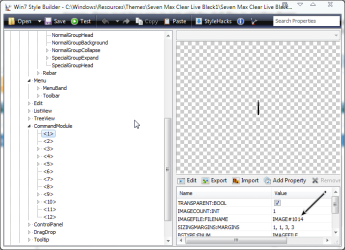
Your VS is make with VistaStyleBuilder. There are the images in the msstyles.
Images #544,549,550,551
Infopanel: #1014


Sorry my english is not the best ;)
(If you still have questions (in german), you find me on deskmodder.de)
 

Attachments

  • vsb.png
    vsb.png
    51 KB · Views: 415

My Computer

OS
Win 7
Ok i got Restorator 2007 now. I was able to find the VS of the shellstlye i want, although #1041 is shown as an image for me, not an infopanel. But what do i have to do now? Insert them into the Aero theme, but how?
 

My Computer

OS
Windows 7 Ultimate x64
CPU
AMD Athlon 64 X2 4200+ @2,2 GHz
Motherboard
Asus A8V-E SE
Memory
2x1 GB
Graphics Card(s)
Ati x1950 xt 512MB
Sound Card
Soundblaster Live! 5.1
Monitor(s) Displays
LG Flatron W2252TQ
Screen Resolution
1680x1050
Hard Drives
WD 360 GB extern
WD 360 GB
WD 80 GB
Keyboard
Cherry
Mouse
ROCCAT Kone USB Mouse (awesome>expensive)
Internet Speed
12mpbt down / 1mbp up
FWIW, I am using a 3rd party application, AveStyler, to switch between three versions of that particular style and two others - SiCo Big and SiCo Small.

For the price (3 Euros) it is indispensable - and since you don't go around editing any system files, anything like a SFC won't break your style.

I personally like the SiCo b/c it makes most of he progress bars a brilliant blue but in Explorer windows the amount used for drives is actually a gradient silver.

SiCO big.PNG
 

My Computers

System One System Two

  • Computer type
    PC/Desktop
    Computer Manufacturer/Model Number
    The Beast Model A (homebrew)
    OS
    Windows 11 21H2 Current build
    CPU
    AMD Ryzen 9 3950X
    Motherboard
    MSI MEG X570 GODLIKE
    Memory
    4 * 32 GB - Corsair Vengeance 3600 MHz
    Graphics Card(s)
    EVGA GeForce RTX 3080 Ti XC3 ULTRA GAMING (12G-P5-3955-KR)
    Sound Card
    Realtek® ALC1220 Codec
    Monitor(s) Displays
    2x Eve Spectrum ES07D03 4K Gaming Monitor (Matte) | Eve Spec
    Screen Resolution
    3x 3840 x 2160
    Hard Drives
    3x Samsung 980 Pro NVMe PCIe 4 M.2 2 TB SSD (MZ-V8P2T0B/AM) } 3x Sabrent Rocket NVMe 4.0 1 TB SSD
    PSU
    PC Power & Cooling’s Silencer Series 1050 Watt, 80 Plus Plat
    Case
    Fractal Design Define 7 XL Dark ATX Full Tower Case
    Cooling
    SteelSeries Apex Pro Wired Gaming Keyboard
    Keyboard
    SteelSeries Apex Pro
    Mouse
    Logitech MX Master 3S | MX Master 3 for business
    Internet Speed
    AT&T LightSpeed Gigabit Duplex Ftth
    Antivirus
    Windows Defender + MB 3
    Browser
    Nightly (default) + Firefox (stable),Chrome, Edge
  • Computer type
    PC/Desktop
    System Manufacturer/Model Number
    Dell Latitude E5470
    OS
    ChromeOS Flex Dev Channel (current)
    CPU
    Intel(R) Core(TM) i5-6300U CPU @ 2.40GHz, 2501 Mhz, 2 Core(s), 4 Logical Processor(s)
    Motherboard
    Dell
    Memory
    16 GB
    Graphics Card(s)
    Intel(R) HD Graphics 520
    Sound Card
    Intel(R) HD Graphics 520 + RealTek Audio
    Monitor(s) Displays
    Dell laptop display 15"
    Screen Resolution
    1920 * 1080
    Hard Drives
    Toshiba 128GB M.2 22300 drive
    INTEL Cherryville 520 Series SSDSC2CW180A 180 GB SATA III SSD
    PSU
    Dell
    Case
    Dell
    Cooling
    Dell
    Keyboard
    Dell
    Mouse
    Logitech MX Master 3S (shared w. Sys 1) | Dell TouchPad
    Internet Speed
    AT&T LightSpeed Gigabit Duplex Ftth
This Vista tutorial may help... much of Win 7 is the same as Vista. If you scroll down it has a section of using Restorator to change shellstyle files.
 

My Computer

Computer Manufacturer/Model Number
me / #1
OS
windows 7 x64 Home Premium
CPU
intel q6600
Motherboard
gigbyte ga ep45 ud3l
Memory
g.skill 8gb ddr2 1066 (pc2 8500)
Graphics Card(s)
evga geforce 9800 gtx 512 mb
Screen Resolution
1680 x 1050
Hard Drives
wd caviar black 500 gb
wd caviar black 1tb
wd elements 1tb external hd x2
PSU
raidmax 500w
Case
smilodon (yes, t'was the pretty blue lites that got me!)
Well, it sure says install Visual Style, so I assumed it was a method to by pass having to actually modify system files.
 

My Computers

System One System Two

  • Computer type
    PC/Desktop
    Computer Manufacturer/Model Number
    The Beast Model A (homebrew)
    OS
    Windows 11 21H2 Current build
    CPU
    AMD Ryzen 9 3950X
    Motherboard
    MSI MEG X570 GODLIKE
    Memory
    4 * 32 GB - Corsair Vengeance 3600 MHz
    Graphics Card(s)
    EVGA GeForce RTX 3080 Ti XC3 ULTRA GAMING (12G-P5-3955-KR)
    Sound Card
    Realtek® ALC1220 Codec
    Monitor(s) Displays
    2x Eve Spectrum ES07D03 4K Gaming Monitor (Matte) | Eve Spec
    Screen Resolution
    3x 3840 x 2160
    Hard Drives
    3x Samsung 980 Pro NVMe PCIe 4 M.2 2 TB SSD (MZ-V8P2T0B/AM) } 3x Sabrent Rocket NVMe 4.0 1 TB SSD
    PSU
    PC Power & Cooling’s Silencer Series 1050 Watt, 80 Plus Plat
    Case
    Fractal Design Define 7 XL Dark ATX Full Tower Case
    Cooling
    SteelSeries Apex Pro Wired Gaming Keyboard
    Keyboard
    SteelSeries Apex Pro
    Mouse
    Logitech MX Master 3S | MX Master 3 for business
    Internet Speed
    AT&T LightSpeed Gigabit Duplex Ftth
    Antivirus
    Windows Defender + MB 3
    Browser
    Nightly (default) + Firefox (stable),Chrome, Edge
  • Computer type
    PC/Desktop
    System Manufacturer/Model Number
    Dell Latitude E5470
    OS
    ChromeOS Flex Dev Channel (current)
    CPU
    Intel(R) Core(TM) i5-6300U CPU @ 2.40GHz, 2501 Mhz, 2 Core(s), 4 Logical Processor(s)
    Motherboard
    Dell
    Memory
    16 GB
    Graphics Card(s)
    Intel(R) HD Graphics 520
    Sound Card
    Intel(R) HD Graphics 520 + RealTek Audio
    Monitor(s) Displays
    Dell laptop display 15"
    Screen Resolution
    1920 * 1080
    Hard Drives
    Toshiba 128GB M.2 22300 drive
    INTEL Cherryville 520 Series SSDSC2CW180A 180 GB SATA III SSD
    PSU
    Dell
    Case
    Dell
    Cooling
    Dell
    Keyboard
    Dell
    Mouse
    Logitech MX Master 3S (shared w. Sys 1) | Dell TouchPad
    Internet Speed
    AT&T LightSpeed Gigabit Duplex Ftth
This Vista tutorial may help... much of Win 7 is the same as Vista. If you scroll down it has a section of using Restorator to change shellstyle files.

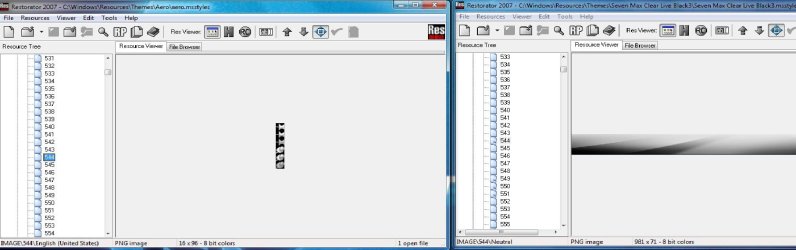
Thanks for this link, now i have an idea what i have to do at least. Unfortunatly the shown numbers of pictures to edit the shellstyle are not the same as in windows 7. The STREAM folder, for example, has only one picture at all.
I tried finding them manually, but after 5 times going through the whole IMAGE folder of .msstyle and .shellstyle still have no idea which pictures have to be replaced. The picture numbers of the aero style and the style i want to extract the shellstyle from seem not to be the same, thats why i cant just replace them:
 

Attachments

  • restoratorshells.jpg
    restoratorshells.jpg
    178.1 KB · Views: 296

My Computer

OS
Windows 7 Ultimate x64
CPU
AMD Athlon 64 X2 4200+ @2,2 GHz
Motherboard
Asus A8V-E SE
Memory
2x1 GB
Graphics Card(s)
Ati x1950 xt 512MB
Sound Card
Soundblaster Live! 5.1
Monitor(s) Displays
LG Flatron W2252TQ
Screen Resolution
1680x1050
Hard Drives
WD 360 GB extern
WD 360 GB
WD 80 GB
Keyboard
Cherry
Mouse
ROCCAT Kone USB Mouse (awesome>expensive)
Internet Speed
12mpbt down / 1mbp up
Thanks for this link, now i have an idea what i have to do at least. Unfortunatly the shown numbers of pictures to edit the shellstyle are not the same as in windows 7. The STREAM folder, for example, has only one picture at all.
I tried finding them manually, but after 5 times going through the whole IMAGE folder of .msstyle and .shellstyle still have no idea which pictures have to be replaced. The picture numbers of the aero style and the style i want to extract the shellstyle from seem not to be the same, thats why i cant just replace them:

I'm new to theme-making, so I can't give you any specifics... just general info... with no guarantee that the info is correct. I spend alot more time hunting than I do modifying!

Win 7 aero uses some basic images in its themes. Did you look through basic images as well? What you're looking for may be there. And I've heard that the "fade effect" for the taskbar is hidden in the DWM folder, not aero or basic.
 

My Computer

Computer Manufacturer/Model Number
me / #1
OS
windows 7 x64 Home Premium
CPU
intel q6600
Motherboard
gigbyte ga ep45 ud3l
Memory
g.skill 8gb ddr2 1066 (pc2 8500)
Graphics Card(s)
evga geforce 9800 gtx 512 mb
Screen Resolution
1680 x 1050
Hard Drives
wd caviar black 500 gb
wd caviar black 1tb
wd elements 1tb external hd x2
PSU
raidmax 500w
Case
smilodon (yes, t'was the pretty blue lites that got me!)
The Vistatutorial its not the same for Windows 7.

When the theme is make with VistaStyleBuilder, the numbers are not the same.
http://www.sevenforums.com/customization/23579-how-change-shellstyle.html#post256086
When you replace the shellstyle in the aerotheme you can do this only in the aero-shellstyle.dll
But why you don't replace in your theme?

I use the aero as my current theme, made some changes allready, but its basically the aero theme. So i have to change that shellstyle.dll, right? So in the aero shellstyle.dll, which images do i have to replace with the ones from the shellstyle i want? Its ok if you PM me in german.


I'm new to theme-making, so I can't give you any specifics... just general info... with no guarantee that the info is correct. I spend alot more time hunting than I do modifying!

Win 7 aero uses some basic images in its themes. Did you look through basic images as well? What you're looking for may be there. And I've heard that the "fade effect" for the taskbar is hidden in the DWM folder, not aero or basic.

No problem, as i said, informative anyway, so thanks.
Where do i find the basic images?
 

My Computer

OS
Windows 7 Ultimate x64
CPU
AMD Athlon 64 X2 4200+ @2,2 GHz
Motherboard
Asus A8V-E SE
Memory
2x1 GB
Graphics Card(s)
Ati x1950 xt 512MB
Sound Card
Soundblaster Live! 5.1
Monitor(s) Displays
LG Flatron W2252TQ
Screen Resolution
1680x1050
Hard Drives
WD 360 GB extern
WD 360 GB
WD 80 GB
Keyboard
Cherry
Mouse
ROCCAT Kone USB Mouse (awesome>expensive)
Internet Speed
12mpbt down / 1mbp up
Got the image to change color of the shellstyle menu part with moinmoins help, its image #891 in the aero .msstyle and image #899 is for the library, if anyone got an interest in changing it. Im still looking for the image for the the bottom window image, cant seem to find it, tho. Help!
 
Last edited:

My Computer

OS
Windows 7 Ultimate x64
CPU
AMD Athlon 64 X2 4200+ @2,2 GHz
Motherboard
Asus A8V-E SE
Memory
2x1 GB
Graphics Card(s)
Ati x1950 xt 512MB
Sound Card
Soundblaster Live! 5.1
Monitor(s) Displays
LG Flatron W2252TQ
Screen Resolution
1680x1050
Hard Drives
WD 360 GB extern
WD 360 GB
WD 80 GB
Keyboard
Cherry
Mouse
ROCCAT Kone USB Mouse (awesome>expensive)
Internet Speed
12mpbt down / 1mbp up
Back
Top