Win7 Crashes. Not sure why. Please help.

WRCLA

New member
Local time
7:06 AM
Messages
15
My computer with win7 pro 64bit is crashing once or twice a day. I tried - win memory diagnostic, virus scan, sys file checker, registry cleaner (winaso). None worked. I think registry cleaner made it worse. Also I used registry cleaner (ccleaner) last month. So I think something is wrong with me registry.
 

My Computer My Computer

Computer type
PC/Desktop
OS
Windows 7 Pro 64Bit

My Computer My Computer

Computer type
PC/Desktop
Computer Manufacturer/Model Number
Self Assembled
OS
Microsoft Windows 10 Pro Insider Preview 64-bit
CPU
Intel(R) Core(TM) i3-4130 CPU @ 3.40GHz
Motherboard
Gigabyte Technology Co., Ltd. B85M-D3H
Memory
Corsair Vengence 4GB x2 (8.00GB Dual-Channel DDR3 @ 798MHz)
Graphics Card(s)
2047MB GeForce GTS 450 (ZOTAC International)
Sound Card
Onboard (Realtek High Definition Audio)
Monitor(s) Displays
LG Flatron E2040T
Screen Resolution
1600x900
Hard Drives
Western Digital 1 TB
Seagate 500 GB
PSU
Corsair VS550
Case
Cooler Master K380
Cooling
Cooler Master Seidon 120V Plus
Keyboard
Logitech MK260r
Mouse
Logitech MK260r
Internet Speed
PMPL Broadband
Antivirus
Windows Defender + MBAM
Browser
Firefox
Other Info
Dell Studio 15" Laptop
I tried the SF - Diagnostic Tool. It gathered my dump files. They are attach. Please take a look at them.
 

My Computer My Computer

Computer type
PC/Desktop
OS
Windows 7 Pro 64Bit
The dumps are caused by a hardware error but the WHEA record doesn't contain any parameters. This could be caused by catastrophic failure, memory faults in CPU cache or memory faults. Check your system temperatures, especially CPU temps. Also, follow the directions to capture system files and event logs. If you are overclocking, stop!
 

My Computer My Computer

Computer type
PC/Desktop
Computer Manufacturer/Model Number
Built 2/11/2011
OS
Windows 7 Pro-x64
CPU
i7-2600 3.4GHz - 3.8GHz Turbo
Motherboard
Intel DH67BL-B3
Memory
8Gb - 2x4GB, Muskin 991770 PC3-1333
Graphics Card(s)
Integrated Intel HD 2000
Sound Card
Integrated Intel 10.1 HD, RealTek ALC892
Monitor(s) Displays
Asus LCD VH222H, Haier HL24XSL2a
Screen Resolution
1920x1080, 1920x1080
Hard Drives
Crucial SSD C300-128Gb,
Western Digital WD5002AALX - 500Gb,
Western Digital WD7501AALS - 750Gb
PSU
Seasonic 650W 80+ Gold Modular
Case
Rosewill Defender
Cooling
Stock CPU, Four 120mm case fans, PCH fan added
Keyboard
Logitech EX100 Y-RBH94 Wireless
Mouse
Logitech EX100 M-RCE95 Wireless
Internet Speed
3.0/1.5 Mbs
Antivirus
Microsoft Security Essentials
Browser
Microsoft Internet Explorer 11
Other Info
Antec Veris Premier-Multimedia IR Station,
Cyber Accoustics-3602 Speakers,
AFT XM-5U Card Reader,
Hauppauge TV-HVR-2250,
Sony LX300 USB Turntable
Probably not the temps. I got a huge thermo transfer for the cpu, gpu, psu. Also, I am not overclocking. When I checked the temps with SpeedFan, they all check out fine, way below the 100's (c), around the 33's (c).

Could you reply with what are in the dumps? For some reason, WinDbg does not install in my computer. Could it because of the VS12 installed in my computer?
 

My Computer My Computer

Computer type
PC/Desktop
OS
Windows 7 Pro 64Bit
A moment ago, my computer was about to crash. It stop for a while. Then it came back.

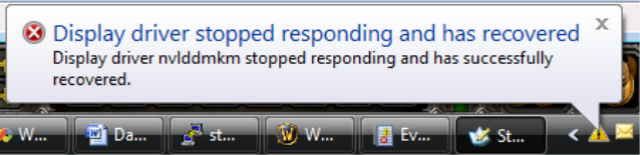
When it came back, Windows notified me the video card driver (Nvidia) recovered. Does this mean the video driver is the problem? Last driver update was on 9/12/13.
 

My Computer My Computer

Computer type
PC/Desktop
OS
Windows 7 Pro 64Bit
This one?

image016.png


In 90% of the cases, it is a hardware error. But that error is not possible to found by stress test, coz it is random in nature.

From the limited data you supplied, we cannot see the model of the card and the driver in use. You are suggested to post following the Blue Screen of Death (BSOD) Posting Instructions, once again; after post http://www.sevenforums.com/bsod-hel...hes-not-sure-why-please-help.html#post2570714.
 

My Computer My Computer

Computer type
PC/Desktop
Computer Manufacturer/Model Number
Self Assembled
OS
Microsoft Windows 10 Pro Insider Preview 64-bit
CPU
Intel(R) Core(TM) i3-4130 CPU @ 3.40GHz
Motherboard
Gigabyte Technology Co., Ltd. B85M-D3H
Memory
Corsair Vengence 4GB x2 (8.00GB Dual-Channel DDR3 @ 798MHz)
Graphics Card(s)
2047MB GeForce GTS 450 (ZOTAC International)
Sound Card
Onboard (Realtek High Definition Audio)
Monitor(s) Displays
LG Flatron E2040T
Screen Resolution
1600x900
Hard Drives
Western Digital 1 TB
Seagate 500 GB
PSU
Corsair VS550
Case
Cooler Master K380
Cooling
Cooler Master Seidon 120V Plus
Keyboard
Logitech MK260r
Mouse
Logitech MK260r
Internet Speed
PMPL Broadband
Antivirus
Windows Defender + MBAM
Browser
Firefox
Other Info
Dell Studio 15" Laptop
I wouldn't rely on Speed Fan. Even your voltages are whacked according to that. Intel processors can fail if you exceed the +/-5% limit on voltages. Download and install HWInfo64 and see what that says but DO NOT run more than ONE temp monitor program at the same time.

Use the "Grab All" option in the BSOD instructions.
 

My Computer My Computer

Computer type
PC/Desktop
Computer Manufacturer/Model Number
Built 2/11/2011
OS
Windows 7 Pro-x64
CPU
i7-2600 3.4GHz - 3.8GHz Turbo
Motherboard
Intel DH67BL-B3
Memory
8Gb - 2x4GB, Muskin 991770 PC3-1333
Graphics Card(s)
Integrated Intel HD 2000
Sound Card
Integrated Intel 10.1 HD, RealTek ALC892
Monitor(s) Displays
Asus LCD VH222H, Haier HL24XSL2a
Screen Resolution
1920x1080, 1920x1080
Hard Drives
Crucial SSD C300-128Gb,
Western Digital WD5002AALX - 500Gb,
Western Digital WD7501AALS - 750Gb
PSU
Seasonic 650W 80+ Gold Modular
Case
Rosewill Defender
Cooling
Stock CPU, Four 120mm case fans, PCH fan added
Keyboard
Logitech EX100 Y-RBH94 Wireless
Mouse
Logitech EX100 M-RCE95 Wireless
Internet Speed
3.0/1.5 Mbs
Antivirus
Microsoft Security Essentials
Browser
Microsoft Internet Explorer 11
Other Info
Antec Veris Premier-Multimedia IR Station,
Cyber Accoustics-3602 Speakers,
AFT XM-5U Card Reader,
Hauppauge TV-HVR-2250,
Sony LX300 USB Turntable
Arc - Yes. It was that, "Display driver stopped responding and has recovered".
 

My Computer My Computer

Computer type
PC/Desktop
OS
Windows 7 Pro 64Bit
Carwiz -

Wow! HWiNFO64 is thoroughly complete. Attached are the computer specs and readouts.
 

My Computer My Computer

Computer type
PC/Desktop
OS
Windows 7 Pro 64Bit
I was away from my computer for a week 10/9-10/13 since the crashes started. Could there have been an update that I missed?
 

My Computer My Computer

Computer type
PC/Desktop
OS
Windows 7 Pro 64Bit
No way to tell unless you attach the files as instructed. Help here as ended until you do. Everything else is just a guess.
 

My Computer My Computer

Computer type
PC/Desktop
Computer Manufacturer/Model Number
Built 2/11/2011
OS
Windows 7 Pro-x64
CPU
i7-2600 3.4GHz - 3.8GHz Turbo
Motherboard
Intel DH67BL-B3
Memory
8Gb - 2x4GB, Muskin 991770 PC3-1333
Graphics Card(s)
Integrated Intel HD 2000
Sound Card
Integrated Intel 10.1 HD, RealTek ALC892
Monitor(s) Displays
Asus LCD VH222H, Haier HL24XSL2a
Screen Resolution
1920x1080, 1920x1080
Hard Drives
Crucial SSD C300-128Gb,
Western Digital WD5002AALX - 500Gb,
Western Digital WD7501AALS - 750Gb
PSU
Seasonic 650W 80+ Gold Modular
Case
Rosewill Defender
Cooling
Stock CPU, Four 120mm case fans, PCH fan added
Keyboard
Logitech EX100 Y-RBH94 Wireless
Mouse
Logitech EX100 M-RCE95 Wireless
Internet Speed
3.0/1.5 Mbs
Antivirus
Microsoft Security Essentials
Browser
Microsoft Internet Explorer 11
Other Info
Antec Veris Premier-Multimedia IR Station,
Cyber Accoustics-3602 Speakers,
AFT XM-5U Card Reader,
Hauppauge TV-HVR-2250,
Sony LX300 USB Turntable
Carwiz - I did as instructed in that tread. I only was able to get the minidumps out of it. They are in the SF_20-10-2013.zip file. Is there another way to gather the necessary information? Could I do this manually?
 

My Computer My Computer

Computer type
PC/Desktop
OS
Windows 7 Pro 64Bit

My Computer My Computer

Computer type
PC/Desktop
Computer Manufacturer/Model Number
Self Assembled
OS
Microsoft Windows 10 Pro Insider Preview 64-bit
CPU
Intel(R) Core(TM) i3-4130 CPU @ 3.40GHz
Motherboard
Gigabyte Technology Co., Ltd. B85M-D3H
Memory
Corsair Vengence 4GB x2 (8.00GB Dual-Channel DDR3 @ 798MHz)
Graphics Card(s)
2047MB GeForce GTS 450 (ZOTAC International)
Sound Card
Onboard (Realtek High Definition Audio)
Monitor(s) Displays
LG Flatron E2040T
Screen Resolution
1600x900
Hard Drives
Western Digital 1 TB
Seagate 500 GB
PSU
Corsair VS550
Case
Cooler Master K380
Cooling
Cooler Master Seidon 120V Plus
Keyboard
Logitech MK260r
Mouse
Logitech MK260r
Internet Speed
PMPL Broadband
Antivirus
Windows Defender + MBAM
Browser
Firefox
Other Info
Dell Studio 15" Laptop
http://www.sevenforums.com/tutorials/92394-sf-diagnostic-tool-using-troubleshooting.html

Did you download the tool?

Be sure to run the diagnostic tool as Administrator. It's proven technology that works. If you get any error messages, snip and paste them here but follow the instructions item by item. It takes to long to explain and gather the info individually. That's why the utility was created. It collects no personal information. The only thing we could possibly see is the name you assigned your computer. And that never gets posted on the forum. I was inactive here for the summer (heavy workload) so I lost my BSOD Badge but those that carry the badges like Archie are the cream of the crop of this forum. They are a trusted asset with thousands of references.
 

My Computer My Computer

Computer type
PC/Desktop
Computer Manufacturer/Model Number
Built 2/11/2011
OS
Windows 7 Pro-x64
CPU
i7-2600 3.4GHz - 3.8GHz Turbo
Motherboard
Intel DH67BL-B3
Memory
8Gb - 2x4GB, Muskin 991770 PC3-1333
Graphics Card(s)
Integrated Intel HD 2000
Sound Card
Integrated Intel 10.1 HD, RealTek ALC892
Monitor(s) Displays
Asus LCD VH222H, Haier HL24XSL2a
Screen Resolution
1920x1080, 1920x1080
Hard Drives
Crucial SSD C300-128Gb,
Western Digital WD5002AALX - 500Gb,
Western Digital WD7501AALS - 750Gb
PSU
Seasonic 650W 80+ Gold Modular
Case
Rosewill Defender
Cooling
Stock CPU, Four 120mm case fans, PCH fan added
Keyboard
Logitech EX100 Y-RBH94 Wireless
Mouse
Logitech EX100 M-RCE95 Wireless
Internet Speed
3.0/1.5 Mbs
Antivirus
Microsoft Security Essentials
Browser
Microsoft Internet Explorer 11
Other Info
Antec Veris Premier-Multimedia IR Station,
Cyber Accoustics-3602 Speakers,
AFT XM-5U Card Reader,
Hauppauge TV-HVR-2250,
Sony LX300 USB Turntable
Thank you, Ken.

We learned by following you. And, it is sure that the badge will be back to the place rightly ... may be just a matter of time :)
 

My Computer My Computer

Computer type
PC/Desktop
Computer Manufacturer/Model Number
Self Assembled
OS
Microsoft Windows 10 Pro Insider Preview 64-bit
CPU
Intel(R) Core(TM) i3-4130 CPU @ 3.40GHz
Motherboard
Gigabyte Technology Co., Ltd. B85M-D3H
Memory
Corsair Vengence 4GB x2 (8.00GB Dual-Channel DDR3 @ 798MHz)
Graphics Card(s)
2047MB GeForce GTS 450 (ZOTAC International)
Sound Card
Onboard (Realtek High Definition Audio)
Monitor(s) Displays
LG Flatron E2040T
Screen Resolution
1600x900
Hard Drives
Western Digital 1 TB
Seagate 500 GB
PSU
Corsair VS550
Case
Cooler Master K380
Cooling
Cooler Master Seidon 120V Plus
Keyboard
Logitech MK260r
Mouse
Logitech MK260r
Internet Speed
PMPL Broadband
Antivirus
Windows Defender + MBAM
Browser
Firefox
Other Info
Dell Studio 15" Laptop
Got it working with administrator. Duh.

It could not do CPUID properly though. Some reason it could not connect to the internet to download CPUID. So I manually saved the CPUID report that CPUID gives.

Hoping you could nail the coffin now.
 

My Computer My Computer

Computer type
PC/Desktop
OS
Windows 7 Pro 64Bit
Sorry it took so long to get back. There wasn't much help in the system log--It stops after August of this year. You should change the option to overlay old event logs. (Or not delete them.) The application event log has a number of strange looking entries and you are correct that your Registry file is damaged. This may take a few steps to get to the root cause but let's make sure your system files are intact then we'll tackle the VMware/Blackberry/Daemon problems. You also have a missing service driver that may be part of USB services.

Start by running SFC /scannow from an elevated command prompt. The inline link points to the directions for running. Use Option Two. Be sure to run the command prompt "As Administrator". If you get errors during the scan, it may take several runs to fix the system files and sync the Registry. If you get a BSOD before SFC completes, reboot in safe mode and uninstall the Daemon Tools through Programs and Features. Reboot and try SFC again until no errors are shown on the console screen. It shouldn't take more than four runs so if you still get errors, report back with a copy of the console screen.
 

My Computer My Computer

Computer type
PC/Desktop
Computer Manufacturer/Model Number
Built 2/11/2011
OS
Windows 7 Pro-x64
CPU
i7-2600 3.4GHz - 3.8GHz Turbo
Motherboard
Intel DH67BL-B3
Memory
8Gb - 2x4GB, Muskin 991770 PC3-1333
Graphics Card(s)
Integrated Intel HD 2000
Sound Card
Integrated Intel 10.1 HD, RealTek ALC892
Monitor(s) Displays
Asus LCD VH222H, Haier HL24XSL2a
Screen Resolution
1920x1080, 1920x1080
Hard Drives
Crucial SSD C300-128Gb,
Western Digital WD5002AALX - 500Gb,
Western Digital WD7501AALS - 750Gb
PSU
Seasonic 650W 80+ Gold Modular
Case
Rosewill Defender
Cooling
Stock CPU, Four 120mm case fans, PCH fan added
Keyboard
Logitech EX100 Y-RBH94 Wireless
Mouse
Logitech EX100 M-RCE95 Wireless
Internet Speed
3.0/1.5 Mbs
Antivirus
Microsoft Security Essentials
Browser
Microsoft Internet Explorer 11
Other Info
Antec Veris Premier-Multimedia IR Station,
Cyber Accoustics-3602 Speakers,
AFT XM-5U Card Reader,
Hauppauge TV-HVR-2250,
Sony LX300 USB Turntable
I did the sfc /scannow.

On the first run, I got verificatioin 100%.
 

My Computer My Computer

Computer type
PC/Desktop
OS
Windows 7 Pro 64Bit
Is this a good thing?
 

My Computer My Computer

Computer type
PC/Desktop
OS
Windows 7 Pro 64Bit
Back
Top