
IE11 Appears not to support gadgets. What are the alternatives ?

Mooly

New member
Power User
VIP
Local time
7:09 PM
Messages
112
Having just installed IE11, I find the standard W7 weather gadget and CPU/RAM meter are broken. A quick web search reveals this is/could be deliberate on the part of MS.

What are the free alternatives for these ? The CPU/RAM meter in particular was very useful to see at a glance whether anything was happening that shouldn't be.

Running W7 x64 in 64 bit mode for IE
 

Attachments
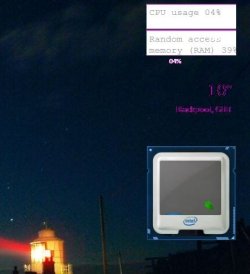
  • IE11 Issue.JPG
    IE11 Issue.JPG
    27.1 KB · Views: 236

My Computer My Computer

At a glance

Windows 7 Professional x64Intel Core i5 2430M (2.4GHz)4096Mb 1333Mhz DDR3 SDRAMIntel Integrated HD
Computer type
Laptop
Computer Manufacturer/Model Number
Dell
OS
Windows 7 Professional x64
CPU
Intel Core i5 2430M (2.4GHz)
Memory
4096Mb 1333Mhz DDR3 SDRAM
Graphics Card(s)
Intel Integrated HD
Monitor(s) Displays
17.3 Inch HD Anti Glare
Screen Resolution
1600 x 900
Hard Drives
320Gb 7200rpm serial ATA
Keyboard
Illuminated standard
Mouse
Microsoft 3500
Internet Speed
40Mb
Antivirus
Security Essentials
Browser
IE11 x64
Microsoft issued a notice, at least two years ago, to not use the gadgets due to potential security issues. In fact Microsoft no longer supports them.

I used to have the CPU meter, which I found helpful in my recording studio applications. I haven't found anything that does what it did.
 

My Computer My Computer

At a glance

Windows 10 64 bitIntel i7 6700K16GB Corsair DominatorIntel CPU Graphics
Computer type
PC/Desktop
Computer Manufacturer/Model Number
My Own Build
OS
Windows 10 64 bit
CPU
Intel i7 6700K
Motherboard
ASUS ROG Maximus VIII Hero
Memory
16GB Corsair Dominator
Graphics Card(s)
Intel CPU Graphics
Sound Card
RealTek
Monitor(s) Displays
27" Dell S2719dgf
Screen Resolution
2560X1440
Hard Drives
1 TB Samsung 850 EVO SSD for Win 10 Pro
500GB Samsung 850 EVO SSD for Win 10 Insider
2 TB drive for backup
PSU
EVGA Supernova 750G2
Case
BeQuiet Silent Base 600
Cooling
Deepcool Captain 120EX
Keyboard
Microsoft Wireless 2000
Mouse
Microsoft wireless
Internet Speed
100 MB/sec (Cable)
Antivirus
Microsoft Defender and Malwarebytes
Browser
Edge/Firefox
Other Info
Cakewalk (Sonar) by BandLab and Studio One 4.1 Pro recording studio software. MOTU 896Mk3 Hybrid recording interface, Frontier Tranzport wireless control unit, Behringer X-Touch Control Surface.
Five USB connected optical drives for CD Audio production using Nero BurningROM
Microsoft Security Advisory (2719662): Vulnerabilities in Gadgets Could Allow Remote Code Execution

In lieu of a desktop gadget perhaps you could make use of the built-in Resource Monitor to keep track of CPU and RAM. Probably not as convenient as a gadget but maybe better than nothing. Same for a weather desktop app. Some reputable sites include The Weather Channel, NOAA, and local TV stations may offer their own apps.

http://www.sevenforums.com/tutorials/12523-resource-monitor.html

The Weather Channel App for Windows with Current Conditions, Local Alerts, and Radar

NOAA's Weather and Climate Toolkit (Viewer and Data Exporter)
 

My Computer My Computer

At a glance

Win 7 Pro 64-bitIntel i5 2.4 Ghz8GB DDR3Intel HD 3000
Computer type
Laptop
Computer Manufacturer/Model Number
Sony Vaio VPCEB47GM Laptop
OS
Win 7 Pro 64-bit
CPU
Intel i5 2.4 Ghz
Memory
8GB DDR3
Graphics Card(s)
Intel HD 3000
Sound Card
IDT High Definition
Monitor(s) Displays
15.6 WGXA Anti-Glare LED
Screen Resolution
1280x800
Hard Drives
640Gb 7200rpm
Antivirus
MSE
Browser
Opera (primary) with IE9 backup

My Computer My Computer

At a glance

Win 7 Pro x64 / Win 10 ProIntel(R) Core(TM) i7-3630QM CPU @ 2.40GHz12 GB(1) Intel(R) HD Graphics 4000 (2) NVIDIA GeFo...
Computer type
Laptop
Computer Manufacturer/Model Number
Sager NP9170
OS
Win 7 Pro x64 / Win 10 Pro
CPU
Intel(R) Core(TM) i7-3630QM CPU @ 2.40GHz
Motherboard
CLEVO P170EM
Memory
12 GB
Graphics Card(s)
(1) Intel(R) HD Graphics 4000 (2) NVIDIA GeForce GTX 675M
Sound Card
(1) Realtek High Definition Audio (2) Intel(R) Display Aud
Monitor(s) Displays
17.3
Screen Resolution
1920x1080
Hard Drives
(1) Samsung 860 EVO 500GB(OS) (1) Samsung 860 EVO 500GB(Data)
Keyboard
Backlite
Antivirus
MSE, Malwarebytes Pro
Browser
Firefox
Other Info
DESKTOP: Custom-built.
OS: Win 10 Pro x64.
CASE: Rosewill R5.
CPU: Intel I5 4670K CPU @ 3.40GHz.
CPU COOLER: Cool Master Hyper 212 EVO.
MOTHERBOARD: Asus Z87-A.
MEMORY: Kingston HyperX 2x4 GB.
GPU: Nvidia Geforce 650 TI.
PSU: Corsair TX750.
DRIVES: (1) Samsung 840 120 GB SSD (2) Western Digital blue 500 GB 7200 RPM.
Thanks for the suggestions marsmimar. One from "weather underground" was suggested to me earlier and I've just been trying that briefly.

I was actually wondering whether IE11 download breaks those two gadgets in some way (breaks... as in you could copy a fresh version back) or whether it really is IE11 that just won't run them and the original gadgets are left intact.

Thanks for those suggestions though :)
 

My Computer My Computer

At a glance

Windows 7 Professional x64Intel Core i5 2430M (2.4GHz)4096Mb 1333Mhz DDR3 SDRAMIntel Integrated HD
Computer type
Laptop
Computer Manufacturer/Model Number
Dell
OS
Windows 7 Professional x64
CPU
Intel Core i5 2430M (2.4GHz)
Memory
4096Mb 1333Mhz DDR3 SDRAM
Graphics Card(s)
Intel Integrated HD
Monitor(s) Displays
17.3 Inch HD Anti Glare
Screen Resolution
1600 x 900
Hard Drives
320Gb 7200rpm serial ATA
Keyboard
Illuminated standard
Mouse
Microsoft 3500
Internet Speed
40Mb
Antivirus
Security Essentials
Browser
IE11 x64
There is a current thread on the Cakewalk Sonar forum of a user that installed Rainmeter and now cannot add programs to the task bar.
 

My Computer My Computer

At a glance

Windows 10 64 bitIntel i7 6700K16GB Corsair DominatorIntel CPU Graphics
Computer type
PC/Desktop
Computer Manufacturer/Model Number
My Own Build
OS
Windows 10 64 bit
CPU
Intel i7 6700K
Motherboard
ASUS ROG Maximus VIII Hero
Memory
16GB Corsair Dominator
Graphics Card(s)
Intel CPU Graphics
Sound Card
RealTek
Monitor(s) Displays
27" Dell S2719dgf
Screen Resolution
2560X1440
Hard Drives
1 TB Samsung 850 EVO SSD for Win 10 Pro
500GB Samsung 850 EVO SSD for Win 10 Insider
2 TB drive for backup
PSU
EVGA Supernova 750G2
Case
BeQuiet Silent Base 600
Cooling
Deepcool Captain 120EX
Keyboard
Microsoft Wireless 2000
Mouse
Microsoft wireless
Internet Speed
100 MB/sec (Cable)
Antivirus
Microsoft Defender and Malwarebytes
Browser
Edge/Firefox
Other Info
Cakewalk (Sonar) by BandLab and Studio One 4.1 Pro recording studio software. MOTU 896Mk3 Hybrid recording interface, Frontier Tranzport wireless control unit, Behringer X-Touch Control Surface.
Five USB connected optical drives for CD Audio production using Nero BurningROM
You could always roll back to IE10 and hide the update to IE11 when it reappears.
 

My Computer My Computer

At a glance

Microsoft Windows 7 Home Premium 64-bit Servi...Intel(R) Core(TM) i3 CPU M 330 @ 2.13GHz8 GB DDR3Intel(R) HD Graphics
Computer type
Laptop
Computer Manufacturer/Model Number
Hewlett-Packard/G62-107SA Notebook
OS
Microsoft Windows 7 Home Premium 64-bit Service Pack 1
CPU
Intel(R) Core(TM) i3 CPU M 330 @ 2.13GHz
Motherboard
Hewlett-Packard 1425
Memory
8 GB DDR3
Graphics Card(s)
Intel(R) HD Graphics
Sound Card
Realtek High Definition Audio
Monitor(s) Displays
Builtin
Screen Resolution
1366 x 768 x 32 bits (4294967296 colors) @ 60 Hz
Hard Drives
250 GB SATA Hard Disk Drive 7200 rpm
2TB Seagate GoFlex USB 2 Drive
1TB Iomega Prestige USB 2 Drive
1.5TB Iomega Prestige USB 2 Drive (Samsung)
2TB WD MyBook Live NAS.
Mouse
Logitech Anywhere MX
Internet Speed
152 Mbs download 10 Mbs upload
Antivirus
Norton 360
Browser
Chrome
@Mooly check Windows features, .net framework... ;)
 

My Computer My Computer

At a glance

Win7 Home Premium x64 W10Pro&HomeA12 9720p 4+8 TurionII M5206GB 8GBR7
Computer type
Laptop
Computer Manufacturer/Model Number
HP 17-ak0xx, dv7 3173nr
OS
Win7 Home Premium x64 W10Pro&Home
CPU
A12 9720p 4+8 TurionII M520
Motherboard
HP 3839
Memory
6GB 8GB
Graphics Card(s)
R7
Monitor(s) Displays
24" sa550
Screen Resolution
1600x900 1920x1080
Mouse
Logitechx2
Internet Speed
120Mb/s down 12up
I just did some testing in VMware with a fresh install of Windows 7 64-bit and also an older install of 32-bit and I just updated both to IE 11 and the gadgets work just fine. Not saying I know what to fix is the it does work for me. If you're up to it try a clean install and let it update and try the gadgets again.

Jerry
 

My Computer My Computer

At a glance

Win 7 Pro x64 / Win 10 ProIntel(R) Core(TM) i7-3630QM CPU @ 2.40GHz12 GB(1) Intel(R) HD Graphics 4000 (2) NVIDIA GeFo...
Computer type
Laptop
Computer Manufacturer/Model Number
Sager NP9170
OS
Win 7 Pro x64 / Win 10 Pro
CPU
Intel(R) Core(TM) i7-3630QM CPU @ 2.40GHz
Motherboard
CLEVO P170EM
Memory
12 GB
Graphics Card(s)
(1) Intel(R) HD Graphics 4000 (2) NVIDIA GeForce GTX 675M
Sound Card
(1) Realtek High Definition Audio (2) Intel(R) Display Aud
Monitor(s) Displays
17.3
Screen Resolution
1920x1080
Hard Drives
(1) Samsung 860 EVO 500GB(OS) (1) Samsung 860 EVO 500GB(Data)
Keyboard
Backlite
Antivirus
MSE, Malwarebytes Pro
Browser
Firefox
Other Info
DESKTOP: Custom-built.
OS: Win 10 Pro x64.
CASE: Rosewill R5.
CPU: Intel I5 4670K CPU @ 3.40GHz.
CPU COOLER: Cool Master Hyper 212 EVO.
MOTHERBOARD: Asus Z87-A.
MEMORY: Kingston HyperX 2x4 GB.
GPU: Nvidia Geforce 650 TI.
PSU: Corsair TX750.
DRIVES: (1) Samsung 840 120 GB SSD (2) Western Digital blue 500 GB 7200 RPM.
You could always roll back to IE10 and hide the update to IE11 when it reappears.

That is a distinct possibility. I had a major play this morning and tried copy and pasting working gadgets into the appropriate system folder but IE11 won't play ball. I tried some gadgets from Thoosje which were loaded with unwanted junk/malware. A pity because there is a really good CPU meter there. At this point I wasn't bothered (because I would revert back with Acronis) so I looked out the designer of the gadget I liked and found it on Softpedia but it was a later version and seemed a little resource hungry. I'm used to seeing the CPU hovering around 1 or 2% and not having fans running and that wasn't quite the case.


@Mooly check Windows features, .net framework... ;)

Afraid I've no idea what I would be looking at there (or even where to look)
 

My Computer My Computer

At a glance

Windows 7 Professional x64Intel Core i5 2430M (2.4GHz)4096Mb 1333Mhz DDR3 SDRAMIntel Integrated HD
Computer type
Laptop
Computer Manufacturer/Model Number
Dell
OS
Windows 7 Professional x64
CPU
Intel Core i5 2430M (2.4GHz)
Memory
4096Mb 1333Mhz DDR3 SDRAM
Graphics Card(s)
Intel Integrated HD
Monitor(s) Displays
17.3 Inch HD Anti Glare
Screen Resolution
1600 x 900
Hard Drives
320Gb 7200rpm serial ATA
Keyboard
Illuminated standard
Mouse
Microsoft 3500
Internet Speed
40Mb
Antivirus
Security Essentials
Browser
IE11 x64
I just did some testing in VMware with a fresh install of Windows 7 64-bit and also an older install of 32-bit and I just updated both to IE 11 and the gadgets work just fine. Not saying I know what to fix is the it does work for me. If you're up to it try a clean install and let it update and try the gadgets again.

Jerry

Thanks Jerry. I'm not sure what I'll do tbh. My install is clean and new to me :) Well it was in March this year anyway and it hasn't been mauled about or had anything other than Windows own housekeeping used on it.

I think I heard that IE11 would be the last IE update W7 sees and so I might (although I don't really want to) stick with IE10.
 

My Computer My Computer

At a glance

Windows 7 Professional x64Intel Core i5 2430M (2.4GHz)4096Mb 1333Mhz DDR3 SDRAMIntel Integrated HD
Computer type
Laptop
Computer Manufacturer/Model Number
Dell
OS
Windows 7 Professional x64
CPU
Intel Core i5 2430M (2.4GHz)
Memory
4096Mb 1333Mhz DDR3 SDRAM
Graphics Card(s)
Intel Integrated HD
Monitor(s) Displays
17.3 Inch HD Anti Glare
Screen Resolution
1600 x 900
Hard Drives
320Gb 7200rpm serial ATA
Keyboard
Illuminated standard
Mouse
Microsoft 3500
Internet Speed
40Mb
Antivirus
Security Essentials
Browser
IE11 x64

My Computer My Computer

At a glance

Win 7 Pro x64 / Win 10 ProIntel(R) Core(TM) i7-3630QM CPU @ 2.40GHz12 GB(1) Intel(R) HD Graphics 4000 (2) NVIDIA GeFo...
Computer type
Laptop
Computer Manufacturer/Model Number
Sager NP9170
OS
Win 7 Pro x64 / Win 10 Pro
CPU
Intel(R) Core(TM) i7-3630QM CPU @ 2.40GHz
Motherboard
CLEVO P170EM
Memory
12 GB
Graphics Card(s)
(1) Intel(R) HD Graphics 4000 (2) NVIDIA GeForce GTX 675M
Sound Card
(1) Realtek High Definition Audio (2) Intel(R) Display Aud
Monitor(s) Displays
17.3
Screen Resolution
1920x1080
Hard Drives
(1) Samsung 860 EVO 500GB(OS) (1) Samsung 860 EVO 500GB(Data)
Keyboard
Backlite
Antivirus
MSE, Malwarebytes Pro
Browser
Firefox
Other Info
DESKTOP: Custom-built.
OS: Win 10 Pro x64.
CASE: Rosewill R5.
CPU: Intel I5 4670K CPU @ 3.40GHz.
CPU COOLER: Cool Master Hyper 212 EVO.
MOTHERBOARD: Asus Z87-A.
MEMORY: Kingston HyperX 2x4 GB.
GPU: Nvidia Geforce 650 TI.
PSU: Corsair TX750.
DRIVES: (1) Samsung 840 120 GB SSD (2) Western Digital blue 500 GB 7200 RPM.
i just installed it through windows updates on 2 windows 7 machines and ie 11 is working fine, but you still can use the cpu gadget it just does not have a graphic to it, the same with the weather one but it is recording properly.
 

My Computer My Computer

At a glance

Windows 7 Pro 32/64 bit and Windows 10 Pro 32...4gigsAMD Radeon HD and Nvidia
Computer type
PC/Desktop
Computer Manufacturer/Model Number
Dell Computers
OS
Windows 7 Pro 32/64 bit and Windows 10 Pro 32 Bit/64bit
Memory
4gigs
Graphics Card(s)
AMD Radeon HD and Nvidia
Monitor(s) Displays
Samsung 24". INC 19". Dell 22 ". Dell 17" & 19"
Thanks for that info Jerry. Yes I'm using 125% (17" laptop) and 100% is to small for comfort tbh

At the moment I'm back on IE10 and have just done todays updates minus IE11. I'm thinking :D
 

My Computer My Computer

At a glance

Windows 7 Professional x64Intel Core i5 2430M (2.4GHz)4096Mb 1333Mhz DDR3 SDRAMIntel Integrated HD
Computer type
Laptop
Computer Manufacturer/Model Number
Dell
OS
Windows 7 Professional x64
CPU
Intel Core i5 2430M (2.4GHz)
Memory
4096Mb 1333Mhz DDR3 SDRAM
Graphics Card(s)
Intel Integrated HD
Monitor(s) Displays
17.3 Inch HD Anti Glare
Screen Resolution
1600 x 900
Hard Drives
320Gb 7200rpm serial ATA
Keyboard
Illuminated standard
Mouse
Microsoft 3500
Internet Speed
40Mb
Antivirus
Security Essentials
Browser
IE11 x64
I would of thought the gadgets would be quite easy to fix, all that would need doing is unpacking them and adding <meta http-equiv="X-UA-Compatible" content="IE=9" /> after the <head> tag then repacking/zipping it as a gadget.
 

My Computer My Computer

At a glance

Windows 11
Computer type
PC/Desktop
OS
Windows 11
I would of thought the gadgets would be quite easy to fix, all that would need doing is unpacking them and adding <meta http-equiv="X-UA-Compatible" content="IE=9" /> after the <head> tag then repacking/zipping it as a gadget.

I wouldn't really know how to do that... what and where to add it.

I've just looked at the gadget files for CPU meter (on Vista at the moment but it will be similar-ish) and there is a Javascript file thats readable in notepad and also one denoted by the little blue box and gear wheel symbol. That one only has a couple of lines in it.

On W7 x64 there are two separate sidebar and gadget folders, one for 32 in the "x86 prog files" and another for 64 bit in the "prog files" folders.

(Could there be anything as simple as a reg edit or even something in the advanced options for IE11)
 

My Computer My Computer

At a glance

Windows 7 Professional x64Intel Core i5 2430M (2.4GHz)4096Mb 1333Mhz DDR3 SDRAMIntel Integrated HD
Computer type
Laptop
Computer Manufacturer/Model Number
Dell
OS
Windows 7 Professional x64
CPU
Intel Core i5 2430M (2.4GHz)
Memory
4096Mb 1333Mhz DDR3 SDRAM
Graphics Card(s)
Intel Integrated HD
Monitor(s) Displays
17.3 Inch HD Anti Glare
Screen Resolution
1600 x 900
Hard Drives
320Gb 7200rpm serial ATA
Keyboard
Illuminated standard
Mouse
Microsoft 3500
Internet Speed
40Mb
Antivirus
Security Essentials
Browser
IE11 x64
I've just installed Windows 7 in a VM and need to install SP1 etc before I can install IE11 and do any tests.

If this is the default CPU meter you are talking about, have a look for cpu.html here C:\Program Files\Windows Sidebar\Gadgets\CPU.Gadget\en-US

Then edit with notepad adding <meta http-equiv="X-UA-Compatible" content="IE=9" /> after the <head> tag

I should have mine up in about 20 minutes to test myself.


Edit -Hmmm I've installed a fresh Win7 with IE11 and all gadgets work out of the box so I cant test :(
 

My Computer My Computer

At a glance

Windows 11
Computer type
PC/Desktop
OS
Windows 11

My Computer My Computer

At a glance

Windows 8.1 Pro w/Media Center 64bit, Windows...Phenom II X6 1100TCrucial Balistic 8gb DDR3-1866 CL9MSI R6850 Cyclone IGD5 PE
Computer type
PC/Desktop
Computer Manufacturer/Model Number
Home Built
OS
Windows 8.1 Pro w/Media Center 64bit, Windows 7 HP 64bit
CPU
Phenom II X6 1100T
Motherboard
ASUS M5A99X EVO
Memory
Crucial Balistic 8gb DDR3-1866 CL9
Graphics Card(s)
MSI R6850 Cyclone IGD5 PE
Sound Card
On Board
Monitor(s) Displays
ASUS VE258Q 25" LED with DVI-HDMI-DisplayPort
Screen Resolution
1920 x 1080
Hard Drives
Two WD Cavier Black 2TB Sata III, WD My Book Essential 2TB USB 3.0
PSU
Seasonic X650 80 Plus GOLD Modular
Case
Corsair 400R
Cooling
Antec Kuhler H2O 620, Two 120mm and four 140mm
Keyboard
Logitech K120
Mouse
Logitech Marble Mouse USB, Logitech Precision Game Pad
Internet Speed
15MB
Antivirus
Norton IS 2013, Malwarebytes Pro Beta 2
Browser
IE-11, FF-27
Other Info
APC UPS ES 750, Netgear WNR3500L Gigabit & Wireless N Router with SamKnows Test Program, Motorola SB6120 Gigabit Cable Modem. Brother HL-2170W Laser Printer, Epson V300 Scanner
The problem is indeed caused by the DPI settings of the PC. Gadgets appear incorrectly if the DPI value is set above 100%, although one may use a custom value of 110% and gadgets seem to appear almost correctly. The reason for the problem is that the default gadgets in Windows 7 have a DPI-locking tag. So there are two ways to resolve this issue:
1. Set the DPI value to 100-110%.
2. The second one requires some basic XML editing skills. One has to delete the locking tag from the XML file completely as setting the value to auto will not resolve it. I am not sure, but this however, might be against Microsoft's policy. In case someone wants to try this one, please, at least make a backup copy of the original file.
 

My Computer My Computer

At a glance

Windows 7 Ultimate x64 & Windows 8.1 Pro Dual...Intel i7-4770k32 GB Kingston HyperX Beast & EVO Cyclone Mem...nVidia
Computer type
PC/Desktop
Computer Manufacturer/Model Number
Custom
OS
Windows 7 Ultimate x64 & Windows 8.1 Pro Dual Boot
CPU
Intel i7-4770k
Motherboard
Asus Maximus VI Extreme
Memory
32 GB Kingston HyperX Beast & EVO Cyclone Memory Cooling
Graphics Card(s)
nVidia
Sound Card
Asus Xonair
Monitor(s) Displays
SONY HS-75P
Screen Resolution
1280x1024
Hard Drives
2 TB Seagate HDD & Intel 240GB S3500 SSD
PSU
Fortron Aurum Pro 1200
Case
Corsair Obsidian 750D
Cooling
Corsair Hydro H100i
Keyboard
Logitech G19s
Mouse
Logitech G700s
Internet Speed
150 mbps
Antivirus
Kaspersky Internet Security 2014
Browser
IE11, Aurora, Opera, Chrom, Safari
I've just installed Windows 7 in a VM and need to install SP1 etc before I can install IE11 and do any tests.

If this is the default CPU meter you are talking about, have a look for cpu.html here C:\Program Files\Windows Sidebar\Gadgets\CPU.Gadget\en-US

Then edit with notepad adding <meta http-equiv="X-UA-Compatible" content="IE=9" /> after the <head> tag

I should have mine up in about 20 minutes to test myself.


Edit -Hmmm I've installed a fresh Win7 with IE11 and all gadgets work out of the box so I cant test :(

Just tried this @ 125% DPI and it did not work, made it worse.

Jerry
 

My Computer My Computer

At a glance

Win 7 Pro x64 / Win 10 ProIntel(R) Core(TM) i7-3630QM CPU @ 2.40GHz12 GB(1) Intel(R) HD Graphics 4000 (2) NVIDIA GeFo...
Computer type
Laptop
Computer Manufacturer/Model Number
Sager NP9170
OS
Win 7 Pro x64 / Win 10 Pro
CPU
Intel(R) Core(TM) i7-3630QM CPU @ 2.40GHz
Motherboard
CLEVO P170EM
Memory
12 GB
Graphics Card(s)
(1) Intel(R) HD Graphics 4000 (2) NVIDIA GeForce GTX 675M
Sound Card
(1) Realtek High Definition Audio (2) Intel(R) Display Aud
Monitor(s) Displays
17.3
Screen Resolution
1920x1080
Hard Drives
(1) Samsung 860 EVO 500GB(OS) (1) Samsung 860 EVO 500GB(Data)
Keyboard
Backlite
Antivirus
MSE, Malwarebytes Pro
Browser
Firefox
Other Info
DESKTOP: Custom-built.
OS: Win 10 Pro x64.
CASE: Rosewill R5.
CPU: Intel I5 4670K CPU @ 3.40GHz.
CPU COOLER: Cool Master Hyper 212 EVO.
MOTHERBOARD: Asus Z87-A.
MEMORY: Kingston HyperX 2x4 GB.
GPU: Nvidia Geforce 650 TI.
PSU: Corsair TX750.
DRIVES: (1) Samsung 840 120 GB SSD (2) Western Digital blue 500 GB 7200 RPM.
Back
Top