Age of Empires 2: AoC expansion

Anarchitect

New member
Local time
3:32 PM
Messages
10
Hi guys,

I installed W7 and so far it's been working fine. However, I ran into a problem. When I try to play my AoE 2: the Conquerors expansion, everything works. When I start a game, some of the graphics (trees, grass and water) seem highly corrupted (mostly they're much to 'red'). When I put the resolution on 800x600, it works. When I try 1024x768, I get the weird corruption.
I tried most of the compatibility modes (XP, W2000, W98, all with different combinations of DPI/Visual Themes/256 colors etcetera). Does anybody have an idea?

Thanks in advance!
 
Last edited:

My Computer My Computer

At a glance

W7
OS
W7
Have you tried updating your display drivers?
 

My Computer My Computer

At a glance

Windows 7 Ultimate Vista Ultimate x64Core 2 Duo E8500 3.16Ghz @ 3.8Ghz2x2Gigs Patriot PC2-6400 LLInno3D GeForce GTX260 216 SP
Computer Manufacturer/Model Number
Home Brew
OS
Windows 7 Ultimate Vista Ultimate x64
CPU
Core 2 Duo E8500 3.16Ghz @ 3.8Ghz
Motherboard
eVGA 750i FTW
Memory
2x2Gigs Patriot PC2-6400 LL
Graphics Card(s)
Inno3D GeForce GTX260 216 SP
Monitor(s) Displays
ASUS VW222U 22" 2ms Response time
Screen Resolution
1680x1050
Hard Drives
SATA 150GB
SATA II 250GB
USB IDE 750GB Ext.
PSU
HYTEC 600W & Thermaltake 650W Toughpower Power Exp
Case
Thermaltake Armor LCS (Liquid Cooling System)
Cooling
Liquid Cooling System
Keyboard
Logitech G15 Gaming Keyboard
Mouse
Logitech G9 Gaming Mouse
I have now, but to no avail. Any other ideas?
 

My Computer My Computer

At a glance

W7
OS
W7
Have you updated your Direct X with latest from Microsoft, which is November I believe.
 

My Computer My Computer

At a glance

Windows 7 Ultimate Vista Ultimate x64Core 2 Duo E8500 3.16Ghz @ 3.8Ghz2x2Gigs Patriot PC2-6400 LLInno3D GeForce GTX260 216 SP
Computer Manufacturer/Model Number
Home Brew
OS
Windows 7 Ultimate Vista Ultimate x64
CPU
Core 2 Duo E8500 3.16Ghz @ 3.8Ghz
Motherboard
eVGA 750i FTW
Memory
2x2Gigs Patriot PC2-6400 LL
Graphics Card(s)
Inno3D GeForce GTX260 216 SP
Monitor(s) Displays
ASUS VW222U 22" 2ms Response time
Screen Resolution
1680x1050
Hard Drives
SATA 150GB
SATA II 250GB
USB IDE 750GB Ext.
PSU
HYTEC 600W & Thermaltake 650W Toughpower Power Exp
Case
Thermaltake Armor LCS (Liquid Cooling System)
Cooling
Liquid Cooling System
Keyboard
Logitech G15 Gaming Keyboard
Mouse
Logitech G9 Gaming Mouse
Yup, I got DirectX off the website, but it doesn't seem to help... Most of the graphics are perfectly okay, it's just a few sprites. However, when the mouse turns into the turning circle (you know, when it's processing), I can see that it's not really 'blending in', there's a bit of black around the circle. I think it's probably the same problem. The parts that look bad look like they're old .gif images.
 

My Computer My Computer

At a glance

W7
OS
W7
What are your system specs?
 

My Computer My Computer

At a glance

Windows 7 Ultimate Vista Ultimate x64Core 2 Duo E8500 3.16Ghz @ 3.8Ghz2x2Gigs Patriot PC2-6400 LLInno3D GeForce GTX260 216 SP
Computer Manufacturer/Model Number
Home Brew
OS
Windows 7 Ultimate Vista Ultimate x64
CPU
Core 2 Duo E8500 3.16Ghz @ 3.8Ghz
Motherboard
eVGA 750i FTW
Memory
2x2Gigs Patriot PC2-6400 LL
Graphics Card(s)
Inno3D GeForce GTX260 216 SP
Monitor(s) Displays
ASUS VW222U 22" 2ms Response time
Screen Resolution
1680x1050
Hard Drives
SATA 150GB
SATA II 250GB
USB IDE 750GB Ext.
PSU
HYTEC 600W & Thermaltake 650W Toughpower Power Exp
Case
Thermaltake Armor LCS (Liquid Cooling System)
Cooling
Liquid Cooling System
Keyboard
Logitech G15 Gaming Keyboard
Mouse
Logitech G9 Gaming Mouse
I'm running an Acer Aspire 5520 Laptop, with an AMD 64 X2 TL-58 1,9GHz, GeForce 8600M GS 512MB, 3 gigs of ram. I believe those are the important parts, but I might've forgotten some.
Cheers!
 

My Computer My Computer

At a glance

W7
OS
W7
Have you installed all your chipset drivers for your motherboard, also have you tried playing the game in compatibility mode for XP?
 

My Computer My Computer

At a glance

Windows 7 Ultimate Vista Ultimate x64Core 2 Duo E8500 3.16Ghz @ 3.8Ghz2x2Gigs Patriot PC2-6400 LLInno3D GeForce GTX260 216 SP
Computer Manufacturer/Model Number
Home Brew
OS
Windows 7 Ultimate Vista Ultimate x64
CPU
Core 2 Duo E8500 3.16Ghz @ 3.8Ghz
Motherboard
eVGA 750i FTW
Memory
2x2Gigs Patriot PC2-6400 LL
Graphics Card(s)
Inno3D GeForce GTX260 216 SP
Monitor(s) Displays
ASUS VW222U 22" 2ms Response time
Screen Resolution
1680x1050
Hard Drives
SATA 150GB
SATA II 250GB
USB IDE 750GB Ext.
PSU
HYTEC 600W & Thermaltake 650W Toughpower Power Exp
Case
Thermaltake Armor LCS (Liquid Cooling System)
Cooling
Liquid Cooling System
Keyboard
Logitech G15 Gaming Keyboard
Mouse
Logitech G9 Gaming Mouse
Make sure you're using the windows update drivers for nvidia cards, the later ones for vista though they may say they have windows 7 drivers break a lot of games.

Anyhow the corrupted colors, just alt-tab and then maximize again, worked for me back in the windows 98 days when that happened to me :P
 

My Computer My Computer

At a glance

Windows 7 Ultimate RC Build 7100Q6600 Quad Core 3.0 Ghz OC8 GB DDR2-800Nvidia 8800 GTS 512 MB
Computer Manufacturer/Model Number
Custom Build
OS
Windows 7 Ultimate RC Build 7100
CPU
Q6600 Quad Core 3.0 Ghz OC
Motherboard
Maximus Formula
Memory
8 GB DDR2-800
Graphics Card(s)
Nvidia 8800 GTS 512 MB
Sound Card
Supreme FX - II SoundMax HD
Monitor(s) Displays
BenQ 6:10 Widescreen
Screen Resolution
1680x1050
Hard Drives
500 GB SATA
1024 GB SATA
250 GB IDE
80 GB IDE
PSU
600 WATT OCZ
Case
Thermaltake Armor Steel Black
Cooling
Mupen CPU Cooler
Keyboard
Microsoft Digital Media 30000
Mouse
Logitek Gaming Mouse
Internet Speed
5 mbps
Okay, I think I installed the nvidia drivers off the Acer website first, then found out about the automatic update drivers. I then installed those, could that've led to a conflict? If so, how do you think I should solve it? I tried doing a system recovery, but the windows update installed drivers remained existent.

Alt tabbing didn't work either :(
Thanks for helping me out though!
 

My Computer My Computer

At a glance

W7
OS
W7
I have the same problem, and i can´t resolve it. I´m usin´radeon 2600 Pci-e.
that alt+tab worked in vista, but not under w7.
 

My Computer My Computer

At a glance

Windows 7
OS
Windows 7
I'm running that game in Windows Vista on my other computer...works fine. According to Microsoft anything that runs in Vista should be running in Win 7 too...at least thats is what they say...the reality may of course be different but hope not...
 

My Computer My Computer

At a glance

Windows 7, Vista, Mandriva 2008
Computer Manufacturer/Model Number
Fujitsu Amilo Li1718 HP Pavillon
OS
Windows 7, Vista, Mandriva 2008
ok, maybe, the problem is the beta version. it could be, that the normal release with the drivers will fix that problem. i have this corruption in vista too, but after alt+tab the graphics are excellent - but nit in w7. we´ll see after releasing.
there is one thing i know: w7 beta is still better than vista pro premium ultimate etc.
 

My Computer My Computer

At a glance

Windows 7
OS
Windows 7
Same problem :( ... the colors are just ****y as hell...
I hope Microsoft will fix this in the final version, because this game is eternal !
 

My Computer My Computer

At a glance

Windows 7 RC 1 Build 7100
OS
Windows 7 RC 1 Build 7100
Ok Anarchitect you're in luck.

I've had the exact same problem, and it has been very annoying.

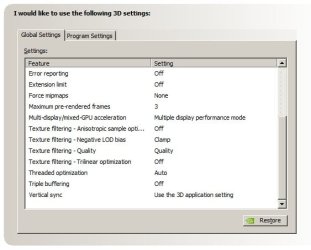
I've actually fixed it. Rather than go through detailed instructions, word for word, these images should do you justice.

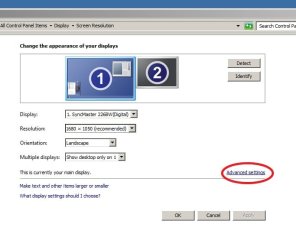
From the first pic, right click on your desktop and click 'screen resolution' then 'Advanced Settings'.

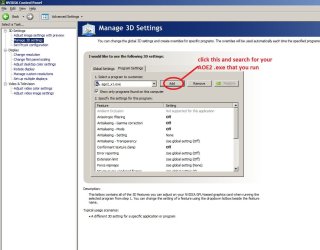
Click the GeForce tab then the 'Start NVIDIA Control Panel' button

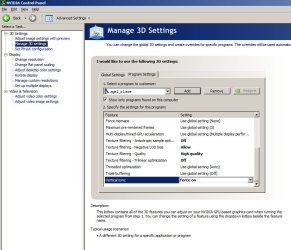
Next, make sure after you follow instructions in red in the pic, make sure you mimic all those settings. In the next pic I've scrolled down so you can see the rest of the settings.

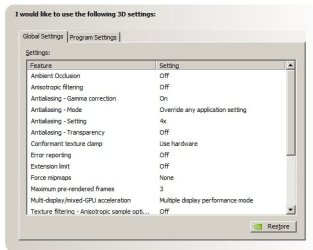
These next two pictures I've taken of the 'Global Settings' screen, so you can mimic those settings as well.

Make sure you click apply in the bottom right hand corner and tell me how it goes.

This game is timeless and will go on for a long time.

Let me know if this works for you.
 

Attachments

  • _aoe2fix.jpg
    _aoe2fix.jpg
    33 KB · Views: 2,303
  • a_oe2fix.jpg
    a_oe2fix.jpg
    27.3 KB · Views: 1,973
  • aoe2fix.jpg
    aoe2fix.jpg
    82.4 KB · Views: 6,691
  • aoe2fix2.jpg
    aoe2fix2.jpg
    78 KB · Views: 6,220
  • aoe2fixov.jpg
    aoe2fixov.jpg
    26.8 KB · Views: 5,028
  • aoe2fixov2.jpg
    aoe2fixov2.jpg
    28.9 KB · Views: 3,996

My Computer My Computer

At a glance

Windows 7
OS
Windows 7
Also, I've just realized that this won't fix it UNLESS you keep the screen resolution window open (right click desktop > Screen Resolution).

Wierd.
 

My Computer My Computer

At a glance

Windows 7
OS
Windows 7
Thank you so much! It works like a charm!
When I had the resolution window open, I started the game. It worked fine, and after about 10 seconds it flashed back to the crappy stuff.
However, thanks to Raddest's methods, everything is working a-okay. I haven't played a whole game yet, but that should be alright. Thank you so much! Especially for taking the time to take screens etc., very much appreciated. If I can help you...

billy+mays.jpeg

Billy Mays approves of your methods!
 

My Computer My Computer

At a glance

W7
OS
W7
So I played AoC the other day, finally, and what'll you know? After approx 5 minutes the screen goes weird again. If I go back to windows and then back to the game again, it fixes itself, and after five minutes it comes back again. Any ideas?
 

My Computer My Computer

At a glance

W7
OS
W7
Nope, but my fix isn't working properly now anymore either.

Thinking of formatting back to XP just because of this game hah.
 

My Computer My Computer

At a glance

Windows 7
OS
Windows 7
Back
Top