IE10 uses WebcacheV01.dat vs index.dat files. How to clear/delete?

pz.png
 

My Computer My Computer

At a glance

W7 Pro SP1 64biti78GBIntel HD Graphics
Computer type
Laptop
Computer Manufacturer/Model Number
Employer provided Dell Latitude
OS
W7 Pro SP1 64bit
CPU
i7
Memory
8GB
Graphics Card(s)
Intel HD Graphics
Hard Drives
crappy SSD
Antivirus
Employer mandated Symantec Endpoint Protection
Browser
Pale Moon 64bit, IE11 64bit & Chrome 64bit
Thanks,

My apologies for being a little dense here, I just got up and haven't scratched my brain yet. :p
So what I'm seeing is from V01.dat?

Then why, when I specify the webcache folder it comes up with no entries??
 

My Computer My Computer

At a glance

Originally Win 7 Hm Prem x64 Ver 6.1.7600 Bui...Intel i3 530 2.93GHz, 2933MHz 2 Cores 4 Logic...6GB of 1,333MHz DDR3 SDRAM32MB Intel Graphics Media Accelerator HD IGChip
Computer type
PC/Desktop
Computer Manufacturer/Model Number
Gateway DX4831-01e (Mid-Tower Desktop)
OS
Originally Win 7 Hm Prem x64 Ver 6.1.7600 Build 7601-SP1 | Upgraded to Windows 10 December 14, 2019
CPU
Intel i3 530 2.93GHz, 2933MHz 2 Cores 4 Logical Processors
Motherboard
Gateway H57M01 133 megahertz
Memory
6GB of 1,333MHz DDR3 SDRAM
Graphics Card(s)
32MB Intel Graphics Media Accelerator HD IGChip
Sound Card
Realtek High Definition Audio
Monitor(s) Displays
Gateway HX2000 20inch TFT active matrix TN
Screen Resolution
1600 x 900 x 59 hertz
Hard Drives
WDC WD10EADS-00M2B0 [HDD] (1000.20 GB) -- drive 0,
HL-DT-ST DVDRAM GH41N [CD-ROM dr]
Four card readers, and Four USB 2.0
PSU
300watts.
Case
Mid-Tower Desktop
Cooling
Stock from Gateway
Keyboard
Natural Ergonomic Keyboard 4000, see Other Info
Mouse
Orig. Gateway wore out now using Insignia USB wired optical
Internet Speed
Vz FIOS 10ms png 57.64Mbps down 65.53Mbps up Speedtest.org
Antivirus
Zamana Anti-logger with Anti-malware, MSE, Windows Firewall,
Browser
IE11.0.9600.19399-Upd ver11.0.135, Firefox 68.0.1 x64
Other Info
System Specs by Belarc.

BIOS: American Megatrends Inc. P01-A0 11/17/2009

Replaced the MS 'Natural' Standard PS/2 Enhanced 101-102 Keyboard with a new Natural Ergonomic Keyboard 4000 on August 1st 2014.

Canon Pixma MG3222 Printer.

Updated to IE11 on 12102015 | Fios Quantum Router g1100

Additional AV: SpywareBlaster, manual Mbam, SAS
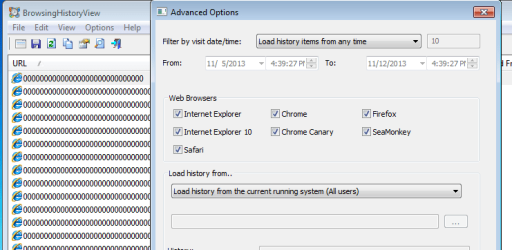
I don't know what all the BrowsingHistoryView tool needs to see in order to show you the info.

If I drill down to this path...
C:\Users\username\AppData\Local\Microsoft\Windows\WebCache
...I get nothing.

If I leave the folder selection at...
C:\Users\
...I get info. But sometimes I have to reboot and reopen the BrowsingHistoryView tool to see the info.

If I try each profile folder below C:\Users\...
C:\Users\All Users
C:\Users\Default
C:\Users\Default User
C:\Users\Public
C:\Users\username
...I get nothing.

If you use desktop gadgets, they might prevent the tool from getting to the info.
 

My Computer My Computer

At a glance

W7 Pro SP1 64biti78GBIntel HD Graphics
Computer type
Laptop
Computer Manufacturer/Model Number
Employer provided Dell Latitude
OS
W7 Pro SP1 64bit
CPU
i7
Memory
8GB
Graphics Card(s)
Intel HD Graphics
Hard Drives
crappy SSD
Antivirus
Employer mandated Symantec Endpoint Protection
Browser
Pale Moon 64bit, IE11 64bit & Chrome 64bit
I don't know what all the BrowsingHistoryView tool needs to see in order to show you the info.
Just to be on the safe side I show all folders, files, drives, and system files in Folder options >View Tab.

If I drill down to this path...
C:\Users\username\AppData\Local\Microsoft\Windows\WebCache
...I get nothing.
Same here.

If I leave the folder selection at...
C:\Users\
...I get info. But sometimes I have to reboot and reopen the BrowsingHistoryView tool to see the info.
Haven't tried that yet, will let you know.

If I try each profile folder below C:\Users\...
C:\Users\All Users
C:\Users\Default
C:\Users\Default User
C:\Users\Public
C:\Users\username
...I get nothing.
Same here. Haven't tried all those permutations yet, will let you know.


If you use desktop gadgets, they might prevent the tool from getting to the info.
No, no gadgets here. I strive to be a purist when it comes to anything involving computing, and using our machine.


Will have to get back to you later...Dinner will be ready in an hour, and I had a few moments to check my email.

The F1 Austin Texas race is on
Last Sprint cup race in Fla is coming up.
And a few American Football games I'm interested in are on.

Just might be around 10pm est before I can get back.....:p
 

My Computer My Computer

At a glance

Originally Win 7 Hm Prem x64 Ver 6.1.7600 Bui...Intel i3 530 2.93GHz, 2933MHz 2 Cores 4 Logic...6GB of 1,333MHz DDR3 SDRAM32MB Intel Graphics Media Accelerator HD IGChip
Computer type
PC/Desktop
Computer Manufacturer/Model Number
Gateway DX4831-01e (Mid-Tower Desktop)
OS
Originally Win 7 Hm Prem x64 Ver 6.1.7600 Build 7601-SP1 | Upgraded to Windows 10 December 14, 2019
CPU
Intel i3 530 2.93GHz, 2933MHz 2 Cores 4 Logical Processors
Motherboard
Gateway H57M01 133 megahertz
Memory
6GB of 1,333MHz DDR3 SDRAM
Graphics Card(s)
32MB Intel Graphics Media Accelerator HD IGChip
Sound Card
Realtek High Definition Audio
Monitor(s) Displays
Gateway HX2000 20inch TFT active matrix TN
Screen Resolution
1600 x 900 x 59 hertz
Hard Drives
WDC WD10EADS-00M2B0 [HDD] (1000.20 GB) -- drive 0,
HL-DT-ST DVDRAM GH41N [CD-ROM dr]
Four card readers, and Four USB 2.0
PSU
300watts.
Case
Mid-Tower Desktop
Cooling
Stock from Gateway
Keyboard
Natural Ergonomic Keyboard 4000, see Other Info
Mouse
Orig. Gateway wore out now using Insignia USB wired optical
Internet Speed
Vz FIOS 10ms png 57.64Mbps down 65.53Mbps up Speedtest.org
Antivirus
Zamana Anti-logger with Anti-malware, MSE, Windows Firewall,
Browser
IE11.0.9600.19399-Upd ver11.0.135, Firefox 68.0.1 x64
Other Info
System Specs by Belarc.

BIOS: American Megatrends Inc. P01-A0 11/17/2009

Replaced the MS 'Natural' Standard PS/2 Enhanced 101-102 Keyboard with a new Natural Ergonomic Keyboard 4000 on August 1st 2014.

Canon Pixma MG3222 Printer.

Updated to IE11 on 12102015 | Fios Quantum Router g1100

Additional AV: SpywareBlaster, manual Mbam, SAS
Binks - any input on this MAJOR privacy issue and how to manage its collection of data?

I still find it hard to believe how little concern there is within the computing population over this topic.
 

My Computer My Computer

At a glance

Windows 7 Professional x64Intel
Computer Manufacturer/Model Number
Maingear
OS
Windows 7 Professional x64
CPU
Intel

My Computer My Computer

At a glance

64-bit Windows 11 Pro for WorkstationsIntel i7-8700K OC'd to 5 GHz64 GB (4x16GB) G.SKILL TridentZ RGB DDR4 3600...ASUS ROG-STRIX-GTX1080TI-O11G-GAMING
Computer type
PC/Desktop
Computer Manufacturer/Model Number
Self built custom
OS
64-bit Windows 11 Pro for Workstations
CPU
Intel i7-8700K OC'd to 5 GHz
Motherboard
ASUS ROG Maximus XI Formula Z390
Memory
64 GB (4x16GB) G.SKILL TridentZ RGB DDR4 3600 MHz
Graphics Card(s)
ASUS ROG-STRIX-GTX1080TI-O11G-GAMING
Sound Card
Integrated
Monitor(s) Displays
2 x Samsung Odyssey G7 27"
Screen Resolution
2560x1440
Hard Drives
1TB Samsung 990 PRO M.2,
4TB Samsung 990 PRO PRO M.2,
TerraMaster F8 SSD Plus NAS
PSU
Seasonic Prime Titanium 850W
Case
Thermaltake Core P3
Cooling
Corsair Hydro H115i
Keyboard
Logitech wireless K800
Mouse
Logitech MX Master 4
Internet Speed
2 Gb/s Download and 100 Mb/s Upload
Antivirus
Malwarebyte Anti-Malware Premium
Browser
Google Chrome
Other Info
Logitech Z625 speaker system,
Logitech BRIO 4K Pro webcam,
HP Color LaserJet Pro MFP M477fdn,
APC SMART-UPS RT 1000 XL - SURT1000XLI,
Galaxy S23 Plus phone
Getting back on this item.

Brink, not sure using InPrivate Browsing even helps as we are not discussing the "user's" ability to delete browsing history, etc. If I recall, at least in IE versions prior to IE10, the InPrivate Browsing still accumulated in the index.dat files.

Years ago there was much concern about the index.dat files and there were instructions everywhere on how to delete these files due to them containing your entire browsing history. Amost any decent "cleaner" program would also rid your system of this files.

Starting with IE10, this gathering of information was moved to a more sophisticated process utilizing webcacheV01.dat files and no one seems know how to delete this information. And worse, cares to figure out how!!!

People, this is a record of everything you view and do on your computer. This information is available to anyone who knows how to obtain these files!!

 

My Computer My Computer

At a glance

Windows 7 Professional x64Intel
Computer Manufacturer/Model Number
Maingear
OS
Windows 7 Professional x64
CPU
Intel
I'm concerned and was just pointed here, good info for us paranoiacs, I have the tee shirt and hat.

Searching for webcacheV01 with w7 search I got 2 webcacheV01.dat and 2 webcacheV01.temp files. @ of them I deleted manually and they went away, the other two say they are open is a host process, or something. This is a bit technical for me.

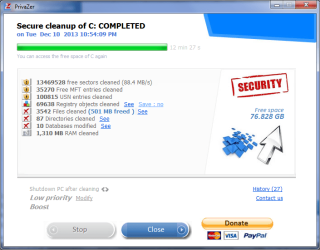
I am running the PZ program as I write this, it found over 8000 traces of "stuff".

Or maybe more....

PZ cleaner.png
 

My Computer My Computer

At a glance

Windows 7 Ultimate X64 SP1Intel i5-2550K, Differing ~4.4-4.8GHz No buil...16GB G.Skill Sniper 1866MHz @ 2133MHz 2x8GBASUS GTX650TIB-DC2OC-2GD5, (650TI Boost)
Computer type
PC/Desktop
Computer Manufacturer/Model Number
Home Built Desktop By DataTech
OS
Windows 7 Ultimate X64 SP1
CPU
Intel i5-2550K, Differing ~4.4-4.8GHz No built in GPU
Motherboard
ASUS P8Z68-V PRO/GEN3
Memory
16GB G.Skill Sniper 1866MHz @ 2133MHz 2x8GB
Graphics Card(s)
ASUS GTX650TIB-DC2OC-2GD5, (650TI Boost)
Sound Card
Onboard Realtek 5-1
Monitor(s) Displays
Samsung P2570HD
Screen Resolution
1920x1080
Hard Drives
Samsung 840 Pro 256GB SSD for OS, 500GB Seagate Constellation (Enterprise drive) for Data
PSU
Corsair HX650W
Case
Inwin Dragon Rider
Cooling
Hyper 212 EVO w/two Noctua fans, push-pull, @1300 RPM
Keyboard
E-Z Eyes, bright yellow keys with large characters
Mouse
steelseries SENSEI Laser Pro Gaming
Internet Speed
48-51Mbs Mbs down, 11 Mbs up Xfinity Cable
Antivirus
Norton Internet Security 2013
Browser
IE 10, Opera, Pale Moon if needed
Other Info
4 case fans, LG BluRay-RE, ASUS DVD-RW, Mr. Fusion power supply, 1.21 gigawatts.
As shown in post #19, the PZ tool changes the info in the database, but it leaves the date and time behind.

You could just delete the database:
...log off of the primary user account
...log on using an admin account
...delete the webcache folder of the primary user
...log off of the secondary account
...log back on to the primary account

Or, you can kill some services and delete the folder that way...
...but I'm not suggesting that to folks just yet.
 

My Computer My Computer

At a glance

W7 Pro SP1 64biti78GBIntel HD Graphics
Computer type
Laptop
Computer Manufacturer/Model Number
Employer provided Dell Latitude
OS
W7 Pro SP1 64bit
CPU
i7
Memory
8GB
Graphics Card(s)
Intel HD Graphics
Hard Drives
crappy SSD
Antivirus
Employer mandated Symantec Endpoint Protection
Browser
Pale Moon 64bit, IE11 64bit & Chrome 64bit
But per my original Post #3, the PDF file attachment talks about "information" (remember these cache files are collecting and retaining browser information and computer usage information) first being collected by logs and then at some point being written into the Webcache files (seem to recall there is a period of time that this is done after IE is closed).
The forensic PDF talks about being able to obtain at least some data from those various log files even without the Webcache file. If so, they must go also.

FYI Brink, I had forgotten but that PDF article does say that some data is recoverable even if InPrivate browsing was utilized.

Until this gets sorted out, I have not installed IE10 so I can only convey what I read to those who may have already installed IE10 or now IE11.

There has to be a way for someone or a cleaner program company to figure this out - yes?

I'm surprised that the PZ - PrivaZer program does much of anything since they have yet to announce that they have solved this issue either.
 

My Computer My Computer

At a glance

Windows 7 Professional x64Intel
Computer Manufacturer/Model Number
Maingear
OS
Windows 7 Professional x64
CPU
Intel
The PZ program does a lot more too. After using it if I add several pictures to a new folder it displays them as a details list. Formerly they appeared as large thumbnails.

It is odd they seem to have abandoned development on PZ.
 

My Computer My Computer

At a glance

Windows 7 Ultimate X64 SP1Intel i5-2550K, Differing ~4.4-4.8GHz No buil...16GB G.Skill Sniper 1866MHz @ 2133MHz 2x8GBASUS GTX650TIB-DC2OC-2GD5, (650TI Boost)
Computer type
PC/Desktop
Computer Manufacturer/Model Number
Home Built Desktop By DataTech
OS
Windows 7 Ultimate X64 SP1
CPU
Intel i5-2550K, Differing ~4.4-4.8GHz No built in GPU
Motherboard
ASUS P8Z68-V PRO/GEN3
Memory
16GB G.Skill Sniper 1866MHz @ 2133MHz 2x8GB
Graphics Card(s)
ASUS GTX650TIB-DC2OC-2GD5, (650TI Boost)
Sound Card
Onboard Realtek 5-1
Monitor(s) Displays
Samsung P2570HD
Screen Resolution
1920x1080
Hard Drives
Samsung 840 Pro 256GB SSD for OS, 500GB Seagate Constellation (Enterprise drive) for Data
PSU
Corsair HX650W
Case
Inwin Dragon Rider
Cooling
Hyper 212 EVO w/two Noctua fans, push-pull, @1300 RPM
Keyboard
E-Z Eyes, bright yellow keys with large characters
Mouse
steelseries SENSEI Laser Pro Gaming
Internet Speed
48-51Mbs Mbs down, 11 Mbs up Xfinity Cable
Antivirus
Norton Internet Security 2013
Browser
IE 10, Opera, Pale Moon if needed
Other Info
4 case fans, LG BluRay-RE, ASUS DVD-RW, Mr. Fusion power supply, 1.21 gigawatts.
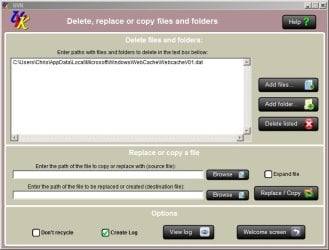
Delete on reboot?

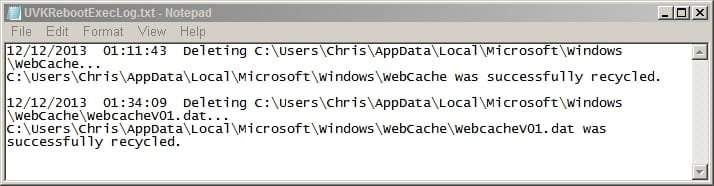
It seems that I can delete webcachev01.dat on reboot and the file gets recreated with a new smaller file size.

I'm having trouble viewing the contents so if anyone can point me in the direction of a file contents viewer that works - feel free.

I've tried a couple of Nirsoft products but all I see is an empty window. I have the full Nirsoft suite installed.

Also Bleachbit log shows the file as deleted but doesn't actually appear to delete it!
 

Attachments

  • UVK_2.jpg
    UVK_2.jpg
    7.1 KB · Views: 90
  • UVK.jpg
    UVK.jpg
    46.4 KB · Views: 2
  • UVKRebootExecLog.jpg
    UVKRebootExecLog.jpg
    26.6 KB · Views: 10
  • WebCache.jpg
    WebCache.jpg
    32 KB · Views: 2
  • New_WebCache.jpg
    New_WebCache.jpg
    32 KB · Views: 3

My Computer My Computer

At a glance

Microsoft Windows 7 Home Premium 64-bit 7601 ...AMD C-60 APU with Radeon(tm) HD Graphics4.00 GBAMD Radeon HD 6290 Graphics
Computer type
Laptop
Computer Manufacturer/Model Number
ASUS
OS
Microsoft Windows 7 Home Premium 64-bit 7601 Multiprocessor Free Service Pack 1
CPU
AMD C-60 APU with Radeon(tm) HD Graphics
Motherboard
ASUSTeK COMPUTER INC. X501U
Memory
4.00 GB
Graphics Card(s)
AMD Radeon HD 6290 Graphics
Sound Card
(1) AMD High Definition Audio Device (2) Realtek High Defi
Screen Resolution
1366 x 768 x 32 bits (4294967296 colors) @ 60 Hz
Hard Drives
Hitachi HTS545050A7E380 SATA Disk Device
Antivirus
Comodo CIS & FW, SecureAplus App Whitelisting, Threatfire
Browser
Cyberfox 64bit, Opera 64bit, Airfox
Other Info
Spy-The-Spy, HitmanPro.Alert, Norton Connect Safe, MJRegWatcher, BitDefender TrafficLight, Voodoo Shield, Zemana AntiMalware
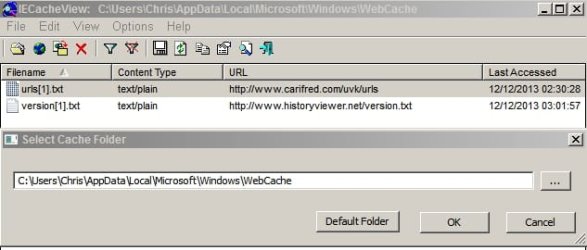
File content as shown by IECacheView

Downloaded latest version of IECacheView and analysis after deletion of webcacheV01.dat shows only the two most recent URL's (visited since deletion).

However analysis with HistoryViewer detects 18 URL's but doesn't display any useful info.

Obviously a 20Mb webcacheV01.dat file must contain other data but how is it possible to view the data?
 

Attachments

  • IECacheView_ Windows_WebCache.jpg
    IECacheView_ Windows_WebCache.jpg
    24.9 KB · Views: 86

My Computer My Computer

At a glance

Microsoft Windows 7 Home Premium 64-bit 7601 ...AMD C-60 APU with Radeon(tm) HD Graphics4.00 GBAMD Radeon HD 6290 Graphics
Computer type
Laptop
Computer Manufacturer/Model Number
ASUS
OS
Microsoft Windows 7 Home Premium 64-bit 7601 Multiprocessor Free Service Pack 1
CPU
AMD C-60 APU with Radeon(tm) HD Graphics
Motherboard
ASUSTeK COMPUTER INC. X501U
Memory
4.00 GB
Graphics Card(s)
AMD Radeon HD 6290 Graphics
Sound Card
(1) AMD High Definition Audio Device (2) Realtek High Defi
Screen Resolution
1366 x 768 x 32 bits (4294967296 colors) @ 60 Hz
Hard Drives
Hitachi HTS545050A7E380 SATA Disk Device
Antivirus
Comodo CIS & FW, SecureAplus App Whitelisting, Threatfire
Browser
Cyberfox 64bit, Opera 64bit, Airfox
Other Info
Spy-The-Spy, HitmanPro.Alert, Norton Connect Safe, MJRegWatcher, BitDefender TrafficLight, Voodoo Shield, Zemana AntiMalware
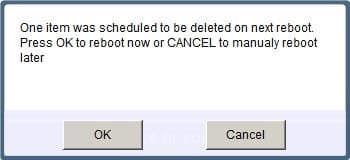
You can use LockHunter to delete it. Expand taskhost.exe, click on the WebCacheV01.dat, click on Delete it. It will tell you it can't be deleted. Choose to Delete At Next System Restart.

1z6dwfn.jpg


LockHunter is a free 64/32 bit tool to delete files blocked by any processes

A Guy
 

My Computer My Computer

At a glance

Windows 10 Home x64INTEL Core i5-750 Quad-Core 3.37GHzHyperX Fury Black Series 8GB (2 x 4GB) 1866MhzEVGA GeForce GTX 750 Superclocked 1GB 128-Bit...
Computer type
PC/Desktop
OS
Windows 10 Home x64
CPU
INTEL Core i5-750 Quad-Core 3.37GHz
Motherboard
ASUS P7P55D
Memory
HyperX Fury Black Series 8GB (2 x 4GB) 1866Mhz
Graphics Card(s)
EVGA GeForce GTX 750 Superclocked 1GB 128-Bit GDDR5
Monitor(s) Displays
LG 32MA68HY 32" IPS
Screen Resolution
1920 x 1080
Hard Drives
Samsung 840 Evo 120GB, SEAGATE 500GB Barracuda® 7200.12, SATA 3 Gb/s, 7200 RPM, 16MB cache
PSU
ANTEC TruePower New TP-550, 80 PLUS, 550W
Case
ANTEC Three Hundred Illusion
Cooling
COOLER MASTER Hyper 212 Plus, 4 x 120mm 1 x 140mm Noctua's
Internet Speed
85 + Mbps
Antivirus
Avast
Browser
Vivaldi
Latest news from PrivaZer team 12/12/13


Today, 07:04 AM
The_PrivaZer_Team
user_offline.gif

Frequent Poster

icon1.gif
Re: Delete WebCacheV01.dat, WebCacheV01.dat Viewer & Deleter
Hello to all,
as promised, we can announce that we will add new features in the next release of PrivaZer v2.12
to delete WebCacheV01.dat or remove portions of it depending on what you need.
cool.gif
 

My Computer My Computer

At a glance

Microsoft Windows 7 Home Premium 64-bit 7601 ...AMD C-60 APU with Radeon(tm) HD Graphics4.00 GBAMD Radeon HD 6290 Graphics
Computer type
Laptop
Computer Manufacturer/Model Number
ASUS
OS
Microsoft Windows 7 Home Premium 64-bit 7601 Multiprocessor Free Service Pack 1
CPU
AMD C-60 APU with Radeon(tm) HD Graphics
Motherboard
ASUSTeK COMPUTER INC. X501U
Memory
4.00 GB
Graphics Card(s)
AMD Radeon HD 6290 Graphics
Sound Card
(1) AMD High Definition Audio Device (2) Realtek High Defi
Screen Resolution
1366 x 768 x 32 bits (4294967296 colors) @ 60 Hz
Hard Drives
Hitachi HTS545050A7E380 SATA Disk Device
Antivirus
Comodo CIS & FW, SecureAplus App Whitelisting, Threatfire
Browser
Cyberfox 64bit, Opera 64bit, Airfox
Other Info
Spy-The-Spy, HitmanPro.Alert, Norton Connect Safe, MJRegWatcher, BitDefender TrafficLight, Voodoo Shield, Zemana AntiMalware
Hi Guys :D

I use CCleaner and with IE 8 and 9 it does delete index.dat.... so if this new dat file for IE 10 and 11 holds the same sort of info that 8 and 9 does then it seems to me that CCleaner and other companies should come up with a way to delete it.

Cricket
 

My Computer My Computer

At a glance

Windows 7 Home Premum 64bit Service Pack 1AMD Athlon II X4 620 2.6 Gigahertz6 Gigs DDR3Nvidia GEForce 9100 Integrated Graphics
Computer type
PC/Desktop
Computer Manufacturer/Model Number
HP Pavilion a4316f
OS
Windows 7 Home Premum 64bit Service Pack 1
CPU
AMD Athlon II X4 620 2.6 Gigahertz
Motherboard
M2N78-LA (Violet6)
Memory
6 Gigs DDR3
Graphics Card(s)
Nvidia GEForce 9100 Integrated Graphics
Sound Card
Integrated Realtek ALC888S Audio
Monitor(s) Displays
HP 2009m LCD 20"
Screen Resolution
1400 x 900
Hard Drives
Western Digital Caviar Green 1 TB
The file webcacheV01.dat remains behind unaltered in IE10 and IE11 after a CCleaner run. Maybe Piriform will add it to the clean up item in the future.
 

My Computer My Computer

At a glance

Windows 7 Ultimate X64 SP1Intel i5-2550K, Differing ~4.4-4.8GHz No buil...16GB G.Skill Sniper 1866MHz @ 2133MHz 2x8GBASUS GTX650TIB-DC2OC-2GD5, (650TI Boost)
Computer type
PC/Desktop
Computer Manufacturer/Model Number
Home Built Desktop By DataTech
OS
Windows 7 Ultimate X64 SP1
CPU
Intel i5-2550K, Differing ~4.4-4.8GHz No built in GPU
Motherboard
ASUS P8Z68-V PRO/GEN3
Memory
16GB G.Skill Sniper 1866MHz @ 2133MHz 2x8GB
Graphics Card(s)
ASUS GTX650TIB-DC2OC-2GD5, (650TI Boost)
Sound Card
Onboard Realtek 5-1
Monitor(s) Displays
Samsung P2570HD
Screen Resolution
1920x1080
Hard Drives
Samsung 840 Pro 256GB SSD for OS, 500GB Seagate Constellation (Enterprise drive) for Data
PSU
Corsair HX650W
Case
Inwin Dragon Rider
Cooling
Hyper 212 EVO w/two Noctua fans, push-pull, @1300 RPM
Keyboard
E-Z Eyes, bright yellow keys with large characters
Mouse
steelseries SENSEI Laser Pro Gaming
Internet Speed
48-51Mbs Mbs down, 11 Mbs up Xfinity Cable
Antivirus
Norton Internet Security 2013
Browser
IE 10, Opera, Pale Moon if needed
Other Info
4 case fans, LG BluRay-RE, ASUS DVD-RW, Mr. Fusion power supply, 1.21 gigawatts.
Either none of the other Cleaner program developers care about privacy or this new way MS is caching your information in IE10 and IE11 is a real bear to crack the code and clean.

If PrivaZer succeeds in its promise, all other Cleaner type progams will have to follow.

Whoever installs the new PrivaZer program when the next version is available, pls post shots and comments on its effectiveness at this task.
 

My Computer My Computer

At a glance

Windows 7 Professional x64Intel
Computer Manufacturer/Model Number
Maingear
OS
Windows 7 Professional x64
CPU
Intel
I will not be using the PrivaZer myself. Ran it after making my weekly images, and it slightly altered too many things. For instance, the read posts at 9F were bold, and the unread were not. Test over, reverted to image, no more PrivaZer.

A Guy
 

My Computer My Computer

At a glance

Windows 10 Home x64INTEL Core i5-750 Quad-Core 3.37GHzHyperX Fury Black Series 8GB (2 x 4GB) 1866MhzEVGA GeForce GTX 750 Superclocked 1GB 128-Bit...
Computer type
PC/Desktop
OS
Windows 10 Home x64
CPU
INTEL Core i5-750 Quad-Core 3.37GHz
Motherboard
ASUS P7P55D
Memory
HyperX Fury Black Series 8GB (2 x 4GB) 1866Mhz
Graphics Card(s)
EVGA GeForce GTX 750 Superclocked 1GB 128-Bit GDDR5
Monitor(s) Displays
LG 32MA68HY 32" IPS
Screen Resolution
1920 x 1080
Hard Drives
Samsung 840 Evo 120GB, SEAGATE 500GB Barracuda® 7200.12, SATA 3 Gb/s, 7200 RPM, 16MB cache
PSU
ANTEC TruePower New TP-550, 80 PLUS, 550W
Case
ANTEC Three Hundred Illusion
Cooling
COOLER MASTER Hyper 212 Plus, 4 x 120mm 1 x 140mm Noctua's
Internet Speed
85 + Mbps
Antivirus
Avast
Browser
Vivaldi
Undesired results after PrivaZer usage

Hi,

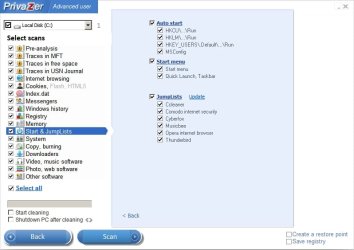
The first time I ran PrivaZer I let it clean everything it found and like you I restored from system image backup as I was unhappy with the results but I've stuck with running PrivaZer on occasions as after repeated usage I discovered how to set it up to meet my needs. Briefly for anyone else who reads this thread and decides to try PrivaZer:

Make a system image backup first.
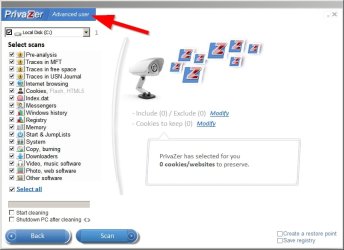
From the GUI switch to Advanced User
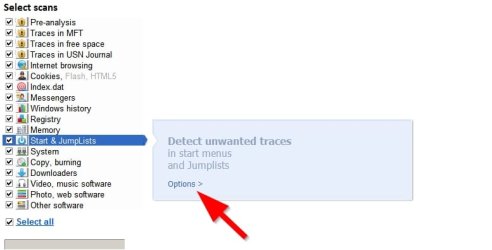
Select only the scans that you require and configure options for removal and backup before scanning.
Review the scan results once the scan is complete and make sure that you're happy with the results before allowing removal.

Tip: It does take some time to run a scan. Personally I run the portable version directly from a RAMdisk to speed things up.
Tip: Your personal scan and backup/ removal settings can be saved in the PrivaZer.ini file.
 

Attachments

  • Advanced.jpg
    Advanced.jpg
    48 KB · Views: 1
  • Options.jpg
    Options.jpg
    24.9 KB · Views: 1
  • Options2.jpg
    Options2.jpg
    44.2 KB · Views: 1

My Computer My Computer

At a glance

Microsoft Windows 7 Home Premium 64-bit 7601 ...AMD C-60 APU with Radeon(tm) HD Graphics4.00 GBAMD Radeon HD 6290 Graphics
Computer type
Laptop
Computer Manufacturer/Model Number
ASUS
OS
Microsoft Windows 7 Home Premium 64-bit 7601 Multiprocessor Free Service Pack 1
CPU
AMD C-60 APU with Radeon(tm) HD Graphics
Motherboard
ASUSTeK COMPUTER INC. X501U
Memory
4.00 GB
Graphics Card(s)
AMD Radeon HD 6290 Graphics
Sound Card
(1) AMD High Definition Audio Device (2) Realtek High Defi
Screen Resolution
1366 x 768 x 32 bits (4294967296 colors) @ 60 Hz
Hard Drives
Hitachi HTS545050A7E380 SATA Disk Device
Antivirus
Comodo CIS & FW, SecureAplus App Whitelisting, Threatfire
Browser
Cyberfox 64bit, Opera 64bit, Airfox
Other Info
Spy-The-Spy, HitmanPro.Alert, Norton Connect Safe, MJRegWatcher, BitDefender TrafficLight, Voodoo Shield, Zemana AntiMalware
Back
Top