Solved Moved Pagefile.sys to second HHD and old pagefile.sys still on primary

mlomanno

New member
Local time
12:23 PM
Messages
12
Hello all,

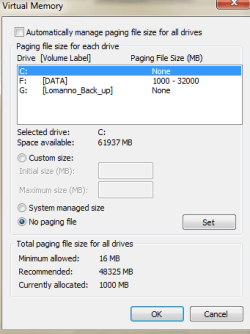
I have a SSD which runs my windows 7 and other processing heavy programs and a secondary HDD which holds files. I've been reading up on making sure I can get the most life out of my SSD since there are limited read/write cycles on them. Therefore, I looked into moving my pagefile.sys from my SSD (C drive) to my HHD (F drive). I went into my virtual memory settings and said no paging files on my C drive and on my F drive, start at ~1GB and get to ~32GB max (I have 32GB RAM). Pagefile3 is a screencap of what my virtual memory looks like right now.

I then used WinDirStat to check if the pagefile was removed from my C and put onto my F. Pagefile1 shows my current C drive and shows the ~32GB pagefile on the C drive. Pagefile2 shows that my F drive has the 1000MB pagefile on it.

My question is, can I delete the pagefile on my C drive. I've done some searching and found that if windows doesn't see a pagefile.sys it freaks out and crashes often. So I just wanted to verify all is good before I go ahead and delete it.

Matt
 

Attachments

  • Pagefilesys1.PNG
    Pagefilesys1.PNG
    5.2 KB · Views: 0
  • Pagefilesys2.PNG
    Pagefilesys2.PNG
    7.1 KB · Views: 0
  • Pagefilesys3.PNG
    Pagefilesys3.PNG
    10.1 KB · Views: 38

My Computer My Computer

At a glance

Windows 7 Professional 32 bit
Computer type
PC/Desktop
Computer Manufacturer/Model Number
Acer
OS
Windows 7 Professional 32 bit

My Computer My Computer

At a glance

x64 (6.3.9600) Win8.1 Pro & soon dual boot x6...AMD A6-3420M APU with Radeon(tm) HD Graphics6.00 GBAMD Radeon(TM) HD 6520G
Computer type
Laptop
Computer Manufacturer/Model Number
HP Pavilion dv6-6c10us
OS
x64 (6.3.9600) Win8.1 Pro & soon dual boot x64 (6.1.7601) Win7_SP1 HomePrem
CPU
AMD A6-3420M APU with Radeon(tm) HD Graphics
Motherboard
Hewlett-Packard 1805
Memory
6.00 GB
Graphics Card(s)
AMD Radeon(TM) HD 6520G
Sound Card
(1) AMD High Definition Audio Device (2) IDT High Definiti
Monitor(s) Displays
HP W2072a 20" LCD (1600 x 900) @ 60 Hz
Screen Resolution
1366 x 768 x 32 bits (4294967296 colors) @ 60 Hz
Hard Drives
ST640LM0 00 HM641JI SATA Disk Device
Keyboard
Logitech k520 wireless KB
Mouse
Logitech m320 wireless mouse (bundled with KB)
Internet Speed
15/5 | 54 MB Wireless 'n'
Antivirus
Realtime: Defender or Avast | On-demand: Malwarebytes, ESET
Browser
IE 11 on Win8, IE 10 on win 7
Other Info
Media: [Gimp, Audacity, VLC] || Comm: [WEmail 2012, Skype] || Productivity: [OpenOffice,| Textpad] || Utils: [Sysinternals, cCleaner, Speccy, Defraggler]
Did you do a restart after making the changes? Decreasing the pagefile in size or moving it to a different location requires a restart.
 

My Computer My Computer

At a glance

Windows 7 Pro 64 bitXeon W35208 GBNvidia Geforce 210
Computer type
PC/Desktop
Computer Manufacturer/Model Number
HP
OS
Windows 7 Pro 64 bit
CPU
Xeon W3520
Memory
8 GB
Graphics Card(s)
Nvidia Geforce 210
Yes, I did a restart after changing the pagefile location.

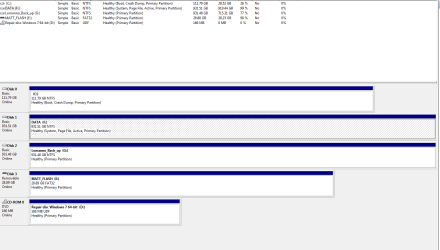
Attached is a PNG of the disk management on my computer

Matt
 

Attachments

  • disc_manage.PNG
    disc_manage.PNG
    18.9 KB · Views: 11

My Computer My Computer

At a glance

Windows 7 Professional 32 bit
Computer type
PC/Desktop
Computer Manufacturer/Model Number
Acer
OS
Windows 7 Professional 32 bit
Looks as though you can delete pagefile.sys on the C:\ drive.
The only pagefile flag is on the F:\ drive.

You might have to change security on C:\pagefile.sys before it will let you remove it.

Your disk configuration is a little different, there is no System Reserve 100 Mb partition and the System, Active flags are set on the F:\ drive.

This will work with one caveat, your system will not boot (or it will BSOD) if you remove the F: drive.
So don't remove the F:\ drive
 

My Computer My Computer

At a glance

x64 (6.3.9600) Win8.1 Pro & soon dual boot x6...AMD A6-3420M APU with Radeon(tm) HD Graphics6.00 GBAMD Radeon(TM) HD 6520G
Computer type
Laptop
Computer Manufacturer/Model Number
HP Pavilion dv6-6c10us
OS
x64 (6.3.9600) Win8.1 Pro & soon dual boot x64 (6.1.7601) Win7_SP1 HomePrem
CPU
AMD A6-3420M APU with Radeon(tm) HD Graphics
Motherboard
Hewlett-Packard 1805
Memory
6.00 GB
Graphics Card(s)
AMD Radeon(TM) HD 6520G
Sound Card
(1) AMD High Definition Audio Device (2) IDT High Definiti
Monitor(s) Displays
HP W2072a 20" LCD (1600 x 900) @ 60 Hz
Screen Resolution
1366 x 768 x 32 bits (4294967296 colors) @ 60 Hz
Hard Drives
ST640LM0 00 HM641JI SATA Disk Device
Keyboard
Logitech k520 wireless KB
Mouse
Logitech m320 wireless mouse (bundled with KB)
Internet Speed
15/5 | 54 MB Wireless 'n'
Antivirus
Realtime: Defender or Avast | On-demand: Malwarebytes, ESET
Browser
IE 11 on Win8, IE 10 on win 7
Other Info
Media: [Gimp, Audacity, VLC] || Comm: [WEmail 2012, Skype] || Productivity: [OpenOffice,| Textpad] || Utils: [Sysinternals, cCleaner, Speccy, Defraggler]
Woo! just had to enable viewing of system files and then deleted it and this went smoothly.

Thanks guys!

Matt

Edit:
I was wondering about that. Should I keep a 1000MB spot on my SSD? my F drive is internal but I know I had some problems a month ago with it not being recognized >.< I had to do a restore to get things working properly.
 

My Computer My Computer

At a glance

Windows 7 Professional 32 bit
Computer type
PC/Desktop
Computer Manufacturer/Model Number
Acer
OS
Windows 7 Professional 32 bit
I think the best config is how MS installs Win7.
100MB System reserve
Remainder -> C:\

I'm not sure of the best way to proceed -> there are a number of possible paths.
It might be better to mark this as solved and open a new thread in Installation & Setup - Windows 7 Help Forums

Decsribe the issue and include the Disk Management screen shot from post# 4
You can just point back to that image (copy the line below and paste it into your new thread)

[IMG]http://www.sevenforums.com/attachments/performance-maintenance/300017d1388695124t-moved-pagefile-sys-second-hhd-old-pagefile-sys-still-primary-disc_manage.png[/IMG]
 

My Computer My Computer

At a glance

x64 (6.3.9600) Win8.1 Pro & soon dual boot x6...AMD A6-3420M APU with Radeon(tm) HD Graphics6.00 GBAMD Radeon(TM) HD 6520G
Computer type
Laptop
Computer Manufacturer/Model Number
HP Pavilion dv6-6c10us
OS
x64 (6.3.9600) Win8.1 Pro & soon dual boot x64 (6.1.7601) Win7_SP1 HomePrem
CPU
AMD A6-3420M APU with Radeon(tm) HD Graphics
Motherboard
Hewlett-Packard 1805
Memory
6.00 GB
Graphics Card(s)
AMD Radeon(TM) HD 6520G
Sound Card
(1) AMD High Definition Audio Device (2) IDT High Definiti
Monitor(s) Displays
HP W2072a 20" LCD (1600 x 900) @ 60 Hz
Screen Resolution
1366 x 768 x 32 bits (4294967296 colors) @ 60 Hz
Hard Drives
ST640LM0 00 HM641JI SATA Disk Device
Keyboard
Logitech k520 wireless KB
Mouse
Logitech m320 wireless mouse (bundled with KB)
Internet Speed
15/5 | 54 MB Wireless 'n'
Antivirus
Realtime: Defender or Avast | On-demand: Malwarebytes, ESET
Browser
IE 11 on Win8, IE 10 on win 7
Other Info
Media: [Gimp, Audacity, VLC] || Comm: [WEmail 2012, Skype] || Productivity: [OpenOffice,| Textpad] || Utils: [Sysinternals, cCleaner, Speccy, Defraggler]
Looks good.
 

My Computer My Computer

At a glance

x64 (6.3.9600) Win8.1 Pro & soon dual boot x6...AMD A6-3420M APU with Radeon(tm) HD Graphics6.00 GBAMD Radeon(TM) HD 6520G
Computer type
Laptop
Computer Manufacturer/Model Number
HP Pavilion dv6-6c10us
OS
x64 (6.3.9600) Win8.1 Pro & soon dual boot x64 (6.1.7601) Win7_SP1 HomePrem
CPU
AMD A6-3420M APU with Radeon(tm) HD Graphics
Motherboard
Hewlett-Packard 1805
Memory
6.00 GB
Graphics Card(s)
AMD Radeon(TM) HD 6520G
Sound Card
(1) AMD High Definition Audio Device (2) IDT High Definiti
Monitor(s) Displays
HP W2072a 20" LCD (1600 x 900) @ 60 Hz
Screen Resolution
1366 x 768 x 32 bits (4294967296 colors) @ 60 Hz
Hard Drives
ST640LM0 00 HM641JI SATA Disk Device
Keyboard
Logitech k520 wireless KB
Mouse
Logitech m320 wireless mouse (bundled with KB)
Internet Speed
15/5 | 54 MB Wireless 'n'
Antivirus
Realtime: Defender or Avast | On-demand: Malwarebytes, ESET
Browser
IE 11 on Win8, IE 10 on win 7
Other Info
Media: [Gimp, Audacity, VLC] || Comm: [WEmail 2012, Skype] || Productivity: [OpenOffice,| Textpad] || Utils: [Sysinternals, cCleaner, Speccy, Defraggler]
Back
Top