Permission Puzzle: Can't Exclude User but Allow Others to Access

tobor8thman

New member
Local time
5:29 PM
Messages
25
Hi All,

This is my first post here. I am trying hard to solve this permissions problem on my own--with lots of research, but I am truly stumped and I hope you can help.

Here is the overview:

I have FIVE PC's networked to a server, FOUR of them through Homegroup and FIFTH PC outside Homegroup. I want to exclude the FIFTH PC from all folders on the FOUR PC's and FOUR of the FIVE folders on the server. The FOUR PC's will have everything BUT Full Control access to the FIVE other folders on the server, but the FIFTH PC will be totally excluded from FOUR of those folders. with everything BUT Full Control over the FIFTH folder. These FIVE folders are on the "J" drive on the server, under a parent folder called "Network Shared Folders."

I learned that if you, or a group you belong to, have share permissions AND NTFS rights, you can browse into the share. I also learned that if you, or the group you belong to, are ONLY on the NTFS, you cannot browse into the share AND you cannot access any folders beneath the share, even if you have rights to them. The two other applicable rules: 1) when combining NTFS permissions and share permissions, the most restrictive effective permission applies and 2) permissions are combined when a user is not explicitly denied access. Finally, you should avoid using the "Deny" permission if possible.

When I set the share and NTFS permissions according to those rules, I either get all the PC's excluded from the folder,OR all the PC's are included. I think it has to do with my inability to place, omit or include "Everyone" in the proper place in the share permissions and NTFS, and setting the inheritance correctly. I noticed that if I set "Everyone" in Shared Permissions, it automatically appears in NTFS Permissions. I can't set it in one, but not the other, even if I remove inheritance from above.

Currently, I have the following permission settings which are not working properly because it allows User 5 to access Folders 1-4:

Permissions%20Chart.PNG


Any help would be greatly appreciated. Thanks.
 

My Computer My Computer

At a glance

Windows 7 Professional 32 bitIntel Core 2 Duo E75002GB
Computer type
PC/Desktop
Computer Manufacturer/Model Number
Lenovo
OS
Windows 7 Professional 32 bit
CPU
Intel Core 2 Duo E7500
Memory
2GB
When you say "server" is this an actual server with server software such as Windows server 2012 or, is the server just a Windows 7 machine with files that the other machines can access?

There is an easy way to do this using Homegroups,. Actual Windows servers aren't made to work with the Homegroup.
 

My Computer My Computer

At a glance

Windows 7 Ult, Windows 8.1 Pro,Q9650-4.275GHz, E8600 4.5GHz, E6750-3.8GHzG.Skill PC2 9600 1200Mhz 5 5 5 15 2TGTX480
Computer type
PC/Desktop
Computer Manufacturer/Model Number
Home built
OS
Windows 7 Ult, Windows 8.1 Pro,
CPU
Q9650-4.275GHz, E8600 4.5GHz, E6750-3.8GHz
Motherboard
Evga 780i FTW
Memory
G.Skill PC2 9600 1200Mhz 5 5 5 15 2T
Graphics Card(s)
GTX480
Sound Card
Asus Xonar D2
Monitor(s) Displays
HannsG
Screen Resolution
1680X1050
Hard Drives
GSkill Phoenix Pro 120GB SSD
PSU
ThermalTake Toughpower 1000Watt modular
Case
ThermalTake XaserV
Cooling
Xigmatek S1283
Keyboard
Logitech G15
Mouse
Logitech G9
Internet Speed
T1
subfolders1: ntfs security: Add explicit DENY all to user5 on subfolder1

If working... do the same to subfolder2 to 4
========
NTFS permissions users1-4 and users1-5 isn't needed. The folders are already accessible by EVERYONE through inheretence
 

My Computer My Computer

At a glance

Microsoft Windows 7 Home Premium 64-bits 7601...Intel(R) Core(TM) i3 CPU M 370 @ 2.40GHz4,00 GBATI Mobility Radeon HD 5400 Series
Computer type
Laptop
Computer Manufacturer/Model Number
ACER ASPIRE 5742G
OS
Microsoft Windows 7 Home Premium 64-bits 7601 Multiprocessor Free Service Pack 1
CPU
Intel(R) Core(TM) i3 CPU M 370 @ 2.40GHz
Motherboard
Acer Aspire 5742G
Memory
4,00 GB
Graphics Card(s)
ATI Mobility Radeon HD 5400 Series
Sound Card
(1) AMD High Definition Audio Device (2) Realtek High Defi
Screen Resolution
1366 x 768 x 32 bits (4294967296 colors) @ 60 Hz
Hard Drives
WDC WD5000BEVT-22ZAT0
@chev65

Sorry, the "server" in the network is just a PC running Windows 8. I would like to know how to do it with Homegroups without giving the FIFTH PC access to the hundreds of files on the other FOUR PCs. Thanks.
 

My Computer My Computer

At a glance

Windows 7 Professional 32 bitIntel Core 2 Duo E75002GB
Computer type
PC/Desktop
Computer Manufacturer/Model Number
Lenovo
OS
Windows 7 Professional 32 bit
CPU
Intel Core 2 Duo E7500
Memory
2GB
Is parent folder part of J?
are subfolder1 to subfolder2 part of what you call parent folder?
is subfolder5 part of same parent folder?
 

My Computer My Computer

At a glance

Microsoft Windows 7 Home Premium 64-bits 7601...Intel(R) Core(TM) i3 CPU M 370 @ 2.40GHz4,00 GBATI Mobility Radeon HD 5400 Series
Computer type
Laptop
Computer Manufacturer/Model Number
ACER ASPIRE 5742G
OS
Microsoft Windows 7 Home Premium 64-bits 7601 Multiprocessor Free Service Pack 1
CPU
Intel(R) Core(TM) i3 CPU M 370 @ 2.40GHz
Motherboard
Acer Aspire 5742G
Memory
4,00 GB
Graphics Card(s)
ATI Mobility Radeon HD 5400 Series
Sound Card
(1) AMD High Definition Audio Device (2) Realtek High Defi
Screen Resolution
1366 x 768 x 32 bits (4294967296 colors) @ 60 Hz
Hard Drives
WDC WD5000BEVT-22ZAT0
@Kaktussoft,

Thanks for the quick reply. Here is the directory structure:

"J" Drive
|
|
Shared Network Folders ("Parent")
|
|
Sub-Folder 1
Sub-Folder 2
Sub-Folder 3
Sub-Folder 4
Sub-Folder 5

I don't want FIFTH PC to have access to Sub-Folders 1-4, but it can have access to Sub-Folder 5.
All the networked PC's run Windows 7 Professional. The "server" is just a PC running Windows 8.0 Pro
 

My Computer My Computer

At a glance

Windows 7 Professional 32 bitIntel Core 2 Duo E75002GB
Computer type
PC/Desktop
Computer Manufacturer/Model Number
Lenovo
OS
Windows 7 Professional 32 bit
CPU
Intel Core 2 Duo E7500
Memory
2GB
Shares shown in #1 all have permissions EVERYONE and Administrators (both full access).

About NTFS permissions:
J-drive: You say administrators and EVERYONE have full control.
parentfolder: You say administrators and EVERYONE have full control. Is that inherited permissions or direct permissions on that folder?
subfolder 1-4:You say administrators and EVERYONE have full control. Is that inherited permissions or direct permissions on that folder? Why do you give user1-4 special permissions???? The are part of group EVERYONE and have full control anyway.
subfolder 5:You say administrators and EVERYONE have full control. Is that inherited permissions or direct permissions on that folder? Why do you give user1-5 special permissions???? The are part of group EVERYONE and have full control anyway.
 

My Computer My Computer

At a glance

Microsoft Windows 7 Home Premium 64-bits 7601...Intel(R) Core(TM) i3 CPU M 370 @ 2.40GHz4,00 GBATI Mobility Radeon HD 5400 Series
Computer type
Laptop
Computer Manufacturer/Model Number
ACER ASPIRE 5742G
OS
Microsoft Windows 7 Home Premium 64-bits 7601 Multiprocessor Free Service Pack 1
CPU
Intel(R) Core(TM) i3 CPU M 370 @ 2.40GHz
Motherboard
Acer Aspire 5742G
Memory
4,00 GB
Graphics Card(s)
ATI Mobility Radeon HD 5400 Series
Sound Card
(1) AMD High Definition Audio Device (2) Realtek High Defi
Screen Resolution
1366 x 768 x 32 bits (4294967296 colors) @ 60 Hz
Hard Drives
WDC WD5000BEVT-22ZAT0
@chev65

Sorry, the "server" in the network is just a PC running Windows 8. I would like to know how to do it with Homegroups without giving the FIFTH PC access to the hundreds of files on the other FOUR PCs. Thanks.

With Homegroups this very simple. It's best not to mess with the NTFS permission settings unless it's absolutely necessary. In this case it's not required. We will assume that the NTFS permissions are still at the default settings.

I assume the one PC that requires limited access has never been included in the Homegroup. If it was included in the current Homegroup at one time then it's best leave the old Homegroup on all Homegroup machines then create a new one, allowing only the full access machines to join. This is a security step so the limited access machine can't automatically rejoin the old Homegroup unless you give it the Homegroup password.

At this point the limited access "non Homegroup" machine won't have access to any shared Library's on the Homegroup machines unless you add the "Everyone" share using the Homegroup sharing options.

Lets assume you want the limited access machine "non Homegroup" to have access to a single Library on one of the Homegroup machines.

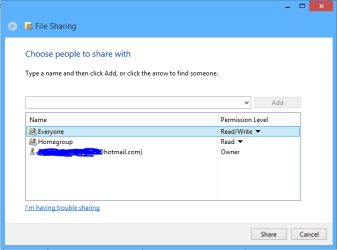
To do this you need to right click a Homegroup Library, choose "Share with" choose "Specific People" click the drop down arrow, Add Everyone to the share with list, add read/write access as required, click Ok etc. If you want to add access to a certain drive then just add the drive location to a shared Library.

In this case the Everyone share refers to machines that are included in the local Workgroup.

Example of the Everyone share added to a Homegroup library in the picture. :)
 

Attachments

  • share with Everyone.PNG
    share with Everyone.PNG
    6.7 KB · Views: 24

My Computer My Computer

At a glance

Windows 7 Ult, Windows 8.1 Pro,Q9650-4.275GHz, E8600 4.5GHz, E6750-3.8GHzG.Skill PC2 9600 1200Mhz 5 5 5 15 2TGTX480
Computer type
PC/Desktop
Computer Manufacturer/Model Number
Home built
OS
Windows 7 Ult, Windows 8.1 Pro,
CPU
Q9650-4.275GHz, E8600 4.5GHz, E6750-3.8GHz
Motherboard
Evga 780i FTW
Memory
G.Skill PC2 9600 1200Mhz 5 5 5 15 2T
Graphics Card(s)
GTX480
Sound Card
Asus Xonar D2
Monitor(s) Displays
HannsG
Screen Resolution
1680X1050
Hard Drives
GSkill Phoenix Pro 120GB SSD
PSU
ThermalTake Toughpower 1000Watt modular
Case
ThermalTake XaserV
Cooling
Xigmatek S1283
Keyboard
Logitech G15
Mouse
Logitech G9
Internet Speed
T1
J is shared. parentfolder is shared.

But is userfolder1-4 also shared (in screenshot of post #1 it is)?
userfolder5 is shared as well? (not in screenshot)

You can access those folders using share parentfolder btw
 

My Computer My Computer

At a glance

Microsoft Windows 7 Home Premium 64-bits 7601...Intel(R) Core(TM) i3 CPU M 370 @ 2.40GHz4,00 GBATI Mobility Radeon HD 5400 Series
Computer type
Laptop
Computer Manufacturer/Model Number
ACER ASPIRE 5742G
OS
Microsoft Windows 7 Home Premium 64-bits 7601 Multiprocessor Free Service Pack 1
CPU
Intel(R) Core(TM) i3 CPU M 370 @ 2.40GHz
Motherboard
Acer Aspire 5742G
Memory
4,00 GB
Graphics Card(s)
ATI Mobility Radeon HD 5400 Series
Sound Card
(1) AMD High Definition Audio Device (2) Realtek High Defi
Screen Resolution
1366 x 768 x 32 bits (4294967296 colors) @ 60 Hz
Hard Drives
WDC WD5000BEVT-22ZAT0
@Kaktussoft,

You said: "J is shared. parentfolder is shared.

But is userfolder1-4 also shared (in screenshot of post #1 it is)?
userfolder5 is shared as well? (not in screenshot)"


Thanks for your reply. Well, this is how I thought about it--it may be incorrect but this is what I did which I thought was a correct way to apply the rules. Users 1-5 are shared because they are part of the group "Everyone." I then gave Users 1-4 and User 5 special permissions because I did not want ANY USER to be able to modify the permissions, which they would have been able to do if they directly inherited the permissions of Everyone (because Users 1-5 are part of the group "Everyone.") If you look at the "Settings" column in #1 above, you will see more restrictive permissions under the column next to NFTS and SHARE permissions.
 

My Computer My Computer

At a glance

Windows 7 Professional 32 bitIntel Core 2 Duo E75002GB
Computer type
PC/Desktop
Computer Manufacturer/Model Number
Lenovo
OS
Windows 7 Professional 32 bit
CPU
Intel Core 2 Duo E7500
Memory
2GB
@chev65
With Homegroups this very simple. It's best not to mess with the NTFS permission settings unless it's absolutely necessary. In this case it's not required. We will assume that the NTFS permissions are still at the default settings.

I need to try it with Homegroups--I am making a mess of share and NTFS permissions. I will try your suggestion tonight. Thanks.
 

My Computer My Computer

At a glance

Windows 7 Professional 32 bitIntel Core 2 Duo E75002GB
Computer type
PC/Desktop
Computer Manufacturer/Model Number
Lenovo
OS
Windows 7 Professional 32 bit
CPU
Intel Core 2 Duo E7500
Memory
2GB
Let's forget about shares in this discussion. It's the NTFS permissions that should be modified.

J drive: Do you really want EVERYONE to be able to do everything? (full control)
A folder on J [parentfolder]: Do you really want EVERYONE to be able to do everything? (full control).
Or do you want only user1-4 to have full access?
 

My Computer My Computer

At a glance

Microsoft Windows 7 Home Premium 64-bits 7601...Intel(R) Core(TM) i3 CPU M 370 @ 2.40GHz4,00 GBATI Mobility Radeon HD 5400 Series
Computer type
Laptop
Computer Manufacturer/Model Number
ACER ASPIRE 5742G
OS
Microsoft Windows 7 Home Premium 64-bits 7601 Multiprocessor Free Service Pack 1
CPU
Intel(R) Core(TM) i3 CPU M 370 @ 2.40GHz
Motherboard
Acer Aspire 5742G
Memory
4,00 GB
Graphics Card(s)
ATI Mobility Radeon HD 5400 Series
Sound Card
(1) AMD High Definition Audio Device (2) Realtek High Defi
Screen Resolution
1366 x 768 x 32 bits (4294967296 colors) @ 60 Hz
Hard Drives
WDC WD5000BEVT-22ZAT0
Let's forget about shares in this discussion. It's the NTFS permissions that should be modified.

J drive: Do you really want EVERYONE to be able to do everything? (full control)
A folder on J [parentfolder]: Do you really want EVERYONE to be able to do everything? (full control).
Or do you want only user1-4 to have full access?

No, not really, I thought I was just following network best practices--initially establish the least restrictive NFTS permissions in the parent folder and THEN be restrictive in the child folders

All I want to do is to have user accounts 1-4 to have full control over sub-folders 1-5, and user account 5 to have full control over sub-folder 5, BUT have NO access to sub-folders 1-4.
 

My Computer My Computer

At a glance

Windows 7 Professional 32 bitIntel Core 2 Duo E75002GB
Computer type
PC/Desktop
Computer Manufacturer/Model Number
Lenovo
OS
Windows 7 Professional 32 bit
CPU
Intel Core 2 Duo E7500
Memory
2GB
In case you were wondering, I've tested this sharing procedure and given the same advice countless times with great success.

Every step I've mentioned has been verified to work perfectly by every person who has followed those instructions.

The problems start when people unknowingly dive into the NTFS settings and start messing up default permissions, because of this, returning them to default and unchecking any inherited permissions my be required.
 

My Computer My Computer

At a glance

Windows 7 Ult, Windows 8.1 Pro,Q9650-4.275GHz, E8600 4.5GHz, E6750-3.8GHzG.Skill PC2 9600 1200Mhz 5 5 5 15 2TGTX480
Computer type
PC/Desktop
Computer Manufacturer/Model Number
Home built
OS
Windows 7 Ult, Windows 8.1 Pro,
CPU
Q9650-4.275GHz, E8600 4.5GHz, E6750-3.8GHz
Motherboard
Evga 780i FTW
Memory
G.Skill PC2 9600 1200Mhz 5 5 5 15 2T
Graphics Card(s)
GTX480
Sound Card
Asus Xonar D2
Monitor(s) Displays
HannsG
Screen Resolution
1680X1050
Hard Drives
GSkill Phoenix Pro 120GB SSD
PSU
ThermalTake Toughpower 1000Watt modular
Case
ThermalTake XaserV
Cooling
Xigmatek S1283
Keyboard
Logitech G15
Mouse
Logitech G9
Internet Speed
T1
In case you were wondering, I've tested this sharing procedure and given the same advice countless times with great success.

Every step I've mentioned has been verified to work perfectly by every person who has followed those instructions.

The problems start when people unknowingly dive into the NTFS settings and start messing up default permissions, because of this, returning them to default and unchecking any inherited permissions my be required.

No worries, your approach sounds logical. But I did mess with the NTFS settings, but only by accessing via Workgroup directory, not the Homegroup directory. Do I need to worry about non-default NTFS settings appearing and causing difficulties if user accounts 1-4 (and not user account 5) will be browsing the shares through Homegroup rather than Workgroup? Thx
 

My Computer My Computer

At a glance

Windows 7 Professional 32 bitIntel Core 2 Duo E75002GB
Computer type
PC/Desktop
Computer Manufacturer/Model Number
Lenovo
OS
Windows 7 Professional 32 bit
CPU
Intel Core 2 Duo E7500
Memory
2GB
IT WORKS! but One additional Question

In case you were wondering, I've tested this sharing procedure and given the same advice countless times with great success.

Every step I've mentioned has been verified to work perfectly by every person who has followed those instructions.

The problems start when people unknowingly dive into the NTFS settings and start messing up default permissions, because of this, returning them to default and unchecking any inherited permissions my be required.

No worries, your approach sounds logical. But I did mess with the NTFS settings, but only by accessing via Workgroup directory, not the Homegroup directory. Do I need to worry about non-default NTFS settings appearing and causing difficulties if user accounts 1-4 (and not user account 5) will be browsing the shares through Homegroup rather than Workgroup? Thx

@chev65,

Ok, I've structured the share permissions like you suggested and not messed around with the NTFS settings. . . AND IT WORKS! User account 5 has been excluded from all FOUR folders and has access to the FIFTH folder, while user accounts 1-4 have access to all FIVE folders. MANY THANKS, and you will be repped. BUT . . . I have one more additional question--Let say I have a user account 6 which I want to put ON THE SAME PC as the excluded user account 5. BUT user account 6 must have access to all FIVE folders. How do I do that? Below is what I did so far:


  • I selected the menu item Share with a Specific Person and choose user account 6, but the permissions for FOUR of the FIVE folders nevertheless denied user account 6 access. Why? The FIFTH folder had "Everyone" and "Homegroup" in its share permissions; the other FOUR folders had "Homegroup" but no "Everyone."
  • If I make the FIFTH PC (containing user accounts 5 and 6) a member of the Homegroup, then user account 5 will have access to all FIVE files, which is not allowed.
So, is there a way to do this? Thx.
 

My Computer My Computer

At a glance

Windows 7 Professional 32 bitIntel Core 2 Duo E75002GB
Computer type
PC/Desktop
Computer Manufacturer/Model Number
Lenovo
OS
Windows 7 Professional 32 bit
CPU
Intel Core 2 Duo E7500
Memory
2GB
So user folder 1 to 4: Permissions allow HOMEGROUP. Most likely you removed EVERYONE and made the permission explicit instead of inherit(?)

user folder 5: Permissions allow HOMEGROUP and EVERYONE. Don't know yet if they are inherited or explicit on folder.
--------------
User folder 1 to 4 are accessible by all members of group HOMEGROUP. Give group MYGROUP access as well to user folder 1 to 4 (NTFS permissions). But first create the group and put the useraccount6 in that group.

Later you can add useraccount7 to MYGROUP to give him access as well.
 

My Computer My Computer

At a glance

Microsoft Windows 7 Home Premium 64-bits 7601...Intel(R) Core(TM) i3 CPU M 370 @ 2.40GHz4,00 GBATI Mobility Radeon HD 5400 Series
Computer type
Laptop
Computer Manufacturer/Model Number
ACER ASPIRE 5742G
OS
Microsoft Windows 7 Home Premium 64-bits 7601 Multiprocessor Free Service Pack 1
CPU
Intel(R) Core(TM) i3 CPU M 370 @ 2.40GHz
Motherboard
Acer Aspire 5742G
Memory
4,00 GB
Graphics Card(s)
ATI Mobility Radeon HD 5400 Series
Sound Card
(1) AMD High Definition Audio Device (2) Realtek High Defi
Screen Resolution
1366 x 768 x 32 bits (4294967296 colors) @ 60 Hz
Hard Drives
WDC WD5000BEVT-22ZAT0
So user folder 1 to 4: Permissions allow HOMEGROUP. Most likely you removed EVERYONE and made the permission explicit instead of inherit(?)

user folder 5: Permissions allow HOMEGROUP and EVERYONE. Don't know yet if they are inherited or explicit on folder.
--------------
User folder 1 to 4 are accessible by all members of group HOMEGROUP. Give group MYGROUP access as well to user folder 1 to 4 (NTFS permissions). But first create the group and put the useraccount6 in that group.

Later you can add useraccount7 to MYGROUP to give him access as well.

Just made User Account 6 a member of MYGROUP through lusrmgr.msc. Added MYGROUP to NTFS permissions of folders 1-4 and set for "Full Control". RESULT: User Account 6 is denied access. I think you have to put Everyone in the NTFS permissions--it appears to work when you do that. But if you do that, then User 5 will have access to folders 1-4. I don't understand why your approach would not work, you should be able to list an individual user account or groups containing the user account under the permissions without including "Everyone" too to make it work, shouldn't you?
 

My Computer My Computer

At a glance

Windows 7 Professional 32 bitIntel Core 2 Duo E75002GB
Computer type
PC/Desktop
Computer Manufacturer/Model Number
Lenovo
OS
Windows 7 Professional 32 bit
CPU
Intel Core 2 Duo E7500
Memory
2GB
So user folder 1 to 4: Permissions allow HOMEGROUP. Most likely you removed EVERYONE and made the permission explicit instead of inherit(?)

user folder 5: Permissions allow HOMEGROUP and EVERYONE. Don't know yet if they are inherited or explicit on folder.
--------------
User folder 1 to 4 are accessible by all members of group HOMEGROUP. Give group MYGROUP access as well to user folder 1 to 4 (NTFS permissions). But first create the group and put the useraccount6 in that group.

Later you can add useraccount7 to MYGROUP to give him access as well.

Just made User Account 6 a member of MYGROUP through lusrmgr.msc. Added MYGROUP to NTFS permissions of folders 1-4 and set for "Full Control". RESULT: User Account 6 is denied access. I think you have to put Everyone in the NTFS permissions--it appears to work when you do that. But if you do that, then User 5 will have access to folders 1-4. I don't understand why your approach would not work, you should be able to list an individual user account or groups containing the user account under the permissions without including "Everyone" too to make it work, shouldn't you?
You're totally right. Please post screenshot of userfolder1 permissions. Please post screenshot of mygroup members as well.
 

My Computer My Computer

At a glance

Microsoft Windows 7 Home Premium 64-bits 7601...Intel(R) Core(TM) i3 CPU M 370 @ 2.40GHz4,00 GBATI Mobility Radeon HD 5400 Series
Computer type
Laptop
Computer Manufacturer/Model Number
ACER ASPIRE 5742G
OS
Microsoft Windows 7 Home Premium 64-bits 7601 Multiprocessor Free Service Pack 1
CPU
Intel(R) Core(TM) i3 CPU M 370 @ 2.40GHz
Motherboard
Acer Aspire 5742G
Memory
4,00 GB
Graphics Card(s)
ATI Mobility Radeon HD 5400 Series
Sound Card
(1) AMD High Definition Audio Device (2) Realtek High Defi
Screen Resolution
1366 x 768 x 32 bits (4294967296 colors) @ 60 Hz
Hard Drives
WDC WD5000BEVT-22ZAT0
So user folder 1 to 4: Permissions allow HOMEGROUP. Most likely you removed EVERYONE and made the permission explicit instead of inherit(?)

user folder 5: Permissions allow HOMEGROUP and EVERYONE. Don't know yet if they are inherited or explicit on folder.
--------------
User folder 1 to 4 are accessible by all members of group HOMEGROUP. Give group MYGROUP access as well to user folder 1 to 4 (NTFS permissions). But first create the group and put the useraccount6 in that group.

Later you can add useraccount7 to MYGROUP to give him access as well.

Just made User Account 6 a member of MYGROUP through lusrmgr.msc. Added MYGROUP to NTFS permissions of folders 1-4 and set for "Full Control". RESULT: User Account 6 is denied access. I think you have to put Everyone in the NTFS permissions--it appears to work when you do that. But if you do that, then User 5 will have access to folders 1-4. I don't understand why your approach would not work, you should be able to list an individual user account or groups containing the user account under the permissions without including "Everyone" too to make it work, shouldn't you?

Which is why my way "the right way" is also the "ONLY" way to do this. I'm not about to go back and forth with anyone on this because as I've already mentioned, it's been tried many times and proven to work, there is no need to use any other method for this. There is also an easy way "same method" to allow access for this new user 6.

It's also easier to use the "Public" folders for this type of sharing because access to the Public folders is not limited with NTFS permissions. ;)
 

My Computer My Computer

At a glance

Windows 7 Ult, Windows 8.1 Pro,Q9650-4.275GHz, E8600 4.5GHz, E6750-3.8GHzG.Skill PC2 9600 1200Mhz 5 5 5 15 2TGTX480
Computer type
PC/Desktop
Computer Manufacturer/Model Number
Home built
OS
Windows 7 Ult, Windows 8.1 Pro,
CPU
Q9650-4.275GHz, E8600 4.5GHz, E6750-3.8GHz
Motherboard
Evga 780i FTW
Memory
G.Skill PC2 9600 1200Mhz 5 5 5 15 2T
Graphics Card(s)
GTX480
Sound Card
Asus Xonar D2
Monitor(s) Displays
HannsG
Screen Resolution
1680X1050
Hard Drives
GSkill Phoenix Pro 120GB SSD
PSU
ThermalTake Toughpower 1000Watt modular
Case
ThermalTake XaserV
Cooling
Xigmatek S1283
Keyboard
Logitech G15
Mouse
Logitech G9
Internet Speed
T1
Back
Top