
I cannot get ZyXel C1000Z router to see all shared files on Desktop

John M65

New member
Local time
3:18 PM
Messages
24
I was hoping to make this a short thread for help but I don’t think this will happen. I am running a 64 bit desktop (DT) running win 7 home premium, a 32 bit laptop (LT) running win 7 home premium. ISP was MidContinent Communications (MIDCO). Linksys wireless router (WAT54G). We could share files from the DT and LT and print to either printer that was attached. One was USB and the other was router connected.
I switched to CenturyLink DSL for cost savings and speed (40MB) although MIDCO had an acceptable speed. I purchased a wireless router from CenturyLink (ZyXel C1000Z wireless router). After installing the ZyXel router I cannot see the shared files on the DT. I can print to the printer connected to the router but not the one connected to the USB port on the DT.
I have contacted voice/written to a number of CenturyLink staff in including the helpdesk (here after referred to as ‘Helpless Desk’). I tried multiple times to explain that all was working with the Linksys router but it will not work with the ZyXel router. They ask me to subscribe to @ease (for an extortion fee). My point is it has never worked and they won’t help.
Here are my observations: with explorer I can see each computer but I cannot expand the DT to see the shared files. The solutions/correction I tried were: make sure the firewall is turned off on the router, turn off the firewall on both computers (windows firewall on both), plug the DT into the router port, check the settings in the network and sharing center OK no change from precious router, ping the router (success) ping the computers no success. I am using Ad-Pro V11 for virus/e-mail.
I connected the LT and DT to the Linksys to see if the router side would work, using network cables. The wireless will not work because there is no cable connection (MIDCO). Now I can access the files on the DT and print to both printers. ZyXel is out of the picture.
I repeated the same test with the ZyXel and I could not get the router to work so I could see the files on the DT.
I did contact ZyXel support (they are not supposed to help third party users, see website). The tech felt sorry for me and offered a solution which was to use the C1000Z to bridge the Linksys. Unfortunately the only instructions were for a PK-5001z which has a few different parameters than the C1000Z. I will keep working.
My conclusions are the C1000Z is at fault but the way CenturyLink works it will be a challenge. I welcome your input. With the documentation I have developed I will challenge the CenturyLink ‘Helpless Desk’
Thanks for reading. J
 
Last edited:

My Computer My Computer

At a glance

7 home premium 64bit and 32 bit on laptop
Computer Manufacturer/Model Number
Dell Studio 540 and Dell 1535 laptop
OS
7 home premium 64bit and 32 bit on laptop
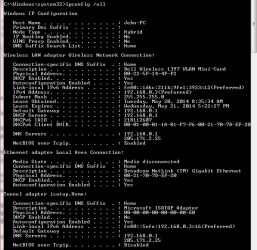
Hi from Sevenforums,

From the desktop can you do an ipconfig /all
From the laptop can you do an ipconfig /all
Mark the ipconfig desktop and laptop.

Can you ping between desktop and laptop and vice versa?

Mark which are which.
 

My Computer My Computer

At a glance

Windows 7 Ultimate x64AMD turion 64x2 TL-64 2.2GhzSodimm DDR2 4GBATI Radeon 1250 128MB IGP
Computer Manufacturer/Model Number
HP Compaq 6715B
OS
Windows 7 Ultimate x64
CPU
AMD turion 64x2 TL-64 2.2Ghz
Motherboard
HC030
Memory
Sodimm DDR2 4GB
Graphics Card(s)
ATI Radeon 1250 128MB IGP
Hard Drives
Fujitsu Siemens 500GB sata 3.0 Gb/s
Hi from Sevenforums,

From the desktop can you do an ipconfig /all
From the laptop can you do an ipconfig /all
Mark the ipconfig desktop and laptop.

Can you ping between desktop and laptop and vice versa?

Mark which are which.

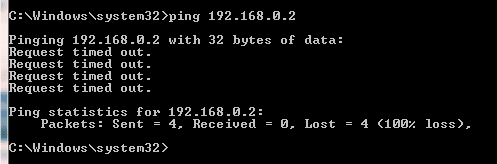
Neither Ping will work

laptop-1 ipconfig

laptop-ipconfig-1.PNG

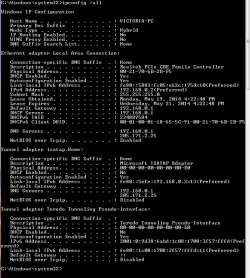
laptop-2 ipconfig

laptop-ipconfig-2.PNG

Ping desktop from laptop

ping-desktop-from-laptop.PNG

Desktop ipconfig

Desktop-ipconfig.PNG

ping laptop from desktop

ping-laptop-from-desktop.PNG

John
 
Last edited:

My Computer My Computer

At a glance

7 home premium 64bit and 32 bit on laptop
Computer Manufacturer/Model Number
Dell Studio 540 and Dell 1535 laptop
OS
7 home premium 64bit and 32 bit on laptop
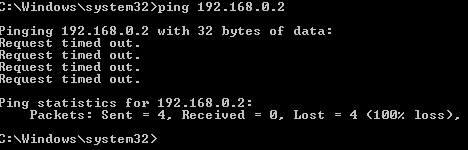
They re' both in the same subnet which is the for filesharing to occur.

Disable the firewall on 192.168.0.2 then ping it again show the results.

Could be a firewall problem.

Re-enable firewall after pings have taken place.
 

My Computer My Computer

At a glance

Windows 7 Ultimate x64AMD turion 64x2 TL-64 2.2GhzSodimm DDR2 4GBATI Radeon 1250 128MB IGP
Computer Manufacturer/Model Number
HP Compaq 6715B
OS
Windows 7 Ultimate x64
CPU
AMD turion 64x2 TL-64 2.2Ghz
Motherboard
HC030
Memory
Sodimm DDR2 4GB
Graphics Card(s)
ATI Radeon 1250 128MB IGP
Hard Drives
Fujitsu Siemens 500GB sata 3.0 Gb/s
I have disabled the firewall on both machines (windows firewall) and had the same results. give me about 30 minutes and i will try again.
J
 

My Computer My Computer

At a glance

7 home premium 64bit and 32 bit on laptop
Computer Manufacturer/Model Number
Dell Studio 540 and Dell 1535 laptop
OS
7 home premium 64bit and 32 bit on laptop
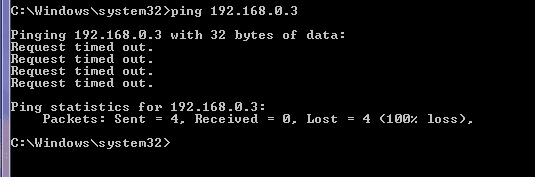
The firewall could have been blocking but you say pings request timeout with the firewalls disabled?

What firewall and anti virus are you running?


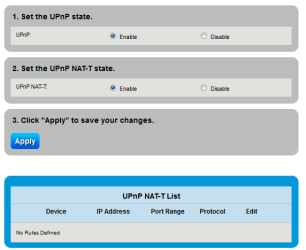
Is unpnp enabled on the zyxel with WAN PING respond unchecked or set to disabled.
 

My Computer My Computer

At a glance

Windows 7 Ultimate x64AMD turion 64x2 TL-64 2.2GhzSodimm DDR2 4GBATI Radeon 1250 128MB IGP
Computer Manufacturer/Model Number
HP Compaq 6715B
OS
Windows 7 Ultimate x64
CPU
AMD turion 64x2 TL-64 2.2Ghz
Motherboard
HC030
Memory
Sodimm DDR2 4GB
Graphics Card(s)
ATI Radeon 1250 128MB IGP
Hard Drives
Fujitsu Siemens 500GB sata 3.0 Gb/s
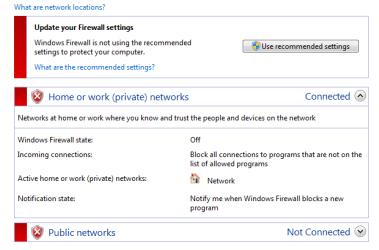
Here are the results:

Win firewall off on DT
win firewall off Desktop.PNG

Ping DT from LT

I have only had the router about a month and it has never worked between the DT and LT. The printed connected to the router will work! ?I think the router is bad!
J

Ping DT from LT Firewall off on DT.PNG
 

My Computer My Computer

At a glance

7 home premium 64bit and 32 bit on laptop
Computer Manufacturer/Model Number
Dell Studio 540 and Dell 1535 laptop
OS
7 home premium 64bit and 32 bit on laptop
I am running the Windows 7 Firewall and Ad-Ware pro on both machines.

UPnP enabled on Zx router.PNG

J
 

My Computer My Computer

At a glance

7 home premium 64bit and 32 bit on laptop
Computer Manufacturer/Model Number
Dell Studio 540 and Dell 1535 laptop
OS
7 home premium 64bit and 32 bit on laptop
Have your ISP details to hand ready for input to the zyxel.

Do a reset on the zyxel router and enter your ISP details again. Do not modify anything else.
 

My Computer My Computer

At a glance

Windows 7 Ultimate x64AMD turion 64x2 TL-64 2.2GhzSodimm DDR2 4GBATI Radeon 1250 128MB IGP
Computer Manufacturer/Model Number
HP Compaq 6715B
OS
Windows 7 Ultimate x64
CPU
AMD turion 64x2 TL-64 2.2Ghz
Motherboard
HC030
Memory
Sodimm DDR2 4GB
Graphics Card(s)
ATI Radeon 1250 128MB IGP
Hard Drives
Fujitsu Siemens 500GB sata 3.0 Gb/s
I did not see your last post until i posted mine.

UNPNP NAT-T possibly has to be disabled. It can make services difficult. UNless you make rules look in your manual.
 

My Computer My Computer

At a glance

Windows 7 Ultimate x64AMD turion 64x2 TL-64 2.2GhzSodimm DDR2 4GBATI Radeon 1250 128MB IGP
Computer Manufacturer/Model Number
HP Compaq 6715B
OS
Windows 7 Ultimate x64
CPU
AMD turion 64x2 TL-64 2.2Ghz
Motherboard
HC030
Memory
Sodimm DDR2 4GB
Graphics Card(s)
ATI Radeon 1250 128MB IGP
Hard Drives
Fujitsu Siemens 500GB sata 3.0 Gb/s
I tried your UNPNP NAT-T suggestion and the results were the same it will not display the shared files on the DT. I rebooted the router and both machines. I could not find a manual for the C1000z, I will try tomorrow. Thanks for your help. Chat tomorrow. J
 

My Computer My Computer

At a glance

7 home premium 64bit and 32 bit on laptop
Computer Manufacturer/Model Number
Dell Studio 540 and Dell 1535 laptop
OS
7 home premium 64bit and 32 bit on laptop
This C1000z is acting like it has a modem built in which is going to cause you problems unless you take the other modem out of the network.

In fact from the data sheet from ZyXEL it's listed as a modem/router, I would need to know if this is the case?

ZyXEL | Modems
 

My Computer My Computer

At a glance

Windows 7 Ult, Windows 8.1 Pro,Q9650-4.275GHz, E8600 4.5GHz, E6750-3.8GHzG.Skill PC2 9600 1200Mhz 5 5 5 15 2TGTX480
Computer type
PC/Desktop
Computer Manufacturer/Model Number
Home built
OS
Windows 7 Ult, Windows 8.1 Pro,
CPU
Q9650-4.275GHz, E8600 4.5GHz, E6750-3.8GHz
Motherboard
Evga 780i FTW
Memory
G.Skill PC2 9600 1200Mhz 5 5 5 15 2T
Graphics Card(s)
GTX480
Sound Card
Asus Xonar D2
Monitor(s) Displays
HannsG
Screen Resolution
1680X1050
Hard Drives
GSkill Phoenix Pro 120GB SSD
PSU
ThermalTake Toughpower 1000Watt modular
Case
ThermalTake XaserV
Cooling
Xigmatek S1283
Keyboard
Logitech G15
Mouse
Logitech G9
Internet Speed
T1
Chev thanks for the reply, I just finished talking with the ZyXEL support. They have provided more information than CenturyLink has. Before I called them I ran a diagnostic test all passed except for the Ethernet which failed. I am going to assume that it tests the cable from the C1000z to the Desktop. (?). The tech suggested I set up a home group but I do not the home group will work with wireless (WIN 7 home) at least it has not worked in the past.
I looked at the data sheet and it did not mention modem either that or I missed it. As far as I can determine their is no modem activity on either machine.
The tech did suggest that I set up a Bridge. The only information on bridging I have is for the PK-5001z. Unfortunately some of the C1000z screens do not match the PK-5001z and it was a little confusing but I will try again later. I would like to set up a bridge with my Linksys just see if I can do it then find a wireless N router, with guest and dual band capabilities.
His last recommendation was to start over by setting back to factory settings. I will try this first then think about the bridge.
Have a few honey dos.

I will start later this afternoon.

Thanks J
 
Last edited:

My Computer My Computer

At a glance

7 home premium 64bit and 32 bit on laptop
Computer Manufacturer/Model Number
Dell Studio 540 and Dell 1535 laptop
OS
7 home premium 64bit and 32 bit on laptop
Did you notice the link I posted? It shows your router under the modem/router category. Please confirm if this is the case?

Or do you not see that it's actually listed as modem here, unless they are calling routers modems for some strange reason? ZyXEL | Modems

Setting up a Homegroup won't help at all with the problem at hand.

I believe this is the actual reason for your problems. The only reason to set up a bridge in this case would to bypass the built in modem.
 

My Computer My Computer

At a glance

Windows 7 Ult, Windows 8.1 Pro,Q9650-4.275GHz, E8600 4.5GHz, E6750-3.8GHzG.Skill PC2 9600 1200Mhz 5 5 5 15 2TGTX480
Computer type
PC/Desktop
Computer Manufacturer/Model Number
Home built
OS
Windows 7 Ult, Windows 8.1 Pro,
CPU
Q9650-4.275GHz, E8600 4.5GHz, E6750-3.8GHz
Motherboard
Evga 780i FTW
Memory
G.Skill PC2 9600 1200Mhz 5 5 5 15 2T
Graphics Card(s)
GTX480
Sound Card
Asus Xonar D2
Monitor(s) Displays
HannsG
Screen Resolution
1680X1050
Hard Drives
GSkill Phoenix Pro 120GB SSD
PSU
ThermalTake Toughpower 1000Watt modular
Case
ThermalTake XaserV
Cooling
Xigmatek S1283
Keyboard
Logitech G15
Mouse
Logitech G9
Internet Speed
T1
Do you have two modemrouters connected ulan port connection not p it should only pre-clude internet access not file sharing access but funnier things have happenlan to ed?

Do you have the linksys and zyxel in a Lan port to Lan port connection not WAN port?

Apologies If I have read wrong. Could you please clarify?
 

My Computer My Computer

At a glance

Windows 7 Ultimate x64AMD turion 64x2 TL-64 2.2GhzSodimm DDR2 4GBATI Radeon 1250 128MB IGP
Computer Manufacturer/Model Number
HP Compaq 6715B
OS
Windows 7 Ultimate x64
CPU
AMD turion 64x2 TL-64 2.2Ghz
Motherboard
HC030
Memory
Sodimm DDR2 4GB
Graphics Card(s)
ATI Radeon 1250 128MB IGP
Hard Drives
Fujitsu Siemens 500GB sata 3.0 Gb/s
The only time the Lynksys is on is when I was testing to see if the Linksys would route the 2 computers and 1 printer. The second printer is connected to a USB port on the Desktop. When I was doing all the tests on this thread the Linksys was off.

When I was trying to connect using the Zyxel as the gateway and the Linksys as my inside router. We tried connecting multiple ways without success. One of my issues is that I cannot prove that the Zyxel router actually works.

My plan is to try resetting the Zyxel to factory settings and start over. If that does not resolve the issue. I will test therouter capability of the Zyxel again. If that fails, I will begin calling CenturyLink, every hour if needed! While that is going on I will try to set up the bridge connection.

I may have an issue with the Zyxel router but I want to develop a procedure to set up the bridge.

And no worries about asking for additional clarity. I am the one responsible for crafting the description of my issues and posting responses to your questions!

J
 

My Computer My Computer

At a glance

7 home premium 64bit and 32 bit on laptop
Computer Manufacturer/Model Number
Dell Studio 540 and Dell 1535 laptop
OS
7 home premium 64bit and 32 bit on laptop
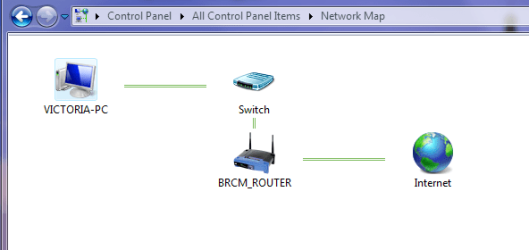
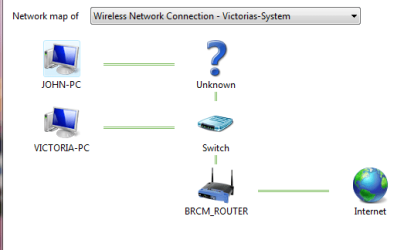
Now here is something new. while on the desktop I was viewing the network settings and inadvertently created a home group. I can remove it but it is interesting what the network map looks like now. I believe the router name 'BRCM' means it does not know what the router is...?:cry:
:banghead:
From DESKTOP
network-map-frm-desktop.PNG

From LAPTOP
network-map-frm-laptop.PNG

J
 

My Computer My Computer

At a glance

7 home premium 64bit and 32 bit on laptop
Computer Manufacturer/Model Number
Dell Studio 540 and Dell 1535 laptop
OS
7 home premium 64bit and 32 bit on laptop
Since ithink they are both Modem/routers you would do an LAN port to Lan port connection.

Only do a Lan port to Lan port, or a wireless bridge if you have a wireless issue upstairs or somewhere in your house.

If they're no issues no need for two routers.
 

My Computer My Computer

At a glance

Windows 7 Ultimate x64AMD turion 64x2 TL-64 2.2GhzSodimm DDR2 4GBATI Radeon 1250 128MB IGP
Computer Manufacturer/Model Number
HP Compaq 6715B
OS
Windows 7 Ultimate x64
CPU
AMD turion 64x2 TL-64 2.2Ghz
Motherboard
HC030
Memory
Sodimm DDR2 4GB
Graphics Card(s)
ATI Radeon 1250 128MB IGP
Hard Drives
Fujitsu Siemens 500GB sata 3.0 Gb/s
I plan to give it a try this weekend. I also subscribed to to CL's @ease. I can cancel anytime. I am ready to pounce on them with vigor. I was going to have them ship me a new router but they want mine back first! NOT.:doh: I think the router is either bad or they have some configuration issue. This is not rocket science. I have configured routers before and my linksys works fine (for cable). My experience is a good reason to stay away form CenturyLink;:mad: that is unless you have no choice. My last option is to purchase a DSL router and say the heck with ZyXel.:banghead:

I am not going to rush into anything until I have exhausted all my options.
J
 

My Computer My Computer

At a glance

7 home premium 64bit and 32 bit on laptop
Computer Manufacturer/Model Number
Dell Studio 540 and Dell 1535 laptop
OS
7 home premium 64bit and 32 bit on laptop
If you are trying to bridge the zyxel all control would come from the first router.

How have you bridged your Zyxel?

If it a configuration issue then it is most likely not their side.

You do not have to use zyxel. You can use Linksys with century links ISP details you know.

Why have you used two routers wireless strength issue or wired issue?
 

My Computer My Computer

At a glance

Windows 7 Ultimate x64AMD turion 64x2 TL-64 2.2GhzSodimm DDR2 4GBATI Radeon 1250 128MB IGP
Computer Manufacturer/Model Number
HP Compaq 6715B
OS
Windows 7 Ultimate x64
CPU
AMD turion 64x2 TL-64 2.2Ghz
Motherboard
HC030
Memory
Sodimm DDR2 4GB
Graphics Card(s)
ATI Radeon 1250 128MB IGP
Hard Drives
Fujitsu Siemens 500GB sata 3.0 Gb/s
Back
Top