External HDD suddenly requires formatting, read as RAW instead of ntfs

I have now seen atleast one July 2013 post wherein it states "that as soon as you wrote data beyond the 2TiB mark, it would have wrapped around to sector 0 and trashed your file system" That was for more than 2TB HDDs on incompatible docks. It is also recommended to "Buy a dock that advertises 4TB drive support and you should be good to go. Amazon.com: 4tb usb dock " You may check on the specs for your dock since it may be the cause for your woes.

This however is not a resolution for your problem but I thought it is better you know it and others who want to go in for Docks know it.

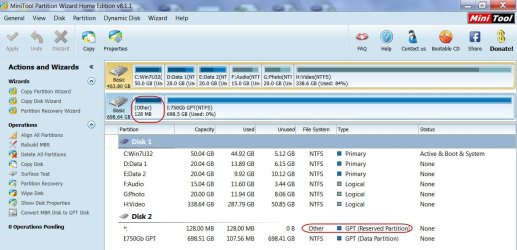
There are many things which is still a mystery to me. What is that 128 MB partition that seems to start from LBA34.( LBA 0-33 is generally occupied by the GPT and partitions start from LBA34) What is the three 3.1MB boot partitions? In your last screenshot it is four. They all appear to be within the 2TB.

Anyway we shall go ahead with data recovery with PhotoRec and see what is in store. Keep me posted if you have any doubts and wait for the go ahead (between 0700hrs to 2300 hrs my time)

I only wish I have the same 4 TB Seagate drive to put it in to my Desktop. I can then copy the GPT sectors(LBAs) both at the beginning and end of the drive that could then be written on your drive to restore it. Ok, that is going to be a costly affair. I just checked the price here Rs.13000/- plus. OOps, more than what I can bite!
 

My Computer My Computer

At a glance

Windows 7 Home Premium 32 bit
OS
Windows 7 Home Premium 32 bit
Hi there
For disk sizes > 2TB you must set the disk as a GPT disk otherwise you can't read beyond 2TB -- note you can't BOOT this if your computer doesn't have UEFI enabled in BIOS (that's not the same as PROTECTED BOOT -- often mis-understanding here - you CAN have UEFI WITHOUT protected boot).

However if that isn't the problem have you tried unplugging the HDD and plugging it into ANOTHER computer or a different USB port.

If it still gives a problem then somehow your HDD as become corrupted and you'll have to re-initialize it again - hopefully you've taken backup.

Cheers
jimbo
 

My Computer My Computer

At a glance

Linux CENTOS 7 / various Windows OS'es and se...Intel i7 Intel i58GB, 16GBOn Motherboard
Computer type
PC/Desktop
Computer Manufacturer/Model Number
Custom built, several laptops HP/ASUS
OS
Linux CENTOS 7 / various Windows OS'es and servers
CPU
Intel i7 Intel i5
Memory
8GB, 16GB
Graphics Card(s)
On Motherboard
Sound Card
Realtek HD audio
Monitor(s) Displays
Apple Cinema display, Samsung LCD
Screen Resolution
1920 X 1080
Hard Drives
4 X 1TB SATA
Mouse
Toshiba wireless laser
Internet Speed
> 20MB up
Hi jimbo45,

The OP bought a 4TB Seagate 3.5" drive. Obviously it would have been formatted as a GPT drive by Seagate. He had been using it on a dock connected to his laptop for sometime atleast before it turned RAW. If you have any ideas on how to recover the data from it he will be most happy and me too.:)
 

My Computer My Computer

At a glance

Windows 7 Home Premium 32 bit
OS
Windows 7 Home Premium 32 bit
I cleared one of my Seagate 750GB GoFlex external HDD of all data and then converted it into a GPT disk with Windows Disk Management.

Examining it with Partition Wizard, I do find an 128MB GPT (Reserved Partition). So far, all my efforts and tricks on hand to make this drive RAW to replicate the OP's HDD condition have not succeeded.

Any inputs on how to turn it RAW is most welcome.( I can then attempt data Recovery from that RAW drive.)

26-10-2013 08-47-00.jpg
 

My Computer My Computer

At a glance

Windows 7 Home Premium 32 bit
OS
Windows 7 Home Premium 32 bit
I think a CLEAN from DISKPART will turn it RAW?
 

My Computer My Computer

At a glance

Windows 10 Pro x64 ; Xubuntu x64Intel i7 860 @ 2.80 GHz O/C'ed to 4.0GHz16GB Corsair Vengance DDR3 @ 661 MHz Dual Cha...EVGA NVidia GTX 560 1024MB
Computer type
PC/Desktop
Computer Manufacturer/Model Number
Golden Mk. I.4
OS
Windows 10 Pro x64 ; Xubuntu x64
CPU
Intel i7 860 @ 2.80 GHz O/C'ed to 4.0GHz
Motherboard
Gigabyte P55A-UD3R Rev.1. Award BIOS F13
Memory
16GB Corsair Vengance DDR3 @ 661 MHz Dual Channel (9-9-9-24)
Graphics Card(s)
EVGA NVidia GTX 560 1024MB
Sound Card
Realtek Integrated
Monitor(s) Displays
Dual Samsung SyncMaster 2494HS
Screen Resolution
1920*1080 and 1920*1080
Hard Drives
1*Samsung 840 EVO 120GB SSD;
1*OCZ Vertex 2 60GB SSD;
2*Samsung F3 SpinPoint 1TB in RAID0;
1*Samsung F1 SpinPoint 1TB;
2*Western Digital 1TB External USB 3.0
1*Western Digital 500GB External USB 3.0
1*Seagate 500GB External USB 2.0
PSU
Thermaltake ToughPower QFan 750W
Case
Thermaltake Element S VK60001W2Z
Cooling
Corsair H60 Water Cooling, 2*230mm and 2*80mm case fans
Keyboard
Logitech G110
Mouse
Logitech MX518
  • Like
Reactions: Arc
Thanks Golden. That was the one that I didn't try. I do it with HDD LLF Format Tool - Perform quick wipe (just remove partitions and MBR) which is the equivalent of it.

Not to leave it anyway I tried Disk Part Clean command. It only turned the HDD unallocated. But I want it RAW as in OP's Screenshot in post #8 G drive RAW.

EDIT:Now referring to the PW screenshot in post #44 where the GPT was in tact, I performed Wipe Disk of the 128 MB partition. PW went through the motions of writing zeroes to the 128 MB partition and announced successful completion but I found that nothing happened to the HDD and it was accessible as before with no changes. I am stumped.
 
Last edited:

My Computer My Computer

At a glance

Windows 7 Home Premium 32 bit
OS
Windows 7 Home Premium 32 bit
I might be way off course here Jumanji but I suppose you didn't try the Partition Wizard wipe it's a bit quicker I find than CLEAN ALL then format it with it as well?

Is that what you are trying to do??
 

My Computer My Computer

At a glance

Desk1 7 Home Prem / Desk2 10 Pro / Main lap A...Desk1 i5 3750K / Laptop i7 GTX 860M / Desk2 i...Desk1 8GB (1866) / Desk2 16GB (1333) / Laptop...Desk 1& 2NVidia GTX 650 & Laptops on board Intel
Computer type
PC/Desktop
Computer Manufacturer/Model Number
Own build (new) Desk1 / Asus ROG Win 7 / Desk2 1st build
OS
Desk1 7 Home Prem / Desk2 10 Pro / Main lap Asus ROG 10 Pro 2 laptop Toshiba 7 Pro Asus P2520 7 & 10
CPU
Desk1 i5 3750K / Laptop i7 GTX 860M / Desk2 i5 2500
Motherboard
Desk1 Asus P877-V / Desk2 Gigabyte H67 UD3H / Laptop ?
Memory
Desk1 8GB (1866) / Desk2 16GB (1333) / Laptop 8Gb DDR3
Graphics Card(s)
Desk 1& 2NVidia GTX 650 & Laptops on board Intel
Sound Card
Desk 1 & 2 -XONAR DG Realtek High Def audio Laptop
Monitor(s) Displays
Desk 1 Benq HD 2450 / Desk2 Philips 24" / Laptop 17.5"
Screen Resolution
1920x1080 D1 & D2 & Laptop 1
Hard Drives
Desk1 Samsung 120GB 830 SSD
Asus ROG 256GB 850 Pro SSD
Desk2 Samsung 840 256 SSD
Toshiba 120GB EVO
PSU
Desk 1 Corsair HX 1050/ Laptop ? / Desk 2 Corsair HX 650
Case
Desk 1 Cooler HAF XM ? Toshiba laptop / Desk2 Coolermaster
Cooling
Fans on all Desk1 -2 Desk2 - all Coolermasters 5 Laptop ?
Keyboard
Desk 1 MS Sidewinder X6 Desk 2 MS Sidewinder X 4
Mouse
Desk 1&2 - Gigabyte MS 900 gamer - laptop - Logitec wireless
Internet Speed
ADSL2+
Other Info
One other Desktop (tester) and spare Toshba laptop both with SSD's
Running Kaspersky 2016 ISS on all machines config'd identically
Logitec audio stereo systems on each machine (x3)
Canon MG5250MFC
Router/modem TP-Link running WPA2SK
@ICit2, It is not my intention to wipe the GPT Data partition at all. I do not want to overwrite it with zeros for I have precious data on it :) which I want to recover. ( To recoup, I want to create a RAW drive as it happened in the case of the OP and try to recover the data from that GPT drive that had turned RAW)

Now regarding the 128MB reserved partition, I found out that it is not part of the GPT at all but is an MS requirement to have it on the GPT drive to store any data.For example when one converts from a basic drive to Dynamic drive some data generated needs to be stored for later reversal of the process from dynamic to basic.GPT does not allow any data to be stored in hidden sectors.So Microsoft has created a reserved space of that 128MB. It is actually called MSR, (Microsoft Reserved). When one creates a GPT drive with Windows Disk Management it effectively hides this 128MB partition and a user does not have access to it. To begin with there is no data in it and that is why even after wiping it with PW the GPT drive continued to work as if nothing has happened. I wiped it hoping that it would turn my drive to RAW.:D

Now I am back to the problem. How to make my GPT drive containing valuable data RAW (as in OP's case) and then retrieve/recover the data?
 

My Computer My Computer

At a glance

Windows 7 Home Premium 32 bit
OS
Windows 7 Home Premium 32 bit
Jumanji,
You'll have to experiment using Diskpart setid, gpt attributes, or create partition msr
DiskPart Command-Line Options

I normally try to fix things, not break them - but I understand you are trying to recreate conditions so a fix can be found. ;)

Bill
 

My Computer My Computer

At a glance

x64 (6.3.9600) Win8.1 Pro & soon dual boot x6...AMD A6-3420M APU with Radeon(tm) HD Graphics6.00 GBAMD Radeon(TM) HD 6520G
Computer type
Laptop
Computer Manufacturer/Model Number
HP Pavilion dv6-6c10us
OS
x64 (6.3.9600) Win8.1 Pro & soon dual boot x64 (6.1.7601) Win7_SP1 HomePrem
CPU
AMD A6-3420M APU with Radeon(tm) HD Graphics
Motherboard
Hewlett-Packard 1805
Memory
6.00 GB
Graphics Card(s)
AMD Radeon(TM) HD 6520G
Sound Card
(1) AMD High Definition Audio Device (2) IDT High Definiti
Monitor(s) Displays
HP W2072a 20" LCD (1600 x 900) @ 60 Hz
Screen Resolution
1366 x 768 x 32 bits (4294967296 colors) @ 60 Hz
Hard Drives
ST640LM0 00 HM641JI SATA Disk Device
Keyboard
Logitech k520 wireless KB
Mouse
Logitech m320 wireless mouse (bundled with KB)
Internet Speed
15/5 | 54 MB Wireless 'n'
Antivirus
Realtime: Defender or Avast | On-demand: Malwarebytes, ESET
Browser
IE 11 on Win8, IE 10 on win 7
Other Info
Media: [Gimp, Audacity, VLC] || Comm: [WEmail 2012, Skype] || Productivity: [OpenOffice,| Textpad] || Utils: [Sysinternals, cCleaner, Speccy, Defraggler]
If I am to answer your post its going to be a long one so I won't go the long way.:)

In short Diskpart - no no ( Anyway I had a look at it.)

I am not breaking anything. Ya, I am wearing out my HDD but you know it can fail anytime even when sparsely used. So what are we counting?:)
 

My Computer My Computer

At a glance

Windows 7 Home Premium 32 bit
OS
Windows 7 Home Premium 32 bit
Thanks - figured you already looked at those. Wish I could help more, but you know I won't have Internet much longer - really expected to lose it yeaterday, but got a short extension.

If I think of anything before I can't connect anymore, I'll post it.

Good luck my friend,

Bill
If I am to answer your post its going to be a long one so I won't go the long way.:)

In short Diskpart - no no ( Anyway I had a look at it.)

I am not breaking anything. Ya, I am wearing out my HDD but you know it can fail anytime even when sparsely used. So what are we counting?:)
 

My Computer My Computer

At a glance

x64 (6.3.9600) Win8.1 Pro & soon dual boot x6...AMD A6-3420M APU with Radeon(tm) HD Graphics6.00 GBAMD Radeon(TM) HD 6520G
Computer type
Laptop
Computer Manufacturer/Model Number
HP Pavilion dv6-6c10us
OS
x64 (6.3.9600) Win8.1 Pro & soon dual boot x64 (6.1.7601) Win7_SP1 HomePrem
CPU
AMD A6-3420M APU with Radeon(tm) HD Graphics
Motherboard
Hewlett-Packard 1805
Memory
6.00 GB
Graphics Card(s)
AMD Radeon(TM) HD 6520G
Sound Card
(1) AMD High Definition Audio Device (2) IDT High Definiti
Monitor(s) Displays
HP W2072a 20" LCD (1600 x 900) @ 60 Hz
Screen Resolution
1366 x 768 x 32 bits (4294967296 colors) @ 60 Hz
Hard Drives
ST640LM0 00 HM641JI SATA Disk Device
Keyboard
Logitech k520 wireless KB
Mouse
Logitech m320 wireless mouse (bundled with KB)
Internet Speed
15/5 | 54 MB Wireless 'n'
Antivirus
Realtime: Defender or Avast | On-demand: Malwarebytes, ESET
Browser
IE 11 on Win8, IE 10 on win 7
Other Info
Media: [Gimp, Audacity, VLC] || Comm: [WEmail 2012, Skype] || Productivity: [OpenOffice,| Textpad] || Utils: [Sysinternals, cCleaner, Speccy, Defraggler]
@ICit2, It is not my intention to wipe the GPT Data partition at all. I do not want to overwrite it with zeros for I have precious data on it :) which I want to recover. ( To recoup, I want to create a RAW drive as it happened in the case of the OP and try to recover the data from that GPT drive that had turned RAW)

Now regarding the 128MB reserved partition, I found out that it is not part of the GPT at all but is an MS requirement to have it on the GPT drive to store any data.For example when one converts from a basic drive to Dynamic drive some data generated needs to be stored for later reversal of the process from dynamic to basic.GPT does not allow any data to be stored in hidden sectors.So Microsoft has created a reserved space of that 128MB. It is actually called MSR, (Microsoft Reserved). When one creates a GPT drive with Windows Disk Management it effectively hides this 128MB partition and a user does not have access to it. To begin with there is no data in it and that is why even after wiping it with PW the GPT drive continued to work as if nothing has happened. I wiped it hoping that it would turn my drive to RAW.:D

Now I am back to the problem. How to make my GPT drive containing valuable data RAW (as in OP's case) and then retrieve/recover the data?
Sorry got the wrong end of the stick the only other ting I can suggest is
Make a bootable Ubuntu disk http://www.ubuntu.com/download
Set the BIOS to boot from the optical when the machine boots it will show you a screen with TRY or INSTALL > select TRY
When it is finished - it takes very little time you will get a screen like in the pic .
Open the drive you want > User and dig down until you get to the data settings you will be able to copy / paste the material you want doing this to an external for safe keeping .
I am not sure if it will but I have recovered tons of data etc using this method both on "dead" or just plain drives that you cannot get data from using Windows.
 

My Computer My Computer

At a glance

Desk1 7 Home Prem / Desk2 10 Pro / Main lap A...Desk1 i5 3750K / Laptop i7 GTX 860M / Desk2 i...Desk1 8GB (1866) / Desk2 16GB (1333) / Laptop...Desk 1& 2NVidia GTX 650 & Laptops on board Intel
Computer type
PC/Desktop
Computer Manufacturer/Model Number
Own build (new) Desk1 / Asus ROG Win 7 / Desk2 1st build
OS
Desk1 7 Home Prem / Desk2 10 Pro / Main lap Asus ROG 10 Pro 2 laptop Toshiba 7 Pro Asus P2520 7 & 10
CPU
Desk1 i5 3750K / Laptop i7 GTX 860M / Desk2 i5 2500
Motherboard
Desk1 Asus P877-V / Desk2 Gigabyte H67 UD3H / Laptop ?
Memory
Desk1 8GB (1866) / Desk2 16GB (1333) / Laptop 8Gb DDR3
Graphics Card(s)
Desk 1& 2NVidia GTX 650 & Laptops on board Intel
Sound Card
Desk 1 & 2 -XONAR DG Realtek High Def audio Laptop
Monitor(s) Displays
Desk 1 Benq HD 2450 / Desk2 Philips 24" / Laptop 17.5"
Screen Resolution
1920x1080 D1 & D2 & Laptop 1
Hard Drives
Desk1 Samsung 120GB 830 SSD
Asus ROG 256GB 850 Pro SSD
Desk2 Samsung 840 256 SSD
Toshiba 120GB EVO
PSU
Desk 1 Corsair HX 1050/ Laptop ? / Desk 2 Corsair HX 650
Case
Desk 1 Cooler HAF XM ? Toshiba laptop / Desk2 Coolermaster
Cooling
Fans on all Desk1 -2 Desk2 - all Coolermasters 5 Laptop ?
Keyboard
Desk 1 MS Sidewinder X6 Desk 2 MS Sidewinder X 4
Mouse
Desk 1&2 - Gigabyte MS 900 gamer - laptop - Logitec wireless
Internet Speed
ADSL2+
Other Info
One other Desktop (tester) and spare Toshba laptop both with SSD's
Running Kaspersky 2016 ISS on all machines config'd identically
Logitec audio stereo systems on each machine (x3)
Canon MG5250MFC
Router/modem TP-Link running WPA2SK
Thanks to inputs from Slartybart and TVeblen ( not mentioning my own google search), I managed to turn my 750GB Seagate GoFlex external HDD RAW.

I used BOOTICE v1.1.5 to do it.

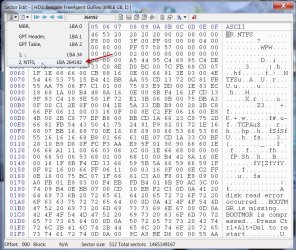
I zeroed the NTFS partition boot record at LBA 264192.

PBR.jpg

Fill0.jpg

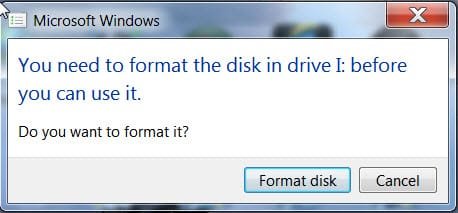
And then I got the following message to format my drive, a sure sign of it having turned RAW.

formatdisk.jpg

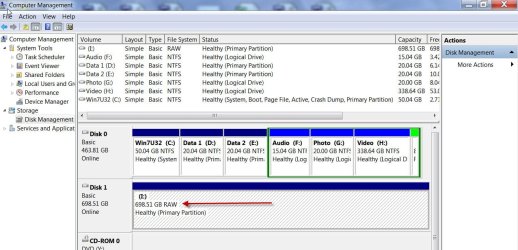
And indeed it is RAW.

RAW.jpg

Now what happens when I zero LBA 0 that contains the Protective MBR? It turned my drive "Not initialised, Unallocated" asking me whether I want to initialise using MBR/GPT.

When I zeroed LBA 1 that is the GPT Header, believe me, nothing catastrophic happened. My drive functional as before. Reason - it took it from the backup in the last sector LBA 1465149166. When I destroyed the backup, the drive turned Not initialised Unallocated.:)

Same thing happened when I zeroed LBA 2, the GPT Table. My drive continued to function normally with the backup in LBA 1465149134

Partition 1 is the MSR.It contains no data. everything is already zero. So no problem.

( OK, I had backed up all these sectors with BOOTICE so that I can restore them at will for this evaluation.)

Now I can get on to recovering the data from the RAW drive. But that after a break.

Insofar as the OP's problem involving a 4 TB drive, he needs to give a little bit of history. PW found that apart from the 128MB MSR partition there were at least three or four 30MB partitions designated as boot. That would indicate that some sort of partitioning had taken place before. This dawned on me as I was going through this exercise. I am only hoping he comes online.
 
Last edited:

My Computer My Computer

At a glance

Windows 7 Home Premium 32 bit
OS
Windows 7 Home Premium 32 bit
As a natural corollary of the above exercise I would suggest the following to the OP.

1. Check the last sectors of your Disk from n to n-32 with Bootice. If you find that the GPT backup exists in those sectors, I would say you have struck gold.:)

2. Save each sector starting from n to n-32.

3. Restore the nth sector to LBA 1 (sector 1), n-1 to LBA 2 and so on till you complete n-32 to LBA 33.

Effectively you would have restored the GPT, and Windows 7 should be able to see your drive as before.

Worth trying since in all these steps, we are definitely not writing any thing to the data sectors.

I have also confirmed that PhotoRec will be able to recover the data after running an excruciatingly slow scan on your present RAW drive, but as you had indicated that you have mostly proprietary format files, that is not going to help you. It may not find those files.( I have recovered some mp3 files and such standard format files.)

In that situation, Test Disk will be a better option. Even here I would think that it will do a better and fast job after restoring the GPT sectors.

So, if restoring the GPT sectors alone does not bring the HDD to life, run Test Disk.

Without doubt, we are still in the learning process of recovering data from a GPT drive, but for any body using GPT drives my advice would be to back up each and every sector from LBA 0-LBA 33 and also any Partition boot record sectors indicated by BOOTICE. (each sector file may only be 512 bytes and so it is not going to take much space). If your HDD becomes inaccessible due to Partition Table corruption, you will have an instant recovery by restoring that sectors. Atleast I would think so.:)
 
Last edited:

My Computer My Computer

At a glance

Windows 7 Home Premium 32 bit
OS
Windows 7 Home Premium 32 bit
Hey guys,

Sorry I haven't been present much these last few days. Got the flu which knocked me down and now trying to catch up on my work. I'll be back to practice all you wrote tomorrow. I have said it several times but I really appreciate the help.

flows69
 

My Computer My Computer

At a glance

Windows 7 ultimate 64 bits
Computer type
Laptop
Computer Manufacturer/Model Number
Alienware M17X R2
OS
Windows 7 ultimate 64 bits
Hard Drives
1 SSD OCZ 256gb
1 HDD Western Digital 1tb black scorpion
1 external HDD Seagate 4tb connected with a USB docking station
Antivirus
Avast pro
Hey,

I kind of let you down for some time now ... sorry about that. If you don't really remember what my problem was about and don't want to reread so many posts I understand.

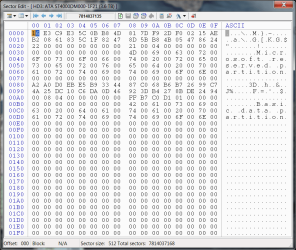
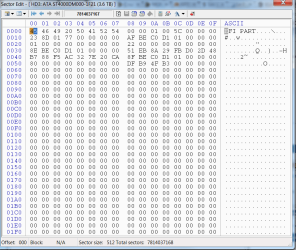
I downloaded Bootice and checked the sectors from n to n-32 as asked above.

Everything is blank beside n-32, n-3, n-2 and n. I upload the pictures of n-32 and n, if you need the other two just let me know, there is not a single word on them.

Does it appear the GPT backup exists ?

I am done publishing my article, don't hesitate to contact me if you need any additional info about the HDD.

Thanks again for the help,

flows69
 

Attachments

  • n-32.png
    n-32.png
    31.1 KB · Views: 4
  • n.png
    n.png
    22.4 KB · Views: 3

My Computer My Computer

At a glance

Windows 7 ultimate 64 bits
Computer type
Laptop
Computer Manufacturer/Model Number
Alienware M17X R2
OS
Windows 7 ultimate 64 bits
Hard Drives
1 SSD OCZ 256gb
1 HDD Western Digital 1tb black scorpion
1 external HDD Seagate 4tb connected with a USB docking station
Antivirus
Avast pro
My post #54 still holds good. Follow it as suggested.

You need not copy and restore sectors that are all zero. But keep the arithmetic right - which should go where and remember n is the last sector of your drive. Have a look at my post here that should help you do that. http://www.sevenforums.com/hardware-devices/310295-lost-partitions.html#post2584426

As I said in my post #54, we are not at all meddling with any data sectors.

If the GPT restore does not help, then try Test Disk.
 

My Computer My Computer

At a glance

Windows 7 Home Premium 32 bit
OS
Windows 7 Home Premium 32 bit
Hey,

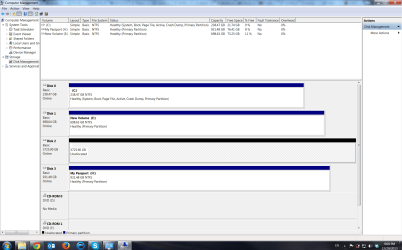
I used Bootice to back up sectors n to n-32. When I used these back ups to restore sectors 1 to 33, I found that sector n-1 was blank but sector 2 wasn't. I tried both leaving sector 2 as it was and replacing it by a back up of a blank sector. If it turns out I shouldn't have made sector 2 blank I backed it up to be sure.

Anyway, in both cases, the disk now appears unallocated.

At this point I am not sure if it is an improvement but at least it is a change ;-)
 

Attachments

  • after Bootice.png
    after Bootice.png
    75.1 KB · Views: 6

My Computer My Computer

At a glance

Windows 7 ultimate 64 bits
Computer type
Laptop
Computer Manufacturer/Model Number
Alienware M17X R2
OS
Windows 7 ultimate 64 bits
Hard Drives
1 SSD OCZ 256gb
1 HDD Western Digital 1tb black scorpion
1 external HDD Seagate 4tb connected with a USB docking station
Antivirus
Avast pro
Sector 2 is the GPT table. I do not know why in your case there was no backup of it in n-1.

In the circumstances, I would advise you as follows.( I would think we are better off than before with the drive showing as unallocated. I had said it even in my post #54)

1. Try Partition Recovery Wizard with sector 2 as it was. Both Quick Scan and if it fails to show the files then Full Scan.

2. Try Partition Recovery Wizard with sector 2 all zeros.

If both fail to find the correct partition info then Test Disk, again with sector 2 as it was and with all zeros.

I know its gonna be a time consuming affair but I think there is no other go unless you turn it on to a professional recovery.

But let me assure you one thing whether you try PW or Test Disk and ask those to write the correct partition table, right or wrong it was done, your data is still safe and will leave it so for professional Recovery or recovery attempt by any other data recovery software.

One thing now I am certain that in view of the fact we still do not know much about GPT, if one uses GPT disk, immediately after partitioning he should backup all the relevant sectors as detailed in my post here . That will make it easy to restore in case of corruptions to these important sectors.
 

My Computer My Computer

At a glance

Windows 7 Home Premium 32 bit
OS
Windows 7 Home Premium 32 bit
Thanks, this helped me out!!!

Three quarters of a year later, but I ran into this problem with my external harddrive. Yesterday it was working fine, today it says "Local Disk", inaccessible, and Disk Management tells me the drive is RAW instead of NTFS. Ran "MiniTool Partition Wizard Home Edition" and sucessfully recovered the partition, with all files and folders showing up and usable as should be.

So... THANK YOU !!!
 

My Computer My Computer

At a glance

Windows 8.1 Professional x64Intel Core i3 M350 @2.27MHz4GBIntel HD Graphics
Computer type
Laptop
Computer Manufacturer/Model Number
Dell Latitude E5510
OS
Windows 8.1 Professional x64
CPU
Intel Core i3 M350 @2.27MHz
Motherboard
Dell Latitude E5510
Memory
4GB
Graphics Card(s)
Intel HD Graphics
Hard Drives
Seagate ST9250827AS (250GB) internal
WD Elements 10A8 (1TB) exterrnal USB
Antivirus
Microsoft System Center Endpoint Protection
Browser
Mozilla Firefox
Back
Top