Solved Thunderbird Links don't work

Superluigi6

New member
Member
VIP
Local time
3:01 PM
Messages
107
I've been trying to read some of my newsletters and I decided to click on one of the links that takes me down to the post (the bullets). This is what I get:

imgur: the simple image sharer

Normally it worked with the older version but I upgraded to Thunderbird 31.0 and it doesn't work anymore. Help?

(For a better understanding, try going to - 3 new articles and press on the first bullet location "FREE Rachael Ray Nutrish Natural Dry Cat Food Sample". Normally, it would take me to that post, but Thunderbird gives me the error in the Imgur pic above.)
 
Last edited by a moderator:

My Computer My Computer

Computer type
Laptop
OS
ncxzjfn
Thunderbird links

Try right clicking the link instead then choose "Copy Link Location" from the menu. Then start your browser and paste into the address bar (Ctrl+V) and see if your browser gets the same error. If so then it's not a Thunderbird problem. Otherwise post that link here.

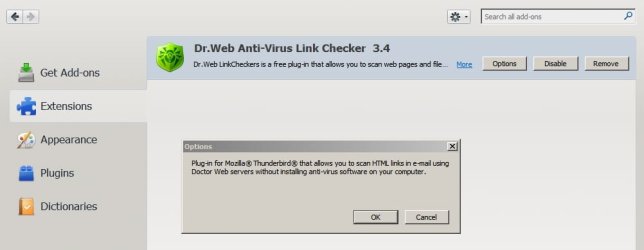
Additionally I'd mention a Thunderbird Add On that you can use to scan any link in an email before you click on it. You just right click to choose "Scan"

Search for it via the add ons manager and install it if you want to. It supplements your antivirus solution for scanning emails.

Add-on Thunderbird.jpg
 
Last edited:

My Computer My Computer

Computer type
Laptop
Computer Manufacturer/Model Number
ASUS
OS
Microsoft Windows 7 Home Premium 64-bit 7601 Multiprocessor Free Service Pack 1
CPU
AMD C-60 APU with Radeon(tm) HD Graphics
Motherboard
ASUSTeK COMPUTER INC. X501U
Memory
4.00 GB
Graphics Card(s)
AMD Radeon HD 6290 Graphics
Sound Card
(1) AMD High Definition Audio Device (2) Realtek High Defi
Screen Resolution
1366 x 768 x 32 bits (4294967296 colors) @ 60 Hz
Hard Drives
Hitachi HTS545050A7E380 SATA Disk Device
Antivirus
Comodo CIS & FW, SecureAplus App Whitelisting, Threatfire
Browser
Cyberfox 64bit, Opera 64bit, Airfox
Other Info
Spy-The-Spy, HitmanPro.Alert, Norton Connect Safe, MJRegWatcher, BitDefender TrafficLight, Voodoo Shield, Zemana AntiMalware
Try right clicking the link instead then choose "Copy Link Location" from the menu. Then start your browser and paste into the address bar (Ctrl+V) and see if your browser gets the same error. If so then it's not a Thunderbird problem. Otherwise post that link here.

Additionally I'd mention a Thunderbird Add On that you can use to scan any link in an email before you click on it. You just right click to choose "Scan"

Search for it via the add ons manager and install it if you want to. It supplements your antivirus solution for scanning emails.

View attachment 328483

When I right click on the first, I get this long line of code that's like "imap://(first part of name)%2Em%2E(last name)%40gmail%[email protected]:993/fetch%3EUID" and more boring stuff like that, rather than a regular link.

I got the Dr. Web Anti Virus Link Checker addon and tried making it scan one of the links, but it showed up to an error.
 
Last edited by a moderator:

My Computer My Computer

Computer type
Laptop
OS
ncxzjfn
Copy link into browser

Questions:

What happens when you copy the link into your browser?

What happens if you skip Thunderbird and sign into your Gmail account then click the link that way?

Did you take the advice offered in your earlier question in another thread you started? - to reinstall Thunderbird but copy your existing Profiles folder and Profile.ini file to a backup location renaming them to:

Folder

Profiles Old

Profiles.in - Profiles.ini_old

Delete the existing profiles - uninstall then clean install Thunderbird.

I'd say if it's just the one link that's a problem then there's no problem with Thunderbird. However if that add on doesn't work for you then somethings not right so reinstall anyway!

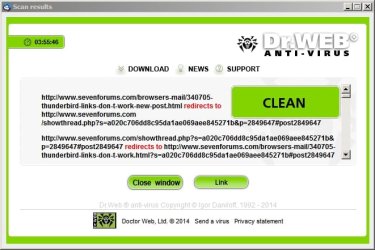
Your reply scanned like this:

(Scan by right clicking the link - not the email)

Scan results.jpg

So you inspect the link and scroll to read all the text before opening it using the "Link" button.
 

My Computer My Computer

Computer type
Laptop
Computer Manufacturer/Model Number
ASUS
OS
Microsoft Windows 7 Home Premium 64-bit 7601 Multiprocessor Free Service Pack 1
CPU
AMD C-60 APU with Radeon(tm) HD Graphics
Motherboard
ASUSTeK COMPUTER INC. X501U
Memory
4.00 GB
Graphics Card(s)
AMD Radeon HD 6290 Graphics
Sound Card
(1) AMD High Definition Audio Device (2) Realtek High Defi
Screen Resolution
1366 x 768 x 32 bits (4294967296 colors) @ 60 Hz
Hard Drives
Hitachi HTS545050A7E380 SATA Disk Device
Antivirus
Comodo CIS & FW, SecureAplus App Whitelisting, Threatfire
Browser
Cyberfox 64bit, Opera 64bit, Airfox
Other Info
Spy-The-Spy, HitmanPro.Alert, Norton Connect Safe, MJRegWatcher, BitDefender TrafficLight, Voodoo Shield, Zemana AntiMalware
Questions:

What happens when you copy the link into your browser?

What happens if you skip Thunderbird and sign into your Gmail account then click the link that way?

Did you take the advice offered in your earlier question in another thread you started? - to reinstall Thunderbird but copy your existing Profiles folder and Profile.ini file to a backup location renaming them to:

Folder

Profiles Old

Profiles.in - Profiles.ini_old

Delete the existing profiles - uninstall then clean install Thunderbird.

I'd say if it's just the one link that's a problem then there's no problem with Thunderbird. However if that add on doesn't work for you then somethings not right so reinstall anyway!

Your reply scanned like this:

(Scan by right clicking the link - not the email)

View attachment 328485

So you inspect the link and scroll to read all the text before opening it using the "Link" button.

Sorry for the delay.

I tried your suggestion of doing the anti virus scan again, it doesn't work. It gives me something from another language.

Copying and pasting the link doesn't help at all.

I don't know how to do the reinstall Thunderbird and delete the profiles or whatever.
 
Last edited by a moderator:

My Computer My Computer

Computer type
Laptop
OS
ncxzjfn
Thunderbird issue

Well you didn't say what happens when you sign in to your email account via a browser. It would help to know if the link works correctly if you do that. That Dr Web should open in English once you can the link. If it doesn't - remove it. It works just fine for me!

Backup your Thunderbird profile anyway for a start:

http://mozbackup.jasnapaka.com/download.php - choose either version.
 

My Computer My Computer

Computer type
Laptop
Computer Manufacturer/Model Number
ASUS
OS
Microsoft Windows 7 Home Premium 64-bit 7601 Multiprocessor Free Service Pack 1
CPU
AMD C-60 APU with Radeon(tm) HD Graphics
Motherboard
ASUSTeK COMPUTER INC. X501U
Memory
4.00 GB
Graphics Card(s)
AMD Radeon HD 6290 Graphics
Sound Card
(1) AMD High Definition Audio Device (2) Realtek High Defi
Screen Resolution
1366 x 768 x 32 bits (4294967296 colors) @ 60 Hz
Hard Drives
Hitachi HTS545050A7E380 SATA Disk Device
Antivirus
Comodo CIS & FW, SecureAplus App Whitelisting, Threatfire
Browser
Cyberfox 64bit, Opera 64bit, Airfox
Other Info
Spy-The-Spy, HitmanPro.Alert, Norton Connect Safe, MJRegWatcher, BitDefender TrafficLight, Voodoo Shield, Zemana AntiMalware
Well you didn't say what happens when you sign in to your email account via a browser. It would help to know if the link works correctly if you do that. That Dr Web should open in English once you can the link. If it doesn't - remove it. It works just fine for me!

Backup your Thunderbird profile anyway for a start:

MozBackup - Backup tool for Firefox and Thunderbird - choose either version.

Signing in on web browser, it works.

Why do I need to backup my profile? I'm backing it up right now.
 
Last edited by a moderator:

My Computer My Computer

Computer type
Laptop
OS
ncxzjfn
I'm still getting the problem, not sure what else to do.
 
Last edited by a moderator:

My Computer My Computer

Computer type
Laptop
OS
ncxzjfn
Profile backup

Well if you've managed to back up your profile it means that you can uninstall Thunderbird and reinstall it without losing your emails or any settings or extensions.

Assuming that you backed up:

Download the Portable version of Geek Uninstaller:

GeekUninstaller | GeekUninstaller

Run the executable "geek.exe" and highlight Thunderbird and double click to uninstall.

When it's been removed choose to delete all leftover files and registry entries.

Close the program when it finishes.

Additionally check the following locations and manually delete any Mozilla Thunderbird files or folders found.

"C:\Program Files (x86)\Mozilla Thunderbird"

"C:\Users\USERNAME\AppData\Roaming\Mozilla"

"C:\Users\Chris\USERNAME\Local\Thunderbird"

Then reboot.

Once you've done that try reinstalling Thunderbird.

Are you using Googlemail and if you are using it have you set up IMAP in your gmail account?

If you have set up IMAP in gmail use the account setup wizard in Thunderbird to connect to your account via IMAP.

I can help with the settings if needed.
 

My Computer My Computer

Computer type
Laptop
Computer Manufacturer/Model Number
ASUS
OS
Microsoft Windows 7 Home Premium 64-bit 7601 Multiprocessor Free Service Pack 1
CPU
AMD C-60 APU with Radeon(tm) HD Graphics
Motherboard
ASUSTeK COMPUTER INC. X501U
Memory
4.00 GB
Graphics Card(s)
AMD Radeon HD 6290 Graphics
Sound Card
(1) AMD High Definition Audio Device (2) Realtek High Defi
Screen Resolution
1366 x 768 x 32 bits (4294967296 colors) @ 60 Hz
Hard Drives
Hitachi HTS545050A7E380 SATA Disk Device
Antivirus
Comodo CIS & FW, SecureAplus App Whitelisting, Threatfire
Browser
Cyberfox 64bit, Opera 64bit, Airfox
Other Info
Spy-The-Spy, HitmanPro.Alert, Norton Connect Safe, MJRegWatcher, BitDefender TrafficLight, Voodoo Shield, Zemana AntiMalware
Well if you've managed to back up your profile it means that you can uninstall Thunderbird and reinstall it without losing your emails or any settings or extensions.

Assuming that you backed up:

Download the Portable version of Geek Uninstaller:

GeekUninstaller | GeekUninstaller

Run the executable "geek.exe" and highlight Thunderbird and double click to uninstall.

When it's been removed choose to delete all leftover files and registry entries.

Close the program when it finishes.

Additionally check the following locations and manually delete any Mozilla Thunderbird files or folders found.

"C:\Program Files (x86)\Mozilla Thunderbird"

"C:\Users\USERNAME\AppData\Roaming\Mozilla"

"C:\Users\Chris\USERNAME\Local\Thunderbird"

Then reboot.

Once you've done that try reinstalling Thunderbird.

Are you using Googlemail and if you are using it have you set up IMAP in your gmail account?

If you have set up IMAP in gmail use the account setup wizard in Thunderbird to connect to your account via IMAP.

I can help with the settings if needed.


I didn't start it yet because I just realized this: I have 2 different versions of Thunderbird: the recent version 31.0 and 24.1.1 version. Is that a problem, and should I uninstall both?


In my GMAIL settings I recently discovered something that might be wrong/corrupting something. I have both POP and IMAP turned on. Do I have to turn POP off?
 
Last edited by a moderator:

My Computer My Computer

Computer type
Laptop
OS
ncxzjfn
Pop & imap

Thunderbird will work better if you use IMAP. As far as having more than one version it's best to uninstall Thunderbird completely and start afresh with the latest version. Sometimes Thunderbird can screw up and a clean install is the best approach.

You can leave POP enabled in Gmail if you want to but for Thunderbird it's better to use IMAP so enable it in your gmail account settings.

Gmail.jpg

Once you've removed all trace of Thunderbird - rebooted and then reinstalled it there are quite a few settings that will help it to work better than the default settings.
 

My Computer My Computer

Computer type
Laptop
Computer Manufacturer/Model Number
ASUS
OS
Microsoft Windows 7 Home Premium 64-bit 7601 Multiprocessor Free Service Pack 1
CPU
AMD C-60 APU with Radeon(tm) HD Graphics
Motherboard
ASUSTeK COMPUTER INC. X501U
Memory
4.00 GB
Graphics Card(s)
AMD Radeon HD 6290 Graphics
Sound Card
(1) AMD High Definition Audio Device (2) Realtek High Defi
Screen Resolution
1366 x 768 x 32 bits (4294967296 colors) @ 60 Hz
Hard Drives
Hitachi HTS545050A7E380 SATA Disk Device
Antivirus
Comodo CIS & FW, SecureAplus App Whitelisting, Threatfire
Browser
Cyberfox 64bit, Opera 64bit, Airfox
Other Info
Spy-The-Spy, HitmanPro.Alert, Norton Connect Safe, MJRegWatcher, BitDefender TrafficLight, Voodoo Shield, Zemana AntiMalware
Thunderbird will work better if you use IMAP. As far as having more than one version it's best to uninstall Thunderbird completely and start afresh with the latest version. Sometimes Thunderbird can screw up and a clean install is the best approach.

You can leave POP enabled in Gmail if you want to but for Thunderbird it's better to use IMAP so enable it in your gmail account settings.

View attachment 329047

Once you've removed all trace of Thunderbird - rebooted and then reinstalled it there are quite a few settings that will help it to work better than the default settings.

Should I leave both POP and IMAP on simultaneously?

I'm removing both versions. Hopefully this works and doesn't screw up anything.

UPDATE: The install just completed. I forgot to reboot. Will that be a problem?

UPDATE 2: We've got a problem. I tried to reinstall the backup from the MozBackup, and it says this:
http://www.uploadimages4free.com/browse_images/backup-97337.html

Help please? Thanks for all your help btw.
 
Last edited by a moderator:

My Computer My Computer

Computer type
Laptop
OS
ncxzjfn
Reboot

A reboot will flush the system cache - it's better to reboot. Since you didn't reboot just continue with the install but please do not attempt to restore your backed up profile as the problem might return. What you need to do is confirm that Thunderbird works okay after a fresh install before restoring anything from that backup and even then you might need to only selectively restore some items rather than all of them!

You may also find that you don't need that backup anyway!

To restore the backup (don't do this yet) you just browse to the file that you saved earlier using the "Browse" button.
 

My Computer My Computer

Computer type
Laptop
Computer Manufacturer/Model Number
ASUS
OS
Microsoft Windows 7 Home Premium 64-bit 7601 Multiprocessor Free Service Pack 1
CPU
AMD C-60 APU with Radeon(tm) HD Graphics
Motherboard
ASUSTeK COMPUTER INC. X501U
Memory
4.00 GB
Graphics Card(s)
AMD Radeon HD 6290 Graphics
Sound Card
(1) AMD High Definition Audio Device (2) Realtek High Defi
Screen Resolution
1366 x 768 x 32 bits (4294967296 colors) @ 60 Hz
Hard Drives
Hitachi HTS545050A7E380 SATA Disk Device
Antivirus
Comodo CIS & FW, SecureAplus App Whitelisting, Threatfire
Browser
Cyberfox 64bit, Opera 64bit, Airfox
Other Info
Spy-The-Spy, HitmanPro.Alert, Norton Connect Safe, MJRegWatcher, BitDefender TrafficLight, Voodoo Shield, Zemana AntiMalware
A reboot will flush the system cache - it's better to reboot. Since you didn't reboot just continue with the install but please do not attempt to restore your backed up profile as the problem might return. What you need to do is confirm that Thunderbird works okay after a fresh install before restoring anything from that backup and even then you might need to only selectively restore some items rather than all of them!

You may also find that you don't need that backup anyway!

To restore the backup (don't do this yet) you just browse to the file that you saved earlier using the "Browse" button.

So, you want me to add my Gmail account to Thunderbird now? I did NOT restore from the backup before. I can add my Gmail account to Thunderbird.

I'll add it right now and tell you the results.

UPDATE: I just added my Gmail account, and the results were great. I got all of my mail back in all my folders, waaaay back to 2011.

Then, I added my second account (Yahoo, IMAP) and again everything came back: folders and all my emails.

Anyways, as to the general questions that started this loong thread, I tried it on this email (from same sender, and same style-of-mail) http://archive.feedblitz.com/405796/~4806708 and I still get the issue (pic is here)

So that's not fixed. Any other tips?
 
Last edited by a moderator:

My Computer My Computer

Computer type
Laptop
OS
ncxzjfn
Attachment

Okay so you say that link opens correctly when using your browser to access your email?

Check the following:

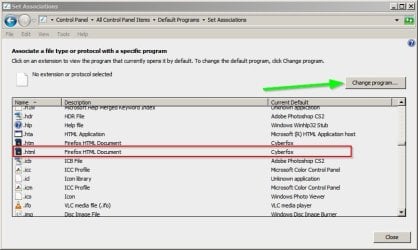
Control Panel > Default Programs

Then associate a file type with a program. Find html files in the list and make sure that it's set to whatever browser you're using.

Set Associations.jpg

I'll be away from my machine until tomorrow but can post some other settings to help Thunderbird work better with IMAP.
 

My Computer My Computer

Computer type
Laptop
Computer Manufacturer/Model Number
ASUS
OS
Microsoft Windows 7 Home Premium 64-bit 7601 Multiprocessor Free Service Pack 1
CPU
AMD C-60 APU with Radeon(tm) HD Graphics
Motherboard
ASUSTeK COMPUTER INC. X501U
Memory
4.00 GB
Graphics Card(s)
AMD Radeon HD 6290 Graphics
Sound Card
(1) AMD High Definition Audio Device (2) Realtek High Defi
Screen Resolution
1366 x 768 x 32 bits (4294967296 colors) @ 60 Hz
Hard Drives
Hitachi HTS545050A7E380 SATA Disk Device
Antivirus
Comodo CIS & FW, SecureAplus App Whitelisting, Threatfire
Browser
Cyberfox 64bit, Opera 64bit, Airfox
Other Info
Spy-The-Spy, HitmanPro.Alert, Norton Connect Safe, MJRegWatcher, BitDefender TrafficLight, Voodoo Shield, Zemana AntiMalware
Okay so you say that link opens correctly when using your browser to access your email?

Check the following:

Control Panel > Default Programs

Then associate a file type with a program. Find html files in the list and make sure that it's set to whatever browser you're using.

View attachment 329063

I'll be away from my machine until tomorrow but can post some other settings to help Thunderbird work better with IMAP.

HTM and HTML are both associated with Chrome HTML Document, which is probably Chrome.

What happens if I make Thunderbird the program associated with .html files? Would that screw up all websites or something like that?
 
Last edited by a moderator:

My Computer My Computer

Computer type
Laptop
OS
ncxzjfn
Thunderbird html handling

No don't set Thunderbird as the default for html - it should be set to open with a browser.

A fresh install of thunderbird should have fixed any problems assuming that all trace was removed. The trouble with reinstalling it is that it will use your old profile if it wasn't fully deleted. Anyway for now have a look at the following and try it to see if it makes any difference.

Fix for Thunderbird not opening links - gHacks Tech News

As far as I can work out - if it's just that one link it's likely to be a problem with that particular email rather than thunderbird. I'll have a think about it to see if anything else can be done.
 

My Computer My Computer

Computer type
Laptop
Computer Manufacturer/Model Number
ASUS
OS
Microsoft Windows 7 Home Premium 64-bit 7601 Multiprocessor Free Service Pack 1
CPU
AMD C-60 APU with Radeon(tm) HD Graphics
Motherboard
ASUSTeK COMPUTER INC. X501U
Memory
4.00 GB
Graphics Card(s)
AMD Radeon HD 6290 Graphics
Sound Card
(1) AMD High Definition Audio Device (2) Realtek High Defi
Screen Resolution
1366 x 768 x 32 bits (4294967296 colors) @ 60 Hz
Hard Drives
Hitachi HTS545050A7E380 SATA Disk Device
Antivirus
Comodo CIS & FW, SecureAplus App Whitelisting, Threatfire
Browser
Cyberfox 64bit, Opera 64bit, Airfox
Other Info
Spy-The-Spy, HitmanPro.Alert, Norton Connect Safe, MJRegWatcher, BitDefender TrafficLight, Voodoo Shield, Zemana AntiMalware
No don't set Thunderbird as the default for html - it should be set to open with a browser.

A fresh install of thunderbird should have fixed any problems assuming that all trace was removed. The trouble with reinstalling it is that it will use your old profile if it wasn't fully deleted. Anyway for now have a look at the following and try it to see if it makes any difference.

Fix for Thunderbird not opening links - gHacks Tech News

As far as I can work out - if it's just that one link it's likely to be a problem with that particular email rather than thunderbird. I'll have a think about it to see if anything else can be done.

No, ALL links with that kind of style (link to click on it, takes you down to specific section) give me that error. It used to be so that when I clicked on it, it would auto-take me to the section inside of the message, rather than opening a web browser.

Anyways, as for doing the tutorial that you showed me I followed all the steps and no luck.

Over night I shut down my computer and recently turned it back on, and again no change.

This might also be something worth noting: the change only started occurring when I upgraded to 31.0 which was when the issue started. We also have a filtering system at out house for Internet, but I don't think that has an impact. Also, I recently installed Firefox again.
 
Last edited by a moderator:

My Computer My Computer

Computer type
Laptop
OS
ncxzjfn
Thunderbird links

Thanks for the video.

I'm wondering if you've got remote content blocked?

In Thunderbird set View> Message Body As> Original HTML and tick Display Attachments Inline.

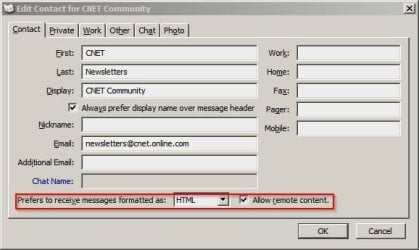
I'd also suggest finding the sender in your address book and checking the following settings:

Edit Contact.jpg
 

My Computer My Computer

Computer type
Laptop
Computer Manufacturer/Model Number
ASUS
OS
Microsoft Windows 7 Home Premium 64-bit 7601 Multiprocessor Free Service Pack 1
CPU
AMD C-60 APU with Radeon(tm) HD Graphics
Motherboard
ASUSTeK COMPUTER INC. X501U
Memory
4.00 GB
Graphics Card(s)
AMD Radeon HD 6290 Graphics
Sound Card
(1) AMD High Definition Audio Device (2) Realtek High Defi
Screen Resolution
1366 x 768 x 32 bits (4294967296 colors) @ 60 Hz
Hard Drives
Hitachi HTS545050A7E380 SATA Disk Device
Antivirus
Comodo CIS & FW, SecureAplus App Whitelisting, Threatfire
Browser
Cyberfox 64bit, Opera 64bit, Airfox
Other Info
Spy-The-Spy, HitmanPro.Alert, Norton Connect Safe, MJRegWatcher, BitDefender TrafficLight, Voodoo Shield, Zemana AntiMalware
Back
Top