As I was doing some imaging backups, I noticed that Macrium was seeing that my SSD drive had the following used/free #s:
Partition 1: System Reserved NTFS Active 24.2 GB used, 100 GB Total
Partition 2: OS & Programs C: 150.0 GB used, 167.58 Total
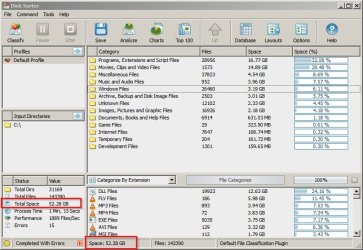
That's tighter than I "think" is a good idea. So I looked at the folders on the C: drive and cleaned up the minimal temp folder data and emptied the recycle bin. Here's what the folders show:
Boot 0.4 GB
CWP 0.1 GB
Intel 0 GB
Program Files 10.6 GB
Program Files (x86) 12.6 GB
Program Data 3.7 GB
Temp 0 GB
Users 10.0 GB
Windows 21.8 GB
Total: 59.2 GB
What is causing the discrepancy?
My Computer
At a glance
Windows 7 Professional 64-bitIntel Core i5-4670K Haswell 3.4GHz Quad-Core ...16GB (2 x 8GB) Kingston DDR3 1600FANLESS ASUS Radeon HD 6450 1GB
Computer type
PC/Desktop
Computer Manufacturer/Model Number
Custom Build
OS
Windows 7 Professional 64-bit
CPU
Intel Core i5-4670K Haswell 3.4GHz Quad-Core 84w CPU
Motherboard
ASUS Z87 Deluxe 1150 Intel Z87 Motherboard
Memory
16GB (2 x 8GB) Kingston DDR3 1600
Graphics Card(s)
FANLESS ASUS Radeon HD 6450 1GB
Hard Drives
c: SSD Intel 520 Series 180GB SATA III (for OS/programs)
e: WD 2TB Green (general data)
f: WD 600 GB Velociraptor (audio recording data)
g: WD 150 GB Velociraptor (open)
Could be that hidden and system files are not included.
Also I see you have an Intel SSD. If you have the Intel SSD Toolbox program, that might sometimes leave multiple large(GB) files in the root directory after doing a diagnostic scan.
My Computer
At a glance
Windows 7 Pro 32Intel(R) Core(TM) i5 CPU M 540 @ 2.53GHz4,00 GB (Usable 2,98)NVIDIA NVS 5100M
Computer type
Laptop
Computer Manufacturer/Model Number
HP Elitebook 8540p
OS
Windows 7 Pro 32
CPU
Intel(R) Core(TM) i5 CPU M 540 @ 2.53GHz
Motherboard
Hewlett-Packard 1521
Memory
4,00 GB (Usable 2,98)
Graphics Card(s)
NVIDIA NVS 5100M
Sound Card
NVIDIA High Definition Audio
Screen Resolution
1600x900
Hard Drives
INTEL SSDSA2CW120G3
Antivirus
F-Secure Internet Security
Browser
IE, Firefox, Opera
Other Info
Sandboxie,
SRP (Software Restriction Policy),
EMET (Enhanced Mitigation Experience Toolkit),
WFC (Windows Firewall Control by BiniSoft),
Malwarebytes Premium
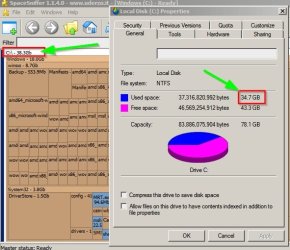
I know that I have "show hidden files" enabled in Windows Explorer and not sure if that even impacts used/free numbers when one right clicks on the drive, selects Properties to see the used/free info.
Any other ideas?
My Computer
At a glance
Windows 7 Professional 64-bitIntel Core i5-4670K Haswell 3.4GHz Quad-Core ...16GB (2 x 8GB) Kingston DDR3 1600FANLESS ASUS Radeon HD 6450 1GB
Computer type
PC/Desktop
Computer Manufacturer/Model Number
Custom Build
OS
Windows 7 Professional 64-bit
CPU
Intel Core i5-4670K Haswell 3.4GHz Quad-Core 84w CPU
Motherboard
ASUS Z87 Deluxe 1150 Intel Z87 Motherboard
Memory
16GB (2 x 8GB) Kingston DDR3 1600
Graphics Card(s)
FANLESS ASUS Radeon HD 6450 1GB
Hard Drives
c: SSD Intel 520 Series 180GB SATA III (for OS/programs)
e: WD 2TB Green (general data)
f: WD 600 GB Velociraptor (audio recording data)
g: WD 150 GB Velociraptor (open)
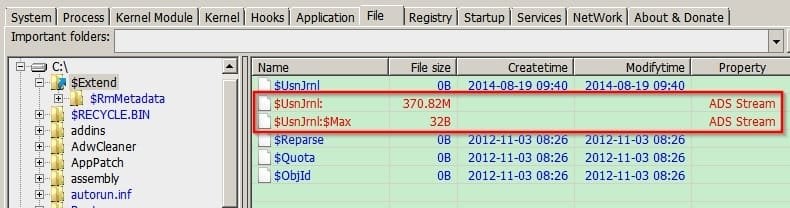
There's tons of files that Windows Explorer can't read or display and if you're using it to get an idea of free space it's not accurate to say the least.
Quote: As Windows Explorer does not list the ADS, it does not include the space used by alternate streams when calculating the free space available on the hard disk.
Example: On my machine $USN Jrnl once grew to over 10Gb (currently it's not so large)
but can't be read by windows explorer. That's just one example.
My Computer
At a glance
Microsoft Windows 7 Home Premium 64-bit 7601 ...AMD C-60 APU with Radeon(tm) HD Graphics4.00 GBAMD Radeon HD 6290 Graphics
Computer type
Laptop
Computer Manufacturer/Model Number
ASUS
OS
Microsoft Windows 7 Home Premium 64-bit 7601 Multiprocessor Free Service Pack 1
CPU
AMD C-60 APU with Radeon(tm) HD Graphics
Motherboard
ASUSTeK COMPUTER INC. X501U
Memory
4.00 GB
Graphics Card(s)
AMD Radeon HD 6290 Graphics
Sound Card
(1) AMD High Definition Audio Device (2) Realtek High Defi
I think it does. But besides hidden files there's also an option to hide/show "protected operating system files".
I tried showing both and did a comparison. Selecting all files+folders(incl. hidden + system files) in the root only showed 93% of what the drive - properties show as used. I don't know why, haven't done a compare like this before.
Maybe someone else knows?
My Computer
At a glance
Windows 7 Pro 32Intel(R) Core(TM) i5 CPU M 540 @ 2.53GHz4,00 GB (Usable 2,98)NVIDIA NVS 5100M
Computer type
Laptop
Computer Manufacturer/Model Number
HP Elitebook 8540p
OS
Windows 7 Pro 32
CPU
Intel(R) Core(TM) i5 CPU M 540 @ 2.53GHz
Motherboard
Hewlett-Packard 1521
Memory
4,00 GB (Usable 2,98)
Graphics Card(s)
NVIDIA NVS 5100M
Sound Card
NVIDIA High Definition Audio
Screen Resolution
1600x900
Hard Drives
INTEL SSDSA2CW120G3
Antivirus
F-Secure Internet Security
Browser
IE, Firefox, Opera
Other Info
Sandboxie,
SRP (Software Restriction Policy),
EMET (Enhanced Mitigation Experience Toolkit),
WFC (Windows Firewall Control by BiniSoft),
Malwarebytes Premium
Nice one Callender! I completely forgot about ADS. And I'm a developer that's even used ADS in programs to hide information from the visible file system. Well, my memory has no backups like drives have
My Computer
At a glance
Windows 7 Pro 32Intel(R) Core(TM) i5 CPU M 540 @ 2.53GHz4,00 GB (Usable 2,98)NVIDIA NVS 5100M
Computer type
Laptop
Computer Manufacturer/Model Number
HP Elitebook 8540p
OS
Windows 7 Pro 32
CPU
Intel(R) Core(TM) i5 CPU M 540 @ 2.53GHz
Motherboard
Hewlett-Packard 1521
Memory
4,00 GB (Usable 2,98)
Graphics Card(s)
NVIDIA NVS 5100M
Sound Card
NVIDIA High Definition Audio
Screen Resolution
1600x900
Hard Drives
INTEL SSDSA2CW120G3
Antivirus
F-Secure Internet Security
Browser
IE, Firefox, Opera
Other Info
Sandboxie,
SRP (Software Restriction Policy),
EMET (Enhanced Mitigation Experience Toolkit),
WFC (Windows Firewall Control by BiniSoft),
Malwarebytes Premium
When explorer calculates folder disk space it only includes files that would be visible. If explorer is configured to not show hidden files they will not be counted. This was a design choice made a long time ago.
Also not included will be the System Volume Information folder and others that the user does not have access to. Even an elevated admin account cannot access this folder. As Explorer runs under the users account it is not able to access these folders either.
Calculating the space consumed by a folder in NTFS is very complex and the results are at best only an approximation. Many largely arbitrary decisions were made in the design. It is not the Windows is lying about the size. The question is: what is the truth? There are many equally valid answers and they could produce very different results.
I find it interesting that no one has mentioned slack space or chkdsk yet. Do you understand how your disk/SSD is divided into Allocation Units, and what size the Allocation Units are? You can run the command
chkdsk c:
as one way of finding out the Allocation Unit size, as well as how many are available for use. The amount of usable space available (in bytes) is simply the number of available Allocation Units multiplied by the number of bytes in an Allocation Unit. Once you understand Allocation Units then you can see why there is slack space where a file containing 10 characters takes up a much larger chunk of disk space.
Slack space is one of many factors that complicates disk space usage calculations. Each file is made up of a number of allocation units known as clusters. Typically they will be 4096 bytes. If a file consumes exactly 1 cluster adding 1 more byte will require the allocation of another cluster just to store that one byte. The rest of the cluster will be wasted. A factor that partially offsets this waste is that very small files may be stored entirely in the MFT (if the drive is NTFS formatted) and not require any extra clusters for it data. How large such a file can be depends on the storage requirements of the other attributes of the file, such security settings. If the file simply inherits it's security settings from the parent folder this will not be much. But if it has settings of it's own it could require substantial space. Then there is the fact that folders are themselves files which consume disk space.
And there is more. Much more.
Windows Explorer and other utilities ignore most of these factors or makes arbitrary decisions. In many cases how much these factors would effect the calculations is unknowable.
My Computer
At a glance
Windows 7 Pro 64 bitXeon W35208 GBNvidia Geforce 210