Bootmgr is missing - Fix

How to Fix the "Bootmgr is missing" Error in Windows

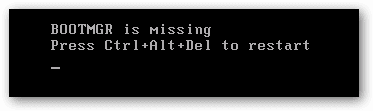
You may get this error while booting your computer.
1.png

   Information
This problem is not hardware related and can be fixed with a Windows 7 DVD OR a system repair disc.


Here's How:

NOTE: Sometimes it may take running a startup repair a few times before it fully fixes the startup issue.

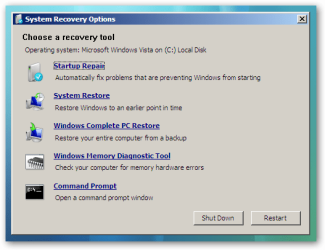
1. Boot to the System Recovery Options screen.

2. Select the Startup Repair option. (See screenshot below)
2.png
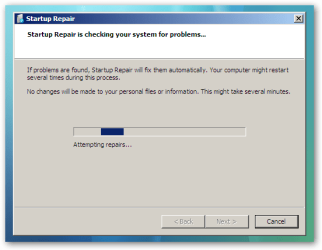
3. Now click on Startup Repair. Run the startup repair and it will attempt to fix this issue.
3.png
NOTE: It will ask you to reboot your system. Reboot to see if it works. If it doesn't work, follow step 4.


4. Click on Command Prompt.
A) Type c: and press <Enter>.

   Note
C:\ is the drive letter where Windows 7 is installed. You may replace it with whatever drive letter you want where you have installed Windows 7.


B) At the C:\ prompt, type cd boot and press <Enter>.

C) At the C:\Boot prompt, type the following commands and press Enter after each command.

Code:
[B]bootrec /FixMbr[/B]
[B]bootrec /FixBoot[/B]
[B]bootrec /RebuildBcd[/B]
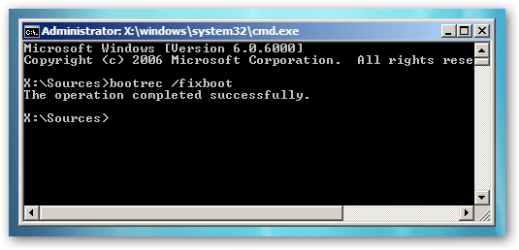
4.png

D) Now close the command prompt, remove the DVD and reboot your computer.
That's it,
Dinesh.


Last edited by a moderator:
bootrec not recognized

After getting back to c:boot. I had to go back 2 folders crom c:\users\funkyecat via (c..). tried to add the three itmes but 'bootrec' was not recognized.
 

My Computer

Computer Manufacturer/Model Number
HP p6520f
OS
Windows 7 Home Premium 64 bit
CPU
AMD Athlon II 625 Quad Core
Motherboard
RS880
Memory
6 gig DDR3
Graphics Card(s)
Integrated Radeon 4200
Sound Card
Integrated Realtek
Monitor(s) Displays
Sony
Hard Drives
1 Terrabyte
320 gigabyte
PSU
250 volt
Case
HP case
Cooling
Standard fans
Thanks, you just saved me from smashing my computer to tiny bits and buying a new one. I almost lost my job because of this error. I had an important event and ended up borrowing a computer installing virtual DJ in a hurry. You guys are life savers. Thank you so much.
 

My Computer

Computer Manufacturer/Model Number
Acer Aspire One/D270-1395
OS
Windows 7 Starter 32 bit
CPU
Intel Atom N2600 (1.6 Ghz, 1MV L2 cache)
Memory
1 GB DDR3
Hard Drives
320 GB HDD
Thanks, you just saved me from smashing my computer to tiny bits and buying a new one. I almost lost my job because of this error. I had an important event and ended up borrowing a computer installing virtual DJ in a hurry. You guys are life savers. Thank you so much.
Glad to know that :thumbsup:
 

My Computer

Computer Manufacturer/Model Number
Samsung NP530U4B-S02IN
OS
Windows® 8 Pro (64-bit)
CPU
Intel® Core™ i5 Processor 2467M (1.60GHz, 3MB L3 Cache)
Motherboard
Samsung Electronics
Memory
6GB DDR3 System Memory at 1,333MHz (on BD 4GB + 2GB x 1)
Graphics Card(s)
AMD Radeon™ HD7550M 1GB DDR3 (Ext. Graphic)
Sound Card
Realtek High Definition Audio
Monitor(s) Displays
35.56cm (14.0) SuperBright 300nit HD LED Display
Screen Resolution
1366x768
Hard Drives
1TB S-ATA II Hard Drive (5400RPM) with ExpressCache 16GB SSD
Internet Speed
sucks
Antivirus
Microsoft Security Essentials
Browser
Google Chrome (Sync enabled)
bootmanager missing

I tried the changes detailed by Dinesh .They all completed successfully but I was left with zero installations. Then I used another correction (somewhere in this thread but I cannot locate again) which was to change the installations from zero to one. Which l applied and it left me with a system which will load the repair disk , leaving me with a WINDOWS BOOT MANAGER titled screen which displays .
File: \Boot\BCD
Status: 0xc000000f
Info: an error occured while attempting to read the boot configuration data
ENTER=Continue ESC= Exit

so I ENTER and the system starts but returns me to the exact same screen every time.
I am now in deep trouble and will have to pay many dollars if you good people cannot successfully guide my hand.
 

My Computer

Computer Manufacturer/Model Number
emachines E528
OS
home premium 64bit
This has been fixed for months (Jan)
 

My Computer

Computer Manufacturer/Model Number
HP p6520f
OS
Windows 7 Home Premium 64 bit
CPU
AMD Athlon II 625 Quad Core
Motherboard
RS880
Memory
6 gig DDR3
Graphics Card(s)
Integrated Radeon 4200
Sound Card
Integrated Realtek
Monitor(s) Displays
Sony
Hard Drives
1 Terrabyte
320 gigabyte
PSU
250 volt
Case
HP case
Cooling
Standard fans
Thanks Funkyecat for your interest. However having read all the thread and tried as many of the fixes I could I am still stuck with the only screen available is the WINDOWS BOOT MANAGER and it leaves me two options, ENTER=Continue and ESC=Exit..
ENTER enables the F2 key which takes me to the SETUP screen which is fully functional but I presume is of no use at this time.
ESC returns me to the Windows Boot Manager screen which is where I started.
At power on I have tried all the F keys without success, ALT gets me to a screen showing BOOTMNGR is missing PressCTL,ALT,Del to restart which gives me the WINDOWS BOOT MANAGER which is where I started.
If there is a way to get to a screen where I can input commands I will appreciate any guidance.
Oh to remember my old DOS basics
If there is no way of getting to a screen where I can input commands then I will have to use the Boot or Nuke option which is at least less expensive than ACER offer.
 

My Computer

Computer Manufacturer/Model Number
emachines E528
OS
home premium 64bit
Is there no-one who can help me with this problem. .I am very disappointed. So it was fixed months ago but the fix didn't fix my problem
When and if I have to nuke my disk how do I start with a blank disk. I have never had the opportunity before.
Any help will be appreciated.
 

My Computer

Computer Manufacturer/Model Number
emachines E528
OS
home premium 64bit
Not sure why this method isn't working for you. I had tried this numerous times and has worked every time.
I'd suggest you to try again and follow each step.
 

My Computer

Computer Manufacturer/Model Number
Samsung NP530U4B-S02IN
OS
Windows® 8 Pro (64-bit)
CPU
Intel® Core™ i5 Processor 2467M (1.60GHz, 3MB L3 Cache)
Motherboard
Samsung Electronics
Memory
6GB DDR3 System Memory at 1,333MHz (on BD 4GB + 2GB x 1)
Graphics Card(s)
AMD Radeon™ HD7550M 1GB DDR3 (Ext. Graphic)
Sound Card
Realtek High Definition Audio
Monitor(s) Displays
35.56cm (14.0) SuperBright 300nit HD LED Display
Screen Resolution
1366x768
Hard Drives
1TB S-ATA II Hard Drive (5400RPM) with ExpressCache 16GB SSD
Internet Speed
sucks
Antivirus
Microsoft Security Essentials
Browser
Google Chrome (Sync enabled)
Thankyou for responding Dinesh,I appreciate your help. I did use your method and while it worked it left me with "0 installations' I tried a method from another thread (I cannot remember) which offered to change from '0 installations to '1' installation. Unfortunately this left me with BOOT MANAGER MISSING from which I could not recover. After multiple failed attempts to recover some magic combination of Repair disk and an old saved Windows Image I am now able to use my laptop. I now face a long and interesting task of bringing everything up to date. Again thanks to you and the forum for being there when needed.
 

My Computer

Computer Manufacturer/Model Number
emachines E528
OS
home premium 64bit
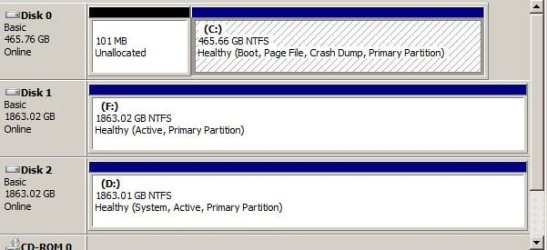
Will it work in my situation which is as follows:
I have three drives. Drive 0 is C drive, which has two partitions on it, one of which is unalocated and small. The other is healthy(Boot, Page file, crashdump, primary partition) shown in Disk Management. This boots windows, but only if my drive 2 is connected. Drive 2 shows healthy(System, Active, Primary Partition) Drive one is a clone of drive 0 created by Seagate Drive Wizard. How the system files get to be on one disk and the boot files on another I don't quite know.
If I remove drive 0 I get the missing MBR mesage.
Question: If I remove drive 0 should the solution shown above still work?
It is my main computer, and I have years of data on the drive that I do not wish to lose.
Looks to me that I need to get System and Boot onto drive 1, but I could be wrong.
neNPlsL52TwAAAABJRU5ErkJggg==
 

Attachments

  • Capture.JPG
    Capture.JPG
    43.6 KB · Views: 1,043
Last edited:

My Computer

OS
7 64
To me it looks like you cloned 0 to 2, unless you have windows on all 3 partitions. You can use EasyBCD to move bootmgr to D.
http://www.sevenforums.com/tutorials/209885-bootmgr-move-c-easybcd.html
You will move to D though not C. You want the new larger drive to boot and load Windows, right?

Then, set Boot Order in BIOS to Drive2. After booting into Windows large Drive will be C, and should be boot and system.
And after that mark drive 1 as inactive - http://www.sevenforums.com/tutorials/197157-partition-mark-inactive.html
 

My Computer

Computer type
PC/Desktop
Computer Manufacturer/Model Number
Custom Build
OS
Windows 7 Ultimate x64 SP1
CPU
AMD Phenom 2 1090T
Motherboard
Gigabyte GA-890FXA-UD5
Memory
2x8GB Kingston HyperX Fury Black 1600Mhz Unganged
Graphics Card(s)
MSI GTX 970 Gaming 4G
Sound Card
Realtek On-Board HD 7.1 Audio / Logitech G35
Monitor(s) Displays
3xAcer GD245HQ
Screen Resolution
1920x1080
Hard Drives
Samsung 850 Pro 512GB SSD - OS /
WD Caviar Black SATA 3 - 1 TBx2 - Dynamic RAID 0 /
WD Caviar Green SATA 2 - 640GBx2 - Dynamic RAID 0 /
WD Caviar Green SATA 2 - 640GB - Internal Backup /
Seagate Barracude SATA 3 - 3TB - External Backup/ Sync
PSU
HighPower 1000W
Case
Cooler Master HAF 932
Cooling
Noctua NH-D14
Keyboard
Logitech G19
Mouse
Logitech G500
Internet Speed
100/4 Mbit Cable (100GB quota)
Antivirus
ZoneAlarm Extreme Security / MBAM Pro / MBAE Free / SAS Free
Browser
IE 11 - Firefox - Chrome
Other Info
Logitech F710/ G27/ G940/ Z5500 // TrackIR 5 // Nvidia 3D Surround Vision
Hi All,

I dont have a compact disc to install again the OS that i had. That is w7 Ultimate x32.
I have a two desktop computer and in my other desktop the OS is not being recognized anymore and what I have done is I removed my hdd from the pc which is not working and I attached it to my other pc.

It is successfully discovered and installed.
So I formatted the d drive and just copy all the folders from my c drive and paste it on my d drive and after successfully transferred the files, I am now encountering the BOOTMGR is missing press/click ctrl+Alt+del to restart error.

how can I install again the OS ?
I dont have dvd or cd in my custom build pc/desktop.
would it be possible just to copy the BOOTMGR in my other desktop computer and have it paste in my other hdd which I formatted..

Please help! =(
 

My Computer

Computer type
PC/Desktop
Computer Manufacturer/Model Number
custom build
OS
Windows 7 Ultimate x32
Antivirus
Avira
Browser
Google chrome
I'm working on a friends sony vaio with this issue and I'm getting this error... (updating)

I found that the problem was that if the hard drive where you're reconstructing the MBR isn't listed in the BIOS Boot list (in the BIOS screens) then the RebuildBcd fails as happened with otakucho...you get that "Requested system device cannot be found message" Once I entered the drive that I wanted the MBR rebuilt on in the BIOS boot list, I could successfully do the RebuilBcd step.

I am also experience same prob. that otakucho has been facing. So i would like to know how to overcome this problem and how i can entered the drive and rebuild MBR in BIOS boot list?

- RKBladex
 

My Computer

Computer type
Laptop
Computer Manufacturer/Model Number
Dell XPS L502X
OS
Windows 7 Home Premium 64 bit
Please i have bootmgr is missing problem with my samsung np-n102sp,cannot even boot to recovery mode,Please what should i do?
 

My Computer

Computer type
Laptop
Computer Manufacturer/Model Number
Samsung np-n102sp
OS
windows 7 ultimate 32bit
CPU
1.60ghz
Memory
2 gb
Hard Drives
300 gb
Will i lost all my data after i fix after startup repair please help!!!!!!!!!!!!!!
 

My Computer

Computer type
PC/Desktop
OS
Windows 7 Home Premium 32bit.
Tried this and got blank screen

I went through all the above steps for my Win 7 installed on C drive. All the feedback was as show above and all seemed correct but when trying to reboot I get a blank screen with blinking cursor that just stays there. I can still boot to Windows by manual selection from the correct option list in the F11 menu.
 

My Computer

Computer type
Laptop
Computer Manufacturer/Model Number
Lenova
OS
Windows 7 Home 64 bit
Memory
8 megs
Antivirus
Avast
Browser
Firefox
Another of which I want to add is to remove any type of connected device either a removable storage drive.
 

My Computer

Computer type
Laptop
Computer Manufacturer/Model Number
HP
OS
Windows 7 Ultimate x64
CPU
AMD E-450 APU with Raedon(tm) HD Graphics (2 CPUs), ~1.6GHz
Motherboard
Hewlett-Packard
Memory
6 GB
Graphics Card(s)
AMD Raedon HD 6320 Graphics
Sound Card
High Definition Audio
Monitor(s) Displays
Monitor PnP Generic
Screen Resolution
1024 x 728 (32 bit) (60Hz)
Keyboard
HP Key
Mouse
Perfect Choice
Internet Speed
1 MB/S
Antivirus
Windows Defender
Browser
Google Chrome
Back
Top