Windows 7 Network and Sharing

HikerRemastered

Homo Geekius
You just have to love it!

I now finally have a use for The Olde Shuttle XPC in the living room. Now it's not just a big mess of switching the external harddrive back and forth between the two computers, but now the sharing options work, and I have to say they far exceed my expectations.

Sharing is made so much easier with the Homegroups, and it is a pure breeze setting it up.
 

My Computer

OS
Windows 7 build 7000 x86
CPU
Intel E6850
Motherboard
ASUS Maximus II Formula
Memory
4GB DDR2
Graphics Card(s)
XFX 8800GT 512
Sound Card
PCI-E X-Fi (Bundled with MB)
Monitor(s) Displays
SyncMaster 223BW
Screen Resolution
1680x1050
Hard Drives
Raptor 10k 150GB
Maxtor 300GB
WD 300GB
PSU
Chill Innovation 700W
Case
Cosmos 1000
Keyboard
G15 Gaming
Mouse
G9
Internet Speed
6/2Mbit
instead of starting a new thread, ill continue on in here..
network sharing in windows 7 can be rough to set up.
sharing on the homegroup is annoying aswell. i set things to share and they dont show up on other computers.
only thing i could do was jam files in the public folders which defeated my point of trying to share a folder directly.
i still cant manage to get this working. any ideas? :sleep:
 

My Computer

Computer Manufacturer/Model Number
Custom Build PC
OS
64bit Windows 7 Build 7201
CPU
Intel core i7 920 C0/C1 ~3.42GHz
Motherboard
ASUS P6T V2 Deluxe
Memory
3x2Gb Corsair Dominator DDR3 (8 8 8 24) ~1600MHz
Graphics Card(s)
ASUS EAH4870x2
Sound Card
Integrated SoundMAX 8.1
Monitor(s) Displays
Samsung SyncMaster T260
Screen Resolution
1920 x 1200
Hard Drives
-----RAID 0-----
1GB Seagate Barracuda
1GB WD Caviar Green
PSU
ANTEC CP-850
Case
ANTEC 1200
Cooling
Prolimatech MEGAHALEMS!!! w/ Delta & Coolermaster fan. ~MX2.
Keyboard
Logitech Keyboard
Mouse
Logitech G9
Internet Speed
6592kbps/448kbps
Other Info
nothing new
instead of starting a new thread, ill continue on in here..
network sharing in windows 7 can be rough to set up.
sharing on the homegroup is annoying aswell. i set things to share and they dont show up on other computers.
only thing i could do was jam files in the public folders which defeated my point of trying to share a folder directly.
i still cant manage to get this working. any ideas? :sleep:

DLG

If we knew more about your networking setup we could be more useful. First thing I would do is not use homegroup, instead use workgroup, diable IPv6 support in network and sharing, and own the folders you want to share. Lets us know if we can be of more help

Ken
 

My Computer

Computer Manufacturer/Model Number
HP Pavillion dv-7 1005 Tx
OS
Win 8 Release candidate 8400
CPU
[email protected]
Memory
4 gigs
Graphics Card(s)
Nvidia 9600M
Sound Card
HD built-in
Monitor(s) Displays
17" Wxga
Screen Resolution
1440x900
Cooling
none
Internet Speed
45Mb down 5Mb up
i dont really know what im doing with the network setup. sharing certain folders requires a homegroup set up, e.g public folders and the downloads folder cant even be shared anyway on its own unless by means of the homegroup which doesnt even work
 

My Computer

Computer Manufacturer/Model Number
Custom Build PC
OS
64bit Windows 7 Build 7201
CPU
Intel core i7 920 C0/C1 ~3.42GHz
Motherboard
ASUS P6T V2 Deluxe
Memory
3x2Gb Corsair Dominator DDR3 (8 8 8 24) ~1600MHz
Graphics Card(s)
ASUS EAH4870x2
Sound Card
Integrated SoundMAX 8.1
Monitor(s) Displays
Samsung SyncMaster T260
Screen Resolution
1920 x 1200
Hard Drives
-----RAID 0-----
1GB Seagate Barracuda
1GB WD Caviar Green
PSU
ANTEC CP-850
Case
ANTEC 1200
Cooling
Prolimatech MEGAHALEMS!!! w/ Delta & Coolermaster fan. ~MX2.
Keyboard
Logitech Keyboard
Mouse
Logitech G9
Internet Speed
6592kbps/448kbps
Other Info
nothing new
i dont really know what im doing with the network setup. sharing certain folders requires a homegroup set up, e.g public folders and the downloads folder cant even be shared anyway on its own unless by means of the homegroup which doesnt even work

Homegroup does tend to give certain users the fits. I ditched it after my own troubles and have been using workgroups since. sharing in workgroup is the same as it was in xp so its less problematic. aAre you the owner of the folders or were they moved from a previous hd?

Ken
 

My Computer

Computer Manufacturer/Model Number
HP Pavillion dv-7 1005 Tx
OS
Win 8 Release candidate 8400
CPU
[email protected]
Memory
4 gigs
Graphics Card(s)
Nvidia 9600M
Sound Card
HD built-in
Monitor(s) Displays
17" Wxga
Screen Resolution
1440x900
Cooling
none
Internet Speed
45Mb down 5Mb up
instead of starting a new thread, ill continue on in here..
network sharing in windows 7 can be rough to set up.
sharing on the homegroup is annoying aswell. i set things to share and they dont show up on other computers.
only thing i could do was jam files in the public folders which defeated my point of trying to share a folder directly.
i still cant manage to get this working. any ideas? :sleep:

DLG

If we knew more about your networking setup we could be more useful. First thing I would do is not use homegroup, instead use workgroup, diable IPv6 support in network and sharing, and own the folders you want to share. Lets us know if we can be of more help

Ken
any step by step procedure on how not to use homegroup anymore and instead use workgroup? how to disable IPv6 as well? sorry, totally newbie here.
 

My Computer

OS
Windows 7
instead of starting a new thread, ill continue on in here..
network sharing in windows 7 can be rough to set up.
sharing on the homegroup is annoying aswell. i set things to share and they dont show up on other computers.
only thing i could do was jam files in the public folders which defeated my point of trying to share a folder directly.
i still cant manage to get this working. any ideas? :sleep:

DLG

If we knew more about your networking setup we could be more useful. First thing I would do is not use homegroup, instead use workgroup, diable IPv6 support in network and sharing, and own the folders you want to share. Lets us know if we can be of more help

Ken
any step by step procedure on how not to use homegroup anymore and instead use workgroup? how to disable IPv6 as well? sorry, totally newbie here.

Boysputnik

before we go the route of trying to change you from homegroup to workgroup why dont you tell us about what the problem is.

ken
 

My Computer

Computer Manufacturer/Model Number
HP Pavillion dv-7 1005 Tx
OS
Win 8 Release candidate 8400
CPU
[email protected]
Memory
4 gigs
Graphics Card(s)
Nvidia 9600M
Sound Card
HD built-in
Monitor(s) Displays
17" Wxga
Screen Resolution
1440x900
Cooling
none
Internet Speed
45Mb down 5Mb up
I have same problem. In short, I have Ellion HMR-350 media player http://www.elliondigital.com/eng/350H_02.htm to home network. And 2 PCs in one workgroup and one subnet with media player connected via simple router.
One PC have Vista, the other one used to have XP and I had never any problems with sharing folders to media player from both PCs, until I installed Windows 7 Ultimate on one of PCs...
All sharing settings on Win7 PC same as on Vista PC, but I cannot access Win7 PC from Ellion browser, when i click on Win7 PC name in workgroup, User name and pass window pop up... When I enter user name (I don't have pass on Win7 PC) I got message - Log in failed.. Your help highly appreciated

P.S. shared folders are accessible between 2 PCs without problems.
 

My Computer

OS
Windows 7 Ultimate
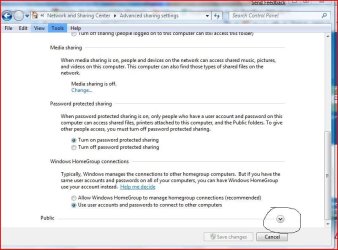
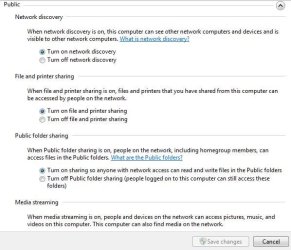
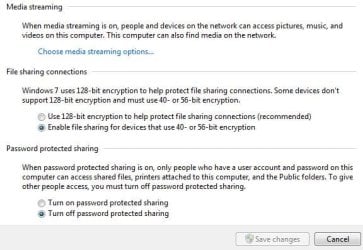
Make sure you have your permisions selected also click the public V thats circled for more permisions
advance2.JPG

advance.JPG
 

My Computer

Computer Manufacturer/Model Number
Gateway GT5692
OS
Windows 7 Ulti. x64
CPU
AMD Phenom 8450 triple-core 2.10 ghz
Memory
4GB
Graphics Card(s)
ATI Radion HD 3200
Monitor(s) Displays
Gateway FPD1775W
Screen Resolution
1280x720
Hard Drives
465.6613 Gibibytes
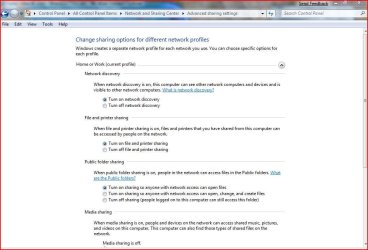
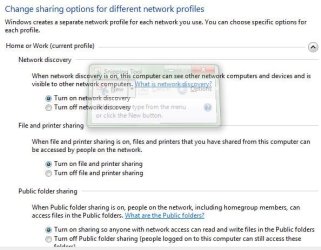
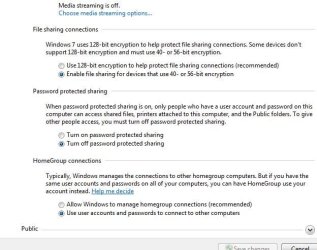
Yes, all permissions for both Private and Public profiles set up as on screen shots. Still logon failed.....
Here it is:

1.JPG

2.JPG

3.JPG

4.JPG
 

My Computer

OS
Windows 7 Ultimate

My Computer

Computer Manufacturer/Model Number
Gateway GT5692
OS
Windows 7 Ulti. x64
CPU
AMD Phenom 8450 triple-core 2.10 ghz
Memory
4GB
Graphics Card(s)
ATI Radion HD 3200
Monitor(s) Displays
Gateway FPD1775W
Screen Resolution
1280x720
Hard Drives
465.6613 Gibibytes
I found solution!! For thousands of those who have similar problems with different kind of streamers and media players, that cannot access shared folders on Windows 7 computers:

In the following paragraph, we use ‘MACHINE’ instead of ‘HKEY_LOCAL_MACHINE’.
First, click on “Start”. Type the command:
–>regedit
… and execute it.
Look for and modify these parameters as the following:
MACHINE\System\CurrentControlSet\Control\Lsa\
  1. On the right side find ‘everyoneincludesanonymous’; change the value to 1
  2. Find ‘NoLmHash’ and change the value to 0
MACHINE\System\CurrentControlSet\Services\LanManServer\Parameters à ‘restrictnullsessaccess’; change the value to 0
Close the registry editor and restart the computer.
 

My Computer

OS
Windows 7 Ultimate
I've been struggling with network shares for days, trying to configure a new Western Digital TV Live streamium device. The software that comes with the apparatus (WD Discovery) gives the following error: "no network share available". Looking for a clue to solve this problem I'v stumbled upon this thread (My OS is Windows 7). I cannot hower, edit my registry the way it is suggested: there is only a HKEY LOCAL MACHINE, no 'other' machine. 'So what do you mean by: we use ‘MACHINE’ instead of ‘HKEY_LOCAL_MACHINE’??
 

My Computer

OS
Windows 7 Home Premium
I wonder what you mean by <use ‘MACHINE’ instead of ‘HKEY_LOCAL_MACHINE’>, in the registry of Windows 7 there is no other machine than the Hkey Local Machine?
 

My Computer

OS
Windows 7 Home Premium
saving keystrokes

I think Machine is just shorthand for the full key name; not actual key name
 

My Computer

OS
windows 7, Vista, XP, Fedora10
Back
Top