Solved Cant convert to MBR because of this (100MB EFI System Partition)

RvB Vakama

New member
Member
Local time
10:12 AM
Messages
57
Hey guys, thank for any help you are able to supply...

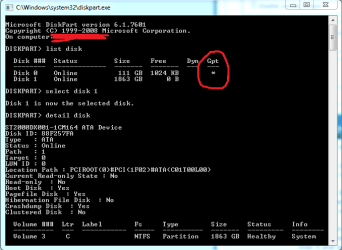
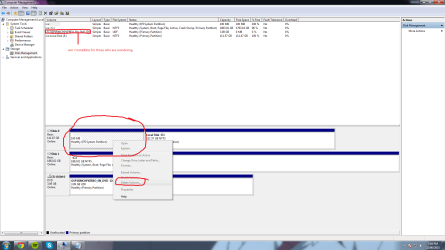
So I corrupted my windows 7 boot files when reinstall an antivirus and turned off my pc half way through install, anyway im trying to convert my gpt style ssd partition to a mbr so i can reinstall windows 7 on it. because for some reason i cannot install it on a gpt style. i have looked at so many guides on how to convert it and they would work if i did not have this silly 100MB EFI System Partition (see image attached). I want to just have my ssd Completely formatted to NTFS 4k allocation size MBR please.

also i tried deleting the partition with diskpart in cmd, but it just stops responding and crashes.

thanks for any help!
 

Attachments
  • Cant delete.png
    Cant delete.png
    54.3 KB · Views: 7

My Computer My Computer

At a glance

Windows 7 Home Premium SP1 64-Bit3.40 GHZ8 GB
Computer type
PC/Desktop
Computer Manufacturer/Model Number
Unknown
OS
Windows 7 Home Premium SP1 64-Bit
CPU
3.40 GHZ
Memory
8 GB

My Computer My Computer

At a glance

Vista, Windows7, Mint Mate, Zorin, Windows 8from 1.6GHz Duo to i7
Computer Manufacturer/Model Number
HP, Dell, Gateway, Toshiba - 4 laptops and 2 desktops
OS
Vista, Windows7, Mint Mate, Zorin, Windows 8
CPU
from 1.6GHz Duo to i7
Monitor(s) Displays
2x HP w2207
Hard Drives
5x HDD, 7x SSD, 12x Externals
Keyboard
with trackball - no mices
Mouse
Trackball mice
Internet Speed
DSL 6000
Since you have EFI BIOS, I guess you need to disable secure boot in BIOS to install windows 7?
 

My Computer My Computer

At a glance

Windows 7 Ultimate x64 SP1AMD Phenom 2 1090T2x8GB Kingston HyperX Fury Black 1600Mhz Unga...MSI GTX 970 Gaming 4G
Computer type
PC/Desktop
Computer Manufacturer/Model Number
Custom Build
OS
Windows 7 Ultimate x64 SP1
CPU
AMD Phenom 2 1090T
Motherboard
Gigabyte GA-890FXA-UD5
Memory
2x8GB Kingston HyperX Fury Black 1600Mhz Unganged
Graphics Card(s)
MSI GTX 970 Gaming 4G
Sound Card
Realtek On-Board HD 7.1 Audio / Logitech G35
Monitor(s) Displays
3xAcer GD245HQ
Screen Resolution
1920x1080
Hard Drives
Samsung 850 Pro 512GB SSD - OS /
WD Caviar Black SATA 3 - 1 TBx2 - Dynamic RAID 0 /
WD Caviar Green SATA 2 - 640GBx2 - Dynamic RAID 0 /
WD Caviar Green SATA 2 - 640GB - Internal Backup /
Seagate Barracude SATA 3 - 3TB - External Backup/ Sync
PSU
HighPower 1000W
Case
Cooler Master HAF 932
Cooling
Noctua NH-D14
Keyboard
Logitech G19
Mouse
Logitech G500
Internet Speed
100/4 Mbit Cable (100GB quota)
Antivirus
ZoneAlarm Extreme Security / MBAM Pro / MBAE Free / SAS Free
Browser
IE 11 - Firefox - Chrome
Other Info
Logitech F710/ G27/ G940/ Z5500 // TrackIR 5 // Nvidia 3D Surround Vision

My Computer My Computer

At a glance

Windows 7 Home Premium SP1 64-Bit3.40 GHZ8 GB
Computer type
PC/Desktop
Computer Manufacturer/Model Number
Unknown
OS
Windows 7 Home Premium SP1 64-Bit
CPU
3.40 GHZ
Memory
8 GB
Since you have EFI BIOS, I guess you need to disable secure boot in BIOS to install windows 7?

the drive that I want to reinstall on Had broken windows 7 which has since been formatted (E:\), the current working windows 7 I am using to post this is on my 2TB SSHD (C:\) why would turning off secure boot change anything on the formatted drive (E:\)
 

My Computer My Computer

At a glance

Windows 7 Home Premium SP1 64-Bit3.40 GHZ8 GB
Computer type
PC/Desktop
Computer Manufacturer/Model Number
Unknown
OS
Windows 7 Home Premium SP1 64-Bit
CPU
3.40 GHZ
Memory
8 GB
A couple of things come to mind that you should check:

You show 2 disks: Disk 0 is the problem disk. Disk 1 contains a Windows installation - you don't say what version of Windows is installed there. You should.

On an UEFI BIOS system, if you have any GPT formatted disks in the system then Windows 7 must be installed on a GPT disk. Any data drives can be either format (MBR or GPT), but the OS must be installed on a GPT disk in a mixed disk system. So we need to know if Disk 1 is a GPT disk also.

Since you already have an OS installed in your system (on Disk 1) it may be that it is using the EFI System partition on Disk 0, if Disk 0 was installed at the time the OS was installed on Disk 1. A quick test for that would be to disconnect Disk 0 and see if the OS on Disk 1 starts up.

To install Windows 7 on a GPT disk in a system that has a UEFI BIOS you must boot the install media in UEFI mode, usually using the Boot Menu and selecting the version from there. This is sometimes not possible when using the install DVD in some systems. In these cases you could create an install USB stick to make the installation in UEFI mode.
UEFI Bootable USB Flash Drive - Create in Windows
 

My Computer My Computer

At a glance

Windows 7 64 Bit Home Premium SP1i7-3820GSkill F3-14900CL9Q - 16GBEVGA GeForce GTX660 - Driver 352.86
Computer type
PC/Desktop
Computer Manufacturer/Model Number
Home Built - Jan 2013
OS
Windows 7 64 Bit Home Premium SP1
CPU
i7-3820
Motherboard
Asus P9X79-PRO - Bios 4608
Memory
GSkill F3-14900CL9Q - 16GB
Graphics Card(s)
EVGA GeForce GTX660 - Driver 352.86
Sound Card
On board Realtek ALC898
Monitor(s) Displays
Acer S271HL
Screen Resolution
1920 x 1080
Hard Drives
#1- Samsung 840 Pro Series
#2- Western Digital WD1002FAEX Sata3 Black
#3- Western Digital WD1002FAEX Sata3 Black
PSU
Corsair CMPSU-850TX-V2 - 850 watt (by Seasonic)
Case
Corsair Obsidian 550D
Cooling
Standard 3 120mm case fans, Cooler Master Hyper 212 EVO
Keyboard
MS KC-0405
Mouse
Intellimouse 5-button
Internet Speed
56 Mbits/Sec (on a good day)
Antivirus
Avast & Malwarebytes
Browser
Firefox
Other Info
Asus DVD - DRW-24B1ST 24X
A couple of things come to mind that you should check:

You show 2 disks: Disk 0 is the problem disk. Disk 1 contains a Windows installation - you don't say what version of Windows is installed there. You should.

On an UEFI BIOS system, if you have any GPT formatted disks in the system then Windows 7 must be installed on a GPT disk. Any data drives can be either format (MBR or GPT), but the OS must be installed on a GPT disk in a mixed disk system. So we need to know if Disk 1 is a GPT disk also.

Since you already have an OS installed in your system (on Disk 1) it may be that it is using the EFI System partition on Disk 0, if Disk 0 was installed at the time the OS was installed on Disk 1. A quick test for that would be to disconnect Disk 0 and see if the OS on Disk 1 starts up.

To install Windows 7 on a GPT disk in a system that has a UEFI BIOS you must boot the install media in UEFI mode, usually using the Boot Menu and selecting the version from there. This is sometimes not possible when using the install DVD in some systems. In these cases you could create an install USB stick to make the installation in UEFI mode.
UEFI Bootable USB Flash Drive - Create in Windows

are you saying that my windows 7 on disk 1 could be relying on the 100MB files on disk 0, i did not think that was possible in any case, plus when i installed windows 7 on disk 1 i did not have any other disk plugged in, so it cant be relying on the 100MB from disk 0. Also disk 1 is not gpt because when i list details in diskpark in cmd it says its not gpt.

PS this UEFI BIOS and all the other terminology you are using confuses me, how can i figure out if my pc matches what you are saying?
 

Attachments

  • Cant delete cmd.png
    Cant delete cmd.png
    12.7 KB · Views: 14

My Computer My Computer

At a glance

Windows 7 Home Premium SP1 64-Bit3.40 GHZ8 GB
Computer type
PC/Desktop
Computer Manufacturer/Model Number
Unknown
OS
Windows 7 Home Premium SP1 64-Bit
CPU
3.40 GHZ
Memory
8 GB
If you installed Windows 7 without any other disks attached then that should eliminate the EFI Partition possibility.
Just do a quick test: disconnect the power from Disk 0 and then see if Windows starts from Disk 1.

UEFI BIOS: When you go into your BIOS settings, can you use your mouse, or is it the legacy BIOS that could only use keyboard?
The new UEFI BIOS can use mouse control.
 

My Computer My Computer

At a glance

Windows 7 64 Bit Home Premium SP1i7-3820GSkill F3-14900CL9Q - 16GBEVGA GeForce GTX660 - Driver 352.86
Computer type
PC/Desktop
Computer Manufacturer/Model Number
Home Built - Jan 2013
OS
Windows 7 64 Bit Home Premium SP1
CPU
i7-3820
Motherboard
Asus P9X79-PRO - Bios 4608
Memory
GSkill F3-14900CL9Q - 16GB
Graphics Card(s)
EVGA GeForce GTX660 - Driver 352.86
Sound Card
On board Realtek ALC898
Monitor(s) Displays
Acer S271HL
Screen Resolution
1920 x 1080
Hard Drives
#1- Samsung 840 Pro Series
#2- Western Digital WD1002FAEX Sata3 Black
#3- Western Digital WD1002FAEX Sata3 Black
PSU
Corsair CMPSU-850TX-V2 - 850 watt (by Seasonic)
Case
Corsair Obsidian 550D
Cooling
Standard 3 120mm case fans, Cooler Master Hyper 212 EVO
Keyboard
MS KC-0405
Mouse
Intellimouse 5-button
Internet Speed
56 Mbits/Sec (on a good day)
Antivirus
Avast & Malwarebytes
Browser
Firefox
Other Info
Asus DVD - DRW-24B1ST 24X
I'm silly

If you installed Windows 7 without any other disks attached then that should eliminate the EFI Partition possibility.
Just do a quick test: disconnect the power from Disk 0 and then see if Windows starts from Disk 1.

UEFI BIOS: When you go into your BIOS settings, can you use your mouse, or is it the legacy BIOS that could only use keyboard?
The new UEFI BIOS can use mouse control.

ok i will try to disconnect disk 0 and boot, just to see if disk 1 is really not depending on disk 0
and my bois had keyboard and mouse control, i actually got the bot right here. wow im pretty dumb the box said like everything i need to know about my bois and motherboard (see image)
 

Attachments

  • im dumb.jpg
    im dumb.jpg
    89.6 KB · Views: 0

My Computer My Computer

At a glance

Windows 7 Home Premium SP1 64-Bit3.40 GHZ8 GB
Computer type
PC/Desktop
Computer Manufacturer/Model Number
Unknown
OS
Windows 7 Home Premium SP1 64-Bit
CPU
3.40 GHZ
Memory
8 GB
We've all been there once!
 

My Computer My Computer

At a glance

Windows 7 64 Bit Home Premium SP1i7-3820GSkill F3-14900CL9Q - 16GBEVGA GeForce GTX660 - Driver 352.86
Computer type
PC/Desktop
Computer Manufacturer/Model Number
Home Built - Jan 2013
OS
Windows 7 64 Bit Home Premium SP1
CPU
i7-3820
Motherboard
Asus P9X79-PRO - Bios 4608
Memory
GSkill F3-14900CL9Q - 16GB
Graphics Card(s)
EVGA GeForce GTX660 - Driver 352.86
Sound Card
On board Realtek ALC898
Monitor(s) Displays
Acer S271HL
Screen Resolution
1920 x 1080
Hard Drives
#1- Samsung 840 Pro Series
#2- Western Digital WD1002FAEX Sata3 Black
#3- Western Digital WD1002FAEX Sata3 Black
PSU
Corsair CMPSU-850TX-V2 - 850 watt (by Seasonic)
Case
Corsair Obsidian 550D
Cooling
Standard 3 120mm case fans, Cooler Master Hyper 212 EVO
Keyboard
MS KC-0405
Mouse
Intellimouse 5-button
Internet Speed
56 Mbits/Sec (on a good day)
Antivirus
Avast & Malwarebytes
Browser
Firefox
Other Info
Asus DVD - DRW-24B1ST 24X
Surprised?

We've all been there once!

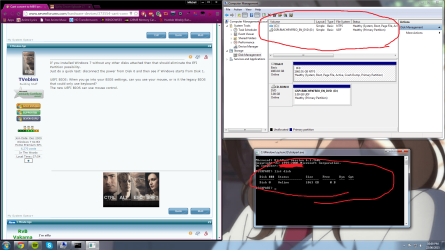
Hey so i took the drive out, and the result speak for themselves.

PS. are you surprised or did you expect this
 

Attachments

  • Proof that my hard disk works by its self screenshot.png
    Proof that my hard disk works by its self screenshot.png
    198.1 KB · Views: 9
  • Proof that my hard disk works by its self.jpg
    Proof that my hard disk works by its self.jpg
    18 KB · Views: 14

My Computer My Computer

At a glance

Windows 7 Home Premium SP1 64-Bit3.40 GHZ8 GB
Computer type
PC/Desktop
Computer Manufacturer/Model Number
Unknown
OS
Windows 7 Home Premium SP1 64-Bit
CPU
3.40 GHZ
Memory
8 GB
Not sure what you mean by "this" in "Did you expect this".
What were the results, exactly?
 

My Computer My Computer

At a glance

Windows 7 64 Bit Home Premium SP1i7-3820GSkill F3-14900CL9Q - 16GBEVGA GeForce GTX660 - Driver 352.86
Computer type
PC/Desktop
Computer Manufacturer/Model Number
Home Built - Jan 2013
OS
Windows 7 64 Bit Home Premium SP1
CPU
i7-3820
Motherboard
Asus P9X79-PRO - Bios 4608
Memory
GSkill F3-14900CL9Q - 16GB
Graphics Card(s)
EVGA GeForce GTX660 - Driver 352.86
Sound Card
On board Realtek ALC898
Monitor(s) Displays
Acer S271HL
Screen Resolution
1920 x 1080
Hard Drives
#1- Samsung 840 Pro Series
#2- Western Digital WD1002FAEX Sata3 Black
#3- Western Digital WD1002FAEX Sata3 Black
PSU
Corsair CMPSU-850TX-V2 - 850 watt (by Seasonic)
Case
Corsair Obsidian 550D
Cooling
Standard 3 120mm case fans, Cooler Master Hyper 212 EVO
Keyboard
MS KC-0405
Mouse
Intellimouse 5-button
Internet Speed
56 Mbits/Sec (on a good day)
Antivirus
Avast & Malwarebytes
Browser
Firefox
Other Info
Asus DVD - DRW-24B1ST 24X
Not sure what you mean by "this" in "Did you expect this".
What were the results, exactly?

oh sorry i though the pictures explained that, the results are when i took out my ssd disk 0, it put my disk 1 sshd to disk 0 and booted fine, so it was not relying on the files from the 100MB, in short it boots by its self
 

My Computer My Computer

At a glance

Windows 7 Home Premium SP1 64-Bit3.40 GHZ8 GB
Computer type
PC/Desktop
Computer Manufacturer/Model Number
Unknown
OS
Windows 7 Home Premium SP1 64-Bit
CPU
3.40 GHZ
Memory
8 GB
So what do you need to do next?
Do you still need to install Windows 7 on that (former) disk 0?
 

My Computer My Computer

At a glance

Windows 7 64 Bit Home Premium SP1i7-3820GSkill F3-14900CL9Q - 16GBEVGA GeForce GTX660 - Driver 352.86
Computer type
PC/Desktop
Computer Manufacturer/Model Number
Home Built - Jan 2013
OS
Windows 7 64 Bit Home Premium SP1
CPU
i7-3820
Motherboard
Asus P9X79-PRO - Bios 4608
Memory
GSkill F3-14900CL9Q - 16GB
Graphics Card(s)
EVGA GeForce GTX660 - Driver 352.86
Sound Card
On board Realtek ALC898
Monitor(s) Displays
Acer S271HL
Screen Resolution
1920 x 1080
Hard Drives
#1- Samsung 840 Pro Series
#2- Western Digital WD1002FAEX Sata3 Black
#3- Western Digital WD1002FAEX Sata3 Black
PSU
Corsair CMPSU-850TX-V2 - 850 watt (by Seasonic)
Case
Corsair Obsidian 550D
Cooling
Standard 3 120mm case fans, Cooler Master Hyper 212 EVO
Keyboard
MS KC-0405
Mouse
Intellimouse 5-button
Internet Speed
56 Mbits/Sec (on a good day)
Antivirus
Avast & Malwarebytes
Browser
Firefox
Other Info
Asus DVD - DRW-24B1ST 24X
So what do you need to do next?
Do you still need to install Windows 7 on that (former) disk 0?

i need to install windows 7 on the ssd, but my understanding is that my current hardware/setup does not allow for installation on a GPT partition style, so i need to convert the ssd form GPT to MBR so that i can install windows 7, but i cannot do so unless the 100MB thing is gone... are we on the same page?

ps. thanks for all the help, this is why i love these forums, because they have people like you willing to help!

ps. in short, yes on that former disk 0 i want windows 7
 

My Computer My Computer

At a glance

Windows 7 Home Premium SP1 64-Bit3.40 GHZ8 GB
Computer type
PC/Desktop
Computer Manufacturer/Model Number
Unknown
OS
Windows 7 Home Premium SP1 64-Bit
CPU
3.40 GHZ
Memory
8 GB
A couple of things you can try:

You could reconnect the SSD (former Disk 0), then disconnect the Disk 1 that has Windows already on it, then boot using a Partition Wizard boot CD, and then delete the partitions (including the EFI Partition), then Covert the disk MBR.

Or, you could use Diskpart to run a CLEAN or CLEAN ALL command on the SSD. I'm not sure, but I believe the CLEAN command will delete the file table but still leave the disk formatted GPT. The CLEAN ALL command will wipe the entire disk and it will be unallocated and ready to initialize MBR.
http://www.sevenforums.com/tutorials/52129-disk-clean-clean-all-diskpart-command.html

Are you planning on removing the old Windows installation after the install on SSD?
I assume you want to do a clean install for a reason, rather than cloning your current installation to the SSD?

If doing a clean install, be sure to disconnect that other hard drive before starting.
 

My Computer My Computer

At a glance

Windows 7 64 Bit Home Premium SP1i7-3820GSkill F3-14900CL9Q - 16GBEVGA GeForce GTX660 - Driver 352.86
Computer type
PC/Desktop
Computer Manufacturer/Model Number
Home Built - Jan 2013
OS
Windows 7 64 Bit Home Premium SP1
CPU
i7-3820
Motherboard
Asus P9X79-PRO - Bios 4608
Memory
GSkill F3-14900CL9Q - 16GB
Graphics Card(s)
EVGA GeForce GTX660 - Driver 352.86
Sound Card
On board Realtek ALC898
Monitor(s) Displays
Acer S271HL
Screen Resolution
1920 x 1080
Hard Drives
#1- Samsung 840 Pro Series
#2- Western Digital WD1002FAEX Sata3 Black
#3- Western Digital WD1002FAEX Sata3 Black
PSU
Corsair CMPSU-850TX-V2 - 850 watt (by Seasonic)
Case
Corsair Obsidian 550D
Cooling
Standard 3 120mm case fans, Cooler Master Hyper 212 EVO
Keyboard
MS KC-0405
Mouse
Intellimouse 5-button
Internet Speed
56 Mbits/Sec (on a good day)
Antivirus
Avast & Malwarebytes
Browser
Firefox
Other Info
Asus DVD - DRW-24B1ST 24X
A couple of things you can try:

You could reconnect the SSD (former Disk 0), then disconnect the Disk 1 that has Windows already on it, then boot using a Partition Wizard boot CD, and then delete the partitions (including the EFI Partition), then Covert the disk MBR.

Or, you could use Diskpart to run a CLEAN or CLEAN ALL command on the SSD. I'm not sure, but I believe the CLEAN command will delete the file table but still leave the disk formatted GPT. The CLEAN ALL command will wipe the entire disk and it will be unallocated and ready to initialize MBR.
http://www.sevenforums.com/tutorials/52129-disk-clean-clean-all-diskpart-command.html

Are you planning on removing the old Windows installation after the install on SSD?
I assume you want to do a clean install for a reason, rather than cloning your current installation to the SSD?

If doing a clean install, be sure to disconnect that other hard drive before starting.

ok ill try the diskpart cleaning one, if unsuccessful ill try the other, and yes i could just leave windows 7 on my sshd but then i feel like my ssd would have no job really, other than just 128GB of fast storage, plus i have a third hdd that has a lot of important files and i only have 2 hdd/sdd/sshd racks so i can only have the ssd with windows 7 (after installing it) and the important files hdd

ps. thanks for all your help, will marked as solved when i successfully boot into windows 7 on my ssd!
 

My Computer My Computer

At a glance

Windows 7 Home Premium SP1 64-Bit3.40 GHZ8 GB
Computer type
PC/Desktop
Computer Manufacturer/Model Number
Unknown
OS
Windows 7 Home Premium SP1 64-Bit
CPU
3.40 GHZ
Memory
8 GB
Clean All is not such a good idea for a SSD. It would write zeros on the whole SSD which would significantly degrade future write operations. I would suggest to go with a Secure Erase instead.

How to securely erase an SSD drive - CNET
 

My Computer My Computer

At a glance

Vista, Windows7, Mint Mate, Zorin, Windows 8from 1.6GHz Duo to i7
Computer Manufacturer/Model Number
HP, Dell, Gateway, Toshiba - 4 laptops and 2 desktops
OS
Vista, Windows7, Mint Mate, Zorin, Windows 8
CPU
from 1.6GHz Duo to i7
Monitor(s) Displays
2x HP w2207
Hard Drives
5x HDD, 7x SSD, 12x Externals
Keyboard
with trackball - no mices
Mouse
Trackball mice
Internet Speed
DSL 6000
It worked!!!

A couple of things you can try:

You could reconnect the SSD (former Disk 0), then disconnect the Disk 1 that has Windows already on it, then boot using a Partition Wizard boot CD, and then delete the partitions (including the EFI Partition), then Covert the disk MBR.

Or, you could use Diskpart to run a CLEAN or CLEAN ALL command on the SSD. I'm not sure, but I believe the CLEAN command will delete the file table but still leave the disk formatted GPT. The CLEAN ALL command will wipe the entire disk and it will be unallocated and ready to initialize MBR.
http://www.sevenforums.com/tutorials/52129-disk-clean-clean-all-diskpart-command.html

Are you planning on removing the old Windows installation after the install on SSD?
I assume you want to do a clean install for a reason, rather than cloning your current installation to the SSD?

If doing a clean install, be sure to disconnect that other hard drive before starting.

Hey so I actually went with the 1st option you provided and put "MiniTool Partition Wizard Free Edition 9" on a usb, then after 2 failed boots from the usb it finally worked, so now I was in the program (its pretty cool how it was built of TinyCore a linux distro) and guess what, the program picked up another partition that windows did not even see, a 128MB with 38MB written to it, I cant remember what format the partition was, but "thats weird" I thought, so I selected all of the partitions and hit delete then apply, that made the whole ssd 1 unallocated partition waiting to be formatted. so I did format it, but it reverted to GPT automatically, then after some investigation I found the GPT to MBR conversion button. hit that, then apply. poof done, went on to install windows 7 without error then GUESS WHAT!, my pc rebooted and went to the install cd instead of the SSD, I though "what?" so I went to install again to see what would happen and it told me that windows could not be installed on a MBR STYLE PARTITION...THAT ONLY GPT WAS SUPPORTED FOR UFI OR SOME SHIT, I WAS LIKE... WWWTTTTTTFFFFFF!!!!! but instead I rebooted and set the boot order to the SSD and all was fine, here I am now writing this.

PS. THANK YOU TVeblen for dedicating some of your time to help me, I greatly appreciated it!
 

My Computer My Computer

At a glance

Windows 7 Home Premium SP1 64-Bit3.40 GHZ8 GB
Computer type
PC/Desktop
Computer Manufacturer/Model Number
Unknown
OS
Windows 7 Home Premium SP1 64-Bit
CPU
3.40 GHZ
Memory
8 GB
1. If you have had a working Windows Installation, you could have simply run Partition Wizard installed in it. ( No need for creating a bootable PW pen drive)

2. The 128MB partition is the MSR partition on a GPT drive created by Windows. Windows Disk Management will always hide it from the users so that users cannot meddle with it. Partition Wizard and other partitioning software can see it.
 

My Computer My Computer

At a glance

Windows 7 Home Premium 32 bit
OS
Windows 7 Home Premium 32 bit
Back
Top