
SFC /SCANNOW Command - System File Checker

How to Repair Windows 7 System Files with System File Checker


   Information
The sfc /scannow command (System File Checker) scans the integrity of all protected Windows 7 system files and replaces incorrect corrupted, changed/modified, or damaged versions with the correct versions if possible.

   Tip
If you get the Windows Resource Protection Could Not Start the Repair Service error when trying to run SFC, then make sure that the Windows Modules Installer service is enabled, click on Start, and set to Manual.

Services - Start or Disable

OR

Copy and paste the command below in the elevated command prompt, and press Enter. After the Windows Modules Installer service has started, try running the SFC command again

net start trustedinstaller

   Note
The KB3022345, KB3035583, and KB3068708 updates will cause SFC to give you a false mismatch message in SFC for files related to these updates.

You can safely ignore these results in your SFC details since it will not affect SFC from being able to repair other system files.

   Warning
Be aware that if you have modified your system files as in theming explorer/system files, running sfc /scannow will revert the system files such as explorer.exe back to it's default state. Make the appropriate backups of your system files that you have modified for theming if you wish to save them before running sfc /scannow.


:note: For the updated Windows 10 tutorial, please see - SFC Command - Run in Windows 10 - Windows 10 Tutorials

CONTENTS:
  • Option One: To Run the SFC /SCANNOW Command at Boot
  • Option Two: To Run the SFC /SCANNOW Command in Windows 7
  • Option Three: How to See and Read Only the "SFC" Scan Results from the CBS.LOG


OPTION ONE

To Run the SFC /SCANNOW Command at Boot


1. For how, see METHOD TWO at this link: SFC /SCANNOW : Run in Command Prompt at Boot

   Note
Using OPTION TWO below is recommended if able.

If you would like to get help with your SFC issue, then be sure to upload and attach your sfcdetails.txt file from OPTION THREE below in your post.


OPTION TWO

To Run the SFC /SCANNOW Command in Windows 7


1. Open an elevated command prompt or an elevated PowerShell, and do step 2 or 3 below for what type of scan you would like to run.


2. To Scan and Repair System Files
NOTE: Scans the integrity of all protected system files and repairs the system files if needed. Please see red WARNING box at the top of this tutorial.
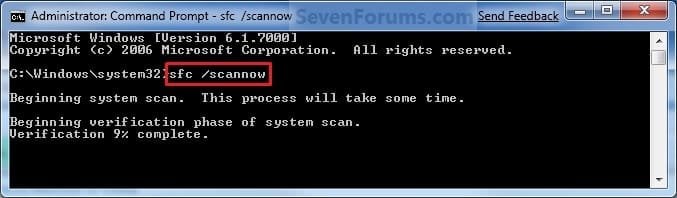
A) In the elevated command prompt, type sfc /scannow, press Enter, and go to step 4 below. (see screenshot below)
NOTE: This may take a little bit to finish.
Command-1.jpg
3. To Only Verify if the System Files are Corrupted
NOTE: Scans and only verifies the integrity of all proteced system files only. This command will not change your system files as in the red WARNING box at the top of this tutorial.
A) In the elevated command prompt, type sfc /verifyonly, press Enter, and go to step 4 below.
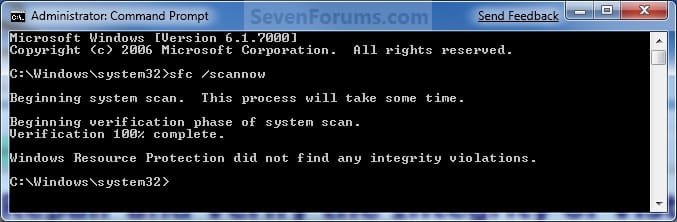
4. When the scan is complete, hopefully you will see all is ok like the screenshot below.

   Note

  • If SFC could not fix something, then run the command again to see if it may be able to the next time. Sometimes it may take running the sfc /scannow command 3 or more times to completely fix everything that it's able to.
  • If not, then download and run the 32-bit (x86) or 64-bit (x64) System Update Readiness Tool for your same installed 32-bit or 64-bit Windows 7, restart the PC afterwards, and try the sfc /scannow command again.
  • If still not, then try using OPTION ONE above to run the sfc /scannow command at boot.
  • If still not, then you can attempt to run a System Restore using a restore point dated before the bad file occured to fix it. You may need to repeat doing a System Restore until you find a older restore point that may work.
  • If still not, then you can use the steps in the TIP box in the OPTION THREE section below to manually replace the files that SFC could not fix if there are not to many fix.
  • If there are to many files to manually fix, or you prefer not to use OPTION THREE below, then you could do a repair install without losing anything.
If you would like to get help with your SFC issue, then be sure to upload and attach your sfcdetails.txt file from OPTION THREE below in your post.


Finished.jpg
5. When done, close the elevated command prompt.


OPTION THREE

How to See and Read Only the "SFC" Scan Results from the CBS.LOG


   Note
When SFC runs, it logs it's actions into the C:\Windows\Logs\CBS\CBS.log. The steps in this option will show you how to see only the specific SFC entries with the [SR] tags in this CBS.log. This can be helpful to show you what files SFC could not fix automatically if you wanted to try and manually replace them.

1. Open an "elevated command prompt" (right click -> Run as administrator).

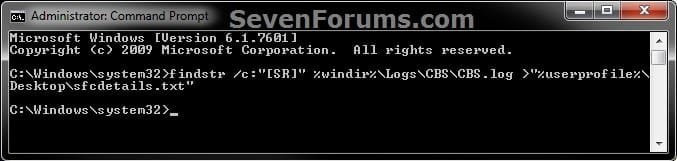
2. In the elevated command prompt, copy and paste the command below, and press Enter. (See screenshot below)
NOTE: This will place a sfcdetails.txt file on your desktop with only the SFC scan result details from the CBS.LOG in it.
Code:
findstr /c:"[SR]" %windir%\Logs\CBS\CBS.log >"%userprofile%\Desktop\sfcdetails.txt"
sfcdetails.jpg
3. Close the elevated command prompt.

4. Open the sfcdetails.txt file on your desktop to see the SFC scan details in the CBS.LOG.

5. You can safely delete the sfcdetails.txt file afterwards if you like.
   Tip
If you need to replace a corrupted system file that SFC cannot fix, then this will show you how to by extracting a new copy directly from your Windows 7 installation DVD.

Extract Files from Windows 7 Installation DVD


That's it,
Shawn


Last edited:

My Computer My Computer

Computer type
PC/Desktop
Computer Manufacturer/Model Number
Self Built
OS
Win 10 Pro x64
CPU
Intel I5-2500K @3.3GHz
Motherboard
Asrock P67 Extreme4
Memory
16GB G.Skill Ripjaws X (4x4GB)
Graphics Card(s)
EVGA GeForce 750 Ti SC 2GB
Sound Card
ASUS Xonar DG 5.1 Channels 24-bit 96KHz PCI Interface Sound
Monitor(s) Displays
auria eq2367
Screen Resolution
1920 x 1080
Hard Drives
250GB Samsung 850 EVO SSD
1TB WD Blue
1TB Hitachi
PSU
SeaSonic X 650W 80 Plus Gold
Case
Corsair Obsidian 750D
Cooling
Corsair H60, Three 140mm case fans
Keyboard
Logitech Wireless Keyboard K520
Mouse
Logitech Wireless Mouse M310
Internet Speed
Wave Broadband ~ 100 dn 5 up
Antivirus
Windows Defender, Malwarebytes Premium
Browser
Edge, IE11, Chrome
Other Info
Laptop specs: HP g7-1365dx /
CPU: AMD A6-3420M APU with Radeon(tm) HD Graphics /
RAM: Crucial 8Gb (2x4Gb) /
SSD: Crucial M4-CT128M4SSD2 ATA Device/ FW 000F /
GFX: AMD Radeon HD 6520G /
OS: Windows 10 Pro x64
Wow, why did I go through that long cmd entry!!!? Thanks that worked. Although now I have 5.63MB of pages to look at that I have no idea what they are. Ask and you shall receive. On to my next problems and tasks. Thanks again.
 

My Computer My Computer

Computer type
PC/Desktop
Computer Manufacturer/Model Number
Custom
OS
W7 Pro 64
CPU
Ryzen 1500X
Motherboard
Gigabyte AX370 - Gaming
Memory
G Skill 2400 - 8GB
Graphics Card(s)
HD 6450
Sound Card
Realtek onboard
Monitor(s) Displays
Dell 19 square, Dell 17 square, Dell 15 square, Element 24
Hard Drives
Samsung 970 nvme 120 GB, WD 1TB 7200
Keyboard
MS ERGO 4000 mostly
Mouse
Dell standard optical
Internet Speed
15 Mbps
Antivirus
AVG, MS firewall
Browser
firefox mostly

My Computer My Computer

Computer type
PC/Desktop
Computer Manufacturer/Model Number
Self Built
OS
Win 10 Pro x64
CPU
Intel I5-2500K @3.3GHz
Motherboard
Asrock P67 Extreme4
Memory
16GB G.Skill Ripjaws X (4x4GB)
Graphics Card(s)
EVGA GeForce 750 Ti SC 2GB
Sound Card
ASUS Xonar DG 5.1 Channels 24-bit 96KHz PCI Interface Sound
Monitor(s) Displays
auria eq2367
Screen Resolution
1920 x 1080
Hard Drives
250GB Samsung 850 EVO SSD
1TB WD Blue
1TB Hitachi
PSU
SeaSonic X 650W 80 Plus Gold
Case
Corsair Obsidian 750D
Cooling
Corsair H60, Three 140mm case fans
Keyboard
Logitech Wireless Keyboard K520
Mouse
Logitech Wireless Mouse M310
Internet Speed
Wave Broadband ~ 100 dn 5 up
Antivirus
Windows Defender, Malwarebytes Premium
Browser
Edge, IE11, Chrome
Other Info
Laptop specs: HP g7-1365dx /
CPU: AMD A6-3420M APU with Radeon(tm) HD Graphics /
RAM: Crucial 8Gb (2x4Gb) /
SSD: Crucial M4-CT128M4SSD2 ATA Device/ FW 000F /
GFX: AMD Radeon HD 6520G /
OS: Windows 10 Pro x64
Wow, why did I go through that long cmd entry!!!? Thanks that worked. Although now I have 5.63MB of pages to look at that I have no idea what they are. Ask and you shall receive. On to my next problems and tasks. Thanks again.

That would be why. OPTION THREE for the sfcdetails.txt will only show you the results of the SFC command and nothing else.

If you like, you can copy and paste the command. :)
 

My Computer My Computer

Computer type
PC/Desktop
Computer Manufacturer/Model Number
Self built custom
OS
64-bit Windows 11 Pro for Workstations
CPU
Intel i7-8700K OC'd to 5 GHz
Motherboard
ASUS ROG Maximus XI Formula Z390
Memory
64 GB (4x16GB) G.SKILL TridentZ RGB DDR4 3600 MHz
Graphics Card(s)
ASUS ROG-STRIX-GTX1080TI-O11G-GAMING
Sound Card
Integrated
Monitor(s) Displays
2 x Samsung Odyssey G7 27"
Screen Resolution
2560x1440
Hard Drives
1TB Samsung 990 PRO M.2,
4TB Samsung 990 PRO PRO M.2,
TerraMaster F8 SSD Plus NAS
PSU
Seasonic Prime Titanium 850W
Case
Thermaltake Core P3
Cooling
Corsair Hydro H115i
Keyboard
Logitech wireless K800
Mouse
Logitech MX Master 4
Internet Speed
2 Gb/s Download and 100 Mb/s Upload
Antivirus
Malwarebyte Anti-Malware Premium
Browser
Google Chrome
Other Info
Logitech Z625 speaker system,
Logitech BRIO 4K Pro webcam,
HP Color LaserJet Pro MFP M477fdn,
APC SMART-UPS RT 1000 XL - SURT1000XLI,
Galaxy S23 Plus phone
Hi
Is there a utility that gets a list of corrupted files from sfc and export it to another file and use some utility on similar ok system using that list of corrupted files copy ok files from donar system and the using some utility install them in affected system..

Or any script?

I hope power shell can do it.. ?

Or some other program that just extracts list of corrupted files from Windows sfc result and and restore it from Windows DVD etc?
 

My Computer My Computer

Computer type
PC/Desktop
OS
Windows 7 32 Bit
Hello bhar,

Not that I'm aware of other than using OPTION THREE, and use the troubleshooting steps in the blue note box at the bottom of OPTION TWO. :(
 

My Computer My Computer

Computer type
PC/Desktop
Computer Manufacturer/Model Number
Self built custom
OS
64-bit Windows 11 Pro for Workstations
CPU
Intel i7-8700K OC'd to 5 GHz
Motherboard
ASUS ROG Maximus XI Formula Z390
Memory
64 GB (4x16GB) G.SKILL TridentZ RGB DDR4 3600 MHz
Graphics Card(s)
ASUS ROG-STRIX-GTX1080TI-O11G-GAMING
Sound Card
Integrated
Monitor(s) Displays
2 x Samsung Odyssey G7 27"
Screen Resolution
2560x1440
Hard Drives
1TB Samsung 990 PRO M.2,
4TB Samsung 990 PRO PRO M.2,
TerraMaster F8 SSD Plus NAS
PSU
Seasonic Prime Titanium 850W
Case
Thermaltake Core P3
Cooling
Corsair Hydro H115i
Keyboard
Logitech wireless K800
Mouse
Logitech MX Master 4
Internet Speed
2 Gb/s Download and 100 Mb/s Upload
Antivirus
Malwarebyte Anti-Malware Premium
Browser
Google Chrome
Other Info
Logitech Z625 speaker system,
Logitech BRIO 4K Pro webcam,
HP Color LaserJet Pro MFP M477fdn,
APC SMART-UPS RT 1000 XL - SURT1000XLI,
Galaxy S23 Plus phone
Hi Brink
i'm running windows 7 PRO x64 on asus n46vm
I ran sfxlc 5 times and keeps showing unfixed problems
Could you help me?
 

My Computer My Computer

Computer type
Laptop
OS
Windows 7 Home Basic 64bits
Hello cyberlan, and welcome to Seven Forums. :)

Did you modify your log on screen? If so, that would account for most of the hash mismatches found below by SFC.

Code:
CSI    00000339 [SR] Cannot repair member file [l:24{12}]"%userprofile%\Desktop" of Microsoft-Windows-Setup-Navigation-Wizard-Framework, Version = 6.1.7601.17514, pA = PROCESSOR_ARCHITECTURE_AMD64 (9), Culture neutral, VersionScope = 1 nonSxS, PublicKeyToken = {l:8 b:31bf3856ad364e35}, Type neutral, TypeName neutral, PublicKey neutral in the store, hash mismatch
2015-10-16 21:06:31, Info                  CSI    0000033b [SR] Cannot repair member file [l:28{14}]"background.bmp" of Setup-UXWizard-ClientImages, Version = 6.1.7600.16385, pA = PROCESSOR_ARCHITECTURE_AMD64 (9), Culture neutral, VersionScope = 1 nonSxS, PublicKeyToken = {l:8 b:31bf3856ad364e35}, Type neutral, TypeName neutral, PublicKey neutral in the store, hash mismatch
2015-10-16 21:06:31, Info                  CSI    0000033d [SR] Cannot repair member file [l:24{12}]"spwizimg.dll" of Microsoft-Windows-Setup-Navigation-Wizard-Framework, Version = 6.1.7601.17514, pA = PROCESSOR_ARCHITECTURE_INTEL (0), Culture neutral, VersionScope = 1 nonSxS, PublicKeyToken = {l:8 b:31bf3856ad364e35}, Type neutral, TypeName neutral, PublicKey neutral in the store, hash mismatch
2015-10-16 21:06:31, Info                  CSI    0000033f [SR] Cannot repair member file [l:24{12}]"spwizimg.dll" of Microsoft-Windows-Setup-Navigation-Wizard-Framework, Version = 6.1.7601.17514, pA = PROCESSOR_ARCHITECTURE_AMD64 (9), Culture neutral, VersionScope = 1 nonSxS, PublicKeyToken = {l:8 b:31bf3856ad364e35}, Type neutral, TypeName neutral, PublicKey neutral in the store, hash mismatch
2015-10-16 21:06:31, Info                  CSI    00000340 [SR] This component was referenced by [l:202{101}]"Microsoft-Windows-Foundation-Package~31bf3856ad364e35~amd64~~6.1.7601.17514.WindowsFoundationDelivery"
2015-10-16 21:06:31, Info                  CSI    00000343 [SR] Could not reproject corrupted file [ml:520{260},l:46{23}]"\??\C:\Windows\System32"\[l:24{12}]"spwizimg.dll"; source file in store is also corrupted
2015-10-16 21:06:31, Info                  CSI    00000345 [SR] Cannot repair member file [l:24{12}]"spwizimg.dll" of Microsoft-Windows-Setup-Navigation-Wizard-Framework, Version = 6.1.7601.17514, pA = PROCESSOR_ARCHITECTURE_INTEL (0), Culture neutral, VersionScope = 1 nonSxS, PublicKeyToken = {l:8 b:31bf3856ad364e35}, Type neutral, TypeName neutral, PublicKey neutral in the store, hash mismatch
2015-10-16 21:06:31, Info                  CSI    00000346 [SR] This component was referenced by [l:202{101}]"Microsoft-Windows-Foundation-Package~31bf3856ad364e35~amd64~~6.1.7601.17514.WindowsFoundationDelivery"
2015-10-16 21:06:31, Info                  CSI    00000349 [SR] Could not reproject corrupted file [ml:48{24},l:46{23}]"\??\C:\Windows\SysWOW64"\[l:24{12}]"spwizimg.dll"; source file in store is also corrupted
2015-10-16 21:06:31, Info                  CSI    0000034b [SR] Cannot repair member file [l:28{14}]"background.bmp" of Setup-UXWizard-ClientImages, Version = 6.1.7600.16385, pA = PROCESSOR_ARCHITECTURE_AMD64 (9), Culture neutral, VersionScope = 1 nonSxS, PublicKeyToken = {l:8 b:31bf3856ad364e35}, Type neutral, TypeName neutral, PublicKey neutral in the store, hash mismatch
2015-10-16 21:06:31, Info                  CSI    0000034c [SR] This component was referenced by [l:242{121}]"Microsoft-Windows-Client-Features-Package~31bf3856ad364e35~amd64~~6.1.7601.17514.Microsoft-Windows-Client-Features-Update"
2015-10-16 21:06:31, Info                  CSI    0000034f [SR] Could not reproject corrupted file [ml:520{260},l:56{28}]"\??\C:\Windows\System32\oobe"\[l:28{14}]"background.bmp"; source file in store is also corrupted
2015-10-16 21:06:31, Info                  CSI    00000351 [SR] Repair complete
 

My Computer My Computer

Computer type
PC/Desktop
Computer Manufacturer/Model Number
Self built custom
OS
64-bit Windows 11 Pro for Workstations
CPU
Intel i7-8700K OC'd to 5 GHz
Motherboard
ASUS ROG Maximus XI Formula Z390
Memory
64 GB (4x16GB) G.SKILL TridentZ RGB DDR4 3600 MHz
Graphics Card(s)
ASUS ROG-STRIX-GTX1080TI-O11G-GAMING
Sound Card
Integrated
Monitor(s) Displays
2 x Samsung Odyssey G7 27"
Screen Resolution
2560x1440
Hard Drives
1TB Samsung 990 PRO M.2,
4TB Samsung 990 PRO PRO M.2,
TerraMaster F8 SSD Plus NAS
PSU
Seasonic Prime Titanium 850W
Case
Thermaltake Core P3
Cooling
Corsair Hydro H115i
Keyboard
Logitech wireless K800
Mouse
Logitech MX Master 4
Internet Speed
2 Gb/s Download and 100 Mb/s Upload
Antivirus
Malwarebyte Anti-Malware Premium
Browser
Google Chrome
Other Info
Logitech Z625 speaker system,
Logitech BRIO 4K Pro webcam,
HP Color LaserJet Pro MFP M477fdn,
APC SMART-UPS RT 1000 XL - SURT1000XLI,
Galaxy S23 Plus phone
XXXL CBS Logs Folder

I apologize in advance if I missed the answer to this somewhere in this thread, but the thread is very long! My C:\Windows\Logs\CBS folder is 112 GB :shock:!! There are 22 CbsPersist_timestamp.log files ranging from 15MB to 30.5GB. I have run sfc /verifyonly and get no integrity violations.

The output from running
Code:
findstr /c:"[SR]" %windir%\Logs\CBS\CBS.log >"%userprofile%\Desktop\sfcdetails.txt"
was too long to post here, but here is a snippet:
Code:
2015-10-21 17:48:22, Info                  CSI    00000829 [SR] Verifying 100 (0x0000000000000064) components
2015-10-21 17:48:22, Info                  CSI    0000082a [SR] Beginning Verify and Repair transaction
2015-10-21 17:48:23, Info                  CSI    0000082e [SR] Verify complete
2015-10-21 17:48:23, Info                  CSI    0000082f [SR] Verifying 100 (0x0000000000000064) components
2015-10-21 17:48:23, Info                  CSI    00000830 [SR] Beginning Verify and Repair transaction
2015-10-21 17:48:24, Info                  CSI    00000832 [SR] Verify complete
2015-10-21 17:48:24, Info                  CSI    00000833 [SR] Verifying 100 (0x0000000000000064) components
2015-10-21 17:48:24, Info                  CSI    00000834 [SR] Beginning Verify and Repair transaction
2015-10-21 17:48:24, Info                  CSI    00000836 [SR] Verify complete
2015-10-21 17:48:24, Info                  CSI    00000837 [SR] Verifying 100 (0x0000000000000064) components
2015-10-21 17:48:24, Info                  CSI    00000838 [SR] Beginning Verify and Repair transaction
2015-10-21 17:48:25, Info                  CSI    0000083a [SR] Verify complete
2015-10-21 17:48:25, Info                  CSI    0000083b [SR] Verifying 100 (0x0000000000000064) components
2015-10-21 17:48:25, Info                  CSI    0000083c [SR] Beginning Verify and Repair transaction
2015-10-21 17:48:26, Info                  CSI    0000083f [SR] Verify complete
2015-10-21 17:48:26, Info                  CSI    00000840 [SR] Verifying 100 (0x0000000000000064) components
2015-10-21 17:48:26, Info                  CSI    00000841 [SR] Beginning Verify and Repair transaction
2015-10-21 17:48:27, Info                  CSI    00000843 [SR] Verify complete
2015-10-21 17:48:27, Info                  CSI    00000844 [SR] Verifying 100 (0x0000000000000064) components
2015-10-21 17:48:27, Info                  CSI    00000845 [SR] Beginning Verify and Repair transaction
2015-10-21 17:48:28, Info                  CSI    00000847 [SR] Verify complete
2015-10-21 17:48:28, Info                  CSI    00000848 [SR] Verifying 100 (0x0000000000000064) components
2015-10-21 17:48:28, Info                  CSI    00000849 [SR] Beginning Verify and Repair transaction
2015-10-21 17:48:29, Info                  CSI    0000084b [SR] Verify complete
2015-10-21 17:48:29, Info                  CSI    0000084c [SR] Verifying 100 (0x0000000000000064) components
2015-10-21 17:48:29, Info                  CSI    0000084d [SR] Beginning Verify and Repair transaction
2015-10-21 17:48:30, Info                  CSI    00000850 [SR] Verify complete
2015-10-21 17:48:30, Info                  CSI    00000851 [SR] Verifying 100 (0x0000000000000064) components
2015-10-21 17:48:30, Info                  CSI    00000852 [SR] Beginning Verify and Repair transaction
2015-10-21 17:48:31, Info                  CSI    00000854 [SR] Verify complete
2015-10-21 17:48:31, Info                  CSI    00000855 [SR] Verifying 100 (0x0000000000000064) components
2015-10-21 17:48:31, Info                  CSI    00000856 [SR] Beginning Verify and Repair transaction
2015-10-21 17:48:32, Info                  CSI    00000858 [SR] Verify complete
2015-10-21 17:48:32, Info                  CSI    00000859 [SR] Verifying 100 (0x0000000000000064) components
2015-10-21 17:48:32, Info                  CSI    0000085a [SR] Beginning Verify and Repair transaction
2015-10-21 17:48:33, Info                  CSI    0000085c [SR] Verify complete
2015-10-21 17:48:33, Info                  CSI    0000085d [SR] Verifying 80 (0x0000000000000050) components
2015-10-21 17:48:33, Info                  CSI    0000085e [SR] Beginning Verify and Repair transaction
2015-10-21 17:48:33, Info                  CSI    00000860 [SR] Verify complete

It goes on and on like that. What's the best way to proceed? Can I safely delete the log files? Will they continue to pop back up? In case it matters, I'm on Windows 7 Pro x64 and connected to a domain. The computer is an i7-4790 with 16GB RAM. I'm happy to answer any other questions which may be helpful. Thanks!!
 

My Computer My Computer

Computer type
PC/Desktop
OS
Windows 7 Pro x64
Hello makismagoo99, and welcome to Seven Forums. :)

There's no need to delete the log files unless you just wanted to. They will be automatically recreated as items are logged again.

We'll need to see the full sfcdetails.txt file to see what SFC reported though.
 

My Computer My Computer

Computer type
PC/Desktop
Computer Manufacturer/Model Number
Self built custom
OS
64-bit Windows 11 Pro for Workstations
CPU
Intel i7-8700K OC'd to 5 GHz
Motherboard
ASUS ROG Maximus XI Formula Z390
Memory
64 GB (4x16GB) G.SKILL TridentZ RGB DDR4 3600 MHz
Graphics Card(s)
ASUS ROG-STRIX-GTX1080TI-O11G-GAMING
Sound Card
Integrated
Monitor(s) Displays
2 x Samsung Odyssey G7 27"
Screen Resolution
2560x1440
Hard Drives
1TB Samsung 990 PRO M.2,
4TB Samsung 990 PRO PRO M.2,
TerraMaster F8 SSD Plus NAS
PSU
Seasonic Prime Titanium 850W
Case
Thermaltake Core P3
Cooling
Corsair Hydro H115i
Keyboard
Logitech wireless K800
Mouse
Logitech MX Master 4
Internet Speed
2 Gb/s Download and 100 Mb/s Upload
Antivirus
Malwarebyte Anti-Malware Premium
Browser
Google Chrome
Other Info
Logitech Z625 speaker system,
Logitech BRIO 4K Pro webcam,
HP Color LaserJet Pro MFP M477fdn,
APC SMART-UPS RT 1000 XL - SURT1000XLI,
Galaxy S23 Plus phone
The sfcdetails.txt file just repeats those same lines over and over. I fear it will not be much help. Nevertheless, it is attached.

[Edit]
There's no need to delete the log files unless you just wanted to. They will be automatically recreated as items are logged again.

I need to get rid of them if possible. This is on a 250 GB SSD which is now nearly full. Is it safe to delete these files? I'd also like to figure out what's causing them to be so large. Will they come back if I delete them?
 

Attachments

Last edited:

My Computer My Computer

Computer type
PC/Desktop
OS
Windows 7 Pro x64
Everything looks good in your SFC details with no issues.

It's normal for these logs to get large. They will eventually overwrite themselves when they reach their max size.

If you like you can run Disk Cleanup to help with them as well.
 

My Computer My Computer

Computer type
PC/Desktop
Computer Manufacturer/Model Number
Self built custom
OS
64-bit Windows 11 Pro for Workstations
CPU
Intel i7-8700K OC'd to 5 GHz
Motherboard
ASUS ROG Maximus XI Formula Z390
Memory
64 GB (4x16GB) G.SKILL TridentZ RGB DDR4 3600 MHz
Graphics Card(s)
ASUS ROG-STRIX-GTX1080TI-O11G-GAMING
Sound Card
Integrated
Monitor(s) Displays
2 x Samsung Odyssey G7 27"
Screen Resolution
2560x1440
Hard Drives
1TB Samsung 990 PRO M.2,
4TB Samsung 990 PRO PRO M.2,
TerraMaster F8 SSD Plus NAS
PSU
Seasonic Prime Titanium 850W
Case
Thermaltake Core P3
Cooling
Corsair Hydro H115i
Keyboard
Logitech wireless K800
Mouse
Logitech MX Master 4
Internet Speed
2 Gb/s Download and 100 Mb/s Upload
Antivirus
Malwarebyte Anti-Malware Premium
Browser
Google Chrome
Other Info
Logitech Z625 speaker system,
Logitech BRIO 4K Pro webcam,
HP Color LaserJet Pro MFP M477fdn,
APC SMART-UPS RT 1000 XL - SURT1000XLI,
Galaxy S23 Plus phone
Thank you so much! Last question: I can just delete the entire contents of the CBS folder correct? Or do I need to keep CBS.log?
 

My Computer My Computer

Computer type
PC/Desktop
OS
Windows 7 Pro x64
I wouldn't mess with it since it's a protected OS file, and would involve taking ownership to be able to delete it. Besides that, it would also just be recreated and still get logged to as needed by Windows.
 

My Computer My Computer

Computer type
PC/Desktop
Computer Manufacturer/Model Number
Self built custom
OS
64-bit Windows 11 Pro for Workstations
CPU
Intel i7-8700K OC'd to 5 GHz
Motherboard
ASUS ROG Maximus XI Formula Z390
Memory
64 GB (4x16GB) G.SKILL TridentZ RGB DDR4 3600 MHz
Graphics Card(s)
ASUS ROG-STRIX-GTX1080TI-O11G-GAMING
Sound Card
Integrated
Monitor(s) Displays
2 x Samsung Odyssey G7 27"
Screen Resolution
2560x1440
Hard Drives
1TB Samsung 990 PRO M.2,
4TB Samsung 990 PRO PRO M.2,
TerraMaster F8 SSD Plus NAS
PSU
Seasonic Prime Titanium 850W
Case
Thermaltake Core P3
Cooling
Corsair Hydro H115i
Keyboard
Logitech wireless K800
Mouse
Logitech MX Master 4
Internet Speed
2 Gb/s Download and 100 Mb/s Upload
Antivirus
Malwarebyte Anti-Malware Premium
Browser
Google Chrome
Other Info
Logitech Z625 speaker system,
Logitech BRIO 4K Pro webcam,
HP Color LaserJet Pro MFP M477fdn,
APC SMART-UPS RT 1000 XL - SURT1000XLI,
Galaxy S23 Plus phone
thank you very much

Thank you for taking youre time, Instruct us step by step
I enjoy to see tutorials with images included, made me feel more secure, and knowing what am doing its's always a plus!!
Thanks again!
 

My Computer My Computer

Computer type
Laptop
Computer Manufacturer/Model Number
Azure Blade 15.6
OS
Windows 10 Pro Version 22H2 64-bit Edition
CPU
Intel(R) Core(TM) i7-10875H CPU @ 2.30GHz 2.30 GHz
Memory
2.0 GB (31.8 GB usable)
Monitor(s) Displays
4K UHD OLED TOUCH
Screen Resolution
3840 x 2160
Hard Drives
1 TB
Mouse
Logitech MX Master 3S
Antivirus
Windows Security
Browser
Google Chrome
Other Info
______________________________________________


______________________________________________
Hi, it's everthing Okay?

I have review .txt.. and everything looks good, or what should I look for?
thank you ver much for review this attachment!
 

Attachments

My Computer My Computer

Computer type
Laptop
Computer Manufacturer/Model Number
Azure Blade 15.6
OS
Windows 10 Pro Version 22H2 64-bit Edition
CPU
Intel(R) Core(TM) i7-10875H CPU @ 2.30GHz 2.30 GHz
Memory
2.0 GB (31.8 GB usable)
Monitor(s) Displays
4K UHD OLED TOUCH
Screen Resolution
3840 x 2160
Hard Drives
1 TB
Mouse
Logitech MX Master 3S
Antivirus
Windows Security
Browser
Google Chrome
Other Info
______________________________________________


______________________________________________
Hello squirtmph, :)

Looking at your SFC details, it looks like you added group policy to your Home Premium edition. If so, that would be why these files are showing with a hash mismatch.

Code:
2015-10-28 15:17:14, Info                  CSI    0000064c [SR] Beginning Verify and Repair transaction
2015-10-28 15:17:15, Info                  CSI    0000064e [SR] Cannot repair member file [l:22{11}]"fdeploy.dll" of Microsoft-Windows-fdeploy, Version = 6.1.7601.17514, pA = PROCESSOR_ARCHITECTURE_INTEL (0), Culture neutral, VersionScope = 1 nonSxS, PublicKeyToken = {l:8 b:31bf3856ad364e35}, Type neutral, TypeName neutral, PublicKey neutral in the store, hash mismatch
2015-10-28 15:17:15, Info                  CSI    00000650 [SR] Cannot repair member file [l:14{7}]"fde.dll" of Microsoft-Windows-fde, Version = 6.1.7601.17514, pA = PROCESSOR_ARCHITECTURE_INTEL (0), Culture neutral, VersionScope = 1 nonSxS, PublicKeyToken = {l:8 b:31bf3856ad364e35}, Type neutral, TypeName neutral, PublicKey neutral in the store, hash mismatch
2015-10-28 15:17:16, Info                  CSI    00000652 [SR] Cannot repair member file [l:14{7}]"fde.dll" of Microsoft-Windows-fde, Version = 6.1.7601.17514, pA = PROCESSOR_ARCHITECTURE_INTEL (0), Culture neutral, VersionScope = 1 nonSxS, PublicKeyToken = {l:8 b:31bf3856ad364e35}, Type neutral, TypeName neutral, PublicKey neutral in the store, hash mismatch
2015-10-28 15:17:16, Info                  CSI    00000653 [SR] This component was referenced by [l:202{101}]"Microsoft-Windows-Foundation-Package~31bf3856ad364e35~amd64~~6.1.7601.17514.WindowsFoundationDelivery"
2015-10-28 15:17:16, Info                  CSI    00000656 [SR] Could not reproject corrupted file [ml:48{24},l:46{23}]"\??\C:\windows\SysWOW64"\[l:14{7}]"fde.dll"; source file in store is also corrupted
2015-10-28 15:17:18, Info                  CSI    00000664 [SR] Cannot repair member file [l:22{11}]"fdeploy.dll" of Microsoft-Windows-fdeploy, Version = 6.1.7601.17514, pA = PROCESSOR_ARCHITECTURE_INTEL (0), Culture neutral, VersionScope = 1 nonSxS, PublicKeyToken = {l:8 b:31bf3856ad364e35}, Type neutral, TypeName neutral, PublicKey neutral in the store, hash mismatch
2015-10-28 15:17:18, Info                  CSI    00000665 [SR] This component was referenced by [l:202{101}]"Microsoft-Windows-Foundation-Package~31bf3856ad364e35~amd64~~6.1.7601.17514.WindowsFoundationDelivery"
2015-10-28 15:17:18, Info                  CSI    00000668 [SR] Could not reproject corrupted file [ml:48{24},l:46{23}]"\??\C:\windows\SysWOW64"\[l:22{11}]"fdeploy.dll"; source file in store is also corrupted
2015-10-28 15:17:18, Info                  CSI    0000066a [SR] Verify complete
2015-10-28 15:17:18, Info                  CSI    0000066b [SR] Verifying 100 (0x0000000000000064) components
2015-10-28 15:17:18, Info                  CSI    0000066c [SR] Beginning Verify and Repair transaction
2015-10-28 15:17:19, Info                  CSI    0000066e [SR] Cannot repair member file [l:20{10}]"gpedit.dll" of Microsoft-Windows-GroupPolicy-Admin-Gpedit, Version = 6.1.7600.16385, pA = PROCESSOR_ARCHITECTURE_INTEL (0), Culture neutral, VersionScope = 1 nonSxS, PublicKeyToken = {l:8 b:31bf3856ad364e35}, Type neutral, TypeName neutral, PublicKey neutral in the store, hash mismatch
2015-10-28 15:17:21, Info                  CSI    00000670 [SR] Cannot repair member file [l:20{10}]"gptext.dll" of Microsoft-Windows-GroupPolicy-Gptext, Version = 6.1.7600.16385, pA = PROCESSOR_ARCHITECTURE_INTEL (0), Culture neutral, VersionScope = 1 nonSxS, PublicKeyToken = {l:8 b:31bf3856ad364e35}, Type neutral, TypeName neutral, PublicKey neutral in the store, hash mismatch
2015-10-28 15:17:23, Info                  CSI    00000672 [SR] Cannot repair member file [l:20{10}]"gptext.dll" of Microsoft-Windows-GroupPolicy-Gptext, Version = 6.1.7600.16385, pA = PROCESSOR_ARCHITECTURE_INTEL (0), Culture neutral, VersionScope = 1 nonSxS, PublicKeyToken = {l:8 b:31bf3856ad364e35}, Type neutral, TypeName neutral, PublicKey neutral in the store, hash mismatch
2015-10-28 15:17:23, Info                  CSI    00000673 [SR] This component was referenced by [l:202{101}]"Microsoft-Windows-Foundation-Package~31bf3856ad364e35~amd64~~6.1.7601.17514.WindowsFoundationDelivery"
2015-10-28 15:17:23, Info                  CSI    00000676 [SR] Could not reproject corrupted file [ml:48{24},l:46{23}]"\??\C:\windows\SysWOW64"\[l:20{10}]"gptext.dll"; source file in store is also corrupted
2015-10-28 15:17:23, Info                  CSI    00000679 [SR] Cannot repair member file [l:20{10}]"gpedit.dll" of Microsoft-Windows-GroupPolicy-Admin-Gpedit, Version = 6.1.7600.16385, pA = PROCESSOR_ARCHITECTURE_INTEL (0), Culture neutral, VersionScope = 1 nonSxS, PublicKeyToken = {l:8 b:31bf3856ad364e35}, Type neutral, TypeName neutral, PublicKey neutral in the store, hash mismatch
2015-10-28 15:17:23, Info                  CSI    0000067a [SR] This component was referenced by [l:202{101}]"Microsoft-Windows-Foundation-Package~31bf3856ad364e35~amd64~~6.1.7601.17514.WindowsFoundationDelivery"
2015-10-28 15:17:23, Info                  CSI    0000067d [SR] Could not reproject corrupted file [ml:48{24},l:46{23}]"\??\C:\windows\SysWOW64"\[l:20{10}]"gpedit.dll"; source file in store is also corrupted
2015-10-28 15:17:24, Info                  CSI    00000680 [SR] Verify complete
 

My Computer My Computer

Computer type
PC/Desktop
Computer Manufacturer/Model Number
Self built custom
OS
64-bit Windows 11 Pro for Workstations
CPU
Intel i7-8700K OC'd to 5 GHz
Motherboard
ASUS ROG Maximus XI Formula Z390
Memory
64 GB (4x16GB) G.SKILL TridentZ RGB DDR4 3600 MHz
Graphics Card(s)
ASUS ROG-STRIX-GTX1080TI-O11G-GAMING
Sound Card
Integrated
Monitor(s) Displays
2 x Samsung Odyssey G7 27"
Screen Resolution
2560x1440
Hard Drives
1TB Samsung 990 PRO M.2,
4TB Samsung 990 PRO PRO M.2,
TerraMaster F8 SSD Plus NAS
PSU
Seasonic Prime Titanium 850W
Case
Thermaltake Core P3
Cooling
Corsair Hydro H115i
Keyboard
Logitech wireless K800
Mouse
Logitech MX Master 4
Internet Speed
2 Gb/s Download and 100 Mb/s Upload
Antivirus
Malwarebyte Anti-Malware Premium
Browser
Google Chrome
Other Info
Logitech Z625 speaker system,
Logitech BRIO 4K Pro webcam,
HP Color LaserJet Pro MFP M477fdn,
APC SMART-UPS RT 1000 XL - SURT1000XLI,
Galaxy S23 Plus phone
Thank you!

I will say this is a good sign! right?, Now back to you stamen/post what this mean to me, me?
thanks for you quick response
 

My Computer My Computer

Computer type
Laptop
Computer Manufacturer/Model Number
Azure Blade 15.6
OS
Windows 10 Pro Version 22H2 64-bit Edition
CPU
Intel(R) Core(TM) i7-10875H CPU @ 2.30GHz 2.30 GHz
Memory
2.0 GB (31.8 GB usable)
Monitor(s) Displays
4K UHD OLED TOUCH
Screen Resolution
3840 x 2160
Hard Drives
1 TB
Mouse
Logitech MX Master 3S
Antivirus
Windows Security
Browser
Google Chrome
Other Info
______________________________________________


______________________________________________
You're welcome. :)

I'd say you have nothing to worry about for the SFC results if you did add group policy.
 

My Computer My Computer

Computer type
PC/Desktop
Computer Manufacturer/Model Number
Self built custom
OS
64-bit Windows 11 Pro for Workstations
CPU
Intel i7-8700K OC'd to 5 GHz
Motherboard
ASUS ROG Maximus XI Formula Z390
Memory
64 GB (4x16GB) G.SKILL TridentZ RGB DDR4 3600 MHz
Graphics Card(s)
ASUS ROG-STRIX-GTX1080TI-O11G-GAMING
Sound Card
Integrated
Monitor(s) Displays
2 x Samsung Odyssey G7 27"
Screen Resolution
2560x1440
Hard Drives
1TB Samsung 990 PRO M.2,
4TB Samsung 990 PRO PRO M.2,
TerraMaster F8 SSD Plus NAS
PSU
Seasonic Prime Titanium 850W
Case
Thermaltake Core P3
Cooling
Corsair Hydro H115i
Keyboard
Logitech wireless K800
Mouse
Logitech MX Master 4
Internet Speed
2 Gb/s Download and 100 Mb/s Upload
Antivirus
Malwarebyte Anti-Malware Premium
Browser
Google Chrome
Other Info
Logitech Z625 speaker system,
Logitech BRIO 4K Pro webcam,
HP Color LaserJet Pro MFP M477fdn,
APC SMART-UPS RT 1000 XL - SURT1000XLI,
Galaxy S23 Plus phone
Last edited by a moderator:

My Computer My Computer

Computer type
Laptop
Computer Manufacturer/Model Number
Azure Blade 15.6
OS
Windows 10 Pro Version 22H2 64-bit Edition
CPU
Intel(R) Core(TM) i7-10875H CPU @ 2.30GHz 2.30 GHz
Memory
2.0 GB (31.8 GB usable)
Monitor(s) Displays
4K UHD OLED TOUCH
Screen Resolution
3840 x 2160
Hard Drives
1 TB
Mouse
Logitech MX Master 3S
Antivirus
Windows Security
Browser
Google Chrome
Other Info
______________________________________________


______________________________________________
Back
Top