Is this is a good deal?

A refurb is likely a year old or more, will come with a much shorter warranty period (if any), might have visible signs of use such as scratches or even dents, and has probably been repaired. I am not saying that it isn't for you but I am saying that that kind of money for a computer in such a condition isn't for me. For that kind of money (or a little bit more if need be) I'd want something brand new. Addram seems to agree with me on that. Others are saying that you don't need that kind of horsepower for an office computer when a cheaper processor such as an i3 should work just fine for web browsing, office, email, etc. Now I've never used an i7 but if what the others are saying is correct the system you are looking at is designed for heavy gaming or video editing and overkill for, as you put it, super-basic use. A dual core i3 would get you that and save you money which is why you came to us correct? Now you are seemingly only considering the costs against other i7 systems but perhaps instead consider if you even need an i7. Why buy that when you can get an i3 for say 450 or even 350? Don't hold me to that because I haven't looked at prices in a while but you should get the idea. Also IMO 8 gb of ram is a waste for such usage. I have 8 gb but only because I run virtual machines. 4 gb would be just fine for light computer use and it would save you a little more money. As for your windows 10 question I cannot answer that.
 

My Computers My Computers

  • At a glance

    Windows 7 pro/Windows 10 ProIntel i7 860 Quad core 2.8 ghz8 gbATI Radeon HD 5770 1 gb ram
    Computer type
    PC/Desktop
    Computer Manufacturer/Model Number
    HP Pavillion Elite HPE-250f
    OS
    Windows 7 pro/Windows 10 Pro
    CPU
    Intel i7 860 Quad core 2.8 ghz
    Memory
    8 gb
    Graphics Card(s)
    ATI Radeon HD 5770 1 gb ram
    Monitor(s) Displays
    Alienware 25 AW2521HF & Viewsonic
    Screen Resolution
    1920 x1080 & 1680x1050
    Hard Drives
    WD blue 1 tb & 500 gb.
    Browser
    FF of course.
    Other Info
    https://www.bestbuy.com/site/hp-pavilion-elite-desktop-intel-core-i7-processor-8gb-memory-1tb-hard-drive/9921493.p?skuId=9921493
  • At a glance

    Windows 2012 R2 Data center/Linux Minti3 9100 3.6GHz, 8M cache, 4C/4T8GB 2666MT/s DDR4 ECC UDIMM
    Computer type
    PC/Desktop
    System Manufacturer/Model Number
    Dell Poweredge T140
    OS
    Windows 2012 R2 Data center/Linux Mint
    CPU
    i3 9100 3.6GHz, 8M cache, 4C/4T
    Memory
    8GB 2666MT/s DDR4 ECC UDIMM
    Monitor(s) Displays
    Viewsonic
    Screen Resolution
    1680x1050
    Hard Drives
    1 TB & 750 GB
    Other Info
    https://www.dell.com/en-us/work/shop/productdetailstxn/poweredge-t140?~ck=bt
A refurb is likely a year old or more, will come with a much shorter warranty period (if any), might have visible signs of use such as scratches or even dents, and has probably been repaired. I am not saying that it isn't for you but I am saying that that kind of money for a computer in such a condition isn't for me. For that kind of money (or a little bit more if need be) I'd want something brand new. Addram seems to agree with me on that. Others are saying that you don't need that kind of horsepower for an office computer when a cheaper processor such as an i3 should work just fine for web browsing, office, email, etc. Now I've never used an i7 but if what the others are saying is correct the system you are looking at is designed for heavy gaming or video editing and overkill for, as you put it, super-basic use. A dual core i3 would get you that and save you money which is why you came to us correct? Now you are seemingly only considering the costs against other i7 systems but perhaps instead consider if you even need an i7. Why buy that when you can get an i3 for say 450 or even 350? Don't hold me to that because I haven't looked at prices in a while but you should get the idea. Also IMO 8 gb of ram is a waste for such usage. I have 8 gb but only because I run virtual machines. 4 gb would be just fine for light computer use and it would save you a little more money.

Town-I totally appreciate your comments and I am absolutely taking them into consideration.
I came here to learn what im doing wrong with my search...and I am adjusting accordingly.
I have already started looking into i3s and 5s and have dropped my RAM down to 4 (I can always add more later, for quite cheap).
All that said, I would like to take some "future-proofing" into perspective here so im thinking I at least grab an SSD to keep things speedy.
I am still amazed at how expensive the lowest models are...relative to the juiced up refurbs.

One other question for you though: does it matter what generation processor I get per sku or should I stick with the most recent ones as possible?

Also, what connectivity requirements would I have if I wanted to have 3 monitors?

Thanks again for your time.
 

My Computer My Computer

At a glance

7/64 bitIntel Core i-5-34704gbIntel HD Graphics-1920x1080
Computer type
Laptop
Computer Manufacturer/Model Number
Dell E6400
OS
7/64 bit
CPU
Intel Core i-5-3470
Motherboard
Dell-042P49
Memory
4gb
Graphics Card(s)
Intel HD Graphics-1920x1080
Sound Card
Intel Display Audio
Monitor(s) Displays
Dell P2211H
Screen Resolution
19620*1080
Hard Drives
Samsung SSD
WDC 1TB
Browser
Chrome
We don't know exactly what you mean by "super-basic". Your other thread shows you have a machine with 98 processes that has only about 1 GB of RAM available out of 6 installed.

Maybe that machine is not representative of what you want out of the new PCs.

So, we are all in the dark a bit.

If I were you----I'd get a quad-core as a minimum. I'm not sure, but I think all or nearly all i5 Intel machines are quad-core.

Re generations: I'd stick to the last couple of generations in order to get the later chipsets and the features they offer. I wouldn't go back as far as Sandy Bridge or Ivy Bridge. PCs from those generations ARE PLENTY fast enough for what you want to do, but you give up a few features and are likely to pay about what you would for the more recent generations (Haswell and Skylake).

If I had to for budgetary reasons, I'd buy the thing without an SSD and then put in an SSD myself--immediately after buying it. Then re-use the included standard HD for some other purpose--probably internal storage. That way, you avoid the premium prices still charged for SSDs, when you can buy a 256 GB SSD all day for 50 or 75 bucks. I say this ONLY if it's necessary for budget purposes and you are willing to move the OS and installed applications from the included HD to the SSD. Maybe you don't even want to open the case--I don't know.

Likewise, you could certainly buy a PC with 4 GB of RAM and later add another 4 on your own. It's a quick and easy job.

But, I'd certainly budget for an SSD, one way or another.

I can tell you from personal experience that the current Skylake generation is a considerable improvement over earlier generations regarding heat and power use. I just moved to an i5-6600K and it runs about 12 degrees cooler than my previous Sandy Bridge i5-2500. So, power use and heat are trending down significantly on newer generations. Maybe that's a factor for you.

Decide if you are willing to install your own SSD.

Then go shopping for a new machine at Dell or Lenovo or HP or Newegg or Amazon with about these specs. Find 4 or 5 candidates and post the links to them so we can better advise you:

Intel mid range quad-core i5 from the last couple of generations--CPU model number beginning with 4 or 6, without a K at the end.

4 GB RAM.

Standard HD up to 1 TB in size or an SSD of perhaps 256 GB.

Monitor if you need one.

Windows: decide if you want 7, 8.1, or 10 pre-installed. I haven't shopped, but you may find 10 much more common now?

Post some links to candidates.

I just took a quick look at Dell.com and found an Inspiron i5-4460 with 8 GB of RAM for 499, without a monitor; 620 with basic monitor. Windows 10. Office 365. Standard hard drive.

Playing with their ridiculous configurator, it looks like they offer SSDs only with i7s, at least in the home line. Maybe not with the business line. I didn't check.

That's probably semi-competitive at least, so you should be able to find candidates from competitors in the 600 to 650 range.
 

My Computer My Computer

At a glance

Windows 7 Home Premium SP1, 64-bitIntel Skylake i5-6600K, not overclocked8 GB HyperX DDR4-2666 (2 x 4 GB)none; graphics are integrated on CPU
Computer type
PC/Desktop
Computer Manufacturer/Model Number
Ignatz Special; 4 speed manual gearbox; factory air conditioning; one of one
OS
Windows 7 Home Premium SP1, 64-bit
CPU
Intel Skylake i5-6600K, not overclocked
Motherboard
AsRock Z170M Extreme 4, micro ATX
Memory
8 GB HyperX DDR4-2666 (2 x 4 GB)
Graphics Card(s)
none; graphics are integrated on CPU
Sound Card
onboard: Realtek ALC1150; external: USB Behringer UF0-202
Monitor(s) Displays
Dell S2340M 23 inch IPS
Screen Resolution
1600 x 900
Hard Drives
System: Crucial MX100 series SSD, 128 GB;
Data: Samsung Spinpoint 103SJ, 1 TB;
Backup: WD Caviar Green WD30EZRX-00D8PB0, 3 TB
PSU
Rosewill SilentNight 500 watt fanless, semi-modular
Case
Antec Solo II
Cooling
Noctua NH-U12S; Noctua F12 intake, Noctua S12A exhaust
Keyboard
Microsoft 200 6JH-00001 USB
Mouse
Dell or Microsoft optical wired; USB
Antivirus
Microsoft Security Essentials and Malwarebytes Premium
Browser
Pale Moon
Other Info
All fans PWM; speeds at idle: CPU circa 500 rpm; intake circa 600 rpm; exhaust circa 600 rpm; CPU temps 27 idle and 47 C load in a warm room (27 C/81 F) when running Intel Extreme Tuning Utility stress test.
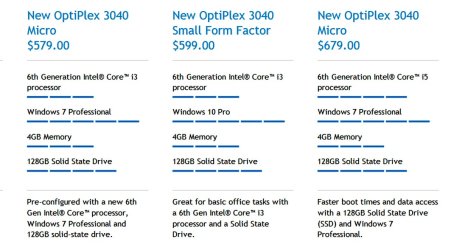
Just took a look at Dell's business line.

It looks like if you want an SSD, you have to pay 579 on up. 679 on up if you want an i5:
 

Attachments

  • Untitled-1.jpg
    Untitled-1.jpg
    117.7 KB · Views: 0

My Computer My Computer

At a glance

Windows 7 Home Premium SP1, 64-bitIntel Skylake i5-6600K, not overclocked8 GB HyperX DDR4-2666 (2 x 4 GB)none; graphics are integrated on CPU
Computer type
PC/Desktop
Computer Manufacturer/Model Number
Ignatz Special; 4 speed manual gearbox; factory air conditioning; one of one
OS
Windows 7 Home Premium SP1, 64-bit
CPU
Intel Skylake i5-6600K, not overclocked
Motherboard
AsRock Z170M Extreme 4, micro ATX
Memory
8 GB HyperX DDR4-2666 (2 x 4 GB)
Graphics Card(s)
none; graphics are integrated on CPU
Sound Card
onboard: Realtek ALC1150; external: USB Behringer UF0-202
Monitor(s) Displays
Dell S2340M 23 inch IPS
Screen Resolution
1600 x 900
Hard Drives
System: Crucial MX100 series SSD, 128 GB;
Data: Samsung Spinpoint 103SJ, 1 TB;
Backup: WD Caviar Green WD30EZRX-00D8PB0, 3 TB
PSU
Rosewill SilentNight 500 watt fanless, semi-modular
Case
Antec Solo II
Cooling
Noctua NH-U12S; Noctua F12 intake, Noctua S12A exhaust
Keyboard
Microsoft 200 6JH-00001 USB
Mouse
Dell or Microsoft optical wired; USB
Antivirus
Microsoft Security Essentials and Malwarebytes Premium
Browser
Pale Moon
Other Info
All fans PWM; speeds at idle: CPU circa 500 rpm; intake circa 600 rpm; exhaust circa 600 rpm; CPU temps 27 idle and 47 C load in a warm room (27 C/81 F) when running Intel Extreme Tuning Utility stress test.
Just took a look at Dell's business line.

It looks like if you want an SSD, you have to pay 579 on up. 679 on up if you want an i5:

Thanks for the help.

You will pay close to a G for a Dell Optiplex with 256gb ssd and a i5 or higher.

On Ebay, I found a new Optiplex (7020) with an i5-4590, 4gb of ram (which I can upgrade to 8 if need be), windows 7 and an 500gb Optical for 500.
That said, I do not want to deal with he hassle of moving everything over to an SSD.

I can get a refurb Opti with an i7, 256ssd and 8gb of ram for 550...
 

My Computer My Computer

At a glance

7/64 bitIntel Core i-5-34704gbIntel HD Graphics-1920x1080
Computer type
Laptop
Computer Manufacturer/Model Number
Dell E6400
OS
7/64 bit
CPU
Intel Core i-5-3470
Motherboard
Dell-042P49
Memory
4gb
Graphics Card(s)
Intel HD Graphics-1920x1080
Sound Card
Intel Display Audio
Monitor(s) Displays
Dell P2211H
Screen Resolution
19620*1080
Hard Drives
Samsung SSD
WDC 1TB
Browser
Chrome
You'd never know you had an i7 rather than an i5 for any task you have yet mentioned. It's a waste. Intel charges a premium of close to 100 for the i7 and it's worthwhile for certain edge cases on certain tasks, but not on your tasks.

Do you have to buy very soon--next few days or a week?

If not, I'd continue to lay in the weeds and watch---looking for a NEW SSD machine with an i5 with either 4 or 8 gb of RAM for say 600 and under.

I personally would not take a chance on a refurb from a random source.

You should look at the Dell Factory Outlet. I assume it's still around. It's part of Dell, where they sell machines that have very little to no use--returns and discontinued stuff mostly. I would be willing to buy from there. I would NOT assume anything there is a bargain, though. You have to compare to a known new identical machine.

Do you have ANY idea of how much storage space you need for data, not Windows--or do you have any idea how much storage space you need all told, including Windows and applications? 200 GB? 700?

Windows alone takes up less than 30. Windows plus 50 apps might take up no more than 40.
 

My Computer My Computer

At a glance

Windows 7 Home Premium SP1, 64-bitIntel Skylake i5-6600K, not overclocked8 GB HyperX DDR4-2666 (2 x 4 GB)none; graphics are integrated on CPU
Computer type
PC/Desktop
Computer Manufacturer/Model Number
Ignatz Special; 4 speed manual gearbox; factory air conditioning; one of one
OS
Windows 7 Home Premium SP1, 64-bit
CPU
Intel Skylake i5-6600K, not overclocked
Motherboard
AsRock Z170M Extreme 4, micro ATX
Memory
8 GB HyperX DDR4-2666 (2 x 4 GB)
Graphics Card(s)
none; graphics are integrated on CPU
Sound Card
onboard: Realtek ALC1150; external: USB Behringer UF0-202
Monitor(s) Displays
Dell S2340M 23 inch IPS
Screen Resolution
1600 x 900
Hard Drives
System: Crucial MX100 series SSD, 128 GB;
Data: Samsung Spinpoint 103SJ, 1 TB;
Backup: WD Caviar Green WD30EZRX-00D8PB0, 3 TB
PSU
Rosewill SilentNight 500 watt fanless, semi-modular
Case
Antec Solo II
Cooling
Noctua NH-U12S; Noctua F12 intake, Noctua S12A exhaust
Keyboard
Microsoft 200 6JH-00001 USB
Mouse
Dell or Microsoft optical wired; USB
Antivirus
Microsoft Security Essentials and Malwarebytes Premium
Browser
Pale Moon
Other Info
All fans PWM; speeds at idle: CPU circa 500 rpm; intake circa 600 rpm; exhaust circa 600 rpm; CPU temps 27 idle and 47 C load in a warm room (27 C/81 F) when running Intel Extreme Tuning Utility stress test.
You'd never know you had an i7 rather than an i5 for any task you have yet mentioned. It's a waste. Intel charges a premium of close to 100 for the i7 and it's worthwhile for certain edge cases on certain tasks, but not on your tasks.

Do you have to buy very soon--next few days or a week?

If not, I'd continue to lay in the weeds and watch---looking for a NEW SSD machine with an i5 with either 4 or 8 gb of RAM for say 600 and under.

I personally would not take a chance on a refurb from a random source.

You should look at the Dell Factory Outlet. I assume it's still around. It's part of Dell, where they sell machines that have very little to no use--returns and discontinued stuff mostly. I would be willing to buy from there. I would NOT assume anything there is a bargain, though. You have to compare to a known new identical machine.

Do you have ANY idea of how much storage space you need for data, not Windows--or do you have any idea how much storage space you need all told, including Windows and applications? 200 GB? 700?

Windows alone takes up less than 30. Windows plus 50 apps might take up no more than 40.

I move into my new office on June 1st so need to have it by then.
I use very little HD space on my work computers.
Maybe 100gbs all in.
Ive had 256ssds in the past and didnt come close to using half of the allotted space as most of what i do is cloud based.

What did you think of the 500 deal for the new Dell machines with optical drives?

I will check the Dell Outlet.
 

My Computer My Computer

At a glance

7/64 bitIntel Core i-5-34704gbIntel HD Graphics-1920x1080
Computer type
Laptop
Computer Manufacturer/Model Number
Dell E6400
OS
7/64 bit
CPU
Intel Core i-5-3470
Motherboard
Dell-042P49
Memory
4gb
Graphics Card(s)
Intel HD Graphics-1920x1080
Sound Card
Intel Display Audio
Monitor(s) Displays
Dell P2211H
Screen Resolution
19620*1080
Hard Drives
Samsung SSD
WDC 1TB
Browser
Chrome
I move into my new office on June 1st so need to have it by then.
I use very little HD space on my work computers.
Maybe 100gbs all in.
Ive had 256ssds in the past and didnt come close to using half of the allotted space as most of what i do is cloud based.

What did you think of the 500 deal for the new Dell machines with optical drives?

I will check the Dell Outlet.

If you've had SSDs, then you are the world's best judge of whether or not you think they are worth the price.

If not, forget about SSDs and go with a standard drive. 500 GB is pretty much the minimum you can find nowadays on a pre-built machine.

If you need to have it at your business within a week, you are up against a deadline.

I don't know if that 500 price for the Dell is competitive. You should be able to figure out within an hour on Google if it is.

Other things you have to consider: installed software, return rights from whoever you are buying from, warranty, customer service, etc. If you aren't buying directly from Dell, you may be in uncharted water with the seller.

I'm not overly excited about Dell, but that's mostly because I build my own. I'd guess the major brands--HP, Dell, Lenovo, etc are all about the same degree of a crapshoot.

So, I'd shop on the basis of specs and my opinion of the seller. You might check him out as best you can through Reseller ratings or whatever else you can think of.

I'd personally pay more for a Dell from Dell than I would for an identical PC from a seller on Ebay about whom I know little to nothing. Ebay is always a gamble to some degree if you are not familiar with the seller.

And I would not reject an upper level i3 if I had to, perhaps an i3-6100? That's speculation based on you saying you don't need anything very strong.

The i3-6100 is just a dual core, but has a high clock speed: 3.70.
 

My Computer My Computer

At a glance

Windows 7 Home Premium SP1, 64-bitIntel Skylake i5-6600K, not overclocked8 GB HyperX DDR4-2666 (2 x 4 GB)none; graphics are integrated on CPU
Computer type
PC/Desktop
Computer Manufacturer/Model Number
Ignatz Special; 4 speed manual gearbox; factory air conditioning; one of one
OS
Windows 7 Home Premium SP1, 64-bit
CPU
Intel Skylake i5-6600K, not overclocked
Motherboard
AsRock Z170M Extreme 4, micro ATX
Memory
8 GB HyperX DDR4-2666 (2 x 4 GB)
Graphics Card(s)
none; graphics are integrated on CPU
Sound Card
onboard: Realtek ALC1150; external: USB Behringer UF0-202
Monitor(s) Displays
Dell S2340M 23 inch IPS
Screen Resolution
1600 x 900
Hard Drives
System: Crucial MX100 series SSD, 128 GB;
Data: Samsung Spinpoint 103SJ, 1 TB;
Backup: WD Caviar Green WD30EZRX-00D8PB0, 3 TB
PSU
Rosewill SilentNight 500 watt fanless, semi-modular
Case
Antec Solo II
Cooling
Noctua NH-U12S; Noctua F12 intake, Noctua S12A exhaust
Keyboard
Microsoft 200 6JH-00001 USB
Mouse
Dell or Microsoft optical wired; USB
Antivirus
Microsoft Security Essentials and Malwarebytes Premium
Browser
Pale Moon
Other Info
All fans PWM; speeds at idle: CPU circa 500 rpm; intake circa 600 rpm; exhaust circa 600 rpm; CPU temps 27 idle and 47 C load in a warm room (27 C/81 F) when running Intel Extreme Tuning Utility stress test.
My 2¢ concerning SSDs - I don't use hard drives anymore, except in my backup server. Yeah, they still cost more, but if you spread that extra cost over the life of the computer (5 years or so), that extra money is almost a wash (don't forget to factor in lower energy consumption and lower cooling costs). Plus there's a good chance that SSD will last another 5 years while the drive will likely be showing signs of wear - if it lasts that long.
 

My Computer My Computer

At a glance

Windows 7 Profession 64-bitIntel Core i7-860 QuadMushkin 4x2Gb PC12800Gigabyte GTX260 896Mb
Computer Manufacturer/Model Number
BrightWorks Systems B4
OS
Windows 7 Profession 64-bit
CPU
Intel Core i7-860 Quad
Motherboard
Gigabyte P55-UD4P
Memory
Mushkin 4x2Gb PC12800
Graphics Card(s)
Gigabyte GTX260 896Mb
Sound Card
Integrated 7.1 HD Dolby
Monitor(s) Displays
2 Samsung 2220wm-HAS 22"
Screen Resolution
1680 x 1050 | 1680 x 1050
Hard Drives
WD HE 1Tb
PSU
Corsair TX-750W
Case
Ultra M998
Cooling
OEM
Keyboard
MS Wireless Comfort 5000
Mouse
MS Wireless 5000
Internet Speed
Cable and pretty darn fast
Please add at least one if not two usb external hard-drives for making weekly or bi-monthly backups using a well-known well-respected backup/restore utility such as Macrium Reflect, Acronis True Image, just to name two of many free and pay-for utilities.
I know you're going to use the Cloud, one question: what if it rains? [worst cases: cloud company goes poof, cloud company goes offline awhile, etc.]
 

My Computer My Computer

At a glance

Windows 7 Professional 64-bitDesktop i5; Acers i5 & i7desktop 16GB; 1 Acer 8GB & 1 Acer 16GB
Computer type
PC/Desktop
Computer Manufacturer/Model Number
Antec desktop; Acer Aspire laptops
OS
Windows 7 Professional 64-bit
CPU
Desktop i5; Acers i5 & i7
Memory
desktop 16GB; 1 Acer 8GB & 1 Acer 16GB
Hard Drives
1TB split into 2 equal partitions [OS and data] usable by RJS
Internet Speed
AT&T DSL
Browser
FF, GChrome, msIE
Other Info
Windows 7 Firewall, Emsisoft AM/AV, MSE [scan-only], SpywareBlaster, Ruiware/BillP combine
I agree with Roland - have a good backup plan that includes multiple backup locations. One backup is not good enough. I am not a fan of external USB drives myself. The problem is, IMO, they rely on USB and that just is not as dependable as promised. If you look at the forums, they are flooded with users complaining they lost connectivity to them.

Plus, if a badguy breaks into the office and steals your computers, they likely will snag any attached USB drive too - then there goes your backup (another reason to have more than one backup).

A NAS (network attached storage) device can be physically located anywhere on your network, in a different room or closet, even a different floor of the building - out of sight [hopefully] of a badguy. And being networked, all users on your network can backup to that device. If you have another old computer, it can be turned into a NAS. I repurposed an old XP system just for that. I just made sure Internet access to that system was blocked in my router. And what's nice about using a computer as a NAS device, you typically can fit several hard drives in it, supporting many users and many backups.
 

My Computer My Computer

At a glance

Windows 7 Profession 64-bitIntel Core i7-860 QuadMushkin 4x2Gb PC12800Gigabyte GTX260 896Mb
Computer Manufacturer/Model Number
BrightWorks Systems B4
OS
Windows 7 Profession 64-bit
CPU
Intel Core i7-860 Quad
Motherboard
Gigabyte P55-UD4P
Memory
Mushkin 4x2Gb PC12800
Graphics Card(s)
Gigabyte GTX260 896Mb
Sound Card
Integrated 7.1 HD Dolby
Monitor(s) Displays
2 Samsung 2220wm-HAS 22"
Screen Resolution
1680 x 1050 | 1680 x 1050
Hard Drives
WD HE 1Tb
PSU
Corsair TX-750W
Case
Ultra M998
Cooling
OEM
Keyboard
MS Wireless Comfort 5000
Mouse
MS Wireless 5000
Internet Speed
Cable and pretty darn fast
After reading most of this thread, I would say, $650 is not an unreasonable price. If you just look at it, a 4790 costs $305 and Windows 7 Pro costs $140. Certainly everything else is worth $200 at least.

That being said, There are a couple of issues. First it is used and you have no idea what condition it is in. Also, it comes from Ebay where many of the dealers are 'shady'. You will get no warranty and if one is offered, I would be very suspect. Third, as has been pointed out several times, the specs are way overkill. For basic office work, you do not need nearly as powerful a machine.

I agree with pretty much everything ignatzatsonic has said. He is spot on with his advice. You can get a good basic machine from Dell Outlet which is a refurb, but comes with the same warranty as a new one. You can get one more inline with the specs you need for a cheaper price and know everything is legal and in pretty good condition. Plus, you will get a new computer warranty. I also suggest trying to buy as basic a machine as they have and add the items on as you need them. Dell and all OEM's charge a fortune for Ram and SSDs. A good 250 GB SSD can be bought for well less than $100 and 8 GB of DDR3 ram can be purchased for $35. I suspect that is about 25% of what Dell will charge you for the same thing. I say listen to ignatzatsonic. He is giving very smart advice.
 

My Computers My Computers

  • At a glance

    Windows 11 ProRyzen 9 5900X32GB G Skill DDR4-3600EVGA RTX 3080 FTW 3 Ultra
    Computer type
    PC/Desktop
    Computer Manufacturer/Model Number
    ALWAYS UNDER CONSTRUCTION
    OS
    Windows 11 Pro
    CPU
    Ryzen 9 5900X
    Motherboard
    Asus X570 Crosshair Viii Hero
    Memory
    32GB G Skill DDR4-3600
    Graphics Card(s)
    EVGA RTX 3080 FTW 3 Ultra
    Sound Card
    On Board/Sennheiser PC37X Headset
    Monitor(s) Displays
    3 X Asus 27"
    Screen Resolution
    2560x1440
    Hard Drives
    2 X 1 TB NVME drives
    PSU
    EVGA 850
    Case
    Phanteks Eclipse P400A
    Cooling
    EVGA 280 AIO
    Keyboard
    Logitech G510s/ Logitech G13
    Mouse
    Logitech G502
    Internet Speed
    24/1
    Antivirus
    ESET/MBAM Pro/SAS Pro
    Browser
    Chrome/ Firefox/ Edge
  • At a glance

    Windows 11 ProIntel Ultra 9 288V32 GB LPDDR5X 8533
    Computer type
    Laptop
    System Manufacturer/Model Number
    Dell 16 Plus
    OS
    Windows 11 Pro
    CPU
    Intel Ultra 9 288V
    Memory
    32 GB LPDDR5X 8533
    Monitor(s) Displays
    16" Mini-LED HDR600 Touch 90 Hz
    Screen Resolution
    2560X1600
    Hard Drives
    1 TB NVME
Just took a look at Dell's business line.

It looks like if you want an SSD, you have to pay 579 on up. 679 on up if you want an i5:

And thats for a 128gb ssd!

If you want 256gb, it goes quite a bit higher...

The Dell 7k Optiplex series is the only one that even offers 256ssds and with 8gbs of ram, its 1100.
 

My Computer My Computer

At a glance

7/64 bitIntel Core i-5-34704gbIntel HD Graphics-1920x1080
Computer type
Laptop
Computer Manufacturer/Model Number
Dell E6400
OS
7/64 bit
CPU
Intel Core i-5-3470
Motherboard
Dell-042P49
Memory
4gb
Graphics Card(s)
Intel HD Graphics-1920x1080
Sound Card
Intel Display Audio
Monitor(s) Displays
Dell P2211H
Screen Resolution
19620*1080
Hard Drives
Samsung SSD
WDC 1TB
Browser
Chrome
Find an i5 without an SSD and with 4 GB ram. Then buy your own SSD and 8 GB of ram. You will save a lot of money.
 

My Computers My Computers

  • At a glance

    Windows 11 ProRyzen 9 5900X32GB G Skill DDR4-3600EVGA RTX 3080 FTW 3 Ultra
    Computer type
    PC/Desktop
    Computer Manufacturer/Model Number
    ALWAYS UNDER CONSTRUCTION
    OS
    Windows 11 Pro
    CPU
    Ryzen 9 5900X
    Motherboard
    Asus X570 Crosshair Viii Hero
    Memory
    32GB G Skill DDR4-3600
    Graphics Card(s)
    EVGA RTX 3080 FTW 3 Ultra
    Sound Card
    On Board/Sennheiser PC37X Headset
    Monitor(s) Displays
    3 X Asus 27"
    Screen Resolution
    2560x1440
    Hard Drives
    2 X 1 TB NVME drives
    PSU
    EVGA 850
    Case
    Phanteks Eclipse P400A
    Cooling
    EVGA 280 AIO
    Keyboard
    Logitech G510s/ Logitech G13
    Mouse
    Logitech G502
    Internet Speed
    24/1
    Antivirus
    ESET/MBAM Pro/SAS Pro
    Browser
    Chrome/ Firefox/ Edge
  • At a glance

    Windows 11 ProIntel Ultra 9 288V32 GB LPDDR5X 8533
    Computer type
    Laptop
    System Manufacturer/Model Number
    Dell 16 Plus
    OS
    Windows 11 Pro
    CPU
    Intel Ultra 9 288V
    Memory
    32 GB LPDDR5X 8533
    Monitor(s) Displays
    16" Mini-LED HDR600 Touch 90 Hz
    Screen Resolution
    2560X1600
    Hard Drives
    1 TB NVME
Hi,
Last I looked Samsung 250gb 850 evo is 88.us at Newegg I believe could of been Amazon.
 

My Computer My Computer

At a glance

Win-7-Pro64bit 7-H-Prem-64biti7-5930K 2nd i9-9940x both water blocked VRM'...Trident-z 3200C14 2nd Trident-z 3600C16EVGA 1080ti ftw3 2nd Titan Xp both water blocked
Computer type
PC/Desktop
Computer Manufacturer/Model Number
Custom assembled by me :}
OS
Win-7-Pro64bit 7-H-Prem-64bit
CPU
i7-5930K 2nd i9-9940x both water blocked VRM's too
Motherboard
ASUS SABERTOOTH X99 2nd ASUS x299 Apex
Memory
Trident-z 3200C14 2nd Trident-z 3600C16
Graphics Card(s)
EVGA 1080ti ftw3 2nd Titan Xp both water blocked
Sound Card
Built-in Realtek
Monitor(s) Displays
1-AOC G2460PG 24"G-Sync 144Hz/ 2nd 1-ASUS VG248QE 24" 144Hz
Screen Resolution
1920 x 1080 144Hz
Hard Drives
2-Samsung M.2 Evo & Evo Plus
2-Samsung 850 EVO 500GB SSD's/ 3-2.5 W.D. Black 1tb-&3-1tb/3-3.5 WD Black 1tb hdd's
PSU
EVGA SuperNOVA 1000-P2 2nd 1200-P2
Case
2-Corsair Obsidian Series 450D Black ATX Mid Tower
Cooling
Custom water loops
Keyboard
Logitech G710+/ 2nd Logitech G910
Mouse
2-RedDragon M901 Perdition 16400 dpi Gaming mouse = wired
Internet Speed
Comcast Ping 19ms 89.31mbps download speed 6.12mbps upload
Antivirus
Malwarebytes Pro/ Superantispyware Pro
Browser
FireFox & Pale moon
Other Info
2nd ASUS X299 Apex/Intel i9-9940x with Custom water loop/7H-Prem-x64/Corsair 450D case/Ram Trident-z 3600C16 4x8gb / Samsung970Evo plus 500gb SSD/Dual ssd EZ swap evo/PSU EVGA SuperNova 1200w-P2 80+Platinum/GPU Titan Xp /8-ML-140 on push-pull on 2-280GTX rads
Find an i5 without an SSD and with 4 GB ram. Then buy your own SSD and 8 GB of ram. You will save a lot of money.

Problem is I dont know how to move an OS from the HD to the SSD.
Is it something I can learn how to do...in short order?
 

My Computer My Computer

At a glance

7/64 bitIntel Core i-5-34704gbIntel HD Graphics-1920x1080
Computer type
Laptop
Computer Manufacturer/Model Number
Dell E6400
OS
7/64 bit
CPU
Intel Core i-5-3470
Motherboard
Dell-042P49
Memory
4gb
Graphics Card(s)
Intel HD Graphics-1920x1080
Sound Card
Intel Display Audio
Monitor(s) Displays
Dell P2211H
Screen Resolution
19620*1080
Hard Drives
Samsung SSD
WDC 1TB
Browser
Chrome

My Computer My Computer

At a glance

Win-7-Pro64bit 7-H-Prem-64biti7-5930K 2nd i9-9940x both water blocked VRM'...Trident-z 3200C14 2nd Trident-z 3600C16EVGA 1080ti ftw3 2nd Titan Xp both water blocked
Computer type
PC/Desktop
Computer Manufacturer/Model Number
Custom assembled by me :}
OS
Win-7-Pro64bit 7-H-Prem-64bit
CPU
i7-5930K 2nd i9-9940x both water blocked VRM's too
Motherboard
ASUS SABERTOOTH X99 2nd ASUS x299 Apex
Memory
Trident-z 3200C14 2nd Trident-z 3600C16
Graphics Card(s)
EVGA 1080ti ftw3 2nd Titan Xp both water blocked
Sound Card
Built-in Realtek
Monitor(s) Displays
1-AOC G2460PG 24"G-Sync 144Hz/ 2nd 1-ASUS VG248QE 24" 144Hz
Screen Resolution
1920 x 1080 144Hz
Hard Drives
2-Samsung M.2 Evo & Evo Plus
2-Samsung 850 EVO 500GB SSD's/ 3-2.5 W.D. Black 1tb-&3-1tb/3-3.5 WD Black 1tb hdd's
PSU
EVGA SuperNOVA 1000-P2 2nd 1200-P2
Case
2-Corsair Obsidian Series 450D Black ATX Mid Tower
Cooling
Custom water loops
Keyboard
Logitech G710+/ 2nd Logitech G910
Mouse
2-RedDragon M901 Perdition 16400 dpi Gaming mouse = wired
Internet Speed
Comcast Ping 19ms 89.31mbps download speed 6.12mbps upload
Antivirus
Malwarebytes Pro/ Superantispyware Pro
Browser
FireFox & Pale moon
Other Info
2nd ASUS X299 Apex/Intel i9-9940x with Custom water loop/7H-Prem-x64/Corsair 450D case/Ram Trident-z 3600C16 4x8gb / Samsung970Evo plus 500gb SSD/Dual ssd EZ swap evo/PSU EVGA SuperNova 1200w-P2 80+Platinum/GPU Titan Xp /8-ML-140 on push-pull on 2-280GTX rads
Find an i5 without an SSD and with 4 GB ram. Then buy your own SSD and 8 GB of ram. You will save a lot of money.

Problem is I dont know how to move an OS from the HD to the SSD.
Is it something I can learn how to do...in short order?

Sure. You can use Free Macrium and clone or Image it and restore the image to the SSD. There are a ton of threads on here on how to do it.
 

My Computers My Computers

  • At a glance

    Windows 11 ProRyzen 9 5900X32GB G Skill DDR4-3600EVGA RTX 3080 FTW 3 Ultra
    Computer type
    PC/Desktop
    Computer Manufacturer/Model Number
    ALWAYS UNDER CONSTRUCTION
    OS
    Windows 11 Pro
    CPU
    Ryzen 9 5900X
    Motherboard
    Asus X570 Crosshair Viii Hero
    Memory
    32GB G Skill DDR4-3600
    Graphics Card(s)
    EVGA RTX 3080 FTW 3 Ultra
    Sound Card
    On Board/Sennheiser PC37X Headset
    Monitor(s) Displays
    3 X Asus 27"
    Screen Resolution
    2560x1440
    Hard Drives
    2 X 1 TB NVME drives
    PSU
    EVGA 850
    Case
    Phanteks Eclipse P400A
    Cooling
    EVGA 280 AIO
    Keyboard
    Logitech G510s/ Logitech G13
    Mouse
    Logitech G502
    Internet Speed
    24/1
    Antivirus
    ESET/MBAM Pro/SAS Pro
    Browser
    Chrome/ Firefox/ Edge
  • At a glance

    Windows 11 ProIntel Ultra 9 288V32 GB LPDDR5X 8533
    Computer type
    Laptop
    System Manufacturer/Model Number
    Dell 16 Plus
    OS
    Windows 11 Pro
    CPU
    Intel Ultra 9 288V
    Memory
    32 GB LPDDR5X 8533
    Monitor(s) Displays
    16" Mini-LED HDR600 Touch 90 Hz
    Screen Resolution
    2560X1600
    Hard Drives
    1 TB NVME

My Computer My Computer

At a glance

Windows 7 Home Premium SP1, 64-bitIntel Skylake i5-6600K, not overclocked8 GB HyperX DDR4-2666 (2 x 4 GB)none; graphics are integrated on CPU
Computer type
PC/Desktop
Computer Manufacturer/Model Number
Ignatz Special; 4 speed manual gearbox; factory air conditioning; one of one
OS
Windows 7 Home Premium SP1, 64-bit
CPU
Intel Skylake i5-6600K, not overclocked
Motherboard
AsRock Z170M Extreme 4, micro ATX
Memory
8 GB HyperX DDR4-2666 (2 x 4 GB)
Graphics Card(s)
none; graphics are integrated on CPU
Sound Card
onboard: Realtek ALC1150; external: USB Behringer UF0-202
Monitor(s) Displays
Dell S2340M 23 inch IPS
Screen Resolution
1600 x 900
Hard Drives
System: Crucial MX100 series SSD, 128 GB;
Data: Samsung Spinpoint 103SJ, 1 TB;
Backup: WD Caviar Green WD30EZRX-00D8PB0, 3 TB
PSU
Rosewill SilentNight 500 watt fanless, semi-modular
Case
Antec Solo II
Cooling
Noctua NH-U12S; Noctua F12 intake, Noctua S12A exhaust
Keyboard
Microsoft 200 6JH-00001 USB
Mouse
Dell or Microsoft optical wired; USB
Antivirus
Microsoft Security Essentials and Malwarebytes Premium
Browser
Pale Moon
Other Info
All fans PWM; speeds at idle: CPU circa 500 rpm; intake circa 600 rpm; exhaust circa 600 rpm; CPU temps 27 idle and 47 C load in a warm room (27 C/81 F) when running Intel Extreme Tuning Utility stress test.
DELL Desktop PC OptiPlex 3020 05WX1W Intel Core i5 4th Gen 4590 (3.30 GHz) 8 GB DDR3 500 GB HDD Intel HD Graphics 4600 Windows 7 Professional 64-Bit with Windows 8.1 Pro License - Newegg.com

$580; price good till midnight today only.

DELL OptiPlex 3020 with i5-4590; 8 GB RAM, 500 gb hard drive, Windows 7 Pro 64-Bit with Windows 8.1 Pro License.

No monitor, no SSD.

60 bucks off normal price.

Hey-thanks for keeping any eye out for me and posting this-much appreciated.
Thats a good deal but I think I am now set on getting an SSD.

I called Dell yesterday and they quoted me a the 3040 Optiplex Mini Tower with an i5-6500, Windows 7, 4gb of RAM, 256ssd (no optical drive-which I dont think I need anyways)-for $750
I figured if I needed it, id just hop on Crucial and get another 4gb of RAM.

Not bad, right?
 

My Computer My Computer

At a glance

7/64 bitIntel Core i-5-34704gbIntel HD Graphics-1920x1080
Computer type
Laptop
Computer Manufacturer/Model Number
Dell E6400
OS
7/64 bit
CPU
Intel Core i-5-3470
Motherboard
Dell-042P49
Memory
4gb
Graphics Card(s)
Intel HD Graphics-1920x1080
Sound Card
Intel Display Audio
Monitor(s) Displays
Dell P2211H
Screen Resolution
19620*1080
Hard Drives
Samsung SSD
WDC 1TB
Browser
Chrome
Back
Top