Windows Update gets stuck looking for updates

Slowpoke47

New member
Member
Local time
4:00 AM
Messages
15
Windows Update has become erratic, currently gets stuck in the "looking for updates" phase. I have followed the instructions on this forum titled "Windows Update Posting Instructions." Ran the SURT with no issues reported. The SFC scan came back clean as well. There are no error codes like the example shown, on the WU screen, but at one point there was a pop-up box (I believe in conjunction with Windows Update Standalone Installer) with error 0x8024001e which may or may not now be resolved. The MS Genuine Advantage Diagnostics Tool has not helped. Also along the way I was advised to install Hotfix for Windows KB947821, which I did. Compressed CBS file will not upload to this post because it is too large (about 6MB).

All this is way above my pay grade as a non-tech user, but I think I have followed the instructions correctly. Any wisdom greatly appreciated!
 

My Computer My Computer

Computer type
PC/Desktop
OS
Windows 7 home premium 64-bit
Hi Slowpoke,
That error code usually infers malware.

For a start please D/L run Malwarebytes (free), uncheck the trial offer.
then in the dashboard check rootkit detection.

As a follow up run the
ESET on-line scan, (dissable your current AV)

Roy
 

My Computer My Computer

Computer type
PC/Desktop
Computer Manufacturer/Model Number
medionl/Aspire 6930G/acer x55a
OS
W7 home premium 32bit/W7HP 64bit/w10 tp insider ring
CPU
E5300 dual core
Motherboard
medion MS7366
Memory
3gb
Graphics Card(s)
Nvidia Geforce 7100 Nforce 630i
Monitor(s) Displays
avixc
Internet Speed
n (isp resticted to 72)
Antivirus
mse/pands
Browser
palemoon
Other Info
Belkin Fd7050 n USB using Railink RT2870 drivers, more upto date
Hi Slowpoke,
That error code usually infers malware.

For a start please D/L run Malwarebytes (free), uncheck the trial offer.
then in the dashboard check rootkit detection.

As a follow up run the
ESET on-line scan, (dissable your current AV)

Roy
Thanks for your response. I'll run the Malwarebytes as you suggest. But I do not know what ESET is. I am a non-tech user and my computer education is far from complete.
 

My Computer My Computer

Computer type
PC/Desktop
OS
Windows 7 home premium 64-bit

My Computer My Computer

Computer type
PC/Desktop
Computer Manufacturer/Model Number
medionl/Aspire 6930G/acer x55a
OS
W7 home premium 32bit/W7HP 64bit/w10 tp insider ring
CPU
E5300 dual core
Motherboard
medion MS7366
Memory
3gb
Graphics Card(s)
Nvidia Geforce 7100 Nforce 630i
Monitor(s) Displays
avixc
Internet Speed
n (isp resticted to 72)
Antivirus
mse/pands
Browser
palemoon
Other Info
Belkin Fd7050 n USB using Railink RT2870 drivers, more upto date
Ran the Malwarebytes software, latest version. There was no mention of "rootkit detection" on the dashboard screen. The report came back clean.

Ran the ESET scanner, was called away from the computer after 30 minutes or so with the program still running. When I left it, there was 1 threat noted. When I returned all the info fields were black and the program seemed to have stopped. Then the ESET screen went blank. I do not know what the outcome of that was.

Today I tried downloading a single update again and WU still hangs on downloading. I plan to start MS Malicious Software Removal Tool on a full scan, which apparently takes hours.

Thanks for your input- do you have a followup?

Steve
 

My Computer My Computer

Computer type
PC/Desktop
OS
Windows 7 home premium 64-bit
there was no mention of "rootkit detection" on the dashboard screen.

edit: I missed some info :-(

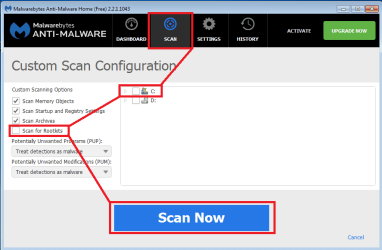
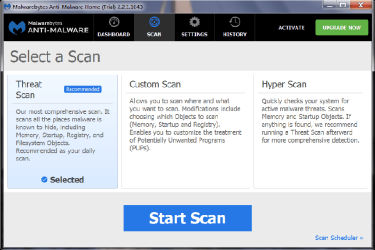
Select Scan from the top row of buttons.
Select Custom Scan from the middle large row of buttons.
That should make the bottom button say Configure Scan.

Select Configure Scan and make it look like the screenshot below.


mamb.png
 
Last edited:

My Computer My Computer

Computer type
Laptop
Computer Manufacturer/Model Number
Employer provided Dell Latitude
OS
W7 Pro SP1 64bit
CPU
i7
Memory
8GB
Graphics Card(s)
Intel HD Graphics
Hard Drives
crappy SSD
Antivirus
Employer mandated Symantec Endpoint Protection
Browser
Pale Moon 64bit, IE11 64bit & Chrome 64bit
Update- found an option for rootkits on the Settings screen, ran the scan. No threats reported in rootkits.
 

My Computer My Computer

Computer type
PC/Desktop
OS
Windows 7 home premium 64-bit
Hi Slowpoke,
can you open your CBS log file
C>>windows>>logs>>cbs.
click on the >>top<< CBS entry, send to compressed zip, then upload it as an attachment.

Roy
 

My Computer My Computer

Computer type
PC/Desktop
Computer Manufacturer/Model Number
medionl/Aspire 6930G/acer x55a
OS
W7 home premium 32bit/W7HP 64bit/w10 tp insider ring
CPU
E5300 dual core
Motherboard
medion MS7366
Memory
3gb
Graphics Card(s)
Nvidia Geforce 7100 Nforce 630i
Monitor(s) Displays
avixc
Internet Speed
n (isp resticted to 72)
Antivirus
mse/pands
Browser
palemoon
Other Info
Belkin Fd7050 n USB using Railink RT2870 drivers, more upto date
Hi, torchwood,

An hour ago I set that computer to do a full scan with MS Security Essentials- likely to continue well into tonight. I'll post that file tomorrow. Thanks for the coaching!
 

My Computer My Computer

Computer type
PC/Desktop
OS
Windows 7 home premium 64-bit
MS Security Essentials found no threats in a full scan.

Here is the attachment you requested:

View attachment 387997
 

My Computer My Computer

Computer type
PC/Desktop
OS
Windows 7 home premium 64-bit
Hi Slowpoke,
please can you Hide KB3035583, (the infamous W10 upgrade)
then select >> 1 << update and see if that works

Have you stopped the install of W10 insome way.


Roy

Info for me next post only
Failed to unload the COMPONENTS hive. [HRESULT = 0x80070005 - E_ACCESSDENIED]
 

My Computer My Computer

Computer type
PC/Desktop
Computer Manufacturer/Model Number
medionl/Aspire 6930G/acer x55a
OS
W7 home premium 32bit/W7HP 64bit/w10 tp insider ring
CPU
E5300 dual core
Motherboard
medion MS7366
Memory
3gb
Graphics Card(s)
Nvidia Geforce 7100 Nforce 630i
Monitor(s) Displays
avixc
Internet Speed
n (isp resticted to 72)
Antivirus
mse/pands
Browser
palemoon
Other Info
Belkin Fd7050 n USB using Railink RT2870 drivers, more upto date
Hi, torchwood,

I'm afraid I have to ask you to lead me by the nose, as I am decidedly non-tech (but trying my best!).

The W10 "update" you mention was offered some months ago among the other updates, but it was called out as W10, and I unchecked the box for it when installing other updates. I see the number you mention is in the current list of important updates, with a disguised name and description, very sly! The other day I did try just one (not that one) but it hung up downloading. How do I "hide" it? I don't think any part of W10 has gotten in, and I don't want any part of it!

Not sure what to do re the CBS file. It opens for me from the link in that post, but of course, it's in my machine. I attached it in the usual way, with the icon bringing up the dialog box that lets me browse for the file to attach. How should I get it to you?

Steve
 

My Computer My Computer

Computer type
PC/Desktop
OS
Windows 7 home premium 64-bit
Hi Slowpoke,
Lets try it this way, from the link below
Via Majorgeeks stop windows 10 install -
Download GWX Control Panel - MajorGeeks

download and install once completed

REBOOT.

Then try any other update, That KB was the first to appear with any error code.

Roy
 

My Computer My Computer

Computer type
PC/Desktop
Computer Manufacturer/Model Number
medionl/Aspire 6930G/acer x55a
OS
W7 home premium 32bit/W7HP 64bit/w10 tp insider ring
CPU
E5300 dual core
Motherboard
medion MS7366
Memory
3gb
Graphics Card(s)
Nvidia Geforce 7100 Nforce 630i
Monitor(s) Displays
avixc
Internet Speed
n (isp resticted to 72)
Antivirus
mse/pands
Browser
palemoon
Other Info
Belkin Fd7050 n USB using Railink RT2870 drivers, more upto date
Hi Slowpoke,
Lets try it this way, from the link below
Via Majorgeeks stop windows 10 install -
Download GWX Control Panel - MajorGeeks

download and install once completed

REBOOT.

Then try any other update, That KB was the first to appear with any error code.

Roy

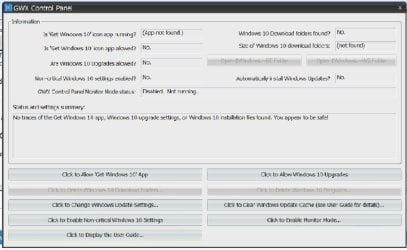
Thank you. Just followed this procedure, tried one update. Still hangs on "downloading" after more than an hour. Here's the current GWX Control Panel screenshot, it did show some bits of W10 at first:
 

Attachments

  • GWX screenshot.jpg
    GWX screenshot.jpg
    64.6 KB · Views: 1
Last edited:

My Computer My Computer

Computer type
PC/Desktop
OS
Windows 7 home premium 64-bit
God i hate MS at the moment the WU service there providing is horrendous.
Like a lot of us we just have to wait for the updates to download and install.


Roy
 

My Computer My Computer

Computer type
PC/Desktop
Computer Manufacturer/Model Number
medionl/Aspire 6930G/acer x55a
OS
W7 home premium 32bit/W7HP 64bit/w10 tp insider ring
CPU
E5300 dual core
Motherboard
medion MS7366
Memory
3gb
Graphics Card(s)
Nvidia Geforce 7100 Nforce 630i
Monitor(s) Displays
avixc
Internet Speed
n (isp resticted to 72)
Antivirus
mse/pands
Browser
palemoon
Other Info
Belkin Fd7050 n USB using Railink RT2870 drivers, more upto date
What version update client are you using?

When did you last successfully checked for updates and what was the last installed update?

When did you first noticed win taking forever to find updates?
 

My Computer My Computer

Computer type
Laptop
Computer Manufacturer/Model Number
Toshiba
OS
Windows 7 Home Premium 64
CPU
Intel T6400 Core 2 Duo
Memory
4GB
Graphics Card(s)
Intel 4500MHD
God i hate MS at the moment the WU service there providing is horrendous.
Like a lot of us we just have to wait for the updates to download and install.


Roy

Many thanks for your efforts to help me with this. Let me see if I understand the current status: The WU problem is caused by MS, whether intentional or not. The GWX control panel has deleted any scraps of W10 software and will prevent any future invasions. Two questions:

1. Would it be worthwhile to set the computer to downloading updates and let it run for, say, overnight?

2. This computer is dual boot with two hard drives, containing W7 and Vista. Should I try to replace the Vista with Ubuntu?

EDIT: Just looked at the list of installed updates and found KB3035583 was installed on 4/6/16 along with about 15 others. Currently attempting to uninstall.
 
Last edited:

My Computer My Computer

Computer type
PC/Desktop
OS
Windows 7 home premium 64-bit
What version update client are you using?

When did you last successfully checked for updates and what was the last installed update?

When did you first noticed win taking forever to find updates?

See my reply to torchwood. As for version, it's whatever came with the W7 HP, installed earlier this year.
 

My Computer My Computer

Computer type
PC/Desktop
OS
Windows 7 home premium 64-bit
Hi Slowpoke,
regarding the WU settings it would appear that all the settings produce the same SLOW results, choose which ever your happiest with.

Regarding the Dual boot.
Vista has not been supported for a number of years now and could be classified as a security risk, I've dabbled with Ubuntu found Mint to be my cuppa tea.

If your having a problem with that KB,
from an elevated command mode

wusa /uninstall /kb:3033583

Roy
 

My Computer My Computer

Computer type
PC/Desktop
Computer Manufacturer/Model Number
medionl/Aspire 6930G/acer x55a
OS
W7 home premium 32bit/W7HP 64bit/w10 tp insider ring
CPU
E5300 dual core
Motherboard
medion MS7366
Memory
3gb
Graphics Card(s)
Nvidia Geforce 7100 Nforce 630i
Monitor(s) Displays
avixc
Internet Speed
n (isp resticted to 72)
Antivirus
mse/pands
Browser
palemoon
Other Info
Belkin Fd7050 n USB using Railink RT2870 drivers, more upto date
Back
Top