Can't access my win7 ultimate

Well, as all tests gave as results a No Error, I'm began to think that your system is working properly, it's only a configuration issue.
Explorer is the file manager in windows. If you launch recycle bin, you did with Explorer.
With your mouse, right click on the screen. Can you launch Personalize (at menu bottom)?
 

My Computers My Computers

System One System Two

  • Computer type
    PC/Desktop
    Computer Manufacturer/Model Number
    custom build
    OS
    Windows 7 HP 64
    CPU
    i5 6600K - 800MHz to 4200MHz
    Motherboard
    GA-Z170-HD3P
    Memory
    4+4G GSkill DDR4 3000
    Graphics Card(s)
    IG - Intel 530
    Monitor(s) Displays
    Samsung 226BW
    Screen Resolution
    1680x1050
    Hard Drives
    (1) -1 SM951 – 128GB M.2 AHCI PCIe SSD drive for Windows 7 and Lubuntu
    (2) -1 WD SATA 3 - 1T for Data
    (3) -1 WD SATA 3 - 1T for backup
    PSU
    Thermaltake 450W TR2 gold
    Keyboard
    Old and good Chicony mechanical keyboard
    Mouse
    Logitech mX performance - 9 buttons (had to disable some)
    Internet Speed
    500Mb/s
    Browser
    Firefox 64
    Other Info
    TinyWall firewall
  • Computer type
    Laptop
    System Manufacturer/Model Number
    Asus Q550LF
    OS
    Windows 7 Pro
    CPU
    i7-4500U 800MHz to 3.0GHz
    Motherboard
    Asus Q550LF
    Memory
    (4+4)G DDR3 1600
    Graphics Card(s)
    IG intel 4400 + NVIDIA GeForce GT 745M
    Sound Card
    Realtek
    Monitor(s) Displays
    LG Display LP156WF4-SPH1
    Screen Resolution
    1920 x 1080
    Hard Drives
    BX500 120G SSD for Windows and programs +
    1T HDD for data
    Internet Speed
    500 Mb/s
    Browser
    Firefox
    Other Info
    TinyWall firewall
I still don't see a "Personalize" option when I right click on display. (All I can see is: Display, Sort by, Refresh, Paste, Paste shortcut, Sync common folders, New' Dell display manager, and Screen Resolution (Free translation from a Hebrew Win7)
 

My Computer My Computer

Computer type
PC/Desktop
OS
Triple boot: WinXP Pro + Win7 Ultimate + Win10 Ultimate
CPU
Intel Core 2 Duo 3.0GHz
Motherboard
Gigabyte GA-P43-ES3G
Memory
Transcend 2GB DDR2 800
Graphics Card(s)
NVIDIA GeForce 9500 GT
Sound Card
Realtek High Definition Audio
Monitor(s) Displays
Dell P2314H
Hard Drives
Samsung 1TB 32 MB 7200RPM
PSU
seasonic ss-500et active pfc
Case
Compucase 6A19 Black
Open Explorer by double click on the recycle bin.
On left panel, under the folders tree you should see Control Panel. If you don't, write on the address bar: Control panel + enter.
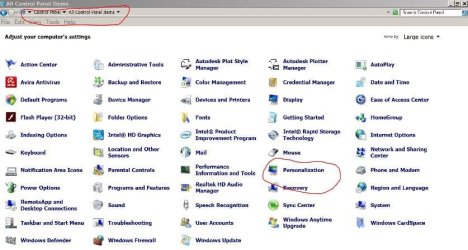
Open it, choose large icons.
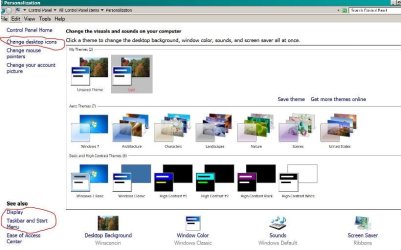
Select Personalization.


Under pesonalization:
- Select Change desktop icons - Select all (Computer - Users files - Recycle Bin - Control Panel
- Select Display - Adjust resolution - On resolution box, select recomended
- Move back to Personalization
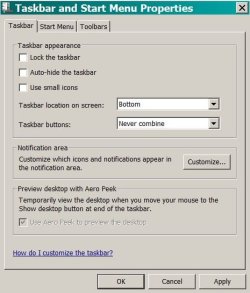
- Select task bar - Do as image
 

Attachments

  • cp.JPG
    cp.JPG
    61.9 KB · Views: 3
  • Person.JPG
    Person.JPG
    56 KB · Views: 5
  • Taskbar.JPG
    Taskbar.JPG
    41.2 KB · Views: 25

My Computers My Computers

System One System Two

  • Computer type
    PC/Desktop
    Computer Manufacturer/Model Number
    custom build
    OS
    Windows 7 HP 64
    CPU
    i5 6600K - 800MHz to 4200MHz
    Motherboard
    GA-Z170-HD3P
    Memory
    4+4G GSkill DDR4 3000
    Graphics Card(s)
    IG - Intel 530
    Monitor(s) Displays
    Samsung 226BW
    Screen Resolution
    1680x1050
    Hard Drives
    (1) -1 SM951 – 128GB M.2 AHCI PCIe SSD drive for Windows 7 and Lubuntu
    (2) -1 WD SATA 3 - 1T for Data
    (3) -1 WD SATA 3 - 1T for backup
    PSU
    Thermaltake 450W TR2 gold
    Keyboard
    Old and good Chicony mechanical keyboard
    Mouse
    Logitech mX performance - 9 buttons (had to disable some)
    Internet Speed
    500Mb/s
    Browser
    Firefox 64
    Other Info
    TinyWall firewall
  • Computer type
    Laptop
    System Manufacturer/Model Number
    Asus Q550LF
    OS
    Windows 7 Pro
    CPU
    i7-4500U 800MHz to 3.0GHz
    Motherboard
    Asus Q550LF
    Memory
    (4+4)G DDR3 1600
    Graphics Card(s)
    IG intel 4400 + NVIDIA GeForce GT 745M
    Sound Card
    Realtek
    Monitor(s) Displays
    LG Display LP156WF4-SPH1
    Screen Resolution
    1920 x 1080
    Hard Drives
    BX500 120G SSD for Windows and programs +
    1T HDD for data
    Internet Speed
    500 Mb/s
    Browser
    Firefox
    Other Info
    TinyWall firewall
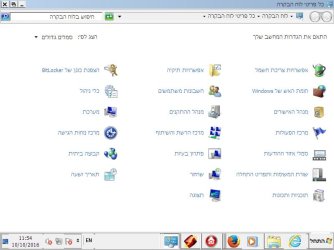
The attached pic shows my Control Panel. Since it is in Hebrew, I'll provide a translation (I'll add "***" whereever a new column strats) :

Bitlocker Drive Encryption *** Folder Options *** Power Options

Administrative Tools *** Users Accounts *** Windows Firewall

System *** Device Manager *** Credential Manager

Ease of Access Center *** Network and Sharing Center *** Action Center

HomeGroup *** Troubleshooting *** Notification Area Icons

Date and Time *** Recovery *** Taskbar and Start Menu

Display *** Programs and Features


As you can see, many of your options don't show up, including "Personalization".
When I run a search inside Control Panel for the term "personalization", all I get is personalization of my Start Menu and my Task Bar.
 

Attachments

  • Control Panel.jpg
    Control Panel.jpg
    40.8 KB · Views: 1

My Computer My Computer

Computer type
PC/Desktop
OS
Triple boot: WinXP Pro + Win7 Ultimate + Win10 Ultimate
CPU
Intel Core 2 Duo 3.0GHz
Motherboard
Gigabyte GA-P43-ES3G
Memory
Transcend 2GB DDR2 800
Graphics Card(s)
NVIDIA GeForce 9500 GT
Sound Card
Realtek High Definition Audio
Monitor(s) Displays
Dell P2314H
Hard Drives
Samsung 1TB 32 MB 7200RPM
PSU
seasonic ss-500et active pfc
Case
Compucase 6A19 Black
It seems that your system is working fine.
It's the problem only the missing icons?
Win 7 Ultimate has option to edit the features on the computer. Group Policy Editor (gpedit.msc)
As some features (like personalize) aren't on your system it can be that they have been disbled on Group Policy Editor.
If you want to have a look type gpedit.msc on a CMD window or on the Run.
I can't help on this as my Windows doesn't have Group Policy Editor.
 

My Computers My Computers

System One System Two

  • Computer type
    PC/Desktop
    Computer Manufacturer/Model Number
    custom build
    OS
    Windows 7 HP 64
    CPU
    i5 6600K - 800MHz to 4200MHz
    Motherboard
    GA-Z170-HD3P
    Memory
    4+4G GSkill DDR4 3000
    Graphics Card(s)
    IG - Intel 530
    Monitor(s) Displays
    Samsung 226BW
    Screen Resolution
    1680x1050
    Hard Drives
    (1) -1 SM951 – 128GB M.2 AHCI PCIe SSD drive for Windows 7 and Lubuntu
    (2) -1 WD SATA 3 - 1T for Data
    (3) -1 WD SATA 3 - 1T for backup
    PSU
    Thermaltake 450W TR2 gold
    Keyboard
    Old and good Chicony mechanical keyboard
    Mouse
    Logitech mX performance - 9 buttons (had to disable some)
    Internet Speed
    500Mb/s
    Browser
    Firefox 64
    Other Info
    TinyWall firewall
  • Computer type
    Laptop
    System Manufacturer/Model Number
    Asus Q550LF
    OS
    Windows 7 Pro
    CPU
    i7-4500U 800MHz to 3.0GHz
    Motherboard
    Asus Q550LF
    Memory
    (4+4)G DDR3 1600
    Graphics Card(s)
    IG intel 4400 + NVIDIA GeForce GT 745M
    Sound Card
    Realtek
    Monitor(s) Displays
    LG Display LP156WF4-SPH1
    Screen Resolution
    1920 x 1080
    Hard Drives
    BX500 120G SSD for Windows and programs +
    1T HDD for data
    Internet Speed
    500 Mb/s
    Browser
    Firefox
    Other Info
    TinyWall firewall
My problem isn't missing icons, it's a startup process that never matures. All my working tools aren't active, neither the Windows Key, nor Ult-Delete. The only symbol I see is the Trash Basket, but even it isn't responding.
Safe Mode, however, works fully.
 

My Computer My Computer

Computer type
PC/Desktop
OS
Triple boot: WinXP Pro + Win7 Ultimate + Win10 Ultimate
CPU
Intel Core 2 Duo 3.0GHz
Motherboard
Gigabyte GA-P43-ES3G
Memory
Transcend 2GB DDR2 800
Graphics Card(s)
NVIDIA GeForce 9500 GT
Sound Card
Realtek High Definition Audio
Monitor(s) Displays
Dell P2314H
Hard Drives
Samsung 1TB 32 MB 7200RPM
PSU
seasonic ss-500et active pfc
Case
Compucase 6A19 Black
Okay lets start at the beginning.

Where did you get the media to install Windows 7 and exactly what Windows 7 are you having problems with.
Your System Specs show this.

Computer type PC/Desktop
OS Triple boot: WinXP Pro + Win7 Ultimate + Win7 Ultimate

Please complete this tutorial by Brink on the Windows 7 install you are having problems with.

Windows Genuine and Activation Issue Posting Instructions

Hopefully some one will understand the language.
 

My Computer My Computer

Computer type
PC/Desktop
Computer Manufacturer/Model Number
Home made Desktop
OS
Windows 10 Pro. 64/ version 1709 Windows 7 Pro/64
CPU
Intel i7-6800K @ 4.3
Motherboard
ASUS X-99 Deluxe II
Memory
Corsair Platinum 16 gig @2400
Graphics Card(s)
EVGA GTX 1070 OC
Monitor(s) Displays
Asus 27" LED LCD/VE278Q
Screen Resolution
1920-1080 or 1280-720 HDMI
Hard Drives
INTEL SSD 730-240 Gb Sata 3.0/
PSU
EVGA Platium 1200W
Case
Phanteks Luxe Tempered Glass 8 fans/ one radiator
Cooling
XSPC/ Water Cooled CPU
Keyboard
Das 4 Professional
Mouse
Logitech M705/MX Anywhere 2-S
Internet Speed
100 mbits
Antivirus
Microsoft Security Essentials/ Malwarebytes Premium 3.0/ SAS
Browser
I.E. 11 default/Firefox/ ISP Time Warner Cable/Spectrum
Other Info
LG BluRay Burner/
Sound system-KLipsch-THX/
Icy Dock ssd Hot Swap bays.
Okay lets start at the beginning.

Where did you get the media to install Windows 7 and exactly what Windows 7 are you having problems with.
Your System Specs show this.
I bought it from my university. Still, looks like the software isn't regarded as an educational discount and therefore, I can't download a repair disk from the MS site. (I solved this problem by myself, and managed to "squeeze" and burn a disk.

Computer type PC/Desktop
OS Triple boot: WinXP Pro + Win7 Ultimate + Win7 Ultimate
Please complete this tutorial by Brink on the Windows 7 install you are having problems with.[/QUOTE]
I made a mistake and my system specification for this forum is erroneous. The right description is available at present.

Windows Genuine and Activation Issue Posting Instructions

Hopefully some one will understand the language.

Attached the report. I zipped it so as to enable its upload.
 

Attachments

My Computer My Computer

Computer type
PC/Desktop
OS
Triple boot: WinXP Pro + Win7 Ultimate + Win10 Ultimate
CPU
Intel Core 2 Duo 3.0GHz
Motherboard
Gigabyte GA-P43-ES3G
Memory
Transcend 2GB DDR2 800
Graphics Card(s)
NVIDIA GeForce 9500 GT
Sound Card
Realtek High Definition Audio
Monitor(s) Displays
Dell P2314H
Hard Drives
Samsung 1TB 32 MB 7200RPM
PSU
seasonic ss-500et active pfc
Case
Compucase 6A19 Black
You Zip will not open for me.
Please read the tutorial again and do exactly as it indicates.

This is from my system.
You should have something like this.

Code:
Diagnostic Report (1.9.0027.0):
-----------------------------------------
Windows Validation Data-->
My MGADiag Log


Validation Code: 0
Cached Online Validation Code: 0x0
Windows Product Key: *****-*****-YYPCR-GW2RX-KQM7J
Windows Product Key Hash: s8N9S55HDUCNrCHYpskXCSvl1ac=
Windows Product ID: 00371-OEM-9045505-46287
Windows Product ID Type: 3
Windows License Type: OEM System Builder
Windows OS version: 6.1.7601.2.00010100.1.0.048
ID: {4553EC69-FA5B-4C50-A5FD-70E3B51D099D}(3)
Is Admin: Yes
TestCab: 0x0
LegitcheckControl ActiveX: N/A, hr = 0x80070002
Signed By: N/A, hr = 0x80070002
Product Name: Windows 7 Professional
Architecture: 0x00000009
Build lab: 7601.win7sp1_ldr.160408-2045
TTS Error: 
Validation Diagnostic: 
Resolution Status: N/A

Vista WgaER Data-->
ThreatID(s): N/A, hr = 0x80070002
Version: N/A, hr = 0x80070002

Windows XP Notifications Data-->
Cached Result: N/A, hr = 0x80070002
File Exists: No
Version: N/A, hr = 0x80070002
WgaTray.exe Signed By: N/A, hr = 0x80070002
WgaLogon.dll Signed By: N/A, hr = 0x80070002

OGA Notifications Data-->
Cached Result: N/A, hr = 0x80070002
Version: N/A, hr = 0x80070002
OGAExec.exe Signed By: N/A, hr = 0x80070002
OGAAddin.dll Signed By: N/A, hr = 0x80070002

OGA Data-->
Office Status: 109 N/A
OGA Version: N/A, 0x80070002
Signed By: N/A, hr = 0x80070002
Office Diagnostics: 025D1FF3-364-80041010_025D1FF3-229-80041010_025D1FF3-230-1_025D1FF3-517-80040154_025D1FF3-237-80040154_025D1FF3-238-2_025D1FF3-244-80070002_025D1FF3-258-3

Browser Data-->
Proxy settings: N/A
User Agent: Mozilla/4.0 (compatible; MSIE 8.0; Win32)
Default Browser: C:\Program Files (x86)\Mozilla Firefox\firefox.exe
Download signed ActiveX controls: Prompt
Download unsigned ActiveX controls: Disabled
Run ActiveX controls and plug-ins: Allowed
Initialize and script ActiveX controls not marked as safe: Disabled
Allow scripting of Internet Explorer Webbrowser control: Disabled
Active scripting: Allowed
Script ActiveX controls marked as safe for scripting: Allowed

File Scan Data-->

Other data-->
Office Details: <GenuineResults><MachineData><UGUID>{4553EC69-FA5B-4C50-A5FD-70E3B51D099D}</UGUID><Version>1.9.0027.0</Version><OS>6.1.7601.2.00010100.1.0.048</OS><Architecture>x64</Architecture><PKey>*****-*****-*****-*****-KQM7J</PKey><PID>00371-OEM-9045505-46287</PID><PIDType>3</PIDType><SID>S-1-5-21-3962400118-3674972015-3409959369</SID><SYSTEM><Manufacturer>System manufacturer</Manufacturer><Model>System Product Name</Model></SYSTEM><BIOS><Manufacturer>American Megatrends Inc.</Manufacturer><Version>4502</Version><SMBIOSVersion major="2" minor="7"/><Date>20131015000000.000000+000</Date></BIOS><HWID>DDB93607018400FE</HWID><UserLCID>0409</UserLCID><SystemLCID>0409</SystemLCID><TimeZone>Eastern Standard Time(GMT-05:00)</TimeZone><iJoin>0</iJoin><SBID><stat>3</stat><msppid></msppid><name></name><model></model></SBID><OEM/><GANotification/></MachineData><Software><Office><Result>109</Result><Products/><Applications/></Office></Software></GenuineResults>  

Spsys.log Content: 0x80070002

Licensing Data-->
Software licensing service version: 6.1.7601.17514

Name: Windows(R) 7, Professional edition
Description: Windows Operating System - Windows(R) 7, OEM_COA_NSLP channel
Activation ID: e120e868-3df2-464a-95a0-b52fa5ada4bf
Application ID: 55c92734-d682-4d71-983e-d6ec3f16059f
Extended PID: 00371-00180-455-046287-02-1033-7601.0000-2392015
Installation ID: 009163986190869151877745601722187200944540971911989940
Processor Certificate URL: http://go.microsoft.com/fwlink/?LinkID=88338
Machine Certificate URL: http://go.microsoft.com/fwlink/?LinkID=88339
Use License URL: http://go.microsoft.com/fwlink/?LinkID=88341
Product Key Certificate URL: http://go.microsoft.com/fwlink/?LinkID=88340
Partial Product Key: KQM7J
License Status: Licensed
Remaining Windows rearm count: 3
Trusted time: 7/30/2016 8:30:16 AM

Windows Activation Technologies-->
HrOffline: 0x00000000
HrOnline: N/A
HealthStatus: 0x0000000000000000
Event Time Stamp: N/A
ActiveX: Registered, Version: 7.1.7600.16395
Admin Service: Registered, Version: 7.1.7600.16395
HealthStatus Bitmask Output:


HWID Data-->
HWID Hash Current: MgAAAAEABAABAAEAAAACAAAAAQABAAEAHKKoI5cZJrWYJmTHdMQOO5wqMivKxDLjAD8=

OEM Activation 1.0 Data-->
N/A

OEM Activation 2.0 Data-->
BIOS valid for OA 2.0: yes, but no SLIC table
Windows marker version: N/A
OEMID and OEMTableID Consistent: N/A
BIOS Information: 
  ACPI Table Name    OEMID Value    OEMTableID Value
  APIC            ALASKA        A M I
  FACP            ALASKA        A M I
  HPET            ALASKA        A M I
  MCFG            ALASKA        OEMMCFG.
  FPDT            ALASKA        A M I
  BGRT            ALASKA        A M I
  SSDT            INTEL        CpuPm

Their is a good change the activation used before, through the university will no longer work.

You have to start with a proper install of Windows 7 from a proper media with the proper activation. Without that being done first you will have nothing but problems.
 

My Computer My Computer

Computer type
PC/Desktop
Computer Manufacturer/Model Number
Home made Desktop
OS
Windows 10 Pro. 64/ version 1709 Windows 7 Pro/64
CPU
Intel i7-6800K @ 4.3
Motherboard
ASUS X-99 Deluxe II
Memory
Corsair Platinum 16 gig @2400
Graphics Card(s)
EVGA GTX 1070 OC
Monitor(s) Displays
Asus 27" LED LCD/VE278Q
Screen Resolution
1920-1080 or 1280-720 HDMI
Hard Drives
INTEL SSD 730-240 Gb Sata 3.0/
PSU
EVGA Platium 1200W
Case
Phanteks Luxe Tempered Glass 8 fans/ one radiator
Cooling
XSPC/ Water Cooled CPU
Keyboard
Das 4 Professional
Mouse
Logitech M705/MX Anywhere 2-S
Internet Speed
100 mbits
Antivirus
Microsoft Security Essentials/ Malwarebytes Premium 3.0/ SAS
Browser
I.E. 11 default/Firefox/ ISP Time Warner Cable/Spectrum
Other Info
LG BluRay Burner/
Sound system-KLipsch-THX/
Icy Dock ssd Hot Swap bays.
Code:
[CODE]
Diagnostic Report (1.9.0027.0):
-----------------------------------------
Windows Validation Data-->

Validation Code: 0
Cached Online Validation Code: N/A, hr = 0x8007043c
Windows Product Key: *****-*****-MPVFB-TVGD3-PYTT9
Windows Product Key Hash: KbOtpYRyXXjCgsxw3UqyFjaoJhs=
Windows Product ID: 00426-260-0989475-85380
Windows Product ID Type: 5
Windows License Type: Retail
Windows OS version: 6.1.7601.2.00010100.1.0.001
ID: {43EB464E-F134-47F4-A8B2-44FDF7F39040}(3)
Is Admin: Yes
TestCab: 0x0
LegitcheckControl ActiveX: N/A, hr = 0x80070002
Signed By: N/A, hr = 0x80070002
Product Name: Windows 7 Ultimate
Architecture: 0x00000000
Build lab: 7601.win7sp1_ldr.160902-0600
TTS Error:
Validation Diagnostic:
Resolution Status: N/A

Vista WgaER Data-->
ThreatID(s): N/A, hr = 0x80070002
Version: N/A, hr = 0x80070002

Windows XP Notifications Data-->
Cached Result: N/A, hr = 0x80070002
File Exists: No
Version: N/A, hr = 0x80070002
WgaTray.exe Signed By: N/A, hr = 0x80070002
WgaLogon.dll Signed By: N/A, hr = 0x80070002

OGA Notifications Data-->
Cached Result: N/A, hr = 0x80070002
Version: N/A, hr = 0x80070002
OGAExec.exe Signed By: N/A, hr = 0x80070002
OGAAddin.dll Signed By: N/A, hr = 0x80070002

OGA Data-->
Office Status: 100 Genuine
Microsoft Office Professional Plus 2007 - 100 Genuine
OGA Version: N/A, 0x80070002
Signed By: N/A, hr = 0x80070002
Office Diagnostics: 025D1FF3-364-80041010_025D1FF3-229-80041010_025D1FF3-230-1_025D1FF3-517-80040154_025D1FF3-237-80040154_025D1FF3-238-2_025D1FF3-244-80070002_025D1FF3-258-3_E2AD56EA-765-d003_E2AD56EA-766-0_E2AD56EA-134-80004005_E2AD56EA-765-b01a_E2AD56EA-766-0_E2AD56EA-148-80004005_16E0B333-89-80004005_B4D0AA8B-1029-80004005

Browser Data-->
Proxy settings: N/A
User Agent: Mozilla/4.0 (compatible; MSIE 8.0; Win32)
Default Browser: C:\Program Files\Mozilla Firefox\firefox.exe
Download signed ActiveX controls: Prompt
Download unsigned ActiveX controls: Disabled
Run ActiveX controls and plug-ins: Allowed
Initialize and script ActiveX controls not marked as safe: Disabled
Allow scripting of Internet Explorer Webbrowser control: Disabled
Active scripting: Allowed
Script ActiveX controls marked as safe for scripting: Allowed

File Scan Data-->
File Mismatch: C:\Windows\system32\wat\watadminsvc.exe[Hr = 0x80070003]
File Mismatch: C:\Windows\system32\wat\npwatweb.dll[Hr = 0x80070003]
File Mismatch: C:\Windows\system32\wat\watux.exe[Hr = 0x80070003]
File Mismatch: C:\Windows\system32\wat\watweb.dll[Hr = 0x80070003]

Other data-->
Office Details: <GenuineResults><MachineData><UGUID>{43EB464E-F134-47F4-A8B2-44FDF7F39040}</UGUID><Version>1.9.0027.0</Version><OS>6.1.7601.2.00010100.1.0.001</OS><Architecture>x32</Architecture><PKey>*****-*****-*****-*****-PYTT9</PKey><PID>00426-260-0989475-85380</PID><PIDType>5</PIDType><SID>S-1-5-21-1522150337-489559921-4268718390</SID><SYSTEM><Manufacturer>Gigabyte Technology Co., Ltd.</Manufacturer><Model>P43-ES3G</Model></SYSTEM><BIOS><Manufacturer>Award Software International, Inc.</Manufacturer><Version>F14</Version><SMBIOSVersion major="2" minor="4"/><Date>20100823000000.000000+000</Date></BIOS><HWID>1EB83607018400F8</HWID><UserLCID>040D</UserLCID><SystemLCID>040D</SystemLCID><TimeZone>שעון רגיל ירושלים(GMT+02:00)</TimeZone><iJoin>0</iJoin><SBID><stat>3</stat><msppid></msppid><name></name><model></model></SBID><OEM/><GANotification/></MachineData><Software><Office><Result>100</Result><Products><Product GUID="{90120000-0011-0000-0000-0000000FF1CE}"><LegitResult>100</LegitResult><Name>Microsoft Office Professional Plus 2007</Name><Ver>12</Ver><Val>ADC5628EBDCF586</Val><Hash>XDOsIVU6OZk7PNjwrLhmcq6Wl6M=</Hash><Pid>89409-707-0995667-65445</Pid><PidType>14</PidType></Product></Products><Applications><App Id="15" Version="12" Result="100"/><App Id="16" Version="12" Result="100"/><App Id="18" Version="12" Result="100"/><App Id="19" Version="12" Result="100"/><App Id="1A" Version="12" Result="100"/><App Id="1B" Version="12" Result="100"/><App Id="44" Version="12" Result="100"/></Applications></Office></Software></GenuineResults>

Spsys.log Content: 0x80070002

Licensing Data-->
On a computer running Microsoft Windows non-core edition, run 'slui.exe 0x2a 0x8007043C' to display the error text.
Error: 0x8007043C

Windows Activation Technologies-->
HrOffline: 0x00000000
HrOnline: N/A
HealthStatus: 0x0000000000000000
Event Time Stamp: N/A
ActiveX: Not Registered - 0x80040154
Admin Service: Not Registered - 0x80040154
HealthStatus Bitmask Output:


HWID Data-->
N/A, hr = 0xe000020b

OEM Activation 1.0 Data-->
N/A

OEM Activation 2.0 Data-->
BIOS valid for OA 2.0: yes, but no SLIC table
Windows marker version: N/A
OEMID and OEMTableID Consistent: N/A
BIOS Information:
ACPI Table Name OEMID Value OEMTableID Value
APIC GBT GBTUACPI
FACP GBT GBTUACPI
HPET GBT GBTUACPI
MCFG GBT GBTUACPI
TAMG GBT GBT B0
SSDT PmRef CpuPm


[/CODE]

 

My Computer My Computer

Computer type
PC/Desktop
OS
Triple boot: WinXP Pro + Win7 Ultimate + Win10 Ultimate
CPU
Intel Core 2 Duo 3.0GHz
Motherboard
Gigabyte GA-P43-ES3G
Memory
Transcend 2GB DDR2 800
Graphics Card(s)
NVIDIA GeForce 9500 GT
Sound Card
Realtek High Definition Audio
Monitor(s) Displays
Dell P2314H
Hard Drives
Samsung 1TB 32 MB 7200RPM
PSU
seasonic ss-500et active pfc
Case
Compucase 6A19 Black
Do you have KB971033 installed?

These are for sure problems.

File Scan Data--> File Mismatch: C:\Windows\system32\wat\watadminsvc.exe[Hr = 0x80070003] File Mismatch: C:\Windows\system32\wat\npwatweb.dll[Hr = 0x80070003] File Mismatch: C:\Windows\system32\wat\watux.exe[Hr = 0x80070003] File Mismatch: C:\Windows\system32\wat\watweb.dll[Hr = 0x80070003]
ActiveX: Not Registered - 0x80040154 Admin Service: Not Registered - 0x80040154 HealthStatus Bitmask Output:

I will see if I can find some help for your problem.
 

My Computer My Computer

Computer type
PC/Desktop
Computer Manufacturer/Model Number
Home made Desktop
OS
Windows 10 Pro. 64/ version 1709 Windows 7 Pro/64
CPU
Intel i7-6800K @ 4.3
Motherboard
ASUS X-99 Deluxe II
Memory
Corsair Platinum 16 gig @2400
Graphics Card(s)
EVGA GTX 1070 OC
Monitor(s) Displays
Asus 27" LED LCD/VE278Q
Screen Resolution
1920-1080 or 1280-720 HDMI
Hard Drives
INTEL SSD 730-240 Gb Sata 3.0/
PSU
EVGA Platium 1200W
Case
Phanteks Luxe Tempered Glass 8 fans/ one radiator
Cooling
XSPC/ Water Cooled CPU
Keyboard
Das 4 Professional
Mouse
Logitech M705/MX Anywhere 2-S
Internet Speed
100 mbits
Antivirus
Microsoft Security Essentials/ Malwarebytes Premium 3.0/ SAS
Browser
I.E. 11 default/Firefox/ ISP Time Warner Cable/Spectrum
Other Info
LG BluRay Burner/
Sound system-KLipsch-THX/
Icy Dock ssd Hot Swap bays.
Hi Chermesh,
LBB is correct you need to activate the system using KB971033.

I do have a couple of comments.

What is your BOOT OS order, if 7 is not the primary option please make it so.
You also appear to have entries in your action Centre review them.

Roy
 

My Computer My Computer

Computer type
PC/Desktop
Computer Manufacturer/Model Number
medionl/Aspire 6930G/acer x55a
OS
W7 home premium 32bit/W7HP 64bit/w10 tp insider ring
CPU
E5300 dual core
Motherboard
medion MS7366
Memory
3gb
Graphics Card(s)
Nvidia Geforce 7100 Nforce 630i
Monitor(s) Displays
avixc
Internet Speed
n (isp resticted to 72)
Antivirus
mse/pands
Browser
palemoon
Other Info
Belkin Fd7050 n USB using Railink RT2870 drivers, more upto date
Thank you torchwood for coming to help with this problem.
 

My Computer My Computer

Computer type
PC/Desktop
Computer Manufacturer/Model Number
Home made Desktop
OS
Windows 10 Pro. 64/ version 1709 Windows 7 Pro/64
CPU
Intel i7-6800K @ 4.3
Motherboard
ASUS X-99 Deluxe II
Memory
Corsair Platinum 16 gig @2400
Graphics Card(s)
EVGA GTX 1070 OC
Monitor(s) Displays
Asus 27" LED LCD/VE278Q
Screen Resolution
1920-1080 or 1280-720 HDMI
Hard Drives
INTEL SSD 730-240 Gb Sata 3.0/
PSU
EVGA Platium 1200W
Case
Phanteks Luxe Tempered Glass 8 fans/ one radiator
Cooling
XSPC/ Water Cooled CPU
Keyboard
Das 4 Professional
Mouse
Logitech M705/MX Anywhere 2-S
Internet Speed
100 mbits
Antivirus
Microsoft Security Essentials/ Malwarebytes Premium 3.0/ SAS
Browser
I.E. 11 default/Firefox/ ISP Time Warner Cable/Spectrum
Other Info
LG BluRay Burner/
Sound system-KLipsch-THX/
Icy Dock ssd Hot Swap bays.
Do you have KB971033 installed?

I don't know and I can't find out. Windows Update isn't available on Safe Mode.

These are for sure problems. File Scan Data--> File Mismatch: C:\Windows\system32\wat\watadminsvc.exe[Hr = 0x80070003 said:
File Mismatch: C:\Windows\system32\wat\npwatweb.dll[Hr = 0x80070003] File Mismatch: C:\Windows\system32\wat\watux.exe[Hr = 0x80070003] File Mismatch: C:\Windows\system32\wat\watweb.dll[Hr = 0x80070003]
ActiveX: Not Registered - 0x80040154 Admin Service: Not Registered - 0x80040154 HealthStatus Bitmask Output:
I will see if I can find some help for your problem.[/QUOTE said:
Thanks.

p.s. Strange, but I failed to find any reference to the directory C:\Windows\system32\wat\ neither in my file system nor in my registry.
 
Last edited:

My Computer My Computer

Computer type
PC/Desktop
OS
Triple boot: WinXP Pro + Win7 Ultimate + Win10 Ultimate
CPU
Intel Core 2 Duo 3.0GHz
Motherboard
Gigabyte GA-P43-ES3G
Memory
Transcend 2GB DDR2 800
Graphics Card(s)
NVIDIA GeForce 9500 GT
Sound Card
Realtek High Definition Audio
Monitor(s) Displays
Dell P2314H
Hard Drives
Samsung 1TB 32 MB 7200RPM
PSU
seasonic ss-500et active pfc
Case
Compucase 6A19 Black
Hi Chermesh,
LBB is correct you need to activate the system using KB971033.

He is sure right. Still, there's no way I know, to run an update while I'm in Safe Mode.

I do have a couple of comments. What is your BOOT OS order said:
At present, my primary option is windows 10, but does it really matter? I can change any time since I've installed EasyBCD


You also appear to have entries in your action Centre review them.[/QUOTE said:
The two entries refer to a recommendation to backup my system and to start my Firwall. I doubt if they are relevant to my "real" problem.


My Computer My Computer

Computer type
PC/Desktop
OS
Triple boot: WinXP Pro + Win7 Ultimate + Win10 Ultimate
CPU
Intel Core 2 Duo 3.0GHz
Motherboard
Gigabyte GA-P43-ES3G
Memory
Transcend 2GB DDR2 800
Graphics Card(s)
NVIDIA GeForce 9500 GT
Sound Card
Realtek High Definition Audio
Monitor(s) Displays
Dell P2314H
Hard Drives
Samsung 1TB 32 MB 7200RPM
PSU
seasonic ss-500et active pfc
Case
Compucase 6A19 Black
Hi Chermesh,
Please change your boot order to W7 first,
It is well known that W7 does NOT perform as expected when running 2nd.
You might find that the "real problem" is solved if you do this, and your firewall might start.

Roy

note if your specs are correct, increase your ram min for W7 Ult is 3GB
 

My Computer My Computer

Computer type
PC/Desktop
Computer Manufacturer/Model Number
medionl/Aspire 6930G/acer x55a
OS
W7 home premium 32bit/W7HP 64bit/w10 tp insider ring
CPU
E5300 dual core
Motherboard
medion MS7366
Memory
3gb
Graphics Card(s)
Nvidia Geforce 7100 Nforce 630i
Monitor(s) Displays
avixc
Internet Speed
n (isp resticted to 72)
Antivirus
mse/pands
Browser
palemoon
Other Info
Belkin Fd7050 n USB using Railink RT2870 drivers, more upto date
You say you can only boot in Safe Mode.

When you try to boot in Normal Mode do you get a error code.
What does your computer do when trying to boot in Normal Mode?

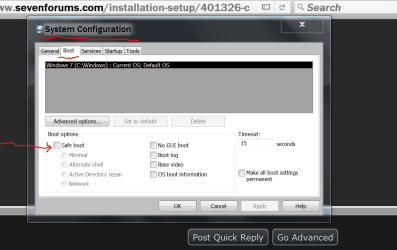
Make sure this is as the picture below.


Safe mode boot.PNG
 

My Computer My Computer

Computer type
PC/Desktop
Computer Manufacturer/Model Number
Home made Desktop
OS
Windows 10 Pro. 64/ version 1709 Windows 7 Pro/64
CPU
Intel i7-6800K @ 4.3
Motherboard
ASUS X-99 Deluxe II
Memory
Corsair Platinum 16 gig @2400
Graphics Card(s)
EVGA GTX 1070 OC
Monitor(s) Displays
Asus 27" LED LCD/VE278Q
Screen Resolution
1920-1080 or 1280-720 HDMI
Hard Drives
INTEL SSD 730-240 Gb Sata 3.0/
PSU
EVGA Platium 1200W
Case
Phanteks Luxe Tempered Glass 8 fans/ one radiator
Cooling
XSPC/ Water Cooled CPU
Keyboard
Das 4 Professional
Mouse
Logitech M705/MX Anywhere 2-S
Internet Speed
100 mbits
Antivirus
Microsoft Security Essentials/ Malwarebytes Premium 3.0/ SAS
Browser
I.E. 11 default/Firefox/ ISP Time Warner Cable/Spectrum
Other Info
LG BluRay Burner/
Sound system-KLipsch-THX/
Icy Dock ssd Hot Swap bays.
Hi Layback Bear,
Please see my first post. My system gets stuck when I opt to Normal Mode. All I can see is the Trask Can icon, and I can't open even this directory. No function (F1. Ctrl-Alt-Del, Windows Key, etc. work).

Bringing my system to Normal Mode boot is the real challenge. Afterwards, all other problems, like installing an update, will probably be solvable.
 

My Computer My Computer

Computer type
PC/Desktop
OS
Triple boot: WinXP Pro + Win7 Ultimate + Win10 Ultimate
CPU
Intel Core 2 Duo 3.0GHz
Motherboard
Gigabyte GA-P43-ES3G
Memory
Transcend 2GB DDR2 800
Graphics Card(s)
NVIDIA GeForce 9500 GT
Sound Card
Realtek High Definition Audio
Monitor(s) Displays
Dell P2314H
Hard Drives
Samsung 1TB 32 MB 7200RPM
PSU
seasonic ss-500et active pfc
Case
Compucase 6A19 Black
Hi torchwood,
I changed the boot order and win7 is now the default booting path. Still, nothing changed.
 

My Computer My Computer

Computer type
PC/Desktop
OS
Triple boot: WinXP Pro + Win7 Ultimate + Win10 Ultimate
CPU
Intel Core 2 Duo 3.0GHz
Motherboard
Gigabyte GA-P43-ES3G
Memory
Transcend 2GB DDR2 800
Graphics Card(s)
NVIDIA GeForce 9500 GT
Sound Card
Realtek High Definition Audio
Monitor(s) Displays
Dell P2314H
Hard Drives
Samsung 1TB 32 MB 7200RPM
PSU
seasonic ss-500et active pfc
Case
Compucase 6A19 Black
You should be able to get into System Configure like my picture even in Safe Mode.
 

My Computer My Computer

Computer type
PC/Desktop
Computer Manufacturer/Model Number
Home made Desktop
OS
Windows 10 Pro. 64/ version 1709 Windows 7 Pro/64
CPU
Intel i7-6800K @ 4.3
Motherboard
ASUS X-99 Deluxe II
Memory
Corsair Platinum 16 gig @2400
Graphics Card(s)
EVGA GTX 1070 OC
Monitor(s) Displays
Asus 27" LED LCD/VE278Q
Screen Resolution
1920-1080 or 1280-720 HDMI
Hard Drives
INTEL SSD 730-240 Gb Sata 3.0/
PSU
EVGA Platium 1200W
Case
Phanteks Luxe Tempered Glass 8 fans/ one radiator
Cooling
XSPC/ Water Cooled CPU
Keyboard
Das 4 Professional
Mouse
Logitech M705/MX Anywhere 2-S
Internet Speed
100 mbits
Antivirus
Microsoft Security Essentials/ Malwarebytes Premium 3.0/ SAS
Browser
I.E. 11 default/Firefox/ ISP Time Warner Cable/Spectrum
Other Info
LG BluRay Burner/
Sound system-KLipsch-THX/
Icy Dock ssd Hot Swap bays.
Back
Top