Realtek, Windows 7 64RTM Crackle/static/popping

CRAZY!!

I have the ACL88 from a GA-965P-Ds3 V3.3 and had the same problems.. One speaker was fine the other sounded like Tin. Had to turn the volume all the way up to hear anything.

Out of frustration I tried plugging into an analog INPUT port, told the Realtek manager it was front speakers and my front speakers. It worked.

I changed to the "Side" speaker analog plugins and it works great.

Since I'm not using the digital output or 5.1 or 7.1 this is a resolution for me.

Perhaps it is just some problem with the front, back, and Digital outputs that just create a bunch of static.

Hope this helps someone else.

Brogers101.

EDIT: I'm using the 2.33 Realtek Drivers. Windows7 64bit.
 
Last edited:

My Computer My Computer

At a glance

Windows 7e43004gb
Computer Manufacturer/Model Number
Piece Meal.
OS
Windows 7
CPU
e4300
Motherboard
GA-965P-DS3 v3.3
Memory
4gb
Sound Card
Built IN
Plagued by this problem, so far 2.21 has been best, it isn't perfect, get a 'pop' every now and then.
Getting fed up with it tbh, will more than likely buy a sound card.


agree with you..
tested v2.21 and this has been the best but still not perfect.. the 'pop' is more soft and not as annoyed as other version..
waiting realtek's next driver to see if this will fixed completely..
 

My Computer My Computer

At a glance

Windows 10 x64Intel Core i7 3770Corsair Vengeance LP 16GB (4x4GB)ASUS ROG Strix GeForce GTX 1070
Computer type
PC/Desktop
OS
Windows 10 x64
CPU
Intel Core i7 3770
Motherboard
Gigabyte GA-Z77X-D3H
Memory
Corsair Vengeance LP 16GB (4x4GB)
Graphics Card(s)
ASUS ROG Strix GeForce GTX 1070
Monitor(s) Displays
Samsung SyncMaster 2243
Screen Resolution
1920x1080
Hard Drives
Samsung 850 EVO 250GB
Western Digital 3TB WD30EZRX
Western Digital 2TB WD20EARX
Seagate 1TB Barracuda 7200.12
PSU
Corsair Enthusiast Series TX850M
Case
Cooler Master CM 690 II Advance USB 3.0
Cooling
Cooler Master Hyper 212 EVO
Internet Speed
8Mbps
Antivirus
Avast Free Antivirus
Browser
Chrome
In my system I have two audio systems conected. In the optical output a Denon receiver with 6 speakers in the living room and on the analog conector, a Pioneer receiver on my studio. On Win XP both of them could work at the same time, which was funny but good. All I had to do was turn off one of them. Now, I must choose one default sound output.Really anoying, but I can get used to it. My surprise was: If I had the optical system enabled and tried to play a movie with AC3 or other digital output, horrible cracks and sounds came off. May be this have something to do with this problem. If watching something with digital soud, disable optical or earphone output. I think it worth a try.
Best wishes to you all.
 

My Computer My Computer

At a glance

Windows 7 x64Core I7 9206Gb Kingston HyperX 1866MhzGForce GTX285
OS
Windows 7 x64
CPU
Core I7 920
Motherboard
Gigabyte GA-UX58-Extreme
Memory
6Gb Kingston HyperX 1866Mhz
Graphics Card(s)
GForce GTX285
Sound Card
Realtek ALC889A
Monitor(s) Displays
LG L226 and Samsung LCD TV 40
Hard Drives
Hitachi 1TB X 3
Seagate 350 GB
PSU
850W
Case
CM Stacker
Cooling
Air
Any news?
 

My Computer My Computer

At a glance

Windows 7 64bit RTMIntel Core2 Quad CPU @ Q8400 @ 2.664GB (2*2GB)nVidia 9800GT
Computer Manufacturer/Model Number
Gigabyte
OS
Windows 7 64bit RTM
CPU
Intel Core2 Quad CPU @ Q8400 @ 2.66
Motherboard
EP43-US3L (F6 BIOS)
Memory
4GB (2*2GB)
Graphics Card(s)
nVidia 9800GT
Sound Card
Realtek ALC888 (Onboard)
i also waiting news.. :huh:

this is the only black sheep of my Windows 7..
 

My Computer My Computer

At a glance

Windows 10 x64Intel Core i7 3770Corsair Vengeance LP 16GB (4x4GB)ASUS ROG Strix GeForce GTX 1070
Computer type
PC/Desktop
OS
Windows 10 x64
CPU
Intel Core i7 3770
Motherboard
Gigabyte GA-Z77X-D3H
Memory
Corsair Vengeance LP 16GB (4x4GB)
Graphics Card(s)
ASUS ROG Strix GeForce GTX 1070
Monitor(s) Displays
Samsung SyncMaster 2243
Screen Resolution
1920x1080
Hard Drives
Samsung 850 EVO 250GB
Western Digital 3TB WD30EZRX
Western Digital 2TB WD20EARX
Seagate 1TB Barracuda 7200.12
PSU
Corsair Enthusiast Series TX850M
Case
Cooler Master CM 690 II Advance USB 3.0
Cooling
Cooler Master Hyper 212 EVO
Internet Speed
8Mbps
Antivirus
Avast Free Antivirus
Browser
Chrome
I also have a problem with Realtek onboard Audio on Windows 7 RTM x86.
If i leave my system idle for some time (like 2 or 3 hours) and use it later, there will be sound only from one of the speakers! There will be very faint sound coming from the other side.
I tried various ways to fix it. As of now, the only way to fix is it is by rebooting the PC. Sound returns back to Normal!

edit: No problems anymore with RTM x64!:D
 
Last edited:

My Computer My Computer

At a glance

Windows 7 Ultimate RTM x64Intel C2D E7400 @ 2.8 Ghz2x 2gb Kingston ValueRAM DDR-2XFX Geforce 9500 GT Low-Profile w/ VGA 1gb DD...
Computer Manufacturer/Model Number
Custom
OS
Windows 7 Ultimate RTM x64
CPU
Intel C2D E7400 @ 2.8 Ghz
Motherboard
Intel DG31PR Classic Series 3 Mobo
Memory
2x 2gb Kingston ValueRAM DDR-2
Graphics Card(s)
XFX Geforce 9500 GT Low-Profile w/ VGA 1gb DDR-2 No O/C
Sound Card
Mobo Realtek High def Audio
Monitor(s) Displays
HP w1907v 19"
Screen Resolution
1440x900
Hard Drives
Maxtor 160gb HD
Memorex External 250gb HDD
PSU
400w
Case
Some Generic Case....
Cooling
Intel Stock Cooling
Keyboard
Genius TwinTouch 750e Keyboard-Mouse
Mouse
Genius TwinTouch 750e Keyboard-Mouse
Other Info
Got the PC with the mobo and processor really cheap @ 350$. and then bought 9500 GT seperate @ 120$ or so! :)
*Might* have found a fix...

Before anyone tries to blame hardware, my same hardware config worked fine under Vista Home Premium x86.

I notice the popping and clicking THE MOST when I turn on iTunes visualization but it happens when iTunes is not even open, like playing through Napster (flash player). The default MS drivers were crackling like hell, I put up for it for weeks and finally did something about it today.

I just downloaded the 2.33 driver from Realtek today, it helped but did not improve.

Someone mentioned an obscure setting further up in this thread so I went poking around in the Control Panel > Sound area.

Under Control Panel > Sound > Playback Devices > Properties on Speakers > Enhancements:

I tried checking "Disable all sound effects", this seemed to help but not fully resolve the pops and clicks.

Next, in the same place I checked "Immediate mode" and it seems to have cleared up all the popping... does this help anyone else? So far so good, I just hope it doesn't come back again, like has happened to everyone else... :sarc:

I am still using the 2.33 driver.
 

Attachments

  • Capture.JPG
    Capture.JPG
    34 KB · Views: 230
Last edited:

My Computer My Computer

At a glance

Windows 7 Enterprise x64AMD Athlon 64 X2 4800+ @ 2.5GHzRadeon 4850 1GB
Computer Manufacturer/Model Number
Acer Aspire ASE380-ED480A
OS
Windows 7 Enterprise x64
CPU
AMD Athlon 64 X2 4800+ @ 2.5GHz
Graphics Card(s)
Radeon 4850 1GB
Sound Card
Realtek
Monitor(s) Displays
Sony Bravia 52"
Screen Resolution
1920x1080
PSU
Nexus 650
Internet Speed
20/5mbps FiOS
HELL YEAH.............
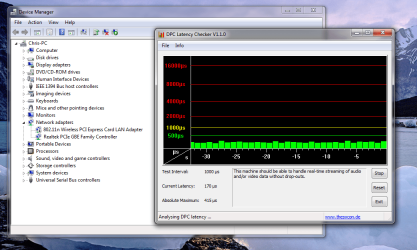
hey guys, okay look at the attachment.
The pic shows a latency checker along with my device manager, the real time latency checker once told me that there was something wrong with my devices. I have my own thread on the stutter problem like a lot of people.

http://www.sevenforums.com/sound-au...y-have-sound-stuttering-fix-2.html#post288586

I tried disabaling realtek sound assuming that was the problem (I to have tried a million drivers) but the latency checker still said there was a problem, the spikes (in real time) used to correspond with sound stutter/buzzing/popping. Now i get no spikes because i disabled one of the 2 pcie express cards. Okay, i dont kno what pcie cards are, something about sonnecting motherboard to something, sounds important but so far my computer is working with no buzzin for the first time ever.

Might be wrong but at least this is some kind of lead....maybe..ill leave it up 2 people who know weather to shut me up or not...anyway, how come i have 2 drivers for pcie. Do you need 2. i wish I had another pc handy to see if 2 is common, just a guess but maybe having 2 causes some conflicting problem. GOOD LUCK. Im still glad mines working, i just hope there is no negative effects of the thing i disabled being disabled.
 

Attachments

  • Capture.PNG
    Capture.PNG
    90.9 KB · Views: 760

My Computer My Computer

At a glance

windows 7core 2 quad40964870
Computer Manufacturer/Model Number
hp pavillion elite m9441uk fr615aa
OS
windows 7
CPU
core 2 quad
Motherboard
g33 express?
Memory
4096
Graphics Card(s)
4870
Sound Card
realtek
Monitor(s) Displays
hpw2216
Screen Resolution
1680
Hard Drives
1 x Serial ATA - integrated
PSU
650 w
Well, 2.34 is out.
I'll install it & see how it goes...
 

My Computer My Computer

At a glance

Windows 7 64bit RTMIntel Core2 Quad CPU @ Q8400 @ 2.664GB (2*2GB)nVidia 9800GT
Computer Manufacturer/Model Number
Gigabyte
OS
Windows 7 64bit RTM
CPU
Intel Core2 Quad CPU @ Q8400 @ 2.66
Motherboard
EP43-US3L (F6 BIOS)
Memory
4GB (2*2GB)
Graphics Card(s)
nVidia 9800GT
Sound Card
Realtek ALC888 (Onboard)

My Computer My Computer

At a glance

Windows 7 64bit RTMIntel Core2 Quad CPU @ Q8400 @ 2.664GB (2*2GB)nVidia 9800GT
Computer Manufacturer/Model Number
Gigabyte
OS
Windows 7 64bit RTM
CPU
Intel Core2 Quad CPU @ Q8400 @ 2.66
Motherboard
EP43-US3L (F6 BIOS)
Memory
4GB (2*2GB)
Graphics Card(s)
nVidia 9800GT
Sound Card
Realtek ALC888 (Onboard)
a bios update fixed my problem. now i can use the latest realtek driver without crackle sound.
 

My Computer My Computer

At a glance

Windows 7 Ultimate 64-bit
OS
Windows 7 Ultimate 64-bit
I updated to R2.34, still have popping and clipping under high-cpu situations.

R2.35 came out 10/12, downloading now, not holding my breath... :(
Realtek
 

My Computer My Computer

At a glance

Windows 7 Enterprise x64AMD Athlon 64 X2 4800+ @ 2.5GHzRadeon 4850 1GB
Computer Manufacturer/Model Number
Acer Aspire ASE380-ED480A
OS
Windows 7 Enterprise x64
CPU
AMD Athlon 64 X2 4800+ @ 2.5GHz
Graphics Card(s)
Radeon 4850 1GB
Sound Card
Realtek
Monitor(s) Displays
Sony Bravia 52"
Screen Resolution
1920x1080
PSU
Nexus 650
Internet Speed
20/5mbps FiOS
Upgrade to R2.35 and still the popping persists...:cry:
 

My Computer My Computer

At a glance

Windows 7 Enterprise x64AMD Athlon 64 X2 4800+ @ 2.5GHzRadeon 4850 1GB
Computer Manufacturer/Model Number
Acer Aspire ASE380-ED480A
OS
Windows 7 Enterprise x64
CPU
AMD Athlon 64 X2 4800+ @ 2.5GHz
Graphics Card(s)
Radeon 4850 1GB
Sound Card
Realtek
Monitor(s) Displays
Sony Bravia 52"
Screen Resolution
1920x1080
PSU
Nexus 650
Internet Speed
20/5mbps FiOS
hi guys...

just downloaded the new acer realtek hd audio driver..
for win 7
driver version 6.0.1.5888
looked under aspire 6930g..
working on my aspire 6920g..
 

My Computer My Computer

At a glance

win 7 64bitt83004gb9500m
Computer Manufacturer/Model Number
acer aspire 6920g
OS
win 7 64bit
CPU
t8300
Memory
4gb
Graphics Card(s)
9500m
Monitor(s) Displays
full hd
Screen Resolution
1920-1080
Internet Speed
100mb
a bios update fixed my problem. now i can use the latest realtek driver without crackle sound.

Well, I've upgraded the BIOS as well (to F6) didn't help at all, but... what mobo do yo have?
currently running 2.34 (and since I've read that 2.35 do not fix the issue, I can't be bothered. I hate rebooting my rig :D )
 

My Computer My Computer

At a glance

Windows 7 64bit RTMIntel Core2 Quad CPU @ Q8400 @ 2.664GB (2*2GB)nVidia 9800GT
Computer Manufacturer/Model Number
Gigabyte
OS
Windows 7 64bit RTM
CPU
Intel Core2 Quad CPU @ Q8400 @ 2.66
Motherboard
EP43-US3L (F6 BIOS)
Memory
4GB (2*2GB)
Graphics Card(s)
nVidia 9800GT
Sound Card
Realtek ALC888 (Onboard)
a bios update fixed my problem. now i can use the latest realtek driver without crackle sound.

Well, I've upgraded the BIOS as well (to F6) didn't help at all, but... what mobo do yo have?
currently running 2.34 (and since I've read that 2.35 do not fix the issue, I can't be bothered. I hate rebooting my rig :D )

im using Asus...but different mobo different issues i guess. try 2.21. it fix my prblem before the bios update released.
 

My Computer My Computer

At a glance

Windows 7 Ultimate 64-bit
OS
Windows 7 Ultimate 64-bit
control panel - audio - proprierties - advanced - and try to set quality from 16/bits 44lhz to 24 bits 48 khz (pro) and my pops disappeared :)
 

My Computer My Computer

At a glance

xp
OS
xp
control panel - audio - proprierties - advanced - and try to set quality from 16/bits 44lhz to 24 bits 48 khz (pro) and my pops disappeared :)

That's the default it is set to (24...) changing it around didn't help either...
 

My Computer My Computer

At a glance

Windows 7 64bit RTMIntel Core2 Quad CPU @ Q8400 @ 2.664GB (2*2GB)nVidia 9800GT
Computer Manufacturer/Model Number
Gigabyte
OS
Windows 7 64bit RTM
CPU
Intel Core2 Quad CPU @ Q8400 @ 2.66
Motherboard
EP43-US3L (F6 BIOS)
Memory
4GB (2*2GB)
Graphics Card(s)
nVidia 9800GT
Sound Card
Realtek ALC888 (Onboard)
Well I tried everything in the book mentioned here and more.
Bios update, new drivers, codecs.....nada.

What worked for me was changing the power settings to High Performance from Balanced - the default setting.

I am running a Gigabyte 780g U2SH mobo and AMD processor. Using on board video and on board audio. Probably a likely set up for HT enthusiasts and likely others using it as well here.

I figured maybe playing the mkv files was loading the system too much and causing the pops.

So far so good. I will report back
 

My Computer My Computer

At a glance

Multi
OS
Multi
nothing working here

I'm pretty much ready to give up and switch to a dedicated sound card... I've upgraded everything and nothing is working.

Does anyone else happen to have a PCI based wireless NIC in their system as well?
 

My Computer My Computer

At a glance

Windows 7 Enterprise x64AMD Athlon 64 X2 4800+ @ 2.5GHzRadeon 4850 1GB
Computer Manufacturer/Model Number
Acer Aspire ASE380-ED480A
OS
Windows 7 Enterprise x64
CPU
AMD Athlon 64 X2 4800+ @ 2.5GHz
Graphics Card(s)
Radeon 4850 1GB
Sound Card
Realtek
Monitor(s) Displays
Sony Bravia 52"
Screen Resolution
1920x1080
PSU
Nexus 650
Internet Speed
20/5mbps FiOS
Back
Top