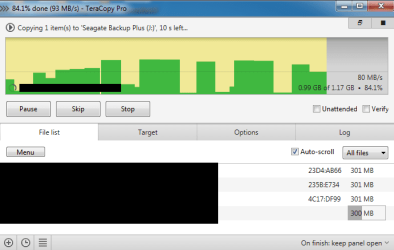
After updating Teracopy from 2.3 to 3.0 I see strange(?) behaviour

Leon1998

New member
Local time
3:01 PM
Messages
10
Hello.

Before Teracopy I just used windows copy to move my files from my internal HDD to my external HDD (1TB USB2).When moving several files windows copy stopped (Froze) between each file and the speed was not accurate at all (I assume it was because it uses windows cache) but Teracopy 2.3 didn't freeze between files (system cache box was unchecked in preferences) and the speed was usually 25 MB/s.

There was no problem until recently I updated Teracopy to version 3, now when I want to move for example a series that consists of 20-30 ~250 MB episodes it freezes between files although "Disable asynchronous file transfer" box is UNchecked and the speed changes constantly (7 MB/s to 109 MB's).
I did a comparison between 2.3 and 3 and 3 took longer to transfer the same series.

So what's the problem ?
Does version 3 use system cache by default ?
 

My Computer My Computer

Computer type
PC/Desktop
Computer Manufacturer/Model Number
Custom built
OS
Windows 7 Ultimate x64 SP1
CPU
Intel i7 7700k
Motherboard
Asus H170 Pro
Memory
Kingston Fury 4GB DDR4
Graphics Card(s)
NVIDIA GeForce GT 440 (2 GB)
Monitor(s) Displays
Samsung
Screen Resolution
1360x768
Hard Drives
Seagate Barracuda 7200
Seagate Backup+ SL USB Device
Antivirus
Eset Smart Security 8
Browser
Waterfox
See Post #11 in this thread:

All memory used when copying files from Truecrypt container

I never did figure out why the user had the problem. I never saw the same issue on my machine.

Suggest: Full removal of Teracopy including deletion of explorer shell extensions. Reboot and install a fresh copy.
 

My Computer My Computer

Computer type
Laptop
Computer Manufacturer/Model Number
ASUS
OS
Microsoft Windows 7 Home Premium 64-bit 7601 Multiprocessor Free Service Pack 1
CPU
AMD C-60 APU with Radeon(tm) HD Graphics
Motherboard
ASUSTeK COMPUTER INC. X501U
Memory
4.00 GB
Graphics Card(s)
AMD Radeon HD 6290 Graphics
Sound Card
(1) AMD High Definition Audio Device (2) Realtek High Defi
Screen Resolution
1366 x 768 x 32 bits (4294967296 colors) @ 60 Hz
Hard Drives
Hitachi HTS545050A7E380 SATA Disk Device
Antivirus
Comodo CIS & FW, SecureAplus App Whitelisting, Threatfire
Browser
Cyberfox 64bit, Opera 64bit, Airfox
Other Info
Spy-The-Spy, HitmanPro.Alert, Norton Connect Safe, MJRegWatcher, BitDefender TrafficLight, Voodoo Shield, Zemana AntiMalware
Have you tried built in robocopy it's very fast and rock solid type robocopy at CMD prompt
 

My Computer My Computer

Computer type
PC/Desktop
OS
win 8 32 bit
Callender
Did you mean this post ?

Thanks. Tried that approach and changed buffer sizes,speeds etc to no avail.
System RAM filled up albeit more slowly...
RAMMAP shows that TC is hogging a lot of the RAM, but what to do?

I can't see how it's related to my problem. I have no RAM issues and I don't use TrueCrypt.
I uninstalled v3 restarted installed v2.3, it was working fine then uninstalled v2.3 and installed v3 again and still the same problem.

I did some more testing with v3 and it LOOKS LIKE Teracopy 3 uses system cache by default for small files (< 300-400 MB).
I moved a few big files (1-3 GB) from my internal HDD to the external one just for testing and the average speed was 25 MB/s (the same as Fastcopy) and it didn't freeze like it did when copying/moving small files.

What asynchronous file transfer is anyway ?

Have you tried built in robocopy it's very fast and rock solid type robocopy at CMD prompt

Thank you so much but I'm not looking for alternatives.
 

My Computer My Computer

Computer type
PC/Desktop
Computer Manufacturer/Model Number
Custom built
OS
Windows 7 Ultimate x64 SP1
CPU
Intel i7 7700k
Motherboard
Asus H170 Pro
Memory
Kingston Fury 4GB DDR4
Graphics Card(s)
NVIDIA GeForce GT 440 (2 GB)
Monitor(s) Displays
Samsung
Screen Resolution
1360x768
Hard Drives
Seagate Barracuda 7200
Seagate Backup+ SL USB Device
Antivirus
Eset Smart Security 8
Browser
Waterfox
Callender
Did you mean this post ?


I did some more testing with v3 and it LOOKS LIKE Teracopy 3 uses system cache by default for small files (< 300-400 MB).
I moved a few big files (1-3 GB) from my internal HDD to the external one just for testing and the average speed was 25 MB/s (the same as Fastcopy) and it didn't freeze like it did when copying/moving small files.

Yes because you asked:

Does version 3 use system cache by default ?

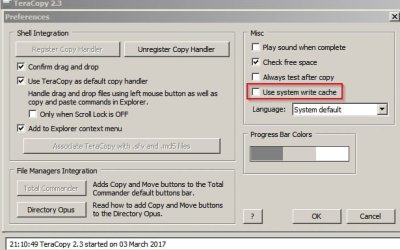
Actually I've just checked my version of Teracopy and it's 2.3 - maybe try going back to 2.3 and see if you still get the same problem.

TeraCopy 2.3.jpg
 

My Computer My Computer

Computer type
Laptop
Computer Manufacturer/Model Number
ASUS
OS
Microsoft Windows 7 Home Premium 64-bit 7601 Multiprocessor Free Service Pack 1
CPU
AMD C-60 APU with Radeon(tm) HD Graphics
Motherboard
ASUSTeK COMPUTER INC. X501U
Memory
4.00 GB
Graphics Card(s)
AMD Radeon HD 6290 Graphics
Sound Card
(1) AMD High Definition Audio Device (2) Realtek High Defi
Screen Resolution
1366 x 768 x 32 bits (4294967296 colors) @ 60 Hz
Hard Drives
Hitachi HTS545050A7E380 SATA Disk Device
Antivirus
Comodo CIS & FW, SecureAplus App Whitelisting, Threatfire
Browser
Cyberfox 64bit, Opera 64bit, Airfox
Other Info
Spy-The-Spy, HitmanPro.Alert, Norton Connect Safe, MJRegWatcher, BitDefender TrafficLight, Voodoo Shield, Zemana AntiMalware
I have both versions amongst my three computers. Yeah, one even has the pay-for version. I think if 2.3 works, stay with 2.3. Now, I will suggest this: when any computer's actively using TeraCopy, it is best to not actively, heavy-duty-wise, use explorer.exe -- clashes can result.
 

My Computer My Computer

Computer type
PC/Desktop
Computer Manufacturer/Model Number
Antec desktop; Acer Aspire laptops
OS
Windows 7 Professional 64-bit
CPU
Desktop i5; Acers i5 & i7
Memory
desktop 16GB; 1 Acer 8GB & 1 Acer 16GB
Hard Drives
1TB split into 2 equal partitions [OS and data] usable by RJS
Internet Speed
AT&T DSL
Browser
FF, GChrome, msIE
Other Info
Windows 7 Firewall, Emsisoft AM/AV, MSE [scan-only], SpywareBlaster, Ruiware/BillP combine
Yes because you asked:

Sorry but still can't see how it's related to my question, perhaps you could elaborate more on that.

Actually I've just checked my version of Teracopy and it's 2.3 - maybe try going back to 2.3 and see if you still get the same problem.

Did you actually read my whole post ?

I uninstalled v3 restarted installed v2.3, it was working fine then uninstalled v2.3 and installed v3 again and still the same problem.

And thank you I'm aware of that system cache option in v2.3.

I think if 2.3 works, stay with 2.3.

I've been using 2.3 for so long and I can tell it works fine overall but has a few problems that are fixed in v3 although using Teracopy 2.3 never once resulted in a file corruption or anything.


Is there any way/method to know whether Teracopy uses system cache or not during file transfer ?
 

My Computer My Computer

Computer type
PC/Desktop
Computer Manufacturer/Model Number
Custom built
OS
Windows 7 Ultimate x64 SP1
CPU
Intel i7 7700k
Motherboard
Asus H170 Pro
Memory
Kingston Fury 4GB DDR4
Graphics Card(s)
NVIDIA GeForce GT 440 (2 GB)
Monitor(s) Displays
Samsung
Screen Resolution
1360x768
Hard Drives
Seagate Barracuda 7200
Seagate Backup+ SL USB Device
Antivirus
Eset Smart Security 8
Browser
Waterfox
I did read but obviously not with enough care. :o

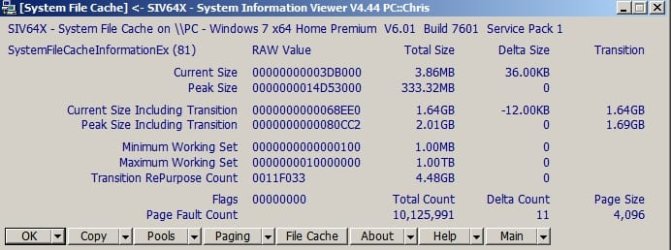
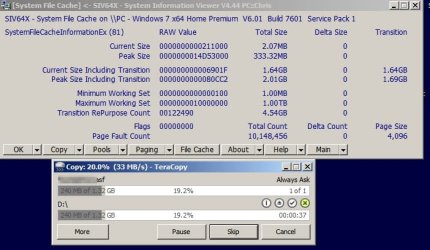
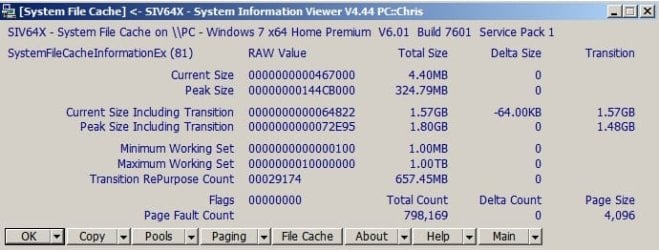
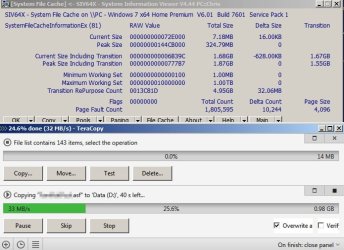
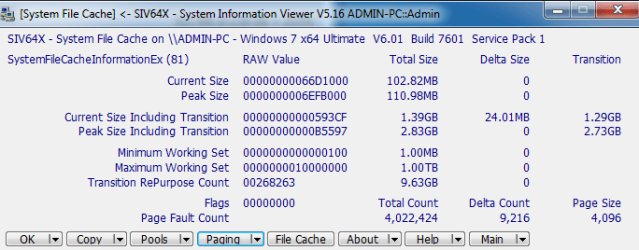
Anyway here's two screenshots showing System File Cache before and during a large file copy using 2.3 with cache option unchecked in preferences. Give us a while and I will try updating Teracopy and compare results.

System File Cache SIV64X.jpg

System File Cache SIV64X 2.jpg
 

My Computer My Computer

Computer type
Laptop
Computer Manufacturer/Model Number
ASUS
OS
Microsoft Windows 7 Home Premium 64-bit 7601 Multiprocessor Free Service Pack 1
CPU
AMD C-60 APU with Radeon(tm) HD Graphics
Motherboard
ASUSTeK COMPUTER INC. X501U
Memory
4.00 GB
Graphics Card(s)
AMD Radeon HD 6290 Graphics
Sound Card
(1) AMD High Definition Audio Device (2) Realtek High Defi
Screen Resolution
1366 x 768 x 32 bits (4294967296 colors) @ 60 Hz
Hard Drives
Hitachi HTS545050A7E380 SATA Disk Device
Antivirus
Comodo CIS & FW, SecureAplus App Whitelisting, Threatfire
Browser
Cyberfox 64bit, Opera 64bit, Airfox
Other Info
Spy-The-Spy, HitmanPro.Alert, Norton Connect Safe, MJRegWatcher, BitDefender TrafficLight, Voodoo Shield, Zemana AntiMalware
Okay I updated Teracopy.

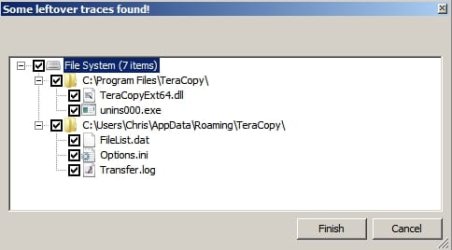
Problems with leftovers that needed removal ingluding Teracopy shell extension. If you didn't remove the old one I guess it could cause problems.

Geek Uninstaller.jpg

Geek Uninstaller 2.jpg

Code:
    ================ Ultra Virus Killer Scan Log File ================

<MemoryModules> | C:\PROGRA~1\TeraCopy\TeraCopyExt64.dll | No description | B766BEADE8D5A8FEE08C78D9558DE282 | Unsigned :  No publisher

<ContentsProgramfiles> | TeraCopy | 662 KB | Directory

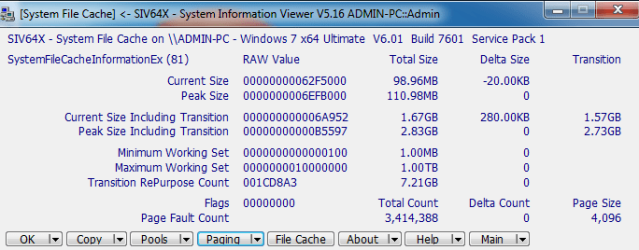
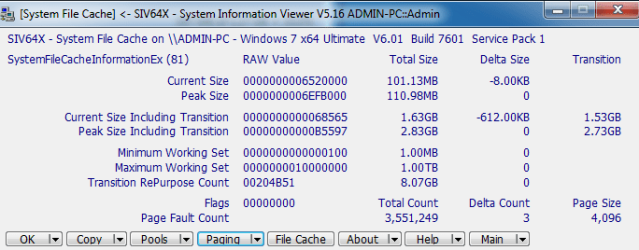
No problems with speed or freezing with the new vwrsion of Teracopy after a complete removal, a reboot and a fresh install of Teracopy 3

before copy
System File Cache SIV64X Teracopy 3 before copy.jpg

during copy
System File Cache SIV64X Teracopy 3 during copy.jpg

To answer another of your questions:

TeraCopy for Microsoft Windows - Code Sector

TeraCopy uses dynamically adjusted buffers to reduce the seek times.
Asynchronous copying speeds up the file transfer between two physical hard drives.

If you are using Ccleaner or similar app that uses winapp2.ini you might want to add this for privacy:

Code:
[TeraCopy*]
LangSecRef=3024
Detect=HKCU\Software\Code Sector\TeraCopy
Default=False
FileKey1=%AppData%\TeraCopy|FileList.dat;Transfer.log
FileKey2=%LocalAppData%\VirtualStore\Program Files*\TeraCopy|FileList.dat;Transfer.log
FileKey3=%ProgramFiles%\TeraCopy|FileList.dat;Transfer.log
FileKey4=%AppData%\TeraCopy\History|*.*
FileKey5=%AppData%\TeraCopy|main.db
RegKey1=HKCU\Software\Code Sector\TeraCopy|LastTargetFolder
 
Last edited:

My Computer My Computer

Computer type
Laptop
Computer Manufacturer/Model Number
ASUS
OS
Microsoft Windows 7 Home Premium 64-bit 7601 Multiprocessor Free Service Pack 1
CPU
AMD C-60 APU with Radeon(tm) HD Graphics
Motherboard
ASUSTeK COMPUTER INC. X501U
Memory
4.00 GB
Graphics Card(s)
AMD Radeon HD 6290 Graphics
Sound Card
(1) AMD High Definition Audio Device (2) Realtek High Defi
Screen Resolution
1366 x 768 x 32 bits (4294967296 colors) @ 60 Hz
Hard Drives
Hitachi HTS545050A7E380 SATA Disk Device
Antivirus
Comodo CIS & FW, SecureAplus App Whitelisting, Threatfire
Browser
Cyberfox 64bit, Opera 64bit, Airfox
Other Info
Spy-The-Spy, HitmanPro.Alert, Norton Connect Safe, MJRegWatcher, BitDefender TrafficLight, Voodoo Shield, Zemana AntiMalware
Sorry for the late reply mate.

https://www.sevenforums.com/attachment.php?attachmentid=397004&stc=1&d=1488735502

Before file transfer.

https://www.sevenforums.com/attachment.php?attachmentid=397005&stc=1&d=1488735502

During copying (Small files).

https://www.sevenforums.com/attachment.php?attachmentid=397006&stc=1&d=1488735502

During copying (Big files).

https://www.sevenforums.com/attachment.php?attachmentid=397007&stc=1&d=1488735502

As you can see it fluctuates very much for small files and there's at least 5 s freeze between each file.

https://www.sevenforums.com/attachment.php?attachmentid=397008&stc=1&d=1488735502

For these big files there's no freeze between them.


To be honest I don't know what those numbers and values mean in SIV, could you please have a look and see whether there's a problem ?
 

Attachments

  • Before.png
    Before.png
    15.4 KB · Views: 41
  • During small.png
    During small.png
    14.9 KB · Views: 39
  • During big.png
    During big.png
    14.6 KB · Views: 38
  • Small.png
    Small.png
    14.8 KB · Views: 37
  • Big.png
    Big.png
    15.2 KB · Views: 38

My Computer My Computer

Computer type
PC/Desktop
Computer Manufacturer/Model Number
Custom built
OS
Windows 7 Ultimate x64 SP1
CPU
Intel i7 7700k
Motherboard
Asus H170 Pro
Memory
Kingston Fury 4GB DDR4
Graphics Card(s)
NVIDIA GeForce GT 440 (2 GB)
Monitor(s) Displays
Samsung
Screen Resolution
1360x768
Hard Drives
Seagate Barracuda 7200
Seagate Backup+ SL USB Device
Antivirus
Eset Smart Security 8
Browser
Waterfox
I've been away and offline for a week. What was the file size for your copied file?

Your file cache is 10 times the size of mine but I'm not sure why that is.

There were no issues with Teracopy 3 on my machine and no freezes or delays.

I've gone back to Teracopy 2.3 as it doesn't install a service which runs in the background.

Maybe check your pagefile size.

I suppose I should point out that on my machine there is a RAMdisk and the pagefile for Windows Partition
has been swapped to another partition so it's not the same setup as yours.
 

My Computer My Computer

Computer type
Laptop
Computer Manufacturer/Model Number
ASUS
OS
Microsoft Windows 7 Home Premium 64-bit 7601 Multiprocessor Free Service Pack 1
CPU
AMD C-60 APU with Radeon(tm) HD Graphics
Motherboard
ASUSTeK COMPUTER INC. X501U
Memory
4.00 GB
Graphics Card(s)
AMD Radeon HD 6290 Graphics
Sound Card
(1) AMD High Definition Audio Device (2) Realtek High Defi
Screen Resolution
1366 x 768 x 32 bits (4294967296 colors) @ 60 Hz
Hard Drives
Hitachi HTS545050A7E380 SATA Disk Device
Antivirus
Comodo CIS & FW, SecureAplus App Whitelisting, Threatfire
Browser
Cyberfox 64bit, Opera 64bit, Airfox
Other Info
Spy-The-Spy, HitmanPro.Alert, Norton Connect Safe, MJRegWatcher, BitDefender TrafficLight, Voodoo Shield, Zemana AntiMalware
I've been away and offline for a week. What was the file size for your copied file?

Your file cache is 10 times the size of mine but I'm not sure why that is.

There were no issues with Teracopy 3 on my machine and no freezes or delays.

I've gone back to Teracopy 2.3 as it doesn't install a service which runs in the background.

Maybe check your pagefile size.

I suppose I should point out that on my machine there is a RAMdisk and the pagefile for Windows Partition
has been swapped to another partition so it's not the same setup as yours.

Hi man.
Sorry for the late reply, I meant to reply sooner but I was just too busy.

You can see the size of copied files in attached screenshots.

Try copying 5-6 small files (200-300 MB) from your internal HDD to your external HDD and expand the window so you can see the log of the files that are being copied and look at it while it's copying them.

Yeah I don't really like TC 3 installing an unnecessary service on my machine.

My pagefile size is managed automatically so it's the same size as my RAM which is 4 GB.

My pagefile is on the system partition.

I'm gonna stick to TC 2.3 for now and try to tolerate its bugs.
 

My Computer My Computer

Computer type
PC/Desktop
Computer Manufacturer/Model Number
Custom built
OS
Windows 7 Ultimate x64 SP1
CPU
Intel i7 7700k
Motherboard
Asus H170 Pro
Memory
Kingston Fury 4GB DDR4
Graphics Card(s)
NVIDIA GeForce GT 440 (2 GB)
Monitor(s) Displays
Samsung
Screen Resolution
1360x768
Hard Drives
Seagate Barracuda 7200
Seagate Backup+ SL USB Device
Antivirus
Eset Smart Security 8
Browser
Waterfox
Actually I had reason last week to copy all important files to seagate backup external HD as I had a non booting machine after this months windows updates. Having initially been unable to restore Macruim Reflect backup, once I got the machine working I used Teracopy 2.3 to copy all of the files to the 1TB external HD and it went okay with no freezes. I'm starting to wonder if you have got a buggy shell extension that might make Teracopy struggle with certain files. I've seen such a shell extension cause delayed copy/ move/ delete operations on my own machine before. The problem is it that it's not easy to diagnose.
 
Last edited:

My Computer My Computer

Computer type
Laptop
Computer Manufacturer/Model Number
ASUS
OS
Microsoft Windows 7 Home Premium 64-bit 7601 Multiprocessor Free Service Pack 1
CPU
AMD C-60 APU with Radeon(tm) HD Graphics
Motherboard
ASUSTeK COMPUTER INC. X501U
Memory
4.00 GB
Graphics Card(s)
AMD Radeon HD 6290 Graphics
Sound Card
(1) AMD High Definition Audio Device (2) Realtek High Defi
Screen Resolution
1366 x 768 x 32 bits (4294967296 colors) @ 60 Hz
Hard Drives
Hitachi HTS545050A7E380 SATA Disk Device
Antivirus
Comodo CIS & FW, SecureAplus App Whitelisting, Threatfire
Browser
Cyberfox 64bit, Opera 64bit, Airfox
Other Info
Spy-The-Spy, HitmanPro.Alert, Norton Connect Safe, MJRegWatcher, BitDefender TrafficLight, Voodoo Shield, Zemana AntiMalware
Back
Top