Solved Win7/Pro x64 - Booting Very Slow - Cannot Save Files

1. MiniTool Partition Wizard is not going to help because it has shown that your Partition is existing.(It is existing and not "lost/deleted")

( While on Partition Wizard, from version 10 onwards it will not do " Partition Recovery". Even if Partitions are lost and it finds the partitions, to write the new partition Table to sector 0 - that is what it does - you have to buy a license. You may uninstall version 10 and install version 9.1 which can do it for free. Download version MiniTool Partition Wizard Free 9.1 from here MiniTool Partition Wizard Free 10.1 Download for Windows / Old Versions / FileHorse.com and keep it for future use.)

2. Double clicking on the existing Partition found, you could see all your files. So your Data is still there. To that extent PW has helped but it cannot be used to copy the files. MiniTool Power Data Recovery again as you have already been intimated can recover only 1GB of data unless you pay and get the paid version. So I usually do not recommend it. ( TestDisk is free and can do it but do not test it or try it on your own - it could be pretty dangerous for the first time user ). I shall guide you to do it step by step)

3. By all means it indicates a File System corruption. We have to find out what is wrong and correct it if possible. But before we do any correction - which may or may not fructify - , as an abunbdant caution we shall try to copy the files first.

4. On your 2TB external drive on which you have free space create a folder named Recovery. This will be your destination to copy the files.

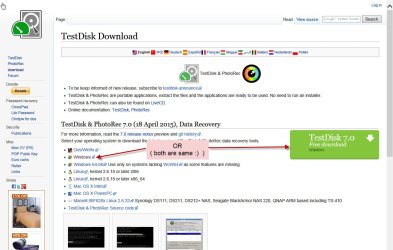
Now download "TestDisk & PhotoRec 7.0 (18 April 2015), Data Recovery" from here TestDisk Download - CGSecurity Extract it to the root of your system drive. ( Please download the Windows version and not the Windows 64bit version)
18-02-2017 14-14-36.jpg

Shall continue after a break during which I have to search my own posts. :)
 
Last edited:

My Computer My Computer

At a glance

Windows 7 Home Premium 32 bit
OS
Windows 7 Home Premium 32 bit
Continuing,

1. Your disk 0 - 119.24 GB is the System Disk.

2. Disk 1 - 931.51 GB WD Black is the RAW disk ( I presume it is your internal Data disk)

3. Plug in your 2TB Image Backup eSATA external drive Disk 2 on which you have created the Recovery Folder. This will be your Destination to copy files from the 1TB WD RAW disk
Repeat: Download TestDisk for Windows from here TestDisk Download - CGSecurity ( The second in the list.)( Do not download " Windows 64 bit" - that is not for you) Extract the testdisk-7.0.win.zip to the root of your system drive C:. You will run testdisk_win.exe in the extracted testdisk-7.0 folder.

Now run TestDisk. You will navigate/select/highlight by using Up/Down, Left/Right Arrow keys in the TestDisk Window.

Go to my post #6 here WD Elements being read as RAW // Contents readable through app

and follow the screenshots.

Screen1: [No Log] Enter. No change

Screen 2: Will show your 119.24 GB System Disk, 1TB RAW Disk and 2TB Destination Disk. It will also show Drive C:, Drive D: and Drive F: 2TB. In particular note the drive letter of your 2TB Destination Disk
Assuming F: is correct your destination to copy files - when we come to it - will be Directory F: \Recovery.

Select /Highlight only the 1TB Raw disk and not the drive. [Proceed] is highlighted. Press Enter

Screen 3: No change [Intel] Enter

Screen 4: No Change [Advanced] Enter

Screen 5: Does it show your Single partition in the 1TB drive with [Boot] highlighted.

If yes, press Enter to go to the sixth Screen and post a screenshot. Further instructions only after I see the screenshot.

After posting the screenshot and if I do not respond within half an hour - not online - you may close TestDisk by pressing X on the top Right TitleBar of the Window.

Caution: Do not proceed further or try any other command unless I instruct you to do so.

If at any stage you have a doubt, post a screenshot and quit TestDisk by pressing X as mentioned above.

Mostly I will be peeping in at regular intervals till my midnight.

However, there is no need to do things in a hurry. Haste makes waste. Do it on your own pace and time, cool and calm.. I shall catch you.

EDIT: Because of some prescribed sedative drugs, I am hitting the sack two and a half hours before the scheduled midnight. I shall see your post/ response only tom 10 A.M.(my time) after 12 hours from now. So you have all the time in the world to do what has been prescribed for you. :)
 
Last edited:

My Computer My Computer

At a glance

Windows 7 Home Premium 32 bit
OS
Windows 7 Home Premium 32 bit
Catch 22 - Disk Not Available

Hello Jumanji (or anyone else following)

I am stuck at step 3-4

3. By all means it indicates a File System corruption. We have to find out what is wrong and correct it if possible. But before we do any correction - which may or may not fructify - , as an abunbdant caution we shall try to copy the files first.

4. On your 2TB external drive on which you have free space create a folder named Recovery. This will be your destination to copy the files.

Windows Explorer tells me that the Data Disk is not available. Is there a Command Prompt approach to copying such a disk that can by-pass this apparent restriction?

thanks
baumgrenze
 

My Computer My Computer

At a glance

Win 7 Pro 64Intel Core 2 Quad Q6600 (2.4 GHz) Quad Core2 x Crucial 4GB Kit (2GBx2) DDR2 CT2KIT25664A...Sapphire Radeon HD 3870 PCIe 512 Mb
Computer type
PC/Desktop
Computer Manufacturer/Model Number
Custom built by GamePC/Solid Electric - Palo Alto - on 03/10/08
OS
Win 7 Pro 64
CPU
Intel Core 2 Quad Q6600 (2.4 GHz) Quad Core
Motherboard
Gigabyte GA-P35-DS3P Intel P35 ATX (rev. 2.1)
Memory
2 x Crucial 4GB Kit (2GBx2) DDR2 CT2KIT25664AA800
Graphics Card(s)
Sapphire Radeon HD 3870 PCIe 512 Mb
Sound Card
RealTek audio on MOBO + EDIROL UA-1EX
Monitor(s) Displays
Samsung S24A450BW 24" LED monitor
Screen Resolution
1600 x 1200 at 75 Hz
Hard Drives
2 Crucial 128 Gb SSD (CT128M550SSD1)
one mounted and running Win7/Pro x64
one disconnected containing only Win10/Pro upgrade - in process
1 1TB WD Caviar Black (WD1003FZEX-00MK2A0) (Data drive)
1 2TB Seagate 2TB (PN/ 9JB1N3-576 - ST2000DM001-1ER
PSU
Seasonic S12-HT 650W 80% Efficiency Power Supply
Case
Lian Li PC-B25B
Cooling
Gigabyte Silent-Pipe
Keyboard
Dell MS Comfort
Mouse
HP x4000 wireless
Internet Speed
Sonic FTTN @ 23 Mbps
Antivirus
Avast
Browser
SeaMonkey
Other Info
BIOS: Award Software International, Inc. F6 06/18/2009

System Specs - Updated on 09//16/19
I remembered that I have a Macrium Reflect license to ver. 6 (they want me to upgrade to 7) I updated my 6 to 6.3.1475 and it reports that my Data Disk is "Unformatted Primary."

Should I use it to clone a copy to new folder on my Backup Drive? If so, I will begin assembling instructions for creating the clone.

thanks
baumgrenze
 

My Computer My Computer

At a glance

Win 7 Pro 64Intel Core 2 Quad Q6600 (2.4 GHz) Quad Core2 x Crucial 4GB Kit (2GBx2) DDR2 CT2KIT25664A...Sapphire Radeon HD 3870 PCIe 512 Mb
Computer type
PC/Desktop
Computer Manufacturer/Model Number
Custom built by GamePC/Solid Electric - Palo Alto - on 03/10/08
OS
Win 7 Pro 64
CPU
Intel Core 2 Quad Q6600 (2.4 GHz) Quad Core
Motherboard
Gigabyte GA-P35-DS3P Intel P35 ATX (rev. 2.1)
Memory
2 x Crucial 4GB Kit (2GBx2) DDR2 CT2KIT25664AA800
Graphics Card(s)
Sapphire Radeon HD 3870 PCIe 512 Mb
Sound Card
RealTek audio on MOBO + EDIROL UA-1EX
Monitor(s) Displays
Samsung S24A450BW 24" LED monitor
Screen Resolution
1600 x 1200 at 75 Hz
Hard Drives
2 Crucial 128 Gb SSD (CT128M550SSD1)
one mounted and running Win7/Pro x64
one disconnected containing only Win10/Pro upgrade - in process
1 1TB WD Caviar Black (WD1003FZEX-00MK2A0) (Data drive)
1 2TB Seagate 2TB (PN/ 9JB1N3-576 - ST2000DM001-1ER
PSU
Seasonic S12-HT 650W 80% Efficiency Power Supply
Case
Lian Li PC-B25B
Cooling
Gigabyte Silent-Pipe
Keyboard
Dell MS Comfort
Mouse
HP x4000 wireless
Internet Speed
Sonic FTTN @ 23 Mbps
Antivirus
Avast
Browser
SeaMonkey
Other Info
BIOS: Award Software International, Inc. F6 06/18/2009

System Specs - Updated on 09//16/19
I found this thread:

Windows 7 help and support
navbit-arrow-right.png
Backup and Restore »
tick.png
Cannot clone my HDD - bad sector.

This suggests that Macrium Reflect may not be the answer. I believe that the complaining poster at the end was using Ver 5.x.
 

My Computer My Computer

At a glance

Win 7 Pro 64Intel Core 2 Quad Q6600 (2.4 GHz) Quad Core2 x Crucial 4GB Kit (2GBx2) DDR2 CT2KIT25664A...Sapphire Radeon HD 3870 PCIe 512 Mb
Computer type
PC/Desktop
Computer Manufacturer/Model Number
Custom built by GamePC/Solid Electric - Palo Alto - on 03/10/08
OS
Win 7 Pro 64
CPU
Intel Core 2 Quad Q6600 (2.4 GHz) Quad Core
Motherboard
Gigabyte GA-P35-DS3P Intel P35 ATX (rev. 2.1)
Memory
2 x Crucial 4GB Kit (2GBx2) DDR2 CT2KIT25664AA800
Graphics Card(s)
Sapphire Radeon HD 3870 PCIe 512 Mb
Sound Card
RealTek audio on MOBO + EDIROL UA-1EX
Monitor(s) Displays
Samsung S24A450BW 24" LED monitor
Screen Resolution
1600 x 1200 at 75 Hz
Hard Drives
2 Crucial 128 Gb SSD (CT128M550SSD1)
one mounted and running Win7/Pro x64
one disconnected containing only Win10/Pro upgrade - in process
1 1TB WD Caviar Black (WD1003FZEX-00MK2A0) (Data drive)
1 2TB Seagate 2TB (PN/ 9JB1N3-576 - ST2000DM001-1ER
PSU
Seasonic S12-HT 650W 80% Efficiency Power Supply
Case
Lian Li PC-B25B
Cooling
Gigabyte Silent-Pipe
Keyboard
Dell MS Comfort
Mouse
HP x4000 wireless
Internet Speed
Sonic FTTN @ 23 Mbps
Antivirus
Avast
Browser
SeaMonkey
Other Info
BIOS: Award Software International, Inc. F6 06/18/2009

System Specs - Updated on 09//16/19
I forgot to ask earlier, do you agree with Minitool that I can (and should) shut down their Partition Wizard program?

I have some Windows updates to install and will need to reboot or I will get nagged to death.

I managed to run Malwarebytes earlier today and this time it worked and gave me 'nothing found' report. Glad to see that.

Sorry to hear about the need for prescriptions. Whatever caused the physician to write the script, I certainly hope you are getting better quickly.

I look forward to your reply.

thanks
baumgrenze
 

My Computer My Computer

At a glance

Win 7 Pro 64Intel Core 2 Quad Q6600 (2.4 GHz) Quad Core2 x Crucial 4GB Kit (2GBx2) DDR2 CT2KIT25664A...Sapphire Radeon HD 3870 PCIe 512 Mb
Computer type
PC/Desktop
Computer Manufacturer/Model Number
Custom built by GamePC/Solid Electric - Palo Alto - on 03/10/08
OS
Win 7 Pro 64
CPU
Intel Core 2 Quad Q6600 (2.4 GHz) Quad Core
Motherboard
Gigabyte GA-P35-DS3P Intel P35 ATX (rev. 2.1)
Memory
2 x Crucial 4GB Kit (2GBx2) DDR2 CT2KIT25664AA800
Graphics Card(s)
Sapphire Radeon HD 3870 PCIe 512 Mb
Sound Card
RealTek audio on MOBO + EDIROL UA-1EX
Monitor(s) Displays
Samsung S24A450BW 24" LED monitor
Screen Resolution
1600 x 1200 at 75 Hz
Hard Drives
2 Crucial 128 Gb SSD (CT128M550SSD1)
one mounted and running Win7/Pro x64
one disconnected containing only Win10/Pro upgrade - in process
1 1TB WD Caviar Black (WD1003FZEX-00MK2A0) (Data drive)
1 2TB Seagate 2TB (PN/ 9JB1N3-576 - ST2000DM001-1ER
PSU
Seasonic S12-HT 650W 80% Efficiency Power Supply
Case
Lian Li PC-B25B
Cooling
Gigabyte Silent-Pipe
Keyboard
Dell MS Comfort
Mouse
HP x4000 wireless
Internet Speed
Sonic FTTN @ 23 Mbps
Antivirus
Avast
Browser
SeaMonkey
Other Info
BIOS: Award Software International, Inc. F6 06/18/2009

System Specs - Updated on 09//16/19
Test Disk Ready?

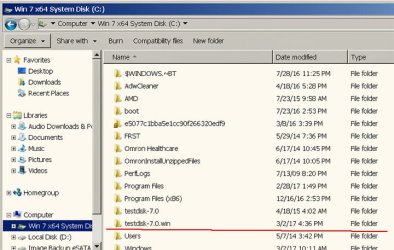
I think my screen shot shows that I have TestDisk ready to run, so that task is completed.

I put a red underline beneath the folder. I see I somehow managed to create another folder with the creation date of TestDisk that is just above which will need to be deleted.

I used 7-Zip and it has been a while since I needed it. I managed to find the HTML documentation file and sorted out how to extract the one I underlined. I searched sevenforums and Google for documentation and found nothing that appeared to tell me where to find the documentation and how to use the program to extract a file in layman's terms.

thanks
baumgrenze
 

Attachments

  • 7ZipResultInC.jpg
    7ZipResultInC.jpg
    72.4 KB · Views: 31

My Computer My Computer

At a glance

Win 7 Pro 64Intel Core 2 Quad Q6600 (2.4 GHz) Quad Core2 x Crucial 4GB Kit (2GBx2) DDR2 CT2KIT25664A...Sapphire Radeon HD 3870 PCIe 512 Mb
Computer type
PC/Desktop
Computer Manufacturer/Model Number
Custom built by GamePC/Solid Electric - Palo Alto - on 03/10/08
OS
Win 7 Pro 64
CPU
Intel Core 2 Quad Q6600 (2.4 GHz) Quad Core
Motherboard
Gigabyte GA-P35-DS3P Intel P35 ATX (rev. 2.1)
Memory
2 x Crucial 4GB Kit (2GBx2) DDR2 CT2KIT25664AA800
Graphics Card(s)
Sapphire Radeon HD 3870 PCIe 512 Mb
Sound Card
RealTek audio on MOBO + EDIROL UA-1EX
Monitor(s) Displays
Samsung S24A450BW 24" LED monitor
Screen Resolution
1600 x 1200 at 75 Hz
Hard Drives
2 Crucial 128 Gb SSD (CT128M550SSD1)
one mounted and running Win7/Pro x64
one disconnected containing only Win10/Pro upgrade - in process
1 1TB WD Caviar Black (WD1003FZEX-00MK2A0) (Data drive)
1 2TB Seagate 2TB (PN/ 9JB1N3-576 - ST2000DM001-1ER
PSU
Seasonic S12-HT 650W 80% Efficiency Power Supply
Case
Lian Li PC-B25B
Cooling
Gigabyte Silent-Pipe
Keyboard
Dell MS Comfort
Mouse
HP x4000 wireless
Internet Speed
Sonic FTTN @ 23 Mbps
Antivirus
Avast
Browser
SeaMonkey
Other Info
BIOS: Award Software International, Inc. F6 06/18/2009

System Specs - Updated on 09//16/19
Hi baumgrenze,

1. If you still have Partition Wizard open, say NO and then close Partition Wizard. Nothing will happen. ( Or simply shut down your PC. Windows will close it and shut down.But manually closing it and any other running program/s is the best way)

2. Shut down your PC and then boot into Windows.

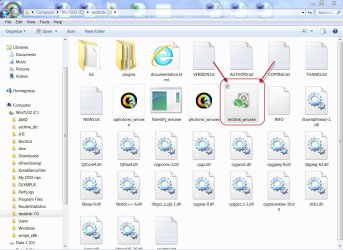
3, I see you have been struggling to extract the testdisk-7.0.win.zip to your C: drive. Actually it is a simple process. ( Right click on the testdisk-7.0.win.zip, "open with" "Windows Explorer". You will see the testdisk-7.0 folder. Move/copy it to your C: drive. Done.)

4. Anyway, I see you have managed to get that folder to your C: drive. Open that folder and you will see testdisk_win.exe which you will click/doubleclick to run TestDisk.

03-03-2017 10-11-17.jpg

Now do the exercise as per my post#22 and post the screenshot.
 

My Computer My Computer

At a glance

Windows 7 Home Premium 32 bit
OS
Windows 7 Home Premium 32 bit
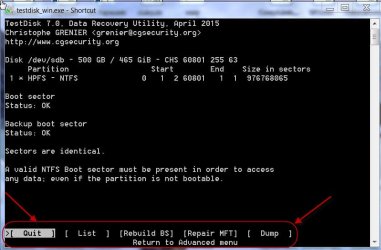
Screen 6 Image - TestDisk

Here is the screen 6 image.

Sorry to be so slow responding.

It took me >5 minutes to boot to the password request. The start of TestDisk was also remarkably slow and I realized I should have printed copies of the pages of your #22 for reference.

thanks
baumgrenze
 

Attachments

  • TestDiskScreen6.jpg
    TestDiskScreen6.jpg
    52.8 KB · Views: 0

My Computer My Computer

At a glance

Win 7 Pro 64Intel Core 2 Quad Q6600 (2.4 GHz) Quad Core2 x Crucial 4GB Kit (2GBx2) DDR2 CT2KIT25664A...Sapphire Radeon HD 3870 PCIe 512 Mb
Computer type
PC/Desktop
Computer Manufacturer/Model Number
Custom built by GamePC/Solid Electric - Palo Alto - on 03/10/08
OS
Win 7 Pro 64
CPU
Intel Core 2 Quad Q6600 (2.4 GHz) Quad Core
Motherboard
Gigabyte GA-P35-DS3P Intel P35 ATX (rev. 2.1)
Memory
2 x Crucial 4GB Kit (2GBx2) DDR2 CT2KIT25664AA800
Graphics Card(s)
Sapphire Radeon HD 3870 PCIe 512 Mb
Sound Card
RealTek audio on MOBO + EDIROL UA-1EX
Monitor(s) Displays
Samsung S24A450BW 24" LED monitor
Screen Resolution
1600 x 1200 at 75 Hz
Hard Drives
2 Crucial 128 Gb SSD (CT128M550SSD1)
one mounted and running Win7/Pro x64
one disconnected containing only Win10/Pro upgrade - in process
1 1TB WD Caviar Black (WD1003FZEX-00MK2A0) (Data drive)
1 2TB Seagate 2TB (PN/ 9JB1N3-576 - ST2000DM001-1ER
PSU
Seasonic S12-HT 650W 80% Efficiency Power Supply
Case
Lian Li PC-B25B
Cooling
Gigabyte Silent-Pipe
Keyboard
Dell MS Comfort
Mouse
HP x4000 wireless
Internet Speed
Sonic FTTN @ 23 Mbps
Antivirus
Avast
Browser
SeaMonkey
Other Info
BIOS: Award Software International, Inc. F6 06/18/2009

System Specs - Updated on 09//16/19
We are approaching (10 minutes left) my 11:00 PM and my aging body (< 1 month to end of year 77) will certainly want to be horizontal soon.

I will resist the temptation to push onward even though my screen and that of JTizzle in the referenced thread from last December are identical.

Let me anticipate and quote your instructions to him. You say:

"OK, both Boot sector and Backup boot sector are OK. Now repeat till you again get this screen, Move the Highlight to [Repair MFT] and press ENTER"

If you will say the same to me, what do you mean by "Now repeat till you again get this screen" ? I may be dense but I do not see what is to be repeated.

thanks
baumgrenze

 
Last edited:

My Computer My Computer

At a glance

Win 7 Pro 64Intel Core 2 Quad Q6600 (2.4 GHz) Quad Core2 x Crucial 4GB Kit (2GBx2) DDR2 CT2KIT25664A...Sapphire Radeon HD 3870 PCIe 512 Mb
Computer type
PC/Desktop
Computer Manufacturer/Model Number
Custom built by GamePC/Solid Electric - Palo Alto - on 03/10/08
OS
Win 7 Pro 64
CPU
Intel Core 2 Quad Q6600 (2.4 GHz) Quad Core
Motherboard
Gigabyte GA-P35-DS3P Intel P35 ATX (rev. 2.1)
Memory
2 x Crucial 4GB Kit (2GBx2) DDR2 CT2KIT25664AA800
Graphics Card(s)
Sapphire Radeon HD 3870 PCIe 512 Mb
Sound Card
RealTek audio on MOBO + EDIROL UA-1EX
Monitor(s) Displays
Samsung S24A450BW 24" LED monitor
Screen Resolution
1600 x 1200 at 75 Hz
Hard Drives
2 Crucial 128 Gb SSD (CT128M550SSD1)
one mounted and running Win7/Pro x64
one disconnected containing only Win10/Pro upgrade - in process
1 1TB WD Caviar Black (WD1003FZEX-00MK2A0) (Data drive)
1 2TB Seagate 2TB (PN/ 9JB1N3-576 - ST2000DM001-1ER
PSU
Seasonic S12-HT 650W 80% Efficiency Power Supply
Case
Lian Li PC-B25B
Cooling
Gigabyte Silent-Pipe
Keyboard
Dell MS Comfort
Mouse
HP x4000 wireless
Internet Speed
Sonic FTTN @ 23 Mbps
Antivirus
Avast
Browser
SeaMonkey
Other Info
BIOS: Award Software International, Inc. F6 06/18/2009

System Specs - Updated on 09//16/19
OK, Close Test Disk now by clicking X in the menu bar.

On the next run you are going to copy the files to your other 2TB external drive. Have you created a folder named Recovery in it? If not do it now.

On the next run on screen 2 please note the drive letter of your 2TB drive where you have created the Recovery folder..

When you reach screen 5, [Boot] was highlighted. Move the highlight to
  • and press enter.
  • That should list your files.

    Select all and copy the files to your other external drive into the Recovery folder you created..

    Read this on How to copy the files first before you run TestDisk.

    My post#28 here My external hard drive suddenly became unllocated:

    Screenshot 5 onwards is what you will do.

    I would advise you select all files by pressing a. All the listed files will turn Green. Then press C ( Capital Shift+C) and a default location will be shown. No, navigate to the destination location.

    (If your 2TB external drive is shown as Drive F: in screen 2, then your destination will be Directory F: / Recovery )

    When your destination Directory F: / Recovery is reached press C (Shift+C) to copy

    Allow copy to complete.
 
Last edited:

My Computer My Computer

At a glance

Windows 7 Home Premium 32 bit
OS
Windows 7 Home Premium 32 bit
Please read my edited post above.
 

My Computer My Computer

At a glance

Windows 7 Home Premium 32 bit
OS
Windows 7 Home Premium 32 bit
Note for future Screenshots:

Your screenshot in post #29 is truncated.

You must always post the full screen including the Commands available on that screen.

03-03-2017 13-35-45.jpg

If not I won't be able to give you proper instructions for the next action.. ( TestDisk is highly interactive and the commands in any screen may vary according to the situation encountered.)

Had you posted the full screenshot as shown above, I would have straightway asked you to move the highlist to
  • Enter and proceed with the copy process, instead of asking you to rerun TestDisk to get at the
    • command.
 

My Computer My Computer

At a glance

Windows 7 Home Premium 32 bit
OS
Windows 7 Home Premium 32 bit
Today my machine began balking even more. Yesterday I could open PSE6 and save a jpg of a screenshot. Today PSE6 has joined Word and it locks up if I ask it to save a file. My only other alternative is digital photos downloaded to my wife's Dell and posted from her machine, unless you can think of an alternative.

I have a printed copy of your 12 screen shot post "Copying files listed by TestDisk during Recovery." I am just starting to work my way through it.

In an abundance of caution I copied my Boot Drive to a folder on F: Computer Management reports 1800 GB free or 97%. The drive I copied is only 119 GB capacity (seemed like a lot when I installed it) so even at 21% free, what I copied is small relative to the 2 TB backup disk.

thanks
baumgrenze
 

My Computer My Computer

At a glance

Win 7 Pro 64Intel Core 2 Quad Q6600 (2.4 GHz) Quad Core2 x Crucial 4GB Kit (2GBx2) DDR2 CT2KIT25664A...Sapphire Radeon HD 3870 PCIe 512 Mb
Computer type
PC/Desktop
Computer Manufacturer/Model Number
Custom built by GamePC/Solid Electric - Palo Alto - on 03/10/08
OS
Win 7 Pro 64
CPU
Intel Core 2 Quad Q6600 (2.4 GHz) Quad Core
Motherboard
Gigabyte GA-P35-DS3P Intel P35 ATX (rev. 2.1)
Memory
2 x Crucial 4GB Kit (2GBx2) DDR2 CT2KIT25664AA800
Graphics Card(s)
Sapphire Radeon HD 3870 PCIe 512 Mb
Sound Card
RealTek audio on MOBO + EDIROL UA-1EX
Monitor(s) Displays
Samsung S24A450BW 24" LED monitor
Screen Resolution
1600 x 1200 at 75 Hz
Hard Drives
2 Crucial 128 Gb SSD (CT128M550SSD1)
one mounted and running Win7/Pro x64
one disconnected containing only Win10/Pro upgrade - in process
1 1TB WD Caviar Black (WD1003FZEX-00MK2A0) (Data drive)
1 2TB Seagate 2TB (PN/ 9JB1N3-576 - ST2000DM001-1ER
PSU
Seasonic S12-HT 650W 80% Efficiency Power Supply
Case
Lian Li PC-B25B
Cooling
Gigabyte Silent-Pipe
Keyboard
Dell MS Comfort
Mouse
HP x4000 wireless
Internet Speed
Sonic FTTN @ 23 Mbps
Antivirus
Avast
Browser
SeaMonkey
Other Info
BIOS: Award Software International, Inc. F6 06/18/2009

System Specs - Updated on 09//16/19
Avast Blocked Threat During Copy in TestDisk

I am on my wife's Dell.

I am about 25% done by my calculation. As I stopped in to check progress Avast popped up briefly to tell me that it had 'blocked a threat.' All I remember is that the file was a *.exe file.

Is this going to cause trouble? You said 'no multitasking.'

Perhaps TestDisk user instructions should include

1) only one window, that for TestDisk
2) disable AV during file transfer

What do you think?

thanks
baumgrenze
 

My Computer My Computer

At a glance

Win 7 Pro 64Intel Core 2 Quad Q6600 (2.4 GHz) Quad Core2 x Crucial 4GB Kit (2GBx2) DDR2 CT2KIT25664A...Sapphire Radeon HD 3870 PCIe 512 Mb
Computer type
PC/Desktop
Computer Manufacturer/Model Number
Custom built by GamePC/Solid Electric - Palo Alto - on 03/10/08
OS
Win 7 Pro 64
CPU
Intel Core 2 Quad Q6600 (2.4 GHz) Quad Core
Motherboard
Gigabyte GA-P35-DS3P Intel P35 ATX (rev. 2.1)
Memory
2 x Crucial 4GB Kit (2GBx2) DDR2 CT2KIT25664AA800
Graphics Card(s)
Sapphire Radeon HD 3870 PCIe 512 Mb
Sound Card
RealTek audio on MOBO + EDIROL UA-1EX
Monitor(s) Displays
Samsung S24A450BW 24" LED monitor
Screen Resolution
1600 x 1200 at 75 Hz
Hard Drives
2 Crucial 128 Gb SSD (CT128M550SSD1)
one mounted and running Win7/Pro x64
one disconnected containing only Win10/Pro upgrade - in process
1 1TB WD Caviar Black (WD1003FZEX-00MK2A0) (Data drive)
1 2TB Seagate 2TB (PN/ 9JB1N3-576 - ST2000DM001-1ER
PSU
Seasonic S12-HT 650W 80% Efficiency Power Supply
Case
Lian Li PC-B25B
Cooling
Gigabyte Silent-Pipe
Keyboard
Dell MS Comfort
Mouse
HP x4000 wireless
Internet Speed
Sonic FTTN @ 23 Mbps
Antivirus
Avast
Browser
SeaMonkey
Other Info
BIOS: Award Software International, Inc. F6 06/18/2009

System Specs - Updated on 09//16/19
Major Progress - Much Work to Be Done

Thank you, jumanji !

My wife sat next to me as we went down through the screen shots for today's effort. Together we managed to run TestDisk and copy my Data Disk to my external backup disk.

As we worked through it, we almost missed the small, off to the right side, drive letter at the start of the process. I have uncommon macular lesions that make seeing difficult. I may think of a few more suggestions I've not posted.

If you want to see 'screen shots' I did use my digital camera to create digital images of my CRT screen. At you request, I will download them to my wife's Dell and we will proceed from there. Some of the screens looked different.

I am pleased to report that when I opened the Recovery folder on my F: drive (external backup) I could see a file structure that looks much like it did before 2/28/17 when I began describing my problem. I've not explored enough to be certain of the extent to which it is exactly the same.

At this moment it is very easy to lock up Windows Explorer. I just tried using my mouse to move up one level instead of the Back arrow and it froze.

I think we should consider restoring my 1 TB data drive, but I will defer to your wisdom. I am very much 'in awe' of the TestDisk software and if you have yet another post where the process of finding and restoring a drive like that one, I thank you in advance for your guidance.

If you have any advice how I should ask for help on dealing with the problems that continue to cripple my machine, I ask for your help there, too. I hate to think of a clean install and finding and installing all the software I've installed. I spent at least a month sorting out how to install from an iso file, find drivers, and all.

Finally, I am really stymied because ZTreeWin won't work for me. I've been hoping that it is because the data disk is compromised, but that is probably not the root cause of the rest of my problems with slow booting and all. Should I consider simply uninstalling it and reinstalling it?

Thank you once more for getting me this far.
baumgrenze
 

My Computer My Computer

At a glance

Win 7 Pro 64Intel Core 2 Quad Q6600 (2.4 GHz) Quad Core2 x Crucial 4GB Kit (2GBx2) DDR2 CT2KIT25664A...Sapphire Radeon HD 3870 PCIe 512 Mb
Computer type
PC/Desktop
Computer Manufacturer/Model Number
Custom built by GamePC/Solid Electric - Palo Alto - on 03/10/08
OS
Win 7 Pro 64
CPU
Intel Core 2 Quad Q6600 (2.4 GHz) Quad Core
Motherboard
Gigabyte GA-P35-DS3P Intel P35 ATX (rev. 2.1)
Memory
2 x Crucial 4GB Kit (2GBx2) DDR2 CT2KIT25664AA800
Graphics Card(s)
Sapphire Radeon HD 3870 PCIe 512 Mb
Sound Card
RealTek audio on MOBO + EDIROL UA-1EX
Monitor(s) Displays
Samsung S24A450BW 24" LED monitor
Screen Resolution
1600 x 1200 at 75 Hz
Hard Drives
2 Crucial 128 Gb SSD (CT128M550SSD1)
one mounted and running Win7/Pro x64
one disconnected containing only Win10/Pro upgrade - in process
1 1TB WD Caviar Black (WD1003FZEX-00MK2A0) (Data drive)
1 2TB Seagate 2TB (PN/ 9JB1N3-576 - ST2000DM001-1ER
PSU
Seasonic S12-HT 650W 80% Efficiency Power Supply
Case
Lian Li PC-B25B
Cooling
Gigabyte Silent-Pipe
Keyboard
Dell MS Comfort
Mouse
HP x4000 wireless
Internet Speed
Sonic FTTN @ 23 Mbps
Antivirus
Avast
Browser
SeaMonkey
Other Info
BIOS: Award Software International, Inc. F6 06/18/2009

System Specs - Updated on 09//16/19
OK, baumgrenze, I see that you have been able successfully copy the files to your external drive destination folder Recovery.

As far as Recovering the drive itself - I have a very poor memory. Doesn't last for more than a day or two. Nearing 71, I can't expect anything better. I have to run through the whole thread again and refresh myself to see what is the problem I have dealt with :D.

If you want to run TestDisk again, disconnect from the internet, disable your antivirus and then proceed so that nothing interrupts the process.

As for your problem with Windows, I am not the or a competent person. You may post your problems in the Performance and Maintenance sub-forum for the experts' resolution.
 

My Computer My Computer

At a glance

Windows 7 Home Premium 32 bit
OS
Windows 7 Home Premium 32 bit
Have you gone into msconfig to check your start up entries? That generally improves boot times on most all computers I've worked on personally. Be careful what you disable though. Don't disable any Microsoft services. Hide them and go through everything else.
 

My Computer My Computer

At a glance

Windows 7 Ultimate x643rd Generation i58GB GDDR3
Computer type
PC/Desktop
Computer Manufacturer/Model Number
Gateway
OS
Windows 7 Ultimate x64
CPU
3rd Generation i5
Memory
8GB GDDR3
Hard Drives
Samsung 840 Evo 250GB
Antivirus
None
Browser
Firefox Extended Support Release
Thank you, YaMoonSun

I found 12 entries and I had 2 unchecked. I decided to uncheck the hueyPRO monitor entry for now.

On further reflection and research I unchecked these, too.

Adobe Photo Downloader 4.0
Acrotray Adove distiller helper application
Catalyst Control Center (from Advanced Micro Devices)
VMonitor

It is certainly not overloaded enough to require an over 5 minute boot time.

thanks
baumgrenze
 
Last edited:

My Computer My Computer

At a glance

Win 7 Pro 64Intel Core 2 Quad Q6600 (2.4 GHz) Quad Core2 x Crucial 4GB Kit (2GBx2) DDR2 CT2KIT25664A...Sapphire Radeon HD 3870 PCIe 512 Mb
Computer type
PC/Desktop
Computer Manufacturer/Model Number
Custom built by GamePC/Solid Electric - Palo Alto - on 03/10/08
OS
Win 7 Pro 64
CPU
Intel Core 2 Quad Q6600 (2.4 GHz) Quad Core
Motherboard
Gigabyte GA-P35-DS3P Intel P35 ATX (rev. 2.1)
Memory
2 x Crucial 4GB Kit (2GBx2) DDR2 CT2KIT25664AA800
Graphics Card(s)
Sapphire Radeon HD 3870 PCIe 512 Mb
Sound Card
RealTek audio on MOBO + EDIROL UA-1EX
Monitor(s) Displays
Samsung S24A450BW 24" LED monitor
Screen Resolution
1600 x 1200 at 75 Hz
Hard Drives
2 Crucial 128 Gb SSD (CT128M550SSD1)
one mounted and running Win7/Pro x64
one disconnected containing only Win10/Pro upgrade - in process
1 1TB WD Caviar Black (WD1003FZEX-00MK2A0) (Data drive)
1 2TB Seagate 2TB (PN/ 9JB1N3-576 - ST2000DM001-1ER
PSU
Seasonic S12-HT 650W 80% Efficiency Power Supply
Case
Lian Li PC-B25B
Cooling
Gigabyte Silent-Pipe
Keyboard
Dell MS Comfort
Mouse
HP x4000 wireless
Internet Speed
Sonic FTTN @ 23 Mbps
Antivirus
Avast
Browser
SeaMonkey
Other Info
BIOS: Award Software International, Inc. F6 06/18/2009

System Specs - Updated on 09//16/19
No, jumanji, I've not disappeared. Time has today!

I intend to use TestDisk to copy both my Boot Drive and my Data Drive (one more time) to the backup drive, this time with no internet connection and no Avast.

I panicked briefly this afternoon when i could not find an income tax file. The software has been saving the files in a folder called 2013 and I never thought to look. To be fair, Intuit's website pointed me to using F3 on the desktop and navigating to the backup disk. It is 'clunky' compared to ZTreeWin, but I get the impression you can search a whole drive for a filespec like *abc*.* (or provide an extension if you want) and limit the results to just a few hits.

Thanks again for your patient guidance.
baumgrenze
 

My Computer My Computer

At a glance

Win 7 Pro 64Intel Core 2 Quad Q6600 (2.4 GHz) Quad Core2 x Crucial 4GB Kit (2GBx2) DDR2 CT2KIT25664A...Sapphire Radeon HD 3870 PCIe 512 Mb
Computer type
PC/Desktop
Computer Manufacturer/Model Number
Custom built by GamePC/Solid Electric - Palo Alto - on 03/10/08
OS
Win 7 Pro 64
CPU
Intel Core 2 Quad Q6600 (2.4 GHz) Quad Core
Motherboard
Gigabyte GA-P35-DS3P Intel P35 ATX (rev. 2.1)
Memory
2 x Crucial 4GB Kit (2GBx2) DDR2 CT2KIT25664AA800
Graphics Card(s)
Sapphire Radeon HD 3870 PCIe 512 Mb
Sound Card
RealTek audio on MOBO + EDIROL UA-1EX
Monitor(s) Displays
Samsung S24A450BW 24" LED monitor
Screen Resolution
1600 x 1200 at 75 Hz
Hard Drives
2 Crucial 128 Gb SSD (CT128M550SSD1)
one mounted and running Win7/Pro x64
one disconnected containing only Win10/Pro upgrade - in process
1 1TB WD Caviar Black (WD1003FZEX-00MK2A0) (Data drive)
1 2TB Seagate 2TB (PN/ 9JB1N3-576 - ST2000DM001-1ER
PSU
Seasonic S12-HT 650W 80% Efficiency Power Supply
Case
Lian Li PC-B25B
Cooling
Gigabyte Silent-Pipe
Keyboard
Dell MS Comfort
Mouse
HP x4000 wireless
Internet Speed
Sonic FTTN @ 23 Mbps
Antivirus
Avast
Browser
SeaMonkey
Other Info
BIOS: Award Software International, Inc. F6 06/18/2009

System Specs - Updated on 09//16/19
Back
Top