
Repair Install

RoWin7

New member
Power User
Local time
11:10 PM
Messages
1,406
Location
NYS, US
I just want to make sure before I do my repair install. Do I have to D/L all the updates afterward?
 

My Computer My Computer

Computer type
PC/Desktop
Computer Manufacturer/Model Number
HP p6-2020t
OS
Win 7 Ult 64-bit
CPU
G620 2.6GHZ Pentium R
Memory
6 GB
Monitor(s) Displays
25" HPLV2311
Screen Resolution
1920 x 1200
Hard Drives
1 SATA, 1 exterior SATA
Case
HP
Cooling
PSU
Antivirus
Glasswire
Browser
Waterfox; Firefox; Chrome for work
Other Info
Firewall--Glasswire
Similar specs in Gateway DX4200
Verizon FIOS Wired network

1 other Win7 computer-- has SSD
I just want to make sure before I do my repair install. Do I have to D/L all the updates afterward?

Yes. You will also need to put your windows product key in again.

The easiest way is to use dism++. Click Toolkit in the left pane, then select activation backup.Click backup.

After the repair install has completed,run dism++ again. Select toolkit, click activation backup.Click restore.

Next, Select Updates on the left panel, then click Scan. It downloads the latest update database from MS, then scans you system and lists which updates you need. If you then click install, it will install them for you.

It uses the differ engine so downloads only the parts that are needed. It will also warn of any incompatibilties and telemetry rubbish you might want to avoid.

It is much faster than the standard method.

Direct download dism++

https://www.chuyu.me/en/index.html
 

My Computers My Computers

System One System Two

  • Computer type
    PC/Desktop
    OS
    7 X64
    CPU
    i5 8400
    Motherboard
    gigabyte b365m ds3h
    Memory
    2x8gb 3200mhz
    Hard Drives
    various
    PSU
    pure power 11 400w cm
    Case
    Coolermaster
    Cooling
    cryorig m9i
  • Computer type
    PC/Desktop
    OS
    7x64
    CPU
    g5400
    Motherboard
    ga b365m ds3h
    Memory
    8gb ddr4 2400
    PSU
    xfx pro 450w
The repair already takes 6 pages of instructions. I don't know if you're making it more complicated or less. I also don't want the updates forcing me to convert to Win10, and I intend to get a list of them. Unless you have the list. Does dism++ let me pick and choose?
 

My Computer My Computer

Computer type
PC/Desktop
Computer Manufacturer/Model Number
HP p6-2020t
OS
Win 7 Ult 64-bit
CPU
G620 2.6GHZ Pentium R
Memory
6 GB
Monitor(s) Displays
25" HPLV2311
Screen Resolution
1920 x 1200
Hard Drives
1 SATA, 1 exterior SATA
Case
HP
Cooling
PSU
Antivirus
Glasswire
Browser
Waterfox; Firefox; Chrome for work
Other Info
Firewall--Glasswire
Similar specs in Gateway DX4200
Verizon FIOS Wired network

1 other Win7 computer-- has SSD
Yes. Dism++ presents you with a list. It lets you pick and choose. It also warns you about undesirable updates.

Repair install is not complicated. Just run setup.exe from within your current windows, then wait. I have done it too many times to count.
 

My Computers My Computers

System One System Two

  • Computer type
    PC/Desktop
    OS
    7 X64
    CPU
    i5 8400
    Motherboard
    gigabyte b365m ds3h
    Memory
    2x8gb 3200mhz
    Hard Drives
    various
    PSU
    pure power 11 400w cm
    Case
    Coolermaster
    Cooling
    cryorig m9i
  • Computer type
    PC/Desktop
    OS
    7x64
    CPU
    g5400
    Motherboard
    ga b365m ds3h
    Memory
    8gb ddr4 2400
    PSU
    xfx pro 450w
Manually download IE11 and the servicing stack update before you proceed to begin the repair install, and keep these in a safe place/folder.

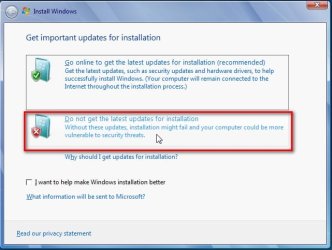
When you commence the repair install, at step 17, click "ask me later" in the screenshot.

When done and finished with the repair install, then install IE11 and the servicing stack update, before seeking to query the other updates via WSUS or DISM++.

In my own experience, I found I had to re-activate some programs too, so make sure these product keys are available to you at this stage, just in case.
 

My Computer My Computer

Computer type
PC/Desktop
OS
Windows 7 x64, Vista x64, 8.1 smartphone
CPU
Intel E8400 65W 64-bit
Motherboard
Gigabyte EP45-UD3LR
Memory
DDR2 2 x 2GB, 1GB x 2
Graphics Card(s)
XFX Radeon HD5750
Sound Card
AMD High Definition Audio; Realtek High Definition Audio
Monitor(s) Displays
iiyama prolite X2377HDS
Screen Resolution
1920 x 1080
Hard Drives
500GB 7200 rpm Seagate ST3500413AS 16MB, 500GB 5400 rpm Toshiba MQ02ABF050H 32MB, 200GB 7200 rpm Seagate ST3200820AS 8MB, 2TB 7200 rpm Western Digital WD20EZRX 64MB
PSU
Enermax Liberty Modular
Case
Antec P193 Midi Tower
Keyboard
Mionix ZIBAL 60
Mouse
Razer USB 2.0 Diamondback Mouse or Huion Graphics Tablet
Browser
Internet Explorer, Lunascape, Firefox, Opera, Avast Safezone
I've done it on XP, but never on 7. I use my computer for work and I'm afraid of converting it into a large doorstop. It's done WITHIN Windows? which would make me a little more confident. Experience with tearing my hair out for days has made me leery of making major changes, but 7 has become too ill to continue without a repair.

But if I run into trouble, will I be able to connect to the web to ask you for help?

I don't use IE ever, don't care if it updates, drowns or commits suicide.

What's WSUS and servicing stack update?
 

My Computer My Computer

Computer type
PC/Desktop
Computer Manufacturer/Model Number
HP p6-2020t
OS
Win 7 Ult 64-bit
CPU
G620 2.6GHZ Pentium R
Memory
6 GB
Monitor(s) Displays
25" HPLV2311
Screen Resolution
1920 x 1200
Hard Drives
1 SATA, 1 exterior SATA
Case
HP
Cooling
PSU
Antivirus
Glasswire
Browser
Waterfox; Firefox; Chrome for work
Other Info
Firewall--Glasswire
Similar specs in Gateway DX4200
Verizon FIOS Wired network

1 other Win7 computer-- has SSD
Boot into windows as normal.

Pop the installation dvd in the drive. Run setup from the dvd.

Or if you have the installation media on usb, then plug in the usb stick and run setup.

It says "setup is starting"

It asks if you want to get the latest updates ( say no because it takes too long)

It asks you to accept the license.(tick the box and click Next)

It asks if you want to do a custom install or an upgrade install. Select upgrade install.

That's all.

Little children do it. It couldn't be easier.
 

My Computers My Computers

System One System Two

  • Computer type
    PC/Desktop
    OS
    7 X64
    CPU
    i5 8400
    Motherboard
    gigabyte b365m ds3h
    Memory
    2x8gb 3200mhz
    Hard Drives
    various
    PSU
    pure power 11 400w cm
    Case
    Coolermaster
    Cooling
    cryorig m9i
  • Computer type
    PC/Desktop
    OS
    7x64
    CPU
    g5400
    Motherboard
    ga b365m ds3h
    Memory
    8gb ddr4 2400
    PSU
    xfx pro 450w
Here are some pics

2018-10-02_184341.jpg

2.jpg

3.jpg
 

My Computers My Computers

System One System Two

  • Computer type
    PC/Desktop
    OS
    7 X64
    CPU
    i5 8400
    Motherboard
    gigabyte b365m ds3h
    Memory
    2x8gb 3200mhz
    Hard Drives
    various
    PSU
    pure power 11 400w cm
    Case
    Coolermaster
    Cooling
    cryorig m9i
  • Computer type
    PC/Desktop
    OS
    7x64
    CPU
    g5400
    Motherboard
    ga b365m ds3h
    Memory
    8gb ddr4 2400
    PSU
    xfx pro 450w
What's WSUS and servicing stack update?

WSUS offline is a program that you are not using. Irrelevant

Servicing stack update is just one of the windows updates.
 

My Computers My Computers

System One System Two

  • Computer type
    PC/Desktop
    OS
    7 X64
    CPU
    i5 8400
    Motherboard
    gigabyte b365m ds3h
    Memory
    2x8gb 3200mhz
    Hard Drives
    various
    PSU
    pure power 11 400w cm
    Case
    Coolermaster
    Cooling
    cryorig m9i
  • Computer type
    PC/Desktop
    OS
    7x64
    CPU
    g5400
    Motherboard
    ga b365m ds3h
    Memory
    8gb ddr4 2400
    PSU
    xfx pro 450w
I've done it on XP, but never on 7. I use my computer for work and I'm afraid of converting it into a large doorstop. It's done WITHIN Windows? which would make me a little more confident. Experience with tearing my hair out for days has made me leery of making major changes, but 7 has become too ill to continue without a repair.

But if I run into trouble, will I be able to connect to the web to ask you for help?

I don't use IE ever, don't care if it updates, drowns or commits suicide.

When I did a Windows 7 repair install, I could not get on any https:/ connection, as Windows Update would not provide me a Trusted Root Certificates Update, until I had updated Internet Explorer to version 11.

So, I gives you the benefit of the doubt, and advise you to download IE11 before you attempt the Repair Install.​
 

My Computer My Computer

Computer type
PC/Desktop
OS
Windows 7 x64, Vista x64, 8.1 smartphone
CPU
Intel E8400 65W 64-bit
Motherboard
Gigabyte EP45-UD3LR
Memory
DDR2 2 x 2GB, 1GB x 2
Graphics Card(s)
XFX Radeon HD5750
Sound Card
AMD High Definition Audio; Realtek High Definition Audio
Monitor(s) Displays
iiyama prolite X2377HDS
Screen Resolution
1920 x 1080
Hard Drives
500GB 7200 rpm Seagate ST3500413AS 16MB, 500GB 5400 rpm Toshiba MQ02ABF050H 32MB, 200GB 7200 rpm Seagate ST3200820AS 8MB, 2TB 7200 rpm Western Digital WD20EZRX 64MB
PSU
Enermax Liberty Modular
Case
Antec P193 Midi Tower
Keyboard
Mionix ZIBAL 60
Mouse
Razer USB 2.0 Diamondback Mouse or Huion Graphics Tablet
Browser
Internet Explorer, Lunascape, Firefox, Opera, Avast Safezone
I will do fresh install and test it now.
 

My Computers My Computers

System One System Two

  • Computer type
    PC/Desktop
    OS
    7 X64
    CPU
    i5 8400
    Motherboard
    gigabyte b365m ds3h
    Memory
    2x8gb 3200mhz
    Hard Drives
    various
    PSU
    pure power 11 400w cm
    Case
    Coolermaster
    Cooling
    cryorig m9i
  • Computer type
    PC/Desktop
    OS
    7x64
    CPU
    g5400
    Motherboard
    ga b365m ds3h
    Memory
    8gb ddr4 2400
    PSU
    xfx pro 450w
Installed and updated without issue. Didn't need to install IE11.
 

My Computers My Computers

System One System Two

  • Computer type
    PC/Desktop
    OS
    7 X64
    CPU
    i5 8400
    Motherboard
    gigabyte b365m ds3h
    Memory
    2x8gb 3200mhz
    Hard Drives
    various
    PSU
    pure power 11 400w cm
    Case
    Coolermaster
    Cooling
    cryorig m9i
  • Computer type
    PC/Desktop
    OS
    7x64
    CPU
    g5400
    Motherboard
    ga b365m ds3h
    Memory
    8gb ddr4 2400
    PSU
    xfx pro 450w
Thanks for trying out. The OP will be pleased.


(I used the convenience rollup, which required the servicing stack update. That went okay. Then I discovered that I was lumbered with IE8 and no root certificates for any of my browsers. FF was playing up and I could not read anything online with IE8. So, it would seem, Im being too over cautious when asked this question.)
 

My Computer My Computer

Computer type
PC/Desktop
OS
Windows 7 x64, Vista x64, 8.1 smartphone
CPU
Intel E8400 65W 64-bit
Motherboard
Gigabyte EP45-UD3LR
Memory
DDR2 2 x 2GB, 1GB x 2
Graphics Card(s)
XFX Radeon HD5750
Sound Card
AMD High Definition Audio; Realtek High Definition Audio
Monitor(s) Displays
iiyama prolite X2377HDS
Screen Resolution
1920 x 1080
Hard Drives
500GB 7200 rpm Seagate ST3500413AS 16MB, 500GB 5400 rpm Toshiba MQ02ABF050H 32MB, 200GB 7200 rpm Seagate ST3200820AS 8MB, 2TB 7200 rpm Western Digital WD20EZRX 64MB
PSU
Enermax Liberty Modular
Case
Antec P193 Midi Tower
Keyboard
Mionix ZIBAL 60
Mouse
Razer USB 2.0 Diamondback Mouse or Huion Graphics Tablet
Browser
Internet Explorer, Lunascape, Firefox, Opera, Avast Safezone
Here goes. I think I can count on the computer being incapacitated all day today. Updates are very slow on this machine, not exactly the fastest CPU in the world.

I'm starting with a Macrium Reflect clone of the entire HD.
 

My Computer My Computer

Computer type
PC/Desktop
Computer Manufacturer/Model Number
HP p6-2020t
OS
Win 7 Ult 64-bit
CPU
G620 2.6GHZ Pentium R
Memory
6 GB
Monitor(s) Displays
25" HPLV2311
Screen Resolution
1920 x 1200
Hard Drives
1 SATA, 1 exterior SATA
Case
HP
Cooling
PSU
Antivirus
Glasswire
Browser
Waterfox; Firefox; Chrome for work
Other Info
Firewall--Glasswire
Similar specs in Gateway DX4200
Verizon FIOS Wired network

1 other Win7 computer-- has SSD
First time I unzipped, it gave me a compatibility report saying to restart the computer and the setup. So I did.
I also unchecked "get the latest updates" and checked the other option.
Checked "Upgrade" not "custom."

Second time, after copying 36% of the files, "data error (cyclic redundancy check)" restarted the machine again.

3rd time "Changes will not be saved. Setup can not continue. Restart the computer and restart setup. When prompted, try getting the latest update."

4th time, same as previous message

it never gets to "gathering files, settings and programs." There are no auto-restarts, only if I restart. I now have 3 partial Win folders on my C partition

Maybe I'm extracting the zipped files wrong. I extract to C:\Windows\temp, then open it to run "setup."


----------------------------------------------------------------------------
**Having problems with dism++. 7-Zip,for most files, tells me it can't find the installation folder, which I created myself. About 6 other files say "Access denied."
 
Last edited:

My Computer My Computer

Computer type
PC/Desktop
Computer Manufacturer/Model Number
HP p6-2020t
OS
Win 7 Ult 64-bit
CPU
G620 2.6GHZ Pentium R
Memory
6 GB
Monitor(s) Displays
25" HPLV2311
Screen Resolution
1920 x 1200
Hard Drives
1 SATA, 1 exterior SATA
Case
HP
Cooling
PSU
Antivirus
Glasswire
Browser
Waterfox; Firefox; Chrome for work
Other Info
Firewall--Glasswire
Similar specs in Gateway DX4200
Verizon FIOS Wired network

1 other Win7 computer-- has SSD
dism++ usually comes in a .zip file The 7-zip program is not needed to open .zip files. They can be opened by windows explorer.


Maybe I'm extracting the zipped files wrong. I extract to C:\Windows\temp, then open it to run "setup."

Windows installation media usually comes as an iso, or on a dvd. Do you have a windows iso or dvd?

1. If you have a dvd, put the dvd in the dvd drive. Run setup from the dvddrive.


2. If you have an.iso you will need to copy the files out of it. Usual methods:

a) use 7-zip or winrar or powerarchiver ( which you seem to be having trouble with). Are you running 7-zip as Adminstrator?

OR

b) mount the iso then copy and paste. You need a program that can mount isos for this method.

OR

c) Burn the iso to dvd ( windows has an isoburner already ) or extract the iso to usb stick using rufus.


http://rufus.akeo.ie/downloads/rufus-3.3p.exe

free isoburner if yours isn't working:

FreeISOBurner.exe
 

My Computers My Computers

System One System Two

  • Computer type
    PC/Desktop
    OS
    7 X64
    CPU
    i5 8400
    Motherboard
    gigabyte b365m ds3h
    Memory
    2x8gb 3200mhz
    Hard Drives
    various
    PSU
    pure power 11 400w cm
    Case
    Coolermaster
    Cooling
    cryorig m9i
  • Computer type
    PC/Desktop
    OS
    7x64
    CPU
    g5400
    Motherboard
    ga b365m ds3h
    Memory
    8gb ddr4 2400
    PSU
    xfx pro 450w
It's an ISO on a DVD, so it's a mutt. I copied the files to a desktop folder and ran Setup from there. I "took ownership" of the file because there's no "run as admin." The results are in post #15

Now you know why I hate working with the system.


Dism++ has a zip extension. Instead of opening dism first, I tried it in the other direction, opening 7Zip as admin, then pointing it at dism.

The 2 Readme files are in Chinese, with a few English words interspersed, but the program appears usable.
 
Last edited:

My Computer My Computer

Computer type
PC/Desktop
Computer Manufacturer/Model Number
HP p6-2020t
OS
Win 7 Ult 64-bit
CPU
G620 2.6GHZ Pentium R
Memory
6 GB
Monitor(s) Displays
25" HPLV2311
Screen Resolution
1920 x 1200
Hard Drives
1 SATA, 1 exterior SATA
Case
HP
Cooling
PSU
Antivirus
Glasswire
Browser
Waterfox; Firefox; Chrome for work
Other Info
Firewall--Glasswire
Similar specs in Gateway DX4200
Verizon FIOS Wired network

1 other Win7 computer-- has SSD
There seem to be a lot of problems with your current installation.

You might be better creating a new partition and clean installling onto it. You could then copy data from your existing windows to your newly installed.

I notice you have a G620 processor. Out of curiosity, what is your motherboard? Or what is the exact model number of your hp machine ?
 

My Computers My Computers

System One System Two

  • Computer type
    PC/Desktop
    OS
    7 X64
    CPU
    i5 8400
    Motherboard
    gigabyte b365m ds3h
    Memory
    2x8gb 3200mhz
    Hard Drives
    various
    PSU
    pure power 11 400w cm
    Case
    Coolermaster
    Cooling
    cryorig m9i
  • Computer type
    PC/Desktop
    OS
    7x64
    CPU
    g5400
    Motherboard
    ga b365m ds3h
    Memory
    8gb ddr4 2400
    PSU
    xfx pro 450w
My current installation has more problems than that, which is why I wanted to redo it. Reinstalling the 50+ programs + the system+ updates is far from my first choice. Do you have any other suggestions?

I don't know what the mobo is, but it's not relevant to this problem.
W7 was installed on 10/2016, not by me.
 

My Computer My Computer

Computer type
PC/Desktop
Computer Manufacturer/Model Number
HP p6-2020t
OS
Win 7 Ult 64-bit
CPU
G620 2.6GHZ Pentium R
Memory
6 GB
Monitor(s) Displays
25" HPLV2311
Screen Resolution
1920 x 1200
Hard Drives
1 SATA, 1 exterior SATA
Case
HP
Cooling
PSU
Antivirus
Glasswire
Browser
Waterfox; Firefox; Chrome for work
Other Info
Firewall--Glasswire
Similar specs in Gateway DX4200
Verizon FIOS Wired network

1 other Win7 computer-- has SSD
I just found this, going to try it:
windows 7 ultimate upgrade - Microsoft Community

Does it mean to right-click "cmd" in the Run box? What do they mean by "from the results?" Neither CMD nor the DOS command box have "Run as admin" in the context menu.
 

My Computer My Computer

Computer type
PC/Desktop
Computer Manufacturer/Model Number
HP p6-2020t
OS
Win 7 Ult 64-bit
CPU
G620 2.6GHZ Pentium R
Memory
6 GB
Monitor(s) Displays
25" HPLV2311
Screen Resolution
1920 x 1200
Hard Drives
1 SATA, 1 exterior SATA
Case
HP
Cooling
PSU
Antivirus
Glasswire
Browser
Waterfox; Firefox; Chrome for work
Other Info
Firewall--Glasswire
Similar specs in Gateway DX4200
Verizon FIOS Wired network

1 other Win7 computer-- has SSD
Back
Top