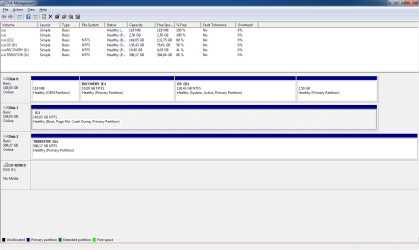
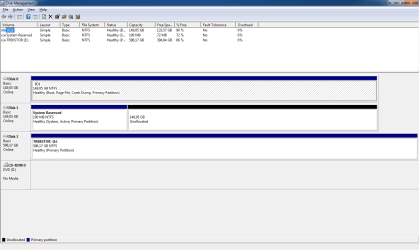
multiple system images

zx81

New member
Hello all,

Below is a screen shot from disk management.
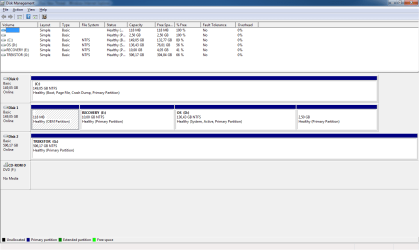
disk management.png

Now the problem is that I must include D: in the system image backup.
See below.
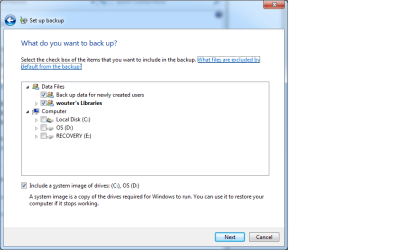
set up backup.png

I only want to include C: as system image.

I think during clean installation of Windows 7, my vista install on partition C: was moved to partition D:. I 100% sure formatted drive C: before installing Windows 7.

During boot-time, the boot menu also displays an entry to boot Vista, I also like to remove that.

Thanks a lot in advance for reading this!

zx81
 

My Computer

Computer Manufacturer/Model Number
Dell Inpspiron 1720
OS
Windows 7 Home Premium x64
CPU
Intel 1720 Core 2 Duo 2.00GHz,800,2M
Memory
4GB 667MHz DDR2 SDRAM (2x2048)
Graphics Card(s)
NVIDIA Geforce Go 8600M GT 256MB DDR2
Sound Card
SigmaTel
Monitor(s) Displays
17.0" Widescreen WXGA+ (1440x900) TFT with TrueLife
Screen Resolution
1440x900
Hard Drives
2x160GB 5400RPM Serial ATA
Mouse
Logitech
Ensure you can see hidden and protected files. In Windows Explorer, click organize, folder and search options. Click view tab to do so.

Copy bootmgr file from D: to C:
Copy boot folder from D: to C:, ignoring the warning that it can not copy bcd or bcd.log. Tell it to skip over them.

Run this command from an elevated command prompt:

bcdedit /export C:\boot\bcd

You can copy and paste that.

Look in Windows Explorer that C:\boot folder now has bcd.

If so, reboot to bios and make your drive C: the default boot device.

Boot to Windows and check disk management to see if C: is now system partition. If so, done.

Use Easybcd to remove the Vista entry.
 

My Computer

Computer Manufacturer/Model Number
self built
OS
7600.20510 x86
CPU
P4 550 3.4 GHz HT running at 3.5 GHz
Motherboard
MSI PM8M3-V (MS-7211 v1.x) Micro-ATX mainboard
Memory
OCZ 2 GB(2x1GB) DDR400mHz running @ 414 mHz
Graphics Card(s)
HIS Radeon HD 3850 IceQ 3 Turbo HDMI Dual DL-DVI AGP
Sound Card
MOTU Traveler firewire studio interface 192 kHz 24 bit
Monitor(s) Displays
22" widescreen Acer X223W LCD, 17" Compaq P75 CRT
Screen Resolution
1680x1050 and 1280x1024
Hard Drives
SATA I x2 WD, 400 GB and 120 GB, SATA 2 WD Caviar Black 1 TB
PSU
350W generic
Case
Cybertronpc, it glows blue
Cooling
stock cpu fan, Ice-Q 3 gpu and system, many case fans
Keyboard
Logitch Classical Keyboard 200
Mouse
Logitech Mediaplay cordless
Internet Speed
1792/448 kbits/sec
Other Info
SATA II PCI fake RAID adapter, 1 GB Readyboost, original ATI Remote Wonder (even works with WMC perfectly), Logitech Rumblepad 2 game controller x2
Ensure you can see hidden and protected files. In Windows Explorer, click organize, folder and search options. Click view tab to do so.

Copy bootmgr file from D: to C:
Copy boot folder from D: to C:, ignoring the warning that it can not copy bcd or bcd.log. Tell it to skip over them.

Run this command from an elevated command prompt:

bcdedit /export C:\boot\bcd

You can copy and paste that.

Look in Windows Explorer that C:\boot folder now has bcd.

If so, reboot to bios and make your drive C: the default boot device.

Boot to Windows and check disk management to see if C: is now system partition. If so, done.

Use Easybcd to remove the Vista entry.

All steps done and disk management still reports D: as system partition.

I like to remove all partitions on disk 1, is this possible?

zx81
 

My Computer

Computer Manufacturer/Model Number
Dell Inpspiron 1720
OS
Windows 7 Home Premium x64
CPU
Intel 1720 Core 2 Duo 2.00GHz,800,2M
Memory
4GB 667MHz DDR2 SDRAM (2x2048)
Graphics Card(s)
NVIDIA Geforce Go 8600M GT 256MB DDR2
Sound Card
SigmaTel
Monitor(s) Displays
17.0" Widescreen WXGA+ (1440x900) TFT with TrueLife
Screen Resolution
1440x900
Hard Drives
2x160GB 5400RPM Serial ATA
Mouse
Logitech
Are you absolutely sure you choose the correct hard drive to boot from? Your C: drive? If so, C: would report as system partition then. Revisit bios. The correct choice is something other than what it is now. You can randomly try them if you're unsure. Probably first one available.

Yes, you can remove all partitions but first you must successfully complete the steps in their entirety.
 

My Computer

Computer Manufacturer/Model Number
self built
OS
7600.20510 x86
CPU
P4 550 3.4 GHz HT running at 3.5 GHz
Motherboard
MSI PM8M3-V (MS-7211 v1.x) Micro-ATX mainboard
Memory
OCZ 2 GB(2x1GB) DDR400mHz running @ 414 mHz
Graphics Card(s)
HIS Radeon HD 3850 IceQ 3 Turbo HDMI Dual DL-DVI AGP
Sound Card
MOTU Traveler firewire studio interface 192 kHz 24 bit
Monitor(s) Displays
22" widescreen Acer X223W LCD, 17" Compaq P75 CRT
Screen Resolution
1680x1050 and 1280x1024
Hard Drives
SATA I x2 WD, 400 GB and 120 GB, SATA 2 WD Caviar Black 1 TB
PSU
350W generic
Case
Cybertronpc, it glows blue
Cooling
stock cpu fan, Ice-Q 3 gpu and system, many case fans
Keyboard
Logitch Classical Keyboard 200
Mouse
Logitech Mediaplay cordless
Internet Speed
1792/448 kbits/sec
Other Info
SATA II PCI fake RAID adapter, 1 GB Readyboost, original ATI Remote Wonder (even works with WMC perfectly), Logitech Rumblepad 2 game controller x2
Are you absolutely sure you choose the correct hard drive to boot from? Your C: drive? If so, C: would report as system partition then. Revisit bios. The correct choice is something other than what it is now. You can randomly try them if you're unsure. Probably first one available.

Yes, you can remove all partitions but first you must successfully complete the steps in their entirety.


torrentg, I have booted from the correct hard drive, I also have booted from the other hard drive, I did this by changing boot order in the BIOS.

Still D: is displayed as System and Active partition.

How can I make C: System and Active?

zx81
 

My Computer

Computer Manufacturer/Model Number
Dell Inpspiron 1720
OS
Windows 7 Home Premium x64
CPU
Intel 1720 Core 2 Duo 2.00GHz,800,2M
Memory
4GB 667MHz DDR2 SDRAM (2x2048)
Graphics Card(s)
NVIDIA Geforce Go 8600M GT 256MB DDR2
Sound Card
SigmaTel
Monitor(s) Displays
17.0" Widescreen WXGA+ (1440x900) TFT with TrueLife
Screen Resolution
1440x900
Hard Drives
2x160GB 5400RPM Serial ATA
Mouse
Logitech
C is automatically active as it's the only partition on the drive.

You can make C system by booting to it, choosing correctly in bios.

While you are in bios, it might be helpful to you to disable any setting that says boot to alternate device or similar. That's so if you choose the wrong drive, it will not attempt a different one. You will know you chose wrong. No harm. Try again.

If you choose the disk with D though, it will boot to it leaving you in Win 7 exactly as you are now.
 

My Computer

Computer Manufacturer/Model Number
self built
OS
7600.20510 x86
CPU
P4 550 3.4 GHz HT running at 3.5 GHz
Motherboard
MSI PM8M3-V (MS-7211 v1.x) Micro-ATX mainboard
Memory
OCZ 2 GB(2x1GB) DDR400mHz running @ 414 mHz
Graphics Card(s)
HIS Radeon HD 3850 IceQ 3 Turbo HDMI Dual DL-DVI AGP
Sound Card
MOTU Traveler firewire studio interface 192 kHz 24 bit
Monitor(s) Displays
22" widescreen Acer X223W LCD, 17" Compaq P75 CRT
Screen Resolution
1680x1050 and 1280x1024
Hard Drives
SATA I x2 WD, 400 GB and 120 GB, SATA 2 WD Caviar Black 1 TB
PSU
350W generic
Case
Cybertronpc, it glows blue
Cooling
stock cpu fan, Ice-Q 3 gpu and system, many case fans
Keyboard
Logitch Classical Keyboard 200
Mouse
Logitech Mediaplay cordless
Internet Speed
1792/448 kbits/sec
Other Info
SATA II PCI fake RAID adapter, 1 GB Readyboost, original ATI Remote Wonder (even works with WMC perfectly), Logitech Rumblepad 2 game controller x2
C is automatically active as it's the only partition on the drive.

You can make C system by booting to it, choosing correctly in bios.

While you are in bios, it might be helpful to you to disable any setting that says boot to alternate device or similar. That's so if you choose the wrong drive, it will not attempt a different one. You will know you chose wrong. No harm. Try again.

If you choose the disk with D though, it will boot to it leaving you in Win 7 exactly as you are now.

I changed the boot hdd, and now disk manager shows different, it looks like the disks are swapped. but D: is still active and system.

different hdd boot.png

Thanks in advance for helping me!

zx81
 

My Computer

Computer Manufacturer/Model Number
Dell Inpspiron 1720
OS
Windows 7 Home Premium x64
CPU
Intel 1720 Core 2 Duo 2.00GHz,800,2M
Memory
4GB 667MHz DDR2 SDRAM (2x2048)
Graphics Card(s)
NVIDIA Geforce Go 8600M GT 256MB DDR2
Sound Card
SigmaTel
Monitor(s) Displays
17.0" Widescreen WXGA+ (1440x900) TFT with TrueLife
Screen Resolution
1440x900
Hard Drives
2x160GB 5400RPM Serial ATA
Mouse
Logitech
I've been thinking about why it seems so hard to choose the correct drive. Some bios, you have to choose amongst HDD, floppy, DVD drive as first boot device. Then there is completely another setting to choose which hard drive after you've chosen HDD.

2 separate settings. Both must be correct. So you definitely want HDD. Then the other setting, if it exists, allows you to specify which HDD amongst them.
 

My Computer

Computer Manufacturer/Model Number
self built
OS
7600.20510 x86
CPU
P4 550 3.4 GHz HT running at 3.5 GHz
Motherboard
MSI PM8M3-V (MS-7211 v1.x) Micro-ATX mainboard
Memory
OCZ 2 GB(2x1GB) DDR400mHz running @ 414 mHz
Graphics Card(s)
HIS Radeon HD 3850 IceQ 3 Turbo HDMI Dual DL-DVI AGP
Sound Card
MOTU Traveler firewire studio interface 192 kHz 24 bit
Monitor(s) Displays
22" widescreen Acer X223W LCD, 17" Compaq P75 CRT
Screen Resolution
1680x1050 and 1280x1024
Hard Drives
SATA I x2 WD, 400 GB and 120 GB, SATA 2 WD Caviar Black 1 TB
PSU
350W generic
Case
Cybertronpc, it glows blue
Cooling
stock cpu fan, Ice-Q 3 gpu and system, many case fans
Keyboard
Logitch Classical Keyboard 200
Mouse
Logitech Mediaplay cordless
Internet Speed
1792/448 kbits/sec
Other Info
SATA II PCI fake RAID adapter, 1 GB Readyboost, original ATI Remote Wonder (even works with WMC perfectly), Logitech Rumblepad 2 game controller x2
Found this about your laptop.

Changing the Boot Sequence

The boot sequence, or boot order, tells the computer where to look to find the software needed to start the operating system. You can control the boot sequence and enable/disable devices using the Boot Order page of the system setup program.
note.gif
NOTE: To change the boot sequence on a one-time-only basis, see Performing a One-Time Boot. The Boot Order page displays a general list of the bootable devices that may be installed in your computer, including but not limited to the following:

  • Diskette Drive
  • Internal HDD
  • USB Storage Device
  • CD/DVD/CD-RW drive
  • Modular bay HDD
note.gif
NOTE: Only devices that are preceded by a number are bootable. During the boot routine, the computer starts at the top of the list and scans each enabled device for the operating system start-up files. When the computer finds the files, it stops searching and starts the operating system.
To control the boot devices, select (highlight) a device by pressing the down-arrow or up-arrow key, and then enable or disable the device or change its order in the list.

  • To enable or disable a device, highlight the item and press the space bar. Enabled items are preceded by a number; disabled items are not preceded by a number.
  • To reorder a device in the list, highlight the device and press <u> to move the device up the list or <d> to move a device down the list.
Boot sequence changes take effect as soon as you save the changes and exit the system setup program.
 

My Computer

Computer Manufacturer/Model Number
self built
OS
7600.20510 x86
CPU
P4 550 3.4 GHz HT running at 3.5 GHz
Motherboard
MSI PM8M3-V (MS-7211 v1.x) Micro-ATX mainboard
Memory
OCZ 2 GB(2x1GB) DDR400mHz running @ 414 mHz
Graphics Card(s)
HIS Radeon HD 3850 IceQ 3 Turbo HDMI Dual DL-DVI AGP
Sound Card
MOTU Traveler firewire studio interface 192 kHz 24 bit
Monitor(s) Displays
22" widescreen Acer X223W LCD, 17" Compaq P75 CRT
Screen Resolution
1680x1050 and 1280x1024
Hard Drives
SATA I x2 WD, 400 GB and 120 GB, SATA 2 WD Caviar Black 1 TB
PSU
350W generic
Case
Cybertronpc, it glows blue
Cooling
stock cpu fan, Ice-Q 3 gpu and system, many case fans
Keyboard
Logitch Classical Keyboard 200
Mouse
Logitech Mediaplay cordless
Internet Speed
1792/448 kbits/sec
Other Info
SATA II PCI fake RAID adapter, 1 GB Readyboost, original ATI Remote Wonder (even works with WMC perfectly), Logitech Rumblepad 2 game controller x2
Glad to hear it Daba. Thanks for verification. :D
 

My Computer

Computer Manufacturer/Model Number
self built
OS
7600.20510 x86
CPU
P4 550 3.4 GHz HT running at 3.5 GHz
Motherboard
MSI PM8M3-V (MS-7211 v1.x) Micro-ATX mainboard
Memory
OCZ 2 GB(2x1GB) DDR400mHz running @ 414 mHz
Graphics Card(s)
HIS Radeon HD 3850 IceQ 3 Turbo HDMI Dual DL-DVI AGP
Sound Card
MOTU Traveler firewire studio interface 192 kHz 24 bit
Monitor(s) Displays
22" widescreen Acer X223W LCD, 17" Compaq P75 CRT
Screen Resolution
1680x1050 and 1280x1024
Hard Drives
SATA I x2 WD, 400 GB and 120 GB, SATA 2 WD Caviar Black 1 TB
PSU
350W generic
Case
Cybertronpc, it glows blue
Cooling
stock cpu fan, Ice-Q 3 gpu and system, many case fans
Keyboard
Logitch Classical Keyboard 200
Mouse
Logitech Mediaplay cordless
Internet Speed
1792/448 kbits/sec
Other Info
SATA II PCI fake RAID adapter, 1 GB Readyboost, original ATI Remote Wonder (even works with WMC perfectly), Logitech Rumblepad 2 game controller x2
One little question tho:

when i run:
C:\Windows\system32>bcdedit

Windows Boot Manager
--------------------
identifier {bootmgr}
device partition=F:

It still says that bootmgr is on my previews drive.. does it matter? or should i just remove the boot folder from F:
 

My Computer

OS
Windows 7
CPU
E8400
Motherboard
P35-DS4
Memory
Coirsair DHX 6400
Graphics Card(s)
8800GT 512MB
Sound Card
Creative X-Fi Gamer
Monitor(s) Displays
LG W2600HP
PSU
Coirsair 650W
Found this about your laptop.

Changing the Boot Sequence

The boot sequence, or boot order, tells the computer where to look to find the software needed to start the operating system. You can control the boot sequence and enable/disable devices using the Boot Order page of the system setup program.
note.gif
NOTE: To change the boot sequence on a one-time-only basis, see Performing a One-Time Boot. The Boot Order page displays a general list of the bootable devices that may be installed in your computer, including but not limited to the following:

  • Diskette Drive
  • Internal HDD
  • USB Storage Device
  • CD/DVD/CD-RW drive
  • Modular bay HDD
note.gif
NOTE: Only devices that are preceded by a number are bootable. During the boot routine, the computer starts at the top of the list and scans each enabled device for the operating system start-up files. When the computer finds the files, it stops searching and starts the operating system.
To control the boot devices, select (highlight) a device by pressing the down-arrow or up-arrow key, and then enable or disable the device or change its order in the list.

  • To enable or disable a device, highlight the item and press the space bar. Enabled items are preceded by a number; disabled items are not preceded by a number.
  • To reorder a device in the list, highlight the device and press <u> to move the device up the list or <d> to move a device down the list.
Boot sequence changes take effect as soon as you save the changes and exit the system setup program.

Thanks, below is what I tried:

1. F2 BIOS Bootsequence only internal hdd selected
no result
2. F12 Boot device Internal HDD
no result
3. F12 Boot device Second Internal HDD
(disks in diskmanager reversed)
4. F2 Bootsequence Second Internal HDD
(D: still active and system)

I guess I do something wrong.
zx81
 

My Computer

Computer Manufacturer/Model Number
Dell Inpspiron 1720
OS
Windows 7 Home Premium x64
CPU
Intel 1720 Core 2 Duo 2.00GHz,800,2M
Memory
4GB 667MHz DDR2 SDRAM (2x2048)
Graphics Card(s)
NVIDIA Geforce Go 8600M GT 256MB DDR2
Sound Card
SigmaTel
Monitor(s) Displays
17.0" Widescreen WXGA+ (1440x900) TFT with TrueLife
Screen Resolution
1440x900
Hard Drives
2x160GB 5400RPM Serial ATA
Mouse
Logitech
Hi zX81,

In Disk Management, rt click C and Mark as Active.

Make sure the HD containing C is first in Bios boot order.

If you followed all torrentg's previous posts, you're good.

Restart and C will be "System" partition.
 

My Computers

System One System Two

  • Computer type
    PC/Desktop
    OS
    7 X64
    CPU
    i5 8400
    Motherboard
    gigabyte b365m ds3h
    Memory
    2x8gb 3200mhz
    Hard Drives
    various
    PSU
    pure power 11 400w cm
    Case
    Coolermaster
    Cooling
    cryorig m9i
  • Computer type
    PC/Desktop
    OS
    7x64
    CPU
    g5400
    Motherboard
    ga b365m ds3h
    Memory
    8gb ddr4 2400
    PSU
    xfx pro 450w
Hi Daba,

Open an elevated cmd, Type:

bcdedit /set {bootmgr} device boot

Then press enter.


One little question tho:

when i run:
C:\Windows\system32>bcdedit

Windows Boot Manager
--------------------
identifier {bootmgr}
device partition=F:

It still says that bootmgr is on my previews drive.. does it matter? or should i just remove the boot folder from F:
 

My Computers

System One System Two

  • Computer type
    PC/Desktop
    OS
    7 X64
    CPU
    i5 8400
    Motherboard
    gigabyte b365m ds3h
    Memory
    2x8gb 3200mhz
    Hard Drives
    various
    PSU
    pure power 11 400w cm
    Case
    Coolermaster
    Cooling
    cryorig m9i
  • Computer type
    PC/Desktop
    OS
    7x64
    CPU
    g5400
    Motherboard
    ga b365m ds3h
    Memory
    8gb ddr4 2400
    PSU
    xfx pro 450w
Thank you very much SIW2. Appreciated.
 

My Computer

Computer Manufacturer/Model Number
self built
OS
7600.20510 x86
CPU
P4 550 3.4 GHz HT running at 3.5 GHz
Motherboard
MSI PM8M3-V (MS-7211 v1.x) Micro-ATX mainboard
Memory
OCZ 2 GB(2x1GB) DDR400mHz running @ 414 mHz
Graphics Card(s)
HIS Radeon HD 3850 IceQ 3 Turbo HDMI Dual DL-DVI AGP
Sound Card
MOTU Traveler firewire studio interface 192 kHz 24 bit
Monitor(s) Displays
22" widescreen Acer X223W LCD, 17" Compaq P75 CRT
Screen Resolution
1680x1050 and 1280x1024
Hard Drives
SATA I x2 WD, 400 GB and 120 GB, SATA 2 WD Caviar Black 1 TB
PSU
350W generic
Case
Cybertronpc, it glows blue
Cooling
stock cpu fan, Ice-Q 3 gpu and system, many case fans
Keyboard
Logitch Classical Keyboard 200
Mouse
Logitech Mediaplay cordless
Internet Speed
1792/448 kbits/sec
Other Info
SATA II PCI fake RAID adapter, 1 GB Readyboost, original ATI Remote Wonder (even works with WMC perfectly), Logitech Rumblepad 2 game controller x2
First of all I like to thank everybody teaching me how to fix the problem of changing my system partition.
I am sorry, but none of the solutions seem to work on my laptop.
Probably it is due to something I do wrong.

I decided to go for a clean install of Windows 7, so that is what I will do.
During the installation I will format both hdd so then everything should work fine.

Again, thank you for all information and patience.

Best regards,

zx81
 

My Computer

Computer Manufacturer/Model Number
Dell Inpspiron 1720
OS
Windows 7 Home Premium x64
CPU
Intel 1720 Core 2 Duo 2.00GHz,800,2M
Memory
4GB 667MHz DDR2 SDRAM (2x2048)
Graphics Card(s)
NVIDIA Geforce Go 8600M GT 256MB DDR2
Sound Card
SigmaTel
Monitor(s) Displays
17.0" Widescreen WXGA+ (1440x900) TFT with TrueLife
Screen Resolution
1440x900
Hard Drives
2x160GB 5400RPM Serial ATA
Mouse
Logitech
Hello, story continues ;-)

I did a clean install of Windows 7 Home Premium x64 full version.
I choose advanced drive options
I deleted all partitions from both HDD's
I formated HDD1
I selected HDD1 to install Windows 7 on
Then I finished install normally

Very weird, but after installing Windows 7, it places System on my second HDD, while I did not select that HDD.

Below is te image from the disk manager.
disk-manager-screen.png

I think this is the way Windows 7 is designed?

I hope someone can explain me more.

Best regards,

zx81
 

My Computer

Computer Manufacturer/Model Number
Dell Inpspiron 1720
OS
Windows 7 Home Premium x64
CPU
Intel 1720 Core 2 Duo 2.00GHz,800,2M
Memory
4GB 667MHz DDR2 SDRAM (2x2048)
Graphics Card(s)
NVIDIA Geforce Go 8600M GT 256MB DDR2
Sound Card
SigmaTel
Monitor(s) Displays
17.0" Widescreen WXGA+ (1440x900) TFT with TrueLife
Screen Resolution
1440x900
Hard Drives
2x160GB 5400RPM Serial ATA
Mouse
Logitech
Can you right click on C and mark it as active?
 

My Computer

Computer Manufacturer/Model Number
self built
OS
7600.20510 x86
CPU
P4 550 3.4 GHz HT running at 3.5 GHz
Motherboard
MSI PM8M3-V (MS-7211 v1.x) Micro-ATX mainboard
Memory
OCZ 2 GB(2x1GB) DDR400mHz running @ 414 mHz
Graphics Card(s)
HIS Radeon HD 3850 IceQ 3 Turbo HDMI Dual DL-DVI AGP
Sound Card
MOTU Traveler firewire studio interface 192 kHz 24 bit
Monitor(s) Displays
22" widescreen Acer X223W LCD, 17" Compaq P75 CRT
Screen Resolution
1680x1050 and 1280x1024
Hard Drives
SATA I x2 WD, 400 GB and 120 GB, SATA 2 WD Caviar Black 1 TB
PSU
350W generic
Case
Cybertronpc, it glows blue
Cooling
stock cpu fan, Ice-Q 3 gpu and system, many case fans
Keyboard
Logitch Classical Keyboard 200
Mouse
Logitech Mediaplay cordless
Internet Speed
1792/448 kbits/sec
Other Info
SATA II PCI fake RAID adapter, 1 GB Readyboost, original ATI Remote Wonder (even works with WMC perfectly), Logitech Rumblepad 2 game controller x2
Can you right click on C and mark it as active?

Hello torrentg, (I really enjoy that you teach me ;-)

I can mark C: as active by right clicking on C.

B.T.W. I think Windows 7 Rocks! I really like the fast response of the system and the fast shutdown and starting up times.

Have a nice day!

zx81
 

My Computer

Computer Manufacturer/Model Number
Dell Inpspiron 1720
OS
Windows 7 Home Premium x64
CPU
Intel 1720 Core 2 Duo 2.00GHz,800,2M
Memory
4GB 667MHz DDR2 SDRAM (2x2048)
Graphics Card(s)
NVIDIA Geforce Go 8600M GT 256MB DDR2
Sound Card
SigmaTel
Monitor(s) Displays
17.0" Widescreen WXGA+ (1440x900) TFT with TrueLife
Screen Resolution
1440x900
Hard Drives
2x160GB 5400RPM Serial ATA
Mouse
Logitech
Back
Top