Library - Include a Folder

How to Include a Folder in a Library in Windows 7


   Information
This will show you how to add a folder so that it's contents will also be included in the library as well in Windows 7.
   Note
Libraries let you access and arrange items from one or more folders quickly without moving them from their original location. Libraries themselves don't store your files or folders. Instead, they point to different locations on a hard disk or external drive attached to your computer. This gives you easy access to a category of files no matter where they are stored. For instance, if you have music files on your hard disk and on an external drive, you can access all of your music files from within the "Music" library.

For more information about Windows 7 Libraries see:
By default, you will have the folder from the C:\Users\(user-name)\(same name as library folder) and C:\Users\Public\(same name as library folder) locations included in a libary.

You can include folders from locations that aren't always accessible by your computer (such as removable drives or networks), but you will not be able to access the contents of those folders unless the drive or network is connected. Although network folders can be included in libraries, searches will likely be slow because the contents of those folders can't be indexed. For more information about Windows 7 Libraries see Understanding Windows 7 Libraries - Windows 7 for Developers - The Windows Blog.
   Tip
The full path to the hidden Libraries folder is below.

C:\Users\(User-Name)\AppData\Roaming\Microsoft\Windows\Libraries

OR

%AppData%\Microsoft\Windows\Libraries

   Warning

  • You will not be able to include a library in another library, or include the Computer folder in a library.
  • You can only include up to 50 folders in one library parent folder.
  • Included folders from external hard drives or USB flash drives are only accessible in the library when the device is connected.
  • To be able to search in libraries, the Windows Search service needs to be Started and set to Automatic. Libraries require it's included folders to also be added to the index to be tracked properly even though they will still open properly.


OPTION ONE

Include Folder in Library from the Folder


1. Open a Windows Explorer window.

2. Navigate to the folder you want to include into a library, and select (highlight) it.

3. Click on the Include in library toolbar button, and click on an available library to include the folder in. (See screenshot below)
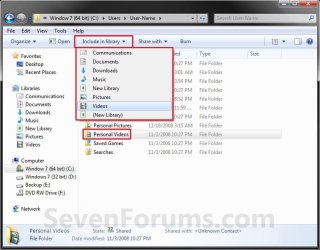
Windows_Explorer.jpg

A) Go to step 5.
OR

4. Right click on the folder and click on Include in Library, and click on an available library to include the folder in. (See screeshot below)
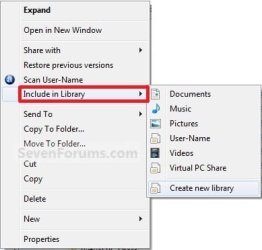
Include_in_Library.jpg
5. The selected folder (step 2) contents will now also be included (linked) in the library (step 3).

6. Close Windows Explorer when done.


OPTION TWO

Include Folder in Library from the Library


1. Open the Start Menu.

2. Right click on the User Name button and click on Open. (See screenshot below)
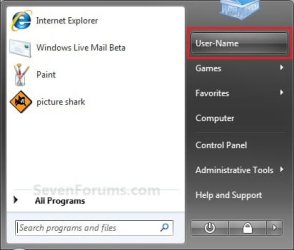
Start_Menu_Link.jpg
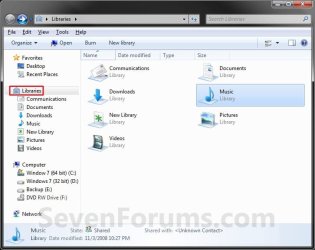
3. Right click on the library (ex: Music) and click on Properties. (See screenshot below)
Libraries.jpg
A) Go to step 5. (See right screenshot below step 5)
OR

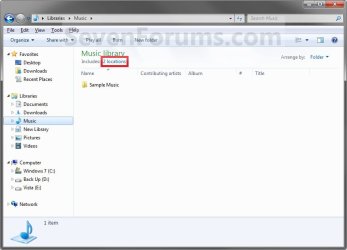
4. Open the library (ex: Music) that you want to include a folder in. (See screenshot below step 3)
A) Click on the # Library Locations toolbar button. (See left screenshot below)
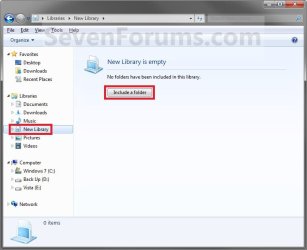
NOTE: If this is a new or empty library, then you will see the right screenshot below instead. Click on the Include a folder button, and go to step 6.
Library.jpg

New_Library.jpg
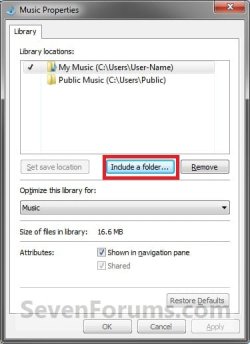
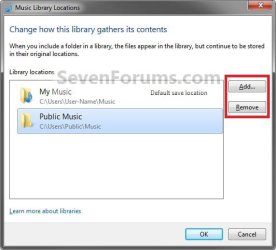
5. Click on the Add button (left screenshot below), or Include a folder button (tight screenshot below).
NOTE: The right screenshot would be from step 3.
Library_Add-Remove.jpgProperties.jpg
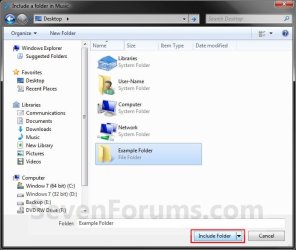
6. Navigate to the folder you want to include in the library, then select the folder and click on the Include Folder button. (See screenshot below)
Add_1.jpg
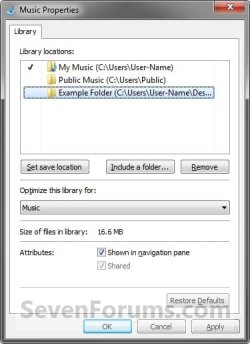
7. Click on OK. (See screenshots below)
NOTE: If this was a new or empty library (note under step 4A), then you will not see this. The folder will automatically be included instead.
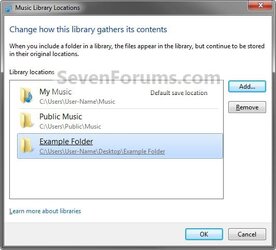
Example_Add-Remove1.jpgExample_Add-Remove.jpg
8. The folder (step 6) contents will now be included (linked) in the selected library (step 4).

9. Close the library window when done. (See screenshots below step 4A)


OPTION THREE

Include a Network Folder in Library


1. For how, please see: How to Include a Network Drive or Folder in a Library in Windows 7
That's it,
Shawn


Last edited:
Sorry, Favorites doesn't have a folder tree available since they are just links instead.

I tried adding Favorites as a library folder for this, but Favorites is not allowed to be a Library. :(
 

My Computer

Computer type
PC/Desktop
Computer Manufacturer/Model Number
Self built custom
OS
64-bit Windows 11 Pro for Workstations
CPU
Intel i7-8700K OC'd to 5 GHz
Motherboard
ASUS ROG Maximus XI Formula Z390
Memory
64 GB (4x16GB) G.SKILL TridentZ RGB DDR4 3600 MHz
Graphics Card(s)
ASUS ROG-STRIX-GTX1080TI-O11G-GAMING
Sound Card
Integrated
Monitor(s) Displays
2 x Samsung Odyssey G7 27"
Screen Resolution
2560x1440
Hard Drives
1TB Samsung 990 PRO M.2,
4TB Samsung 990 PRO PRO M.2,
TerraMaster F8 SSD Plus NAS
PSU
Seasonic Prime Titanium 850W
Case
Thermaltake Core P3
Cooling
Corsair Hydro H115i
Keyboard
Logitech wireless K800
Mouse
Logitech MX Master 4
Internet Speed
2 Gb/s Download and 100 Mb/s Upload
Antivirus
Malwarebyte Anti-Malware Premium
Browser
Google Chrome
Other Info
Logitech Z625 speaker system,
Logitech BRIO 4K Pro webcam,
HP Color LaserJet Pro MFP M477fdn,
APC SMART-UPS RT 1000 XL - SURT1000XLI,
Galaxy S23 Plus phone
Well, drat. Oh well, maybe in final release.

Thanks for trying to help. Really appreciate it.

Regards,

Larry
 

My Computer

OS
Window 7
CPU
Intel Core 2 Quad
Memory
8GB DDR 2
Graphics Card(s)
nVidia GeForce 9800 GT
Sound Card
Creative SB X-Fi
Monitor(s) Displays
HP w2408HDMI
Screen Resolution
1920 X 1200
Hard Drives
325GB 7200
Mouse
Microsoft Laser Mouse
Internet Speed
50Mbps Extreme tier from Comcast.
Hi Larry,

Jacee had suggested to me a workaround that may work for you. You can create a new library named My Favorites, and you can copy and paste the shortcuts you want in there to use as Favorites with a folder tree. Afterwards, you can even change the library icon to the star to match. These are two icon locations that you can use for it:

Folder with star:
C:\Windows\System32\imageres.dll,-1020

Star by itself:
C:\Windows\System32\imageres.dll,-1024
 

My Computer

Computer type
PC/Desktop
Computer Manufacturer/Model Number
Self built custom
OS
64-bit Windows 11 Pro for Workstations
CPU
Intel i7-8700K OC'd to 5 GHz
Motherboard
ASUS ROG Maximus XI Formula Z390
Memory
64 GB (4x16GB) G.SKILL TridentZ RGB DDR4 3600 MHz
Graphics Card(s)
ASUS ROG-STRIX-GTX1080TI-O11G-GAMING
Sound Card
Integrated
Monitor(s) Displays
2 x Samsung Odyssey G7 27"
Screen Resolution
2560x1440
Hard Drives
1TB Samsung 990 PRO M.2,
4TB Samsung 990 PRO PRO M.2,
TerraMaster F8 SSD Plus NAS
PSU
Seasonic Prime Titanium 850W
Case
Thermaltake Core P3
Cooling
Corsair Hydro H115i
Keyboard
Logitech wireless K800
Mouse
Logitech MX Master 4
Internet Speed
2 Gb/s Download and 100 Mb/s Upload
Antivirus
Malwarebyte Anti-Malware Premium
Browser
Google Chrome
Other Info
Logitech Z625 speaker system,
Logitech BRIO 4K Pro webcam,
HP Color LaserJet Pro MFP M477fdn,
APC SMART-UPS RT 1000 XL - SURT1000XLI,
Galaxy S23 Plus phone
Well, that looks easy enough. I have to give it a try over the weekend and let you know.

Thank you very much to you Brink and Jacee for all your help. I really like Windows 7, but there's just a few niggles that I don't fully understand yet, but I'm getting there. Can't wait for the full release.:D
 

My Computer

OS
Window 7
CPU
Intel Core 2 Quad
Memory
8GB DDR 2
Graphics Card(s)
nVidia GeForce 9800 GT
Sound Card
Creative SB X-Fi
Monitor(s) Displays
HP w2408HDMI
Screen Resolution
1920 X 1200
Hard Drives
325GB 7200
Mouse
Microsoft Laser Mouse
Internet Speed
50Mbps Extreme tier from Comcast.
You're welcome Larry. :)
 

My Computer

Computer type
PC/Desktop
Computer Manufacturer/Model Number
Self built custom
OS
64-bit Windows 11 Pro for Workstations
CPU
Intel i7-8700K OC'd to 5 GHz
Motherboard
ASUS ROG Maximus XI Formula Z390
Memory
64 GB (4x16GB) G.SKILL TridentZ RGB DDR4 3600 MHz
Graphics Card(s)
ASUS ROG-STRIX-GTX1080TI-O11G-GAMING
Sound Card
Integrated
Monitor(s) Displays
2 x Samsung Odyssey G7 27"
Screen Resolution
2560x1440
Hard Drives
1TB Samsung 990 PRO M.2,
4TB Samsung 990 PRO PRO M.2,
TerraMaster F8 SSD Plus NAS
PSU
Seasonic Prime Titanium 850W
Case
Thermaltake Core P3
Cooling
Corsair Hydro H115i
Keyboard
Logitech wireless K800
Mouse
Logitech MX Master 4
Internet Speed
2 Gb/s Download and 100 Mb/s Upload
Antivirus
Malwarebyte Anti-Malware Premium
Browser
Google Chrome
Other Info
Logitech Z625 speaker system,
Logitech BRIO 4K Pro webcam,
HP Color LaserJet Pro MFP M477fdn,
APC SMART-UPS RT 1000 XL - SURT1000XLI,
Galaxy S23 Plus phone
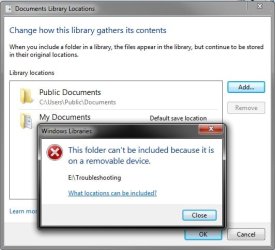
Question: Has anybody figured out how to include a folder that sits on a removable device?
 

My Computer

Computer Manufacturer/Model Number
HP, Dell, Gateway, Toshiba - 4 laptops and 2 desktops
OS
Vista, Windows7, Mint Mate, Zorin, Windows 8
CPU
from 1.6GHz Duo to i7
Monitor(s) Displays
2x HP w2207
Hard Drives
5x HDD, 7x SSD, 12x Externals
Keyboard
with trackball - no mices
Mouse
Trackball mice
Internet Speed
DSL 6000
Hello Wolfgang,

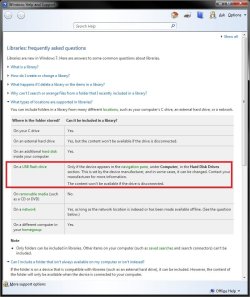
It appears that it may not be possible. It says this in Help & Support:
Help&Support.jpg
However, I get this when trying to do so with a USB flash drive even though it is as it states above.
error.jpg
 

My Computer

Computer type
PC/Desktop
Computer Manufacturer/Model Number
Self built custom
OS
64-bit Windows 11 Pro for Workstations
CPU
Intel i7-8700K OC'd to 5 GHz
Motherboard
ASUS ROG Maximus XI Formula Z390
Memory
64 GB (4x16GB) G.SKILL TridentZ RGB DDR4 3600 MHz
Graphics Card(s)
ASUS ROG-STRIX-GTX1080TI-O11G-GAMING
Sound Card
Integrated
Monitor(s) Displays
2 x Samsung Odyssey G7 27"
Screen Resolution
2560x1440
Hard Drives
1TB Samsung 990 PRO M.2,
4TB Samsung 990 PRO PRO M.2,
TerraMaster F8 SSD Plus NAS
PSU
Seasonic Prime Titanium 850W
Case
Thermaltake Core P3
Cooling
Corsair Hydro H115i
Keyboard
Logitech wireless K800
Mouse
Logitech MX Master 4
Internet Speed
2 Gb/s Download and 100 Mb/s Upload
Antivirus
Malwarebyte Anti-Malware Premium
Browser
Google Chrome
Other Info
Logitech Z625 speaker system,
Logitech BRIO 4K Pro webcam,
HP Color LaserJet Pro MFP M477fdn,
APC SMART-UPS RT 1000 XL - SURT1000XLI,
Galaxy S23 Plus phone
Yeah, they are lying. I got the same message and mine appears in Computer. But thanks Shawn for looking at the problem.
 

My Computer

Computer Manufacturer/Model Number
HP, Dell, Gateway, Toshiba - 4 laptops and 2 desktops
OS
Vista, Windows7, Mint Mate, Zorin, Windows 8
CPU
from 1.6GHz Duo to i7
Monitor(s) Displays
2x HP w2207
Hard Drives
5x HDD, 7x SSD, 12x Externals
Keyboard
with trackball - no mices
Mouse
Trackball mice
Internet Speed
DSL 6000
LOl, yeah someone messed up. ;)
 

My Computer

Computer type
PC/Desktop
Computer Manufacturer/Model Number
Self built custom
OS
64-bit Windows 11 Pro for Workstations
CPU
Intel i7-8700K OC'd to 5 GHz
Motherboard
ASUS ROG Maximus XI Formula Z390
Memory
64 GB (4x16GB) G.SKILL TridentZ RGB DDR4 3600 MHz
Graphics Card(s)
ASUS ROG-STRIX-GTX1080TI-O11G-GAMING
Sound Card
Integrated
Monitor(s) Displays
2 x Samsung Odyssey G7 27"
Screen Resolution
2560x1440
Hard Drives
1TB Samsung 990 PRO M.2,
4TB Samsung 990 PRO PRO M.2,
TerraMaster F8 SSD Plus NAS
PSU
Seasonic Prime Titanium 850W
Case
Thermaltake Core P3
Cooling
Corsair Hydro H115i
Keyboard
Logitech wireless K800
Mouse
Logitech MX Master 4
Internet Speed
2 Gb/s Download and 100 Mb/s Upload
Antivirus
Malwarebyte Anti-Malware Premium
Browser
Google Chrome
Other Info
Logitech Z625 speaker system,
Logitech BRIO 4K Pro webcam,
HP Color LaserJet Pro MFP M477fdn,
APC SMART-UPS RT 1000 XL - SURT1000XLI,
Galaxy S23 Plus phone
Folders

Problem:
When you add folders for your libaries, you add the subfolders, not the folder itself. Is it possible to add the folder, not the contents of the folder?

Extra information:
I am trying to sync my skydrive/school folder with MyDocuments folder. I can not sync the skydrive folder, because there are pictures in the skydrive folder itself, but if I add the school folder, MyDocuments folder gets flooded with folders, because there are a lot of them (unfortunally :) ).

Thank you,
Newnottakenname
 

My Computer

OS
Windows 7 Home Premium x64
Problem:
When you add folders for your libaries, you add the subfolders, not the folder itself. Is it possible to add the folder, not the contents of the folder?

Extra information:
I am trying to sync my skydrive/school folder with MyDocuments folder. I can not sync the skydrive folder, because there are pictures in the skydrive folder itself, but if I add the school folder, MyDocuments folder gets flooded with folders, because there are a lot of them (unfortunally :) ).

Thank you,
Newnottakenname

Hello Newnottakenname, and welcome to Seven Forums.

When you include a folder to a library, it includes everything in the folder as well. This cannot be changed. :(

A SkyDrive folder is a network folder, so you should be able to include it using the tutorial below instead.

http://www.sevenforums.com/tutorials/4617-libraries-include-network-folder.html

You might also see these tutorials below as well if you do not already have the SkyDrive folder mapped in Windows 7 to be able to include the mapped folder.

http://www.sevenforums.com/tutorials/165806-windows-live-skydrive-map-drive.html

and

http://www.sevenforums.com/tutorials/19765-skydrive-upload-windows-7-desktop.html

Hope this helps,
Shawn
 
Last edited:

My Computer

Computer type
PC/Desktop
Computer Manufacturer/Model Number
Self built custom
OS
64-bit Windows 11 Pro for Workstations
CPU
Intel i7-8700K OC'd to 5 GHz
Motherboard
ASUS ROG Maximus XI Formula Z390
Memory
64 GB (4x16GB) G.SKILL TridentZ RGB DDR4 3600 MHz
Graphics Card(s)
ASUS ROG-STRIX-GTX1080TI-O11G-GAMING
Sound Card
Integrated
Monitor(s) Displays
2 x Samsung Odyssey G7 27"
Screen Resolution
2560x1440
Hard Drives
1TB Samsung 990 PRO M.2,
4TB Samsung 990 PRO PRO M.2,
TerraMaster F8 SSD Plus NAS
PSU
Seasonic Prime Titanium 850W
Case
Thermaltake Core P3
Cooling
Corsair Hydro H115i
Keyboard
Logitech wireless K800
Mouse
Logitech MX Master 4
Internet Speed
2 Gb/s Download and 100 Mb/s Upload
Antivirus
Malwarebyte Anti-Malware Premium
Browser
Google Chrome
Other Info
Logitech Z625 speaker system,
Logitech BRIO 4K Pro webcam,
HP Color LaserJet Pro MFP M477fdn,
APC SMART-UPS RT 1000 XL - SURT1000XLI,
Galaxy S23 Plus phone
You're most welcome. :)
 

My Computer

Computer type
PC/Desktop
Computer Manufacturer/Model Number
Self built custom
OS
64-bit Windows 11 Pro for Workstations
CPU
Intel i7-8700K OC'd to 5 GHz
Motherboard
ASUS ROG Maximus XI Formula Z390
Memory
64 GB (4x16GB) G.SKILL TridentZ RGB DDR4 3600 MHz
Graphics Card(s)
ASUS ROG-STRIX-GTX1080TI-O11G-GAMING
Sound Card
Integrated
Monitor(s) Displays
2 x Samsung Odyssey G7 27"
Screen Resolution
2560x1440
Hard Drives
1TB Samsung 990 PRO M.2,
4TB Samsung 990 PRO PRO M.2,
TerraMaster F8 SSD Plus NAS
PSU
Seasonic Prime Titanium 850W
Case
Thermaltake Core P3
Cooling
Corsair Hydro H115i
Keyboard
Logitech wireless K800
Mouse
Logitech MX Master 4
Internet Speed
2 Gb/s Download and 100 Mb/s Upload
Antivirus
Malwarebyte Anti-Malware Premium
Browser
Google Chrome
Other Info
Logitech Z625 speaker system,
Logitech BRIO 4K Pro webcam,
HP Color LaserJet Pro MFP M477fdn,
APC SMART-UPS RT 1000 XL - SURT1000XLI,
Galaxy S23 Plus phone
My Libraries on Different Drive don't work with some Programs

Since I have an SSD on my C: I am using my D: as the storage location for my files.
I went through the process to move my user libraries to the D:, but some programs will not accept libraries unless they are on on c:
I think I must have messed something up, since the libraries are not working.
Here is what I do:
Click on Libraries, in the Left Pane, then New library
in this case I call it Test Lib
I add a location in the library, D:\Users\Public\Documents\O-TOWN REALTY, LLC\
I now have a library.
However, when I try to save anything to the library I get the following:
Capture1.PNG


Capture2.PNG


Capture3.PNG


It changed the D: in the path, to C:?

The MS programs, Office, etc, that I have tried work ok. Others, not so much.
I have tried Quicken, Quickbooks, and in this case I was trying PDFill, PDF printer

Have I screwed up something or is this known behavior?
 

My Computer

Computer type
PC/Desktop
Computer Manufacturer/Model Number
Dell/XPS410
OS
Microsoft Windows 8.1 Pro 64-bit 9600 Multiprocessor Free
CPU
Intel(R) Core(TM)2 CPU 6420 @ 2.13GHz
Motherboard
Dell Inc. 0CT017
Memory
4.00 GB
Graphics Card(s)
NVIDIA GeForce 8600 GTS
Sound Card
High Definition Audio Device
Screen Resolution
1280 x 1024 x 32 bits (4294967296 colors) @ 60 Hz
Hard Drives
(1) WDC WD7501AALS-00J7B0 (2) WDC WD10EARS-00Y5B1 (3) WDC WD7501AALS-00J7B0 (4) SAMSUNG SSD 830 Series
Hello Isaac,

Could you post a screenshot like below showing what the library says it has it's included folders, and what it's set "Save to" folder is? There may be something off here since you say the folder is on D, but the error says it's looking for the folder on C.

I'm thinking that the "Save to" folder for the library had been forgotten to be changed to the D path.

714d1243482202-library-include-folder-properties.jpg


Hope this helps, :)
Shawn
 

My Computer

Computer type
PC/Desktop
Computer Manufacturer/Model Number
Self built custom
OS
64-bit Windows 11 Pro for Workstations
CPU
Intel i7-8700K OC'd to 5 GHz
Motherboard
ASUS ROG Maximus XI Formula Z390
Memory
64 GB (4x16GB) G.SKILL TridentZ RGB DDR4 3600 MHz
Graphics Card(s)
ASUS ROG-STRIX-GTX1080TI-O11G-GAMING
Sound Card
Integrated
Monitor(s) Displays
2 x Samsung Odyssey G7 27"
Screen Resolution
2560x1440
Hard Drives
1TB Samsung 990 PRO M.2,
4TB Samsung 990 PRO PRO M.2,
TerraMaster F8 SSD Plus NAS
PSU
Seasonic Prime Titanium 850W
Case
Thermaltake Core P3
Cooling
Corsair Hydro H115i
Keyboard
Logitech wireless K800
Mouse
Logitech MX Master 4
Internet Speed
2 Gb/s Download and 100 Mb/s Upload
Antivirus
Malwarebyte Anti-Malware Premium
Browser
Google Chrome
Other Info
Logitech Z625 speaker system,
Logitech BRIO 4K Pro webcam,
HP Color LaserJet Pro MFP M477fdn,
APC SMART-UPS RT 1000 XL - SURT1000XLI,
Galaxy S23 Plus phone
Here is the screenshot:
Capture4.PNG
 

My Computer

Computer type
PC/Desktop
Computer Manufacturer/Model Number
Dell/XPS410
OS
Microsoft Windows 8.1 Pro 64-bit 9600 Multiprocessor Free
CPU
Intel(R) Core(TM)2 CPU 6420 @ 2.13GHz
Motherboard
Dell Inc. 0CT017
Memory
4.00 GB
Graphics Card(s)
NVIDIA GeForce 8600 GTS
Sound Card
High Definition Audio Device
Screen Resolution
1280 x 1024 x 32 bits (4294967296 colors) @ 60 Hz
Hard Drives
(1) WDC WD7501AALS-00J7B0 (2) WDC WD10EARS-00Y5B1 (3) WDC WD7501AALS-00J7B0 (4) SAMSUNG SSD 830 Series
It looks ok. Not sure why it's say C in the error when it shows D here.

Is the D:\Users\Public\Documents\O-TOWN REALTY, LLC folder still there?

Is that folder just one you manually created on D, or did you move the actual C:\Users\Public folders there?
 

My Computer

Computer type
PC/Desktop
Computer Manufacturer/Model Number
Self built custom
OS
64-bit Windows 11 Pro for Workstations
CPU
Intel i7-8700K OC'd to 5 GHz
Motherboard
ASUS ROG Maximus XI Formula Z390
Memory
64 GB (4x16GB) G.SKILL TridentZ RGB DDR4 3600 MHz
Graphics Card(s)
ASUS ROG-STRIX-GTX1080TI-O11G-GAMING
Sound Card
Integrated
Monitor(s) Displays
2 x Samsung Odyssey G7 27"
Screen Resolution
2560x1440
Hard Drives
1TB Samsung 990 PRO M.2,
4TB Samsung 990 PRO PRO M.2,
TerraMaster F8 SSD Plus NAS
PSU
Seasonic Prime Titanium 850W
Case
Thermaltake Core P3
Cooling
Corsair Hydro H115i
Keyboard
Logitech wireless K800
Mouse
Logitech MX Master 4
Internet Speed
2 Gb/s Download and 100 Mb/s Upload
Antivirus
Malwarebyte Anti-Malware Premium
Browser
Google Chrome
Other Info
Logitech Z625 speaker system,
Logitech BRIO 4K Pro webcam,
HP Color LaserJet Pro MFP M477fdn,
APC SMART-UPS RT 1000 XL - SURT1000XLI,
Galaxy S23 Plus phone
I think what I did was to create a new folder then did the move user folders.
 

My Computer

Computer type
PC/Desktop
Computer Manufacturer/Model Number
Dell/XPS410
OS
Microsoft Windows 8.1 Pro 64-bit 9600 Multiprocessor Free
CPU
Intel(R) Core(TM)2 CPU 6420 @ 2.13GHz
Motherboard
Dell Inc. 0CT017
Memory
4.00 GB
Graphics Card(s)
NVIDIA GeForce 8600 GTS
Sound Card
High Definition Audio Device
Screen Resolution
1280 x 1024 x 32 bits (4294967296 colors) @ 60 Hz
Hard Drives
(1) WDC WD7501AALS-00J7B0 (2) WDC WD10EARS-00Y5B1 (3) WDC WD7501AALS-00J7B0 (4) SAMSUNG SSD 830 Series
That could be the problem then. Moving user folders can cause issues like this.

It may be best to move your user folders back to their default location on C. Afterwards, just create a new folder on D, move any files you want into the new folderm and include that folder in the library instead. This way your junction points to your user folders do not get scrambled.
 

My Computer

Computer type
PC/Desktop
Computer Manufacturer/Model Number
Self built custom
OS
64-bit Windows 11 Pro for Workstations
CPU
Intel i7-8700K OC'd to 5 GHz
Motherboard
ASUS ROG Maximus XI Formula Z390
Memory
64 GB (4x16GB) G.SKILL TridentZ RGB DDR4 3600 MHz
Graphics Card(s)
ASUS ROG-STRIX-GTX1080TI-O11G-GAMING
Sound Card
Integrated
Monitor(s) Displays
2 x Samsung Odyssey G7 27"
Screen Resolution
2560x1440
Hard Drives
1TB Samsung 990 PRO M.2,
4TB Samsung 990 PRO PRO M.2,
TerraMaster F8 SSD Plus NAS
PSU
Seasonic Prime Titanium 850W
Case
Thermaltake Core P3
Cooling
Corsair Hydro H115i
Keyboard
Logitech wireless K800
Mouse
Logitech MX Master 4
Internet Speed
2 Gb/s Download and 100 Mb/s Upload
Antivirus
Malwarebyte Anti-Malware Premium
Browser
Google Chrome
Other Info
Logitech Z625 speaker system,
Logitech BRIO 4K Pro webcam,
HP Color LaserJet Pro MFP M477fdn,
APC SMART-UPS RT 1000 XL - SURT1000XLI,
Galaxy S23 Plus phone
# of Folders UNDER Parent

Hi Brink, Happy New Year.

" Warning
You will not be able to include a library in another library, or include the Computer folder in a library.
You can only include up to 50 folders in one library parent folder.
Included folders from external hard drives or USB flash drives are only accessible in the library when the device is connected.
To be able to search in libraries, the Windows Search service needs to be Started and set to Automatic. Libraries require it's included folders to also be added to the index to be tracked properly even though they will still open properly."

In the above warning, item #2 concerning number of included folders (50), does that include "child folder" under the 50 included folder limit?
 

My Computer

Computer type
PC/Desktop
Computer Manufacturer/Model Number
Dell, Asus,HP, MSI.
OS
Win7 32 & 64bit vers.
CPU
P4 3.8ghz to Intel Core 2 Duo
Motherboard
MSI, Asus.
Memory
Upto 8GB
Graphics Card(s)
ATI Radeon HD 3450's
Hard Drives
Seagate's, WD's, Hitachi's, Samsung's, SanDisk SSD's, etc.
Antivirus
SEP
Browser
IE, Chrome, FireFox
Back
Top