I can't stand this any more, please help!!

yanks0826

New member
I know it is difficult to remedy my issue with basic information, so here is a quick run down on my situation:

My computer specs are listed in my profile.

I recently upgraded to W7 with a clean install. There are times when my laptop is choppy, very slow. I scroll down, and it skips and takes forever. Then there are times when it runs nice and smooth. Why is that?

Every time I run task manager to see what is running, most of the time the resource hogging up is either IE or Firefox.

Please, I need some pointers on how to get this thing running smooth, all the time.

Thanks
 

My Computer

Computer Manufacturer/Model Number
Dell Inspiron 1521
OS
Windows 7 x64
CPU
AMD Turion(tm) 64 X2 Mobile Technology TL-58 1.90 GHz
Memory
4 GB
Graphics Card(s)
Integrated - ATI Rad. X1200.
Sound Card
Integrated
Hard Drives
180 gig
From your specs you should not be having any issues running Windows 7 on your hardware.
The next time that you have the issue If you can take a snip of the Task manager, showing as much detail as you can, (show processes from all users), and upload it here by use of the paperclip icon.

This should allow us to diagnose better where the bottleneck is :)
 

My Computers

System One System Two

  • Computer type
    PC/Desktop
    Computer Manufacturer/Model Number
    ChillBlast - Custom to my design
    OS
    Windows 11 Pro x64 [Latest Release and Release Preview]
    CPU
    Ryzen 9 5950X, 3.8 - 5.2 MHz
    Motherboard
    Asus Prime X570-Pro
    Memory
    64GB [2 x 32GB] DDR4 3200MHz
    Graphics Card(s)
    4GB NVIDIA GEFORCE GTX 1650 Ti
    Sound Card
    On-board SPDIF to 5.1 System + HDMI [5.1 system]
    Monitor(s) Displays
    32" UHD 32 Bit HDR Monitor + 43" UHD 4K 32Bit HDR TV
    Screen Resolution
    2 x 3840 x 2160 @60Hz
    Hard Drives
    1TB M2 SSD OS, 500GB Fast Access SSD, 2 x 8TB Data + Various Externals from 1TB to 4TB, 10TB NAS
    PSU
    NZXT C750 80 PLUS Gold 750W Modular PSU
    Case
    Workstation Case [Matt Black]
    Cooling
    NZXT Kraken X63 280mm CPU Cooler +2x Quiet Case fans
    Keyboard
    Logitech Wireless MX Keys & K400 + others
    Mouse
    Logitech Wireless MX Master 3S
    Internet Speed
    920 MB Down 50 MB Up
    Antivirus
    BitDefender Total Security Pro
    Browser
    Chrome (always run latest Non-Beta)
    Other Info
    Also run ...
    Laptop - Quad 8GB - Windows 10 Pro x64
    Nexus 7 Android tablet x2
    Samsung 10.2" tablet
    Blackview TAB 8 4G Android Tablet c/w Keyboard
    Wacom Intuos Pro Medium Pen Pad
    Wacom Intuos Pro Small Pen Pad
    Wacom Expresskeys Remote
    Loopdeck+ Graphics Controller
    Shuttle Pro v2 Control
  • Computer type
    Laptop
    System Manufacturer/Model Number
    Dell XPS 17 10750H
    OS
    Windows 11 Pro x64 Latest RP
    CPU
    Intel I7 10750H 5.0GHz
    Motherboard
    Dell XPS
    Memory
    32GB [2x16GB] DDR4 2933 MHz
    Graphics Card(s)
    nVidia GTX1650Ti 4 GB GDDR6
    Sound Card
    Stock [Realtek] 4 Speaker
    Monitor(s) Displays
    17" IPS UHD+ Infinity Edge Touchscreen
    Screen Resolution
    3840 x 2400
    Hard Drives
    2TB M2 NVMe, 4TB External + various 500GB & 1TB External NVMe (also have access to spinner HDD from
    PSU
    Stock
    Case
    Stock XPS Aluminium & Carbon Fibre
    Cooling
    Stock - Active Fan Control
    Keyboard
    Backlit + Various Logitech
    Mouse
    Stock Track Pad + Logitech MX Trackball
    Internet Speed
    72 MB Down 18MB Up
    Browser
    Chrome
    Other Info
    Also run ...
    Laptop - Quad 8GB - Windows 10 Pro x64
    Nexus 7 Android tablet x2
    10.2" tablet
    Sony Z3 Android Smartphone
    Wacom Intuos Pro Medium Pen Pad
    Wacom Intuos Pro Small Pen Pad
    Wacom Expresskeys Remote
    Loopdeck+ Graphics Controller
    Shuttle Pro v2 Control Pad
    10TB NAS
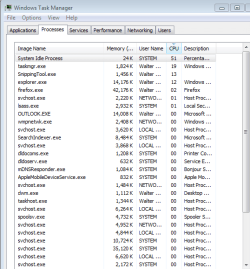
It's running a little choppy now, so here is a quick snapshot:
 

Attachments

  • Untitled.png
    Untitled.png
    40.7 KB · Views: 107

My Computer

Computer Manufacturer/Model Number
Dell Inspiron 1521
OS
Windows 7 x64
CPU
AMD Turion(tm) 64 X2 Mobile Technology TL-58 1.90 GHz
Memory
4 GB
Graphics Card(s)
Integrated - ATI Rad. X1200.
Sound Card
Integrated
Hard Drives
180 gig
What anti-virus are you using?
 

My Computer

Computer Manufacturer/Model Number
Custom
OS
Windows 7 Professional x64
CPU
Intel i7 2600K OC'd @ 4620 MHz
Motherboard
Asus P8Z68-V Pro
Memory
16GB GSkill Sniper 2133 Mhz (4x4GB)
Graphics Card(s)
EVGA GeForce GTX 480 SuperClocked+
Sound Card
Realtek High Definition Audio
Monitor(s) Displays
2x Acer S273HLbmii 27"
Screen Resolution
2 x 1920x1080
Hard Drives
64GB Crucial M4 SSD

Storage: Hitachi 1TB 5400RPM, Samsung 1.5TB 5400RPM
PSU
Corsair HW Series 750w (modular)
Case
Cooler Master HAF 932 Advanced Blue Edition
Cooling
CM Hyper 212+ CPU cooler, 3x 230mm + 1x 140mm case fans
Keyboard
Logitech MK320 (wireless)
Mouse
Logitech MK320 (wireless)
Internet Speed
30 Mb/s : 2 Mb/s
Well there does not seem anything out of place there that is stressing the cpu more than I would expect.

On initial install it is normal for the system to perform various housekeeping tasks such as indexing and setting the superfetch cache, although this is not showing here.

I assume that you have the latest drivers installed for all your hardware - you may want to check with the laptop's download site to ensure that there are no new drivers for your model as there is a lot of activity with drivers since the official release, with changes happening daily.

The other thing to try is to leave the laptop switched on for an hour or two when not being used to allow the OS to fully complete the initial setups - these may not show when you check as they are designed to stop when they detect user activity
 

My Computers

System One System Two

  • Computer type
    PC/Desktop
    Computer Manufacturer/Model Number
    ChillBlast - Custom to my design
    OS
    Windows 11 Pro x64 [Latest Release and Release Preview]
    CPU
    Ryzen 9 5950X, 3.8 - 5.2 MHz
    Motherboard
    Asus Prime X570-Pro
    Memory
    64GB [2 x 32GB] DDR4 3200MHz
    Graphics Card(s)
    4GB NVIDIA GEFORCE GTX 1650 Ti
    Sound Card
    On-board SPDIF to 5.1 System + HDMI [5.1 system]
    Monitor(s) Displays
    32" UHD 32 Bit HDR Monitor + 43" UHD 4K 32Bit HDR TV
    Screen Resolution
    2 x 3840 x 2160 @60Hz
    Hard Drives
    1TB M2 SSD OS, 500GB Fast Access SSD, 2 x 8TB Data + Various Externals from 1TB to 4TB, 10TB NAS
    PSU
    NZXT C750 80 PLUS Gold 750W Modular PSU
    Case
    Workstation Case [Matt Black]
    Cooling
    NZXT Kraken X63 280mm CPU Cooler +2x Quiet Case fans
    Keyboard
    Logitech Wireless MX Keys & K400 + others
    Mouse
    Logitech Wireless MX Master 3S
    Internet Speed
    920 MB Down 50 MB Up
    Antivirus
    BitDefender Total Security Pro
    Browser
    Chrome (always run latest Non-Beta)
    Other Info
    Also run ...
    Laptop - Quad 8GB - Windows 10 Pro x64
    Nexus 7 Android tablet x2
    Samsung 10.2" tablet
    Blackview TAB 8 4G Android Tablet c/w Keyboard
    Wacom Intuos Pro Medium Pen Pad
    Wacom Intuos Pro Small Pen Pad
    Wacom Expresskeys Remote
    Loopdeck+ Graphics Controller
    Shuttle Pro v2 Control
  • Computer type
    Laptop
    System Manufacturer/Model Number
    Dell XPS 17 10750H
    OS
    Windows 11 Pro x64 Latest RP
    CPU
    Intel I7 10750H 5.0GHz
    Motherboard
    Dell XPS
    Memory
    32GB [2x16GB] DDR4 2933 MHz
    Graphics Card(s)
    nVidia GTX1650Ti 4 GB GDDR6
    Sound Card
    Stock [Realtek] 4 Speaker
    Monitor(s) Displays
    17" IPS UHD+ Infinity Edge Touchscreen
    Screen Resolution
    3840 x 2400
    Hard Drives
    2TB M2 NVMe, 4TB External + various 500GB & 1TB External NVMe (also have access to spinner HDD from
    PSU
    Stock
    Case
    Stock XPS Aluminium & Carbon Fibre
    Cooling
    Stock - Active Fan Control
    Keyboard
    Backlit + Various Logitech
    Mouse
    Stock Track Pad + Logitech MX Trackball
    Internet Speed
    72 MB Down 18MB Up
    Browser
    Chrome
    Other Info
    Also run ...
    Laptop - Quad 8GB - Windows 10 Pro x64
    Nexus 7 Android tablet x2
    10.2" tablet
    Sony Z3 Android Smartphone
    Wacom Intuos Pro Medium Pen Pad
    Wacom Intuos Pro Small Pen Pad
    Wacom Expresskeys Remote
    Loopdeck+ Graphics Controller
    Shuttle Pro v2 Control Pad
    10TB NAS
Actually, since this was a new install, I didn't install an AV, yet. But, I usually use Avast.
 

My Computer

Computer Manufacturer/Model Number
Dell Inspiron 1521
OS
Windows 7 x64
CPU
AMD Turion(tm) 64 X2 Mobile Technology TL-58 1.90 GHz
Memory
4 GB
Graphics Card(s)
Integrated - ATI Rad. X1200.
Sound Card
Integrated
Hard Drives
180 gig
Well there does not seem anything out of place there that is stressing the cpu more than I would expect.

On initial install it is normal for the system to perform various housekeeping tasks such as indexing and setting the superfetch cache, although this is not showing here.

I assume that you have the latest drivers installed for all your hardware - you may want to check with the laptop's download site to ensure that there are no new drivers for your model as there is a lot of activity with drivers since the official release, with changes happening daily.

The other thing to try is to leave the laptop switched on for an hour or two when not being used to allow the OS to fully complete the initial setups - these may not show when you check as they are designed to stop when they detect user activity


I didn't know that Windows uses inactivity to complete/repair operating systems. That's news to me. So, can I place the unit in sleep/hibernate mode for it to complete the setups?

As for the driver updates, I used Windows update to install my drivers, so I have to assume they are updated. I went to ATI website, and what I have installed is the latest.
 

My Computer

Computer Manufacturer/Model Number
Dell Inspiron 1521
OS
Windows 7 x64
CPU
AMD Turion(tm) 64 X2 Mobile Technology TL-58 1.90 GHz
Memory
4 GB
Graphics Card(s)
Integrated - ATI Rad. X1200.
Sound Card
Integrated
Hard Drives
180 gig
I doubt it is one of your browsers. They are using more RAM than that on my machine right now.

How recent was this install? You don't have antivirus protection installed yet?
 

My Computer

Computer Manufacturer/Model Number
Dell Inspiron 1520 (Laptop)/ Home (Desktop)
OS
Windows 7 x64 / Same
CPU
Intel Core 2 Duo T7250 / Intel Core i7 930
Motherboard
Intel 945 / Asus P6X58D-E
Memory
4GB / 6GB
Graphics Card(s)
NVIDIA GeForce 8400M GS / ASUS 1GB
Sound Card
Whatever Dell gave me :-( / Onboard
Monitor(s) Displays
15.4" LCD / Crappy CRT
Hard Drives
Seagate 500GB SATA; 7200 RPM / Seagate 1TB SATA; 7200 RPM
PSU
N/A / OCZ Fatal1ty 550W Modular
Case
N/A / Antec 900
Cooling
Air
Mouse
Microsoft Presenter (Bluetooth)
The system has to be active for the setups to happen rather than in sleep or hibernate. I normally switch off the sleep function on any new install, switch off the monitor, and allow the system to run overnight.

The other question I would ask is does the issue only occur after sleep or hibernate - if so you may need to check the system drivers as this is a common issue with new installs.

generally with drivers I would check with the system manufacturer's website - Dell is normally very good in this respect - the actual manufacturer will often have newer drivers available than windows update
 

My Computers

System One System Two

  • Computer type
    PC/Desktop
    Computer Manufacturer/Model Number
    ChillBlast - Custom to my design
    OS
    Windows 11 Pro x64 [Latest Release and Release Preview]
    CPU
    Ryzen 9 5950X, 3.8 - 5.2 MHz
    Motherboard
    Asus Prime X570-Pro
    Memory
    64GB [2 x 32GB] DDR4 3200MHz
    Graphics Card(s)
    4GB NVIDIA GEFORCE GTX 1650 Ti
    Sound Card
    On-board SPDIF to 5.1 System + HDMI [5.1 system]
    Monitor(s) Displays
    32" UHD 32 Bit HDR Monitor + 43" UHD 4K 32Bit HDR TV
    Screen Resolution
    2 x 3840 x 2160 @60Hz
    Hard Drives
    1TB M2 SSD OS, 500GB Fast Access SSD, 2 x 8TB Data + Various Externals from 1TB to 4TB, 10TB NAS
    PSU
    NZXT C750 80 PLUS Gold 750W Modular PSU
    Case
    Workstation Case [Matt Black]
    Cooling
    NZXT Kraken X63 280mm CPU Cooler +2x Quiet Case fans
    Keyboard
    Logitech Wireless MX Keys & K400 + others
    Mouse
    Logitech Wireless MX Master 3S
    Internet Speed
    920 MB Down 50 MB Up
    Antivirus
    BitDefender Total Security Pro
    Browser
    Chrome (always run latest Non-Beta)
    Other Info
    Also run ...
    Laptop - Quad 8GB - Windows 10 Pro x64
    Nexus 7 Android tablet x2
    Samsung 10.2" tablet
    Blackview TAB 8 4G Android Tablet c/w Keyboard
    Wacom Intuos Pro Medium Pen Pad
    Wacom Intuos Pro Small Pen Pad
    Wacom Expresskeys Remote
    Loopdeck+ Graphics Controller
    Shuttle Pro v2 Control
  • Computer type
    Laptop
    System Manufacturer/Model Number
    Dell XPS 17 10750H
    OS
    Windows 11 Pro x64 Latest RP
    CPU
    Intel I7 10750H 5.0GHz
    Motherboard
    Dell XPS
    Memory
    32GB [2x16GB] DDR4 2933 MHz
    Graphics Card(s)
    nVidia GTX1650Ti 4 GB GDDR6
    Sound Card
    Stock [Realtek] 4 Speaker
    Monitor(s) Displays
    17" IPS UHD+ Infinity Edge Touchscreen
    Screen Resolution
    3840 x 2400
    Hard Drives
    2TB M2 NVMe, 4TB External + various 500GB & 1TB External NVMe (also have access to spinner HDD from
    PSU
    Stock
    Case
    Stock XPS Aluminium & Carbon Fibre
    Cooling
    Stock - Active Fan Control
    Keyboard
    Backlit + Various Logitech
    Mouse
    Stock Track Pad + Logitech MX Trackball
    Internet Speed
    72 MB Down 18MB Up
    Browser
    Chrome
    Other Info
    Also run ...
    Laptop - Quad 8GB - Windows 10 Pro x64
    Nexus 7 Android tablet x2
    10.2" tablet
    Sony Z3 Android Smartphone
    Wacom Intuos Pro Medium Pen Pad
    Wacom Intuos Pro Small Pen Pad
    Wacom Expresskeys Remote
    Loopdeck+ Graphics Controller
    Shuttle Pro v2 Control Pad
    10TB NAS
I installed W7 just last week, then I reinstalled it again because it was so choppy. But now, as I type this message, my computer is flying great. It has its moments. One minute it is running awesome, like right now, and another minute it bogs down. Argh.
 

My Computer

Computer Manufacturer/Model Number
Dell Inspiron 1521
OS
Windows 7 x64
CPU
AMD Turion(tm) 64 X2 Mobile Technology TL-58 1.90 GHz
Memory
4 GB
Graphics Card(s)
Integrated - ATI Rad. X1200.
Sound Card
Integrated
Hard Drives
180 gig
The system has to be active for the setups to happen rather than in sleep or hibernate. I normally switch off the sleep function on any new install, switch off the monitor, and allow the system to run overnight.

The other question I would ask is does the issue only occur after sleep or hibernate - if so you may need to check the system drivers as this is a common issue with new installs.

generally with drivers I would check with the system manufacturer's website - Dell is normally very good in this respect - the actual manufacturer will often have newer drivers available than windows update


I normally don't put my laptop in sleep mode, I shut it down when done using it.

As for the drivers, what hardware should I check new drivers for? Display, processor? Any others, BIOS?
 

My Computer

Computer Manufacturer/Model Number
Dell Inspiron 1521
OS
Windows 7 x64
CPU
AMD Turion(tm) 64 X2 Mobile Technology TL-58 1.90 GHz
Memory
4 GB
Graphics Card(s)
Integrated - ATI Rad. X1200.
Sound Card
Integrated
Hard Drives
180 gig

My Computers

System One System Two

  • Computer type
    PC/Desktop
    Computer Manufacturer/Model Number
    ChillBlast - Custom to my design
    OS
    Windows 11 Pro x64 [Latest Release and Release Preview]
    CPU
    Ryzen 9 5950X, 3.8 - 5.2 MHz
    Motherboard
    Asus Prime X570-Pro
    Memory
    64GB [2 x 32GB] DDR4 3200MHz
    Graphics Card(s)
    4GB NVIDIA GEFORCE GTX 1650 Ti
    Sound Card
    On-board SPDIF to 5.1 System + HDMI [5.1 system]
    Monitor(s) Displays
    32" UHD 32 Bit HDR Monitor + 43" UHD 4K 32Bit HDR TV
    Screen Resolution
    2 x 3840 x 2160 @60Hz
    Hard Drives
    1TB M2 SSD OS, 500GB Fast Access SSD, 2 x 8TB Data + Various Externals from 1TB to 4TB, 10TB NAS
    PSU
    NZXT C750 80 PLUS Gold 750W Modular PSU
    Case
    Workstation Case [Matt Black]
    Cooling
    NZXT Kraken X63 280mm CPU Cooler +2x Quiet Case fans
    Keyboard
    Logitech Wireless MX Keys & K400 + others
    Mouse
    Logitech Wireless MX Master 3S
    Internet Speed
    920 MB Down 50 MB Up
    Antivirus
    BitDefender Total Security Pro
    Browser
    Chrome (always run latest Non-Beta)
    Other Info
    Also run ...
    Laptop - Quad 8GB - Windows 10 Pro x64
    Nexus 7 Android tablet x2
    Samsung 10.2" tablet
    Blackview TAB 8 4G Android Tablet c/w Keyboard
    Wacom Intuos Pro Medium Pen Pad
    Wacom Intuos Pro Small Pen Pad
    Wacom Expresskeys Remote
    Loopdeck+ Graphics Controller
    Shuttle Pro v2 Control
  • Computer type
    Laptop
    System Manufacturer/Model Number
    Dell XPS 17 10750H
    OS
    Windows 11 Pro x64 Latest RP
    CPU
    Intel I7 10750H 5.0GHz
    Motherboard
    Dell XPS
    Memory
    32GB [2x16GB] DDR4 2933 MHz
    Graphics Card(s)
    nVidia GTX1650Ti 4 GB GDDR6
    Sound Card
    Stock [Realtek] 4 Speaker
    Monitor(s) Displays
    17" IPS UHD+ Infinity Edge Touchscreen
    Screen Resolution
    3840 x 2400
    Hard Drives
    2TB M2 NVMe, 4TB External + various 500GB & 1TB External NVMe (also have access to spinner HDD from
    PSU
    Stock
    Case
    Stock XPS Aluminium & Carbon Fibre
    Cooling
    Stock - Active Fan Control
    Keyboard
    Backlit + Various Logitech
    Mouse
    Stock Track Pad + Logitech MX Trackball
    Internet Speed
    72 MB Down 18MB Up
    Browser
    Chrome
    Other Info
    Also run ...
    Laptop - Quad 8GB - Windows 10 Pro x64
    Nexus 7 Android tablet x2
    10.2" tablet
    Sony Z3 Android Smartphone
    Wacom Intuos Pro Medium Pen Pad
    Wacom Intuos Pro Small Pen Pad
    Wacom Expresskeys Remote
    Loopdeck+ Graphics Controller
    Shuttle Pro v2 Control Pad
    10TB NAS
I know it is difficult to remedy my issue with basic information, so here is a quick run down on my situation:

My computer specs are listed in my profile.

I recently upgraded to W7 with a clean install. There are times when my laptop is choppy, very slow. I scroll down, and it skips and takes forever. Then there are times when it runs nice and smooth. Why is that?

Every time I run task manager to see what is running, most of the time the resource hogging up is either IE or Firefox.

Please, I need some pointers on how to get this thing running smooth, all the time.

Thanks


Did you try reducing video resolution to see if it smooths out?
How much onboard memory do you have and what percent use is the Task Manager showing?
Did you upgrade your video driver after installing 7?
 

My Computer

Computer Manufacturer/Model Number
Compaq Presario 5110f
OS
Win 7
CPU
Athlon Dual Core 7550 2.5 GHz
Motherboard
?
Memory
3 GB
Graphics Card(s)
ATI 4670 HD
Sound Card
ATI HD
Monitor(s) Displays
Acer AL2051W LCD
Screen Resolution
1152 X 864
Hard Drives
320 GB
Man, right now my PC is flying like a champ. So, I did some digging, I ended up in the task scheduler, and I scrolled down to the active tasks and 29 things pop up. Some things start up after start up, some every 10 days, etc. Do I need all of these? Or, if you check yours, and let me know the ones I should keep, and I can delete the others. I noticed when I first start up my computer and shortly thereafter is when my PC runs rather slow.
 

My Computer

Computer Manufacturer/Model Number
Dell Inspiron 1521
OS
Windows 7 x64
CPU
AMD Turion(tm) 64 X2 Mobile Technology TL-58 1.90 GHz
Memory
4 GB
Graphics Card(s)
Integrated - ATI Rad. X1200.
Sound Card
Integrated
Hard Drives
180 gig
Download Process Explorer Process Explorer
When your computer starts acting 'choppy', see what process is running that could be the possible cause.
 

My Computer

Computer type
PC/Desktop
Computer Manufacturer/Model Number
Bruce ... somewhere in his 40's
OS
Windows 7 Ultimate 32bit SP1
CPU
Intel(R) Core(TM)2 Quad CPU @ 2.40GHz, 2400 MHz
Motherboard
INTEL/D975XBX2
Memory
4 GB
Graphics Card(s)
ATI Radeon HD 2600 Pro
Monitor(s) Displays
Samsung SyncMaster 914v
Screen Resolution
1280 x 1024
Hard Drives
2/500GB each ... ST3500630AS ATA Device.
One is not connected
PSU
Rocketfish 700 W
Case
G.Skill Gigabyte Chassis
Keyboard
Standard PS/2 Keyboard
Mouse
Microsoft PS/2 Mouse
Internet Speed
DSL
Antivirus
Avira Internet Security
Browser
IE 11
Other Info
ATI HDMI Audio
Sounds very basic...but what power plan are you using? High performance, balanced or power saver? also, are you sure it dosen't happen when you unplug it ? :D
 

My Computer

Computer Manufacturer/Model Number
Custom
OS
Windows 7 build 7600 64 bit
CPU
Phenom II X4 955 retail 3.2GHz
Motherboard
ASRock M3A790GXH/USB3 ATX AMD AMD3
Memory
4x GeiL 2GB Value PC3-10660 CL9 DC DDR3-1333, CL 9-9-9-28
Graphics Card(s)
PowerColor Radeon HD5850 PCS+ 1024MB, 256-bit GDDR5
Sound Card
Built in
Hard Drives
G.Skill Phoenix Pro 120GB SATA2 SSD Sandforce SF-120
Samsung Spinpoint 500GB SATA2 7200RPM
PSU
Tacens Radix III Smart 520W
Another question, when it starts going choppy...has been on a while, or does it do it shortly after windows is done starting up. I may be going to wrong dircection...but it is possibly your laptop is overheating. Try everest ultimate and check your temps. You can also run a stability test...but do that when you are running smooth...and if it starts chopping...its a hardware malfunction (usually memory) or overheating. So things I would check: heat, memory, and video driver...sometimes the wrong driver for video cards work but it can would make it choppy.
 

My Computer

OS
Windows 7 (Build 7068)
Some things start up after start up, some every 10 days, etc. Do I need all of these? Or, if you check yours, and let me know the ones I should keep, and I can delete the others. I noticed when I first start up my computer and shortly thereafter is when my PC runs rather slow.


You'll have to determine which items you want/need to be started, and for those that don't need to be started, such as rarely used items, you can move them to another folder, than start them as needed. I usually create a folder in "All Programs" called "Startup Holds" then put the program shortcuts that I rarely use or don't need to run at startup in there. Likewise you could just remove the programs you don't need.

Just a thought.
 

My Computer

Computer type
PC/Desktop
Computer Manufacturer/Model Number
Custom built by me.
OS
Windows 10 Pro
CPU
Intel Core i7-4770K (3.5Ghz)
Motherboard
Gigabyte G1 Sniper 5 (F10 Bios)
Memory
32 gig Corsair Dominator Platinum (4x8Gig)
Graphics Card(s)
Sapphire Tri-X R9 Fury
Sound Card
Soundblaster ZXR
Monitor(s) Displays
NEC PA242W 24" LCD Monitor
Screen Resolution
1920 x 1200
Hard Drives
Primary - Samsung 850 Pro (512gig), Samsung 840 Pro (256gig), 2TB WD Caviar Black.
PSU
EVGA Supernova 1000 G2
Case
Cooler Master HAF X
Cooling
Corsair H100i with Corsair Air Series SP120 Quiet Fans
Keyboard
Logitech Wireless Wave
Mouse
Logitech Performance MX
Internet Speed
High Speed Cable
Antivirus
Norton Security
Browser
IE11
Other Info
Memory Timings - 1866MHz @ 9-9-9-27-1T @ 1.5 volts
Hi.

Type system information into the start menu search box. Hit enter. Use Ctrl+S on the opened screen to save the .nfo file.

Rar or zip the saved file and attach to a post using the paperclip. I will have a look and tell you things to do.
 

My Computer

Computer Manufacturer/Model Number
self built
OS
7600.20510 x86
CPU
P4 550 3.4 GHz HT running at 3.5 GHz
Motherboard
MSI PM8M3-V (MS-7211 v1.x) Micro-ATX mainboard
Memory
OCZ 2 GB(2x1GB) DDR400mHz running @ 414 mHz
Graphics Card(s)
HIS Radeon HD 3850 IceQ 3 Turbo HDMI Dual DL-DVI AGP
Sound Card
MOTU Traveler firewire studio interface 192 kHz 24 bit
Monitor(s) Displays
22" widescreen Acer X223W LCD, 17" Compaq P75 CRT
Screen Resolution
1680x1050 and 1280x1024
Hard Drives
SATA I x2 WD, 400 GB and 120 GB, SATA 2 WD Caviar Black 1 TB
PSU
350W generic
Case
Cybertronpc, it glows blue
Cooling
stock cpu fan, Ice-Q 3 gpu and system, many case fans
Keyboard
Logitch Classical Keyboard 200
Mouse
Logitech Mediaplay cordless
Internet Speed
1792/448 kbits/sec
Other Info
SATA II PCI fake RAID adapter, 1 GB Readyboost, original ATI Remote Wonder (even works with WMC perfectly), Logitech Rumblepad 2 game controller x2
Dell has not listed the 1521 on its Windows 7 compatibility chart. They also have not released any Windows 7 drivers. Whatever drivers Windows automatically installed are not 100% compatible and are, in my humble opinion, the reason for your problems. The only thing I suggest is installing all of the available Vista drivers listed on the Dell website for your laptop; use compatibility mode if things don't want to install.
 

My Computer

Computer Manufacturer/Model Number
Dell XPS 15 L502x
OS
Windows 7 Ultimate x64 SP1
CPU
Core i7-2670QM
Memory
8GB DDR3 PC3-10600
Graphics Card(s)
Intel HD Graphics 3000 + GeForce GT 540M
Screen Resolution
1920x1080
Hard Drives
1TB 5400RPM Seagate
Back
Top