Windows 7 Remote Desktop question/problem

ajm786

New member
Here's the scenario.

I have my rig, running Win7 Ultimate x64, Aero capable (of course), and dual monitors.

I want to control this rig using Remote Desktop on a laptop, which is running Win7 Ultimate 32bit, running wireless, and have the monitor schema for my rig spanned over a single window on the laptop, so it doesn't mess up the window placement and what not.

The problem is that when I connect to the desktop using the laptop, Aero is not enabled, it switches to basic, and it does NOT span the monitor sessions. It piles everything into a single window session, so that when I go back to my desktop, I have to place all the windows again.

What's going wrong here?

Thanks!
 

My Computer

Computer Manufacturer/Model Number
Custom
OS
Windows 7 x64 Ultimate
CPU
Core Quad Q9550
Motherboard
Asus P5K Deluxe
Memory
8GB Corsair PC6400 DDR2
Graphics Card(s)
EVGA 260GTX 216
Sound Card
X-Fi Platinum
Monitor(s) Displays
Viewsonic VP201b & VX922
Hard Drives
HD103SJ, WD7500AAKS, WD5000KS, HD160JJ, SP1614C
PSU
Corsair 620HX PSU
Case
CMStacker 830
Cooling
Stacker 830
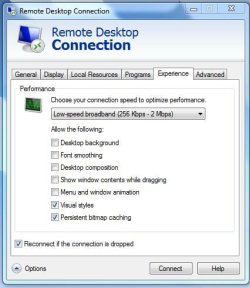
Did you edit any of the remote desktop options?
 

Attachments

  • Capture.JPG
    Capture.JPG
    49.4 KB · Views: 126

My Computer

Computer Manufacturer/Model Number
Dell XPS 15 L502x
OS
Windows 7 Ultimate x64 SP1
CPU
Core i7-2670QM
Memory
8GB DDR3 PC3-10600
Graphics Card(s)
Intel HD Graphics 3000 + GeForce GT 540M
Screen Resolution
1920x1080
Hard Drives
1TB 5400RPM Seagate
Yes indeed. I made absolutely sure all those options were checked.
 

My Computer

Computer Manufacturer/Model Number
Custom
OS
Windows 7 x64 Ultimate
CPU
Core Quad Q9550
Motherboard
Asus P5K Deluxe
Memory
8GB Corsair PC6400 DDR2
Graphics Card(s)
EVGA 260GTX 216
Sound Card
X-Fi Platinum
Monitor(s) Displays
Viewsonic VP201b & VX922
Hard Drives
HD103SJ, WD7500AAKS, WD5000KS, HD160JJ, SP1614C
PSU
Corsair 620HX PSU
Case
CMStacker 830
Cooling
Stacker 830
Do you have the LAN (10 Mbps or higher) option selected?

I have a 7 x86 desktop that I routinely connect via RDP from my 7 x64 laptop, and I get aero and all the goodies. I don't have multiple monitors, so I have no idea if that would work for me. Have you tried going the other way, connecting to x64 from the x86 machine, to see if you have the same problems?
 

My Computer

Computer Manufacturer/Model Number
Dell XPS 15 L502x
OS
Windows 7 Ultimate x64 SP1
CPU
Core i7-2670QM
Memory
8GB DDR3 PC3-10600
Graphics Card(s)
Intel HD Graphics 3000 + GeForce GT 540M
Screen Resolution
1920x1080
Hard Drives
1TB 5400RPM Seagate
Yes, I have the LAN 10Mbps option selected.

Does Aero have to be supported on both machines for it to be displayed in the RDC window?
 

My Computer

Computer Manufacturer/Model Number
Custom
OS
Windows 7 x64 Ultimate
CPU
Core Quad Q9550
Motherboard
Asus P5K Deluxe
Memory
8GB Corsair PC6400 DDR2
Graphics Card(s)
EVGA 260GTX 216
Sound Card
X-Fi Platinum
Monitor(s) Displays
Viewsonic VP201b & VX922
Hard Drives
HD103SJ, WD7500AAKS, WD5000KS, HD160JJ, SP1614C
PSU
Corsair 620HX PSU
Case
CMStacker 830
Cooling
Stacker 830
If one machine doesn't have the ability to display an aero theme, I guess it would make sense that it wouldn't display an aero theme over a remote connection. I haven't tested that, since all of my computers support aero.
 

My Computer

Computer Manufacturer/Model Number
Dell XPS 15 L502x
OS
Windows 7 Ultimate x64 SP1
CPU
Core i7-2670QM
Memory
8GB DDR3 PC3-10600
Graphics Card(s)
Intel HD Graphics 3000 + GeForce GT 540M
Screen Resolution
1920x1080
Hard Drives
1TB 5400RPM Seagate
Ok, that's understandable, but why does the RDC window of the laptop cause all the windows of the system that I'm connecting to to reset themselves all into a single window? Isn't it supposed to keep the schema of each window? I thought RDC in Windows 7 was multi monitor capable?
 

My Computer

Computer Manufacturer/Model Number
Custom
OS
Windows 7 x64 Ultimate
CPU
Core Quad Q9550
Motherboard
Asus P5K Deluxe
Memory
8GB Corsair PC6400 DDR2
Graphics Card(s)
EVGA 260GTX 216
Sound Card
X-Fi Platinum
Monitor(s) Displays
Viewsonic VP201b & VX922
Hard Drives
HD103SJ, WD7500AAKS, WD5000KS, HD160JJ, SP1614C
PSU
Corsair 620HX PSU
Case
CMStacker 830
Cooling
Stacker 830
Yes, it has true multi-monitor support, according to this:

Remote Desktop Services (Terminal Services) Team Blog : Remote Desktop Connection 7 for Windows 7, Windows XP & Windows Vista

However, it appears that aero glass is not supported in multi-monitor configurations. I don't know why the desktop would reset on the host machine.

Are you using the command line interface to open up the RDP? There are additional commands that may assist with the multi-monitor configs:

http://blog.mpecsinc.ca/2009/06/windows-7-remote-desktop-multi-monitor.html
 

My Computer

Computer Manufacturer/Model Number
Dell XPS 15 L502x
OS
Windows 7 Ultimate x64 SP1
CPU
Core i7-2670QM
Memory
8GB DDR3 PC3-10600
Graphics Card(s)
Intel HD Graphics 3000 + GeForce GT 540M
Screen Resolution
1920x1080
Hard Drives
1TB 5400RPM Seagate
Yes, it has true multi-monitor support, according to this:

Remote Desktop Services (Terminal Services) Team Blog : Remote Desktop Connection 7 for Windows 7, Windows XP & Windows Vista

However, it appears that aero glass is not supported in multi-monitor configurations. I don't know why the desktop would reset on the host machine.

Are you using the command line interface to open up the RDP? There are additional commands that may assist with the multi-monitor configs:

MPECS Inc. Blog: Windows 7 – Remote Desktop Multi-Monitor Goodness

I tried all those. Everytime I connect to my client machine which has multi monitors, it only opens it as everything on one screen instead of spanning across a "dual monitor" type window.
 

My Computer

Computer Manufacturer/Model Number
Custom
OS
Windows 7 x64 Ultimate
CPU
Core Quad Q9550
Motherboard
Asus P5K Deluxe
Memory
8GB Corsair PC6400 DDR2
Graphics Card(s)
EVGA 260GTX 216
Sound Card
X-Fi Platinum
Monitor(s) Displays
Viewsonic VP201b & VX922
Hard Drives
HD103SJ, WD7500AAKS, WD5000KS, HD160JJ, SP1614C
PSU
Corsair 620HX PSU
Case
CMStacker 830
Cooling
Stacker 830
I still can't get it to work.

On the notebook, I tried everything:

mstsc /span
mstsc /multimon

No matter what I do, when I connect to the desktop, it connects as a single screen and piles all the windows onto that one screen.

What could I be doing wrong here?
 

My Computer

Computer Manufacturer/Model Number
Custom
OS
Windows 7 x64 Ultimate
CPU
Core Quad Q9550
Motherboard
Asus P5K Deluxe
Memory
8GB Corsair PC6400 DDR2
Graphics Card(s)
EVGA 260GTX 216
Sound Card
X-Fi Platinum
Monitor(s) Displays
Viewsonic VP201b & VX922
Hard Drives
HD103SJ, WD7500AAKS, WD5000KS, HD160JJ, SP1614C
PSU
Corsair 620HX PSU
Case
CMStacker 830
Cooling
Stacker 830
To simplify:

I have a computer, System A, with 1 monitor. I want to RDC into a computer, System B that has 2 monitors. How can I see the entire desktop of System B on System A?

Thanks!
 

My Computer

Computer Manufacturer/Model Number
Custom
OS
Windows 7 x64 Ultimate
CPU
Core Quad Q9550
Motherboard
Asus P5K Deluxe
Memory
8GB Corsair PC6400 DDR2
Graphics Card(s)
EVGA 260GTX 216
Sound Card
X-Fi Platinum
Monitor(s) Displays
Viewsonic VP201b & VX922
Hard Drives
HD103SJ, WD7500AAKS, WD5000KS, HD160JJ, SP1614C
PSU
Corsair 620HX PSU
Case
CMStacker 830
Cooling
Stacker 830

My Computer

Computer Manufacturer/Model Number
Dell XPS 15 L502x
OS
Windows 7 Ultimate x64 SP1
CPU
Core i7-2670QM
Memory
8GB DDR3 PC3-10600
Graphics Card(s)
Intel HD Graphics 3000 + GeForce GT 540M
Screen Resolution
1920x1080
Hard Drives
1TB 5400RPM Seagate
Have you reviewed this?

Remote Desktop Services (Terminal Services) Team Blog : Using Multiple Monitors in Remote Desktop Session

I'm wondering if the lack of an additional monitor on the laptop is causing the problem. Since I don't have the hardware to test this, I'm just guessing that there is no support for viewing more than one monitor from the host on the client, if the client only has one monitor - everything will just get squished together.

Yes, I reviewed that. The problem with that, and, for that matter, most of all articles about multi monitors and RDC, they seem to assume that BOTH the client and the server have multi monitors. But they don't specify which, if it's one or the other, or vice versa.
 

My Computer

Computer Manufacturer/Model Number
Custom
OS
Windows 7 x64 Ultimate
CPU
Core Quad Q9550
Motherboard
Asus P5K Deluxe
Memory
8GB Corsair PC6400 DDR2
Graphics Card(s)
EVGA 260GTX 216
Sound Card
X-Fi Platinum
Monitor(s) Displays
Viewsonic VP201b & VX922
Hard Drives
HD103SJ, WD7500AAKS, WD5000KS, HD160JJ, SP1614C
PSU
Corsair 620HX PSU
Case
CMStacker 830
Cooling
Stacker 830
The easiest thing to do is borrow another monitor and attach it to your laptop. See if the multi-monitor config works then.
 

My Computer

Computer Manufacturer/Model Number
Dell XPS 15 L502x
OS
Windows 7 Ultimate x64 SP1
CPU
Core i7-2670QM
Memory
8GB DDR3 PC3-10600
Graphics Card(s)
Intel HD Graphics 3000 + GeForce GT 540M
Screen Resolution
1920x1080
Hard Drives
1TB 5400RPM Seagate
Hi there
I think RDP doesn't have all the video bells and whistles.

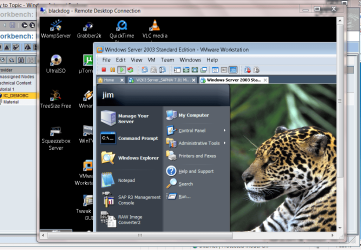
BUT what IS crazy is that if you have a VIRTUAL MACHINE running on your machine you've just RDP'd to you get the screen etc in all its gloriious technicolour and on the laptop it works on 2 monitors (if you expand the VM to full screen mode).

Crazy but true.


Here's a screenshot of an RDP session with SH__TE graphics with the Virtual machine running inside it displayed in glorious technicolor with Aero, desktop background and decent fonts.

So it must be something to do with the RDP itself.

Cheers
jimbo.
 

Attachments

  • rdp.png
    rdp.png
    503.9 KB · Views: 40

My Computer

Computer type
PC/Desktop
Computer Manufacturer/Model Number
Custom built, several laptops HP/ASUS
OS
Linux CENTOS 7 / various Windows OS'es and servers
CPU
Intel i7 Intel i5
Memory
8GB, 16GB
Graphics Card(s)
On Motherboard
Sound Card
Realtek HD audio
Monitor(s) Displays
Apple Cinema display, Samsung LCD
Screen Resolution
1920 X 1080
Hard Drives
4 X 1TB SATA
Mouse
Toshiba wireless laser
Internet Speed
> 20MB up
Enabling /span or /multimon on Remote Desktop works a little different then what you are looking for.

If you remote from your dual screen desktop to your single screen laptop, enabling this feature would allow you to have a multi-screen view of your laptop.

It sounds like what you were hoping for is to remote from your laptop to your desktop, and to have a session that requires scroll bars to "see" the entires dual screen area that your desktop has. An option for doing that is to use "TightVNC".

I prefer Remote Desktop, and to handle the changes in the screen size/configuration, I use "Stardock Fences". This is a free product that adds some additional controls to your desktop. To save each desktop setup automatically, just select Tools - More Tools - Screen resolution changes...

When using Fences, I can switch between dual screen and Remote Desktop from my laptop, and all the icons on the desktop keep their positions for each resolution.
 

My Computer

OS
Windows XP
Enabling /span or /multimon on Remote Desktop works a little different then what you are looking for.

If you remote from your dual screen desktop to your single screen laptop, enabling this feature would allow you to have a multi-screen view of your laptop.

It sounds like what you were hoping for is to remote from your laptop to your desktop, and to have a session that requires scroll bars to "see" the entires dual screen area that your desktop has. An option for doing that is to use "TightVNC".

I prefer Remote Desktop, and to handle the changes in the screen size/configuration, I use "Stardock Fences". This is a free product that adds some additional controls to your desktop. To save each desktop setup automatically, just select Tools - More Tools - Screen resolution changes...

When using Fences, I can switch between dual screen and Remote Desktop from my laptop, and all the icons on the desktop keep their positions for each resolution.

This is an option. I will look into this.

I noticed something else. If I switch the host system on, but do NOT log in, and simply log in to the host from the client, the monitor schema on the host will be kept intact, as long as I logoff (not simply ending the session). I do not know if this is specific to Win7, but it works.
 

My Computer

Computer Manufacturer/Model Number
Custom
OS
Windows 7 x64 Ultimate
CPU
Core Quad Q9550
Motherboard
Asus P5K Deluxe
Memory
8GB Corsair PC6400 DDR2
Graphics Card(s)
EVGA 260GTX 216
Sound Card
X-Fi Platinum
Monitor(s) Displays
Viewsonic VP201b & VX922
Hard Drives
HD103SJ, WD7500AAKS, WD5000KS, HD160JJ, SP1614C
PSU
Corsair 620HX PSU
Case
CMStacker 830
Cooling
Stacker 830
Back
Top