Recorded Live TV files HUGE

vkw104

New member
Hello all,
I just started toying around with my Hauppauge 950Q + OTA HD TV + Windows Media Center and recording some live TV shows. The problem I'm running into is the huge size of the recorded files.

For instance, I recorded 5-10 minutes of a live tv broadcast and it took up over one gig. Is there something wrong with this? Can I somehow lower the quality or something to that effect? I looked in the settings and it only mentioned the maximum size of the recordings, but I'm not sure how that works.

Thanks!
 

My Computer

OS
Windows 7 x64
Yes, you can lower the quality, but I wouldn't recommend that. I take my mpeg transport stream files, which are over 8 gig an hour and squeeze them with the divx converter built into Beyond TV. It takes an hour down to around 600MB with good good quality. It's not perfect like the HD stream, but very watchable.

You can buy the DivX suite for a reasonable price that included a converter.

Featured | DivX.com
 

My Computer

OS
Windows Vista Home Premium -> Windows 7 Home Premium
I guess quality isn't that high of a priority. As long as it's watchable. How would I go about shrinking it? Would I just record at it's massive size and then import it into the DIVX converter? Or is there some other way to do it?
 

My Computer

OS
Windows 7 x64
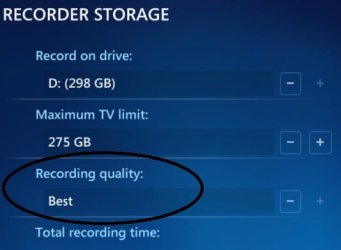
Tasks>Settings>TV>Recorder>Recorder Storage

Here you can select the Recorded TV qual, and therefore, filesize (and also location).

Hi,
I dont have any settings for qaulity in this screen. Is there something i need to unlock in my W7 Ultimate install to access it?
 

My Computer

Computer Manufacturer/Model Number
Asus
OS
W7 ultimate
CPU
Athalon AM2 64
Motherboard
M2n-mx asus
Memory
Kingston DDR300
Graphics Card(s)
ATI HD4850
Sound Card
inbuilt
Monitor(s) Displays
Sony Bravia KDL46W4500
Hard Drives
Samsung 1TB
Samsun 750G
Western Dig 500Gb
PSU
Antec
Case
Antec Fusion Black
Cooling
Antec
I guess quality isn't that high of a priority. As long as it's watchable. How would I go about shrinking it? Would I just record at it's massive size and then import it into the DIVX converter? Or is there some other way to do it?

That's what I do. If I know I'm going to be watching it in the very near future, I don't shrink the mpeg transport stream, otherwise I do. Yes, you just drag and drop it into the divx converter, and make sure to delete the original afterwards. I highly recommend Beyond TV for all of this. It works great in Windows 7 and pretty much does everything I want it to do. Find a copy on ebay and you won't be sorry.
 

My Computer

OS
Windows Vista Home Premium -> Windows 7 Home Premium
You may not be seeing this option as your hardware only supports one of the available options, the lowest. I have all the options as my hardware properly supports HD.
qual.jpg
 
Can you set quality per recording? I don't need to record "The Simpsons" or "Curious George" in HD quality, but would like to record other live TV shows on "Best" quality.

I can only find a universal setting.
Thanks
 

My Computer

Computer Manufacturer/Model Number
Home built
OS
Windows 7 Home Premium, 64bit
CPU
Core 2 Duo E6300
Motherboard
Gigabyte GA-965P-DS3
Memory
4GB
Graphics Card(s)
Nvidia 8600GT
Sound Card
mobo sound
That would be an interesting feature, suggest it to Microsoft.

My solution is to allow qual at best and then have my WHS automaticaly grab my TV for archiving.
 
I guess quality isn't that high of a priority. As long as it's watchable. How would I go about shrinking it? Would I just record at it's massive size and then import it into the DIVX converter? Or is there some other way to do it?

That's what I do. If I know I'm going to be watching it in the very near future, I don't shrink the mpeg transport stream, otherwise I do. Yes, you just drag and drop it into the divx converter, and make sure to delete the original afterwards. I highly recommend Beyond TV for all of this. It works great in Windows 7 and pretty much does everything I want it to do. Find a copy on ebay and you won't be sorry.

Divx Converter didn't support WTV file format ! (I got this error when I try)
 

My Computer

OS
Windows 7
Right click the .wtv file and "convert to dvr-ms" format and try with that.
 

My Computer

Computer type
Laptop
Computer Manufacturer/Model Number
Custom
OS
Windows 7 Home Premium x64
CPU
Intel Core i5 2500K
Motherboard
MSI MS-7750
Memory
8GB DDR3
Graphics Card(s)
nVidia GeForce GTX650 Ti BOOST
Sound Card
Realtek
Monitor(s) Displays
21' Philips
Screen Resolution
Full HD
Hard Drives
1TB
PSU
500W
In that case try a different converter... I use nothing but open source solutions, but there might be some freeware programs out there that might work for you. Google around a bit.

EDIT - Windows Live Movie Maker!!!
 
Last edited:

My Computer

Computer type
Laptop
Computer Manufacturer/Model Number
Custom
OS
Windows 7 Home Premium x64
CPU
Intel Core i5 2500K
Motherboard
MSI MS-7750
Memory
8GB DDR3
Graphics Card(s)
nVidia GeForce GTX650 Ti BOOST
Sound Card
Realtek
Monitor(s) Displays
21' Philips
Screen Resolution
Full HD
Hard Drives
1TB
PSU
500W
Back
Top