Counter strike 1.6 black stripes probleme

georgo14

New member
Hi!

I have installed win7 64bit on my notebook and now I have problem with CS 1,6. Everytime before I was playing on 800x600 or 1024... resolution.. But now I have two stripes on sides of screen... When I want to play fullscreen I have to set widescreen and resolution 1280x800 :( What should I do? Help me pls!

My graphic card: ATI RADEON 3100 (I have notebook TOSHIBA SATELLITE M305D-S4829)

Thank you!
 

My Computer

OS
Windows 7
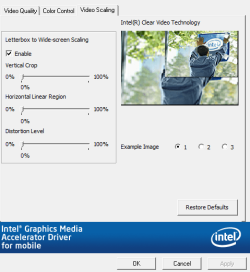
Enable Video scaling on your graphic card properties.
 

My Computer

OS
Windows 7 Ultimate x86 SP1
Go to your graphic control panel look up there:
Is there something like in this image: (widescreen scaling or graphic card scaling or use scaling)

Or look in this topic:
http://www.sevenforums.com/gaming/43492-cant-play-games-widescreen.html
http://www.sevenforums.com/gaming/44586-no-longer-full-screen-when-playing-games.html

Hope you find ansewer ;)

If something like this: (try Full screen)
gg.png
 

Attachments

  • Capture.PNG
    Capture.PNG
    132.7 KB · Views: 229

My Computer

OS
Windows 7 Ultimate x86 SP1
On Catalyst Control Center I cant set it and I dont know why! check screen... I am sad :(
w6zczc.jpg
 

My Computer

OS
Windows 7
Are sure that your driver is up to date?
If no, Then update your driver and check again.
Hopefully it will work.
 

My Computer

OS
Windows 7 Ultimate x86 SP1
problem is solved... have a nice day


Hi, I have teh same exact problem that you have. I have toshiba satellie a355d with the almost same graphic card ati radeon 3470 hd...I checked out the screen shots i cant cehck any boxes....lik I said i have the same problem and I dont know how to fix this please tell us how did u fix it???????
 

My Computer

OS
windows 7
you have to change display resolution for example on 1024 x 768 and then you can change scalling settings on "FULL SCREEN", when you change resolution back - your black stripes will disappear
 

My Computer

OS
Windows 7
Back
Top