10 Foot experience

psuarmy

New member
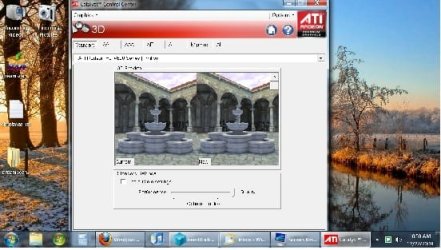
I have my computer in my living room and displayed on a 47 inch Philips 1080P LCD TV as a HTPC. I am having problems getting good settings for viewing from afar.

I have tried setting it to 1080 resolution (everything too small) then increasing Font up to 150%. Works OK, but text is extremely sharp and often unreadable. Also not all windows/programs increase to 150% and are unreadable.

Tried 1280 by 768 resolution at 125% font size. Things are a little blurry and stretched, but best for text and windows fitting.

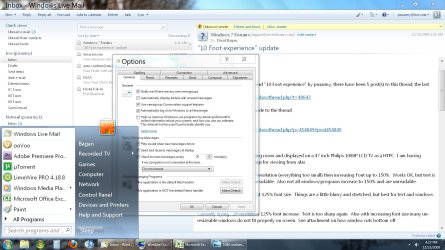
Currently trying 720 resolution 125% font increase. Text is too sharp again. Also with increasing font size many un-resizeable windows do not fit properly on screen. See attachment on how window cuts bottom off.

Does anyone have any suggestions on good settings, or what I think I need. It would be nice to be able to use the 720 resolution with no increase of font size. and just use a theme that is bigger. I don't know if this would work or not. I would also need to change the font to something bigger, not just magnify it.

I am really not sure how to do all thins though. any help would be appreciated.


screenshot.jpg
 

My Computer

Computer Manufacturer/Model Number
home built
OS
Win 7 x64
CPU
AMD Athalon x2 5200
Motherboard
Gigabyte GA-M57SLI-S4
Memory
4GB
Graphics Card(s)
ATI HD4670
Sound Card
Turtlebeach Montego DDL
Monitor(s) Displays
Philips 47 inch TV
Hard Drives
WD 1TB black
Well I can tell you that the issue of oversharpeness is a problem with the way your TV is set up.

TVs all ship with the sharpness set way too high to compensate for the worst of the blurry non HD signals.

If your TV sharpness can be set by input, merely reduce it on the TV itself. If not, get one odf the nice TV tuning DVDs out there and set the sharpness according to it's instructions. Your DVDs and HD channels will look better too (though SD may be "blurrier" that you are used to).

Also you probably notice the whites being overly blinding and possibly blooming over the text. The contrast/brightness also suffers from the "WOW!" settings that TVs normally ship with. The tuning DVD can help with that.

In lieu of that, remember that brightness controls the black level and contrast controls the white level :)
 

My Computer

Computer Manufacturer/Model Number
Scratch built
OS
Windows 7 x64 Ultimate
CPU
i7 960
Motherboard
Asus P6X58D
Memory
12 Gig Corsair Dominator
Graphics Card(s)
Nvidia 480
Sound Card
Maudio Delta 44 + breakout box
Monitor(s) Displays
Dell UltraSharp U2410 24in and Samsung 21 dual monitors
Screen Resolution
1920x1200 and 1280x1024
Hard Drives
Primary: Intel X-25M G2 160G SSD
Secondary: Segate baracuda 1.0 TB
HDs in AHCI mode.
PSU
Corasair TX850
Case
Cooler Master HAF
Cooling
Corsair H50
Keyboard
Logitech G15 + N52 game pad
Mouse
Logitech MX518
Internet Speed
15kbs down 4.5kbps up
Other Info
WEI 7.6
CPU & RAM 7.6
Graphics 7.9
Hard disk 7.7
Id say manually up your fonts.

r-click desktop>Personalisation>Window Colour> advanced settings

a really old school window opens and it has a combo box with like 20 options in there - its tedious but keep the 1080 res and put your fonts upto something like 24pt?
 

My Computer

OS
Win 7 Pro
Thank both of you for your help. I adjusted the TV and it helped. Contrast was 100 I lowered it to 50. Not perfect, but better. I will play with it.

Those were the settings that I was looking for. I will work with it. If anyone has gone through them and has good recommendations I would like them. If not I will try and post what I came up with.
 

My Computer

Computer Manufacturer/Model Number
home built
OS
Win 7 x64
CPU
AMD Athalon x2 5200
Motherboard
Gigabyte GA-M57SLI-S4
Memory
4GB
Graphics Card(s)
ATI HD4670
Sound Card
Turtlebeach Montego DDL
Monitor(s) Displays
Philips 47 inch TV
Hard Drives
WD 1TB black
hmmm...

One question? Did you try the cleartype setting wizard?

Control Panel -> Display -> Adjust ClearType text
 

My Computer

Computer Manufacturer/Model Number
Custom builds... I build my own.
OS
Windows 7 Ultimate x86 & x64
CPU
Core i7-860, AMD Phenom II X4 955, AMD Athlon II X2 250
Motherboard
ASUS
Memory
Kingston HyperX
Graphics Card(s)
EVGA GeForce 9800 GTX, SAPPHIRE Radeon HD 5870
Sound Card
HT | OMEGA
Monitor(s) Displays
LCD
Hard Drives
Western Digital
PSU
OCZ Technology
Case
COOLER MASTER Storm Sniper, Storm Scout, Antec Skeleton
Internet Speed
DSL
I have tried the clear type tuner. It didn't help. I played with the advanced settings. Here is what I got. You can see that I was able to increase some of the font sizes and some of the window features such as the start menu, and top bar and text of the window. Though not all of them increased. Anyone know of other settings? The email text is small and the task bar icons are small. I am definatly moving in the right direction.
 

Attachments

  • example .jpg
    example .jpg
    479.8 KB · Views: 204
Last edited:

My Computer

Computer Manufacturer/Model Number
home built
OS
Win 7 x64
CPU
AMD Athalon x2 5200
Motherboard
Gigabyte GA-M57SLI-S4
Memory
4GB
Graphics Card(s)
ATI HD4670
Sound Card
Turtlebeach Montego DDL
Monitor(s) Displays
Philips 47 inch TV
Hard Drives
WD 1TB black
I'm not sure why you're having problems reading your fonts unless you have really bad eyes?

Always set the PC to your LCD's native resolution.

Go to Display settings and adjust the font to 150%

I have this running on a 47" LCD sitting from 10ft away with no problem reading. Depending on what you're trying to do, some programs don't adapt to this very well.
 

My Computer

OS
Windows 7
I'm not sure why you're having problems reading your fonts unless you have really bad eyes?

Always set the PC to your LCD's native resolution.

Go to Display settings and adjust the font to 150%

I have this running on a 47" LCD sitting from 10ft away with no problem reading. Depending on what you're trying to do, some programs don't adapt to this very well.


I have very good eyes. I am about 13 to 15 feet away. If I set the font at 150% almost every program does not adapt well. I have been playing with this excessively the last few days. I am beginning to think that until Microsoft comes out with a 10foot setting, it is what it is. Right now I am at 720 resolution and 115% font, redid Clear type and all windows fit, and font is readable, just small.
 

My Computer

Computer Manufacturer/Model Number
home built
OS
Win 7 x64
CPU
AMD Athalon x2 5200
Motherboard
Gigabyte GA-M57SLI-S4
Memory
4GB
Graphics Card(s)
ATI HD4670
Sound Card
Turtlebeach Montego DDL
Monitor(s) Displays
Philips 47 inch TV
Hard Drives
WD 1TB black
that's strange, what program are you using that's not adapting? I use mine mainly for HTPC but I do a lot of browsing on it with no problem.

Try to set your PC to 1920x1080 res. to match your LCD. 720p isn't your native resolution, which could be the problem.

I'm not sure if there's a difference, but what I set is the DPI to 150% been doing this since XP without a problem. If anything Window 7 gave me a much betteer experience with this setting. I leave everything default, no messing around with clear type or anything. I did have some issues with Xp and Vista adapting some programs to this, but I don't recall having any issues at all with 7 for the last few months.
 

My Computer

OS
Windows 7
Are you using DVI or HDMI to connect to the monitor? Do have you access to more then one interface one your video card? Can you try a different type of interface to see if you get a different result?
 

My Computer

Computer Manufacturer/Model Number
Custom builds... I build my own.
OS
Windows 7 Ultimate x86 & x64
CPU
Core i7-860, AMD Phenom II X4 955, AMD Athlon II X2 250
Motherboard
ASUS
Memory
Kingston HyperX
Graphics Card(s)
EVGA GeForce 9800 GTX, SAPPHIRE Radeon HD 5870
Sound Card
HT | OMEGA
Monitor(s) Displays
LCD
Hard Drives
Western Digital
PSU
OCZ Technology
Case
COOLER MASTER Storm Sniper, Storm Scout, Antec Skeleton
Internet Speed
DSL
Are you using DVI or HDMI to connect to the monitor? Do have you access to more then one interface one your video card? Can you try a different type of interface to see if you get a different result?

DVI & HDMi are basically the same signal with the exception of audio. I don't think it would make a difference
 

My Computer

OS
Windows 7
Actually I've found that using the component out cable to the component in on the TV gave a far superior picture to the direct DVI to DVI on my tv. I have not tried HDMI on my TV but if it's the same as DVI, maybe try using the "RGB" component cables instead?
 

My Computer

Computer Manufacturer/Model Number
Scratch built
OS
Windows 7 x64 Ultimate
CPU
i7 960
Motherboard
Asus P6X58D
Memory
12 Gig Corsair Dominator
Graphics Card(s)
Nvidia 480
Sound Card
Maudio Delta 44 + breakout box
Monitor(s) Displays
Dell UltraSharp U2410 24in and Samsung 21 dual monitors
Screen Resolution
1920x1200 and 1280x1024
Hard Drives
Primary: Intel X-25M G2 160G SSD
Secondary: Segate baracuda 1.0 TB
HDs in AHCI mode.
PSU
Corasair TX850
Case
Cooler Master HAF
Cooling
Corsair H50
Keyboard
Logitech G15 + N52 game pad
Mouse
Logitech MX518
Internet Speed
15kbs down 4.5kbps up
Other Info
WEI 7.6
CPU & RAM 7.6
Graphics 7.9
Hard disk 7.7
I connect my PC to my 40" Samsung 1080p using a dvi to hdmi cable, the picture is perfect!!

If you buy a cable don't be fooled into buying an expensive one, there is no need!!
Mine cost me 14 pounds for a 1.5 mtr cable :D
 

My Computer

Computer type
PC/Desktop
Computer Manufacturer/Model Number
Self Build
OS
MS Windows 7 Professional 64-bit SP1
CPU
AMD FX(tm)-6100 Six-Core Processor Socket AM3+ (942)
Motherboard
ASUSTeK COMPUTER INC. SABERTOOTH 990FX (AM3r2)
Memory
8.00 GB Dual-Channel DDR3 @ 802MHz (11-11-11-36) 1.5Volts
Graphics Card(s)
NVIDIA GeForce GTX 560 Ti
Sound Card
Onboard Realtek HD
Monitor(s) Displays
shimian (1920x1080@60Hz)
Screen Resolution
1920*1080
Hard Drives
OCZ-AGIL ITY3 SATA Disk Device 120GB
PSU
Corsair TX 750
Case
Corsair
Cooling
WaterCooled
Keyboard
Microsoft Wired
Mouse
Logitech USB Optical TiltWheel Mouse
Internet Speed
Realtek PCIe GBE Family Controller 20MB*1MB
Antivirus
Avast
Browser
Firefox
Other Info
150GB Internal Hard Drive for Backing Up Important Files -
Hauppauge Nova-DT Dual DVB-T Tuner Device (+IR) -
USB PC Camera with Mic (SN9C105)
I think some are missing the issue that I am having. I have a great picture. There is not a quality issue. The issue is the sizing on text and windows on the TV. If you look at one the the pictures I posted you can see that either the text is way way too small, or if I magnify, the bottom of the windows is below the taskbar at the bottom.
 

My Computer

Computer Manufacturer/Model Number
home built
OS
Win 7 x64
CPU
AMD Athalon x2 5200
Motherboard
Gigabyte GA-M57SLI-S4
Memory
4GB
Graphics Card(s)
ATI HD4670
Sound Card
Turtlebeach Montego DDL
Monitor(s) Displays
Philips 47 inch TV
Hard Drives
WD 1TB black
You say your image quality is ok but those pictures of your browser text are horrid.

Set you TV to 1080P, use good HDMI cabling, adjust Windows 7 for cleartype text and slightly turn down the sharpness on your TV.

I am running Windows 7 on a 52" 1080P 7 series Samsung and the imaging is almost better than on my 24" acer monitor upstairs.

Once you get it the way you like remember to save it as a profile if you can. My hdmi switching receiver lets me do that, one for bluray, one for htpc, one for tv ,etc.

TC
 

My Computer

Computer Manufacturer/Model Number
Custom Built
OS
Windows 7 Ultimate 64bit
CPU
Intel Quad Core Q9400 2.66ghz
Motherboard
MSI Nero 3
Memory
8GB PC2-6400 Corsair
Graphics Card(s)
Nvidia 8800GT 512mb
Sound Card
OnBoard Realtek HD
Monitor(s) Displays
Acer 24" H243H LCD
Screen Resolution
1920 x 1080
Hard Drives
120GB Seagate - OS & Programs,
1TB Seagate - Media storage,
1TB Seagate - Media2 storage
PSU
Antec Eartwatts 500W
Case
NZXT black finish, glass side, blue lighting
Cooling
Scythe CPU Cooler w/removable fan
Keyboard
Dell (old)
Mouse
Logitech G5 w/copper accents
Internet Speed
8mb download, 1mb upload
Other Info
2nd computer, asrock board, amd x2-6000 cpu (htpc use)
3rd computer, gigabyte GA-E7AUM-DS2H board, Intel E8400 cpu (htpc use)
You say your image quality is ok but those pictures of your browser text are horrid.

Set you TV to 1080P, use good HDMI cabling, adjust Windows 7 for cleartype text and slightly turn down the sharpness on your TV.

I am running Windows 7 on a 52" 1080P 7 series Samsung and the imaging is almost better than on my 24" acer monitor upstairs.

Once you get it the way you like remember to save it as a profile if you can. My hdmi switching receiver lets me do that, one for bluray, one for htpc, one for tv ,etc.

TC


I am getting no where. If I set the resolution to 1080P then the text is too small to read. If I increase the text to 150% or higher then windows to do not fit on the screen. I am using an HDMI cable. I have adjusted the Cleartype and the contrast of my TV. The cleartype and contrast has NOTHING to do with the size of the text and windows. MY ISSUE IS NOT PICTURE QUALITY.
 

My Computer

Computer Manufacturer/Model Number
home built
OS
Win 7 x64
CPU
AMD Athalon x2 5200
Motherboard
Gigabyte GA-M57SLI-S4
Memory
4GB
Graphics Card(s)
ATI HD4670
Sound Card
Turtlebeach Montego DDL
Monitor(s) Displays
Philips 47 inch TV
Hard Drives
WD 1TB black
Back
Top