
Tell her we are all ready.
Hello aem, you and everyone here have been so helpful that I need to let you'll in on something. This lady is or was traveling as I said and I'm not sure if she's back yet, she hasn't called me. But there is also a situation she has through no wish of her own become involved in that makes it problematic as to when she will call me about the computer, at this point it could be awhile.
I'm chomping at the bit to get back over there and see if We have helped her with her computer problem, but to her because of the situation at the moment the computer is a secondary problem.
For now I'm not sure there is anything else we can do until I can get back over there and plug the computer in and see if it works. So I will report back on this thread let you know when that happens and if it's working, or I may have to ask for more help.
In the mean time I'm going to work through all the suggestions and maybe ask some questions about anything I don't understand, such as this from TimStitt,
Ensure that the latest drivers have been downloaded and installed for the network access point (get these from the manufacturers website, not MS update)
Is this meaning the drivers for the network card.
My Computer
- Computer Manufacturer/Model Number
- HomeBuilt
- OS
- Win7-Professional 64bit
- CPU
- AMD Athlon(TM)64 X4 630 Processor 2.81 GHz
- Motherboard
- System Model GA-MA790GPT-UD3H
- Memory
- 8 GB
- Graphics Card(s)
- ATI Radeon HD 3300 Graphics
- Sound Card
- On board
- Monitor(s) Displays
- 1-SOYO TOPAZ S 24" / 2-SOYO 19"
- Screen Resolution
- 1920 x 1200 / 1680 x 1050
- Hard Drives
- WD 500GB
- PSU
- 650W
- Keyboard
- Logitech K350
- Mouse
- Logitech V450
- Internet Speed
- 10mb


 However, as the same network card works on your network this is unlikely to be an issue. Take Aem's advice and use your friends PC like your own, this was help to verify that the problem is not intermittent.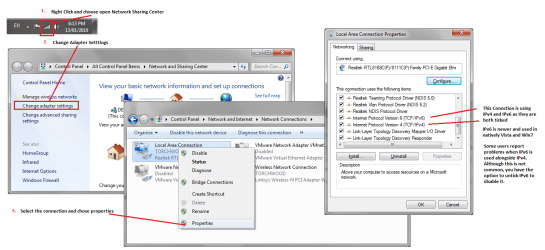
 But she definitely is not computer literate, to the point that she thinks I'm a computer guru even though I keep telling her I'm not.